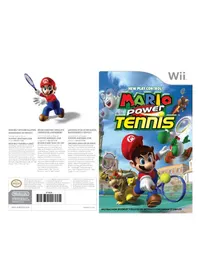
New Play Control! Mario Power Tennis (Wii) - Game NINTENDO - Free user manual and instructions
Find the device manual for free New Play Control! Mario Power Tennis (Wii) NINTENDO in PDF.



User questions about New Play Control! Mario Power Tennis (Wii) NINTENDO
0 question about this device. Answer the ones you know or ask your own.
Ask a new question about this device
Download the instructions for your Game in PDF format for free! Find your manual New Play Control! Mario Power Tennis (Wii) - NINTENDO and take your electronic device back in hand. On this page are published all the documents necessary for the use of your device. New Play Control! Mario Power Tennis (Wii) by NINTENDO.
USER MANUAL New Play Control! Mario Power Tennis (Wii) NINTENDO
natural_image
Cartoon character of a Mario holding a tennis racket, wearing a red cap with the letter M (no text or symbols present)NEED HELP WITH INSTALLATION, MAINTENANCE OR SERVICE?
Nintendo Customer Service SUPPORT.NINTENDO.COM or call 1-800-255-3700
NEED HELP PLAYING A GAME? Recorded tips for many titles are available on Nintendo's Power Line at (425) 885-7529. This may be a long-distance call, so please ask permission from whoever pays the phone bill. If the information you need is not on the Power Line, you may want to try using your favorite Internet search engine to find tips for the game you are playing. Some helpful words to include in the search, along with the game's title, are: "walk through," "TAQ," "codes," and "tips."
BESOIN D'AIDE POUR L'INSTALLATIO L'ENTRETIEN OU LA RÉPARATION?
The Official Seal is your assurance that this product is licensed or manufactured by Nintendo. Always look for this seal when buying video game systems, accessories, games and related products.
- Some people (about 1 in 4000) may have seizures or blackouts triggered by light flashes or patterns, and this may occur while they are watching TV or playing video games, even if they have never had a seizure before.
- Anyone who has had a seizure, loss of awareness, or other symptom linked to an epileptic condition should consult a doctor before playing a video game.
- Parents should watch their children play video games. Stop playing and consult a doctor if you or your child has any of the following symptoms:
Convulsions Eye or muscle twitching Altered vision Loss of awareness Involuntary movements Disorientation
• To reduce the likelihood of a seizure when playing video games:
- Sit or stand as far from the screen as possible.
- Play video games on the smallest available television screen.
- Do not play if you are tired or need sleep.
- Play in a well-lit room.
- Take a 10 to 15 minute break every hour.
WARNING - Repetitive Motion Injuries and Eyestrain
Playing video games can make your muscles, joints, skin or eyes hurt. Follow these instructions to avoid problems such as tendinitis, carpal tunnel syndrome, skin irritation or eyestrain:
- Avoid excessive play. Parents should monitor their children for appropriate play.
• Take a 10 to 15 minute break every hour, even if you don't think you need it. - If your hands, wrists, arms or eyes become tired or sore while playing, or if you feel symptoms such as tingling, numbness, burning or stiffness, stop and rest for several hours before playing again.
- If you continue to have any of the above symptoms or other discomfort during or after play, stop playing and see a doctor.
CAUTION - Motion Sickness
Playing video games can cause motion sickness in some players. If you or your child feel dizzy or nauseous when playing video games, stop playing and rest. Do not drive or engage in other demanding activity until you feel better.
IMPORTANT LEGAL INFORMATION
This Nintendo game is not designed for use with
any unauthorized device. Use of any such device will invalidate your Nintendo product warranty. Copying of any Nintendo game is illegal and is strictly prohibited by domestic and international intellectual property laws. "Back-up" or "archival" copies are not authorized and are not necessary to protect your software. Violators will be prosecuted.
REV-E
WARRANTY & SERVICE INFORMATION
REV-0
You may need only simple instructions to correct a problem with your product. Try our website at support.nintendo.com or call our Consumer Assistance Hotline at 1-800-255-3700, rather than going to your retailer. Hours of operation are 6 a.m. to 7 p.m., Pacific Time, Monday - Sunday (times subject to change). If the problem cannot be solved with the troubleshooting information available online or over the telephone, you will be offered express factory service through Nintendo. Please do not send any products to Nintendo without contacting us first.
HARDWARE WARRANTY
Nintendo of America Inc. ("Nintendo") warrants to the original purchaser that the hardware product shall be free from defects in material and workmanship for twelve (12) months from the date of purchase. If a defect covered by this warranty occurs during this warranty period, Nintendo will repair or replace the defective hardware product or component, free of charge.* The original purchaser is entitled to this warranty only if the date of purchase is registered at point of sale or the consumer can demonstrate, to Nintendo's satisfaction, that the product was purchased within the last 12 months.
GAME & ACCESSORY WARRANTY
Nintendo warrants to the original purchaser that the product (games and accessories) shall be free from defects in material and workmanship for a period of three (3) months from the date of purchase. If a defect covered by this warranty occurs during this three (3) month warranty period, Nintendo will repair or replace the defective product, free of charge.*
SERVICE AFTER EXPIRATION OF WARRANTY
Please try our website at support.nintendo.com or call the Consumer Assistance Hotline at 1-800-255-3700 for troubleshooting information and repair or replacement options and pricing.*
*In some instances, it may be necessary for you to ship the complete product, FREIGHT PREPAID AND INSURED FOR LOSS OR DAMAGE, to Nintendo. Please do not send any products to Nintendo without contacting us first.
WARRANTY LIMITATIONS
THIS WARRANTY SHALL NOT APPLY IF THIS PRODUCT: (a) IS USED WITH PRODUCTS NOT SOLD OR LICENSED BY NINTENDO (INCLUDING, BUT NOT LIMITED TO, NON-LICENSED GAME ENHANCEMENT AND COPIER DEVICES, ADAPTERS, AND POWER SUPPLIES); (b) IS USED FOR COMMERCIAL PURPOSES (INCLUDING RENTAL); (c) IS MODIFIED OR TAMPERED WITH; (d) IS DAMAGED BY NEGLIGENCE, ACCIDENT, UNREASONABLE USE, OR BY OTHER CAUSES UNRELATED TO DEFECTIVE MATERIALS OR WORKMANSHIP; OR (e) HAS HAD THE SERIAL NUMBER ALTERED, DEFACED OR REMOVED.
ANY APPLICABLE IMPLIED WARRANTIES, INCLUDING WARRANTIES OF MERCHANTABILITY AND FITNESS FOR A PARTICULAR PURPOSE, ARE HEREBY LIMITED IN DURATION TO THE WARRANTY PERIODS DESCRIBED ABOVE (12 MONTHS OR 3 MONTHS, AS APPLICABLE). IN NO EVENT SHALL NINTENDO BE LIABLE FOR CONSEQUENTIAL OR INCIDENTAL DAMAGES RESULTING FROM THE BREACH OF ANY IMPLIED OR EXPRESS WARRANTIES. SOME STATES DO NOT ALLOW LIMITATIONS ON HOW LONG AN IMPLIED WARRANTY LASTS OR EXCLUSION OF CONSEQUENTIAL OR INCIDENTAL DAMAGES, SO THE ABOVE LIMITATIONS MAY NOT APPLY TO YOU.
This warranty gives you specific legal rights. You may also have other rights which vary from state to state or province to province.
Nintendo's address is: Nintendo of America Inc., P.O. Box 957, Redmond, WA 98073-0957 U.S.A.
This warranty is only valid in the United States and Canada.
DOLBY. PRO LOGIC II
Manufactured under license from Dolby Laboratories. Dolby, Pro Logic, and the double-D symbol are trademarks of Dolby Laboratories.
This game is presented in Dolby® Pro Logic® II surround sound. Connect your game console to a sound system with Dolby Pro Logic, Dolby Pro Logic II, or Dolby Pro Logic IIx decoding to experience the excitement of surround sound. You need to enable "Surround" in the sound settings of the game console.
©2004-2009 Nintendo/CAMELOT. TM, g and the Wii logo are trademarks of Nintendo. © 2009 Nintendo.

Contents
3 Controls
5 Getting Started
6 Setting Up a Match
7 Viewing the Game Screen

Controls
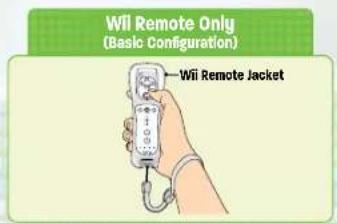
You can play this game with only the Wii Remote™ controller, but you can also plug in a Nunchuk™ to move your character.

How to Hold the Controller
The way you hold the controller depends on whether you're using just a Wii Remote controller or a Wii Remote and Nunchuk (Nunchuk style).
Please see the Wii Operations Manual for how to use the Wii Remote controller and the Wii Remote Jacket and wrist strap, and how to attach peripheral devices.
text_image
WII Remote Only (Basic Configuration) —Wii Remote Jacket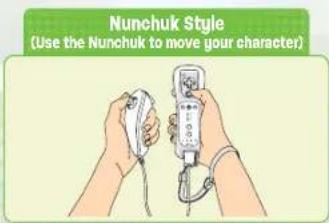
text_image
Nunchuk Style (Use the Nunchuk to move your character)SYSTEM MENU UPDATE
Please note that when first loading the Game Disc into the Wii console, the Wii console will check if you have the latest system menu, and if necessary, a Wii System Update screen will appear. Press OK to proceed.
Controls | Mario Power Tennis

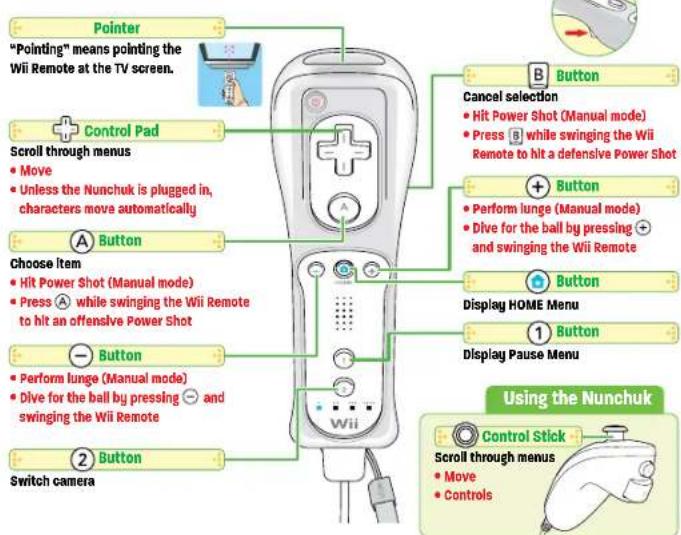
Wii Remote Controller
Black text denotes menu operations, while red text denotes actions. Swing the Wii Remote controller to hit a shot during game play.
text_image
Pointer "Pointing" means pointing the Wii Remote at the TV screen. + Control Pad Scroll through menus • Move • Unless the Nunchuk is plugged in, characters move automatically A Button Choose item • Hit Power Shot (Manual mode) • Press ☑ while swinging the Wii Remote to hit an offensive Power Shot - Button • Perform lunge (Manual mode) • Dive for the ball by pressing ☑ and swinging the Wii Remote 2 Button Switch camera Cancel selection • Hit Power Shot (Manual mode) • Press ☑ while swinging the Wii Remote to hit a defensive Power Shot + Button • Perform lunge (Manual mode) • Dive for the ball by pressing ☑ and swinging the Wii Remote Button Display HOME Menu 1 Button Display Pause Menu Using the Nunchuk Control Stick Scroll through menus • Move • ControlsThis game isn't compatible with Nintendo GameCube™ controllers.

CAUTION: WRIST STRAP USE
Please use the wrist strap to help prevent injury to other people or damage to surrounding objects or the Wii Remote in case you accidentally let go of the Wii Remote during game play.
Also remember the following:
• Make sure all players put on the wrist strap properly when it is their turn.
- Do not let go of the Wii Remote during game play.
- Dry your hands if they become moist.
- Allow adequate room around you during game play and make sure that all areas you might move into are clear of other people and objects.
- Stay at least three feet from the television.
• Use the Wii Remote Jacket

Getting Started

Main Menu
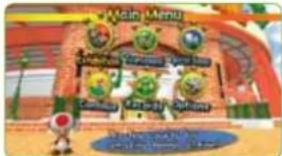
At the title screen, press Ⓐ to go to the Main Menu. Use + or Ⓞ to scroll over to a selection, or point to it. Confirm your selection by pressing Ⓐ.
text_image
Main Menu Main Menu - Game 1 Game 2 Game 3 Game 4 Game 5 Game 6 Game 7 Game 8 Game 9 Game 10 Game 11 Game 12 Game 13 Game 14 Game 15 Game 16 Game 17 Game 18 Game 19 Game 20 Game 21 Game 22 Game 23 Game 24 Game 25 Game 26 Game 27 Game 28 Game 29 Game 30 Game 31 Game 32 Game 33 Game 34 Game 35 Game 36 Game 37 Game 38 Game 39 Game 40 Game 41 Game 42 Game 43 Game 44 Game 45 Game 46 Game 47 Game 48 Game 49 Game 50 Game 51 Game 52 Game 53 Game 54 Game 55 Game 56 Game 57 Game 58 Game 59 Game 60 Game 61 Game 62 Game 63 Game 64 Game 65 Game 66 Game 67 Game 68 Game 69 Game 70 Game 71 Game 72 Game 73 Game 74 Game 75 Game 76 Game 77 Game 78 Game 79 Game 80 Game 81 Game 82 Game 83 Game 84 Game 85 Game 86 Game 87 Game 88 Game 89 Game 90 Game 91 Game 92 Game 93 Game 94 Game 95 Game 96 Game 97 Game 98 Game 99 Game 100Exhibition

Up to four people can play in this versus mode.
Tournament

Beat your rivals and advance through tournaments in this single-player mode.
Special Games

Play special tennis-themed games. A maximum of four people can play.
Continue

Continue a previous game.
Records

See results for all game modes.
Event Games
At the title screen, press Ⓐ while holding Ⓑ to make Event Games appear on the Main Menu.
About Saving.
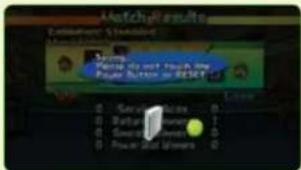
If you've played the game at least once, your VS records and some other records will automatically save. Depending on the mode, you can even save games in progress. You can save up to three games. In order to save a game, there must be at least one available block in the Wii system memory.
text_image
Machg Results Default/Standard Machg Results Save As to Start Power Screw or Reset 0 1 2 3 4 5 6 7 8 9 10 11 12 13 14 15 16 17 18 19 20 21 22 23 24 25 26 27 28 29 30 31 32 33 34 35 36 37 38 39 40 41 42 43 44 45 46 47 48 49 50 51 52 53 54 55 56 57 58 59 60 61 62 63 64 65 66 67 68 69 70 71 72 73 74 75 76 77 78 79 80 81 82 83 84 85 86 87 88 89 90 91 92 93 94 95 96 97 98 99 100To erase all your save data, go to the Options menu and choose Data and then Erase all. Be careful, because once a file is erased, it's gone forever. When you save during a game, your completed sets and games will be saved. Accumulated ring points for ring shots will also be saved.

Setting Up a Match
Here's the basic process for setting up a match, whether it's an exhibition P.12, tournament P.14, or special game P.14.

Match Preparation
Choose a game mode from the Main Menu → P.5 and follow these steps.

Choose a character and type of game.
Choose a character. If there are multiple players, pressⒶ on each Wii Remote controller on the Select Character screen. Press⊖ to switch the configuration between right-handed and left-handed. When playing an exhibition match with one or two people, choose between singles or doubles.

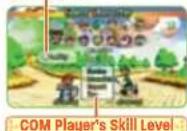

Select a court, cup, or game.
In Exhibition, choose the game type and court → P. 12 . In Tournament → P. 14 , choose the cup. In Special Games, choose the game and level.

Setting up VS play.
When playing an exhibition, choose the type of match P.12

Toad's Tennis Corner
Tennis Rules to Remember
● Games and Sets
In tennis, there are three types of scoring: points, games, and sets. There are four points in a game and six games in a set. (In Mario Power Tennis, there's also a two-games-per-set setting.) If you're playing a one-set match, the player who wins the set wins the match. If you are playing a three-set match, the player who wins two sets wins the match, and if you're playing a five-set match, you'll need to win three sets to win the match.
- Calling the Score
Tennis scores are announced in the following manner:
No Points = 0 (Love)
1 Point = 15
2 Points = 30
3 Points = 40
Once someone wins a fourth point, the game is over.
Deuce and Advantage
When both players have scored three times and the score is tied at 40, this is called deuce. The next player to score gets closer to winning and then has the advantage. If the player who has the advantage scores again, that player wins and the game is over. If, however, the opposing player scores, then the game is tied again and returns to deuce.
Tiebreak
For example, if, in a two-game, one-set match, both players have won two games, this situation is called a tiebreak. In a tiebreak, the first player to score seven points wins. If the players tie at six to six, however, they're at deuce and must continue playing until one player wins two points in a row.

Viewing the Game Screen
Starting a Game
To start a game, refer to Setting Up a Match → P.6 and choose the characters and type of match.

Game Screen
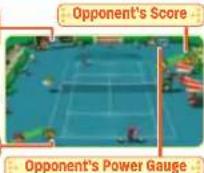
Your character automatically moves toward the ball, but you can also move using ⚠. Swing the Wii Remote at the right time to hit the ball. When using the Nunchuk, move using Ⓞ.

Match Results
When a match is over, the Match Results will report the number of sets and games won. After you press Ⓐ, you can choose to return to the Main Menu or play again.
Pause Menu
Press ① to display the Pause Menu during the game. The contents of the Pause Menu differ between game modes. Press ① or B to return to the game.
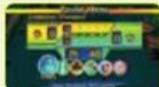
| Rules | View the rules for the current game mode. |
| Controls | See how to perform different shots. |
| Camera | Switch the camera view. You can also do this by pressing2 during the game. |
| Stationary Cam This camera shoots the entire court from a fixed position behind the player. | |
| Dynamic Cam The camera is placed close to the player's character. | |
| Control Options | Switch control setups here P.14 . |
| End Game | Choose this to end the game and return to the Main Menu. |
| Save | Select this to save a game in progress. |
| Tournament Board | Open this to view the tournament board. |

Serving and Returning
Serve the ball to start the game, and when your opponent hits the ball back to you, swing your Wii Remote with good timing to hit the ball back.

Serving
Move left or right with + or Ⓞ to change the location of your serve. Swing the Wii Remote up to toss the ball, and while the ball is in the air, swing the Wii Remote again to serve the ball. The serve will change depending on how you swing P.9. When serving, aim for the opponent's court diagonally across from you. If your serve doesn't land in this area, it's called a fault, and if you hit two faults in a row, your opponent will gain a point.
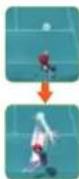

Hitting a Return
Swing the Wii Remote at an incoming ball to return it. Just like the serve, your shot will change depending on how you swing the Wii Remote. When you return a serve, only hit the ball after it bounces once on your side of the court.
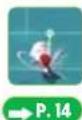
Your player will automatically lunge at faraway shots. When your Control Options are set to Manual, you can also manually lunge at a shot by pressing + or - and swinging the Wii Remote.

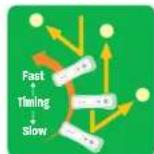
Shot Direction and Strength
The direction of a shot is determined by the timing of hitting the shot. Swing the Wii Remote quickly to hit a strong shot. Instead of large swings, take light and fast swings.

Toad's Tennis Corner
Q What kind of matches can I play, and how are they different?
There are two types of tennis games, one-on-one singles matches and two-on-two doubles matches. The area of the court used differs between singles and doubles. The alleys (the outer areas of the court) are used in doubles, but not in singles. Balls hit out-of-bounds or into areas not used are out, resulting in points being awarded to your opponent.
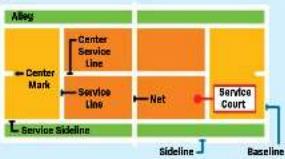
flowchart
graph TD
    A["Alley"] --> B["Center Mark"]
    B --> C["Center Service Line"]
    C --> D["Service Line"]
    D --> E["Net"]
    E --> F["Service Court"]
    F --> G["Baseline"]
    style A fill:#f9f,stroke:#333
    style G fill:#f9f,stroke:#333
    subgraph Service Sideline
        H["Service Sideline"]
        I["Sideline"]
        J["Baseline"]
    end

Different Shots
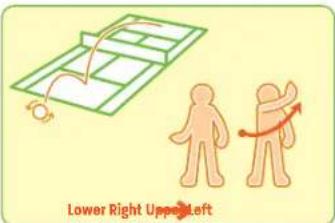
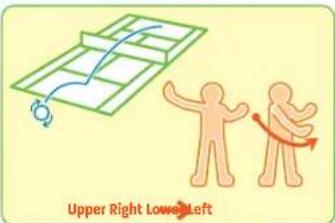
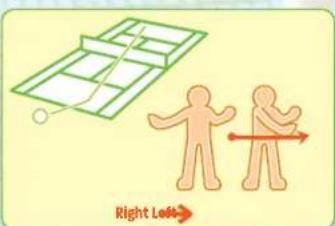
Hit different types of shots by swinging the Wii Remote in different ways. Right and left controls switch if you're in left-handed mode.

Topspin
Swing the Wii Remote diagonally upward from right to left to hit a fast-moving shot with a high bounce.
The ball's trail will become orange. Swing the Wii Remote diagonally upward from left to right to hit a backhand topspin shot.
text_image
Lower Right Upper Left
Slice
Swing the Wii Remote diagonally downward from right to left to hit a slower shot with a low trajectory and a low bounce. The ball's trail will become blue. Swing the Wii Remote diagonally downward from left to right to hit a backhand slice.
text_image
Upper Right Lower Left
Flat Shot
Swing the Wii Remote in a straight line from right to left to hit a fast shot with a low bounce. The ball's trail will become green. Swing the Wii Remote from left to right to hit a flat backhand shot.
text_image
Right LeftMario Power TennisDiff

Smash
When a ball comes at you with a very high trajectory, a smash point will appear on the court. Move close to the smash point and swing the Wii Remote down to hit a smash shot. A smash is a very fast shot. A smash shot's trail is purple.
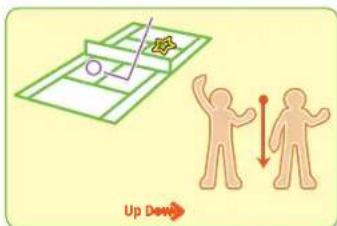
text_image
Up Down
Lob
Swing the Wil Remote up to hit a shot with an extremely high trajectory toward the back of the court.
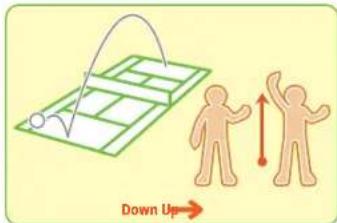
text_image
Down Up
Drop Shots
Swing the Wii Remote down to hit a shot with an extremely low trajectory aimed toward the front of the court.
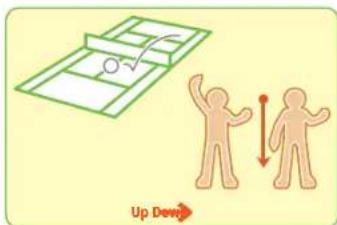
text_image
Up DewChoosing Your Shots
Choose your shot based on the position of your opponents. When your opponents are close to the net, hit a lob shot over their heads. When they are at the baseline, hit a drop shot closer to the net.
Mario Power Tennis Different Shots

Power Shots
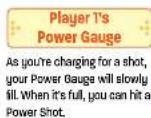
When the Power Gauge → P.7 is full, you can hit a Power Shot. There are two types of Power Shots, offensive and defensive, which automatically change according to your distance from the ball. Control options are set to Easy by default, which means that Power Shots are triggered by swinging the Wii Remote. Go to the Control Options menu → P.7 to change this setting. When Hit Power Shots is set to Manual, Power Shots are activated by swinging the Wii Remote while pressing A or B.
If you try to hit an offensive Power Shot when you're far from the ball, a defensive Power Shot will automatically be activated when Select Power Shot is set to Auto in the Control Options. When it's set to Manual, swing the Wii Remote while pressing Ⓐ to activate an offensive Power Shot, or swing the Wii Remote while pressing Ⓑ to activate a defensive Power Shot. If you're too far away from the ball or your timing is off, you'll miss the shot.

Offensive Power Shots
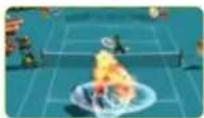
If you're close to the ball when you use a Power Shot, you'll perform a super-strong offensive shot with all sorts of special effects.

Defensive Power Shots
If the ball is out of your range when you use a Power Shot, you'll perform a distance-negating defensive shot that will allow you to return almost anything your opponent sends your way.
Taunting
Taunt your opponents by waving the Wil Remote when the ball is on their side of the court. Taunting can decrease your opponent's Power Gauge.

Game Modes
Choose a game mode from the Main Menu → P.5 . The number of people who can play differs depending on the game mode. For two or more players, all players must enter the game by pressing Ⓐ on their Wii Remote controllers on the Select Character screen.

Exhibition
Up to four players can play this versus mode. Depending on the court you choose, you can play either standard tennis or something a little more unusual and Mario themed.

Standard Court
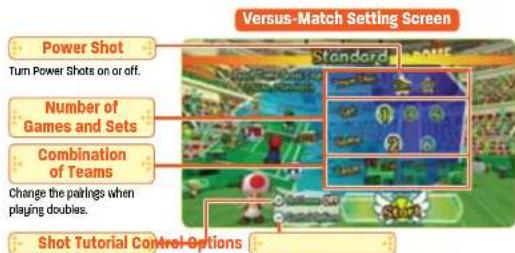
Adjust the versus-match format and play a standard tennis match. Select a court by pointing at it and pressing Ⓐ or by scrolling with + or Ⓞ and pressing Ⓐ. Choose Start to start the game.
text_image
Versus-Match Setting Screen Power Shot Turn Power Shots on or off. Number of Games and Sets Combination of Teams Change the pairings when playing doubles. Shot Tutorial Control Options
Ring Shot
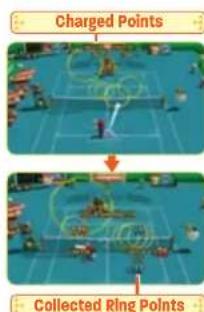
Score points by hitting the ball through rings that appear around the court. The smaller the ring, the higher the point total. If you win a point in the game, you collect half of your opponent's ring points. The winner is the one to reach the number of points designated in the Settings menu. If the game ends in a tie, the player who won the last point in the game is the winner.
text_image
Charged Points Collected Ring PointsMario Power Tennis Game Modes

Item Battle
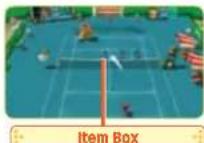
Use the special items that appear on the court for wild tennis matches. You'll receive one of the following items if you hit a ball through one of the item boxes. The items you receive go into effect automatically the next time you hit the ball.

Red Shell
A homing shell that chases after opponents. If a red shell hits you, you'll lose your balance and stumble.

Green Shell
Three shells that zoom out in straight lines along three distinct paths. If a green shell hits you, you'll lose your balance and stumble.

Banana
A slippery peel that will make you lose your footing if you step on it.

Mushroom
A mushroom that increases your movement speed for a little bit.

Star
A star that increases your abilities and makes you invulnerable for a little bit.

Lightning
A bolt that shrinks your opponents in stature and power.

Tournament
Pit your skills against other players in a tournament and aim for a championship in this one-player mode. Choose the tournament you will compete in and confirm your choice. When you win, you get a trophy and open up new tournaments to play in. You can save progress in a tournament after each match is completed.

Special Games
These are tennis-themed games that up to four people can play. Set the difficulty level you prefer. When playing with multiple people, you can also set time limits.

Continue
To continue a previous game, choose a save file and pressⒶ to confirm.

Records
View records for all game modes here.

Options
Adjust game features here.
| Music | Turn music on or off. |
| Control Options | Choose between Easy, Normal, Technical, or Manual control options. |
| Data | Erase all save data here. Be careful! Once game data is erased, it's gone for good. |
Control Options
| Hlt Power Shot | Choose whether to activate Power Shots automatically or manually. |
| Select Power Shot | If this is set to Auto, you choose which type of Power Shot to use in a given situation. |
| Lunge | If this is set to Auto, you will automatically dive for a ball that is far away from you. |
VEUILLEZ LIRE ATTENTIVEMENT L'INTÉGRALITÉ DU MODE D'EMPLOI DE LA Wii™ AVANT D'UTILISER VOTRE SYSTÈME, VOTRE DISQUE DE JEU, OU VOS ACCESSOIRES Wii. CE MODE D'EMPLOI COMPREND D'IMPORTANTES INFORMATIONS SUR VOTRE SANTÉ ET VOTRE SÉCURITÉ.
INFORMATIONS IMPORTANTES CONCERNANT VOTRE SÉCURITÉ : VEUILLEZ LIRE LES PRÉCAUTIONS SUIVANTES AVANT QUE VOUS OU VOTRE ENFANT NE JOUIEZ À VOS JEUX VIDÉO.
Commandes | Mario Power Tennis

Manette Wii Remote
text_image
Match Results Publishing Options Make Tools Make Tools to set the line Power Button or RESET Save Close 0 Save Active 0 0 Replace Number 1 0 Select Memory 0 0 Power and Numbers 0Pas de points = 0 1 Point = 15 2 Points = 30 3 Points = 40