RB280704 - Freezer GAGGENAU - Free user manual and instructions
Find the device manual for free RB280704 GAGGENAU in PDF.



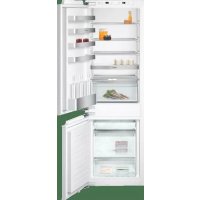
| Product Type | Built-in Freezer |
| Brand | Gaggenau |
| Model | RB280704 |
| Niche dimensions (W x H x D) | 560 mm x (height unspecified) x 560 mm (recommended depth) |
| Power supply | 110-120 V ~ 60 Hz, fuse 10-16 A |
| Maximum simultaneous power | 6 A |
| Cooling system | NoFrost (automatic defrost) |
| Fast freezing | Yes, button activation (duration approx. 2.5 days) |
| Holiday mode | Yes (for refrigerator compartment, temperature 57 °F) |
| Connectivity | Home Connect (Wi-Fi, compatible with mobile app) |
| Door alarm | Yes, audible |
| Temperature alarm | Yes, audible and visual |
| Lighting | LED (maintenance-free) |
| Interior equipment | Ice cube tray, cold accumulators, adjustable glass shelves, bottle rack |
| Maintenance | Clean with warm water and mild detergent, do not use steam cleaner |
| Safety | Flammable refrigerant, grounding required |
| Self-diagnosis | Built-in program for fault detection |
| Customer service | USA: 1-877-442-4436, Canada: 1-877-442-4436 |
| Intended use | Domestic, max altitude 2000 m |
Frequently Asked Questions - RB280704 GAGGENAU
User questions about RB280704 GAGGENAU
0 question about this device. Answer the ones you know or ask your own.
Ask a new question about this device
Download the instructions for your Freezer in PDF format for free! Find your manual RB280704 - GAGGENAU and take your electronic device back in hand. On this page are published all the documents necessary for the use of your device. RB280704 by GAGGENAU.
USER MANUAL RB280704 GAGGENAU
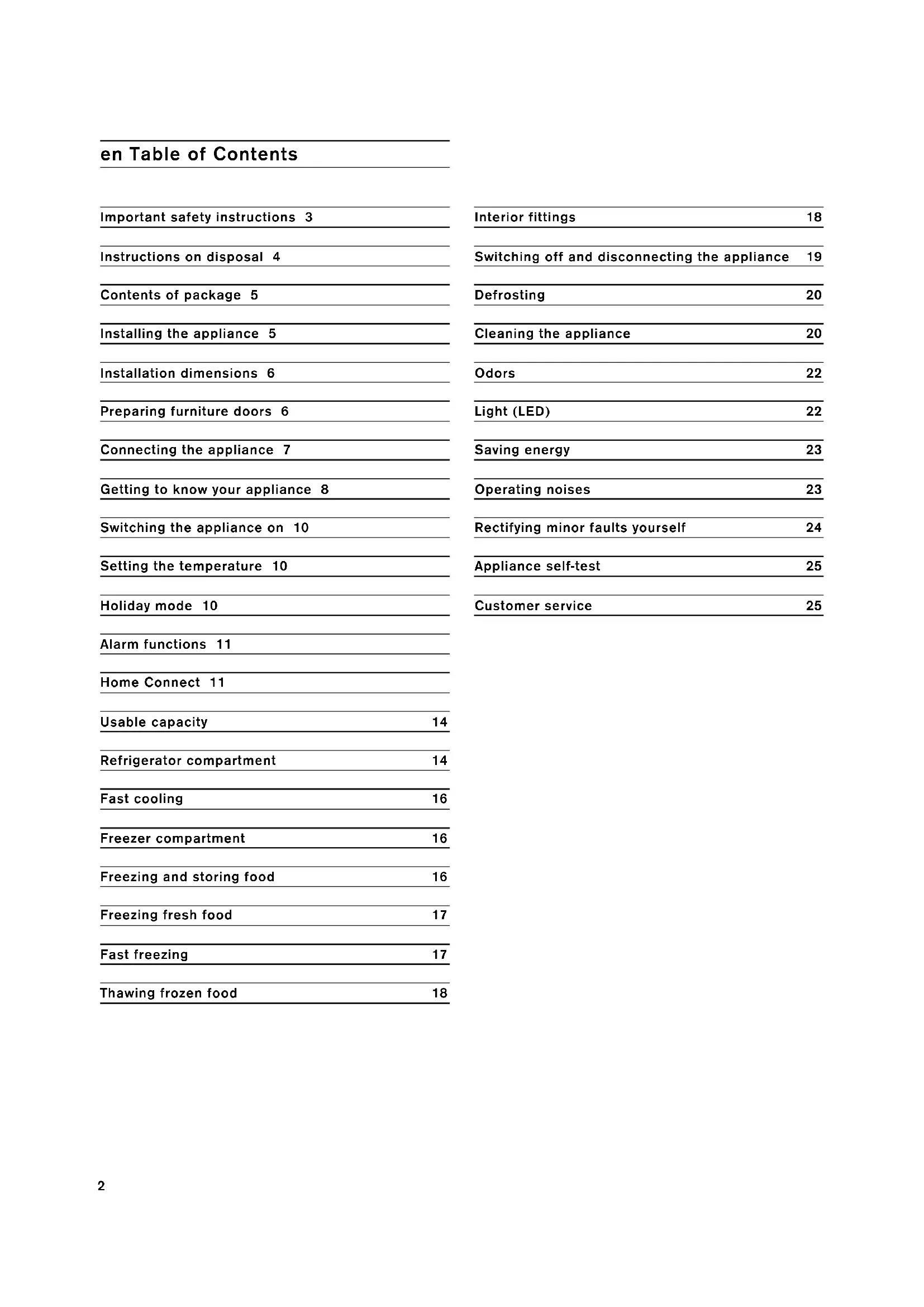
Important safety instructions 3
Instructions on disposal 4
Contents of package 5
Installing the appliance 5
Installation dimensions 6
Preparing furniture doors 6
Connecting the appliance 7
Getting to know your appliance 8
Switching the appliance on 10
Setting the temperature 10
Holiday mode 10
Alarm functions 11
Home Connect 11
Usable capacity 14
Refrigerator compartment 14
Fast cooling 16
Freezer compartment 16
Freezing and storing food 16
Freezing fresh food 17
Fast freezing 17
Thawing frozen food 18
Interior fittings 18
Switching off and disconnecting the appliance 19
Defrosting 20
Cleaning the appliance 20
Odors 22
Light (LED) 22
Saving energy 23
Operating noises 23
Rectifying minor faults yourself 24
Appliance self-test 25
Customer service 25
Definition
WARNING:
This indicates that death or serious injury may result due to non-observation of this warning.
CAUTION:
This indicates that minor or moderately severe injury may result due to non-observance of this warning.
Before you switch on the appliance
Please read the instructions for use and installation carefully. They contain important information on how to install, use and maintain the appliance.
The manufacturer is not liable if you disregard the instructions and warnings in the operating instructions. Retain all documents for later use or for the subsequent owner.
Technical safety
If damage has occurred
- Keep naked flames and ignition sources away from the appliance,
ventilate the room thoroughly for several minutes. - switch off the appliance and pull out the mains plug,
Inform customer service.
The more refrigerant there is in an appliance, the bigger the room must be in which the appliance is located. If rooms are too small, a leak may result in a flammable gas-air mixture.
The room must be at least 36ft^3 (1m^3) per 8 g of refrigerant. The amount of refrigerant in your appliance is indicated on the rating plate inside the appliance.
Flammable refrigerant is used. Risk of fire or explosion.
This appliance may only be repaired by authorized specialist personnel. All safety precautions must be followed. Do not use force to open refrigerant tubing. Follow the instructions carefully. Dispose of the appliance properly in accordance with the applicable federal or local regulations.
If this appliance's power cord is damaged, it must be replaced by the manufacturer, authorized service providers or similarly qualified persons. Improper installations and repairs may put the user at risk.
Repairs may only be performed by the manufacturer, authorized service providers or similarly qualified persons.
Only original parts supplied by the manufacturer may be used. Only for original parts does the manufacturer guarantee that they satisfy the safety requirements.
The appliance comes with a UL registered 3-wire power cord.
Never sever or remove the third (earth) conductor from the power cord.
The appliance requires a 3-pole socket. The socket may be connected by an electrician only.
Where there is a 2-pole standard wall socket, it is the personal responsibility of the customer to have this socket replaced with a correctly grounded 3-pole wall socket. Do not use any adapter plugs.
During use
- Never use electrical equipment inside the appliance (e.g. heaters, electric ice makers etc.). Explosion hazard!
- Never defrost or clean the appliance with a steam cleaner! The steam can penetrate electrical parts and cause a short circuit. Risk of electric shock!
- Do not use pointed or sharp-edged tools to remove frost or layers of ice. They could damage the refrigerant tubes. Leaking refrigerant can ignite or cause eye injuries.
- Do not store products which contain flammable propellants (e.g. spray cans) and do not store any explosive substances. Explosion hazard!
- Do not stand on or lean against base of appliance, drawers or doors etc.
Before cleaning, unplug the appliance or switch off the fuse. Pull on the plug, not on the cord.
- Only store high-proof alcohol tightly closed and standing up.
- Keep plastic parts and the door seal free of oil and grease. The plastic parts and the door seal will otherwise become porous.
- Never cover or block the appliance's ventilation openings.
- Avoiding placing children and disabled people at risk:
This appliance must not be used by children without adult supervision or by disabled persons without assistance. Never allow children to play with the appliance.
- Do not store bottled or canned liquids (especially carbonated drinks) in the freezer compartment. Bottles and cans may burst!
- Never put frozen food straight from the freezer compartment into your mouth. Risk of low-temperature burns!
- Avoid prolonged touching of frozen food, ice or the evaporator pipes etc.
Risk of low-temperature burns!
Children in the household
- Keep children away from the packaging and its parts.
Danger of suffocation from collapsible boxes and foil!
Do not allow children to play with the appliance!
If the appliance features a lock: keep the key out of the reach of children.
General information
The appliance is suitable
for refrigerating and freezing food,
for making ice.
This appliance is intended for use in the home and the home environment.
This appliance is intended for use at an elevation of no more than 2000 meters above sea level.
State of California Proposition 65 Warnings
This product may contain a chemical known to the State of California, which can cause cancer or reproductive harm. Therefore, the packaging of your product may bear the following label as required by California:
STATE OF CALIFORNIA PROPOSITION 65 WARNING:/ AVERTISSEMENT ISSUE DE LA PROPOSITION 65 DE L'ETAT DE LA CALIFORNIE:
WARNING / AVERTISSEMENT
Cancer and Reproductive Harm / Cancer et dommages à la reproduction - www.P65Warnings.ca.gov.
Instructions on disposal
Disposal of packaging
The packaging protects your appliance from damage during transport. All utilized materials are environmentally safe and recyclable. Please help us by disposing of the packaging in an environmentally friendly manner.
Please ask your dealer or inquire at your local authority about current means of disposal.
Disposal of your old appliance
Old appliances are not worthless garbage! Valuable raw materials can be reclaimed by recycling old appliances.
WARNING:
Redundant appliances
- Pull out the mains plug.
- Cut off the power cord and discard with the mains plug.
-
Do not take out the trays and receptacles to prevent children from climbing in!
-
To prevent children from locking themselves in the redundant appliance: Remove appliance doors!
- Do not allow children to play with the redundant appliance. Risk of suffocation!
Refrigerators contain refrigerant and gases in the insulation. Refrigerant and gases must be disposed of professionally. Ensure that tubing of the refrigerant circuit is not damaged prior to proper disposal.
Contents of package
After unpacking all parts, check for any damage during transport.
CAUTION:
Do not set up the appliance if it is damaged. If there are any problems, please contact the dealer from whom you purchased the appliance, or our customer service.
The delivery consists of the following parts:
Built-in appliance
Interior fittings (depending on model)
- Bag containing installation materials
- Instruction manual
- Installation instructions
- Customer service booklet
Warranty enclosure
Information on the energy consumption and noises
Installing the appliance
Have a technician install and connect the appliance according to the enclosed installation instructions.
WARNING:
Do not install this appliance:
outdoors,
in an environment with dripping water,
in rooms where there is a risk of frost.
Transport
The appliance is heavy. It must be secured during transport and installation.
WARNING:
Due to the appliance's weight and dimensions and to minimize the risk of injuries or damage to the appliance, at least two people are needed for safe installation of the appliance.
Installation location
A dry, well ventilated room is suitable as an installation location. The installation location should not be exposed to direct sunlight and not placed near a heat source, e.g. a cooker, radiator, etc. If installation near a heat source is unavoidable, use a suitable insulating plate or observe the following minimum distances to a heat source:
1_/4^1 (3 cm) to electric or gas cookers.
11 ^13 / 16 (30 cm) to oil or solid-fuel cookers.
The floor of the installation location must not give way; if required, reinforce floor.
Ventilation
The air on the rear panel of the appliance heats up. Dissipation of the heated air must not be obstructed. Otherwise, the refrigeration unit must work harder. This increases power consumption. Therefore: Never cover or block ventilation openings!
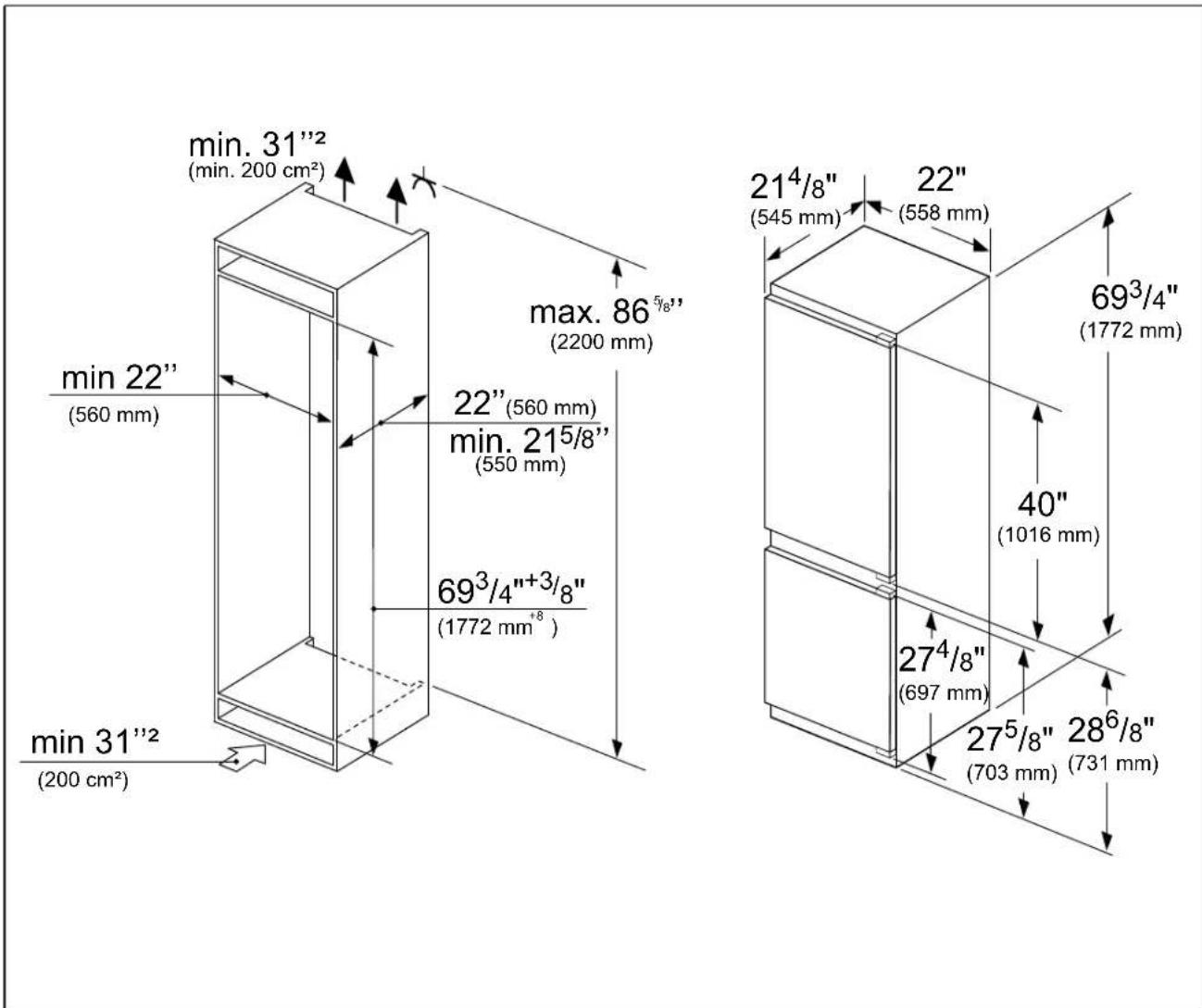
Niche dimensions
Cavity depth
A cavity depth of 22^3 / 64 (560 mm) is recommended for the appliance. If the cavity depth is smaller - at least 21^21 / 32 (550 mm) - the energy consumption increases slightly.
Niche width
An inside niche width of at least 22^3 / 64 (560 mm) is required for the appliance. If this is not the case, problems may occur when installing the appliance.
Side by side installation
It is only possible to install appliances side by side with a gap of at least 5.9^ (15 cm).
Preparing furniture doors
Note:
When working on furniture doors, always observe the following:
- Select a furniture door thickness between at least 5/8'' (16 mm) and 3/4'' (19 mm).
Always select a screw length which is shorter than the thickness of the furniture door.
Always insert screws into the part of the furniture door which is best able to handle the load. -
Do not insert screws into fillings, etc.
-
Do not insert screws into filters, decorative strips, etc.
- Protect the furniture door surfaces against damage during installation.
Furniture door dimensions
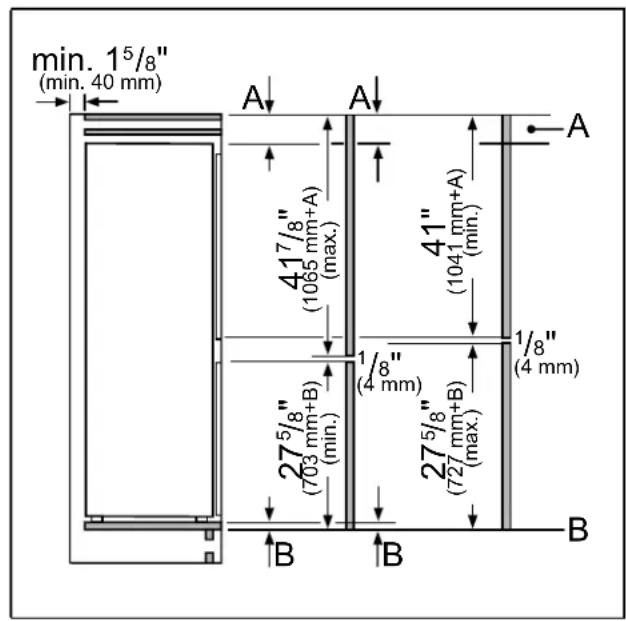
Key
A Furniture door protrusion
B Lower edge of furniture door
The specified furniture door dimensions apply for a door gap of 5 / _32'' (4 mm).
Connecting the appliance
After installing the appliance, wait at least 8 hours until starting up the appliance. During transportation the oil in the compressor may have flowed into the refrigeration system.
Before switching on the appliance for the first time, clean the interior of the appliance (see chapter Cleaning the appliance).
Electrical connection
WARNING:
Risk of electric shock!
Connect the appliance to a grounded, 3-phase outlet only. Never remove the ground phase. Do not use any adapters. Do not use any extension leads.
WARNING:
Risk of electric shock!
Incorrect connection of the appliance may result in death, fire or electric shock. Improper connection of the protective conductor may result in electric shock. If you are in doubt as to whether the appliance has been properly grounded, have it tested by a qualified electrician or Customer Service technician.
WARNING:
Risk of electric shock!
If the length of the power cord is inadequate, never use multiple outlets or extension leads. Instead, please contact Customer Service for alternatives. This appliance must be connected to a permanently installed outlet.
The outlet must be near the appliance and also freely accessible following installation of the appliance.
The appliance complies with protection class I. Connect it to a correctly installed outlet. Correct means: with a protective conductor, 110V - 120V / 60Hz alternating current. The outlet must be protected by a 10A - 16A fuse.
The appliance comes with a UL registered 3-wire power cord. The appliance requires a 3-pole outlet.
Please observe the following table with regard to this:
| Appliance Maximum simultaneous load |
Fridge-freezer 6 A
Check on the rating plate whether the indicated voltage and current type match the values of your power supply. The position of the rating plate can be found in the chapter entitled Customer Service.
WARNING:
Never connect the appliance to electronic energy saver plugs.
Our appliances can be used with mains and sine-controlled inverters. Mains-controlled inverters are used for photovoltaic systems which are connected directly to the national grid. Sine-controlled inverters must be used for isolated applications (e.g. on ships or in mountain lodges) which are not connected directly to the national grid.
Getting to know your appliance
These operating instructions refer to several models.
The features of the models may vary.
The diagrams may differ.
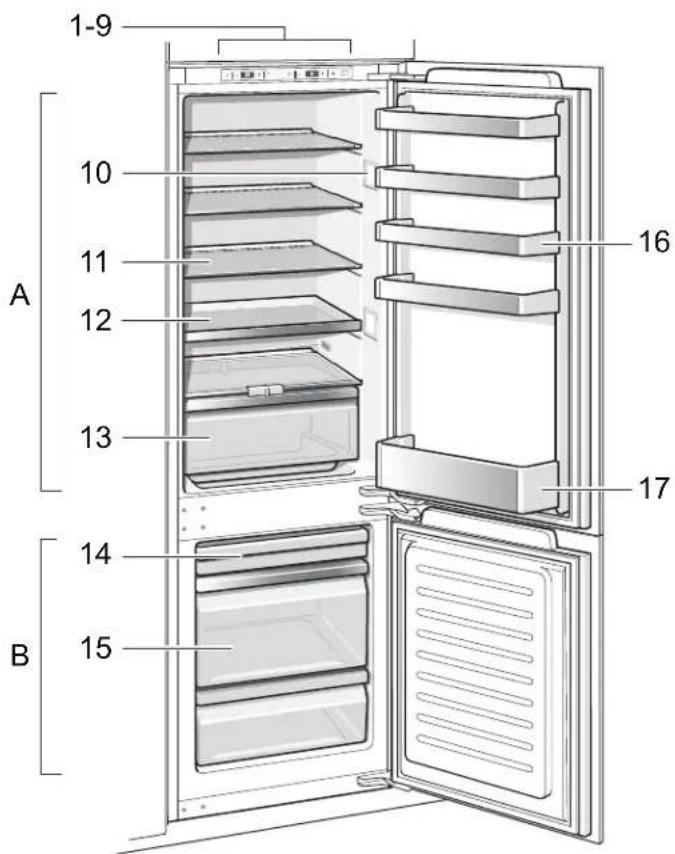
- Not all models.
A Refrigerator compartment
B Freezer compartment
1-9 Operating controls
10 Lighting
11 Glass shelf in the refrigerator compartment
12 Extendable glass shelf
13 Vegetable container
14* Berry tray
15 Frozen food container
16 Door shelf
17 Shelf for large bottles
Operating controls
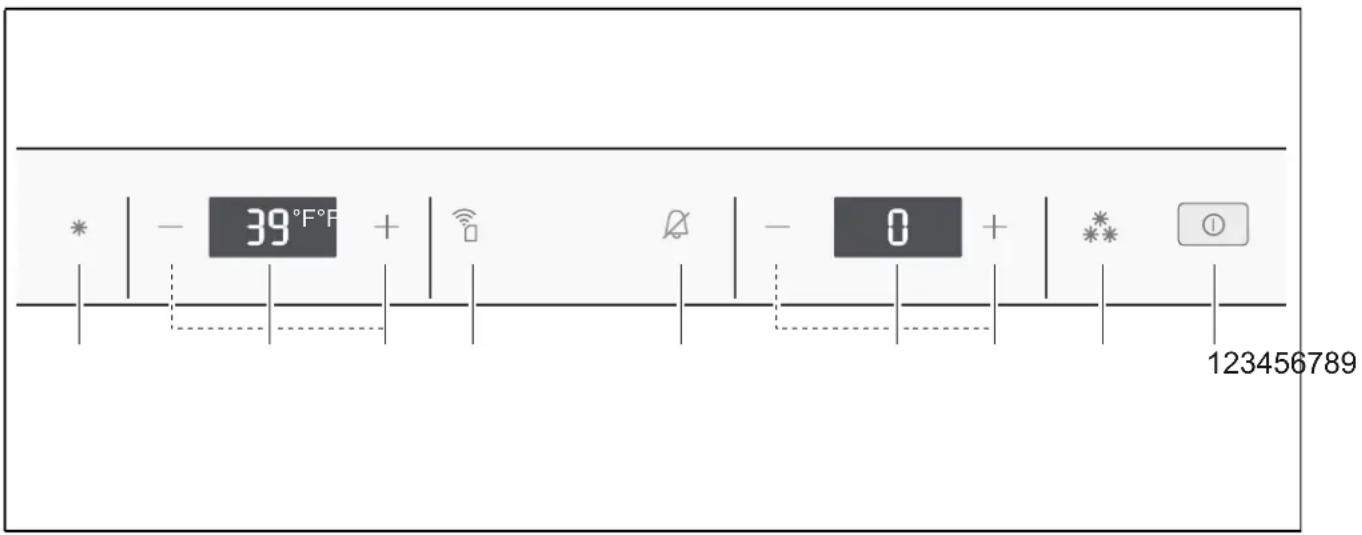
1 On/Off button ①
Serves to switch the whole appliance on and off.
2 Fast button freezer section \*\*
Switches fast freezing on and off (see chapter "Fast freezing").
3 Temperature selection buttons freezer section +/-
These buttons set the temperature in the freezer section.
4 Temperature display freezer compartment
The numbers correspond to the set freezer compartment temperatures in ^ F
5 Alarm button
Used to switch off the warning signal (see chapter "Alarm function").
6 Home Connect button
Used to switch on and off as well as configure the Home Connect function (see chapter Home Connect).
7 Temperature selection buttons refrigerator section +/-
These buttons set the temperature in the refrigerator section.
8 Temperature display refrigerator compartment
The numbers correspond to the set refrigerator compartment temperatures in ^ F
9 Fast button refrigerator section *
Switches fast cooling on and off (see chapter Fast cooling).
Switching the appliance on
- Switch on the appliance with the On/Off button ① .
A warning signal sounds, the temperature display for the freezer section flashes and the alarm button is lit.
- The warning signal is switched off by pressing the alarm button
The appliance begins to cool. Light is switched on when the door is open.
The factory has recommended the following temperatures:
Refrigerator section +39^(+4^)
Freezer section 0^(-18^)
Operating tips
After the appliance has been switched on, it may take several hours until the set temperature has been reached. Do not put any food in the appliance beforehand.
The fully automatic No Frost system ensures that the freezer compartment remains free of ice. Defrosting is not required.
The front sides of the housing are sometimes heated slightly. This prevents condensation in the area of the door seal.
If the freezer compartment door cannot be immediately re-opened after it has been closed, wait until the resulting low pressure has equalized.
Setting the temperature
Refrigerator section
The temperature can be set from +36^(+2^) to +46^(+8^) .
Keep pressing temperature selection button +/- until the required refrigerator section temperature is set.
The value last selected is saved. The set temperature is indicated on the temperature display for the refrigerator section.
Freezer section
The temperature can be set from 3^(-16^) to -11^(-24^) .
Keep pressing temperature selection button + / - until the required freezer section temperature is set.
The value last selected is saved. The set temperature is indicated on the temperature display for the freezer section.
Holiday mode
If leaving the appliance for a long period of absence, you can switch the appliance over to the energy-saving vacation mode. The refrigerator compartment temperature is automatically switched to 57^ (14^) .
CAUTION:
Do not store any food in the refrigerator compartment during this time!
Switching on and off
- Switching on: Press the temperature selection button + until the temperature display refrigerator compartment 8 indicates Ho.
When holiday mode is switched on, the temperature display refrigerator compartment no longer indicates a temperature.
- Switching off: Press the temperature selection button - until the temperature display refrigerator compartment 8 indicates the desired temperature.
Alarm functions
Door alarm
A warning signal is switched on if the appliance door is left open for a while. Close the door to switch off the warning signal.
Temperature alarm
The temperature alarm switches on if the freezer compartment is too warm and the frozen food is at risk of thawing.
When the alarm button 5 is pressed, the temperature display freezer compartment 4 indicates for five seconds the warmest temperature reached in the freezer compartment.
Then this value is deleted. The temperature display freezer compartment 4 indicates the set freezer compartment temperature without flashing.
From this time on the warmest temperature is recalculated and saved.
The alarm may switch on without any risk to the frozen food:
- when the appliance is first switched on,
- when large quantities of fresh food are placed in the appliance,
- if the freezer compartment door is open too long.
Note:
Do not refreeze partly or completely thawed food. Only food that has then been cooked (boiled or fried) may be refrozen.
No longer store the frozen produce for the max. storage period.
Switching off the alarm
Press the alarm button 5 to switch off the warning signal.
Home Connect
This appliance is Wi-Fi-capable and can be controlled remotely using a mobile device.
Note:
Wi-Fi is a registered trade mark of the Wi-Fi Alliance. In the following cases, the appliance functions like a refrigerator without a network connection and can still be operated manually via the controls:
The appliance is not connected to a home network.
The availability of the Home Connect function depends on the availability of Home Connect services in your country. Home Connect services are not available in every country. You can find more information on www.home-connect.com.
Note:
- Please observe the safety information in these operating instructions and ensure that they are still observed if you operate the appliance using the Home Connect app and are not at home when doing so.
You must also follow the instructions in the Home Connect app. - If the appliance is being operated by means of the controls on the appliance itself, this mode of operation always has priority. During this time, it is not possible to operate the appliance using the Home Connect app.
Setting up Home Connect
Note:
- Observe the Home Connect supplementary sheet, which is available for download under www.gaggenau.com with the instructions. To do so, enter the E-number of your appliance in the search field.
After switching on the appliance, wait at least two minutes until internal device initialization is complete. Only then start setting up Home Connect. - To implement settings with Home Connect, you have to install the Home Connect app on your mobile device. Observe the supplied Home Connect documents with regard to this. Follow the steps specified by the app to implement the settings.
The Home Connect menu will close automatically when the appliance is not operated for a lengthy period of time. You can find information on how to open the Home Connect menu at the start of the appropriate chapter.
Automatic connection with the home network (WLAN)
If a WLAN router with WPS function is available, the refrigerator can automatically connect to the home network.
- Press the Home Connect button 6. The temperature display refrigerator compartment 8 indicates Cn.
- Press the refrigerator compartment temperature selection button 7 until the temperature display refrigerator compartment 8 indicates AC and the temperature display freezer compartment 4 indicates OF.
- Press the freezer compartment temperature selection button 3. The appliance is ready for automatic connection. The temperature display freezer compartment 4 displays an animation for 2 minutes. The appliance is ready for automatic connection for as long as the animation is displayed.
- Within those 2 minutes, activate the WPS function on the home network router (e.g. using the WPS/WLAN button; read the information on this topic in the router documentation). If the connection is successful, On flashes in the temperature display freezer compartment 4. The refrigerator is ready to connect with the app.
Note:
If the temperature display freezer compartment 4 indicates OF, no connection could be established.
- Check whether the refrigerator is located within the range of the home network (WLAN).
- Repeat the process or establish the connection manually.
Manual connection with the home network (WLAN)
If the WLAN router present does not have a WPS function, or if this is unknown, you can manually connect the refrigerator with the home network.
- Press the Home Connect button 6. Temperature display refrigerator compartment 8 indicates Cn.
- Press the refrigerator compartment temperature selection button 7 until the temperature display refrigerator compartment 8 indicates SA and the temperature display freezer compartment 4 indicates OF.
-
Press the freezer compartment temperature selection button 3. The appliance is ready for manual connection. The temperature display freezer compartment 4 displays an animation. The appliance is ready for manual connection for as long as the animation is displayed.
-
The refrigerator has now set up its own WLAN network with the network name HomeConnect. You can now access this network with your mobile device.
- Call up the WLAN settings in the settings menu of the mobile device.
- Connect the mobile device with the WLAN network HomeConnect. Password:HomeConnect It can take up to 60 seconds to establish the connection.
- After successfully connecting, open the Home Connect app on the mobile device. The app will search for the refrigerator.
- As soon as the refrigerator has been found, enter the network name (SSID) and the password (Key) of your own home network (WLAN) into the corresponding fields.
- Confirm with the button Transmit to domestic appliances.
Once successfully connected, On flashes in the temperature display freezer compartment 4.
You can now connect the refrigerator with the app.
- If the temperature display freezer compartment 4 indicates OF, it was not possible to establish a connection. Check whether the refrigerator is located within the range of the home network (WLAN). Repeat the process.
Connecting your refrigerator to the Home Connect app
- Press 6 Home Connect button.
Temperature display refrigerator compartment 8 indicates Cn. - Press 7 temperature selection button refrigerator compartment until the temperature display refrigerator compartment 8 indicates PA and the temperature display freezer compartment 4 indicates OF.
- Press 3 temperature selection button freezer compartment to connect the appliance to the app. The temperature display freezer compartment 4 displays an animation.
As soon as the refrigerator and app are connected, the temperature display freezer compartment 4 indicates On.
- Open the app and wait until the refrigerator is displayed.
Press Add to confirm the connection between the app and the refrigerator.
If the refrigerator is not automatically displayed, click on Add appliance in the app and follow the instructions. As soon as your refrigerator is displayed, add it with ^+
- Follow the instructions in the app until the process is complete.
The temperature display refrigerator compartment 8 indicates PA and the temperature display freezer compartment 4 indicates On.
The refrigerator has been connected to the app. If the connection has failed, please check whether the mobile device is connected to the home network (WLAN).
Then try to establish the connection again. If the temperature display freezer compartment 4 indicates Er, reset the Home Connect settings.
Note:
When resetting, all Home Connect settings are reset.
Verify signal strength
You should verify the signal strength if no connection can be established.
-
Press the Home Connect button 6. The temperature display refrigerator compartment 8 indicates Cn.
-
Press the refrigerator compartment temperature selection button 7 until the temperature display refrigerator compartment 8 indicates SI. The temperature display freezer compartment 4 indicates a value between 0 (no reception) and 3 (full reception).
The signal strength should be at least 2. If the signal strength is too weak, the connection may be interrupted.
- Place the router and refrigerator closer together.
- Ensure that the connection do not interfere with by screening walls.
- Alternatively, install a repeater to make the signal stronger.
Resetting Home Connect settings
If there is a problem when trying to establish a connection or if you want to register the appliance in a different home network (WLAN), the Home Connect settings can be reset:
- Press the Home Connect button 6. The temperature display refrigerator compartment 8 indicates Cn.
- Press the refrigerator compartment temperature selection button 7 until the temperature display refrigerator compartment 8 indicates rE and the temperature display freezer compartment 4 indicates OF.
- Press the freezer compartment temperature selection button 3.
The temperature display freezer compartment 4 displays an animation for 15 seconds.
Then the temperature display freezer compartment 4 indicates OF.
The Home Connect settings have been reset.
Installing the Home Connect software update
The refrigerator checks for updates to the Home Connect software at regular intervals.
When an update is available, the temperature display refrigerator compartment 8 indicates UP.
Press any button to reset the display to the set temperature.
Installing the update:
- Press the Home Connect button 6. The temperature display refrigerator compartment 8 indicates Cn.
- Press the refrigerator compartment temperature selection button 7 until the temperature display refrigerator compartment 8 indicates UP and the temperature display freezer compartment 4 indicates OF.
- Press the freezer compartment temperature selection button 3.
The temperature display freezer compartment 4 displays an animation.
The update is installed.
During the installation, all buttons are locked.
If the installation was successful, the temperature display freezer compartment 4 indicates On.
If installation was not successful, the temperature display freezer compartment 4 indicates Er. Start the update again at a later time. If the installation has still not been successfully completed after several attempts, inform customer Service.
Information on data protection
When your Home Connect refrigerator is connected for the first time to a WLAN network that is connected to the Internet, your appliance transmits the following categories of data to the Home Connect server (initial registration):
- Unique appliance identification (consisting of appliance codes as well as the MAC address of the installed Wi-Fi communication module).
Security certificate of the Wi-Fi communication module (to ensure a secure IT connection).
The current software and hardware version of your domestic appliance. - Status of any previous resetting to factory settings.
This initial registration prepares the Home Connect functions for use and is required only when you want to use Home Connect for the first time.
Note:
Note that the Home Connect functions can be used only in conjunction with the Home Connect app. Information on data protection can be accessed in the Home Connect app.
Usable capacity
Information on the usable capacity can be found inside your appliance on the rating plate (see diagram in chapter Customer service).
Fully utilizing the freezer volume
The maximum amount of food can be placed in the freezer by removing all fittings. The food can be stacked directly on the shelves and in the bottom of the freezer compartment.
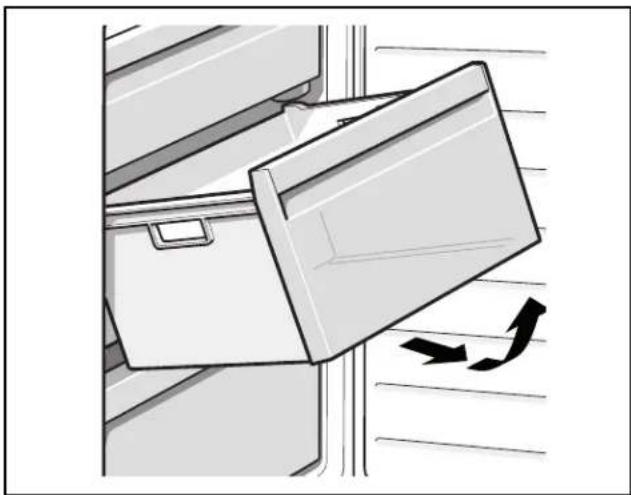
Removing the fittings
Pull out the frozen food container all the way, lift at the front and remove.
Refrigerator compartment
The refrigerator compartment is the ideal storage location for meat, sausage, fish, dairy products, eggs, ready meals and pastries.
Note when storing food
- Store fresh, undamaged food. The quality and freshness will then be retained for longer.
In the case of ready-made products and bottled goods, observe the best-before date or use-by date specified by the manufacturer.
To retain aroma, color and freshness, pack or cover food well before placing in the appliance. This will prevent the transfer of flavors and the discoloration of plastic parts in the refrigerator compartment. - Allow warm food and drinks to cool down before placing in the appliance.
Note:
Avoid contact between food and rear panel. Otherwise the air circulation will be impaired. Food or packaging could freeze to the rear panel.
Note the chill zones in the refrigerator compartment
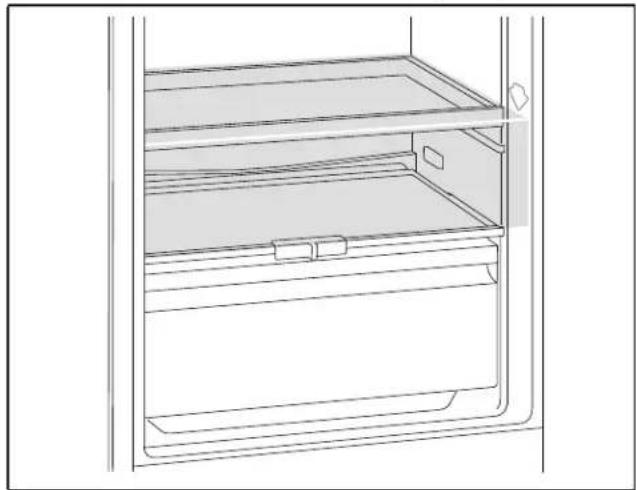
The air circulation in the refrigerator compartment creates different chill zones:
- Coldest zone is between the arrow stamped on the side and the glass shelf situated below. Note:
Store perishable food (e.g. fish, sausage, meat) in the coldest zone.
The warmest zone is at the very top of the door. Note:
Store e.g. hard cheese and butter in the warmest zone. Cheese can then continue to release its flavor, and butter will still be easy to spread.
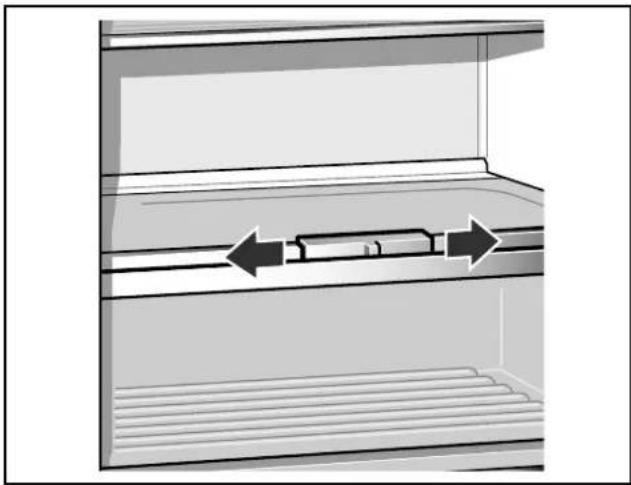
Vegetable container with humidity controller
The vegetable container is the optimum storage location for fresh fruit and vegetables. A humidity controller and a special seal can be used to adjust the air humidity in the vegetable container. This allows fresh fruit and vegetables to be stored up to twice as long as with conventional storage.
The air humidity in the vegetable container can be set according to the type and quantity of products to be stored:
- Mainly fruit as well as for a large load - lower air humidity
- Mainly vegetables as well as for a mixed load or small load - higher air humidity
Note:
Fruit sensitive to cold (e.g. pineapple, banana, papaya and citrus fruit) and vegetables sensitive to cold (e.g. eggplant, cucumbers, zucchini, peppers, tomatoes and potatoes) should be stored outside the refrigerator at temperatures of approx. +46^ F (+8^ C) to +54^ F (+12^ C) for optimum preservation of quality and flavor.
Note:
Condensation may form in the vegetable container depending on the type and quantity of products stored. Remove condensation with a dry cloth and adjust air humidity in the vegetable container with the humidity controller.
Fast cooling
Fast cooling cools the refrigerator section as cold as possible for approx. 15 hours. Then the appliance automatically switches to the temperature set prior to fast cooling mode.
Switch on fast cooling mode, e.g.
- before placing large quantities of food in the refrigerator section.
for the fast cooling of drinks.
Note:
When fast cooling is switched on, increased operating noises may occur.
Switching on and off
Press fast button for refrigerator section *.
The button is lit when fast cooling is switched on.
Freezer compartment
Use the freezer compartment
To store frozen food.
To make ice cubes.
To freeze food.
Note:
Ensure that the freezer compartment door has always been closed properly! If the door is open, the frozen food will thaw. The freezer compartment will become covered in thick ice. Besides: energy is wasted due to the high power consumption!
Freezing and storing food
Purchasing frozen food
The packaging must not be damaged.
Pay attention to the expiration date.
- Temperature in the supermarket freezer must be 0^(-18^) or lower.
If possible, transport frozen food in an insulated bag and place quickly in the freezer compartment.
When loading products
- Preferably freeze large quantities of food in the top compartment, where food freezes particularly quickly and therefore also gently.
- Place the food over the whole area of the compartments or the frozen food containers.
Note:
Food which is already frozen must not come into contact with the food which is to be frozen. If required, move the frozen food to other frozen food containers.
Storing frozen food
Insert frozen food container all the way to ensure unrestricted air circulation.
Freezing fresh food
Freeze only fresh and undamaged food.
To retain the best possible nutritional value, flavor and color, vegetables should be blanched before freezing. Eggplants, peppers, zucchini and asparagus do not require blanching.
Literature on freezing and blanching can be found in bookstores.
Note:
Keep food which is to be frozen away from food which is already frozen.
The following foods are suitable for freezing: Baked goods, fish and seafood, meat, game, poultry, vegetables, fruit, herbs, eggs without shells, dairy products such as cheese and butter, ready meals and leftovers such as soups, stews, cooked meat and fish, potato dishes, souffles and desserts.
The following foods are not suitable for freezing: Vegetables that are usually consumed raw, such as lettuce or radishes, eggs in shells, grapes, whole apples, pears and peaches, hard-boiled eggs, yoghurt, soured milk, sour cream, crème fraîche and mayonnaise.
Packing frozen food
To prevent food from losing its flavor or drying out, place in airtight containers.
- Place food in packaging.
- Remove air.
- Seal the packaging.
- Label packaging with contents and date of freezing.
Suitable packaging:
Cling wrap, tubular film made of polyethylene, aluminum foil, freezer containers.
These products are available from specialist outlets.
Unsuitable packaging:
Wrapping paper, greaseproof paper, cellophane, bin liners and used shopping bags.
Items suitable for sealing packaged food:
Rubber bands, plastic clips, string, cold-resistant adhesive tape, etc.
Bags and tubular film made of polyethylene (PE) can be sealed with a film heat sealer.
Shelf life of frozen food
Shelf life depends on the type of food.
At a temperature of 0^ F (-18^)
Fish, sausage, ready meals, cakes and pastries: up to 6 months
- Cheese, poultry and meat: up to 8 months
Vegetables, fruit: up to 12 months
Fast freezing
Food should be frozen solid as quickly as possible in order to retain vitamins, nutritional value, appearance and flavor.
Several hours before placing fresh food in the freezer compartment, switch on fast freezing to prevent an unwanted temperature rise.
As a rule, 4-6 hours is adequate.
This appliance runs constantly, and the freezer compartment drops to a very low temperature.
If you would like to use the max. freezing capacity, switch on fast freezing for 24 hours before placing the fresh food in the freezer compartment.
You can place smaller quantities of food (up to 2kg ) in the top compartment without fast freezing.
Note:
When fast freezing is switched on, increased operating noises may occur.
Switching on and off
Press fast button for freezer section **.
If fast freezing has been switched on, the button is lit.
Fast freezing automatically switches off after approx. 21/2 days.
Thawing frozen food
Depending on the type and application, you can select one of the following options:
at room temperature
in the refrigerator
in an electric oven with/without a hot air fan
in a microwave.
CAUTION:
Do not refreeze partly or completely thawed food.
Only food that has then been cooked (boiled or fried) may be refrozen.
Do not store the frozen produce for the max. storage period.
Interior fittings
(not all models)
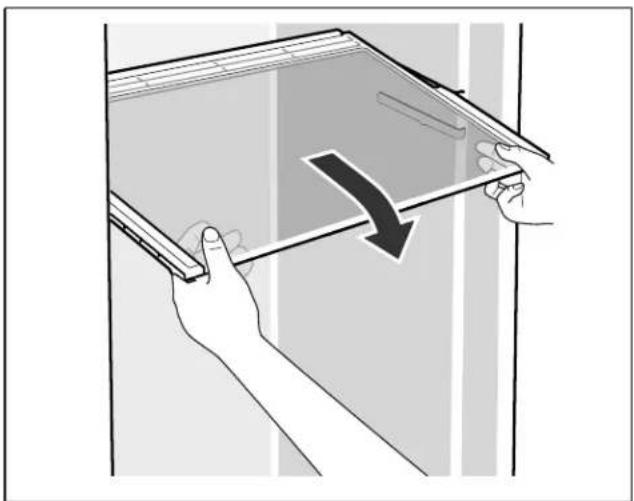
Glass shelves
You can reposition the inner shelves as required: lift shelf, pull forwards, lower and swivel out to the side.
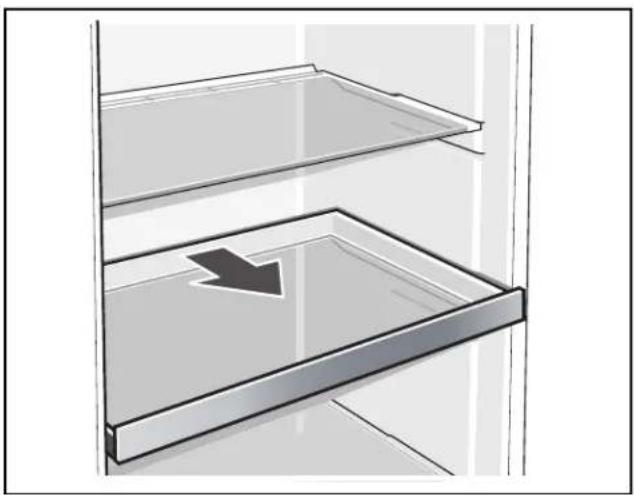
Extendable glass shelf
The extendable glass shelf can be pulled out for a better overview of the food.
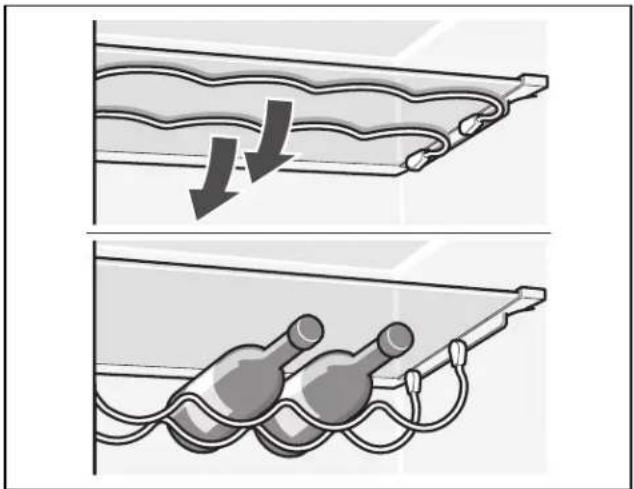
Wine and champagne rack
You can store bottles securely in the wine and champagne rack. If you require space for other food, you can fold the metal clips upwards.
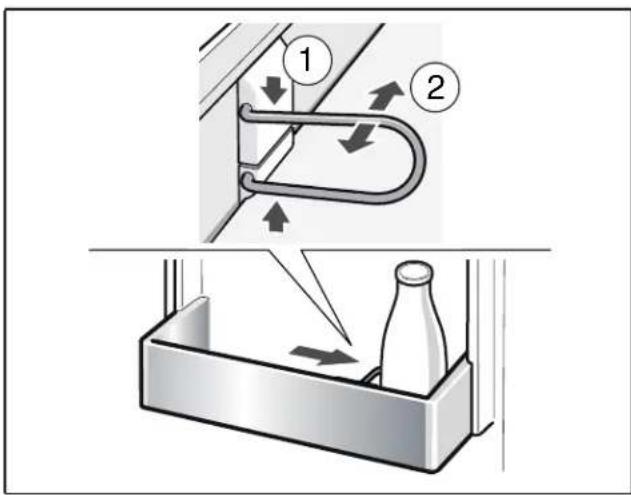
Bottle holder
The bottle holder prevents bottles from falling over when the door is opened and closed.
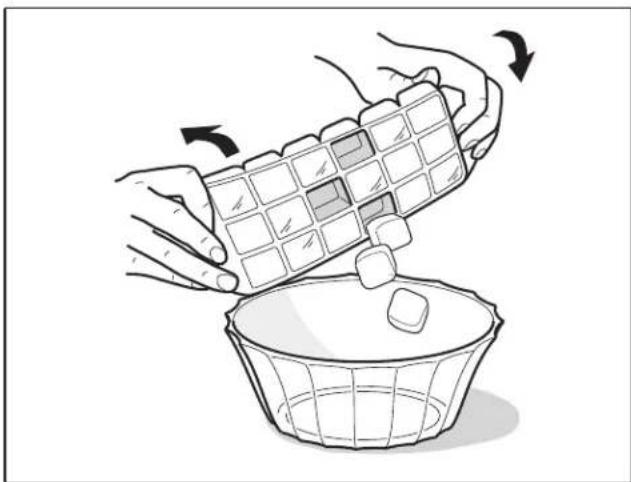
Ice cube tray
Fill the ice cube tray 3 / 4 full of drinking water and place in the freezer section.
If the ice tray is stuck to the freezer section, loosen with a blunt implement only (spoon handle).
To loosen the ice cubes, twist the ice cube tray slightly or hold briefly under running water.
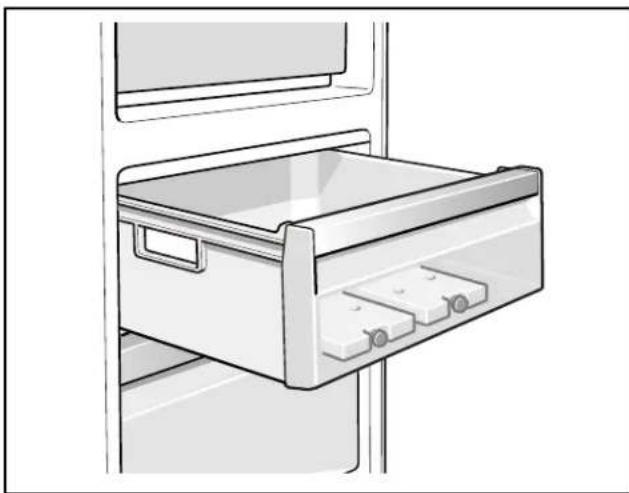
Ice pack
(if enclosed, quantity varies)
If a power failure or malfunction occurs, the ice packs can be used to delay the thawing process. The longest storage time is obtained by placing the ice pack directly on the food in the top compartment.
The ice pack can also be used to cool food temporarily, e.g. in a cold bag.
Switching off and disconnecting the appliance
Switching off the appliance
Press the On/Off button ①.
Temperature display goes out, refrigeration unit switches off.
Disconnecting the appliance
If you do not use the appliance for a prolonged period:
- Switch off the appliance.
- Pull out the mains plug or switch off the fuse.
- Clean the appliance.
- Leave the appliance door open.
Defrosting
Refrigerator compartment
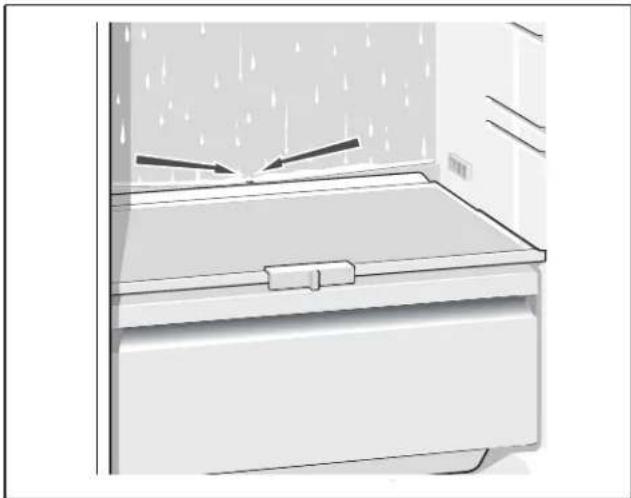
While the appliance is in operation, condensation droplets or frost form on the rear panel of the refrigerator compartment. As the rear panel defrosts automatically, it is not necessary to remove the frost or condensation droplets. The condensation runs through the condensation channel and the drainage hole to the evaporation pan, where it evaporates.
Note:
Keep the condensation channel and drainage hole clean, so the condensation can drain off.
Freezer compartment
The fully automatic No Frost system ensures that the freezer compartment remains free of ice. Defrosting is no longer required.
Cleaning the appliance
CAUTION:
- Do not use abrasive, chloride or acidic cleaning agents or solvents.
Do not use scouring or abrasive sponges. The metallic surfaces could corrode. - Never clean the shelves or containers in the dishwasher. The parts may become deformed!
Proceed as follows:
- Before cleaning: Switch the appliance off.
- Pull out mains plug or switch off fuse.
- Take out food and store in a cool location. Place ice pack (if available) on the food.
- Wait until the layer of frost has thawed.
- Clean the appliance with a soft cloth, lukewarm water and a little pH-neutral washing-up liquid. The rinsing water must not run into the light or through the drainage hole into the evaporation area.
- Wipe the door seal with clear water only and then wipe dry thoroughly.
- After cleaning reconnect and switch the appliance back on.
- Put the food back in the appliance.
Interior fittings
All variable parts of the appliance can be taken out for cleaning.
Take out glass shelves
To do this, pull out shelf, lift at the front and take out.
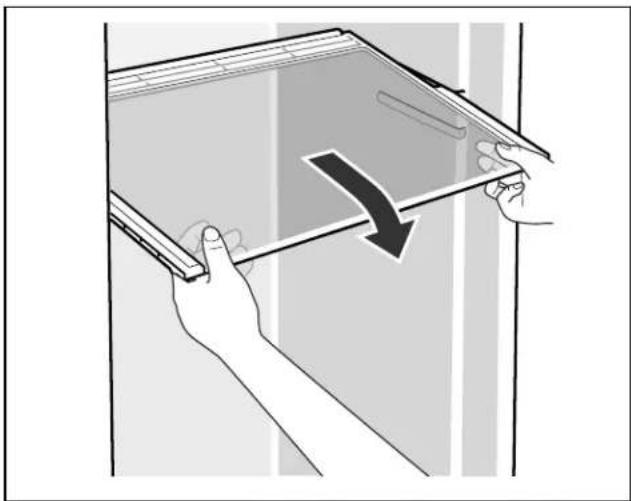
Taking out the extendable glass shelf
Hold down levers on the underside on both sides, pull glass shelf forwards, lift and swivel out to the side.
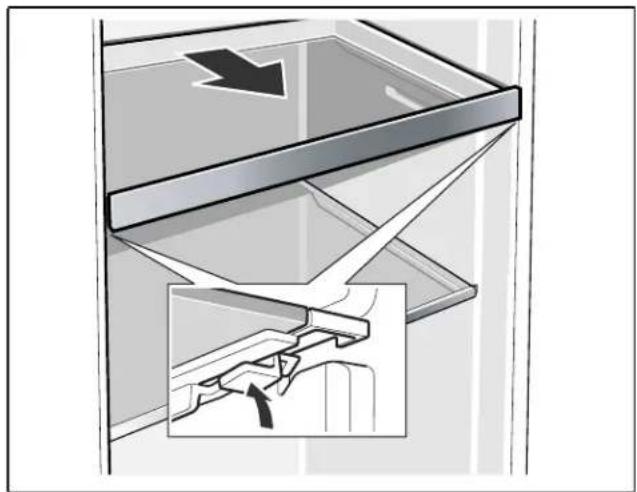
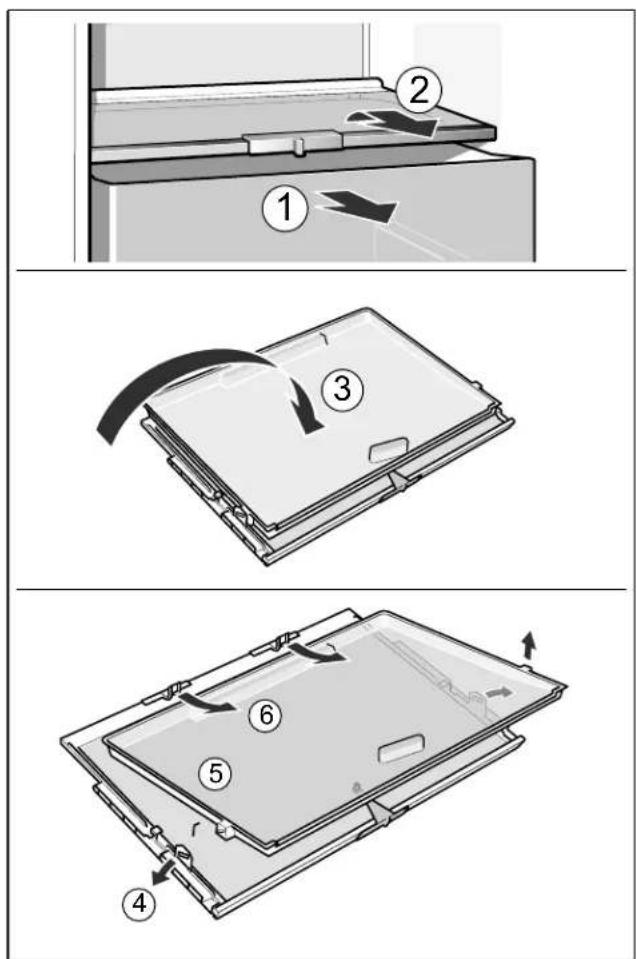
Taking out glass shelf above vegetable container
The glass shelf can be taken out and disassembled for cleaning.
Note:
Before taking out the glass shelf, pull out the vegetable container.
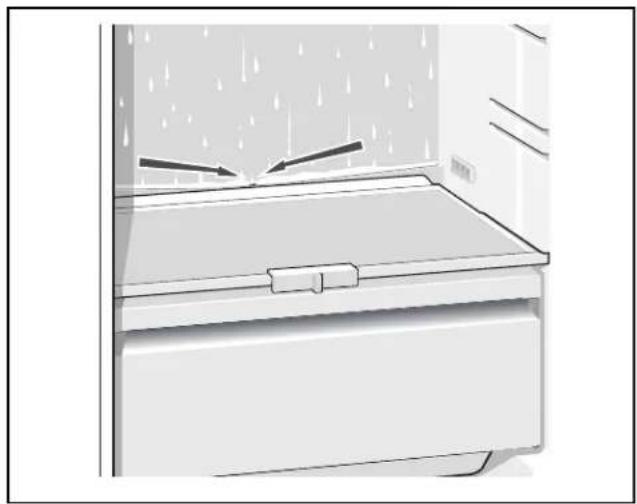
Condensation channel
Regularly clean the condensation channel and drainage hole with a cotton bud or similar implement to ensure that the condensation can drain off.
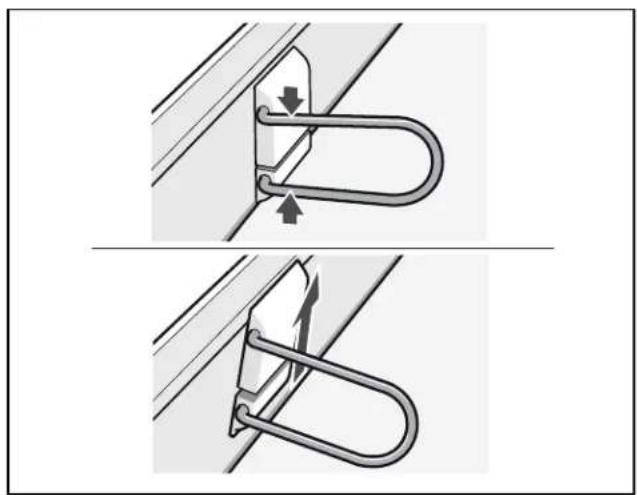
Taking out the bottle holder
Press bottle holder together and take out.
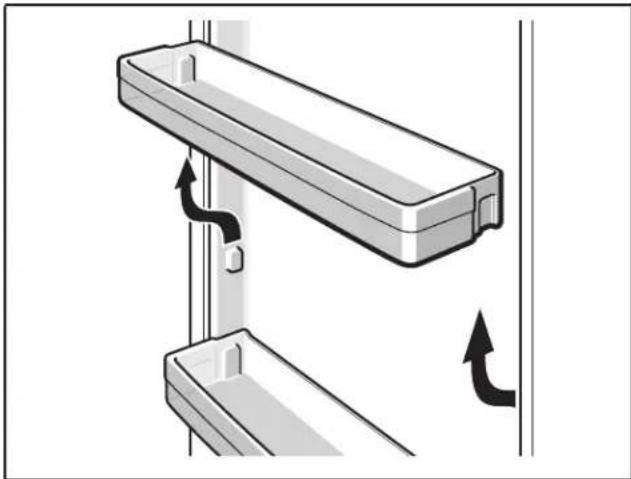
Taking out shelves in the door
Lift shelves upwards and take out.
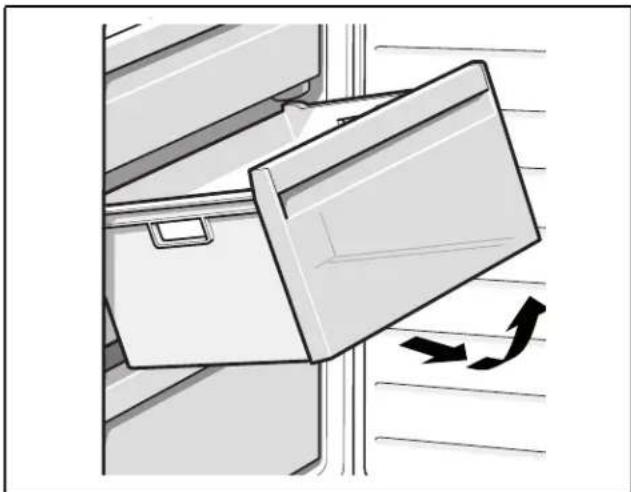
Removing containers
Pull out the container all the way, lift at the front and remove.
Odors
If you experience unpleasant odors:
- Switch off the appliance with the on/off button ①.
- Take all food out of the appliance.
- Clean interior (see chapter Cleaning the appliance).
- Clean all packaging.
- Seal strong smelling food in order to prevent odors from forming.
- Switch the appliance on again.
- Store food in the appliance.
- Check whether the formation of odors is still occurring after 24 hours.
Light (LED)
Your appliance features a maintenance-free LED light.
These lights may be repaired by customer service or authorized technicians only.
Saving energy
Install the appliance in a dry,ventilated room. The appliance should not be installed in direct sunlight or in the vicinity of heat sources (e.g. radiator, cooker). If required, use an insulating plate.
- Select 560 mm niche depth.
A smaller niche depth will result in a higher energy consumption.
- Allow warm food and drinks to cool down before placing them in the appliance.
Thaw frozen food in the refrigerator compartment and use the low temperature of the frozen food to cool refrigerated food.
- Open the appliance as briefly as possible.
Make sure that the freezer compartment door has always been closed properly!
The arrangement of the fittings does not affect the energy absorption of the appliance.
Operating noises
Completely normal noises
Note:
When fast freezing is switched on, increased operating noise may occur.
Droning
Motors are running (e.g. refrigeration units, fan).
Bubbling, humming or gurgling noises
Refrigerant flowing through the pipes.
Clicking
Motor, switches or solenoid valves are switching on/off.
Cracking
Automatic defrosting is running.
Preventing noises
The appliance is not level
Please align the appliance with a spirit level. Use the height-adjustable feet or place packing underneath them.
The appliance is not free-standing
Please move the appliance away from adjacent units or appliances.
Containers or storage areas wobble or stick
Check which parts are removable and, if necessary, re-insert them correctly.
Bottles or receptacles are touching each other
Move the bottles or receptacles slightly away from each other.
Rectifying minor faults yourself
Before you call customer service:
Check whether you can eliminate the fault yourself based on the following information.
Customer service will charge you for advice - even if the appliance is still under guarantee!
| Fault Possible cause Remedial action | |
| Temperature differs greatly from the set value. | In certain cases it may be enough to switch off the appliance for 5 minutes.If the temperature is too high, wait a few hours and check whether the temperature has approached the set value.If the temperature is too low, check the temperature again the next day. |
| Displays do not illuminate. Power cut; the fuse has tripped; the mains plug has not been inserted properly. | Connect the mains plug. Check whether the power is on, and check the fuses. |
| Temperature display indicates "E.." | Electronics have detected a fault. Call customer service. |
| Warning signal sounds, alarm button lights up. | |
| The freezer section is too warm! | Appliance is open. Close the appliance. |
| Frozen food is at risk! | Ventilation openings have been covered. |
| Too much food was placed in the freezer at once. | |
| The temperature display for the freezer section flashes, a warning signal sounds and the alarm button is lit. | |
| The freezer section is too warm! | Appliance is open. Close the appliance. |
| Frozen food is at risk! | Ventilation openings have been covered. |
| Too much food was placed in the freezer at once. | |
| Temperature display for the freezer section flashes. | A fault caused the freezer section to become too warm in the past. |
| Appliance is not cooling, temperature display and light are lit. | Showroom mode is switched on. Start appliance self-test (see chapter Appliance self-test).When the program has ended, the appliance switches over to normal operation. |
Appliance self-test
Your appliance features an automatic self-test program which indicates sources of faults that may be repaired by customer service only.
Starting the appliance self-test
- Switch off the appliance with the On/Off button ① and wait 5 minutes.
- Switch on the appliance with the On/Off button ①.
- Within the first 10 seconds after switching on the appliance, hold down the freezer section fast button for 3 to 5 seconds until an acoustic signal sounds.
The self-test program starts. While the self-test is running, a long audible signal sounds in the meantime.
If 2 acoustic signals sound and the set temperature is displayed after the self-test has ended, your appliance is OK.
If 5 acoustic signals sound and the freezer section fast button * flashes for 10 seconds after the selftest has ended, there is a fault. Inform customer service.
Ending the appliance self-test
When the program has ended, the appliance switches over to normal operation.
Customer service
If required, we recommend that you have the door hinges changed over by our customer service. You can find out the costs for changing over the door hinges from your customer service.
Before you call customer service, see the chapter entitled "Rectifying minor faults yourself".
After checking according to the chapter "Rectifying minor faults yourself", additional help can be requested by calling the Gaggenau Customer Interaction Center, 1-877-442-4436 (toll-free), from anywhere in the USA.
In Canada contact your Gaggenau customer service or call 1-877-442-4436.
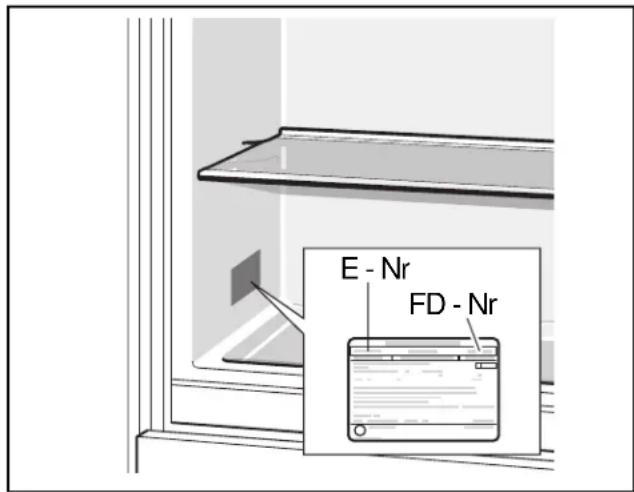
Write down the following information about your appliance so that you have it ready and can get better assistance if you require support from customer service.
Dealer's name:
Address:
Telephone number:
Purchase date:
Model number:
FD number:
Serial number
Type
fr Table des matieres
Lieud'st installation
Installation side by side
6 Touche Home Connect
Configurer Home Connect
Remarque:
Compartmento refrigerator 65
Colocacion side by side
Compartmento refrigerator
La temperatura se pueda ajustar de +36^(+2^) a +46^(+8^) .
