MCD 250 M - Car stereo CALIBER - Free user manual and instructions
Find the device manual for free MCD 250 M CALIBER in PDF.



User questions about MCD 250 M CALIBER
0 question about this device. Answer the ones you know or ask your own.
Ask a new question about this device
Download the instructions for your Car stereo in PDF format for free! Find your manual MCD 250 M - CALIBER and take your electronic device back in hand. On this page are published all the documents necessary for the use of your device. MCD 250 M by CALIBER.
USER MANUAL MCD 250 M CALIBER
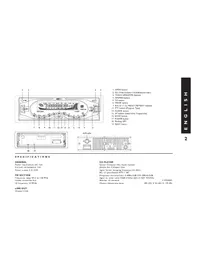
- OPEN button
- SEL (Volume/Bass/Treble/Balance/Fader)
- TRACK UP/DOWN buttons
- APS/MP3 button
5.TA button - MODE button
7-8-9-10-11-12. PRESET MEMORY buttons - PTY button (Program Type)
- CLOCK button
- AF button (Alternative Frequencies)
16.BAND button - POWER button
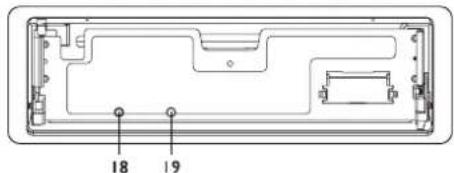
- Flashing LED
- RESET button
SPECIFICATIONS
GENERAL
Power requirement DC 12V
Current consumption 1SA
Power output 4X55W
FM SECTION
Frequency range 87.5 to 108 MHz
Usable sensitivity 3uV
I.F frequency 10.7MHz
LINE-OUT
Output I Volt
CD PLAYER
System Compact Disc Audio System
Usable disc Compact Disc
Signal format Sampling frequency 44.1KHz
No. of quantization BITs I BIT
Frequency characteristics 5-40Hz-5dB 10K-20KHz-5dB
Signal to noise radio 70dB (IKHz) (IEC-A NET W)
Number of channels
Chassis dimensions (mm)
2 STEREO
184(W)X54(H)X170(D)
OPERATION
For CD/RW + RDS + MP3 model with optional subwoofer function
1. OPEN button
Press it to flip down the front panel. Then you can insert the CD disc into the CD compartment or press the Eject button to eject the disc.
2. SEL (AUDIO MODE SELECT)/+/- buttons
Press SEL button to change the mode in the sequence of:

A. The volume level can be adjusted at any time by pressing the audio level + or - button as select mode has been initially defaulted at volume mode.
B. The volume level is also obtained by stepping through the SEL button until the function VOL is displayed and then press + or - button to adjust the sound level.
C. Press SEL button to select the BAS,TRE, BAL, FAD mode, then press +/- button to adjust the level.
D. Press SEL button, hold for more than 2 seconds and select + or - button, so a beep sound can be heard.
3. TRACK UP /DOWN buttons
A. During CD mode, pressing the >> button will allow you to track forwards. Hold it to skip forwards.
B. During MP3 mode, pressing the >> button will allow you to track forwards. Hold it to skip forwards. For MP3 playing, these two buttons act as the digit 8 & 9 key.
C. During RADIO mode, press and hold >> or << for more than 2 seconds to manually search a channel. Then press >> or << to automatically search a channel.
4. APS/MP3 button
In radio mode:
When pressed short, the radio searches for each preset station.
When the field strength level is more than the threshold level of stop level, the radio will hold at that preset number for a few seconds with releasing mute, and then searches again. In FM band, FM 1, FM 2 and FM 3 are checked one at a time. When pressed long (more than 1 second), the radio searches from the current frequency and checks the signal strength level until I cycle search is finished. And then the 6 strongest stations are preset to the corresponding preset number. The AS operation is implemented in each selected band. When the AS operation is finished, the radio executes the preset scan.

In MP3 mode:
Press 0-9 and ENTER button to play the track, number 1-108.
5. TA button
TA function (traffic announcement)
When pressed short, it is activated as TA mode on or off.
When TA mode is on and traffic announcement is transmitted:
I. When the unit is in CD mode, it will switch to radio mode temporarily.
2. Temporary switch over to an EON (Enhanced Other Networks) linked station when EON detects a traffic announcement on that other program.
- If the volume level was under the threshold point, it will be raised to the threshold point. But if the user changed the volume level which was more than the threshold point (min_TA volume level), it will be set to the last level.
When pressed long, EON TA LOCAL / EON TA DISTANCE mode is selected:
The purpose of this key is to reduce unwanted EON TA switching, when EON TA information was received from current station and the radio switched to that EON linked station, but no information could be received because the EON linked station is located too far from that area.
So the radio is switched back to the current station.
In above operation, the user may listen to a wrong program or mute sound for a while.
EON TA LOCAL mode
When the field strength level of EON linked is less than the threshold level, the radio does not switch to that station, and the user can hardly hear any disturbances. When EON TA LOCAL mode is selected, EON TA LO on the numeric display is indicated for a few seconds.
EON TA DISTANCE mode
EON TA switching is trying to implement the information of the current station.
When EON TA DISTANCE mode is selected, EON TA DX on the numeric display is indicated for a few seconds.
6. MODE button
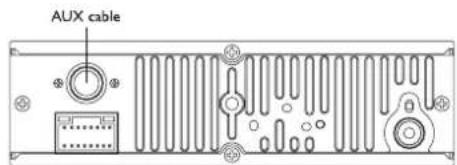
Press it repeatedly to select CDP, AUX and RADIO mode in sequence and circulation. For SUBWOOFER function (optional), press and hold for more than 2 seconds to select SUBWOOFER mode.
For MP3 playing, this button can act as the digit 7 key.
7-8-9-10-11-12. PRESET MEMORY buttons
A. To memorize the current frequency, press any one of the six preset buttons and hold for more than 2 seconds.
B. To recall the preset memory, press one of the preset buttons (1-6).
C.Radio mode
When pressed short, these keys select a preset station directly. When pressed longer than one second, the current station is stored in the preset memory bank.
When PTY mode is selected, the preset memory buttons are shared as follows: PTY music group - PTY speech group - OFF MUSIC SPEECH
a. POP M, ROCK M a. NEWS, AFFAIRS, INFO
b. EASY M, LIGHT M b. SPORT, EDUCATE, DRAMA
c. CLASSICS, OTHER M C. CULTURE, SCIENCE,VARIED
d. JAZZ, COUNTRY d. WEATHER, FINANCE, CHILDREN
e. NATION M, OLDIES e. SOCIAL, RELIGION, PHONE IN f. FOLK M f. TRAVEL, LEISURE, DO
D. In CDP mode, press IPAU button to pause CDP playing, press it again to resume CDP playing.
E. In CDP mode, press 2SCN button to play the first 10 seconds of each song, press it again to stop scanning and retain playing the song currently selected.
F. In CDP mode, press 3RPT button to play the current track repeatedly. Press it again to cancel this mode.
G.In CDP mode, press 4SHF button to play the tracks in random order. Press it again to cancel this mode.
- PTY (Program type) button
This key is operated as follows:
While selecting PTY TYPE, its selection is implemented by preset buttons as described in preset key. When PTY is selected, the radio starts to search corresponding PTY information, and stops if the corresponding PTY information is detected. If corresponding PTY information does not exist anymore, PTY type automatically exits to normal mode.
- CLOCK button
Press it to display time on the LCD for a few seconds. Press it, hold and then press << or >> button to adjust hour or minute. For MP3 playing, this button can act as the digit 0 key.
- AF button (alternative frequencies)
When pressed short, AF switching mode is selected and the state of AF switching mode is displayed by AF segment in LCD.
Segment off:AF switching mode off.
Segment on:AF switching mode on: Has RDS information.
Segment flashing:AF switching mode is selected, but RDS information is not received yet.
When AF switching mode is selected, the radio checks the signal strength of the AF all the time. The interval of checking time of each AF depends on the signal strength
of the current station, from a few minutes for a strong station to a few seconds for a weak station. Every time that a new AF is stronger than the current station, it switches over to that frequency for a very short time, and NEW FREQUENCY is displayed for 1-2 seconds. Because the mute time of AF switching or checking time is very short, it is almost inaudible in case of a normal program. When pressed long, regional mode on/off is activated.
Regional mode ON
AF switching or PI SEEK is implemented to the station where all PI codes are the same as the current station. REG of individual segment is turned on also, together with displaying REG ON on the numeric display for a few seconds.
Regional mode OFF
The regional code in the format of PI code is ignored when AF switching or PI SEEK is implemented. REG of individual segment is turned off together with displaying REG OFF on the numeric display for a few seconds.
16.BAND button
Press it to select your desired radio band and the band which is selected will be displayed on the LCD. Press it and hold for more than 2 seconds to activate LOUD mode.
LOUD MODE:
When reducing the volume to half level, press it to enhance the bass effect.
For MP3 playing, this button can act as the ENTER key.
- POWER button
Press it to turn the unit on or off.
- Flashing LED
If the front panel is not on the main unit, LED will be flashing.
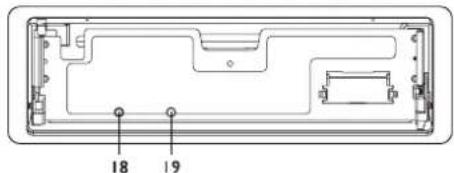
- RESET button
The RESET button is placed on the housing and must be activated with either a ballpoint pen or a thin metal object. The RESET button is to be activated for the following reasons:
-
Initial installation of the unit when all wiring is completed.
-
All the function buttons do not operate.
-
Error symbol on the display.
Note: If RESET button is pressed, the unit can't work yet; please use a cotton swab soaked in isopropyl alcohol to clean the socket on the back of the front panel.
INSTALLATION
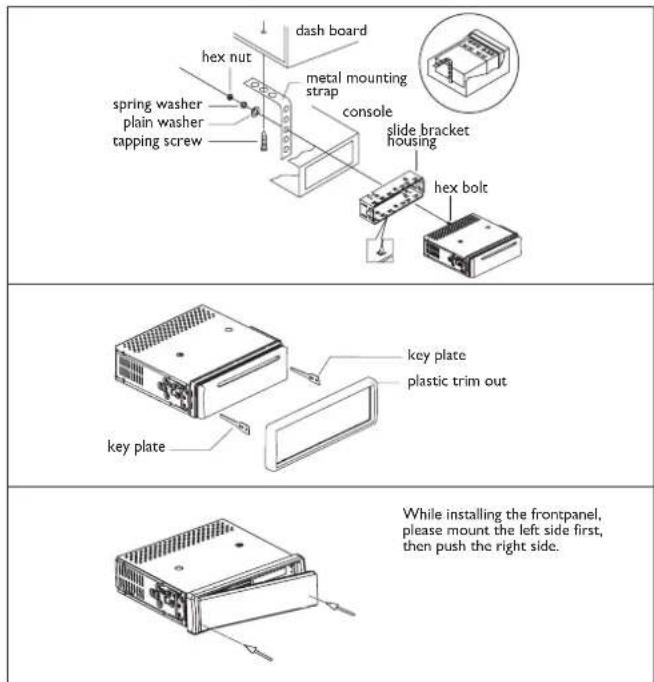

Caution: Do not install the detachable panel before connecting the wire.
- The unit is designed for negative terminal of the battery which is connected to the vehicle metal. Please confirm it before installation.
- If the car interior is extremely hot, as after being parked in the sun, do not use the player until the car has been driven for a while to cool off the interior.
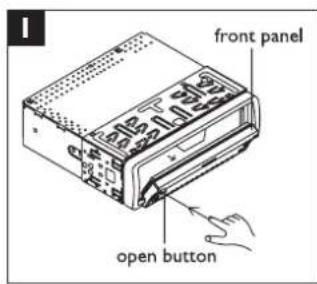
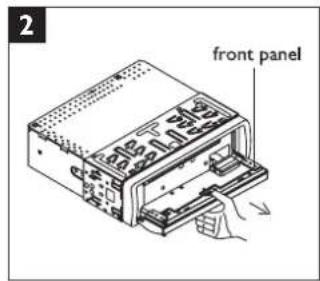
- Press the OPEN button to flip down the front panel (see fig. 1), then take away the front panel (see fig. 2) and put it in the protective case (see fig. 3) for safe keeping.
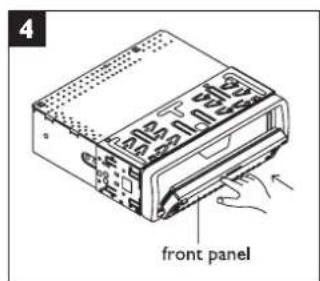
- Install the front panel back into its bracket and then push it back to the position for playing (see fig. 4).

DISC PLAY
Cleaning discs
Before playing, clean the disc with a clean, lint-free.
Flip the disc in the direction of the arrow.
Note I:
Do not use solvents such as benzine, thinners. Commercially available cleaners or anti static spray damage the unit.
Do not insert a disc with the label surface down. Doing so may damage the unit.
Note 2:
Do not try to insert another disc when one has been already inserted.
Doing so may damage the unit.
Handle the disc by its edge. And to keep the disc clean, do not touch the surface.
Do not stick paper or tape on the disc.
Do not expose the disc to direct sunlight or heat sources such as hot air ducts, or leave it
in a car parked in direct sunlight where there can be a considerable rise in temperature.
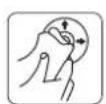
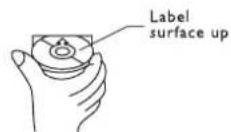
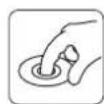
WIRING DIAGRAM
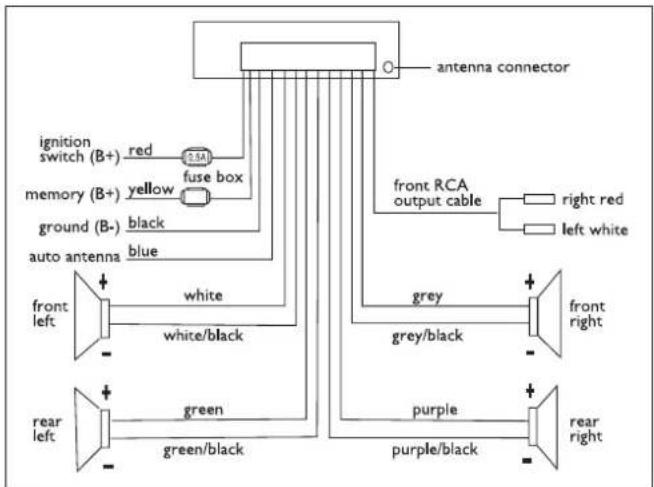
NOTE:
In spite of having any kinds of speaker system, you must use 4 ohms impedance of speaker to reduce the distortion during high volume level.
TROUBLESHOOTING

Before going through the check list, check wiring connection. If any of the problems persist after check list has been made, consult your nearest service dealer.
| Problem | Cause | Solution |
| No power | The car ignition switch is not on | If the power supply is properly connected to the car accessory terminal,switch the ignition key to "ACC" |
| The fuse is blown | Replace the fuse | |
| Disc cannot be loaded or ejected | Presence of disc inside the player | Remove the disc in the player, then insert a new one |
| Inserting the disc in reverse direction | Insert the compact disc with the label facing upward | |
| The disc is extremely dirty or defective | Clean the disc or try to play a new one | |
| Temperature inside the car is too high | Cool off or until the ambient temperature returns to normal | |
| Condensation | Leave the player off for an hour, then try again | |
| No sound | Volume is in minimum | Adjust volume to a desired level |
| Wiring is not properly connected | Check wiring connection | |
| Sound skips | The installation angle is more than 30 degrees | Adjust the installation angle less than 30 degrees |
| The disc is extremely dirty or defective | Clean the compact disc, then try to play a new one | |
| The operation keys do not work | The built-in microcomputer is not operating properly due to noise | Press the RESET button. Front panel is not properly fixed into its place |
| The radio does not work | The antenna cable is not connected | Insert the antenna cable firmly |
| The signals are too weak | Select a station manually |
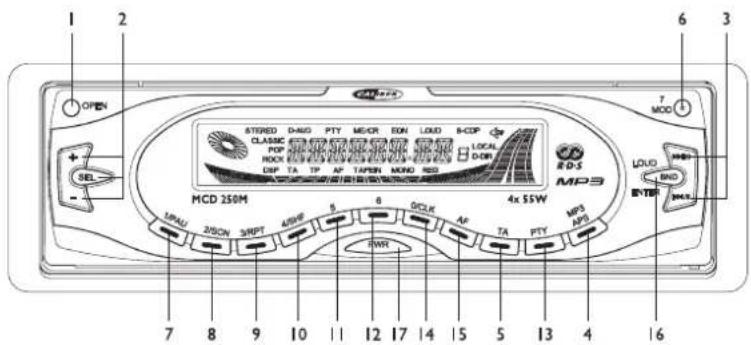
- Bouton OUVRIR
- Boutons SEL (SELECTION MODE AUDIO)/+/-
- Boutons TRACK UP /DOWN
- Bouton APS/MP3
- Bouton TA
- Bouton MODE
7-8-9-10-11-12. Boutons PRESET MEMORY - Bouton PTY (type de programme)
- Bouton CLOCK
- Bouton AF
- Bouton BAND
- Bouton POWER
8.Voyant DEL clignotant - Bouton RESET
FICHE TECHNIQUE
GÉNÉRALITÉS
Puisance necessaire 12 V CC
Consummation 1SA