
RCD120/B - Car radio CALIBER - Free user manual and instructions
Find the device manual for free RCD120/B CALIBER in PDF.


| Product Type | Car Stereo |
| Brand | Caliber |
| Model | RCD120/B |
| Form Factor | 1-DIN |
| Dimensions (W x H x D) | 180 x 50 x 160 mm |
| Weight | 0.5 kg |
| Power Supply | 12V DC, negative ground |
| Radio Bands | AM/FM |
| USB Playback | Yes, via USB port |
| AUX Input | Yes, 3.5 mm jack |
| Bluetooth | No (wired connectivity only) |
| Maximum Power Output | 4 x 50W (peak) |
| Equalizer | Preset equalizer modes |
| Display | LCD with white backlight |
| Remote Control | Not included |
| ISO Connector | Compatible with standard ISO plugs |
| Detachable Faceplate | No (fixed faceplate) |
| Steering Wheel Control Support | No (requires adapter, not supported directly) |
| Care Instructions | Clean with a soft, dry cloth; avoid solvents |
| Safety Note | Disconnect battery before installation; use correct fuse |
| Spare Parts | Mounting sleeve, trim ring, wiring harness (optional) |
Frequently Asked Questions - RCD120/B CALIBER
User questions about RCD120/B CALIBER
0 question about this device. Answer the ones you know or ask your own.
Ask a new question about this device
Download the instructions for your Car radio in PDF format for free! Find your manual RCD120/B - CALIBER and take your electronic device back in hand. On this page are published all the documents necessary for the use of your device. RCD120/B by CALIBER.
USER MANUAL RCD120/B CALIBER
RCD 120BT(/B)
MANUAL
GB
CALIBER
RCD 120BT(/B) · MANUAL
RCD 120BT(/B) · MANUAL
CALIBER


1. Frame


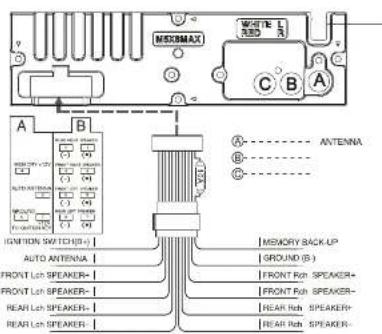
HOW TO INSTALL AND REMOVE THE FRONT PANEL
INSTALLING THE FRONT PANEL
To install the front panel, insert the panel into the housing and make sure the panel is properly installed, otherwise, abnormalities occur on the display or some keys will not function properly.

DETACHING THE FRONT PANEL
Press the REL button in the upper left corner, and then the front panel will not function properly.
REMOVING THE FRONT PANEL
When the front panel is turned down to a position of 90°, hold and slide the front panel to the left, and then pull it out.


FADER (optional)
Press button (3) four times. Adjust sound balance between front and rear speakers by using knob (3).
Press button (3) for several seconds to activate the cyclical mode of the following functions for user selection.

Press and hold the button, then turn it leftward or rightward to switch between different modes.
DSP ON/OFF mode:
Turn the button to choose the equalizer mode: POP M, ROCK M, CLASS M, FLAT M, DSP OFF.
ESP (Electronic Shock Protection) 12/45 mode.
Turn the MENU/VOL button to choose the ESP value for CD disc.
BEEP ON/OFF mode:
Choose BEEP ON: a beep sound can be heard from the speakers when the button is pressed.
VOL LAST/ADJUST
This function allows setting the volume level of the unit after it is turned off and then turned on again. Choose VOL LAST if you want the volume level to be the same as it was before turning off. VOL ADJUST allows you to choose the volume level.
SEEK MODE
SEEK 1: When SEEK 1 mode is activated, AUTO SEEK SCAN is stopped when a station is detected even if the user still pushes the SEEK button.
SEEK 2: Auto SEEK SCAN is not stopped even if a station is detected while the user pushes the SEEK button. When the SEEK button is released, it stops when a station is detected.
MUTE
Press the MUTE button (4) to mute the sound. Press it again to release this mode and recover the previous volume level.
Press button (3) for several seconds to activate the cyclical mode of the following functions for user selection.

Press and hold the button, then turn it leftward or rightward to go to different modes.
DSP ON/OFF mode:
Turn the button to choose the equalizer mode: POP M, ROCK M, CLASS M, FLAT M, DSP OFF.
ESP (Electronic Shock Protection) 12/45 mode.
Turn the MENU/VOL button to choose the ESP value for CD disc.
BEEP ON/OFF mode:
Choose BEEP ON: a beep sound can be heard from the speakers when the button is pressed.
VOL LAST/ADJUST
This function allows you to set the volume level of the unit after it is turned off and then turned on again. Choose VOL LAST if you want the volume level to be the same as it was before turning off. VOL ADJUST allows you to choose the volume level.
SEEK MODE
SEEK 1: When SEEK 1 mode is activated, AUTO SEEK SCAN is stopped when a station is detected even if the user still pushes the SEEK button.
SEEK 2: Auto SEEK SCAN is not stopped even if a station is detected when the user pushes the SEEK button. When the SEEK button is released, it stops when a station is detected.
MUTE
Press MUTE button (4) to mute down the sound. Press it again to release this mode and recover previous volume level.
LOUDNESS
CALIBER
RCD 120BT(/B) · MANUAL
RCD 120BT(/B) · MANUAL
CALIBER
RDS OPERATION
RDS (Radio Data System) operation
AF: Alternative Frequencies
- Setting RDS Mode
AF / REG
AE
- AF / REG key directs the activation of AF SEARCH.
- AF indicator is displayed when AF is ON, AF search is activated when reception is bad.
- During FM MODE, when AF is ON, SEEK, SCAN, AUTO, MEMORY functions can only receive and save RDS programs. However, when the Italy option is in use, regardless of RDS, programs that satisfy the SD LEVEL can be received and saved.
| INDICATOR | CONDITIONS |
| AF ON | AF ON MODE, RDS information is received. |
| AF OFF | AF OFF MODE |
| AF FLASHING | AF ON MODE, RDS information is not received. |
REGION
- AF MODE is converted to REGION ON/OFF MODE when is pressed for longer than 1 second.
- ON: PI CODE is checked when AF CHECK is in progress.
- OFF: PI CODE and COVERAGE AREA are not checked when AF CHECK is in progress.
PTY
RADIO MODE
If no keys are entered for 2 seconds, the previously selected PTY is searched. During 1 LOOP, if the desired PTY is not found, NO PTY is displayed. The 2 program types are SPEECH and MUSIC. By pressing PTY once, MUSIC is entered. When PTY is pressed a second time, SPEECH is entered. M1~M6 keys can be used to select the desired program type.
2 seconds, previously selected PTY is searched. During 1 LOOP, if desired PTY is not found, NO PTY is displayed. 2 program types are SPEECH and MUSIC. By pressing PTY once, MUSIC is entered. When PTY is pressed the second time, SPEECH is entered. M1~M6 keys can be used to select the desired program type.
TA button is operated as follows:
TA is turned ON/OFF and the TA indicator is displayed.
TA is turned ON / OFF and TA indicator is displayed.
When a traffic announcement is transmitted, regardless of the mode, the traffic announcement is received.
If VOLUME LEVEL is below 20, it is raised to 20, and returns to its previous mode and volume level when the traffic announcement is over. If volume is adjusted during a traffic announcement, only the previous volume is valid. - When TA is on, SEEK, SCAN, and AUTO MEMORY functions can be received or saved only when the traffic program identification code has been received. - When TA is ON, the traffic program identification code is not received during the specified time. TA ALARM: NO TA / TP is displayed and an alarm is set off.
TA SEEK: TA SEEK is activated.
CALIBER
RCD 120BT(/B) · MANUAL
RCD 120BT(/B) · MANUAL
CALIBER
MP3/WMA overview
CALIBER
RCD 120BT(/B) · MANUAL
RCD 120BT(/B) · MANUAL
CALIBER
-


Bluetooth Freq range: 2402-2480 Mhz
Max e.r.p: <100mW/20dBm

GB Old appliances and/or batteries must not be disposed with garbage! If the device/battery can not be used anymore, every user is legally obliged to dispose of old appliances and/or batteries separated from the garbage, e.g. at a collection point of his municipality/district.


Brand : CALIBER
Model : RCD120/B
Category : Car radio