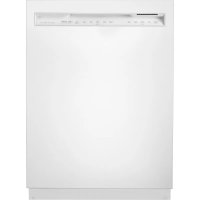
Elite 14689 - Dishwasher KENMORE - Free user manual and instructions
Find the device manual for free Elite 14689 KENMORE in PDF.



User questions about Elite 14689 KENMORE
0 question about this device. Answer the ones you know or ask your own.
Ask a new question about this device
Download the instructions for your Dishwasher in PDF format for free! Find your manual Elite 14689 - KENMORE and take your electronic device back in hand. On this page are published all the documents necessary for the use of your device. Elite 14689 by KENMORE.
USER MANUAL Elite 14689 KENMORE
Transform SR Brands Management LLC
Hoffman Estates, IL 60179
www.kenmore.com

CONTENTS
WARRANTY 3
1 IMPORTANT SAFETY INSTRUCTIONS......6
2 INSTALLATION 11
3 TECHNICAL SPECIFICATIONS 13
4 BEFORE USING THE APPLIANCE 14
5 LOADING YOUR DISHWASHER. 16
6 CYCLES AND OPTIONS TABLE. 23
7 THE CONTROL PANEL 25
8 MAINTENANCE AND CLEANING. 29
9 TROUBLESHOOTING 32
10 PRACTICAL INFORMATION 35
Kenmore Limited Warranty
Kenmore® products are sold and distributed by Kenmore and Kenmore authorized distributors and licensees in various countries.
For information on the limited warranty and authorized provider applicable to your product and country please visit: https://www.kenmore.com/warranty-information/
For a printed copy please contact us at 1-844-553-6667 or at the address below:
ATTN: Kenmore Warranty Request
5407 Trillium Suite B120
Hoffman Estates, IL 60192
Thank you for choosing this product.
This user manual contains important information on safety and instructions intended to assist you in the operation and maintenance of your appliance.
Please take the time to read this user manual before using your appliance and keep this book for future reference.
| Icon Type | Meaning |
| ! | WARNING Serious injury or death risk |
| 5 | RISK OF ELECTRIC SHOCK Dangerous voltage risk |
| 6 | FIRE Warning; Risk of fire / flammable materials |
| ! | CAUTION Injury or property damage risk |
| IMPORTANT / NOTE Operating the system correctly |
INTRODUCTION
Please read this user manual and particularly the safety instructions completely and carefully. They will save you time and effort and help to ensure optimum dishwasher performance.
Be sure to observe all listed warnings and cautions. Look particularly for the icons with exclamation marks inside. The information icon will also provide important references.
WARNING: Indicates a potentially hazardous situation which, if not avoided, could result in death or serious injury.
CAUTION: Indicates a potentially hazardous situation which, if not avoided, may result in injury. It may also be used to alert against unsafe practices.
O NOTICE: Indicates a potentially hazardous situation which, if not avoided, may result in damage to the dishwasher, the tableware, the equipment or the environment.
1 IMPORTANT SAFETY INSTRUCTIONS
WARNING: When using the dishwasher, follow basic precautions. Read all instructions before using the dishwasher! Save these operating instructions and pass them on to any future user.
- Use the dishwasher only for its intended purpose as described in this user manual. This appliance is intended for normal household use only. Do not change the specification of the appliance. The manufacturer disclaims responsibility for damage or injury caused by improper use of this appliance.
- The information in this user manual must be followed to minimize the risk of fire or explosion and to prevent property damage, personal injury or loss of life.
- Use only detergents or rinse aids recommended for use in a dishwasher and keep them out of the reach of children.
- When loading items to be washed:
1) Locate sharp items so that they are not likely to damage the door seal.
2) Load sharp knives with the handles up to reduce the risk of type injuries.
- Do not wash plastic items unless they are marked "dishwasher safe" or the equivalent. For plastic items not so marked, check the manufacturer's recommendations.
- Do not operate your dishwasher unless all ENCLOSURE panels are properly in place.
-
Do not tamper with controls.
-
Do not abuse, sit on, or stand on the door or dish rack of the dishwasher.
- The cup shelves are designed to support cups, glasses and kitchen utensils. When the cup shelves are in the dishwasher do not lean on or use the cup shelves to support your body weight.
- This appliance must be grounded. In the event of a malfunction or breakdown, grounding will reduce the risk of electric shock by providing a path of least resistance for electric current.
WARNING:
- Improper connection of the equipment grounding conductor can result in a risk of electric shock. Check with a qualified electrician or service representative if you are in doubt whether the appliance is properly grounded.
- Some dishwasher detergents are strongly alkaline. They can be extremely dangerous if swallowed. Avoid contact with the skin and eyes and keep children and persons unfit to operate the dishwasher away when the door is open.
- Consult a doctor immediately if detergent has been swallowed or inhaled.
- Do not remove the dishes from the appliance until the cycle is complete. Some detergent may remain on the dishes.
-
Check that the detergent dispenser is empty after the completion of each wash cycle.
-
Do not drink and play with the water in the appliance as harmful residues could be present.
- To reduce the risk of injury, do not allow children to play in or on a dishwasher.
- When children become old enough to operate the appliance, it is the responsibility of the parents/legal guardians to ensure the children are instructed in safe practices by qualified persons.
Do not leave the appliance with the open door unattended to avoid stepping accidentally onto it.
WARNING: Before any maintenance operation, deactivate the appliance and disconnect the machine from the power supply.
- Do not use high pressure water sprays and/or steam to clean the appliance.
- Ensure that there are no visible water leaks during and after the first use of the appliance.
- To avoid floor damage and possible mold growth, do not allow wet areas to remain around or under the dishwasher.
- To avoid dishwasher damage, do not allow water to remain in your dishwasher systems through extended periods of freezing.
RISK OF INJURY: To avoid risk of injury, always use caution when opening the door during or following a wash cycle as hot water or steam may escape.
-
Do not store or use flammable liquids or vapors in the area of the dishwasher, near or on the appliance.
-
Under certain conditions, hydrogen gas may be produced in a hot water system that has not been used for two weeks or more. HYDROGEN GAS IS EXPLOSIVE. If the hot water system has not been used for such a period, before using the dishwasher turn on all hot water faucets and let the water flow from each for several minutes. This will release any accumulated hydrogen gas. As the gas is flammable, do not smoke or use an open flame during this time.
-
Please check the water supply line periodically. It is susceptible to breakage. It becomes less flexible as time goes by. Replace it immediately when it is torn, cut, swollen or there is water leakage.
-
Please keep the dishwasher packaging out of the reach of children after unpacking it.
WARNING!
Risk of injury or suffocation! Ensure that any plastic wrappings, bags, small pieces etc. are disposed of safely and kept out of the reach of children.
RECYCLING
Remove the door to the washing compartment when removing an old dishwasher from service or discarding it. Ensure that the appliance presents no danger to children while being stored for disposal. Before disposing the dishwasher:
- Disconnect the appliance from the electrical supply.
- Cut off the connections between electrical and junction box of dishwasher.
- Remove the door catch to prevent children and pets from getting closed in the appliance.
- Old appliances may contain materials that can be recycled. Please contact your local recycling authority about the possibility of recycling these materials.
SAVE THESE INSTRUCTIONS
2 INSTALLATION
WARNING: When installing the dishwasher, follow the Installation Instructions provided with the product.
- Installation, maintenance and repair should be performed by a qualified installer. Work by unqualified persons could be dangerous and may void the warranty.
- Do not operate the appliance if damaged, malfunctioning, partially disassembled or if it has missing or broken parts.
- Before installation or service, disconnect the power supply to the work area by unplugging the unit, "stripping" the circuit breaker or removing the fuse.
- Only connect the dishwasher to the power supply when all installation and plumbing work is complete.
- Never connect the ground wire to gas lines, hot water pipes or plumbing lines.
- Do not install or store the dishwasher where it can be exposed to below freezing temperatures or exposed to weather.
- Dishwasher must be secured to adjacent cabinetry using the brackets provided. Failure to do this may cause damage to property or bodily injury.
-
Connect to a properly rated, protected and sized power supply circuit to avoid electrical overload. The dishwasher is designed for an electrical supply of 120V (volts), 60 Hz (hertz), AC, connected to a dishwasher-dedicated, properly grounded electrical circuit with a fuse or breakers rated for 15 amperes.
-
Electrical supply conductors shall be a minimum of # 16 AWG copper wire rated at 90^ (194°F) or higher. These requirements must be met to prevent injury and machine damage. Consult a qualified electrician if in doubt.
-
Do not use any extension cord or portable outlet device to connect the dishwasher to a power supply.
3 TECHNICAL SPECIFICATIONS
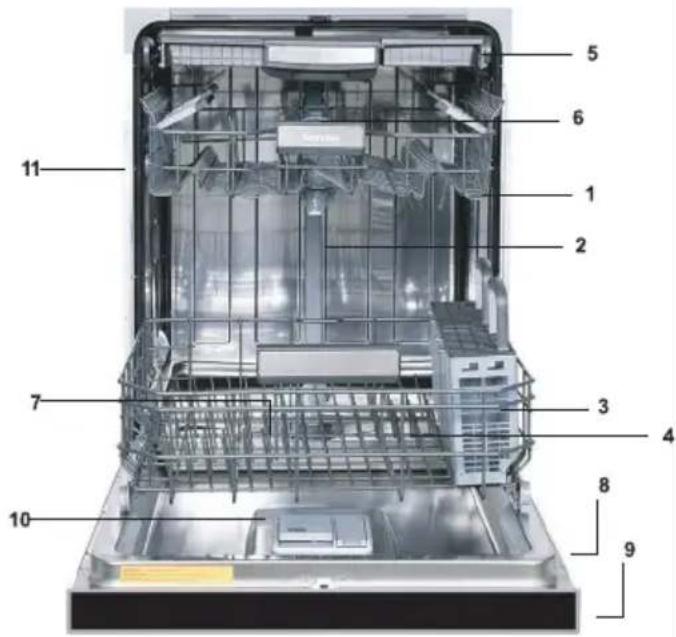
General Appearance
- Upper rack with shelves
- Upper spray arm
- Lower rack
- Lower spray arm
- 3rd rack
- Top nozzle
- Filters
- Rating plate
- Control panel
- Detergent and rinse-aid dispenser
- Upper rack track latch
- Drying Unit: This system provides better drying performance for your dishes.
Technical Specifications
| Permissible water pressure | 4.35 - 145 psi (0.3 - 10 bars) |
| Electrical connection | 120 V (volts), 12 A (amps), 60Hz (hertz) |
| Total power 1400 | (W) |
| Heater power 110 | 0 (W) |

NOTICE: Because we continually strive to improve our products, we may change our specifications and design without prior notice. This device corresponds to the following directives: UL 749 Household Dishwasher directive.
4 BEFORE USING THE APPLIANCE
Preparing your dishwasher for first use
- Make sure the electricity and supply water specifications match the values indicated in the installation instructions for the machine.
- Remove all packaging material inside the machine.
- Fill the rinse aid compartment.
Detergent usage
Only use detergents specifically designed for domestic dishwashers. Store detergents in cool, dry places out of reach of children.
Add the proper detergent for the selected cycle to ensure the best performance. The amount of detergent needed depends on the cycle, load size, and soil level of dishes.
Do not overfill the detergent compartment. Using too much detergent can cause discoloration on glasses and dishes and glass corrosion. Continued use of too much detergent may cause machine damage.
Using too little detergent can result in poor cleaning and whitish streaks, especially in hard water.
See the detergent manufacturer's instructions for a further information.
Filling the detergent
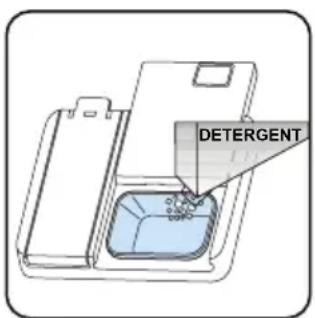
Push the latch to open the dispenser and pour in the detergent.
Close the lid and press it until it locks in place. The dispenser should be refilled just before the start of each cycle. If the dishes are heavily soiled, place additional detergent in the prewash detergent chamber.

Using detergent pacs
These products should be used according to the manufacturer's instructions.
Never put detergent bags into the interior section or the cutlery basket.
Detergent pacs contain not only the detergent but also rinse aid, salt replacement substances and additional components depending on the combination.
We recommend you do not use detergent pads in short cycles. Please use powder or liquid detergents instead of detergent pads in short cycles.
If you encounter problems when using detergent.
pacs, please contact the detergent manufacturer.
When you stop using detergent pacs, make sure that rinse aid setting is set to the correct level.
Rinse-aid usage
The rinse aid helps to dry the dishes without streaks and stains. Rinse aid is required for stain-free utensils and clear glasses. The rinse aid is automatically released during the hot rinse phase. If rinse aid setting is too low, whitish stains remain on dishes and dishes do not dry or wash clean.
If rinse aid setting is too high, bluish layers on glasses and dishes may be seen.
Filling the rinse-aid and setting
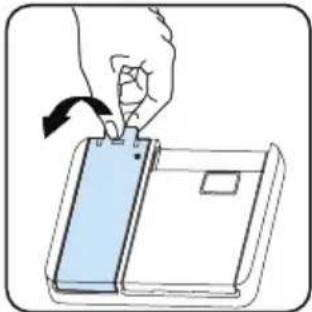
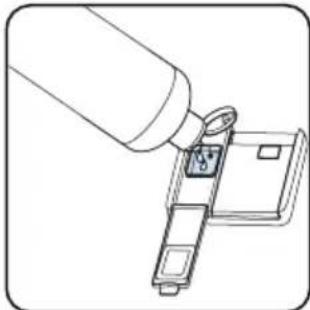
To fill the rinse aid compartment, open the rinse aid compartment cap. Fill the compartment with rinse aid to the MAX level and then close the cap. Be careful not to overfill the rinse aid compartment and wipe up any spills.
In order to change the rinse aid level, follow the below steps
- Turn on the machine and press Menu button for 3 seconds. Water hardness level is seen first. ("SL1" is the factory setting)
- Press Delay Start(+) button to go to Rinse Aid setting.
- Rinse aid follows water hardness setting.
- Then, press Menu Select button and the level of Rinse aid (e.g. "r:4") blinks.
-
Change the level by pressing the Delay Start buttons.
-
Press Menu Select to save desired level and the new level of Rinse aid will illuminate constantly.
- Turn off the machine to exit from the setting.
The factory setting is "4".
If the dishes are not drying properly or are spotted, increase the level. If blue stains form on your dishes, decrease the level.
| Level R | nse Aid Dose Indicator | |
| 1 Rinse-aid not dispensed | r:1 is shown on the display. | |
| 2 1 dose is dispensed r:2 is | shown on the display. | |
| 3 2 doses are dispensed | r:3 is shown on the display. | |
| 4 3 doses are dispensed | r:4 is shown on the display. | |
| 5 4 doses are dispensed | r:5 is shown on the display. | |
5 LOADING YOUR DISHWASHER
Proper loading of the dishwasher will help it run efficiently with the best possible washing and drying performance.
The lower rack can accommodate large and deep items such as pots with long handles, pot lids, plates, salad plates and cutlery sets. The upper rack has been designed for dessert plates, salad bowls, cups and glasses. When placing long stem glasses and goblets, lean them against the basket edge, rack or glass supporter wire and not against other items. Do not lean long glasses against one another or they cannot remain steady and may be damaged. It is more appropriate to locate the thin and narrow shaped items into the middle sections of racks. Place spoons in separate openings of the silverware basket and do not allow them to nest. Use the silverware basket to obtain the best cleaning result for spoons, forks, and knives. To avoid any possible injuries, always place such long-handle and sharp-pointed items as serving fork, bread knife etc. with their sharp points facing down or horizontally on the baskets.
WARNING: Place your dishes into your machine in a way that they will not prevent the upper and lower spray arms from spinning.

NOTE: Place all large and very dirty items in the lower rack.

WARNING: Do not put in the appliance that can absorb water (sponges, householders).

NOTE: Place all containers such as cups, ties and pots into the dishwasher with the ing facing downwards (so that no water can act).

NOTE: Dishes and cutlery should not be fed above each other.

NOTE: Do not overload your dishwasher by paying attention to manufacturer instructions or adding dishes which are appropriate for a dishwasher. Only with suitable dishes (tioned in section 5) will you obtain optimal results with a sensible use of energy. A temperature water and dishwasher agent may form a chemical synthesis that damage certain items.

WARNING: Be careful when loading and loading sharp items. Load sharp knives with handles up to reduce the risk of personal injury.
Follow the below steps before loading dishwasher.
- Open the door.
- Remove coarse food leftovers from tableware.
- Load the dishwasher.

NOTE: While the appliance is running
if you open the door all functions are automatically interrupted. Once the door is closed functions will continue to work.
Upper Rack
Load the upper rack with dessert plates, cups, glasses etc.
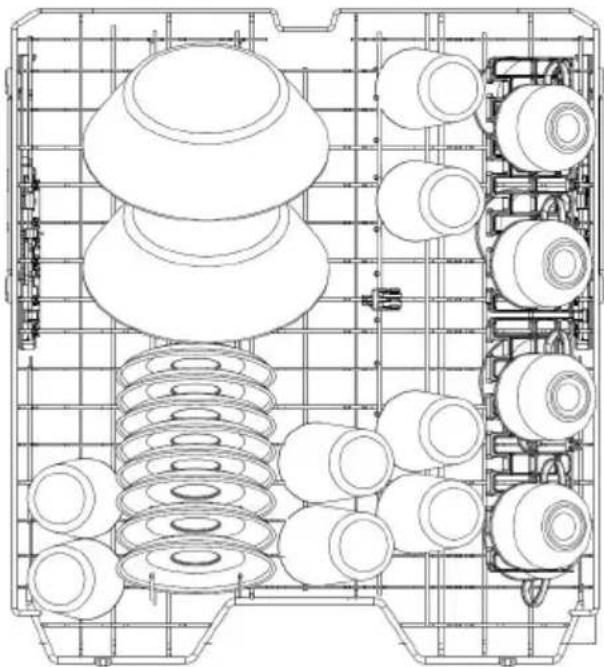
Top rack load pattern for 8 place settings.
Lower Rack
You can load into the lower rack such round and deep items as pots with long handles, pot lids, plates, salad plates, cutlery sets. The lower rack should not be used for small items such as cups or wine glasses.
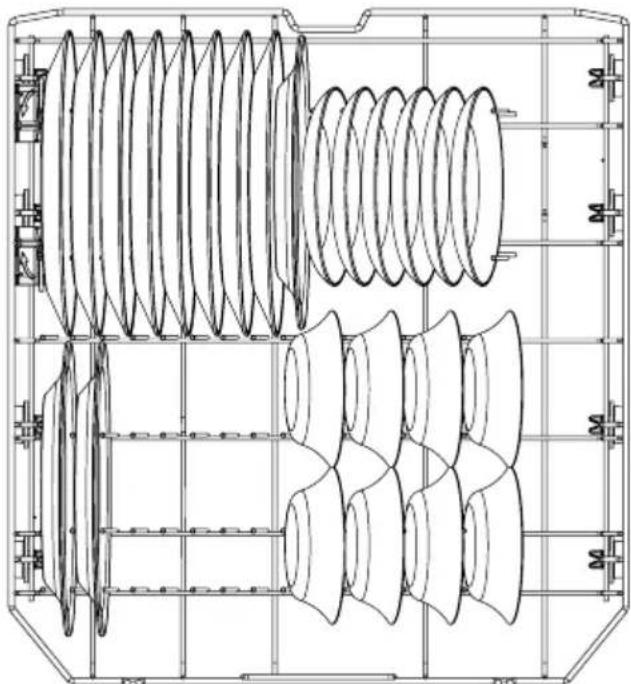

NOTE: Place all large and very dirty items at lower rack.

WARNING: Large knives and other utensils sharp tips and edges must be placed pontally into the upper rack due to risk of. Other smaller knives and sharp utensils d be placed with sharp side down in the ware basket.

NOTE: Make sure that large items do not
interfere with the rotation of the spray arms, and do not prevent the detergent dispenser from opening.
Third Rack
The third rack can be loaded with items such as knives, spoons, forks, serving spoons, etc.
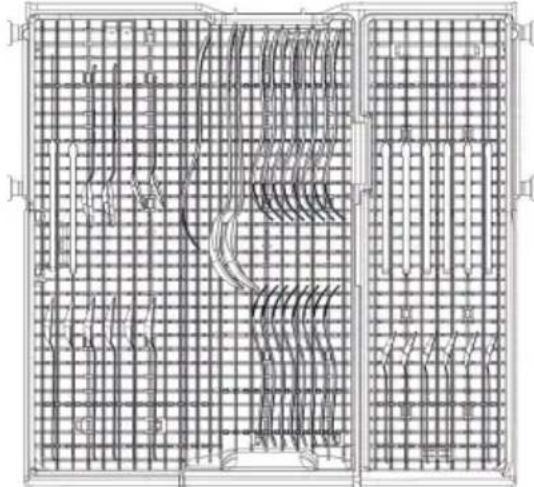
EasyFlex Third Rack (Models 1464# and 1467#)
Third rack load pattern for 8 place settings.

TotalFlex Third Rack (Models 1468# and 1469#)
Third rack load pattern for 8 place settings.
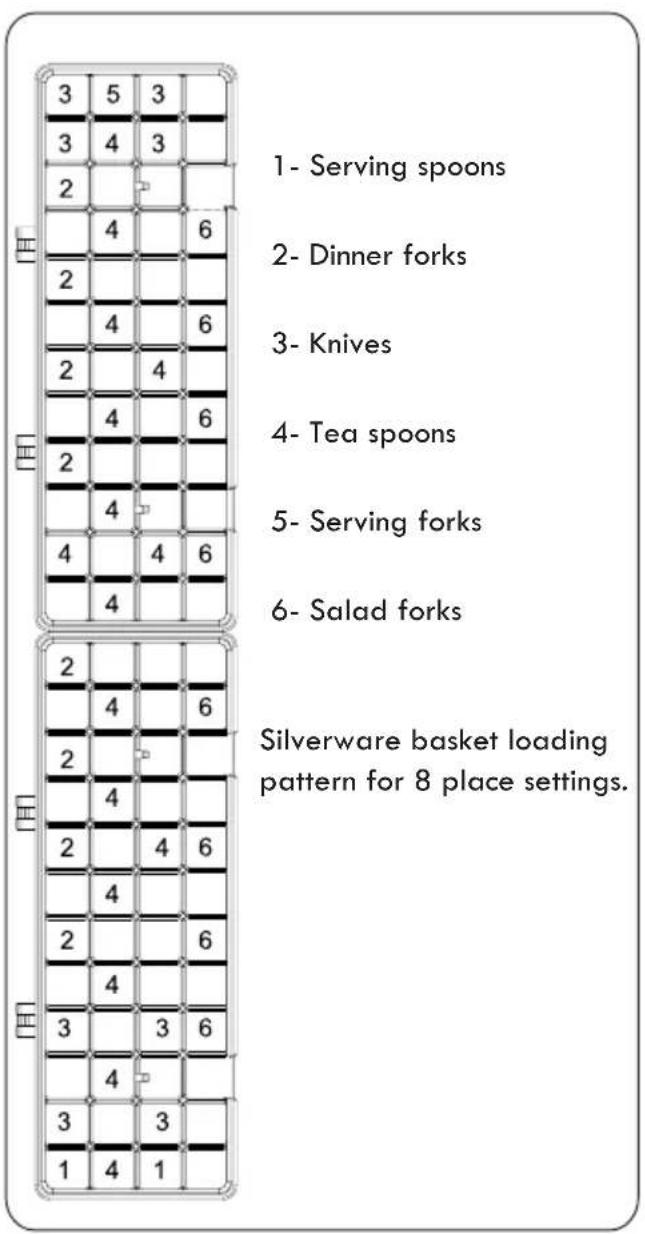
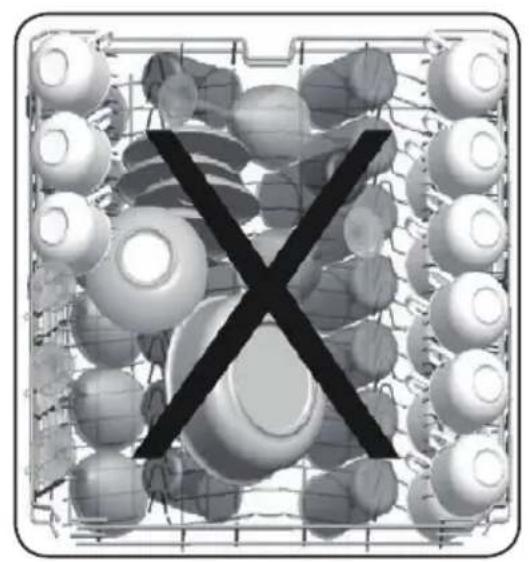
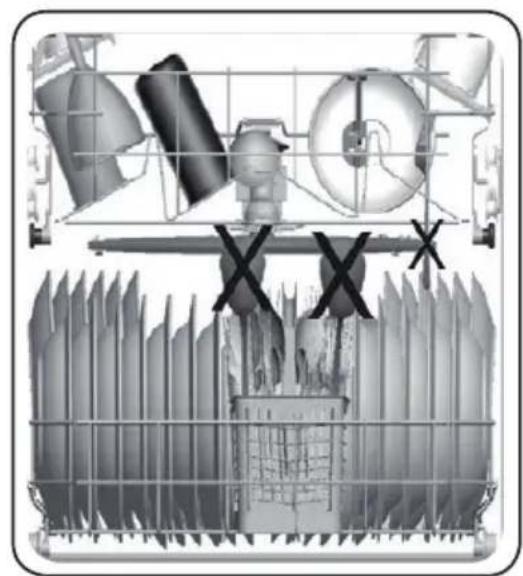
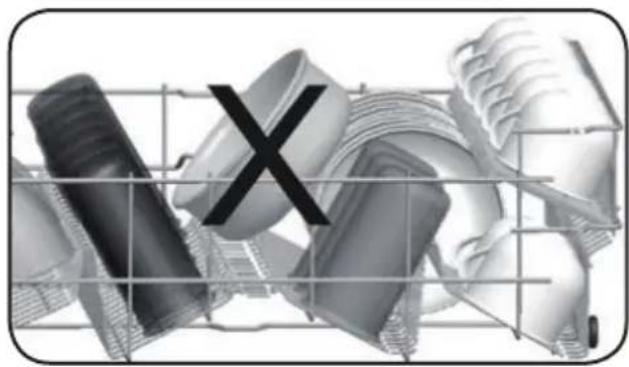
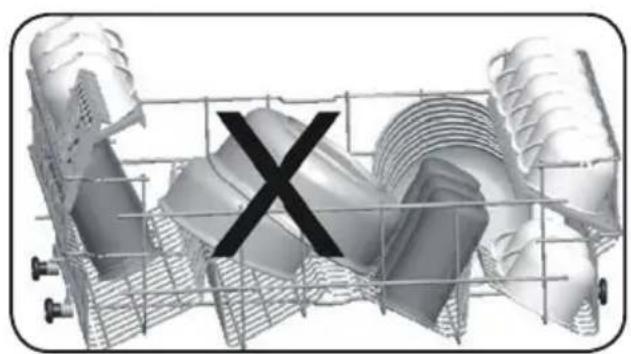
Incorrect Loads
Incorrect loading can cause poor washing and drying performance. Please follow the manufacturer's recommendations for a good result.
Upper Rack with Cup Shelf
These shelves are designed to increase the capacity of upper rack. Place cups and glasses on this rack. Use the adjustment feature to accommodate different size items.
Place long knives, forks and spoons on these shelves horizontally for them not to block the movement of spray arms.
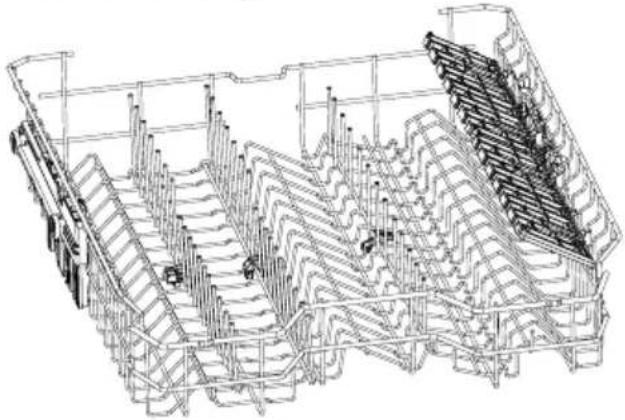
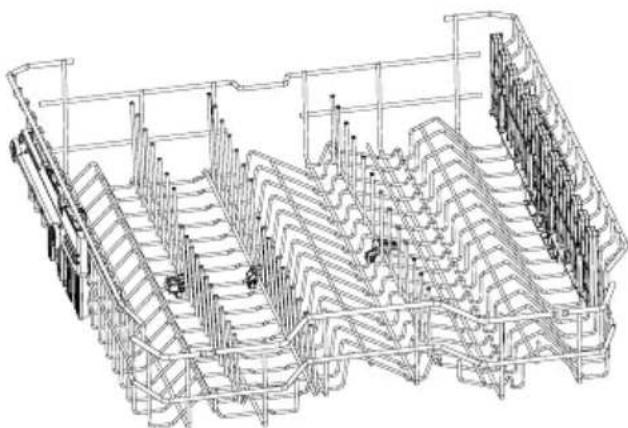
CUP SHELF OPEN POSITION
CUP SHELF CLOSED POSITION
Lower Rack Folding Tines
There are two folding tine sections in the lower rack. The tines can be folded down to allow for easier loading of large items such as pots and pans. Each of the two tine sections can be folded down separately or all of them can be folded together to create a larger loading area.
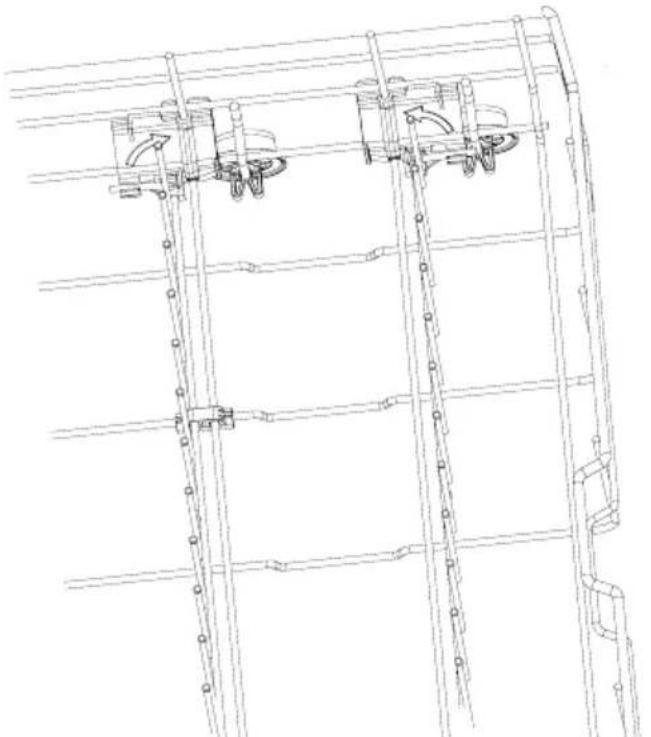
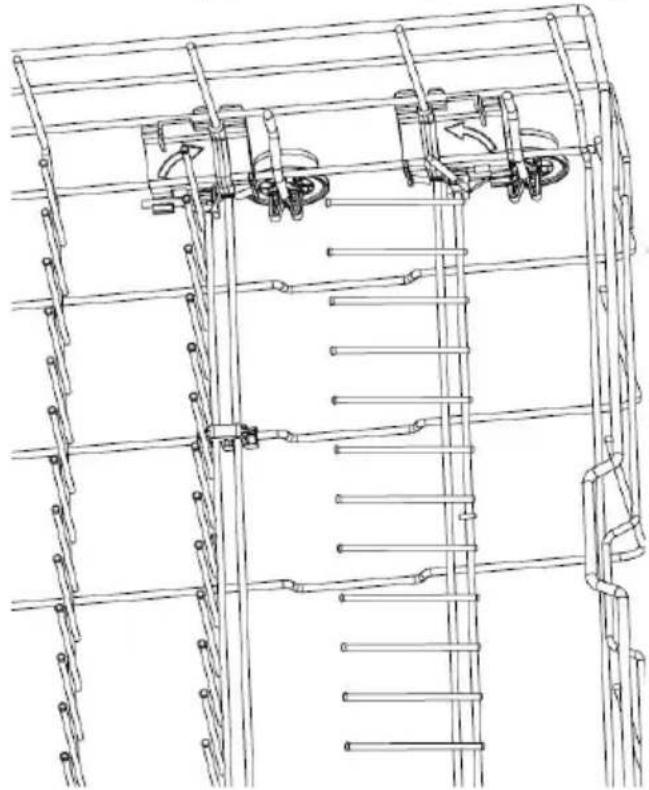
There are two silverware baskets in the dishwasher. The two baskets can be assembled together or used separately. Follow the steps below to assemble.
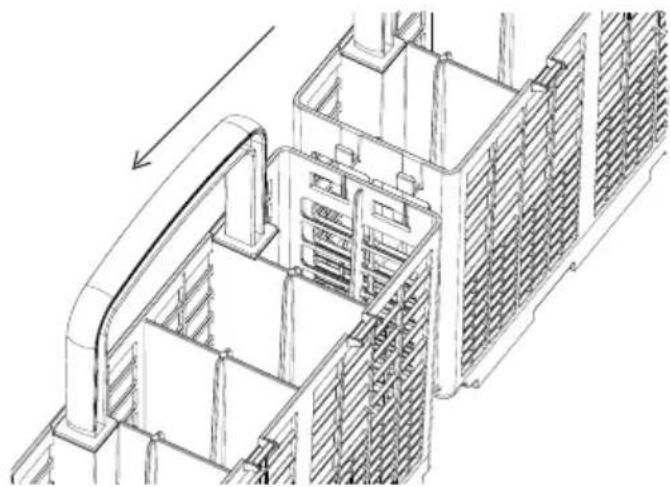
The tabs on the basket are aligned with the opening on the other basket.
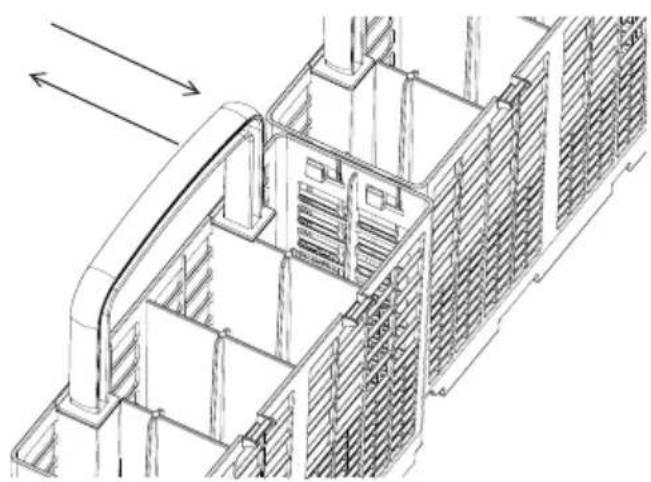
Push the baskets together with the tab on one basket aligning with the slot on the other basket.
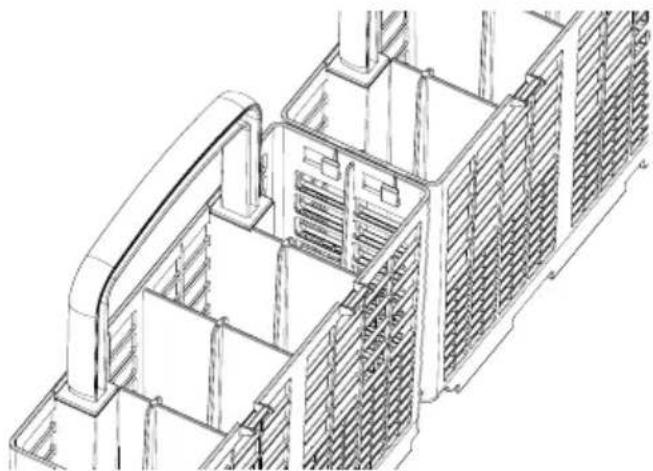
The tab is slid into place to join the baskets together.
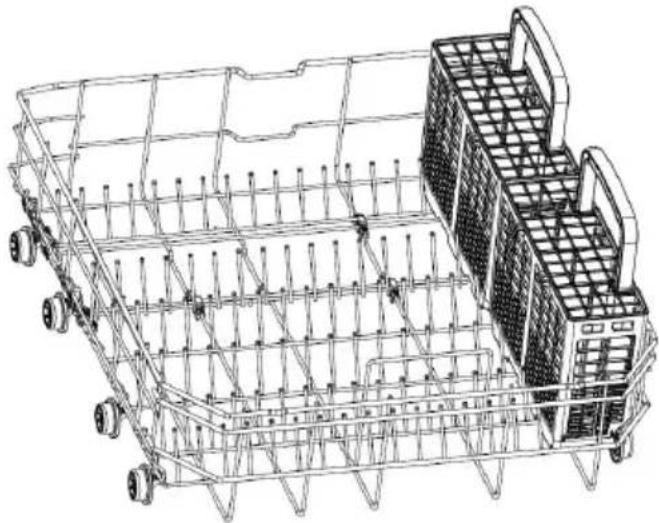
The silverware baskets are placed in the lower rack.
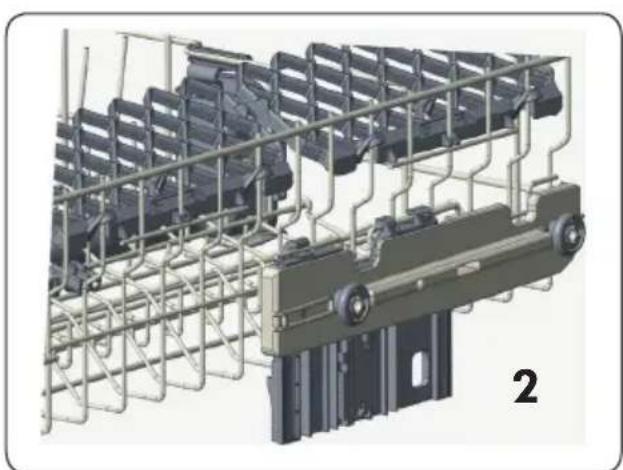
Upper Rack Height Setting - When Rack is Empty (Models 1464# and 1467#)
In certain models, the height setting of the upper rack may be changed using the wheels which are present at two height levels.
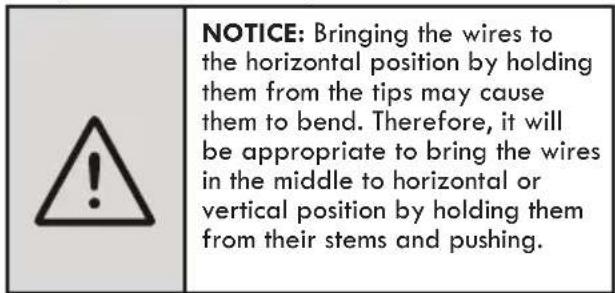
- Release the latches on both the right and left tshelves of the upper rack by turning them to the outside A.
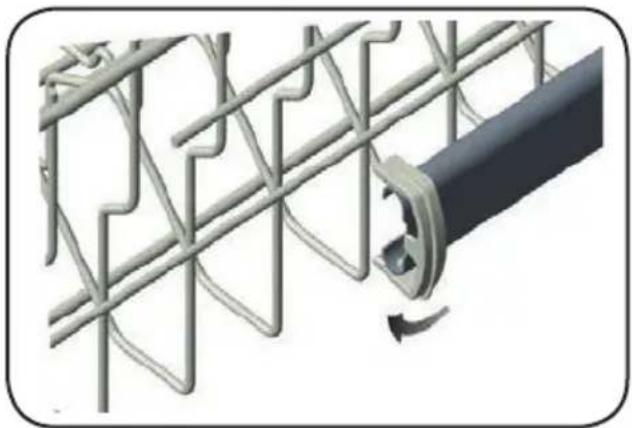
2.Pull out the rack completely B.
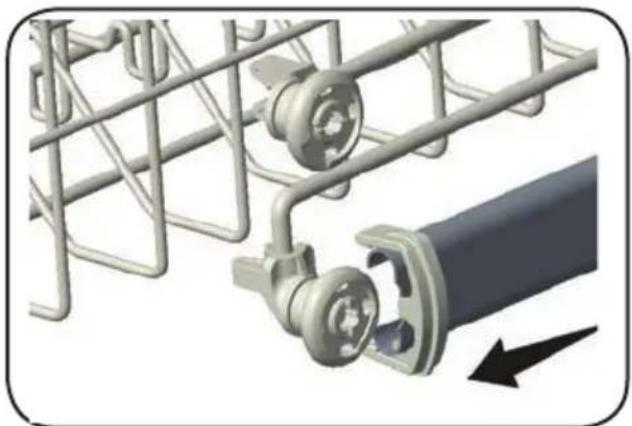
- Place the rack into the tshelves again at the desired height C.
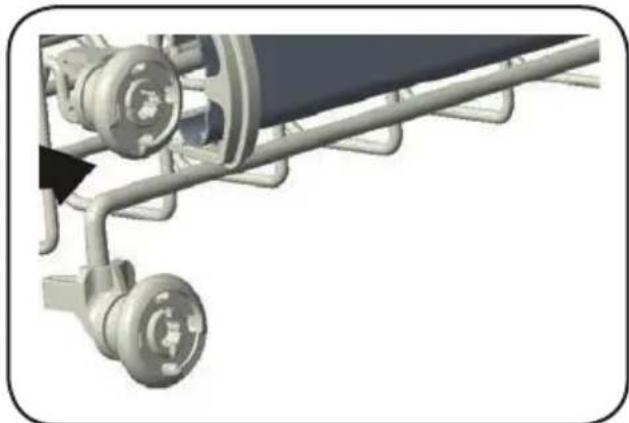
- Push the latches back into the correct position
Wine Glass Basket (Models 1468# and 1469#)
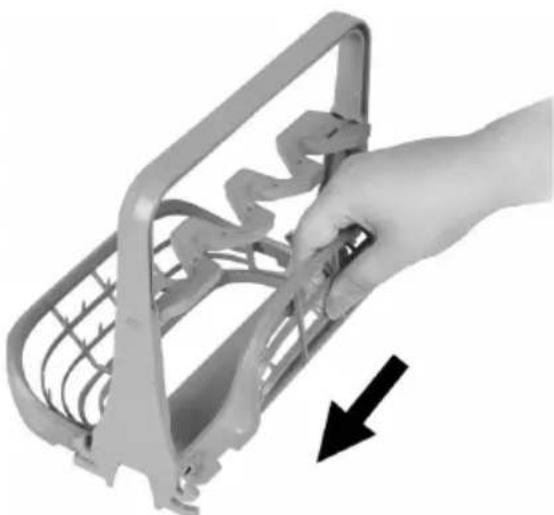
This position makes the wine glass holder compact and stowable.
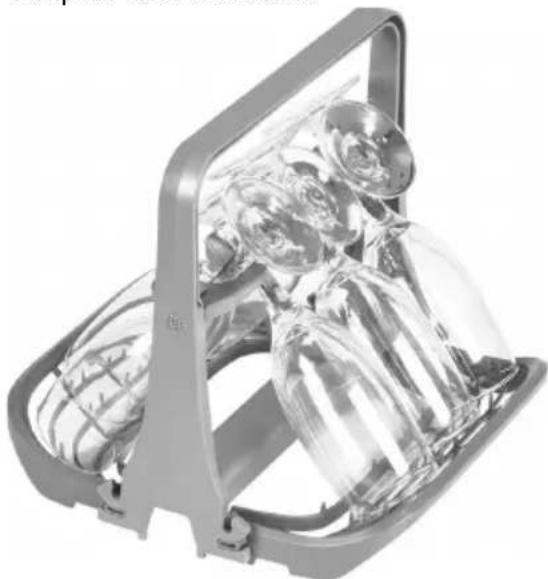
This position allows the wine glass holder to be placed in the dishwasher.
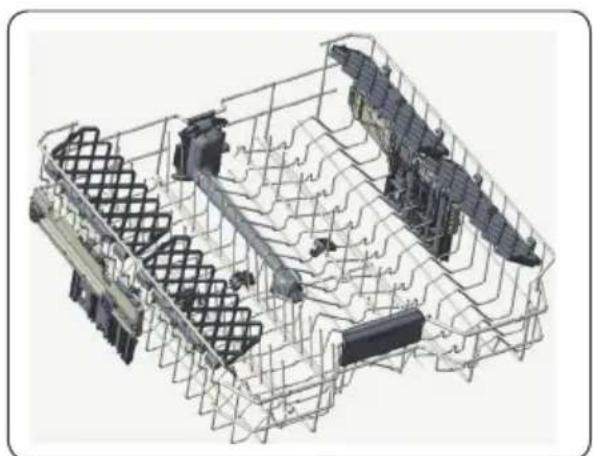
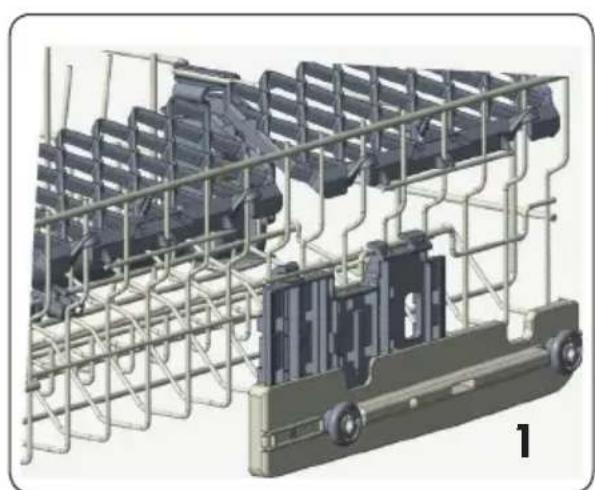
Upper Rack Height Setting - When Rack is Filled (Models 1468# and 1469#)
The upper rack includes a mechanism which enables the height of the rack to be adjusted up (1) or down (2) without having to remove the rack. Hold the rack on both sides and pull it up or push it down, ensuring both sides of the upper rack are in the same position.
6 CYCLES AND OPTIONS TABLE
| Cycles | Duration (min) | Descriptions | |
| Normal | Dirty 145 | Standard cycle for daily, regular or typical use to completely wash a load of normally soiled dishes. | |
| Clean 122 | |||
| Smart Wash | Dirty 155 | This cycle automatically adjusts the temperature and the quantity of water, the energy consumption and the cycle duration. | |
| Clean 110 | |||
| Heavy Duty 165 Suitable | for heavily soiled dishes with dried on food. | ||
| Pots&Pans 130 Suitable | for heavily soiled dishes. | ||
| Light Wash 117 Suitable | for normally soiled daily dishes. | ||
| Delicate 90 Suitable | lightly soiled delicate dishes. | ||
| Express 50 | Suitable for normally soiled daily dishes when fast results are needed. | ||
| Quick Rinse 15 For rinsing | dishes that will be washed later. | ||
| Compatibility of Cycles and Options | Options | |||||||
| Delay Start | Accela Wash | Quiet Wash | Half Load | Extra Dry | Sani Rinse | High Temp | ||
| Cycles | Normal | ✓✓ | ✓✓✓✓ | ✓ | ||||
| Smart Wash | ✓✓ | ✓✓✓✓ | ✓ | |||||
| Heavy Duty | ✓✓ | ✓✓✓✓ | ✓ | |||||
| Pots&Pans | ✓✓ | ✓✓✓✓ | ✓ | |||||
| Light Wash | ✓✓ | ✓✓✓✓ | ✓ | |||||
| Delicate | ✓✓ | ✓✓✓×× | ||||||
| Express | ✓×× | ✓✓✓✓ | ||||||
| Quick Rinse | ✓×× | ✓××× | ||||||

NOTE: The cycle duration may change according to the amount of dishes, the water temperature, the ambient temperature and selected additional functions.

NOTE: The energy-usage label is based on the "Normal" cycle. This cycle is the most efficient in terms of its combined energy and water consumption at cleaning normally soiled dishes. The Energy Guide Label is based on the normal soil detection cycle. In this cycle, the dishwasher was tested without any rinse aid in the rinse aid dispenser, with a single dose of detergent in the detergent dispenser and detergent used for the prewash step. For cycles with prewash, a dose of detergent can be added on the inside of the cabinet door. We recommend that the rack position for crockery loads be set to the highest position as in the energy certificate test.
- Only use powder or liquid detergent for short cycles.
- Short cycles do not include drying.
To assist drying, we recommend slightly opening the door after a cycle is complete.
7 THE CONTROL PANEL

- Power Button
- Cycle Buttons
- Display
- Delay Hours Buttons
- Half Load Button
- Extra Dry Button
- Sani Rinse Button
- High Temp Button
9.Accela Wash Button - Quiet Wash Button
11.Start/Pause Button
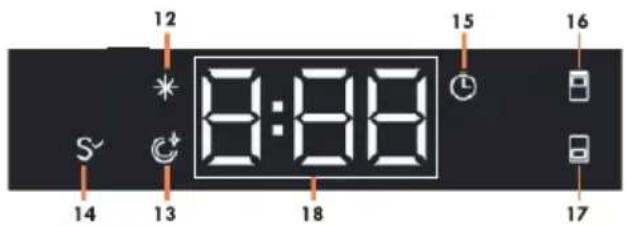
- Rinse Aid Indicator
- End Step Indicator
- Sanitized Indicator
- Delay Indicator
- Upper Half Load Indicator
- Lower Half Load Indicator
- Cycle Time Indicator
1. Power Button
Turn the machine on by pressing the Power button.
2. Cycle Buttons
Select a suitable cycle for your dishes by pressing Cycle buttons. For the details of the cycles refer to section Cycle Table.
3. Display
The display shows the total time of the selected cycle and the remaining time during operation.
4. Delay Hours Buttons
Press the Delay Hours Buttons to delay the start time of a cycle for 1 hour up to 24 hours. Pressing once to + button will delay the start time for 1 hour. Once you press it, display will show "1h" and display will show cycle duration and delay time alternately for 2 seconds. Continuing to press the button will increase the delay duration. Press the - button to decrease the delay duration. In order to start the selected cycle with delay, Start/Pause button(11) should be pressed and the door of the dishwasher must be closed within 4 seconds. If you turn off the machine after activating the delay time, the delayed time is cancelled.
5. Half Load Button
There is a half load option with three modes. Use the half load feature to direct cleaning to the desired rack when the dishwasher is not fully loaded. When the half load button is pressed, the indicator(s) on the control panel will illuminate according to the selections. If the half load button is pressed once, the upper half load indicator will illuminate. If the button is pressed a second time, the lower half load indicator will illuminate. If the button is pressed a third time, the upper half load and lower half load indicators will both illuminate. This mode will shorten the length of cycle and reduce energy and water consumption. After the fourth press, the indicators will go off and the feature will not be activated.
6. Extra Dry Button
Press the Extra Dry button to add extra drying steps to a cycle in order to obtain drier dishes. This option increases water temperature of the final rinse step and duration of the drying step. Extra Dry led will be on.
7. Sani Rinse Button
Sani Rinse function raises the water temperature in the final rinse. Sani Rinse led will be on.
8. High Temp Button
When this option is selected, both the water temperature and the washing time are increased. High Temp led will be on.
9. Accela Wash Button
Select the Accela Wash option to help decrease the duration of a cycle by raising water temperature and pressure.
10. Quiet Wash Button
Select the Quiet Wash option to help reduce the sound level of the washing operation by lowering the pressure level of the water.
11. Start/Pause Button
After choosing the cycle and options, press the Start/Pause button and close the door within four seconds to begin the cycle. The time remaining will be shown in the Time Remaining Indicator. The total time may change due to the ambient temperature, water temperature, and soil on the dishes. It is best to avoid opening the door while the dishwasher is running, but if it is necessary to open the door, the cycle will pause when the door is opened. If the door is closed within four seconds after opening, the cycle will continue automatically. If the door is opened for longer than four seconds, the Start/Pause button must be pressed and the door must be closed within four seconds to resume the cycle.
12. Rinse Aid Indicator
When the rinse aid level is low, the rinse aid indicator turns on, advising that the rinse aid compartment needs to be filled.
13. End Cycle Indicator
When the cycle is completed, the end cycle indicator will illuminate and the chime will activate. The chime will sound five times each in five minute intervals (at cycle completion, after 5 minutes, after 10 minutes, and after 15 minutes).
14. Sanitized Indicator
At the end of a successful sanitization, Sanitized indicator will illuminate at the end of the cycle.
15. Delay Indicator
When cycle is started with delay, the Delay Indicator will be on.
16. Upper Half Load Indicator
If you have dishes only in the upper rack, select the half load upper rack option. If it is selected, half load upper rack indicator will illuminate.
17. Lower Half Load Indicator
If you have dishes only in the lower rack, select the half load lower rack option. If it is selected, half load lower rack indicator will illuminate.
Note: If you have dishes both of in the upper and lower rack, select the half load upper rack and half load lower rack option together. If it is selected, upper half load rack indicator and lower half load rack indicator together will illuminate. This mode will shorten the length of cycle and reduce energy and water consumption.
18. Cycle Time Indicator
Cycle duration can be monitored via Cycle Time Indicator.

Changing a Cycle
Follow the steps below to change a cycle while in operation.
Open the door and press the Start/Pause button(11). Choose a new cycle by pressing Cycle buttons(2). After cycle selection, press the Start/ Pause button(11). After closing the door within 4 seconds, the newly selected cycle will resume the course of the old cycle. If four seconds is exceeded and the door is closed, the cycle will not resume. In this case, open the door again, press the Start/ Pause button and then close the door within four seconds to resume the cycle.
NOTE: Open the door slightly at first to stop a wash cycle before it is complete in order to avoid water spillage.
Cancelling a Cycle
Follow the steps below if you would like to cancel a cycle while in operation.
Open the door of your machine. The selected cycle will appear on the display. Press and hold the Start/Pause button(11) for 3 seconds. "0:01" will be shown on the display. Press Start/Pause button(11) and after closing the door of the machine within 4 seconds, the water discharge process will start and continue for 30 seconds. When the cycle is cancelled, chime will sound 5 times.
Switching the Machine Off
"0" will be shown on the display when the selected cycle is complete. Chime will also sound 5 times. You can then switch your machine off using the Power On/Off button.
NOTE: Do not open the door before the cycle is complete.
NOTE: If the door of the machine is opened or the power is cut off while a cycle is in operation, the cycle will continue when the door is closed or the power returns.
NOTE: If the power is cut off during the drying process, the cycle will terminate. Your machine will be ready for a new cycle selection.
Menu Settings
Press and hold the Extra Dry button(6) for three seconds to access the menu. Press the Delay Hours buttons(4) to view available settings in the menu. Press the Half Load button(5) to select the desired setting. At this time, the display(3) blinks, which indicates the setting can be adjusted by pressing the Delay Hours buttons(4). Set the new level with the Delay Hours buttons(4) and press the Half Load button(5) to save the new level. Once completed, the display will no longer blink, which indicates the setting level was saved. Additional settings can be adjusted or the menu can be exited by pressing the Extra Dry button(6) for three seconds or by powering off the dishwasher.
| No Setting Options Description | ||
| 1 Rinse Aid | r:1 | Set the amount of rinse aid. |
| r:2 | ||
| r:3 | ||
| r:4* | ||
| r:5 | ||
| 2 Chime Level | b:0 | Set the chime level. No chime will sound at the b:0 level |
| b:1 | ||
| b:2 | ||
| b:3* | ||
| 3 Start Cycle | LPO* | Set a default cycle for when the app- liance switched on. |
| LP1 | ||
| 4 Save Power Mode | SPO | Set the Save Power Mode. |
| SP1* | ||
| SP2 | ||
| 5 Factory Setting | FS0* Restore | changed settings to the factory settings. |
| FS1 | ||
*Default setting
1. Rinse Aid
To change the Rinse Aid level, follow the "Menu Settings." r:4 is the default dosage level.
2. Chime Level
To change the Chime Level, follow the "Menu Settings". "b:3" level is the highest chime level. "b:0" level means chime is off
3. Start Cycle
To change the start cycle selection, follow the "Menu Settings". In "LPO" level, machine turns on with Normal cycle. In "LP1" level, machine turns on with last selected cycle and option.
4. Save Power Mode
To change the save power mode setting, follow the "Menu Settings". In "SPO" level, interior lights (if available) will always be off, the screen will turn off after 4 minutes and the machine will turn off after 15 minutes of no activity in order to save energy.
In "SP1" level, interior lights will turn off after 4 minutes when the door is opened, the screen will turn off after 4 minutes and the machine will turn off after 15 minutes of no activity in order to save energy.
In "SP2" level, when the machine is off, interior lights will turn off after 4 minutes when the door is opened. When the machine is on, interior lights is on as long as the door stays open and machine will not turn off except by pressing On/off button.
5. Factory Setting
To change the factory setting, follow the "Menu Settings". If you change the level as "FS1" in factory setting, all settings return to default setting.
LED Cycle Indicator
LED Cycle Indicator that is positioned on the bottom side of the dishwasher shines a light on to floor to indicate the current status of the dishwasher during washing.
| LED Indicator State of | the Machine |
| Red, continuous The machine is running a cycle. | |
| Red, flashing A cycle is cancelled. | |
| Red, flashing rapidly | The machine has a fault. Refer to section "Automatic fault warnings and what to do". |
| Green, continuous A cycle is finished. | |
Interior Light (Models 1468# and 1469#)
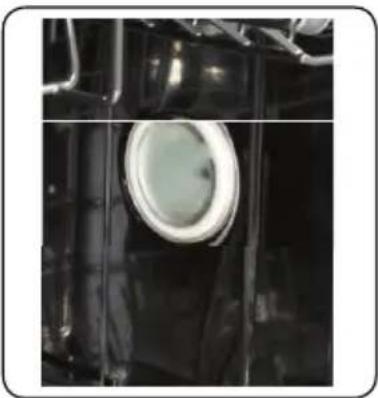
Provides lighting inside the dishwasher.
8 MAINTENANCE AND CLEANING
WARNING: Before cleaning or carrying out maintenance, switch off the appliance, disconnect the power supply and turn off the water tap.
Your dishwasher can only be repaired by an authorized service agent. Do not try to repair or perform any maintenance on your machine beyond what is described in this manual.
WARNING: All surfaces are susceptible to scratching. Contact with unsuitable cleaning agents can alter or discolor all surfaces.
WARNING: Keep the floor around your dishwasher clean and dry to prevent any possible injury. It is recommended to keep your dishwasher clean and empty with the door cracked open to allow air to circulate when it will not be used for an extended time.
Dishwasher door can be damaged by abrasive cleaners, scouring pads, abrasive cloths. Cleaning the machine in regular intervals prolongs the machine's service life.
Oil and lime may accumulate in the machine's washing section. To remove such accumulation, fill the detergent compartment, do not load any dishes into the dishwasher, select the Pots & Pans cycle with the High Temp option, and start the machine.
If the accumulation is not removed, use cleaning agents recommended for dishwashers. Follow the instructions of the cleaning agent manufacturer.
To clean any residue in the door seals, wipe the seals regularly with a dampened cloth. Clean the filters and spray arms at least once a month.
Turn off the power of machine and turn off its tap before starting the cleaning.
Do not use abrasive materials when cleaning the dishwasher. Wipe with a cleaner recommended for dishwashers and a dampened cloth.
To clean the filters, turn the Coarse Filter (b) counter clockwise and then pull up to remove the Coarse Filter and Micro Filter (a). With the Coarse Filter and Micro Filter removed, the Mesh Filter (c) can be lifted out. Remove any debris from the filters and clean them thoroughly under running tap water.
Filter
a. Mesh Filter
b. Coarse Filter
c. Metal Filter
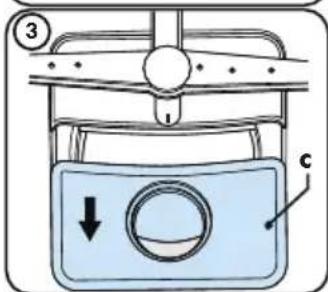
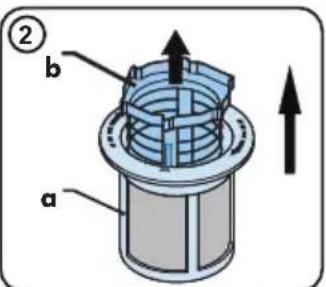
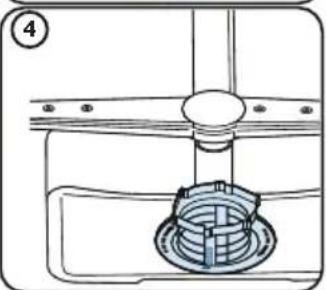
Spray Arms
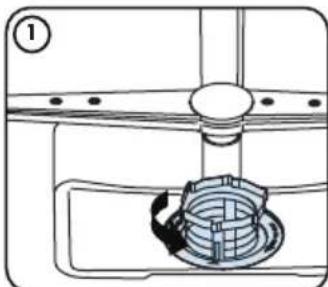
Check clogging situations on all holes on lower and upper spray arms.
If there is any clogging, remove the spray arms and clean them under running tap water.
The lower spray arm can be removed by pulling it upwards. To remove the upper spray arm, rotate the retaining nut counter-clockwise.
Properly tighten the nut when re-installing the upper spray arm.
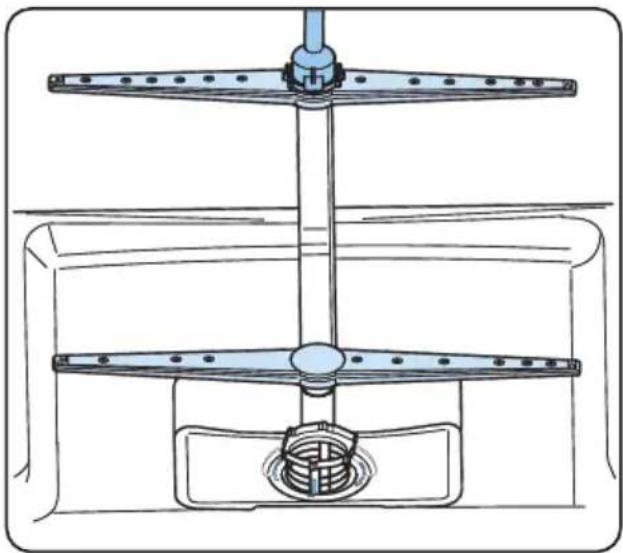
WHAT SHOULD NOT BE WASHED IN YOUR DISHWASHER?
- All items to be placed in the dishwasher should be dishwasher safe.
- Only Plastics with "dishwasher safe" or equivalent label can only be used in dishwashers. Plastics may lose their shape or color. Check with manufacturer for recommendations.
- Any dishes made out of wood or made with wooden parts are not suitable for washing in dishwashers. High temperatures can cause the wood to swell or crack.
Silver items without dishwasher safe label should not be washed in the dishwasher because high temperatures and detergent can damage your silver. Check with manufacturer for recommendations. - Dishwasher safe silver items and stainless steel items should not come into contact, as the silver can become discolored.
- Porcelains and glassware with decorations and hand-painted utensils may lose their color and patterns due to the high temperatures. Non-decorated items are dishwasher-proof. Check with manufacturer for recommendations.
- Aluminum can turn dark in the dishwasher due to the heat, the detergent used or even just certain minerals in your water.
- Do not wash sponges or dish cloths in dishwasher.
- Do not wash any material like acrylic, copper, brass, pewter, iron, bronze or tin.
- Pots without a non-stick coating are safe to be cleaned in the dishwasher, but some non-stick pots and pans can lose their coating and non-stick ability.
- Glued dishes or cutlery are not suitable for machine washing since adhesives that join materials such as plastic, wood, bone, steel, copper, tin, etc. may loosen.
Remember, if there is any doubt about any aspect concerning items to be washed in the dishwasher, follow the instructions from the manufacturer of the items, or wash the items by hand.

WARNING: If in doubt, wash by hand or follow the instructions from the manufacturer of unsils, dishes, glasses or pots and pans. Do not wash items soiled with cigarette ash, candle wax, dish, paints or chemicals since they can damage your dishwasher.

WARNING: In general, it is not advisable to open the door while the dishwasher is in operation. The door is opened, a safety device stops the dishwasher. Care should be taken when opening the door immediately following the cycle, as steam may escape.

NOTE: Empty the lower rack first and then the upper rack. This will avoid water dripping from upper rack onto dishes in the lower rack.
9 TROUBLESHOOTING
| FAULT POSSIBLE CAUSE | TROUBLESHOOTING | |
| The cycle does not start. | Dishwasher is not switched on. | Switch on dishwasher by pressing power button. |
| Fuse blown. Check indoor fuses. | ||
| Water inlet tap is closed. Turn on the water inlet tap. | ||
| Dishwasher door is open Close the Dishwasher door. | ||
| Water inlet hose and machine filters are clogged. | Check the water inlet hose and machine filters and make sure they are not clogged. | |
| Water remains inside the machine. | Water drain hose is clogged or twisted. | Check the drain hose, then either clean or untwist it. |
| The filters are clogged. Clean the filters. | ||
| The cycle is not finished yet. Wait until the cycle is finished. | ||
| Note: It is normal to have some water remain in the machine below the filters. | ||
| Machine stops during washing. | Power failure. Check electrical supply. | |
| Water inlet failure. Check water tap. | ||
| Shaking and hitting noises are heard during a wash operation. | The spray arm is hitting the dishes in the lower basket. | Move or remove items blocking the spray arm. |
| Partial food wastes remain on the dishes. | Dishes placed incorrectly, sprayed water not reaching affected dishes. | Do not overload dishwasher. |
| Dishes leaning each another. | Place dishes as instructed in the section on loading your dishwasher. | |
| Not enough detergent used. | Use the correct amount of detergent, as instructed in the cycle table. | |
| Wrong wash cycle selected. | Use the information in the cycle table to select the most appropriate cycle. | |
| Spray arms clogged with food waste. | Clean the holes in the spray arms with thin objects. | |
| Filters or water drain pump clogged or filter misplaced. | Check the drain hose and filters are correctly fitted. | |
| FAULT POSSIBLE CAUSE TROUBLESHOOTING | ||
| Whitish stains remains on dishes. | Not enough detergent used. | Use the correct amount of detergent, as instructed in the cycle table. |
| Dishes do not dry. | Drying option is not selected. Select a cycle with a drying option. | |
| Rinse aid dosage set too low. Increase rinse aid dosage setting. | ||
| Rust stains form on the dishes. | Stainless-steel quality of the dishes is insufficient. | Use only dishwasher-proof sets. |
| Improper grounding of electrical supply. Consult a qualified electrician immediately. | ||
| Detergent remains in the detergent compartment. | Detergent was added when the detergent compartment was wet. | Make sure detergent compartment is dry before use. |
| Items in the dishwasher may prevent the detergent compartment from opening. | Make sure the items in the dishwasher do not block the detergent compartment. | |
| TROUBLE CODE | POSSIBLE FAULT WHAT TO DO | |
| FF | Water inlet system failure | Make sure the water inlet tap is open and water is flowing. |
| Separate the inlet hose from the tap and clean the filter of the hose. | ||
| Contact for service if the error continues. | ||
| F5 | Pressure system failure | Contact for service. |
| F3 | Continuous water input | Close the tap and contact for service. |
| F2 | Inability to discharge water | Water discharge hose and filters may be clogged. |
| Cancel the cycle. | ||
| If the error continues, contact for service. | ||
| F8 | Heater error | Contact for service. |
| F1 Overflow | Unplug the machine and close the tap. | |
| Contact for service. | ||
| F7 Overheating | Contact for service. | |
| F9 Divisor position error Contact for service. | ||
| F6 Faulty heater sensor Contact for service. | ||
| H1 High voltage failure Contact for service. | ||
10 PRACTICAL INFORMATION
- When the machine isn't in operation:
- Disconnect the electrical supply and close the tap.
- Leave the door slightly open to prevent odor formation.
- Select the dry option to remove water droplets.
- Place dishes in the machine properly to achieve the best energy consumption, washing and drying performance. Please see the cycle and consumption table for more information.
- Rinse dirty dishes before placing them in the dishwasher.
- Only use the Rinse cycle when necessary.
- Do not place the machine near a refrigerator because it will reach high temperatures.
- If the machine is located in an area that is at risk of freezing, close the tap, disconnect the inlet hose from the tap and drain the water inside the hose and the machine completely.
INDICE
GARANTIA 3
1 INSTRUCCIONES IMPORTANTES DE SEGURIDAD......6
2 INSTALLACION 11
3 ESPECIFICACIONES TECNICAS 13
4 ANTES DE UTILIZAR EL ELECTRODOMÉSTICO..14
5 CARGA DEL LAVAVAJILLAS. 16
6 CICLOS Y TABLAS DE OPCIONES 23
7 PANEL DE CONTROL 25
8 MANTENIMIENTO Y LIMPIEZA 29
9 RESOLUCION DE PROBLEMAS 32
10 INFORMACION PRACTICA 35
ATTN:Kenmore Warranty Request
5407 Trillium Suite B120
Hoffman Estates, IL 60192
10 INFORMATIONS PRATIQUES
For Customer Care go to:
www.kenmore.com/contact-us/
to select your local area or retailer where this appliance was purchased for contact information on scheduling in-home repair service or ordering replacement parts.