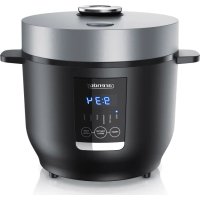
Suteki 305598 - Rice cooker Arendo - Free user manual and instructions
Find the device manual for free Suteki 305598 Arendo in PDF.



| Product type | Rice cooker |
| Brand | Arendo |
| Model | Suteki 305598 |
| Capacity | Approx. 2 L (max 4 cups of raw rice) |
| Rated power | 350 W |
| Power supply | 220-240 V AC, 50-60 Hz |
| Number of programs | 6 (Rice, Claypot, Porridge, Soup, Steam, Keep warm) |
| Keep warm function | Yes, automatic after cooking, up to 12 hours |
| Delayed timer function | Yes, adjustable from 1 h to 24 h in 30 min increments |
| Included accessories | Cooking pot, steam basket, rice spoon, measuring cup |
| Pot material | Non-stick coating (not specified, assumed) |
| Cleaning | Pot, lid, accessories hand washable in warm soapy water. Do not immerse the housing. Not dishwasher safe. |
| Safety | Automatic shutdown in case of malfunction, overheat protection (error codes E1-E4) |
| Weight | Approx. 1.5 kg (estimated) |
| Dimensions (W x D x H) | Approx. 25 x 20 x 20 cm (estimated) |
Frequently Asked Questions - Suteki 305598 Arendo
User questions about Suteki 305598 Arendo
0 question about this device. Answer the ones you know or ask your own.
Ask a new question about this device
Download the instructions for your Rice cooker in PDF format for free! Find your manual Suteki 305598 - Arendo and take your electronic device back in hand. On this page are published all the documents necessary for the use of your device. Suteki 305598 by Arendo.
USER MANUAL Suteki 305598 Arendo
ENG: Current drivers, user manuals and other relevant documents for this product can be found on our homepage.
Important safety guidelines for this appliance
- If the power cord is damaged, it should be replaced by the manufacturer, his specialist dealer, or an equally qualified person, so as to prevent any risk.
- Children should use or clean the appliance only under supervision or guidance.
-
In the interest of child safety, please do not leave any packaging material (plastic bags, cardboard, polystyrene, etc.) lying around!
• Children should be supervised to ensure that they do not play with the appliance. -
This appliance is not intended to be used, cleaned or maintained by people (including children) with reduced physical, sensory or mental abilities or lack of experience and/or knowledge. Unless they are supervised by a person who is responsible for their safety or have received instructions from this person about how the appliance is to be used.
-
Operate the appliance only with the voltage indicated on the appliance label.
- Disconnect the power plug from the mains socket when the appliance is not being used or for cleaning.
-
Keep it on an suitable surface so that it does not tip over.
-
Do not use the appliance outdoors and keep it away from sources of heat (e.g., electric stove) and direct sunlight. Please do not keep the appliance in immediate proximity to water sources (e.g., washbasin).
- The appliance is meant exclusively for personal use and for its intended purpose. This product is not intended for commercial use.
- Never allow the power cord to come into contact with hot surfaces.
- Never immerse the appliance in water or any other liquid so as to prevent the risk of electrical shock!
-
Do not touch any moving parts of the appliance.
-
Do not use this appliance with wet hands.
- Do not move the appliance when it is being operated.
- Stay away from escaping steam.
- Fill the rice cooker only up to the top-most mark.
- Please do not place the appliance near objects which can be damaged by the escaping steam.
Thank you for choosing an Arendo product. Please read the following user manual carefully so as to get the most from the product you have purchased. Before using the product, first check that the delivered item is complete, accurate and undamaged.
1. Scope of delivery
- Rice cooker
- Rice spoon
- Cooking vessel
- Measuring cup
- Steaming cooking attachment
Power cord
2. Technical data
| Power supply 220-240 V AC, 50 - 60 Hz | |
| Power consumption 350 W | |
| Capacity Max. about 2 L | |
| Ambient temperature + 0-3°C to 35-40°C | |
| Features • Indicator lights | for cooking/keep-warm function • Keep-warm function • 6 Cooking programs • Status indicators and Display • Timer delay function |
3. Function and product details
Arendo's rice cooker enables you to cook rice or porridge according to your liking. Thanks to the inbuilt keep-warm function, the rice stays warm and edible for a longer time.
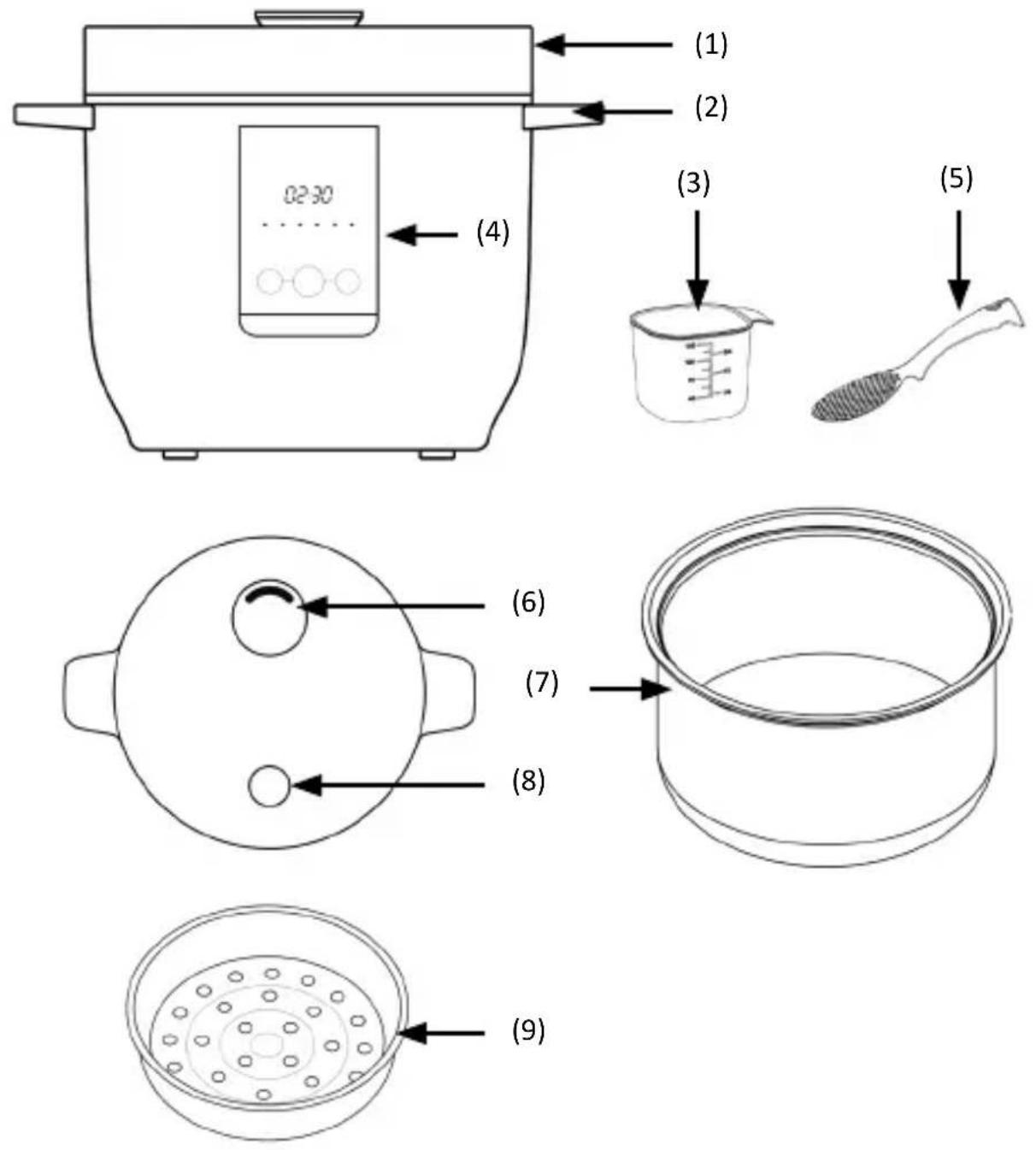
| Number Description | |
| 1 Lid | |
| 2 Carrying handle | |
| 3 Measuring cup | |
| 4 Operating elements + Display | |
| 5 Rice spoon | |
| 6 Valve | |
| 7 Cooking vessel | |
| 8 Lid opener | |
| 9 Steam cooking attachment |
4. Operating controls
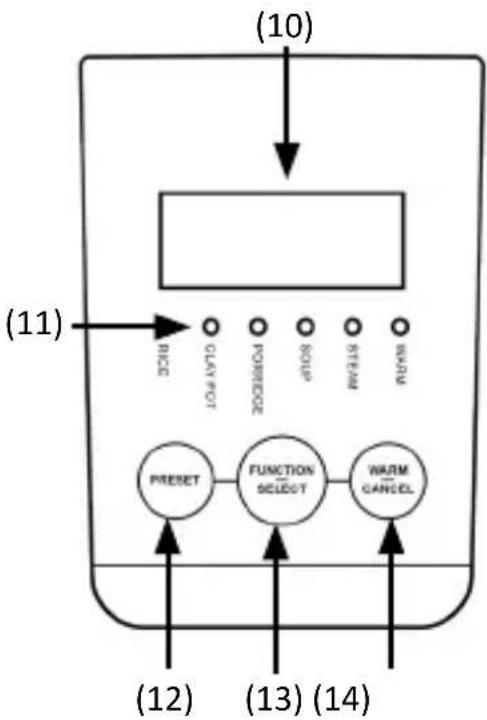
| Number Description |
| 10 Display |
| 11 Program display |
| 12 "PRESET" button (default settings) |
| 13 "FUNCTION / SELECT" button (Function/Select) |
| 14 "WARM / CANCEL" button (Keep Warm/Cancel) |
5. Before initial use
Check if the product and the components are intact and if the appliance is working properly when using it for the first time. Take the appliance out of the package and remove all the packaging material. Then rinse and dry the cooking vessel, rice spoon, steam cooking attachment and the measuring cup thoroughly. Do not use aggressive cleaning agents. Please wipe the outer body with a clean damp cloth. Then wipe it dry. Never immerse the outer body and the electronic parts in water or any other liquid! Do not operate the appliance unattended and check it for damage and proper assembly before using it each time.
6. Usage
6.1 Preparation
Before using the rice cooker, please refer to the appropriate preparations.
- Use the provided measuring cup for measuring rice.
- Wash the rice thoroughly and add it to the inner rice vessel. Make sure that the rice is flat and evenly distributed in the vessel, and then add water. The ratio should be 1:1 (uncooked rice : water). Maximum number of cups of uncooked rice: 4 cups. Alternatively, you can also refer to the inner scale of the cooking vessel (7) depending on your taste. In this case, water is filled up to the first mark for one cup of rice, and up to the second mark for two cups of rice.
- Press the lid button to open the lid.
- Place the cooking vessel in the housing of the rice cooker and make sure that the vessel is level and properly connected to the heating plate.
- Close the lid and insert the plug into the socket.
Note: The quantity of water can be adjusted depending on personal preference and the type of rice used. Do not exceed the maximum quantity specified on the inner vessel to prevent overflow. The maximum capacity for cooking rice porridge is 0.5 cups. Make sure that the outer surface of the inner rice vessel is dry, clean and that there are no foreign objects on the heating plate.
6.2 Cooking rice
- Follow the steps in chapter "6.1 Preparation".
-
Press the "FUNCTION / SELECT" button to select the "RICE" function.
-
The indicator for RICE flashes for 5 seconds. When the indicator stops flashing and you hear a beep, the display shows a rotating outer border.
- 10 minutes before the currently selected function ends, the display shows the remaining time (the time decreases / value becomes smaller). If the selected function completes the cooking process, you hear 5 "beeps" and the indicator for the selected function goes off and switches to keep-warm status. From this point, the display increments the time so that you can now see for how long the rice has been kept warm.
Note: The cooking time for rice may vary depending on the ratio of rice and water. The cooking time for rice is about 35 minutes. The cooking time depends on the quantity of rice being cooked. To prevent rice clumps from affecting the taste too much, it is advisable to stir the rice within 30 minutes to loosen it. The default keep-warm time is 12 hours. To turn off the keep-warm function, you can press the "WARM / CANCEL" button.
Note: If the rice needs to be kept warm, then the power cord must be connected and the lid should be in place. The keep-warm function will be terminated if the power cord is removed.
The approximate quantities of rice and water depend on the type of rice.
Sample quantities of rice and water:
The supported quantities of 1 - 4 measuring cups of rice correspond to a portion of rice for 1-5 persons. For this purpose, please fill the provided measuring cup with rice, add it to the cooking vessel, and then fill water up to the first mark for rice. Likewise, for two full measuring cups of rice, water has to be filled up to the second mark in the cooking vessel, or up to the third mark for 3 measuring cups of rice.
6.3 Claypot rice (rice casserole)
- Follow the steps in chapter "6.1 Preparation".
- Press the "FUNCTION / SELECT" button to select the "Claypot" function.
-
The indicator for "Claypot" flashes for 5 seconds. Once the indicator stops flashing and you hear a beep, the rice begins to cook. The display shows a rotating outer border.
-
After some time you hear a beep for 1 minute. Press the function key to stop the sound. Open the lid and add the remaining food ingredients into the inner vessel.
- 10 minutes before the currently selected function ends, the display shows the remaining time (the time decreases / value becomes smaller). If the selected function completes the cooking process, you hear 5 "beeps" and the indicator for the selected function goes off and switches to keep-warm status. From this point, the display increments the time so that you can now see for how long the rice has been kept warm.
Note: Do not exceed the maximum water level in the inner vessel as this could lead to overflowing. The default keep-warm time is 12 hours. To turn off the keep-warm function, you can press the "Keep warm / Cancel" button.
Note: If the porridge needs to be kept warm, then the power cord has to be connected and the lid should be in place. The keep-warm function will be terminated if the power cord is removed.
6.4 Cooking porridge
Cooking time: 1 hour 30 minutes
- Add the desired ingredients for porridge to the vessel.
- Place the cooking vessel in the housing of the rice cooker and make sure that the vessel is level and properly connected to the heating plate.
- Press the "FUNCTION / SELECT" button to select "Porridge".
- The indicator for "Porridge" flashes for 5 seconds. Once the indicator stops flashing and you hear a beep, the porridge begins to cook. The display shows a rotating outer border.
- As soon as the function starts, the display shows the remaining time (the time decreases / value becomes smaller). When the porridge is ready, you hear 5 "beeps" and the "PORRIDGE" display indicator turns off and switches to keep-warm status. From this point, the display increments the time so that you can now see for how long the rice has been kept warm.
Note: Do not exceed the maximum water level in the inner vessel as this could lead to overflowing. The default keep-warm time is 12 hours. To turn off the keepwarm function, you can press the "Keep warm / Cancel" button.
Note: If the porridge needs to be kept warm, then the power cord has to be connected and the lid should be in place. The keep-warm function will be terminated if the power cord is removed.
6.5 Soup
Cooking time: 2 hours
- Add the desired ingredients for your soup to the vessel.
- Place the cooking vessel in the housing of the rice cooker and make sure that the vessel is level and properly connected to the heating plate.
- Press the "FUNCTION / SELECT" button to select "Soup".
- The indicator for "SOUP" flashes for 5 seconds. Once the indicator stops flashing and you hear a beep, the soup begins to cook. The display shows a rotating outer border.
- As soon as the function starts, the display shows the remaining time (the time decreases / value becomes smaller). When the soup is ready, you hear 5 "beeps" and the "SOUP" indicator turns off and switches to keepwarm status. From this point, the display increments the time so that you can now see for how long the rice has been kept warm.
Note: Do not exceed the maximum water level in the inner vessel as this could lead to overflowing. The default keep-warm time is 12 hours. To turn off the keepwarm function, you can press the "WARM / CANCEL" button.
Note: If the soup needs to be kept warm, then the power cord has to be connected and the lid should be in place. The keep-warm function will be terminated if the power cord is removed.
6.6 Steaming
Cooking time: 30 minutes
- Add the desired ingredients you want to steam to the steam cooking attachment over the vessel.
-
Place the cooking vessel filled with water in the housing of the rice cooker and make sure that the vessel is level and properly connected to the heating plate.
-
Then place the steam cooking attachment filled with ingredients on the vessel and close the appliance lid.
- Press the "FUNCTION / SELECT" button to select the "STEAM" function.
- The indicator for "STEAM" flashes for 5 seconds. Once the indicator stops flashing and you hear a beep, the appliance begins steaming. The display shows a rotating outer border.
- As soon as the function starts, the display shows the remaining time (the time decreases / value becomes smaller). When the process is complete, you hear 5 "beeps" and the "STEAM" indicator turns off and switches to keep-warm status. From this point, the display increments the time so that you can now see for how long the item has been kept warm.
6.7 Keep-warm function
The keep-warm function is automatically started after the cooking is completed. Alternatively, you can start the keep-warm function manually by pressing the "Keep Warm / Cancel" button. To switch off the keep-warm function, press the button again or disconnect the power cord from the socket.
6.8 Delay function
After preparing, press the "FUNCTION / SELECT" button and select the cooking function you wish to use.
Once the indicator of the selected function starts flashing, press the "PRESET" button and set the time. The default preset time is 4 hours, which is displayed on the control panel as "4:00". To change the preset time, press the "PRESET" button. The preset time is increased each time by 30 minutes. Once the pre-selection button reaches the maximum preset time, it returns to the minimum preset time when the button is pressed.
The maximum "PRESET" time is 24 hours, the minimum "PRESET" time is 1 hour. When the "FUNCTION / SELECT" button is pressed after setting the "PRESET" time, the preset time does not work and you have to set it again. The delay function cannot be adjusted / selected after the currently selected function has been started.
Once you set the preset time, leave it for 5 seconds and the preset starts working accordingly.
Once the set time lapses, the selected cooking function starts working.
For example, if it is 1:00 p.m and you want to start cooking at 6:00 p.m, then you need to set the "Delay" time to 5:00 hours. The rice cooker will start automatically at 6:00 p.m.
After the configured time, the rice cooker automatically switches to the keepwarm mode. To cancel the keep-warm mode, press the "Keep Warm / Cancel" button (18) or disconnect the power cord from the socket.

7. Cleaning and Care
Before cleaning, please disconnect the power cord and allow the appliance to cool down completely. Clean the cooking vessel, lid, measuring cup and the rice spoon in warm water. Do not use any strong or aggressive cleaning agents or scouring agents. Please do not use steel wool or metal objects for cleaning to prevent damage. Then rinse all the parts thoroughly and allow them to dry. Wipe the outer body with a clean, damp cloth and then dry it thoroughly. Ensure that water does not get into the switching mechanism or onto the heating plate since there is a risk of electric shock. This appliance is not suitable for cleaning in dishwashers.
8. Causes of errors
| Error Cause Troub | eshooting | |
| Light is not working | •Power cable is not con- nected •Power PCB is damaged •PCB is disconnected •Motherboard is damaged | •Check power supply •Check switch, power plug, thermal fuse •Contact our customer service |
| Heating plate is not heating up | •Power cable is not properly connected •Power cable is faulty •Appliance is faulty | •Check power supply •Contact our customer service |
| Status LED is off and the heating plate does not heat up | •Heating plate is faulty •PCB is faulty | •Contact our customer service |
| Uncooked rice • too little or too much rice •Rice to water ratio is wrong •The cooking vessel is not placed properly •There are objects between heating plate and cooking vessel •Sensor damage •The heating plate is faulty | •Adjust the amount of rice / water •Rotate the cooking vessel left and right and try again. Make sure that the cooking vessel is resting on the heating plate •Contact our customer service | |
| Error Cause Troubleshooting | ||
| Spillage from rice cooker | Too much water Use less water | |
| A large amount of porridge overflows | ·Motherboard is damaged ·The top lid is abnormal ·Foreign objects in the steam vent ·Check if the water quantity exceeds the maximum limit value or if water is added according to the scale ·Check if the lid is attached and the function is used. | ·Contact our customer service department ·Clean the steam vent ·Add water according to scale ·Attach the lid / ensure that the selected function is correct |
| Rice / porridge does not cook for long | ·The motherboard is damaged ·The top lid thermostat is abnormal | Contact our customer service department |
| Error code E1, E2, E3, E4 | Sensor loop error Contact our contactor service department | customer service department |

Caution!
9. Safety instructions and disclaimer
Please do not try to open the appliance to carry out repairs or modifications by yourself. Avoid contact with the mains supply. The appliance does not carry current only when disconnected. Please do not short-circuit the product. Do not forget to disconnect the power cord when the appliance is not being used or during thunderstorms. The appliance is not approved for outdoor use. Therefore, please use it only in dry surroundings. Protect it from high humidity, water and snow. Do not expose the appliance to high outside temperatures. Do not expose the appliance to sudden changes in temperature or strong vibrations,
as this could damage the electronic components. Check the appliance for any damages before using it. The appliance should not be used if it has been subject to impact or has been damaged in some other way. Please follow the local regulations and restrictions. Do not use the appliance for purposes other than those described in this user manual. This product is not a toy. Keep it out of the reach of children or mentally disabled persons. Use the appliance only with the supplied base plate. Any repairs or modifications to the appliance not carried out by the original supplier will void any warranty and guarantee claims. The appliance should only be used by those who have read and understood this user manual. The specifications of the appliance may be changed without any special prior notification.

10. Disposal instructions
In line with the European WEEE directive, electrical and electronic appliances should not be disposed of along with domestic waste. Their components have to be separately sent for recycling or disposal, because improper disposal of toxic and dangerous components may permanently damage the environment. According to the Electronic Equipment Act (ElektroG), you are obliged (as a consumer) to return (free of charge) all electrical and electronic appliances to the manufacturer, the point of sale or public collection points at the end of their service life. The relevant local laws regulate the details in this regard. The symbol displayed on the product, in the user manual or/and on the packaging refers to these regulations. With this manner of sorting, recycling and disposal of used appliances, you make an important contribution towards protecting our environment. For information on authorised collection points in your area, please contact your local city or municipal administration.

WEEE directive 2012/19/EU
WEEE Register no.: DE 67896761
The company WD Plus GmbH hereby certifies that the appliance 305598/305991 complies with the fundamental requirements and all other relevant stipulations. A complete conformity statement can be obtained from: WD Plus GmbH, Wohlenbergstraße 16, 30179 Hannover
(IT) +49511/13221740
(ES) +49511/13221750
MO-FR 9:30am - 18pm CET

www.arendo.de


- Important safety guidelines for this appliance
- Scope of delivery
- Technical data
- Function and product details
- Operating controls
- Before initial use
- Usage
- Preparation
- Cooking rice
- Sample quantities of rice and water:
- Claypot rice (rice casserole)
- Cooking porridge
- Soup
- Steaming
- Keep-warm function
- Delay function
- Cleaning and Care
- Causes of errors
- Caution!
- Safety instructions and disclaimer
- Disposal instructions
Brand : Arendo
Model : Suteki 305598
Category : Rice cooker