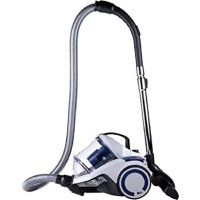
DD2504 - Vacuum Cleaner DIRT DEVIL - Free user manual and instructions
Find the device manual for free DD2504 DIRT DEVIL in PDF.



| Product type | Bagless vacuum cleaner |
| Brand | Dirt Devil |
| Model | DD2504 |
| Power supply | Mains 220-240 V, 50/60 Hz |
| Power | 700 W |
| Technology | Mono cyclone |
| Dust bin capacity | 2.7 L |
| Filtration | HEPA 12 |
| Noise level | 79 dB |
| Cord length | 6 m |
| Reach | 9 m |
| Tube length | 86 cm |
| Tube material | Metal |
| Body material | ABS plastic |
| Brush type | Combination brush |
| Suction control | Adjustable |
| Cord rewind | Automatic |
| Power plug | Type C (CEE 7/17) |
| Package contents | Vacuum cleaner, 3-in-1 tool, parquet brush |
| Safety | Thermal cut-off |
| Maintenance | Washable filters, cleanable separator |
Frequently Asked Questions - DD2504 DIRT DEVIL
User questions about DD2504 DIRT DEVIL
0 question about this device. Answer the ones you know or ask your own.
Ask a new question about this device
Download the instructions for your Vacuum Cleaner in PDF format for free! Find your manual DD2504 - DIRT DEVIL and take your electronic device back in hand. On this page are published all the documents necessary for the use of your device. DD2504 by DIRT DEVIL.
USER MANUAL DD2504 DIRT DEVIL
IMPORTANT SAFETY INSTRUCTIONS
This appliance should only be used for domestic cleaning and not for commercial or industrial use. Please ensure that this guide is fully understood before operating the appliance.
WARNING: DANGER TO THE PERSON!
IMPORTANT: Damage to the appliance!
In addition we offer the following safety advice:
LOCATION
- Do not use or keep this product outside when it is raining.
- Do not store the appliance near hot ovens or heating appliances.
- Store your vacuum cleaner in a cool, dry area. If filters have been cleaned as per user guide instructions ensure they are thoroughly dry before storing away.
MAINS LEAD
- Do not allow the mains lead to become strained or run this appliance over it.
- If the electrical cable becomes damaged, the complete cable assembly must be replaced. Do not attempt this task yourself. Contact the local retailers.
- Agency service: To ensure the continued safe and efficient operation of this appliance we recommend that any servicing or repairs are only carried out by an authorized Agency service engineer.
CHILDREN
-
This appliance can be used by children aged from 8 years and above and persons with reduced physical, sensory or mental capabilities or lack of experience and knowledge if they have been given supervision or instruction concerning use of the appliance in a safe way and understand the hazards involved.
Children shall not play with the appliance -
This appliance can be used by children aged from 8 years and above.
PERSONAL SAFETY
- The plug must be removed from the wall socket before cleaning or maintaining the appliance.
- Never modify the cleaner in any way.
- Never use in the presence of explosive liquids or vapors.
- Never pick up inflammable or poisonous liquids such as petrol, copier toner or other volatile substances. Never pick up acids, asbestos or asbestos dust.
- Repairs to electrical appliances are only to be undertaken by trained personnel.
- Unprofessional repairs can be dangerous for users.
- The appliance must never be left running when unsupervised.
PRODUCT SAFETY
- Never use the appliance without the filters being installed.
- Never use the appliance to vacuum hot ashes, broken glass, sharp objects or liquids.
- To protect against fire, electric shock and personal injury do not immerse cord, plug or cleaner in water or other liquid.
- This appliance is not intended for use by persons (including children) with reduced physical, sensory or mental capabilities, or lack of experience and knowledge, unless they have been given supervision or instruction concerning use of the appliance by a person responsible for their safety. -
- Cleaning and user maintenance shall not be made by children without supervision.
- If the supply cord is damaged, it must be replaced by the manufacturer, its service agent or similarly qualified persons in order to avoid a hazard.
- Always switch off the vacuum cleaner before disconnecting or connecting the hose and accessories.
- Keep all openings clear and free from debris as this may affect the airflow/suction.
- Do not use the appliance to clean animals or people.
Electrical requirements
- Check that the voltage on the rating plate corresponds with your house electricity supply which must be A.C (alternating current).
Product Description
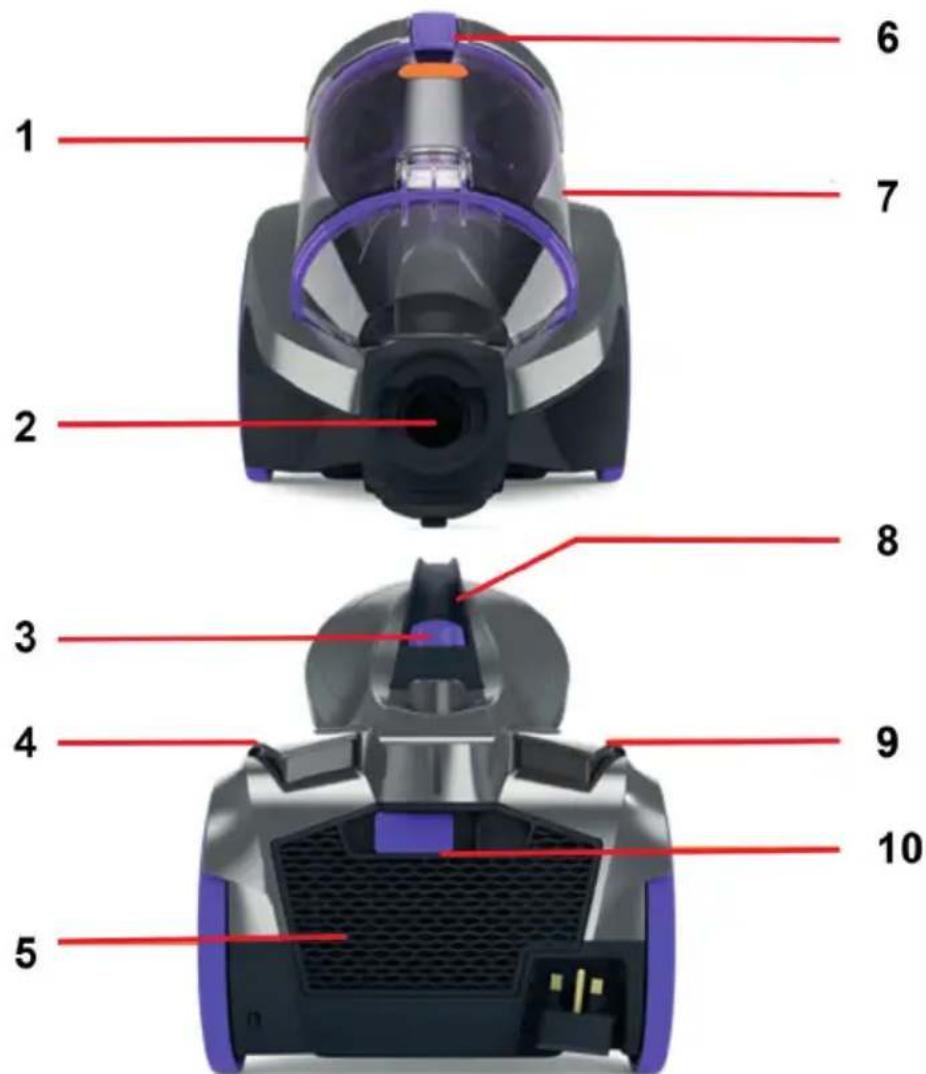
Features
- Separator 6. Dirt bin lid release clip
- Hose entry point 7. Dirt container
- Dirt container release button 8. Carry handle
- Power On/Off button 9. Cord rewind button
- Post motor filter cover 10. Post-motor filter cover release clip
HOW TO INSTALL / OPERATE THE MACHINE
Before you start
- Always switch off and unplug the vacuum cleaner before connecting or disconnecting the hose/attachments, or removing and emptying the dirt container.
- The vacuum cleaner is equipped with a thermal cut-out. If for
any reason the vacuum cleaner does overheat the thermostat will automatically turn the vacuum cleaner off. If this happens, switch the vacuum cleaner off and unplug from electrical socket. Remove and empty the dirt container and also heck the vacuum cleaner for blockages. Allow the vacuum cleaner to cool for approximately 1 hour (if you have cleaned the filters please wait 24 hours for the filters to fully dry before putting back into the machine).
- For best cleaning results, filters should be tapped over a bin every 4-6 uses to remove dirt and debris and washed every 3 to 6 months (depending on the level of use).
- If the vacuum cleaner is blocked, switch off and unplug before removing the blockage.
ASSEMBLING YOUR MACHINE
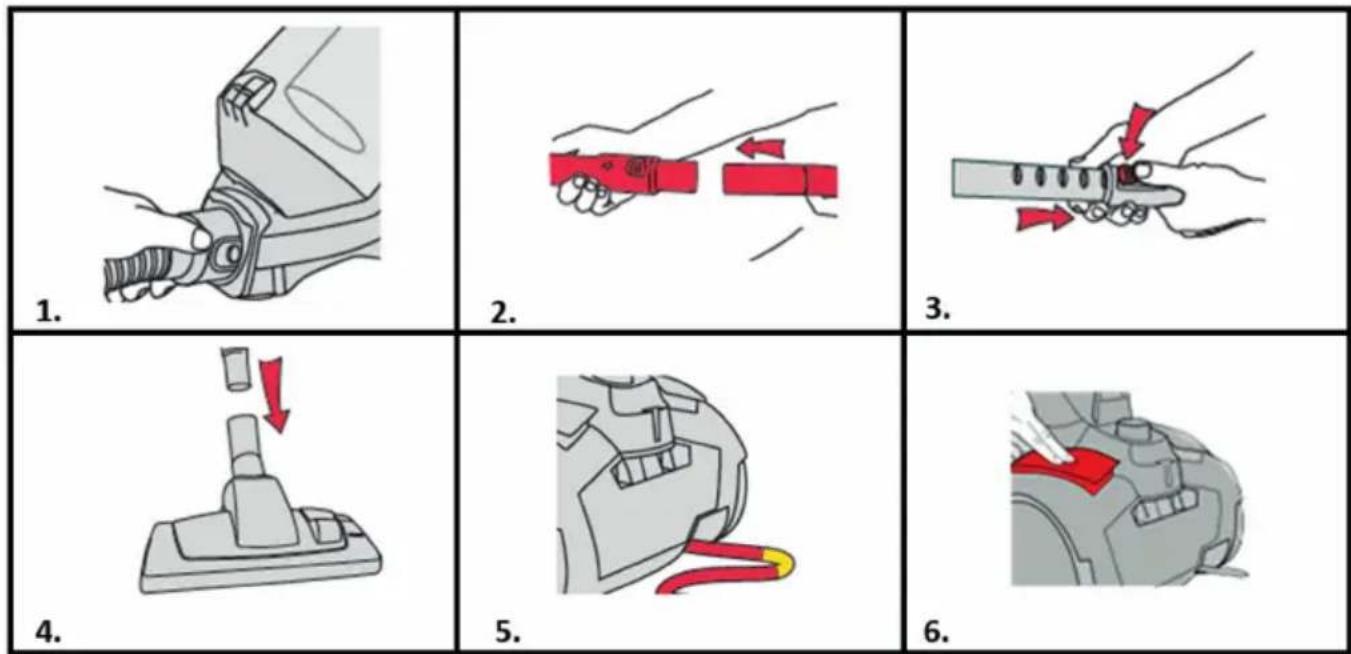
IMPORTANT: The base of the vacuum cleaner should always be positioned flat on the floor when starting and in use. The dirt container should be locked into place before lifting the vacuum cleaner by the carry handle.
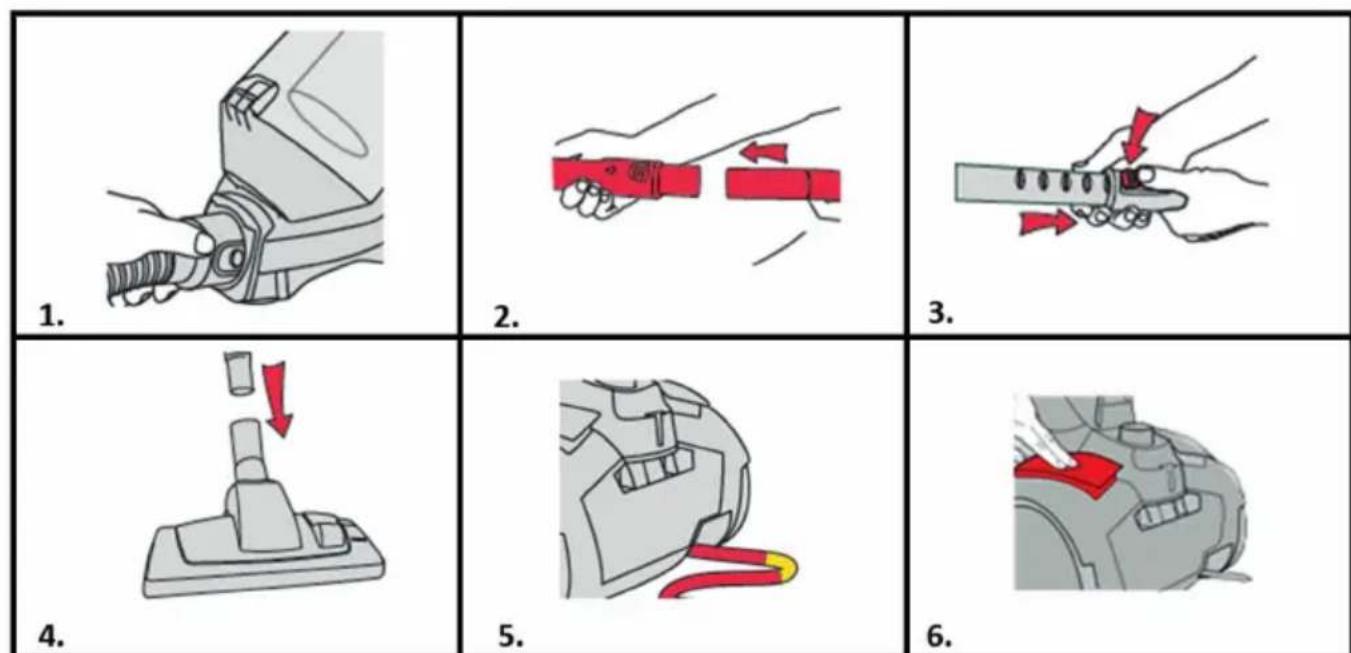
- Press both buttons at the end of the hose and push hose into the hose entry point.
- Insert the hose grip into the telescopic extension tube.
- Press the button on the telescopic extension tube and adjust to required length.
- Insert the other end of the telescopic extension tube into the
floorhead.
- Fully unwind the power cord. A yellow mark on the cord indicates the recommended cord length.
Do not exceed the cord beyond the yellow mark.
- Plug in and switch the unit on by pressing the power button.
CAUTION: When unwinding the power cord always pull out to the yellow marker but not further.
HOW TO USE
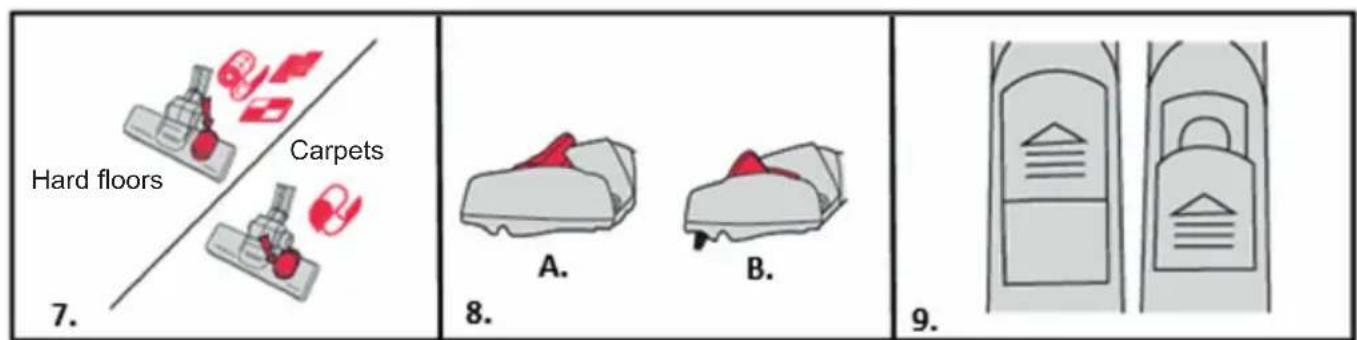
- For use on carpets, click rocker switch forward for use on hard floors click rocker switch back.
- A: Raise brushes for carpets. B: Lower brushes for hard floors.
- Slide vent cover on hose grip open to reduce suction if required.
USING YOUR ACCESSORIES
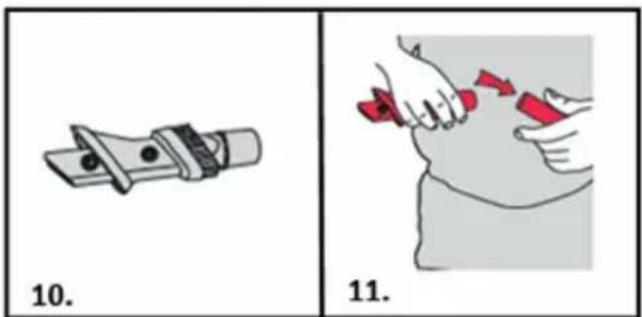
- Choose an accessory (parquet brush / 3-in-1 tool)
- Push accessory onto the telescopic extension tube or hose.
STORAGE
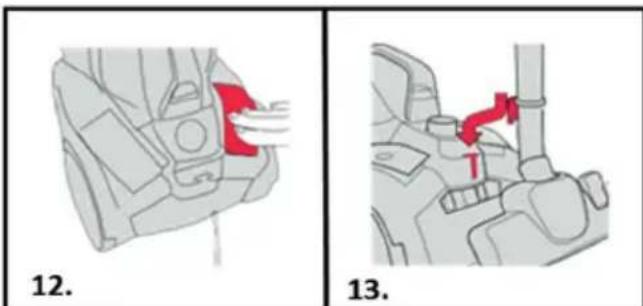
- Press the cord rewind button to retract the cord into the vacuum cleaner.
- Place the floorhead into the parking slot on the back of the vacuum cleaner for storage and carrying.
CAUTION: Make sure to hold the cord with your other hand to prevent injury when rewinding.
EMPTYING AND CLEANING THE DIRT CONTAINER
IMPORTANT: Always switch off and unplug the vacuum cleaner from the electrical socket before assembling, opening or emptying the dirt container, or before connection / disconnecting the attachments. Check the pre-motor filter every time you empty the dirt container and tap against a bin to remove dirt/debris if required. Do not use your vacuum cleaner without all of the filters in place.
The motor is equipped with a thermal cut-out. If for any reason the unit should overheat, the thermostat will automatically turn the unit off.

- Remove dirt container by pushing down the dirt container release button and lifting the dirt container.
- Hold dirt container over a bin. Pull the dirt release clip at the bottom of the container, the dirt release door will open allowing dirt/debris to fall out.
CLEANING THE PRE-MOTOR FILTER
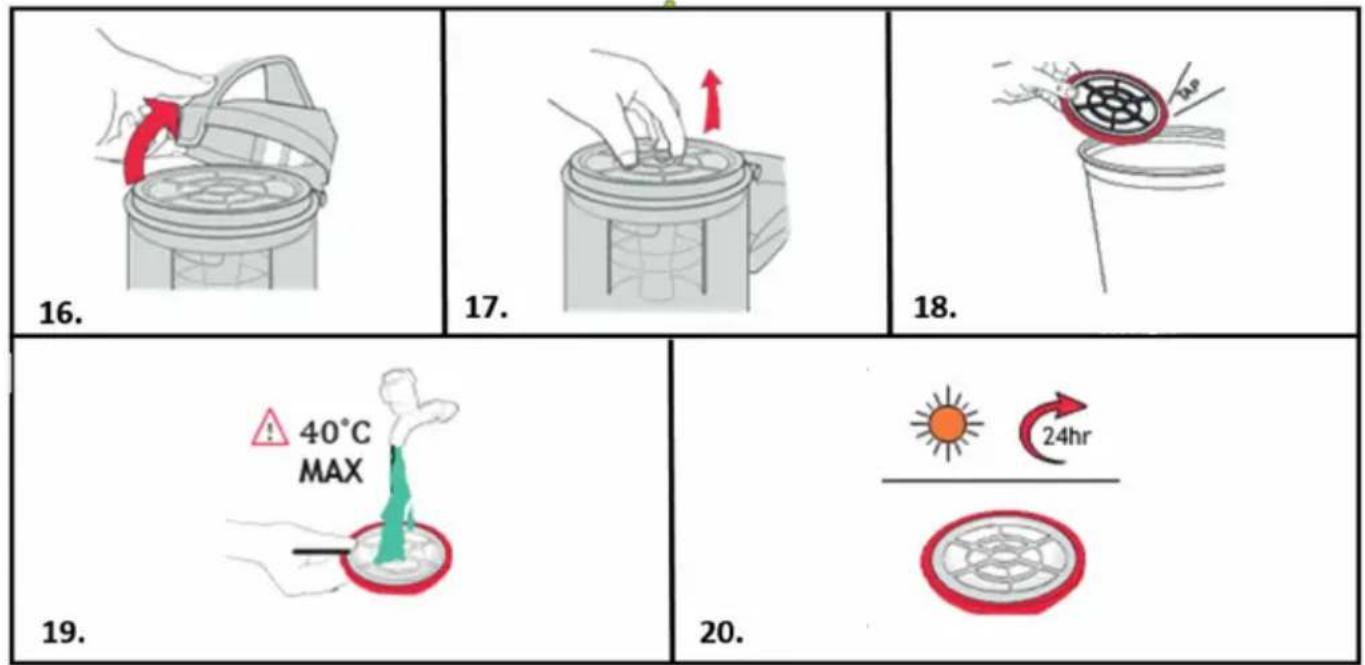
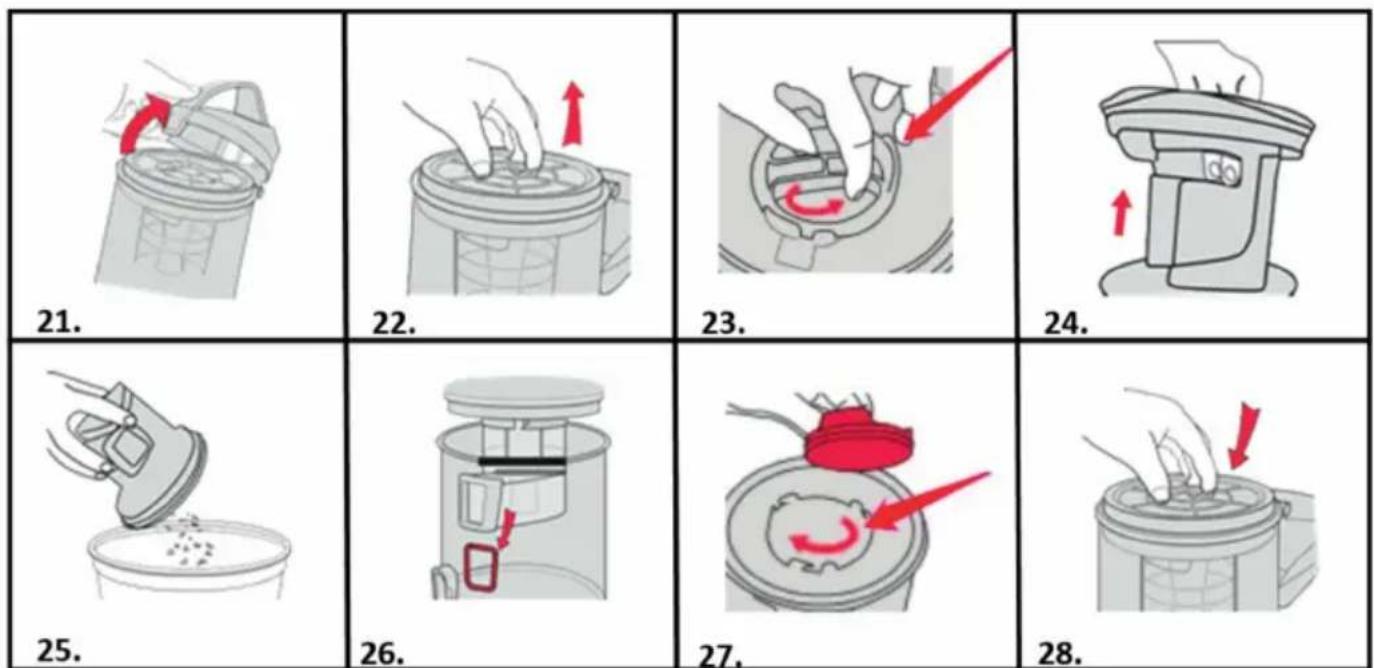
- Lift the dirt bin lid release clip.
- Lift the pre-motor filter and remove the dirt container.
- Tap the pre-motor filter and sponge against a bin to remove any dirt/debris.
- Separate the sponge and filter and rinse under water (Max 40^ ).
- Leave to dry for 24 hours or until fully dry before placing back in the machine.
CLEANING THE SEPARATOR
-
Lift the dirt bin lid release clip.
-
Lift the pre-motor filter and remove from the dirt container.
- Twist the separator cap anti-clockwise to unlock and remove.
- Lift and remove the separator from the dirt container.
- Tap the separator against a bin to remove any dirt/debris.
- Make sure the rectangular hole in the dirt container lines up with the rectangular hole on the separator.
- Replace the separator cap, twist clockwise to lock.
- Replace the pre-motor filter. Close dirt bin lid making sure it clicks and locks into place.
POST-MOTOR FILTER MAINTENANCE
IMPORTANT: The exhaust filter is designed to offer long life with no maintenance. The filter should be checked periodically and when heavily discolored it should be replaced. Please do not wash, scrub or brush the filter as this will damage the delicate filter media.
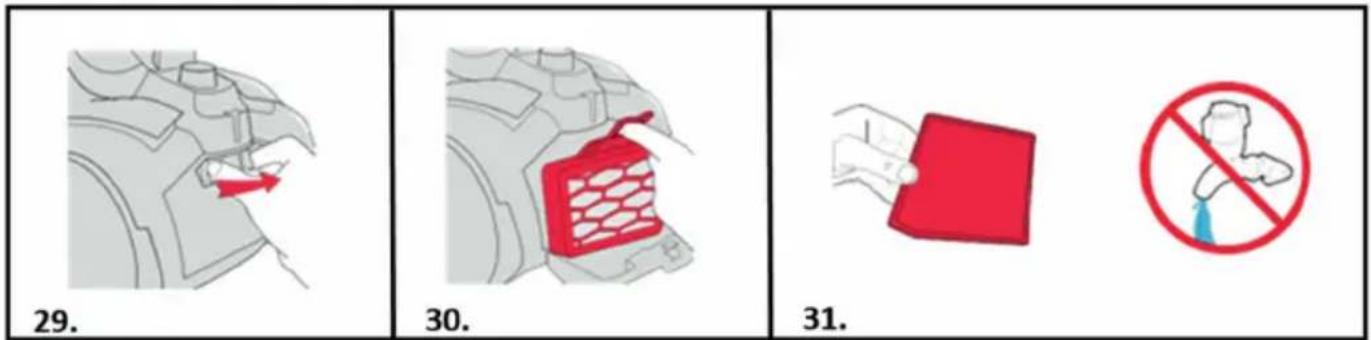
- Push the post-motor filter cover release clip to the right.
- Pull open the post-motor filter cover. Lift out the post-motor filter.
- Check the post-motor filter for discoloration. Do not wash the postmotor filter.
REMOVING BLOCKAGES FROM THE HOSE
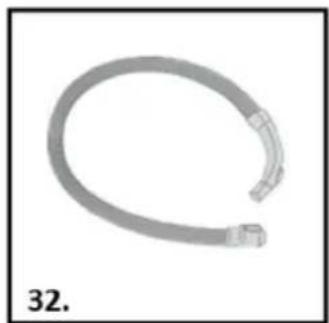
- Remove the hose from the vacuum cleaner and telescopic extension tube. Remove any blockage by inserting a wire coat hanger into the hose.
NOTE: To test for a blockage in the hose, drop a small ball of paper into the hose. The paper will drop through if the hose is clear.
TROUBLE SHOOTING
Should you have any problem with you cleaner, follow this simple check list before calling the agency customer service center.
A: Some accessories are missing
- Check the packaging content that is mentioned below the product specifications to be sure the parts included with the appliances.
B: Appliances have no power
- The plug is not connected (well) into the electrical socket.
- Check if the plug need to be replaced.
- The motor thermostat may have tripped. If this has happened, unplug the vacuum cleaner. Remove and empty the dirt container and check the hose for blockages. Clean the filter sand allow the vacuum cleaner to cool for approximately 1 hour (if you have washed the filters you will need to wait 24 hours for the filters to fully dry before putting them back into the vacuum cleaner).
C: Vacuum cleaner won't pick up dust
- The dirt container may not be correctly fitted, remove the dirt container from the vacuum cleaner and check it's assembled correctly, refit ensuring it's locked into place.
- The filter may be clogged, clean the filter.
- The dirt container may be blocked, empty the dirt container.
- There may be a blockage in the hose/tube. Disconnect from the vacuum cleaner and carefully remove any blockages.
- The separator is blocked. Check cleaning the separator.
- The separator is incorrectly fitted. Check cleaning the separator.
D: Dust is escaping from the vacuum cleaner
- The filters may be clogged, clean the filter.
PRODUCT SPECIFICATIONS
Power source type : Mains powered
Input voltage : 220 - 240 V AC 50/60 Hz
Technology : Single cyclone
Power plug : Type C (CEE 7/17)
Automatic cable rewind : Yes
Integrated handle : No
Power cord length : 6m
With dust bag or bagless : Bagless
Power: 700W
Material : ABS plastic
Brush type : Combi brush
Range:9m
Tube length : 86cm
Tube material : Metal
HEPA air filter : Hepa 12
Dust capacity : 2.71
Adjustable suction control : Yes
Noise level : 79dB
PACKAGING CONTENT
1x vacuum cleaner
1x 3-in1 tool
1x Parquet brush
THE ENVIRONMENT
The symbol on this appliance indicates that this appliance may not be treated as household waste. Instead it must be handed over to the applicable collection point for the recycling of electrical and electronic equipment. Disposal must be carried out in accordance with local environmental regulations for waste disposal. For more detailed information about treatment, recovery and recycling of this appliance, please contact your local city office, your household and waste disposal service or the shop where you purchased the appliance.

SPÉCIFICATIONS DU PRODUIT
HET APPARAAT IN ELKAAR ZETTEN
PRODUCT SPECIFICATIONS
1x 3-in-1 accessoire
F1x parketborstel
MILIEU
DÔLEŽITÉ BEZPEČNOSTNÉ POKNY
Tento spotrebič by sa mal používat' len na upratovanie v domácnosti, nepoužívajte ho na komerçné ani priemyselné účely. Pred uvedením spotrebiča do prevádzky sa uistite,Že ste tomuto námodu plne porozumeli.
UPOZORNENIE: NEBEZPECENSTVO URAZU! DOLEZITÉ: Nebezpecenstvo poškodenia spotrebica!
VAŽNE SIGURNOSNE UPUTE
TEXHnKA B3OpACHOCTNДЯDETeN

- IMPORTANT SAFETY INSTRUCTIONS
- WARNING: DANGER TO THE PERSON!
- IMPORTANT: Damage to the appliance!
- LOCATION
- MAINS LEAD
- CHILDREN
- PERSONAL SAFETY
- PRODUCT SAFETY
- Electrical requirements
- Product Description
- Features
- HOW TO INSTALL / OPERATE THE MACHINE
- Before you start
- ASSEMBLING YOUR MACHINE
- HOW TO USE
- USING YOUR ACCESSORIES
- STORAGE
- EMPTYING AND CLEANING THE DIRT CONTAINER
- CLEANING THE PRE-MOTOR FILTER
- CLEANING THE SEPARATOR
- POST-MOTOR FILTER MAINTENANCE
- REMOVING BLOCKAGES FROM THE HOSE
- TROUBLE SHOOTING
- A: Some accessories are missing
- B: Appliances have no power
- C: Vacuum cleaner won't pick up dust
- D: Dust is escaping from the vacuum cleaner
- PRODUCT SPECIFICATIONS
- PACKAGING CONTENT
- THE ENVIRONMENT
- SPÉCIFICATIONS DU PRODUIT
- HET APPARAAT IN ELKAAR ZETTEN
- MILIEU
- DÔLEŽITÉ BEZPEČNOSTNÉ POKNY
- UPOZORNENIE: NEBEZPECENSTVO URAZU! DOLEZITÉ: Nebezpecenstvo poškodenia spotrebica!
- VAŽNE SIGURNOSNE UPUTE
- TEXHnKA B3OpACHOCTNДЯDETeN
Brand : DIRT DEVIL
Model : DD2504
Category : Vacuum Cleaner