ManualGo.com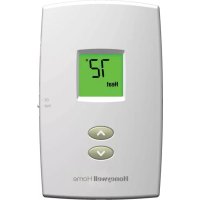
TH1100DV1000U - Thermostat HONEYWELL - Free user manual and instructions
Find the device manual for free TH1100DV1000U HONEYWELL in PDF.



Download the instructions for your Thermostat in PDF format for free! Find your manual TH1100DV1000U - HONEYWELL and take your electronic device back in hand. On this page are published all the documents necessary for the use of your device. TH1100DV1000U by HONEYWELL.
USER MANUAL TH1100DV1000U HONEYWELL
- FanRead before installing. Need Help? For assistance with this product please visit Honeywellhome.com/support ® U.S. Registered Trademark. Patents pending. Copyright © 2020 Resideo Technologies Inc. All rights reserved. CAUTION: EQUIPMENT DAMAGE HAZARD. To prevent possible compressor damage, do not operate cooling system when outdoor temperature is below 50°F (10°C). This manual covers the following models: TH1100DV: For 1 Heat systems TH1110DV: For 1 Heat/1 Cool systems TH1210DV: For 2 Heat/1 Cool heat pump systems (Pull thermostat from wallplate and turn over to find model number.)1 69-2798EFS—03 About your new thermostat Thermostat features p. 2
- Quick reference to controls p. 3
- Quick reference to display p. 4
- Operation Select system setting p. 5
- Select fan setting p. 6
- Adjust the temperature p. 7
- Compressor protection p. 8
- Appendices Battery replacement p. 9
- Customer assistance p. 10
- In case of difficulty p. 11
- Limited warranty Table of contents69-2798EFS—03 2 Your new Resideo thermostat has been designed to give you many years of reliable service and easy-to-use, push-button climate control. Features p. 13
- Backlit display is easy to read
- Displays ambient (measured) temperature at all times
- One-touch access to setpoint temperature
Off Cool Heat Quick reference to controls Up/Down buttons Press to adjust temperature. Fan Switch (see page 6) On: Fan runs continuously. Auto: Fan runs only when heating or cooling system is on. System switch (see page 5)
- Cool: Cooling system control.
- Off: All systems off.
- Heat: Heating system control.
- Em Heat: Emergency & Auxiliary Heat control. Compressor is locked out. (Select models only.)69-2798EFS—03 4
Quick reference to display screen Low battery warning (see page 9)Temperature The ambient (measured) temperature is normally displayed. To view the setpoint temperature, press the Up or Down button once. The setpoint temperature will appear for five seconds.System status Cool on: Cooling system is on. Heat on: Heating system is on. Aux On: Auxiliary heat is on. (Only for heat pumps with this capability [select models only].)When “Heat On” or “Cool On” is flashing, compressor protection is engaged (see page 8).Setpoint indicator Appears when the setpoint temperature is displayed5 69-2798EFS—03 M34675 Set Cool
Off Cool Heat Select the system setting The SYSTEM switch can be set to control your heating or cooling system, depending on the season.
- Cool: Cooling system control.
- Off: All systems are off.
- Heat: Heating system control.
- Em Heat: Emergency & Auxiliary Heat control. Compressor is locked out. (Select models only.) Set SYSTEM switch to control the heating or cooling system.
CAUTION: EQUIPMENT DAMAGE
HAZARD. To prevent possible compressor damage, do not operate cooling system when outdoor temperature is below 50°F (10°C).69-2798EFS—03 6 M34675 Set Cool
Off Cool Heat Select the fan setting Set the FAN switch to Auto or On. In “Auto” mode (the most commonly used setting), the fan runs only when the heating or cooling system is on. If set to “On,” the fan runs continuously. Set FAN switch to choose whether the fan runs continuously or only as needed.7 69-2798EFS—03 M34675 Set Cool
Off Cool Heat Adjust the temperature Press s or t to adjust the temperature. Note: Make sure the thermostat is set to the system you want to control (heat or cool).69-2798EFS—03 8Set Cool
Built-in compressor protection This feature helps prevent damage to the com- pressor in your air conditioning or heat pump system. Damage can occur if the compressor is restarted too soon after shutdown. This fea- ture forces the compressor to wait 5 minutes before restarting. During the wait time, the display will flash the message Cool On (or Heat On if you have a heat pump model). When the safe wait time has elapsed, the message stops flashing and the compressor turns on. Message flashes until safe restart time has elapsed.9 69-2798EFS—03 M34673 M34676 Set Cool
Battery replacement Install two fresh AAA batter- ies when Lo Batt flashes on the screen. Lo Batt appears for 60 days before the batter- ies are depleted. Replace batteries once a year, or when you will be away for more than a month. The settings are stored in non-volatile (permanent) memory and are thus pre- served when the thermostat is without batteries. Pull at bottom to remove thermostat from wallplate. Turn thermostat over, insert fresh AAA alka- line batteries, then reinstall thermostat.69-2798EFS—03 10 M34673 M34676 Set Cool
Customer assistance For assistance with this product, please visit Honeywellhome.com/support. Turn thermostat over to find model number and date code. Pull at bottom to remove thermostat from wallplate. To save time, please note your model number and date code before calling.11 69-2798EFS—03 If you have difficulty with your thermostat, please try the following sugges- tions. Most problems can be corrected quickly and easily. Display is blank
- Check circuit breaker and reset if necessary.
- Make sure power switch at heating & cooling system is on.
- Make sure furnace door is closed securely.
- Make sure fresh AAA alkaline batteries are correctly installed (see page 9). Heating or cooling system does not respond
- Set system switch to Heat (see page 5). Make sure the temperature is set higher than the Inside temperature.
- Set system switch to Cool (see page 5). Make sure the temperature is set lower than the Inside temperature.
- Wait 5 minutes for the system to respond. In case of difficulty69-2798EFS—03 12 Temperature settings do not change Make sure heating and cooling temperatures are set to acceptable ranges:
- Heat: 40° to 90°F (4.5° to 32°C).
- Cool: 50° to 99°F (10° to 37°C). “Heat On” or “Cool On” is flashing
- Compressor protection feature is engaged. Wait 5 minutes for the system to restart safely, without damage to the compressor (see page 8). “Heat On” is not displayed
- Set the System switch to Heat, and set the temperature level above the current room temperature (see page 5). “Cool On” is not displayed