SBH 5.0 A1 - Headphones SILVERCREST - Free user manual and instructions
Find the device manual for free SBH 5.0 A1 SILVERCREST in PDF.


| Product type | Bluetooth headset earpiece |
| Brand | SilverCrest |
| Model | SBH 5.0 A1 |
| Dimensions (L x H x D) | Approx. 50 x 22 x 18 mm (without ear hook) |
| Weight | Approx. 8 g (with ear hook) |
| Operating voltage | 5 V |
| Power consumption | 300 mA max via USB |
| Battery type | Lithium polymer 85 mAh |
| Talk time | Up to 6 hours |
| Standby time | Up to 140 hours |
| Bluetooth version | Bluetooth® V5.0 |
| Bluetooth range | Up to 10 meters |
| Supported profiles | HSP, HFP, A2DP, AVRCP |
| Transmission power | 10 dBm max |
| Transmission frequency | 2.402 - 2.480 GHz |
| Operating temperature | +5 °C to +35 °C |
| Storage temperature | -20 °C to +45 °C |
| Maximum relative humidity | 85 % |
| Charging type | Micro USB |
| Available languages | English, French, Dutch, German |
| Included accessories | Ear hook (x2), earpads (3 sizes), USB cable, user manual |
| Package contents | Earpiece, 2 ear hooks (one installed), 3 earpads (small, medium, large), USB cable, manual |
| Intended use | Hands-free calls, music listening |
Frequently Asked Questions - SBH 5.0 A1 SILVERCREST
User questions about SBH 5.0 A1 SILVERCREST
0 question about this device. Answer the ones you know or ask your own.
Ask a new question about this device
Download the instructions for your Headphones in PDF format for free! Find your manual SBH 5.0 A1 - SILVERCREST and take your electronic device back in hand. On this page are published all the documents necessary for the use of your device. SBH 5.0 A1 by SILVERCREST.
USER MANUAL SBH 5.0 A1 SILVERCREST
Bluetooth® Headset SBH 5.0 A1
TARGA GMBH
Coessterweg 45
59494 SOEST
GERMANY
Last Information Update
Operating instructions and safety instructions
FR BE
- Trademarks 5
- Intended use 5
- Package contents 6
- Technical specifications 8
- Safety instructions 9
- Overview 17
- Getting started 18
7.1 Charging the battery 18
7.2 Powering the headset on/off 19
7.3 Pairing the headset with a mobile phone 20
7.4 Changing the language 22
7.5 Using the headset 23
7.6 Replacing the ear pad 24
7.7 Accepting / ending calls 24
7.8 Rejecting a call 25
7.9 Redialling 25
7.10 Adjusting the volume 25
7.11 Playing music 26
- Cleaning 27
- Storage when not in use 27
- Environmental regulations and disposal information 28
- Conformity notes 29
- Troubleshooting 30
- Warranty and service information 31
Congratulations!
By purchasing the SilverCrest SBH 5.0 A1 Bluetooth® headset, hereinafter referred to as the headset, you have opted for a quality product.
Before first using it, familiarise yourself with the way the headset works and read these operating instructions through carefully. Be careful to follow the safety instructions and only use the headset as described in the operating instructions and for the applications given.
Keep these operating instructions in a safe place. If you pass the headset on to someone else, make sure to give them all the relevant documents with it. The User's Manual forms part of this product.
1. Trademarks
The Bluetooth® wording and its logo are registered trademarks of Bluetooth SIG, Inc. (Special Interest Group). TARGA GmbH is using these marks under license. The SilverCrest trademark and the SilverCrest brand are the property of their respective owners.
USB is a registered trademark.
Other names and products may be the trademarks or registered trademarks of their respective owners.
2. Intended use
This headset is an information technology device which allows you to make telephone calls using a compatible mobile phone without having to handle it. It is operated using a multi-function button. The adjustable ear hook allows you to wear the headset comfortably on the left or right ear. The headset may only be used for private
purposes, not for industrial or commercial ones. The headset is also not suitable for use in tropical climates. The manufacturer is not liable for any damage or interference caused by unauthorised modifications to the headset. Observe the regulations and laws in the country of use.
3. Package contents
Remove the headset and all accessories from the packaging. Remove all packaging material and check that all parts are complete and undamaged. If you find anything missing or damaged, please contact the manufacturer.
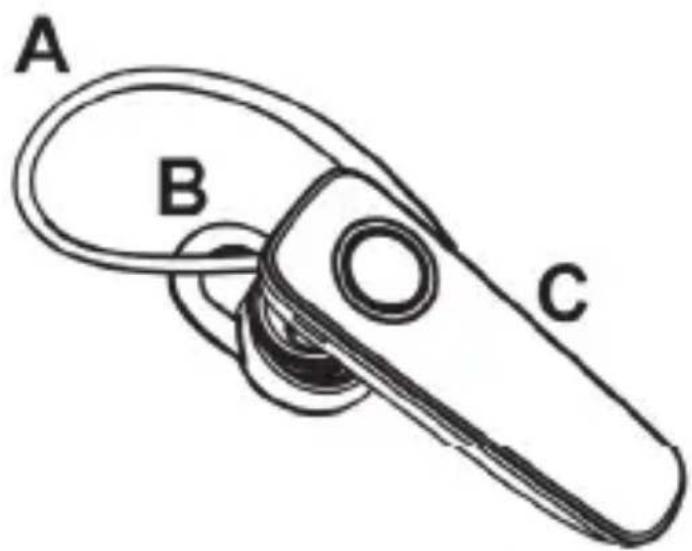

A Ear hook (1 x fitted, 1 x replacement)
B Ear pad - medium (fitted)
C SilverCrest Bluetooth Headset SBH 5.0 A1
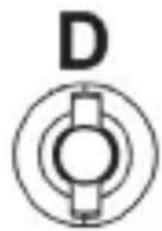
D Ear pad - small
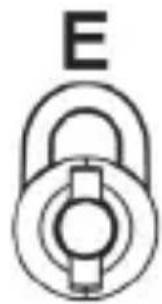
E Ear pad - large
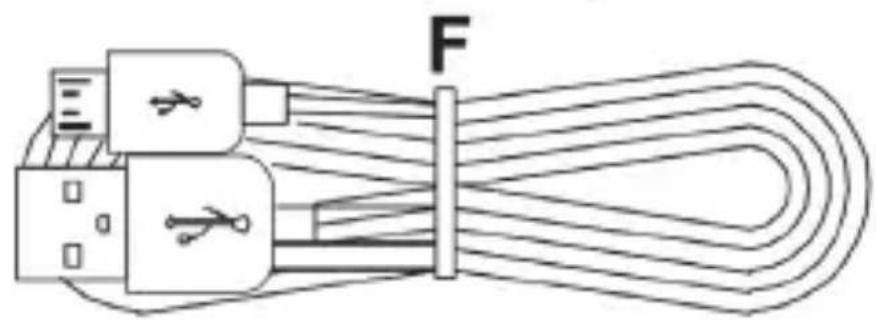
F USB charger cable
G These operating instructions (line-art illustration)
- Technical specifications
The technical data and design may be changed without prior notice.
5. Safety instructions
Before using this headset for the first time, please read the following instructions carefully and take note of the safety warnings, even if you are familiar with the use of electronic devices. Keep this manual in a safe place for future reference. If you sell the headset or pass it on, always include these instructions.
Explanation of the symbols and signal words used in these instructions

DANGER! This symbol and the word "Danger" alert you to a potentially dangerous situation. Ignoring it can lead to severe injury or even death.

WARNING! This symbol and the word "Warning" denote important information required for the safe operation of the product and for the safety of its users.

Direct current

DANGER! RF interface
Turn the headset off when on board an aircraft, in a hospital, in an operating theatre or in the vicinity of electronic medical equipment. The RF signals may interfere with the functionality of sensitive devices. Keep the headset at least 20 cm (8 inches) away from pacemakers or implanted defibrillators, as the RF signals could interfere with their functionality. The RF signals transmitted can interfere with hearing aids. If wireless mode is switched on, do not place the headset near flammable gases or in a potentially explosive area (e.g. a
paint shop), as the RF signals transmitted could cause explosions or fire. The range of the radio frequency signals depends on environmental conditions. If data is transmitted via a wireless connection, it can also be received by unauthorised parties. TARGA GmbH is not liable for any interference caused to RF or TV signals derived from unauthorised modification to this device. Furthermore, TARGA does not assume any liability if cables or devices are replaced with those that have not been specifically approved by TARGA GmbH. The user is solely responsible and liable for remedying any faults caused by such unauthorised modification of this device or for replacing the device.

DANGER! Risk of explosion!
Do not throw the headset into a fire as the built-in battery could explode.

DANGER! Risk of fire!
Do not cover the headset while it is charging. Do not charge the headset inside drawers, cupboards or containers in which the air cannot circulate.

WARNING! Please heed the following:
- Do not expose the headset to direct heat sources (e.g. radiators).
- The temperature inside a parked vehicle can exceed +45^ C in the sun. Do not store delicate electronic devices in your vehicle.
- Do not expose the headset to direct sunlight or bright artificial light.
- Avoid contact with spraying or dripping water or aggressive fluids and never operate the headset near water. In particular, never submerge the headset, do
not place any items containing liquids, such as drinks or vases, on or near the headset.
- Do not place naked flames (e.g. burning candles) on or near the headset.
- Do not introduce foreign bodies into the headset.
- Never place the headset right next to magnetic fields (e.g. speakers).
- Do not subject the headset to major temperature fluctuations as this can cause condensation and short-circuiting. If the headset has been exposed to strong temperature fluctuations, wait for it to reach the ambient temperature before switching it on (about 2 hours).
- Do not expose the headset to excessive shocks and vibrations.
- Lay any connected cables so they do not present a trip hazard. There is a danger of injury.
- Always disconnect cables using the plug and not by pulling on the cable itself. Do not place furniture or other heavy objects on the cables and make sure that the cables are not kinked, especially at the plug and
sockets. Never tie knots in a cable and do not tie them to other cables.

DANGER! Personal safety
This headset may be used by children of 8 years or over or by persons with physical, sensory or mental impairments or those with no knowledge or experience providing they are supervised or they have been given instructions on the proper use of the headset and they understand the associated risks. Children must not play with the headset. The product must not be cleaned or maintained by unsupervised children. Keep the packaging materials out of the reach of children.

Danger of suffocation!

WARNING! Maintenance / Repairs
Repairs are required if this headset has been damaged in any way, for example if the device housing is damaged, if liquids or objects have penetrated the device or if the product has been exposed to rain or moisture. Repairs are also necessary if the product is not working properly or has been dropped. If you notice any smoke, unusual noises or strange smells, power the headset off immediately. Disconnect any charging cables, if connected. If this occurs, the headset should not be used before it has been inspected by authorised service personnel. All repairs must be carried out by qualified service personnel. Do not attempt to open the housing of the headset, this will void your warranty.
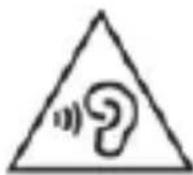
Be careful when using the headset. Listening to high-volume audio for long periods can damage your hearing. Before using the headset, set the volume to the minimum.
6. Overview
These operating instructions have a fold-out cover. Foldout the cover so you can refer to the relevant controls at any time.
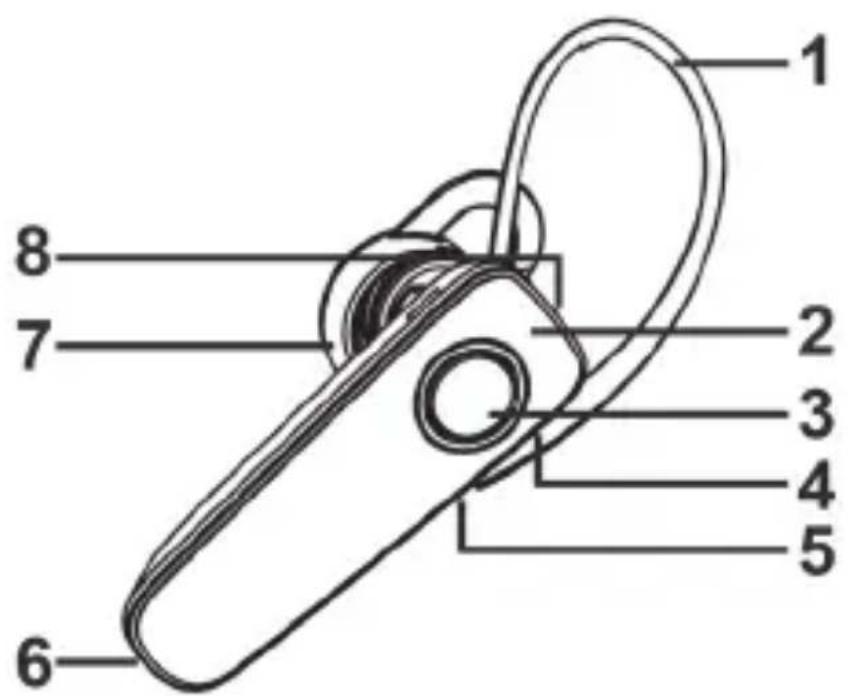
1 Ear hook 5 Increase volume
2 LED 6 Microphone
3 Multi-function button 7 Earpiece
4 Reduce volume 8 Micro USB charging port
7. Getting started
7.1 Charging the battery
Before the first use or when the built-in battery is empty, charge it up as follows:
- Connect the USB charging cable (F) to the Micro USB charging port (8) and to a free USB port on your computer (which must be switched on) or a USB power adapter (not supplied).
- The LED (2) lights orange while the battery is charging. When the battery is fully charged, the LED (2) goes green.
Do not cover the headset during the charging process, as this could cause it to overheat.
A flashing orange LED (2) indicates that the battery is low.
7.2 Powering the headset on/off
Power the headset on by pressing and holding the multifunction button (3) for about 2 seconds.
A sequence of beeps sounds, and the headset says:
Powering on
The LED (2) flashes white to indicate that the headset is scanning for the last Bluetooth® device connected.
If a known device is found, the headset says:
Connected
If the headset has not yet been paired with a mobile phone, this is the first thing to do. The next chapter explains how to pair your mobile phone.
Press and hold the multi-function button (3) for about 3 seconds to power the headset off. The headset says:
Powering off
If an existing connection is also disconnected during powering off, the headset also says: Disconnected
The LED (2) goes orange briefly when the headset is powered off.
7.3 Pairing the headset with a mobile phone
Proceed as follows to pair the headset with your mobile phone:
Power the headset off.
- Press and hold the multi-function button (3) for approx. 6 seconds to start pairing mode. Two short beeps sound.
- The LED (2) flashes quickly in white. The headset is now in scanning mode for about 5 minutes. In this time, you can pair a compatible mobile phone to the headset using the Bluetooth® function. To do this, start scanning for Bluetooth® devices.
- Now pair your mobile phone to the headset via Bluetooth®. Follow the instructions on the mobile phone. From the list of devices found, select "SBH 5.C
A1" and establish the connection. Once the connection has been established, there are two short beeps and the headset says: Connected
- If you are prompted for a PIN, enter "0000".
While a device is connected, the LED (2) flashes white briefly once about every 10 seconds.
If the connection to the mobile phone is lost, the LED (2) flashes white once about every 5 seconds.
Bring the mobile phone back into the range of the headset or power it on in order to automatically re-establish the connection to the headset. In some mobile models, you will need to initiate the re-connection from your phone. Only one mobile phone can be actively connected to the headset at the same time.
If you wish to connect another mobile phone to the headset, repeat the pairing process as described above.
7.4 Changing the language
You can change the language of things the headset says. Proceed as follows:
- Power the headset off.
- Press and hold the multi-function button (3) for approx. 6 seconds to start pairing mode.
- Press the Increase volume button (5) to toggle through the languages.
You can choose between the following languages:
| 1 | English |
| 2 | French |
| 3 | Dutch |
| 4 | German |
Please note that languages are selected in a cyclical menu and can only be changed using the Increase volume button (5). You cannot go backwards by pressing the Reduce volume button (4).
- The headset says the language selected.
- Power the headset off.
• You can now use the headset with the language you selected.
7.5 Using the headset
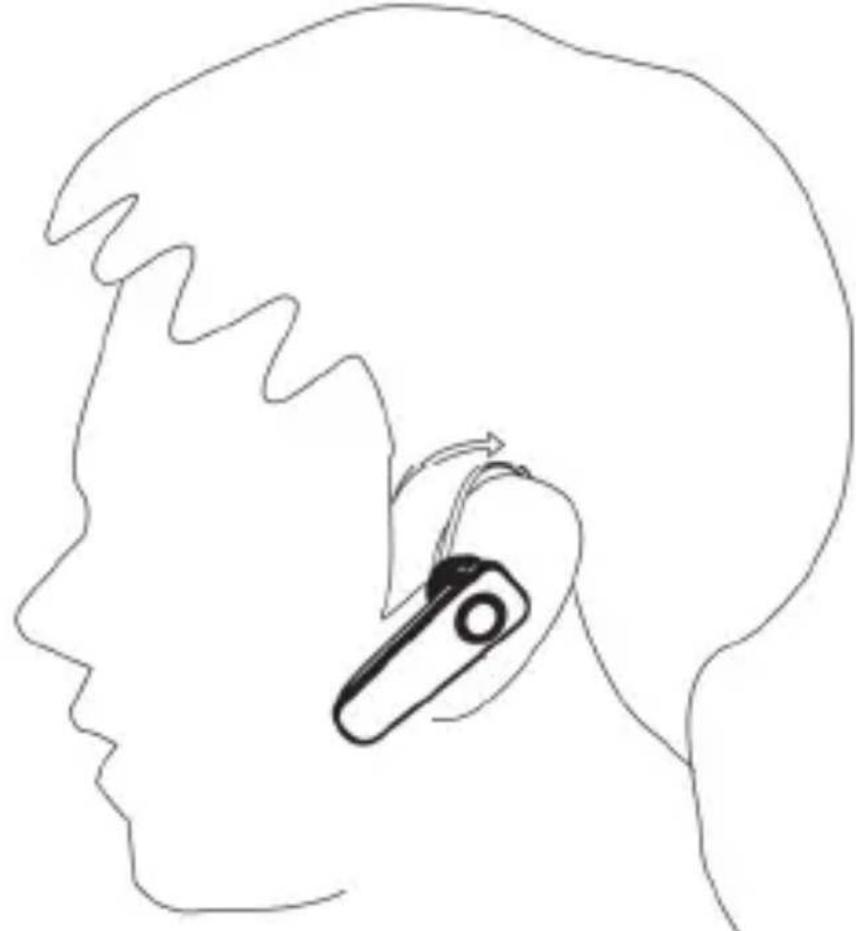
You can use the headset comfortably on either your left or right ear using the adjustable ear hook (A).
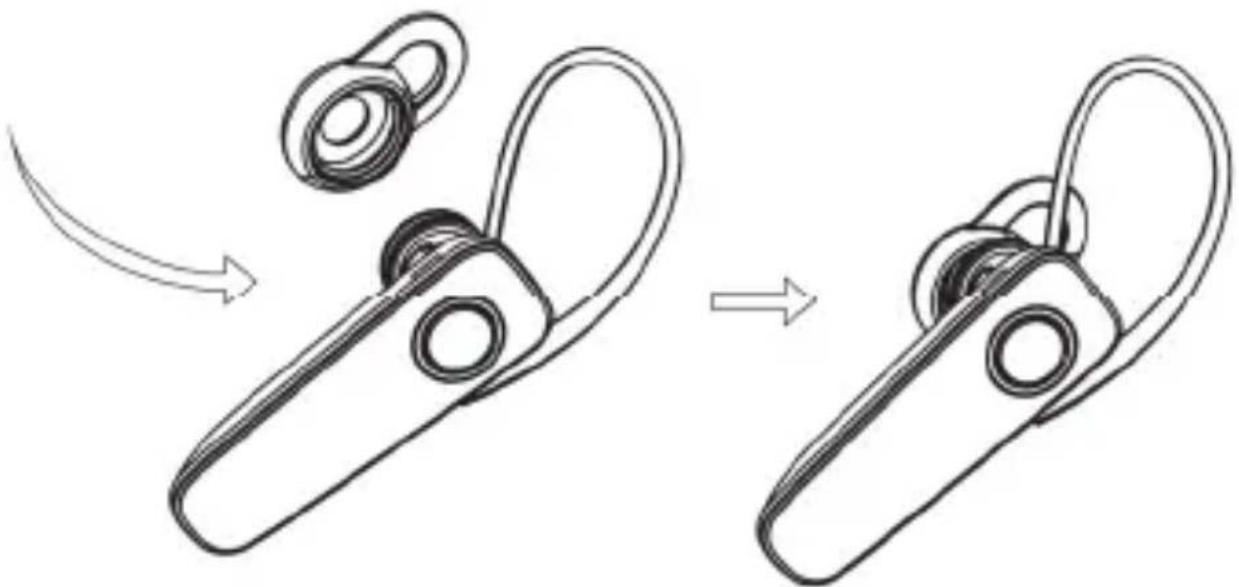
7.6 Replacing the ear pad
The ear pad - medium (B) is fitted to the headset by default. If the ear pad does not fit correctly, you can replace it. Proceed as follows:
- Carefully pull the ear pad off the earpiece (7) using your fingers.
- Select the ear pad you want, either small (D) or large (E) and push it onto the earpiece (7) until it slips into the recess.
7.7 Accepting / ending calls
Press the multi-function button (3) briefly to accept a call. The headset signals an incoming call even when your mobile phone is on silent. To end a telephone call, press
the multi-function button (3) again briefly. There is a short beep as confirmation.
7.8 Rejecting a call
In order to reject an incoming call, press the multi-function button (3) for approx. two seconds until a beep sounds. Once you hear the beep, release the multi-function button (3), as otherwise the headset will power off.
7.9 Redialling
Press the multi-function button (3) twice to redial the last number dialled by your mobile phone.
7.10 Adjusting the volume
You can adjust the volume of the headset using the Reduce volume (4) and Increase volume (5) buttons. Simply press the relevant button briefly. You can also adjust the setting from your mobile phone. Please read the operating instructions of your mobile phone.
7.11 Playing music
While you are playing music, you can press the buttons as follows:
| Button / Action Function | |
| Quick press of multi-function button (3) | Play / Pause |
| Long press of Reduce volume button (4) | Skip back one track |
| Long press of Increase volume button (5) | Skip forward one track |
8. Cleaning
To clean the headset, use a slightly damp cloth. Never use any solvents or cleaners that may damage the plastic. Make sure that no liquid gets into the housing.
Remove the ear pad to clean it. Clean the ear pad under running water. Then dry the ear pad carefully. Once the ear pad is completely dry, put it back on the earpiece (7).
9. Storage when not in use
If you do not use the headset for an extended period, you should recharge the battery at regular intervals. This preserves the performance of the battery. Keep the headset and its accessories clean and in a clean, dry, cool place.
10. Environmental regulations and disposal information
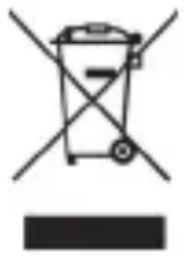
The product bears the symbol of a rubbish bin crossed out. This means it is subject to European Directive 2012/19/EU. All electrical and electronic devices must be disposed of
separately from household waste at official disposal centres. For further information, contact your local government, disposal bodies or the shop where you bought the device.
The built-in rechargeable battery cannot be removed for disposal.

Dispose of all packaging in an environmentally friendly manner. Cardboard packaging can be taken to paper recycling centres or public collection points for recycling. Any film or plastic contained in the packaging should be taken to your public collection points for disposal.

Please note the markings on the packaging material when disposing of it, it is labelled with abbreviations (a) and numbers (b), the meanings of which are as follows:
1-7: plastic / 20-22: paper and cardboard / 80-98: composite materials.
11. Conformity notes
CE This device complies with the basic and other relevant requirements of RE Directive 2014/53/EU and the RoHs Directive 2011/65/EU.
The complete EU Declaration of Conformity is available for download from this link:
www.targa.de/downloads/conformity/313582.pdf
12. Troubleshooting
The headset does not power on.
- Recharge the battery.
The headset will not charge
- If you are using a charger (e.g. USB power bank) with automatic charging shut-off, the headset cannot be charged because the charge current is so low. Charge the headset from a USB port on your computer (which must be switched on) or a USB power adapter.
No audio over Bluetooth® connection
- Power the headset on.
- Try to pair the headset with your mobile phone again.
No Bluetooth® connection is established
-
Check whether Bluetooth® functionality is enabled on the mobile phone.
-
The distance between the headset and the mobile telephone is too great, move them closer.
Not all of the functions described are working
- All the functions described depend on the functionality of the mobile telephone used.
13. Warranty and service information
Warranty of TARGA GmbH
This device is sold with three years warr date of purchase. Please keep the original receipt in a safe place as proof of purchase. Before using your product for the first time, please read the enclosed documentation. Should any problems arise which cannot be solved in this way, please call our hotline. Please have the article number and, if available, the serial number to hand for all enquiries. If it is not possible to solve the problem on the phone, our hotline support staff will initiate further servicing procedures depending on the
fault. Within the warranty period the product will be repaired or replaced free of charge as we deem appropriate. No new warranty period commences if the product is repaired or replaced. Consumables such as batteries, rechargeable batteries and lamps are not covered by the warranty.
Your statutory rights towards the seller are not affected or restricted by this warranty.
Service

Phone: 0800 404 7657
E-Mail: targa@lidl.co.uk

Phone: 1890 930 034
E-Mail: targa@lidl.ie

Phone: 800 62230
E-Mail: targa@lidl.com.mt

Phone: 8009 4409
E-Mail: targa@lidl.com.cy
IAN: 313582

Manufacturer
TARGA GmbH
Coesterweg 45
DE-59494 Soest
GERMANY
Table des matieres
www.targa.de/downloads/conformity/313582.pdf
12. Problemen oplossen




- Bluetooth® Headset SBH 5.0 A1
- TARGA GMBH
- Congratulations!
- Trademarks
- Intended use
- Package contents
- Safety instructions
- Explanation of the symbols and signal words used in these instructions
- DANGER! RF interface
- DANGER! Risk of explosion!
- DANGER! Risk of fire!
- WARNING! Please heed the following:
- DANGER! Personal safety
- Danger of suffocation!
- WARNING! Maintenance / Repairs
- Overview
- Getting started
- Charging the battery
- Powering the headset on/off
- Powering on
- Connected
- Powering off
- Pairing the headset with a mobile phone
- Changing the language
- Using the headset
- Replacing the ear pad
- Accepting / ending calls
- Rejecting a call
- Redialling
- Adjusting the volume
- Playing music
- Cleaning
- Storage when not in use
- Environmental regulations and disposal information
- The built-in rechargeable battery cannot be removed for disposal.
- Conformity notes
- Troubleshooting
- The headset does not power on.
- The headset will not charge
- No audio over Bluetooth® connection
- No Bluetooth® connection is established
- Not all of the functions described are working
- Warranty and service information
- Warranty of TARGA GmbH
- Service
- IAN: 313582
- Manufacturer
- Table des matieres
- Problemen oplossen
Brand : SILVERCREST
Model : SBH 5.0 A1
Category : Headphones