
SK-110 - Headphones SILVERCREST - Free user manual and instructions
Find the device manual for free SK-110 SILVERCREST in PDF.


| Type | Over-ear, closed-back |
| Connectivity | Wired, 3.5 mm jack |
| Driver diameter | 40 mm |
| Impedance | 32 ohms |
| Frequency response | 20 Hz - 20 kHz |
| Sensitivity | 98 dB |
| Cable length | 1.2 m |
| Plug type | 3.5 mm gold-plated, straight |
| Weight | 200 g |
| Dimensions (HxWxD) | 200 x 150 x 80 mm |
| Materials | Plastic, faux leather ear pads, metal headband core |
| Controls | In-line volume control and microphone |
| Included accessories | 3.5 mm to 6.3 mm adapter, user manual |
| Color | Black |
| Warranty | 2 years limited |
| Cleaning | Wipe with a dry cloth, avoid liquids |
| Safety | Do not expose to moisture or extreme temperatures |
Frequently Asked Questions - SK-110 SILVERCREST
User questions about SK-110 SILVERCREST
0 question about this device. Answer the ones you know or ask your own.
Ask a new question about this device
Download the instructions for your Headphones in PDF format for free! Find your manual SK-110 - SILVERCREST and take your electronic device back in hand. On this page are published all the documents necessary for the use of your device. SK-110 by SILVERCREST.
USER MANUAL SK-110 SILVERCREST
GB In-Ear Headphones
MT User manual and service information

natural_image
Black and white photo of a Silver Crest earband device against a gradient blue background (no text or symbols on the device itself)SK110
Auriculares para deporte SK-110
natural_image
Black and white photo of an earless earbuds with attached cable, plus four small earbuds (no text or symbols visible)natural_image
Symbol of a trash bin with crossed lines and a blank rectangular base (no text or numbers)natural_image
Close-up grayscale illustration of a ear with a black earband and a metallic ring (no text or symbols)Sports Headset SK-110
natural_image
Black and white photo of an earless earbuds with attached cable, plus four small black buttons arranged nearby (no text or symbols visible)natural_image
Symbol of a trash bin with crossed lines and a blank rectangular base (no text or numbers)natural_image
Close-up grayscale illustration of a ear with a black earband and a white ear cap (no text or symbols visible)natural_image
Black and white photo of an earless earbuds with attached cable, plus four small black buttons below (no text or symbols visible)natural_image
Symbol of a trash bin with crossed lines and a blank rectangular base (no text or numbers)natural_image
Close-up grayscale image of a ear with a black earband and a white ear cap (no text or symbols visible)Ligar os Auscultadores
Sports Headset SK-110
User's Manual and Service Information
Contents
Contents of the Package ....21
Important Safety Notice 22
Operating Environment 22
Maintenance and Care....22
Children 23
Intended Use....23
Danger Through Noise Disturbance....23
Disposal of Old Devices....24
Introduction....24
Use....24
Ear Cushion Pads....24
Putting the Earphones on....25
Connecting....25
Appendix 25
Technical Specifications....25
Details of Guarantee 26
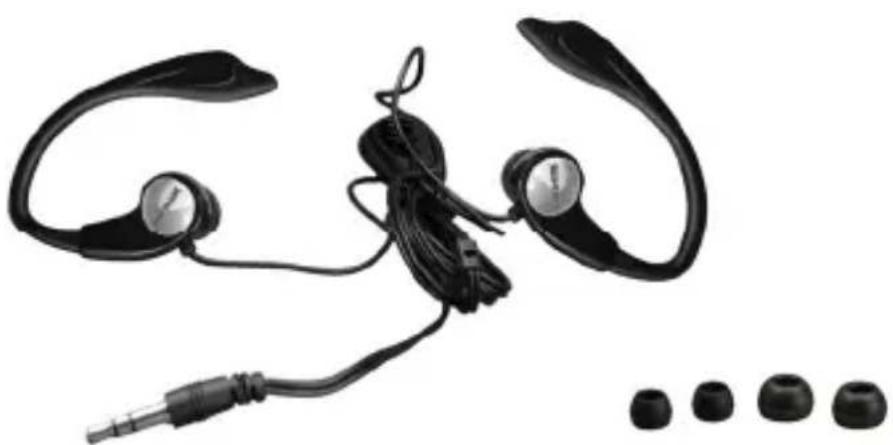
Contents of the Package
natural_image
Black-and-white photo of an earless ear with earbuds, cord, and connector (no text or symbols visible)- Earphones SK-110 with connection cable and attached medium-size ear cushion pads
■ 2 small ear cushion pads
■ 2 large ear cushion pads
Important Safety Notice
Before you use this device for the first time, please read the following notes in this manual and heed all warnings, even if you are familiar with handling electronic devices. Keep this manual safe for future reference. If you sell the device or pass it on, it is essential you hand over this manual also.
Operating Environment
The device is not for use in environments with a high temperature or humidity (e.g. bathrooms), and must be kept free of dust. Operating temperature and operating humidity: 5°C to 35°, max. 85% RH.
Always make sure that:
- no direct heat sources (e.g. heating) can affect the device;
- no direct sunlight or bright artificial light reaches the device;
- contact with sprayed and dripping water and abrasive liquids must be avoided and the device should never be operated near water. It must especially never be immersed (do not place any recipients containing liquids such as beverages, vases, etc. onto or next to the device);
- no fire sources (e.g. burning candles) are placed on or near the device;
■ do not introduce any foreign bodies into the device
Maintenance and Care
Servicing is required when this device has been damaged in any way, for example, when the device housing is damaged, when liquids or objects have entered the device or when the product has been exposed to rain or moisture. Servicing is also necessary when the product does not perform normally or when it has been dropped. If you notice any smoke, unusual noise or strange smells, the device should not be used further and should be inspected by authorized service personnel. Please contact qualified personnel when servicing is needed. Only use a clean, dry cloth for cleaning. Never use any corrosive liquids.
Children
Electrical appliances do not belong in the hands of children! Do not allow children to use electrical devices when not under supervision. Children may not comprehend the presence of potential risks. Small parts can represent choking hazards. Keep the packaging away from children too as there is danger of suffocation.
Intended Use
This is a consumer electronics device. It may only be used for private use, not industrial or commercial purposes. Furthermore, the device may not be used in tropical climates. Only connection cables and external devices may be used that comply with safety standards and the electromagnetic compatibility and shielding quality of this device. This device fulfils all that relates to CE Conformity, relevant norms and standards. Any modifications to the equipment other than recommended changes by the manufacturer may result in these directives no longer being met. Only use the accessories recommended by the manufacturer. If you are not using the device within the Republic of Germany, you must observe the regulations and laws in the country of use.
Danger Through Noise Disturbance

Listening at high volume can harm the user's auditory system.
- Using the earphones at high sound volume can damage your hearing and cause nuisance to your surroundings.
■ Under dangerous circumstances (for example when driving a vehicle or when working with machines) the sound may distract your attention or prevent you from being aware of what is happening around you. - This headset fulfils all requirement of the Directive EN 50332.
Disposal of Old Devices

natural_image
Symbol of a trash bin with crossed lines and a blank rectangular base (no text or numbers)If the product is labelled with a crossed-out waste bin, it is subject to the European Guideline 2002/96/EC. All electric and electronic devices must be disposed of separately from household waste at established bodies. With the proper disposal of old devices you avoid damage to the environment and your personal health. For further information about proper disposal, contact your local government, disposal bodies or the shop where you bought the device.
Introduction
Thank you for purchasing these SilverCrest sports headphones SK-110. These sport headphones offer a high-quality stereo sound.
Secure and optimum fitting to your ear canals is guaranteed by the supplied ear cushion pads in different sizes. The ear cushion pads can be easily cleaned with running water.
The earphones use built-in Neodym magnets. These will improve the bass sound and sensitivity.
Use
Ear Cushion Pads
The factory default configuration is with the medium-size ear cushion pads attached. Depending on the size of your external ear you may use a different ear cushion size.
- Use your fingers to carefully pull on the ear cushions to release them from the earphones. Do not use any sharp objects, as this will damage the cushion pads.
- Prepare a pair of ear cushion pads of a different size. Push the pad straight down onto the earphones until they fit into the slot on the earphones. Normally you can hear a slight 'click' sound.
- It is recommended that you use the same size ear cushion pads for both ears. Repeat the procedure with the other ear cushion pad.
Putting the Earphones on
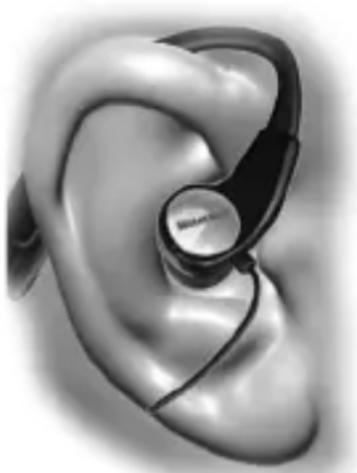
- Hold the first earphone in front of your face. The open curved side of the earpiece should face towards you with the ear cushion pads to the inside.
- Put the earpiece of the earphones behind your external ear and apply slight pressure to place the ear cushion pad into your ear (see figure).
- Repeat the procedure for the second earphone.
natural_image
Close-up grayscale illustration of a ear with a black earband and a small circular device on the inner ear (no text or symbols visible)Connecting
The sports headphones feature a gold-covered 3.5 mm stereo jack-type plug. Most consumer electronics devices present a corresponding jack-type receptacle. If your audio device features a different headphone connector, you can use a suitable adapter (not supplied). For more information, consult the User's Manual of your audio device.
Appendix
Technical Specifications
| Model | Sports Headset SK-110 |
| Frequency Response | 20 Hz - 18 kHz |
| Impedance 32 Ohms | |
| Acoustic noise level at 1 KHz | 87 dB (1 kHz / 1 Vrms) |
| THD at 1 KHz < 1 % | |
| Nominal output voltage 140 mV ±20% | |
| Conversion technique dynamic | |
| Weight approx. 17 g | |
| Cable length 1.2 m | |
Details of Guarantee
SILVERCREST®

United
36 month warranty from date of purchase
Important warranty information
Dear Customer,
Thank you for purchasing a SILVERCREST product.
Please carefully read through the enclosed documentation or online help before putting your SILVERCREST product into service. If you have a problem, which can't be solved in this way, please contact our hotline.
If the problem cannot be solved over the phone, you will be given a reference number (RMA), which you should enclose together with a copy of the proof of purchase. After you have packaged the unit safe for transport and in plain packaging, please send it for warranty processing, with the RMA noted on the outside of the package, to the address given to you by our hotline employee. After receiving the unit we will correct the manufacturing and material defect free of charge.
Up-to-date information and answers to the most frequently asked questions are available on the internet from: www.silvercrest.cc.
This guarantee is valid in the UK.
Your statutory guarantees from the seller are in addition to this warranty and are not limited by it.
Hotline number:
0207-3650744
Manufacturer:
TARGA GmbH
Postfach 22 44
D-59482 Soest
www.silvercrest.cc
CE
TARGA GmbH
Lange Wende 41
D-59494 Soest
www.silvercrest.cc
1463523
new


- GB In-Ear Headphones
- MT User manual and service information
- Auriculares para deporte SK-110
- Sports Headset SK-110
- Ligar os Auscultadores
- User's Manual and Service Information
- Contents
- Contents of the Package
- Important Safety Notice
- Operating Environment
- Maintenance and Care
- Children
- Intended Use
- Danger Through Noise Disturbance
- Disposal of Old Devices
- Introduction
- Use
- Ear Cushion Pads
- Putting the Earphones on
- Connecting
- Appendix
- Details of Guarantee
- SILVERCREST®
- month warranty from date of purchase
Brand : SILVERCREST
Model : SK-110
Category : Headphones