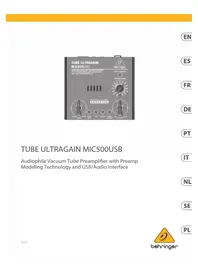
USER MANUAL Tube Ultragain MIC500USB BEHRINGER
Audiophile Vacuum Tube Preamplifier with Preamp Modeling Technology and USB/Audio Interface

Important Safety Instructions

Terminals marked with this symbol carry electrical current of sufficient
magnitude to constitute risk of electric shock. Use only high-quality professional speaker cables with 1/4 TS or twist-locking plugs pre-installed. All other installation or modification should be performed only by qualified personnel.

This symbol, wherever it appears, alerts you to the presence of uninsulated
dangerous voltage inside the enclosure - voltage that may be sufficient to constitute a risk of shock.

This symbol, wherever it appears, alerts you to important operating and
maintenance instructions in the accompanying literature. Please read the manual.

Caution
To reduce the risk of electric shock, do not remove the
top cover (or the rear section). No user serviceable parts inside. Refer servicing to qualified personnel.

Caution
To reduce the risk of fire or electric shock, do not expose
this appliance to rain and moisture. The apparatus shall not be exposed to dripping or splashing liquids and no objects flled with liquids, such as vases, shall be placed on the apparatus.

Caution
These service instructions are for use by qualified
service personnel only. To reduce the risk of electric shock do not perform any servicing other than that contained in the operation instructions. Repairs have to be performed by qualifi ed service personnel.
- Read these instructions.
- Keep these instructions.
- Heed all warnings.
- Follow all instructions.
- Do not use this apparatus near water.
-
Clean only with dry cloth.
-
Do not block any ventilation openings. Install in accordance with the manufacturer's instructions.
- Do not install near any heat sources such as radiators, heat registers, stoves, or other apparatus (including amplifiers) that produce heat.
- Do not defeat the safety purpose of the polarized or grounding-type plug. A polarized plug has two blades with one wider than the other. A grounding-type plug has two blades and a third grounding prong. The wide blade or the third prong are provided for your safety. If the provided plug does not fit into your outlet, consult an electrician for replacement of the obsolete outlet.
- Protect the power cord from being walked on or pinched particularly at plugs, convenience receptacles, and the point where they exit from the apparatus.
- Use only attachments/accessories specified by the manufacturer.

- Use only with the cart, stand, tripod, bracket, or table specified by the manufacturer, or sold with
the apparatus. When a cart is used, use caution when moving the cart/apparatus combination to avoid injury from tip-over.
- Unplug this apparatus during lightning storms or when unused for long periods of time.
- Refer all servicing to qualified service personnel. Servicing is required when the apparatus has been damaged in any way, such as power supply cord or plug is damaged, liquid has been spilled or objects have fallen into the apparatus, the apparatus has been exposed to rain or moisture, does not operate normally, or has been dropped.
- The apparatus shall be connected to a MAINS socket outlet with a protective earthing connection.
- Where the MAINS plug or an appliance coupler is used as the disconnect device, the disconnect device shall remain readily operable.
- Correct disposal of this product: This symbol indicates that this product must not be disposed of with
household waste, according to the WEEE Directive (2012/19/EU) and your national law. This product should be taken to a collection center licensed for the recycling of waste electrical and electronic equipment (EEE).
The mishandling of this type of waste could have a possible negative impact on the environment and human health due to potentially hazardous substances that are generally associated with EEE. At the same time, your cooperation in the correct disposal of this product will contribute to the efficient use of natural resources. For more information about where you can take your waste equipment for recycling, please contact your local city office, or your household waste collection service.
- Do not install in a confined space, such as a book case or similar unit.
- Do not place naked flame sources, such as lighted candles, on the apparatus.
- Please keep the environmental aspects of battery disposal in mind. Batteries must be disposed-of at a battery collection point.
- This apparatus may be used in tropical and moderate climates up to 45^
LEGAL DISCLAIMER
Music Tribe accepts no liability for any loss which may be suffered by any person who relies either wholly or in part upon any description, photograph, or statement contained herein. Technical specifications, appearances and other information are subject to change without notice. All trademarks are the property of their respective owners. Midas, Klark Teknik, Lab Gruppen, Lake, Tannoy, Turbosound, TC Electronic, TC Helicon, Behringer, Bugera, Oberheim, Auratone, Aston Microphones, Aston Microphones and Coolaudio are trademarks or registered trademarks of Music Tribe Global Brands Ltd. © Music Tribe Global Brands Ltd. 2021 All rights reserved.
LIMITED WARRANTY
For the applicable warranty terms and conditions and additional information regarding Music Tribe's Limited Warranty, please see complete details online at musictribe.com/warranty.
Quick Start Guide

BESCHRANKTE GARANTIE
RISQUE D'LECTROCUTION
NE PAS OUVIRI

Uwaga
Stage Live Performance
Stage Live Performance
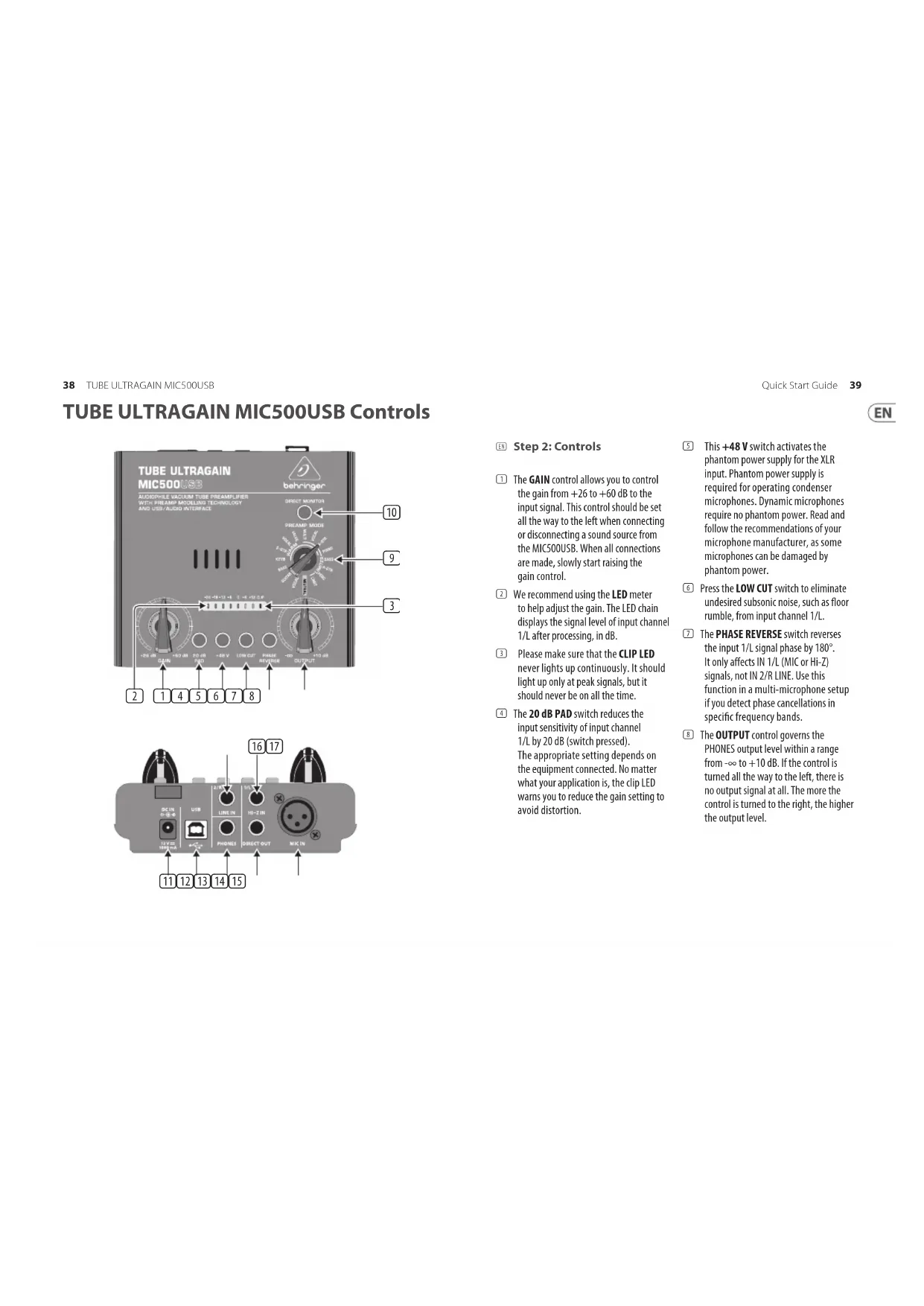
The GAIN control allows you to control the gain from +26 to +60 dB to the input signal. This control should be set all the way to the left when connecting or disconnecting a sound source from the MIC500USB. When all connections are made, slowly start raising the gain control.
We recommend using the LED meter to help adjust the gain. The LED chain displays the signal level of input channel 1/L after processing, in dB.
3 Please make sure that the CLIP LED never lights up continuously. It should light up only at peak signals, but it should never be on all the time.
The 20 dB PAD switch reduces the input sensitivity of input channel 1/L by 20 dB (switch pressed). The appropriate setting depends on the equipment connected. No matter what your application is, the clip LED warns you to reduce the gain setting to avoid distortion.
This +48V switch activates the phantom power supply for the XLR input. Phantom power supply is required for operating condenser microphones. Dynamic microphones require no phantom power. Read and follow the recommendations of your microphone manufacturer, as some microphones can be damaged by phantom power.
Press the LOW CUT switch to eliminate undesired subsonic noise, such as floor rumble, from input channel 1/L.
The PHASE REVERSE switch reverses the input 1/L signal phase by 180^ . It only affects IN 1/L (MIC or Hi-Z) signals, not IN 2/R LINE. Use this function in a multi-microphone setup if you detect phase cancellations in specific frequency bands.
The OUTPUT control governs the PHONES output level within a range from - to +10 dB. If the control is turned all the way to the left, there is no output signal at all. The more the control is turned to the right, the higher the output level.
TUBE ULTRAGAIN MIC500USB Controls
The PREAMP MODE rotary switch gives you a wide selection of preamp preset for input channel 1/L signals. 16 presets with different sound color from WARM over LIMITER to NEUTRAL are available.
10 The DIRECT MONITOR switch allows you to monitor in headphones a mono mix of input channel 1/L and 2/R, merged with the stereo playback coming from USB. Set the OUTPUT control to minimum before putting on the headphones, and then adjust as required. If the switch is not selected, then the headphones will play only the audio playback from a computer, via the USB connection. If no USB is connected (or no audio application running), you need to press the DIRECT MONITOR switch to listen to the analog inputs (stand alone mode).
11 Use the POWER SUPPLY CONNECTOR to hook up the enclosed power supply unit.
12 Connect to the USB port of a computer. The device is class-compliant and no drivers are required. However you can use a 3rd party ASIO driver (ASIO4ALL) to reduce audio latency while live recording on your computer. Set your digital audio workstation (DAW) to recognize the device as an audio input and output. Two channels of audio can
be sent to the computer: One channel is the signal from the MIC or IN 1/L (after all the controls, gain, modes, and the tube section). The other channel is the input signal from IN 2/R (LINE). Two channels of audio can be received from a computer and monitored on the PHONES output (independent of the position of the DIRECT MONITOR switch).
The PHONES output allows you to listen to the stereo signal from a computer, and (if the DIRECT MONITOR switch is on) listen to a mono mix of input channels 1/L and 2/R. Set the OUTPUT control to minimum before putting on the headphones, and then adjust as required.
The balanced 1 / 4 TRS DIRECT OUTPUT can be connected to a mixer, recording system or power amp. This is the line-level output of the IN 1/L (MIC or Hi-Z) audio signals after having passed through the preamplifier and tube section. The output contains no audio from IN 2/R LINE, or from the computer.
Ideally, the balanced XLR MIC IN should be used to connect a microphone.
The MIC500USB's MIC and HI-Z inputs should never be used simultaneously!
The 14TRS 1/L HI-Z IN can be used to connect your electric guitar, for example. This input is wired parallel to the XLR input.
Important Note: If your system develops a hum heard through the speakers or headphones, this may be reduced by making sure your other components such as the power amplifier, powered speakers, or computer have a good earth/ground connection, such as supplied by a 3-pin power cord.
This balanced 1 / 4 TRS 2/R LINE IN can be used to connect a line-level balanced audio source. The audio passes directly to an analog to digital converter and is then sent to a computer via the USB port. The source can be monitored directly in the headphones by pressing the DIRECT MONITOR switch (adjust the OUTPUT knob to suit). Any audio coming into this input is not affected by the other controls, switches, modes, or the tube section.
TUBE ULTRAGAIN MIC500USB Controls
Paso 2: Controles
| Input |
| Type | 1 x XLR (mic)
1 x ¼" TRS (line)
1 x ¼" TRS (Hi-Z)
2 channels from USB |
| Input impedance | Mic in: 3 kΩ balanced / 1.5 kΩ unbalanced
Instrument in: 800 kΩ |
| Maximum input level | Mic: +1 dBu / line: +22 dBu
Hi-Z: +12 dBu with pad |
| Phantom power +48 V switchable, mic input |
| Output |
| Type | 1 x ¼" TRS, direct output
1 x ¼" TRS stereo, headphone output
2 channels to USB |
| Output impedance | Direct out: 480 Ω balanced, 240 Ω unbalanced
Headphone out: 24 Ω min |
| Maximum output level | +22 dBu direct output
+22 dBu headphones output |
| Controls |
| Gain Variable (+26 dB to +60 dB) | |
| Output Variable (-∞ to +20 dB) | |
| Preamp mode control | Selection of various preamp models for microphone and instruments |
| Switches |
| 20 dB Pad Level attenuation (20 dB) |
| +48 V +48 V phantom power |
| Low cut High-pass filter (cut-off frequency 90 Hz) |
| Phase reverse Phase reverse (180°) |
| Direct monitor | Headphone mono mix of Mic/Hi-Z preamp out and Line in |
| Indicators |
| Input level LEDs -24, -18, -12, -6, 0, +6, +12, clip (dB) |
| System Data |
| Signal-to-noise ratio 90 dB, A-weighted @ -20 dBu input level |
| Frequency response
(headphones out, direct monitor) | 10 Hz - 71 kHz (+0/-3 dB) (mic input)
10 Hz - 71 kHz (+0/-3 dB) (Hi-Z input)
10 Hz - 65 kHz (+0/-3 dB) (line input) |
| Computer Bus Connectivity |
| Type USB 2.0, type B |
| Resolution / Max. Sample Rate 16-bit / 48 kHz |
| Voltage 12 V DC, 1000 mA power adapter |
| Power consumption 7 W | |
| Power adapter Mains voltage | |
| USA/Canada 120 V~, 60 Hz | |
| Europe/U.K./Australia 230 V~, 50 Hz | |
| China 220 V~, 50 Hz | |
| Korea 220 V~, 60 Hz | |
| Japan 100 V~, 50/60 Hz | |
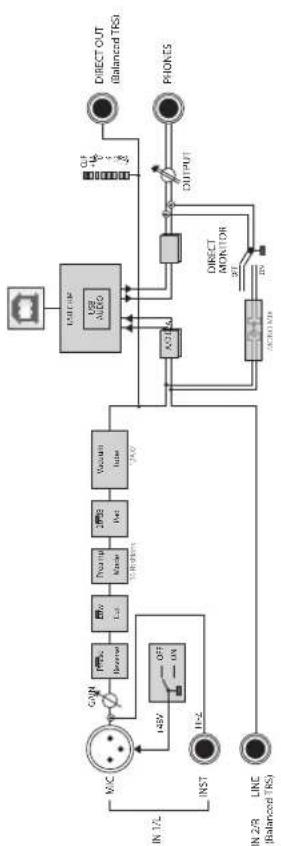
Block Diagram
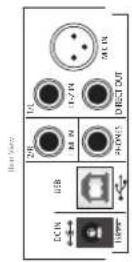

Important information Aspectos

antes
- Register online. Please register your new Music Tribe equipment right after you purchase it by visiting musictribe.com. Registering your purchase using our simple online form helps us to process your repair claims more quickly and efficiently. Also, read the terms and conditions of our warranty, if applicable.
-
Malfunction. Should your Music Tribe Authorized Reseller not be located in your vicinity, you may contact the Music Tribe Authorized Fulfiller for your country listed under "Support" at musicrobe.com. Should your country not be listed, please check if your problem can be dealt with by our "Online Support" which may also be found under "Support" at musicrobe.com. Alternatively, please submit an online warranty claim at musicrobe.com BEFORE returning the product.
-
Registro online. Le recommendamos que registre su nuevo aparato Music Tribe juste après de su compra accediendo a la頁ina web musicitribe.com. El registro de su compra a travers de nuestro sencillo sistemas online nos ayudar a resolverrialquier incidencia que se presente alamayr brevidad possible. Ademas,aproveche para leer los terminos y conditiones de notre garantia,si es aplicable en su caso.
- Averías. En el caso de que no existe un distribuidor Music Tribe en las immediaciones, puede ponsere en contacto con el distribuidor Music Tribe de su pais, que encontrará Dentro del apartado "Support" de nuestra网页 web musicitcribe.com. En caso de que su Pais no aparezca en este lista, acceda a la sección "Online Support" (que también inclura para Dentro del apartado "Support" de nuestra网页 web) y compruebe si su problema aparece descripto y SOLUTIONADO alli. De forma alternatively, envientos a travers de la网页 web una solicitud online de soporte en periodo de garantía ANTES de devolvernlos el aparato.

Informations importantes

Responsible Party Name: Music Tribe Commercial NV Inc.
Address: 5270 Procyon Street,
Las Vegas NV 89118, United States
Phone Number: +1 702 800 8290
This equipment has been tested and found to comply with the limits for a Class B digital device, pursuant to part 15 of the FCC Rules. These limits are designed to provide reasonable protection against harmful interference in a residential installation. This equipment generates, uses and can radiate radio frequency energy and, if not installed and used in accordance with the instructions, may cause harmful interference to radio communications. However, there is no guarantee that interference will not occur in a particular installation. If this equipment does cause harmful interference to radio or television reception, which can be determined by turning the equipment off and on, the user is encouraged to try to correct the interference by one or more of the following measures:
- Reorient or relocate the receiving antenna.
- Increase the separation between the equipment and receiver.
- Connect the equipment into an outlet on a circuit different from that to which the receiver is connected.
- Consult the dealer or an experienced radio/TV technician for help.
This device complies with Part 15 of the FCC rules. Operation is subject to the following two conditions:
(1) this device may not cause harmful interference, and
(2) this device must accept any interference received, including interference that may cause undesired operation.
Changes or modifications to the equipment not expressly approved by Music Tribe can void the user's authority to use the equipment.

Hereby, Music Tribe declares that this product is in compliance with Directive 2014/35/EU, Directive 2014/30/EU, Directive 2011/65/EU and Amendment 2015/863/EU, Directive 2012/19/EU, Regulation 519/2012 REACH SVHC and Directive 1907/2006/EC.
Full text of EU DoC is available at https://community.musictribe.com/
EU Representative: Music Tribe Brands DK A/S
Address: Ib Spang Olsens Gade 17, DK -8200 Aarhus N, Denmark
We Hear You