Ultralink ULM202USB - Microphone BEHRINGER - Free user manual and instructions
Find the device manual for free Ultralink ULM202USB BEHRINGER in PDF.


| Product Type | Wireless Handheld Microphone System |
| Brand | Behringer |
| Model | Ultralink ULM202USB |
| Wireless Technology | 2.4 GHz ISM band, 18 channels |
| Operating Frequency | 2406 – 2474 MHz |
| Operating Range | Up to 120 m (line of sight) |
| Dynamic Range | 92 dB (A-weighted) |
| Frequency Response | 20 Hz – 20 kHz, ±1 dB (wireless link) |
| Sampling Rate | 48 kHz |
| Bit Depth | 24-bit |
| Latency | 14.5 ms |
| Encoding | 232 kbps SLAC |
| Receiver Connectivity | USB 5 VDC (70 mA) |
| Microphones Included | 2 x handheld (ULM200M) |
| Microphone Battery Type | 2 x AA (LR6) alkaline |
| Microphone Battery Life | Approximately 30 hours |
| Microphone Dimensions (W x D x H) | 45.7 x 45.7 x 243.8 mm |
| System Weight | 0.4 kg (0.9 lbs) |
| LED Indicators | Power/Status on mic, Link Status on receiver |
| Mute Function | Yes (long press volume down) |
| Auto Power Off | After 10 seconds if not connected; 60 sec if muted |
| Pairing Method | Press ▲ and ▼ simultaneously within 10 cm of receiver |
| Cleaning | Wipe with a dry cloth; do not use liquids or solvents |
| Safety | Do not expose to moisture, extreme temperatures, or disassemble |
| Repairability | No user-serviceable parts; contact authorized service center |
| Regulatory Compliance | FCC Part 15, CE, RF exposure compliant |
| Warranty | 1 year limited warranty |
Frequently Asked Questions - Ultralink ULM202USB BEHRINGER
User questions about Ultralink ULM202USB BEHRINGER
0 question about this device. Answer the ones you know or ask your own.
Ask a new question about this device
Download the instructions for your Microphone in PDF format for free! Find your manual Ultralink ULM202USB - BEHRINGER and take your electronic device back in hand. On this page are published all the documents necessary for the use of your device. Ultralink ULM202USB by BEHRINGER.
USER MANUAL Ultralink ULM202USB BEHRINGER
Wireless System with Handheld
Microphone(s) and Dual-Mode
USB Receiver
ULM202USB/ULM200USB
Hook-Up
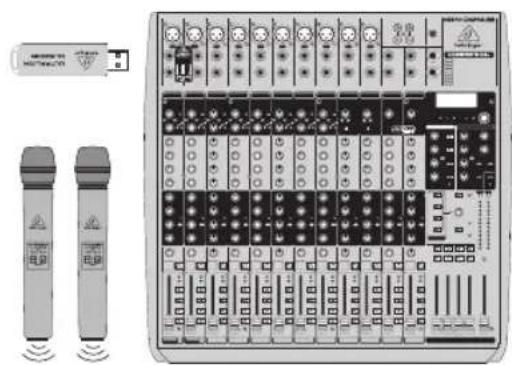
natural_image
Front view of a wireless audio workstation with two speakers and a USB port (no visible text or labels)XENYX QX2442USB
EN
ES
FR
DE
PT
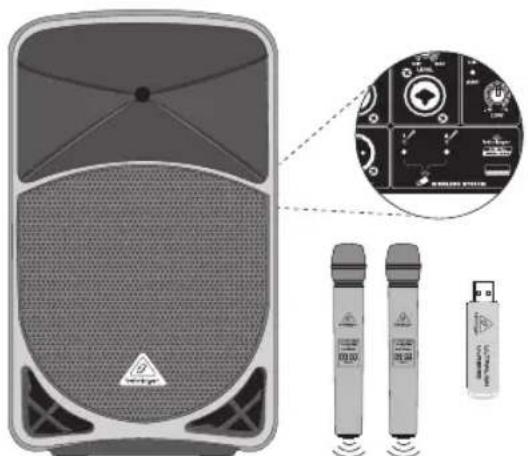
B115M P3
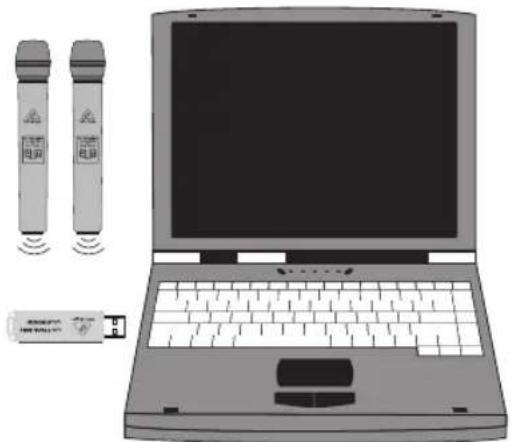
natural_image
Illustration of a laptop with two remote control devices and a separate device emitting signal waves (no text or symbols)Laptop
ULM202USB/ULM200USB Controls
Model: ULM200M
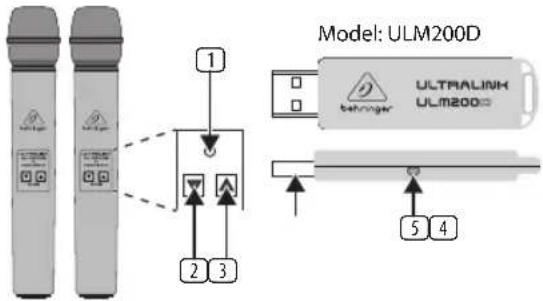
Type of product: Wireless Microphone
ULM200USB/ULM202USB Controls
1. POWER/STATUS LED
- ▼ VOLUME Button (Mute/volume down)
- ▲ VOLUME Button (Power on/unmute/volume up)
- USB connector
- Wireless Link Status LED
ULM200USB/ULM202USB Getting Started
- Connect the ULM200D wireless receiver to the "WIRELESS ONLY!" USB connector on wireless-enabled BEHRINGER mixers, powered speakers or other compatible products, or to a USB port on a computer.
- Press and hold the ▲ button on the ULM200M wireless microphone to connect wirelessly to the ULM200D receiver. The LED on the microphone will flash slowly during the connecting sequence and will light solid once connected. If the ULM200M wireless microphone cannot connect to a receiver, the microphone will automatically power down after 10 seconds.
- Once connected, the ULM200M microphone will be set at a medium volume. Use the ▲ and ▼ buttons to adjust the volume
- A long press of the ▼ button will put the ULM200M microphone into mute. The mute condition is indicated by rapid flashing of the LED. If the user does not unmute within 60 seconds, the ULM200M microphone will power down to save battery life.
- A short press of the ▲ button will unmute the ULM200M microphone. If the ULM200M microphone is unmuted more than 10 seconds after muting, it will return to the previous volume level, if unmuted after less than 10 seconds it will be set to the minimum volume level.
- Unplug the ULM200D wireless receiver to power down. The ULM200M wireless microphone will power down 10 seconds after the ULM200D wireless receiver is unplugged.
- The LED in the ULM200M wireless microphone will indicate when the battery is low by regular brief flashes.
- Should the ULM200M wireless microphone become unpaired with the ULM200D wireless receiver, the microphone can be re-paired from the powered down state by simultaneously pressing the ▲ and ▼ buttons and moving the microphone to within 10 cm (4 inches) of the ULM200D wireless receiver. The LED on the microphone will flash slowly during the pairing sequence and will light solid once connected. If the ULM200M wireless microphone cannot pair to the receiver it will automatically power down after 10 seconds.
Specification
| RF output <20 dBm (100 mW) | |
| Operating range 120 m (Line of Sight)* | |
| Dynamic range 92 dB, A-weighted** | |
| Equivalent input noise -112 dBu | |
| Frequency Response 20 Hz - 20 kHz, ±1 dB** (Wireless Link) | |
| Sampling rate 48 kHz | |
| Resolution | 24-bit |
| Encoding 232 kbps SLAC (Slightly Lossy Audio Codec) | |
| Latency 14.5 ms | |
| RF frequency 2.4 GHz ISM band(2406 MHz - 2474 MHz), 18 channels | |
| USB current consumption 70 mA @ 5 VDC | |
| Battery type 2 x AA (LR6)Alkaline cells | |
| Battery life 30 hours | |
| Dimensions (W x D x H) 45.7 x 45.7 x 243.8 mm(1.8 x 1.8 x 9.6") | |
| Weight | |
| ULM200USB 0.2 kg (0.4 lbs) | |
| ULM202USB | 0.4 kg (0.9 lbs) |
*Achievable range will be dependent on nearby sources of RF interference and/or line of sight obstacles.
*Measured from analog input to analog output, unity gain operation without wire ess compression.

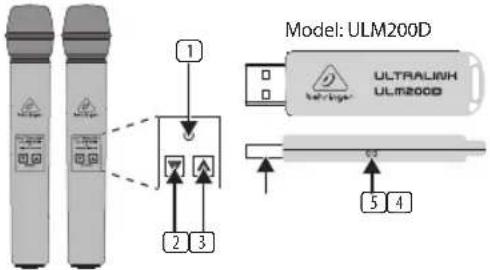
ULM202USB/ULM200USB Controles
Model: ULM200M
MUSIC Tribe accepts no liability for any loss which may be suffered by any person who relies either wholly or in part upon any description, photograph, or statement contained herein. Technical specifications, appearances and other information are subject to change without notice. All trademarks are the property of their respective owners. MIDAS, KLARK TEKNIK, LAB GRUPPEN, LAKE, TANNOY, TURBOSOUND, TC ELECTRONIC, TC HELICON, BEHRINGER, BUGERA and COOLAUDIO are trademarks or registered trademarks of MUSIC Tribe Global Brands Ltd. © MUSIC Tribe Global Brands Ltd. 2018 All rights reserved.
LIMITED WARRANTY
For the applicable warranty terms and conditions and additional information regarding MUSIC Tribe's Limited Warranty, please see complete details online at musictri.be/warranty.
NEGACIÓN LEGAL
BESCHRÄNKTE GARANTIE
Responsible Party Name: MUSIC Tribe Commercial NV Inc.
Address: 5270 Procyon Street Las Vegas, NV 89118 USA
Phone Number: +1 702 800 8290
ULTRALINK ULM202USB/ULM200USB
complies with the FCC rules as mentioned in the following paragraph:
This equipment has been tested and found to comply with the limits for a Class B digital device, pursuant to part 15 of the FCC Rules. These limits are designed to provide reasonable protection against harmful interference in a residential installation. This equipment generates, uses and can radiate radio frequency energy and, if not installed and used in accordance with the instructions, may cause harmful interference to radio communications. However, there is no guarantee that interference will not occur in a particular installation. If this equipment does cause harmful interference to radio or television reception, which can be determined by turning the equipment off and on, the user is encouraged to try to correct the interference by one or more of the following measures:
• Reorient or relocate the receiving antenna
• Increase the separation between the equipment and receiver
- Connect the equipment into an outlet on a circuit different from that to which the receiver is connected
- Consult the dealer or an experienced radio/TV technician for help
This device complies with Part 15 of the FCC rules. Operation is subject to the following two conditions:
(1) this device may not cause harmful interference, and (2) this device must accept any interference received, including interference that may cause undesired operation.
Important information:
Changes or modifications to the equipment not expressly approved by MUSIC Tribe can void the user's authority to use the equipment.
RF EXPOSURE:
This equipment meets the government's requirements for exposure to radio waves, and has been tested and meets the FCC RF exposure guidelines.
The highest SAR value (1g) for this ULM200D Receiver is 0.649 W/kg.
The highest SAR value (1g) for this ULM200M wireless microphone is 0.774 W/kg.

This equipment complies with the European Council Recommendation of 12 July 1999 on the Limitation of Exposure of the General Public to Electromagnetic Fields [1999/519/EC].
We Hear You