Ultralink ULM302MIC - Microphone BEHRINGER - Free user manual and instructions
Find the device manual for free Ultralink ULM302MIC BEHRINGER in PDF.


| Product Type | Wireless Microphone System |
| Brand | Behringer |
| Model | Ultralink ULM302MIC |
| Frequency Range | UHF 500-900 MHz (varies by region) |
| Operating Range | Up to 100 meters (line of sight) |
| Audio Output | XLR balanced, 1/4" unbalanced |
| Power Supply (Receiver) | 12V DC via included adapter |
| Battery Type (Transmitter) | 2 x AA alkaline or rechargeable |
| Battery Life (Transmitter) | Approx. 8 hours continuous use |
| Receiver Dimensions | 200 x 150 x 45 mm |
| Transmitter Dimensions | 250 x 50 x 50 mm (handheld) |
| Weight (Receiver) | 500 g |
| Weight (Transmitter) | 250 g (including batteries) |
| Material | Metal receiver chassis, plastic transmitter body |
| Color | Black |
| Connectors | Antenna BNC, audio XLR/1/4", power DC |
| Display | LCD screen on receiver (frequency, channel, level) |
| Functions | Auto scan, IR sync, mute, volume control |
| Cleaning | Wipe with dry cloth; avoid moisture |
| Safety | Keep away from water; do not disassemble |
| Spare Parts | Replacement antennas, power adapters, microphone capsules |
| Included Accessories | 1 handheld transmitter, 1 receiver, power adapter, 2 AA batteries, user manual |
Frequently Asked Questions - Ultralink ULM302MIC BEHRINGER
User questions about Ultralink ULM302MIC BEHRINGER
0 question about this device. Answer the ones you know or ask your own.
Ask a new question about this device
Download the instructions for your Microphone in PDF format for free! Find your manual Ultralink ULM302MIC - BEHRINGER and take your electronic device back in hand. On this page are published all the documents necessary for the use of your device. Ultralink ULM302MIC by BEHRINGER.
USER MANUAL Ultralink ULM302MIC BEHRINGER
High-Performance 2.4 GHz Digital Wireless System with 2 Handheld Microphones and Receiver
23Quick Start GuideULM302MIC
EN

Important Safety Instructions
ES
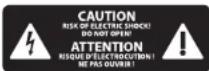
Terminals marked with this symbol carry electrical current of sufficient magnitude to constitute risk of electric shock. Use only high-quality professional speaker cables with 14 " TS or twist-locking plugs pre-installed. All other installation or modification should be performed only by qualified personnel.
This symbol, wherever it appears, alerts you to the presence of uninsulated dangerous voltage inside the enclosure - voltage that may be sufficient to constitute a risk of shock.
This symbol, wherever it appears, alerts you to important operating and maintenance instructions in the accompanying literature. Please read the manual.
Caution To reduce the risk of electric shock, do not remove the top cover (or the rear section). No user serviceable parts inside. Refer servicing to qualified personnel.
Caution To reduce the risk of fire or electric shock, do not expose this appliance to rain and moisture. The apparatus shall not be exposed to dripping or splashing liquids and no objects filled with liquids, such as vases, shall be placed on the apparatus.
Caution These service instructions are for use by qualified service personnel only. To reduce the risk of electric shock do not perform any servicing other than that contained in the operation instructions. Repairs have to be performed by qualified service personnel.
- Read these instructions.
- Keep these instructions.
- Heed all warnings.
- Follow all instructions.
-
Do not use this apparatus
near water. -
Clean only with dry cloth.
-
Do not block any ventilation openings. Install in accordance with the manufacturer's instructions.
-
Do not install near any heat sources such as radiators, heat registers, stoves, or other apparatus (including amplifiers) that produce heat.
-
Do not defeat the safety purpose of the polarized or grounding-type plug. A polarized plug has two blades with one wider than the other. A grounding-type plug has two blades and a third grounding prong. The wide blade or the third prong are provided for your safety. If the provided plug does not fit into your outlet, consult an electrician for replacement of the obsolete outlet.
-
Protect the power cord from being walked on or pinched particularly at plugs, convenience receptacles, and the point where they exit from the apparatus.
-
Use only attachments/accessories specified by the manufacturer.

- Use only with the cart, stand, tripod, bracket, or table specified by the manufacturer, or sold with
the apparatus. When a cart is used, use caution when moving the cart/ apparatus combination to avoid injury from tip-over.
-
Unplug this apparatus during lightning storms or when unused for long periods of time.
-
Refer all servicing to qualified service personnel. Servicing is required when the apparatus has been damaged in any way, such as power supply cord or plug is damaged, liquid has been spilled or objects have fallen into the apparatus, the apparatus has been exposed to rain or moisture, does not operate normally, or has been dropped.
-
The apparatus shall be connected to a MAINS socket outlet with a protective earthing connection.
- Where the MAINS plug or an appliance coupler is used as the disconnect device, the disconnect device shall remain readily operable.

- Correct disposal of this product: This symbol indicates that this product must not be disposed of with ste, according to the
WEEE Directive (2012/19/EU) and your national law. This product should be taken to a collection center licensed for the recycling of waste electrical and electronic equipment (EEE). The mishandling of this type of waste could have a possible negative impact on the environment and human health due to potentially hazardous substances that are generally associated with EEE. At the same time, your cooperation in the correct disposal of this product will contribute to the efficient use of natural resources. For more information about where you can take your waste equipment for recycling, please contact your local city office, or your household waste collection service.
-
Do not install in a confined space, such as a book case or similar unit.
-
Do not place naked flame sources, such as lighted candles, on the apparatus.
-
Please keep the environmental aspects of battery disposal in mind. Batteries must be disposed-of at a battery collection point.
-
This apparatus may be used in tropical and moderate climates up to 45°C.
LEGAL DISCLAIMER
Music Tribe accepts no liability for any loss which may be suffered by any person who relies either wholly or in part upon any description, photograph, or statement contained herein. Technical specifications, appearances and other information
are subject to change without notice. All trademarks are the property of their respective owners. Midas, Klark Teknik, Lab Gruppen, Lake, Tannoy, Turbosound, TC Electronic, TC Helicon, Behringer, Bugera, Aston Microphones and Coolaudio are trademarks or registered trademarks of Music Tribe Global Brands Ltd. © Music Tribe Global Brands Ltd. 2021 All rights reserved.
LIMITED WARRANTY
For the applicable warranty terms and conditions and additional information regarding Music Tribe's Limited Warranty, please see complete details online at community.musictribe.com/pages/support#warranty.

BESCHRÄNKTE GARANTIE
POWER/STATUS LED will light green when the microphone is powered on. The LED will flash when Mute mode is engaged, and will turn off when the mic is powered down. The LED will flash red when the batteries are low and need to be replaced.
☐ VOLUME UP/DOWN buttons perform several functions
• Volume - Press the buttons briefly to turn the volume up or down.
- Mute – Hold the DOWN button to mute the microphone, press the UP button to unmute.
- Power – Hold the UP button to turn the microphone on. While in Mute mode, hold the DOWN button again to power the mic off.
Note – if the microphone is left in Mute mode for 10 minutes, the power will automatically turn off.
① Changing the batteries – With the microphone powered off, unscrew the lower half of the microphone body to expose the battery slots. Observing correct polarity, insert the new batteries and replace the covering, then turn the power on again.
4 POWER LED lights when the unit is powered on.
5 AUDIO LEDs light whenever an audio signal is received from the associated microphone.
6 Connection Meters display the signal strength of the wireless connection for each channel.
BATT(ery) LEDs light green to indicate a healthy battery, and light red when the batteries need to be replaced. They will also light red when their associated mic is turned off.
OUTPUTS send the audio signal via balanced XLR or unbalanced 14 TS cable.
[9] DC IN socket accepts the connection of the included power adapter.
ON/OFF switch powers the unit on and off.
ULM302MIC Controls
ES Controles
| ULM302MIC | |
| RF output <10 dBm (10 mW) | |
| Operating range max. 60 m (200 feet)* | |
| Dynamic range 95 dB A-weighted** | |
| Equivalent input noise -115 dBu, unweighted @ 24 dB gain, 600 Ω | |
| Frequency response 20 Hz - 20 kHz, +0.1/-1 dB* | |
| Sampling rate 48 kHz | |
| Resolution 24 bit | |
| Encoding 4 bit ADPCM (192 kbps) | |
| Latency Max. 14.5 ms | |
| RF frequency | 2.404 - 2.476 GHz, 37 channels2.404 - 2.478 GHz, 38 channels |
| Battery type 2 x AA (per microphone) | |
| Battery life > 24 hours*** | |
| Dimensions (W x D x H) | |
| ULM300M 260 x 53 x 53 mm (10.2 x 2.1 x 2.1") | |
| ULM300RD | 41 x 150 x 119 mm (1.6 x 5.9 x 4.7") |
| Weight | |
| ULM500M 0.3 kg (0.66 lbs) | |
| ULM300RD | 0.25 kg (0.55 lbs) |
* Achievable range will be dependent on nearby sources of RF interference and/or line of sight obstacles
^26 Measured from analog input to analog output, unity gain operation without wireless compression
Depending on battery type and use pattern
-
For best performance, avoid placing the receiver close to radio frequency generating equipment such as computers, wireless access points, cell phones or microwave ovens.
-
It is recommended to use only one set of ULM302MIC at the same time / location (2 microphones with 1 receiver).
-
The wireless operation might cause trouble when two or more sets of ULM300 series models are used simultaneously. In this case you should keep a minimum distance of 1-2 meters between each microphone, between the mics and receiver, and 10-15 meters between all used ULM300 series sets.
Other important information

Important information As

ortantes

Informations importantes
1. Register online.
Please register your new Music Tribe equipment right after you purchase it by visiting musictribe.com. Registering your purchase using our simple online form helps us to process your repair claims more quickly and efficiently. Also, read the terms and conditions of our warranty, if applicable.
- Malfunction. Should your Music Tribe Authorized Reseller not be located in your vicinity, you may contact the Music Tribe Authorized Fulfiller for your country listed under "Support" at musictribe.com. Should your country not be listed, please check if your problem can be dealt with by our "Online Support" which may also be found under "Support" at musictribe.com. Alternatively, please submit an online warranty claim at musictribe.com BEFORE returning the product.
3. Power Connections.
Before plugging the unit into a power socket, please make sure you are using the correct mains voltage for your particular model. Faulty fuses must be replaced with fuses of the same type and rating without exception.
1. Registro online.
Other important information

Responsible Party Name: Music Tribe Commercial NV Inc.
Address: 122 E. 42nd St.1,
8th Floor NY, NY 10168, United States
Email Address: legal@muslctrlbe.com
FCC ID: QWHULM300MCH1, FCC ID: QWHULM300MCH2
ULM302MIC
This equipment has been tested and found to comply with the limits for a Class B digital device, pursuant to part 15 of the FCC Rules. These limits are designed to provide reasonable protection against harmful interference in a residential installation. This equipment generates, uses and can radiate radio frequency energy and, if not installed and used in accordance with the instructions, may cause harmful interference to radio communications. However, there is no guarantee that interference will not occur in a particular installation. If this equipment does cause harmful interference to radio or television reception, which can be determined by turning the equipment off and on, the user is encouraged to try to correct the interference by one or more of the following measures:
• Reorient or relocate the receiving antenna.
- Increase the separation between the equipment and receiver.
- Connect the equipment into an outlet on a circuit different from that to which the receiver is connected.
- Consult the dealer or an experienced radio/TV technician for help.
This device complies with Part 15 of the FCC rules. Operation is subject to the following two conditions:
(1) this device may not cause harmful interference, and (2) this device must accept any interference received, including interference that may cause undesired operation.
Important information:
Changes or modifications to the equipment not expressly approved by Music Tribe can void the user's authority to use the equipment.
This equipment complies with FCC RF radiation exposure limits set forth for an uncontrolled environment.
Quick Start Guide

Warning
- As with all small batteries, the batteries used with this product should be kept away from small children who still put things in their mouths. If they are swallowed, promptly call your local poison control center.
- Always purchase the correct size and grade of battery most suitable for intended use.
- Replace all batteries of a set at the same time.
- Clean the battery contacts and also those of the device prior to battery installation.
- Ensure the batteries are installed correctly with the regard to polarity (- and -).
- Always remove battery if consumed or if product is to be left unused for a long time.
- Replacement of a battery with an incorrect type that can defeat a safeguard! Replace only with the same or equivalent type
- Risk of fire or explosion if the battery is replaced by an incorrect type.
- Disposal of a battery into fire or a hot oven, or mechanically crushing or cutting of a battery, that can result in an explosion;
- Leaving a battery in an extremely high temperature surrounding environment that can result in an explosion or the leakage of flammable liquid or gas; and
- A battery subjected to extremely low air pressure that may result in an explosion or the leakage of flammable liquid or gas
- Attention should be drawn to the environmental aspects of battery disposal.

Advertencia
The Ground Truth image displays a single, solid horizontal line. According to Rule 2 (UNDERSCORE & LINE RULES), this is a stylistic or background line, not a placeholder underscore. Therefore, the OCR result must ignore it. The provided OCR content is "____", which consists of four underscores. This is an incorrect interpretation of the line as a placeholder, violating the rule that stylistic lines must be ignored. The OCR has hallucinated text (underscores) where none should exist, violating the rule to ignore such lines. Hence, the OCR result is inconsistent with the Ground Truth.
[Non-Text]
。
[Non-Text]
A
。
广力云
[Non-Text]
[Non-Text]
CE
Herby, Music Tribe declares that this product is in compliance with Directive 2014/53/EU, Directive 2014/30/EU, Directive 2014/35/EU, Directive 2011/65/EU and Amendment 2015/863/EU, Directive 2012/19/EU, Regulation S19/2012 REACH SWHC and Directive 1907/2006/EC.
Full text of EU DoC is available at https://community.musictribe.com/
EU Representative: Music Tribe Brands DK A/S Address: Gammel Strand 44, DK 1202 Kobenhavn K, Denmark
UK Representative: Music Tribe Brands UK Ltd. Address: 6 Lloyds Avenue, Unit 4CL London EC3N 3AX, United Kingdom