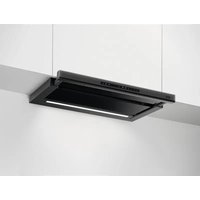
DTB3652M - Basket AEG - Free user manual and instructions
Find the device manual for free DTB3652M AEG in PDF.

 FR
FR
 BG
BG
 CS
CS
 DA
DA
 DE
DE
 EL
EL
 EN
EN
 ES
ES
 ET
ET
 FI
FI
 HU
HU
 IT
IT
 KK
KK
 LT
LT
 LV
LV
 MK
MK
 NL
NL
 NO
NO
 PL
PL
 PT
PT
 RO
RO
 RU
RU
 SK
SK
 SL
SL
 SQ
SQ
 SV
SV
 TR
TR
 UK
UK
User questions about DTB3652M AEG
0 question about this device. Answer the ones you know or ask your own.
Ask a new question about this device
Download the instructions for your Basket in PDF format for free! Find your manual DTB3652M - AEG and take your electronic device back in hand. On this page are published all the documents necessary for the use of your device. DTB3652M by AEG.
USER MANUAL DTB3652M AEG
natural_image
Simple line drawing of a kitchen chimney with three dots on the base (no text or symbols)CONTENTS
- SAFETY INFORMATION......2
- SAFETY INSTRUCTIONS......4
- MAINTENANCE....5
- CONTROLS....6
- INSTALLATION METHODS....6
- LIGHTING.... 6
- ENVIRONMENT CONCERNS....6
WE'RE THINKING OF YOU
Thank you for choosing this AEG product. We have created it to give you impeccable performance for many years, with innovative technologies that help make life simpler – features you might not find on ordinary appliances. Please spend a few minutes reading to get the very best from it.
Visit our website for:

Get usage advice, brochures, trouble shooter, service information: www.aeg.com

Register your product for better service: www.registeraeg.com

Buy Accessories, Consumables and Original spare parts for your appliance: www.aeg.com/shop
CUSTOMER CARE AND SERVICE
Always use original spare parts.
When contacting our Authorised Service Centre, ensure that you have the following data available: Model, PNC, Serial Number.
The information can be found on the rating plate.
⚠ Warning / Caution-Safety information
i General information and tips
Environmental information
Subject to change without notice.
1. ⚠SAFETY INFORMATION
Before the installation and use of the appliance, carefully read the supplied instructions. The manufacturer is not responsible for any injuries or damages that are the result of incorrect installation or usage. Always keep the instructions in a safe and accessible location for future reference.
1.1 Children and vulnerable people safety
- This appliance can be used by children aged from 8 years and above and persons with reduced physical, sensory or mental capa-
bilities or lack of experience and knowledge if they have been given supervision or instruction concerning the use of the appliance in a safe way and understand the hazards involved.
- Children between 3 and 8 years of age and persons with very extensive and complex disabilities shall be kept away unless continuously supervised.
- Children of less than 3 years of age should be kept away unless continuously supervised.
- Do not let children play with the appliance.
- Keep all packaging away from children and dispose of it appropriately.
- Keep children and pets away from the appliance when it operates.
- Children shall not carry out cleaning and user maintenance of the appliance without supervision.
1.2 General Safety
- This appliance is intended for domestic use above hobs, cookers and similar cooking devices.
- Before carrying out any maintenance, disconnect the appliance from the power supply.
- CAUTION: Accessible parts may become hot during use with cooking appliances.
- Use only the fixing screws supplied with the appliance if not supplied, use the screws recommended in the installation instructions.
- Do not use adhesives to fix the appliance.
- The minimum distance between the hob surface on which the pans stand and the lower part of the appliance shall be at least 65 cm, unless otherwise specified in the installation instructions. If the hob installation instructions specify a greater distance, it must be taken into account.
- The discharge of air must comply with local authorities regulations.
- Ensure good air ventilation in the room where the appliance is installed to avoid the backflow of unwanted gases into the room from appliances burning gas or other fuels, including open fi res.
- Make sure that the ventilation openings are not blocked and the air collected by the appliance is not conveyed into a duct used to exhaust smoke and steam from other appliances (central heating
systems, thermosiphons, water-heaters, etc.).
- When the appliance operates with other appliances the maximum vacuum generated in the room should not exceed 0.04 mbar.
- Make sure not to cause damage to the mains cable. Contact our Authorised Service Centre or an electrician to change a damaged mains cable.
- If the appliance is connected directly to the power supply, the electrical installation must be equipped with an isolating device that allows to disconnect the appliance from the mains at all poles. Complete disconnection must comply with conditions specified in the overvoltage category III. The means for disconnection must be incorporated in the fixed wiring in accordance with the wiring rules.
- Do not fl ambé under the appliance.
- Do not use to exhaust hazardous or explosive materials and vapours.
- Clean the appliance regularly to prevent the deterioration of the surface material.
- Clean the appliance with a soft cloth regularly.
- Do not use a steam cleaner, water spray, harsh abrasive cleaners or sharp metal scrapers to clean the surface of the appliance. Use only neutral detergents.
- Clean grease filters regularly (at least every 2 months) and remove grease deposits from the appliance to prevent the risk of fire.
- Use a cloth or brush to clean the interior of the appliance.
2. SAFETY INSTRUCTIONS
2.1 Installation

WARNING!
Risk of injury, electric shock, fire, burns or damage to the appliance.
- Only a qualified person must install this appliance.
- Do not install or use a damaged appliance.
- Follow the installation instructions supplied with the appliance.
• Always take care when moving the appliance as it is heavy. Always use safety gloves and enclosed footwear. - Before installing the appliance remove all the packaging, the labelling and the protective film.
- Do not install the exhaust air into a wall
cavity, unless the cavity is designed for that purpose.
2.2 Electrical connection

WARNING!
Risk of fire and electric shock.
- All electrical connections should be made by a qualified electrician.
- Make sure that the parameters on the rating plate are compatible with the electrical ratings of the mains power supply.
- If the symbol (☐) is not printed on the rating plate, the appliance must be earthed
• Always use a correctly installed hockproof socket. -
Do not let the electricity mains cable tangle.
-
Do not use multi-plug adapters and extension cables.
- If the mains socket is loose, do not connect the mains plug.
- Do not pull the mains cable to disconnect the appliance. Always pull the mains plug.
- The shock protection of live and insulated parts must be fastened in such a way that it cannot be removed without tools.
- Make sure the appliance is installed correctly. Loose and incorrect electricity mains cable can make the terminal become too hot.
- Connect the appliance at the end of the installation. Make sure that there is access to the mains after the installation.
2.3 Use

WARNING!
Risk of injury, burns and electric shock.
- This appliance is for cooking purpose only. Do not use the appliance for other purpose.
- Do not change the specification of this appliance.
- Do not operate the appliance with wet hands or when it has contact with water.
- Use only the accessories supplied with the appliance.
- Keep flames or heated objects away from fats and oils during cooking and frying.
- Do not use uncovered electric grates.
- Do not use the appliance as a storage surface.
- Do not use magnifying glasses, binoculars or similar optical devices to look directly at the lighting of the appliance.
2.4 Service
• To repair the appliance contact an Authorised Service Centre.
- Use original spare parts only.
2.5 Disposal

WARNING! Risk of injury or suffo tion.
- Contact your municipal authority for information on how to discard the appliance correctly.
- Disconnect the appliance from the mains supply.
- Cut off the mains electrical cable close to the appliance and dispose of it.
3. MAINTENANCE
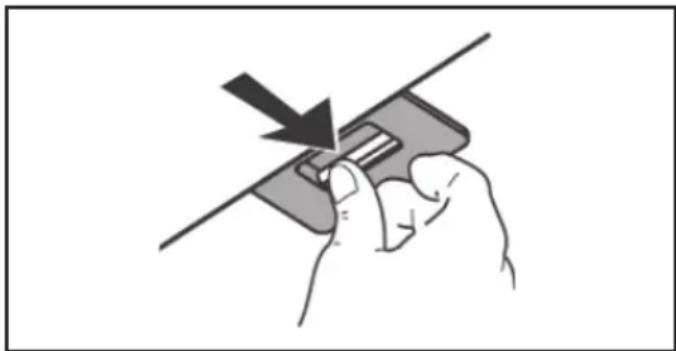
Clean grease filters in relation to use, at least every 2 months to prevent the risk of fire. Hand wash or clean in a dishwasher using a neutral detergent. If washing in the dishwasher, possible discoloration of the filters does not in any way compromise their functioning.
natural_image
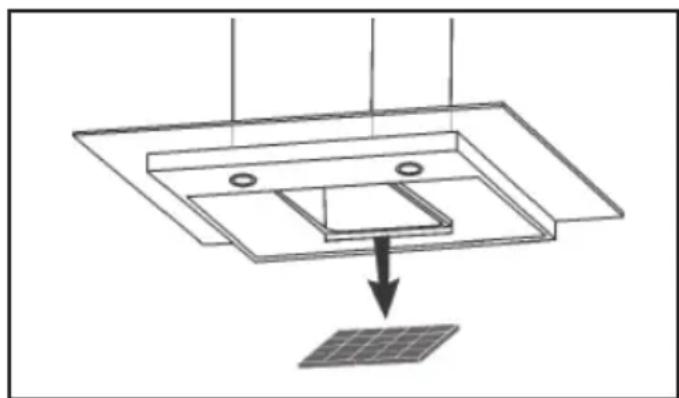
Hand holding a card with a downward arrow indicating compression or dislocation (no text or symbols)The activated charcoal filter is not washable and cannot be regenerated, and must be replaced approximately every 4 months of operation, or more frequently for particularly heavy usage.
natural_image
Diagram showing a solar panel installation with a downward arrow indicating direction (no text or symbols present)4. CONTROLS
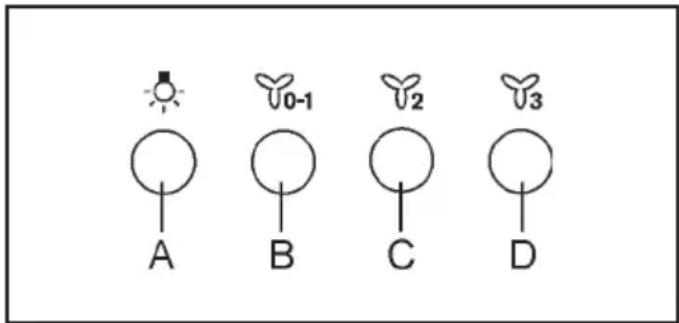
text_image
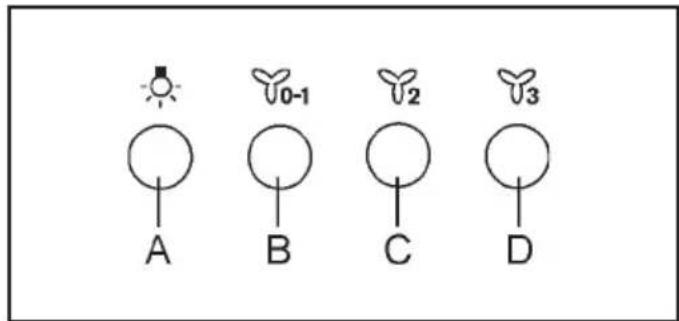
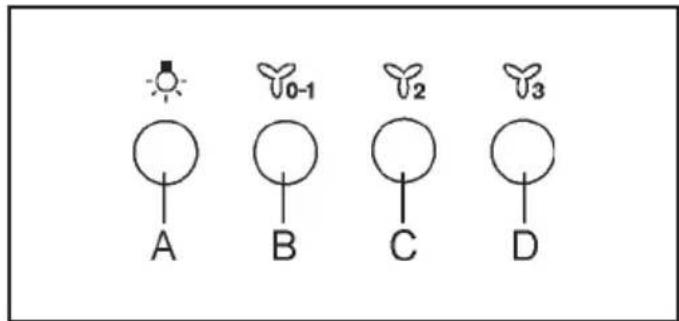
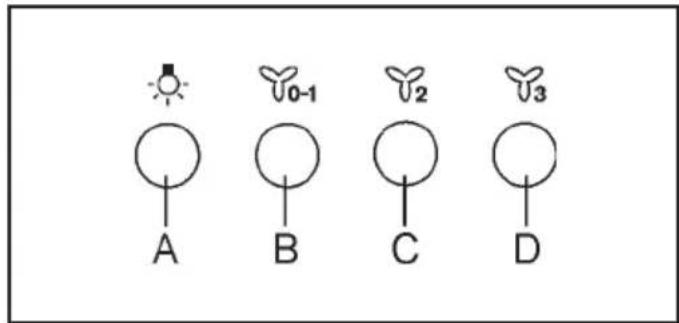
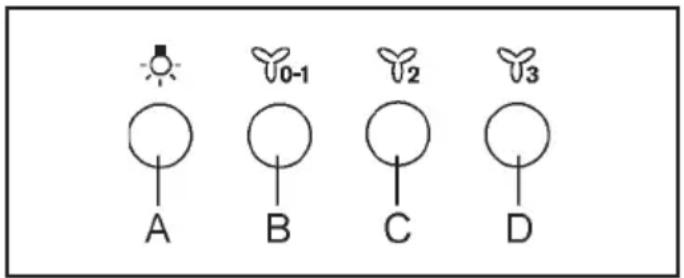
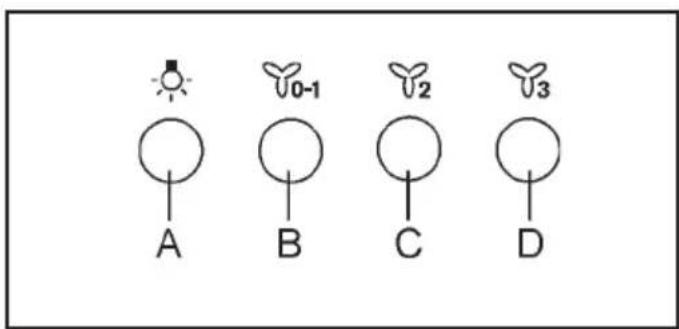
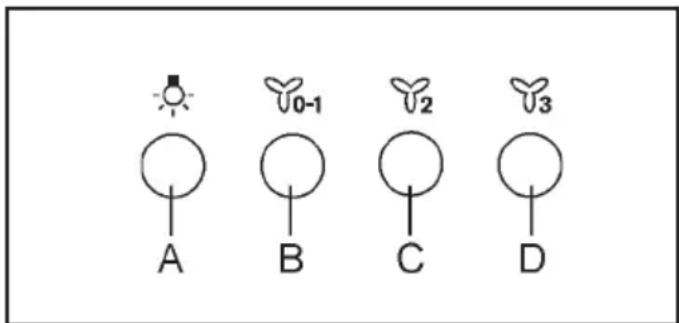
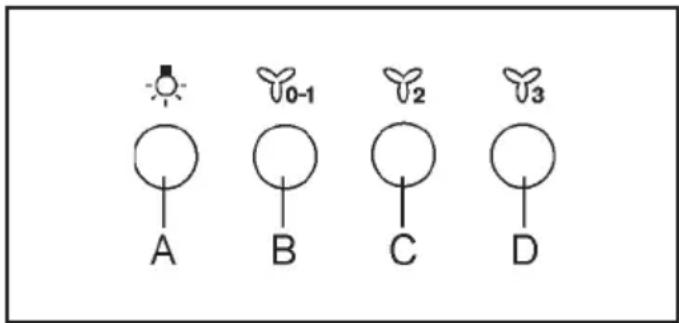
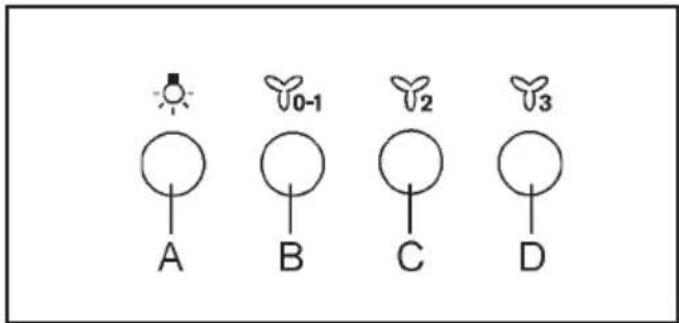
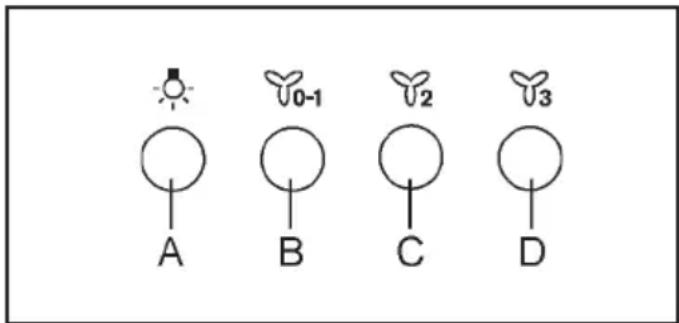
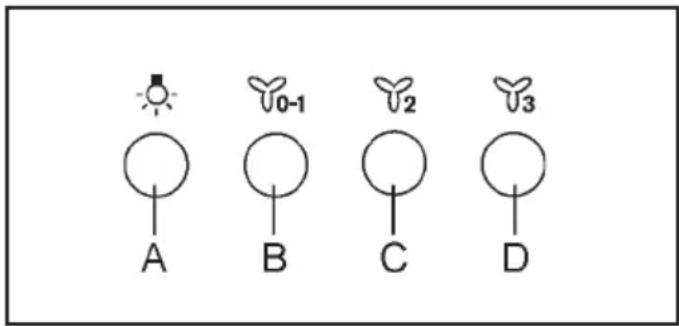
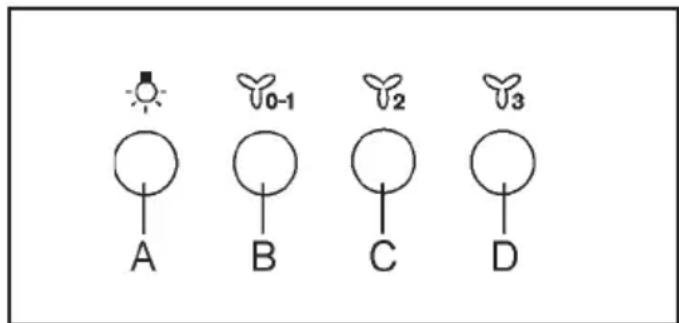
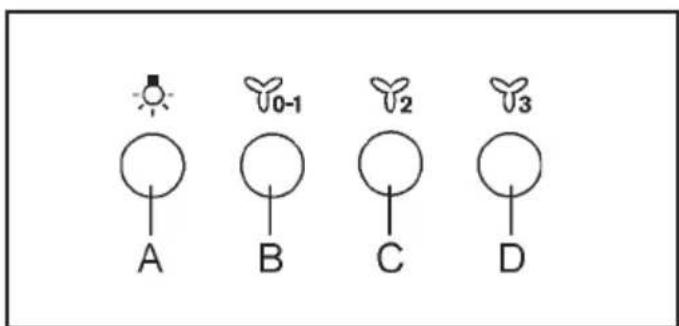
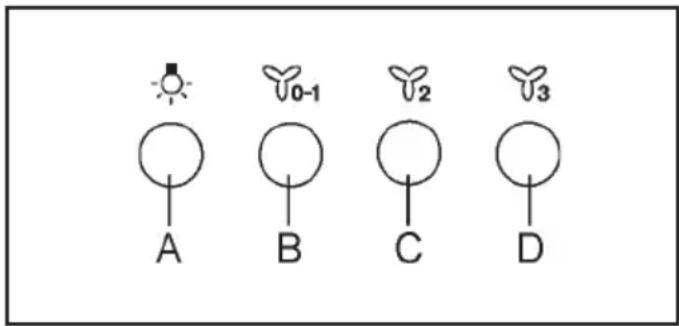
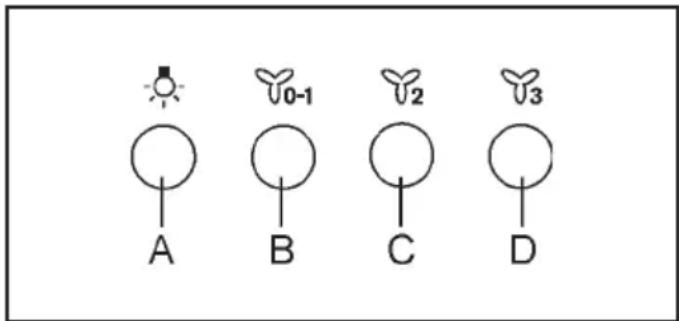
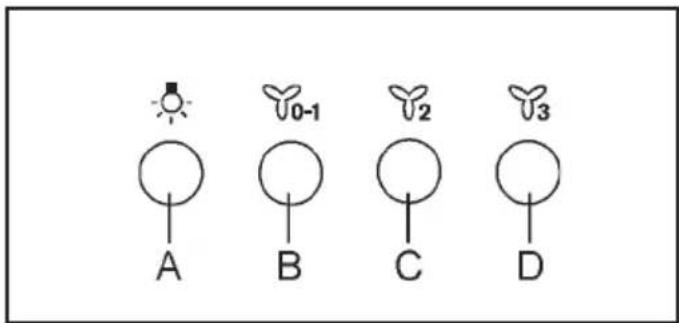
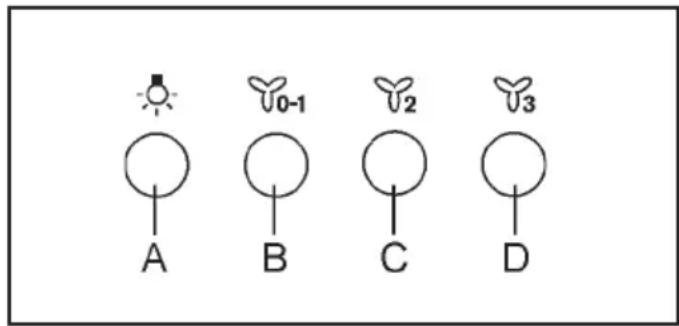
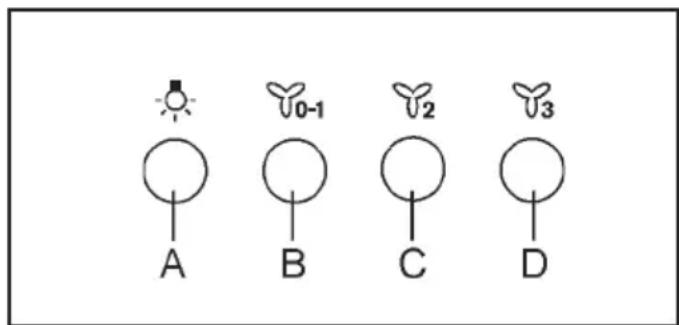
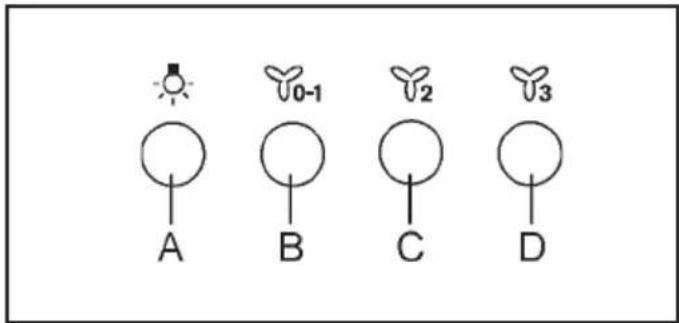
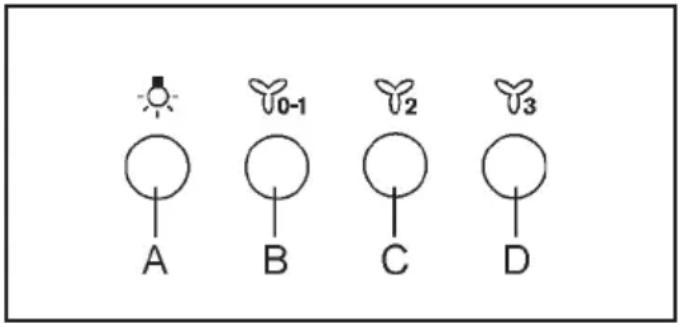
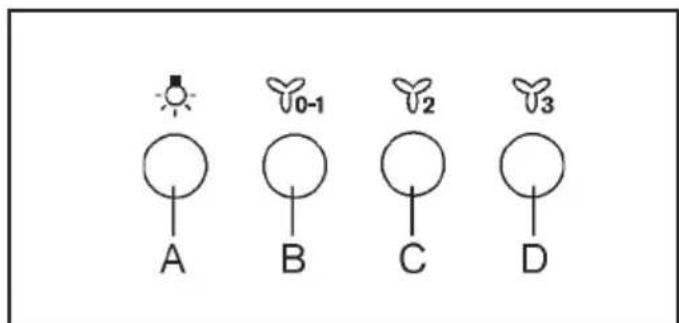
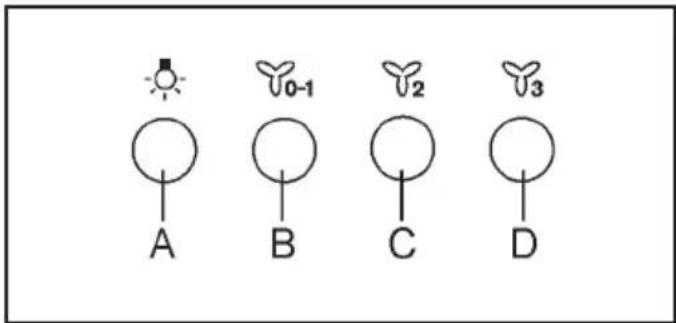
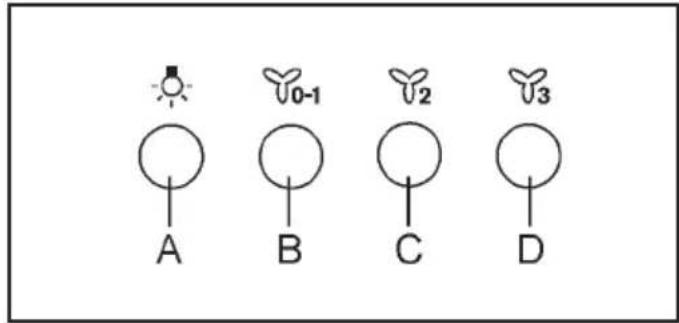
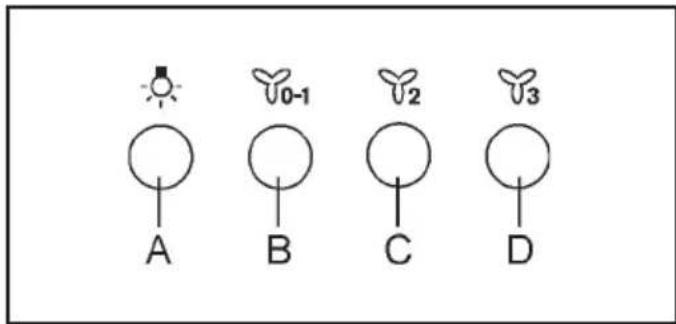
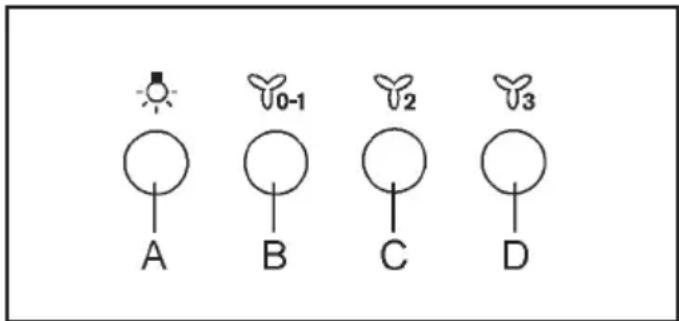
A B C D 0-1 2 3Key A: light switch.
Key B: first speed motor ON/OFF switch.
Key C: second speed switch.
Key D: third speed switch.
5. INSTALLATION METHODS
FILTERING OR DUCTING VERSION ?
The hood may be in fi ltering or in ducting version. Decide from the outset which type is to be installed.
For better efficiency, we recommend installing the hood in the ducting version (if possible).

Ducting version
The hood purifi es the air and evacuates it to the outside through an exhaust duct.

Filtering version
The hood purifi es the air and recycles the clean air back into the room.
6. LIGHTING
If the light spot is damaged, it must be replaced only by the manufacturer, its service agent or similarly qualified persons in order to avoid a hazard.
7. ENVIRONMENTAL CONCERNS
Recycle materials with the symbol

Put the packaging in relevant containers to recycle it. Help protect the environment and human health by recycling waste of electrical and electronic appliances. Do not dispose of
appliances marked with the symbol with the household waste.

Return the product to your local recycling facility or contact your municipal office.
INHALT
www.aeg.com/productregistration

natural_image
Hand holding a card with a downward arrow indicating compression or disassembly (no text or symbols)natural_image
Diagram showing a solar panel installation with a downward arrow indicating direction (no text or symbols present)4. BEDIENELEMENTE
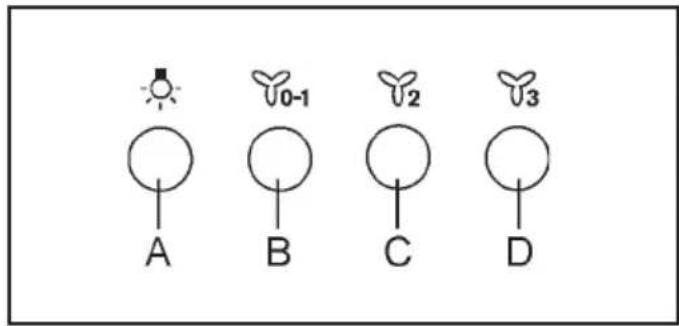
text_image
A B C D 0-1 2 3.aeg.com/productregistration
natural_image
Hand holding a card with a downward arrow indicating compression or dislocation (no text or symbols)natural_image
Diagram showing a solar panel installation with a downward arrow indicating direction (no text or symbols present)4. COMMANDES
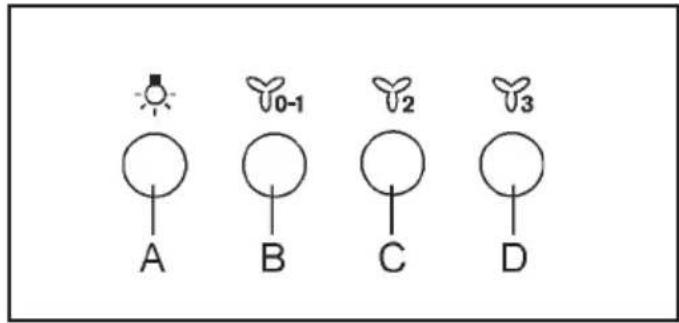
text_image
A B C D 0-1 2 3natural_image
Hand holding a card with a downward arrow indicating compression or dislocation (no text or symbols)natural_image
Diagram showing a solar panel installation with a downward arrow indicating the component (no text or symbols present)4. BEDIENINGEN
text_image
A B C D 0-1 2 3AFVOER OF RECIRCULATIE?
www.aeg.com/productregistration

natural_image
Hand holding a smartphone with a downward arrow indicating compression or disassembly (no text or symbols present)natural_image
Diagram showing a solar panel installation with a downward arrow indicating direction (no text or symbols present)4. MANDOS
text_image
A B C D 0-1 2 3natural_image
Hand holding a card with a downward arrow indicating compression or dislocation (no text or symbols)natural_image
Diagram showing a solar panel installation with a downward arrow indicating the process (no text or symbols present)4. COMANDOS
text_image
A B C D Y0-1 Y2 Y3natural_image
Hand holding a card with a downward arrow indicating compression or dislocation (no text or symbols)natural_image
Diagram showing a solar panel installation with a downward arrow indicating the component (no text or symbols present)4. COMANDI
text_image
0-1 2 3 A B C Dnatural_image
Hand holding a card with a downward arrow indicating compression or dislocation (no text or symbols)natural_image
Diagram showing a solar panel installation with a downward arrow indicating direction (no text or symbols present)4. KOMMANDON
text_image
A B C D 0-1 2 3Knapp A: belysningsknapp.
www.aeg.com/productregistration

KUNDESERVICE OG VEDLIKEHOLD
Vi anbefaler kun bruk av originale reservedeler.
natural_image
Hand holding a card with a downward arrow indicating compression or dislocation (no text or symbols)natural_image
Diagram showing a solar panel installation with a downward arrow indicating direction (no text or symbols present)4. KONTROLLER
text_image
A B C D 0-1 2 3A-knapp: lys opp.
www.aeg.com/productregistration

1. ⚠TURVALLISUUSTIEDOT
natural_image
Hand holding a card with a downward arrow indicating compression or dislocation (no text or symbols)natural_image
Diagram showing a solar panel installation with a downward arrow indicating direction (no text or symbols present)4. OHJAIMET
text_image
A B C D 0-1 2 3Painike A: valokytkin.
www.aeg.com/productregistration

natural_image
Hand holding a card with a downward arrow indicating compression or dislocation (no text or symbols)natural_image
Diagram showing a solar panel installation with a downward arrow indicating direction (no text or symbols present)4. BETJENING
text_image
A B C D 0-1 2 3Tast A: lyskontakt.
.aeg.com/productregistration

natural_image
Hand holding a card with a downward arrow indicating compression or dislocation (no text or symbols)Угольный фильтр.
natural_image
Diagram showing a solar panel installation with a downward arrow indicating direction (no text or symbols present)natural_image
Hand holding a card with a downward arrow indicating compression or dislocation (no text or symbols)natural_image
Diagram showing a solar panel installation with a downward arrow indicating direction (no text or symbols present)4. JUHIKUD
text_image
A B C D 0-1 2 3www.aeg.com/productregistration

natural_image
Hand holding a card with a downward arrow indicating compression or dislocation (no text or symbols)natural_image
Diagram showing a solar panel installation with a downward arrow indicating direction (no text or symbols present)4. VADĪBAS ELEMENTI
text_image
A B C D 0-1 2 3FILTRĒJOŠAIS VAI UZSŪCOŠAIS VEIDS?
v.aeg.com/productregistration

natural_image
Hand holding a card with a downward arrow indicating compression or dislocation (no text or symbols)natural_image
Diagram showing a solar panel installation with a downward arrow indicating direction (no text or symbols present)4. VALDYMAS
text_image
A B C D 0-1 2 3www.aeg.com/productregistration

natural_image
Hand holding a card with a downward arrow indicating compression or dislocation (no text or symbols)natural_image
Diagram showing a solar panel installation with a downward arrow indicating direction (no text or symbols present)/aeg.com/productregistration

natural_image
Hand holding a card with a downward arrow indicating compression or dislocation (no text or symbols)natural_image
Diagram showing a solar panel installation with a downward arrow indicating direction (no text or symbols present)4. KEZELŐSZERVEK
text_image
A B C D 0-1 2 3www.aeg.com/productregistration

natural_image
Hand holding a card with a downward arrow indicating compression or dislocation (no text or symbols)natural_image
Diagram showing a solar panel installation with a downward arrow indicating direction (no text or symbols present)4. PŘÍKAZY
text_image
A B C D 0-1 2 3.aeg.com/productregistration
PODPORA PRE ZÁKAZNÍKOV A ÚDRŽBA
natural_image
Hand holding a card with a downward arrow indicating compression or dislocation (no text or symbols)natural_image
Diagram showing a solar panel installation with a downward arrow indicating direction (no text or symbols present)4. OVLÁDAČE
text_image
0-1 2 3 A B C DTlačidlo A: zapnite svetlo.
www.aeg.com/productregistration

natural_image
Hand holding a card with a downward arrow indicating compression or dislocation (no text or symbols)natural_image
Diagram showing a solar panel installation with a downward arrow indicating the component (no text or symbols present)4. COMENZI
text_image
A B C D 0-1 2 3www.aeg.com/productregistration

natural_image
Hand holding a card with a downward arrow indicating compression or dislocation (no text or symbols)natural_image
Diagram showing a solar panel installation with a downward arrow indicating direction (no text or symbols present)4. STEROWANIE
text_image
0-1 2 3 A B C D.aeg.com/productregistration

natural_image
Hand holding a card with a downward arrow indicating compression or dislocation (no text or symbols)natural_image
Diagram showing a solar panel installation with a downward arrow indicating direction (no text or symbols present)4. NAREDBI
text_image
A B C D 0-1 2 3www.aeg.com/productregistration

vili dodatno opremo, potrošni material in originalne rezervne dele za svojo napravo:
www.aeg.com/shop
PODPORA STRANKAM IN VZDRŽEVANJE
natural_image
Hand holding a card with a downward arrow indicating compression or dislocation (no text or symbols)natural_image
Diagram showing a solar panel installation with a downward arrow indicating direction (no text or symbols present)4. UPRAVLJALNI GUMBI
text_image
A B C D 0-1 2 3Tipka A: Stikalo za vklop osvetlitve.
www.aeg.com/productregistration

natural_image
Hand holding a card with a downward arrow indicating compression or dislocation (no text or symbols)natural_image
Diagram showing a solar panel installation with a downward arrow indicating direction (no text or symbols present)4. XEIPISTHPIA
text_image
A B C D 0-1 2 3/aeg.com/productregistration

natural_image
Hand holding a card with a downward arrow indicating compression or dislocation (no text or symbols)natural_image
Diagram showing a solar panel installation with a downward arrow indicating the process (no text or symbols present)4. KONTROLLER
text_image
A B C D 0-1 2 3www.aeg.com/productregistration

За да закупите аксесоари, консумативи и оригинални резервни части за уред:
www.aeg.com/shop
natural_image
Hand holding a card with a downward arrow indicating compression or disassembly (no text or symbols)natural_image
Diagram showing a solar panel installation with a downward arrow indicating direction (no text or symbols present)4. УПРАВЛЕНИЯ
text_image
A B C D 0-1 2 3www.aeg.com/productregistration

natural_image
Hand holding a card with a downward arrow indicating compression or dislocation (no text or symbols)natural_image
Diagram showing a solar panel installation with a downward arrow indicating direction (no text or symbols present)/aeg.com/productregistration

natural_image
Hand holding a card with a downward arrow indicating compression or dislocation (no text or symbols)natural_image
Diagram showing a solar panel installation with a downward arrow indicating direction (no text or symbols present)4. КОНТРОЛИ
text_image
A B C D 0-1 2 3www.aeg.com/productregistration

natural_image
Hand holding a card with a downward arrow indicating compression or dislocation (no text or symbols)natural_image
Diagram showing a solar panel installation with a downward arrow indicating the direction (no text or symbols present)4. KOMANDIMET
text_image
A B C D 0-1 2 3www.aeg.com/productregistration

natural_image
Hand holding a card with a downward arrow indicating compression or dislocation (no text or symbols)natural_image
Diagram showing a solar panel installation with a downward arrow indicating direction (no text or symbols present)4. КОМАНДЕ
text_image
A B C D 0-1 2 3Tipka A: upali svetlo.
natural_image
Hand holding a smartphone with a downward arrow indicating compression or disassembly (no text or symbols present)natural_image
Diagram showing a solar panel installation with a downward arrow indicating direction (no text or symbols present)استعمال 3.2
2. تعليمات السلام
ترکیب 1.2
www.aeg.com/productregistration

natural_image
Five circular icons representing shopping, camera, gear, and car (no text or symbols)04308897/1 CE