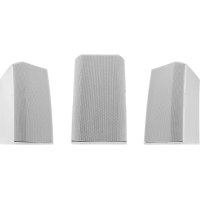
USER MANUAL ADS10T QSC
AcousticDesign™ Series
QSC
User Guide
AD-S6T - 6" two-way, foreground/background loudspeaker with 70/100V transformer
AD-S8T - 8" two-way, foreground/background loudspeaker with 70/100V transformer
AD-S10T - 10" two-way, foreground/background loudspeaker with 70/100V transformer
AD-S12 - 12" two-way, foreground/background loudspeaker
AD-S112sw-12" direct-radiating subwoofer
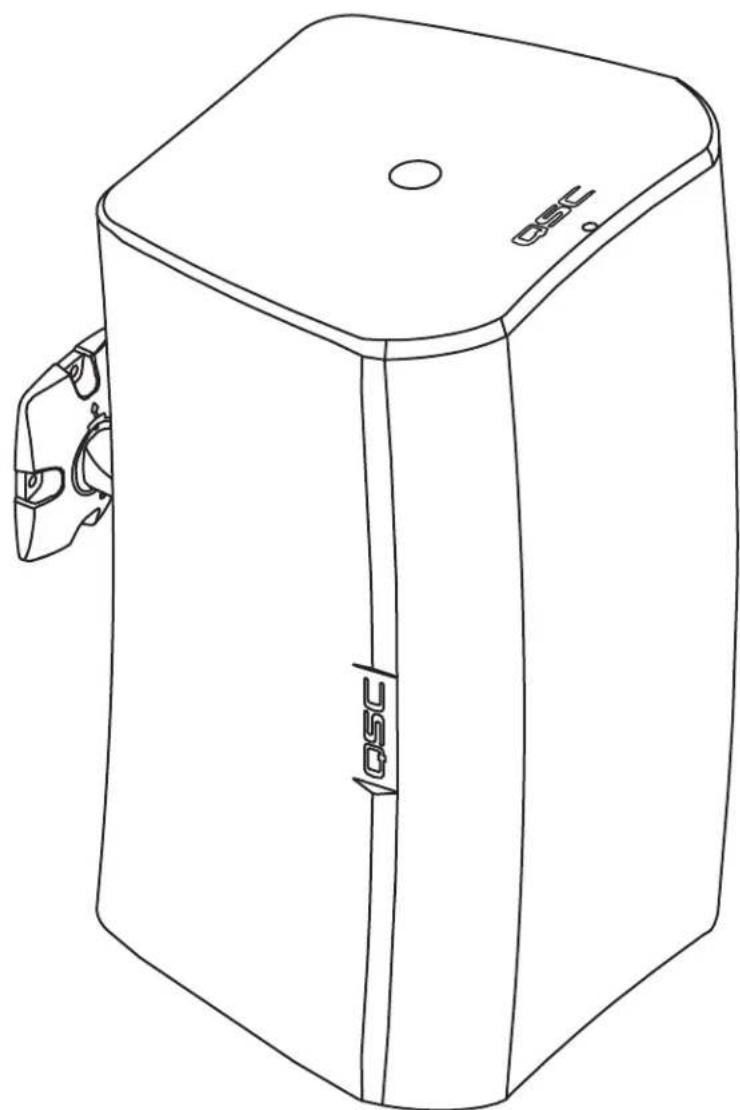
TD-000329-00-D
TD-000329-00

EXPLANATION OF SYMBOLS
The term "WARNING!" indicates instructions regarding personal safety. If the instructions are not followed the result may be bodily injury or death.
The term "CAUTION!" indicates instructions regarding possible damage to physical equipment. If these instructions are not followed, it may result in damage to the equipment that may not be covered under the warranty.
The term "IMPORTANT!" indicates instructions or information that are vital to the successful completion of the procedure.
The term "NOTE" is used to indicate additional useful information.

NOTE: The intent of the lightning flash with arrowhead symbol in a triangle is to alert the user to the presence of un-insulated "dangerous" voltage within the product's enclosure that may be of sufficient magnitude to constitute a risk of electric shock to humans.

NOTE: The intent of the exclamation point within an equilateral triangle is to alert the user to the presence of important safety, and operating and maintenance instructions in this manual.

IMPORTANT SAFETY INSTRUCTIONS

WARNING! TO PREVENT FIRE OR ELECTRIC SHOCK,DO NOT EXPOSE THIS EQUIPMENT TO RAIN OR MOISTURE.

WARNING: While it is possible for one person to lift a loudspeaker, it is important to use proper lifting techniques. Suggested reading: OSHA Technical Manual on Back Disorders and Injuries (http://www.osha.gov/dts/osta/otm/otm_vii/otm_vii_1.html#app_vii:1_2).
- Keep these instructions.
Heed all warnings.
- Follow all instructions.
- Clean only with a dry cloth.
- Do not install near any heat sources such as radiators, heat registers, stoves, or other apparatus (including amplifiers) that produce heat.
- Only use attachments/accessories specified by the manufacturer.
Refer all servicing to quali ed service personnel.
- Adhere to all applicable, local codes.
- Consult a licensed, professional engineer when any doubt or questions arise regarding a physical equipment installation.
Introduction
AcousticDesign series is a line of premium surface-mount loudspeakers intended for permanent installation applications. Housed in rugged ABS molded enclosures, each loudspeaker (except the AD-S12 and AD-S112sw) features a 70/100V transformer for use with distributed-audio lines. The unique X-Mount™ Bracket and Euro-style connector, supplied with each AcousticDesign loudspeaker, are designed for maximum flexibility and a quick install. Featuring a knurled ball-mount and discrete angle deployment marks, installers can set loudspeaker deployment angles quickly and securely. The Euro-style connector allows pre-wiring of the system and when combined with the quick "snap-on" deployment of the loudspeaker to the mount, installation is completed in a fraction of the time required versus competitive models.
Unpacking
Package Contents
- Quick-Start Guide
- AcousticDesign Loudspeaker
-
Euro-style Connector, 4-pin
-
Terminal Weather Protection Cover
- Phillips Screws (4) M4 (Terminal Weather Protection Cover)
- X-Mount™ Bracket (Yoke Mount for AD-S112sw)
Refer to - Figure 1
- Insert a 4mm fl at-lip screwdriver into Transformer Tap hole and engage the slot.
- At fully clockwise the transformer is in 8 -bypass.
AD-S10T
| 100 Volt 70 | Volt |
| 8 Ω8 Ω | |
| N/A 100W | |
| 100W 50W | |
| 50W 25W | |
| 25W 12.5W | |
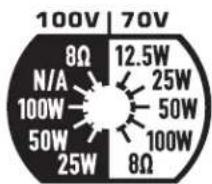
Figure 2
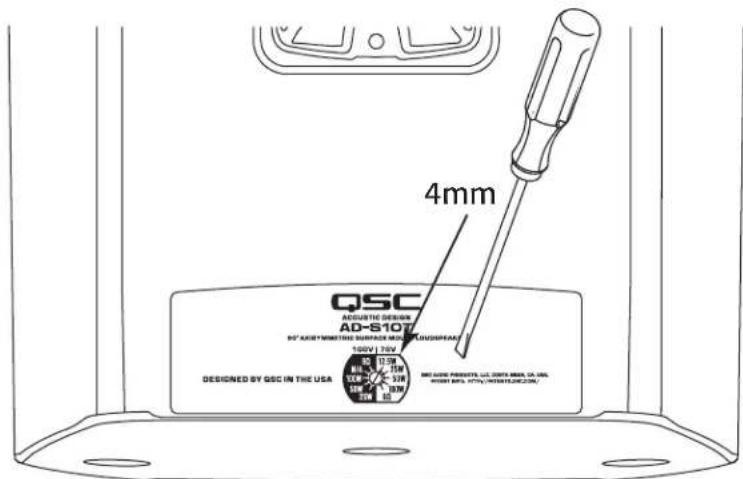
Figure 1
AD-S6T, AD-S8T
| 100 Volt 70 | Volt |
| 8 Ω8 Ω | |
| N/A 60W | |
| 60W 30W | |
| 30W 15W | |
| 15W 7.5W | |
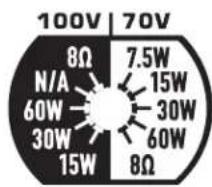
Figure 3
EN
Mount the Loudspeakers
Install the X-Mount™ Bracket
Refer to - Figure 4

WARNING! Install the system in accordance with local building codes and regulations. Use a licensed contractor or professional engineer. QSC Audio Products is not responsible for damages resulting from the negligent installation of any bracket or loudspeaker.
- Mount to a surface capable of supporting the weight of the loudspeaker.
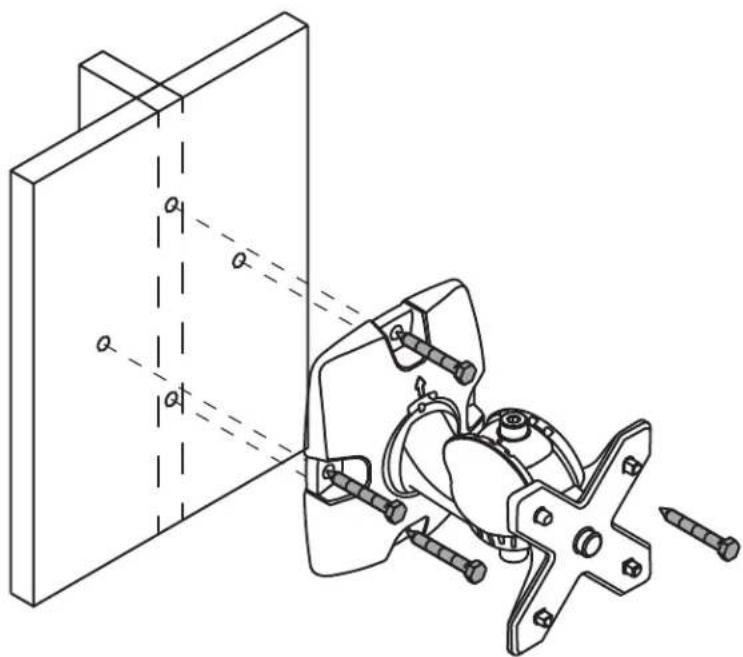
Figure 4
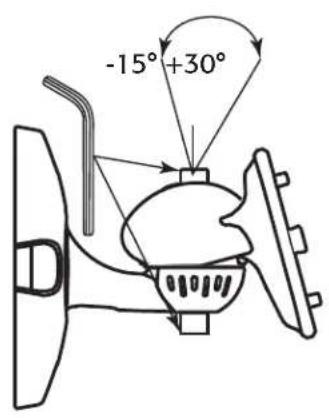
Adjust the Angle of the X-Mount™ Bracket
Refer to - Figure 5

NOTE: This step may be done now or after mounting the loudspeaker.
- Use a 5mm hex wrench to loosen the adjustment locking screws.
- Orient the bracket as necessary.
SIDE TOP FRONT
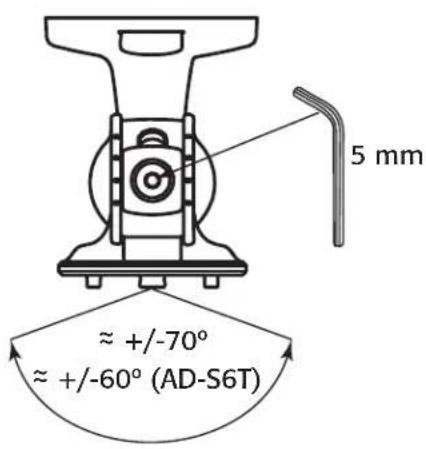
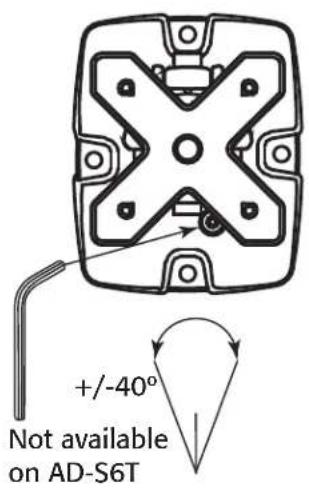
Figure 5
- Tighten the adjustment locking screws.
Mount the Loudspeaker on the Bracket
Refer to - Figure 6.

NOTE: The loudspeaker can be placed on the mount in ANY direction (Up, Down, Left, Right).
- Align the "X" slot with the X-Mount™ bracket and push the loudspeaker onto the bracket. (1)
- When seated, pull the loudspeaker down to lock the loudspeaker onto the bracket. (2)
- (Optional) Remove and retain the security tab (3); pull straight out. To remove the loudspeaker, re-install the security tab, press in and then remove the loudspeaker.
Connect a Safety Tether (Not supplied)

WARNING: DO NOT connect the tether to the mounting bracket or the screws holding the mounting bracket.
- It is recommended that you connect a safety tether from the safety ring (4) on the back of the loudspeaker to a spot on the wall that is structurally suffi cient to hold the weight of the loudspeaker in the event the loudspeaker should fall.
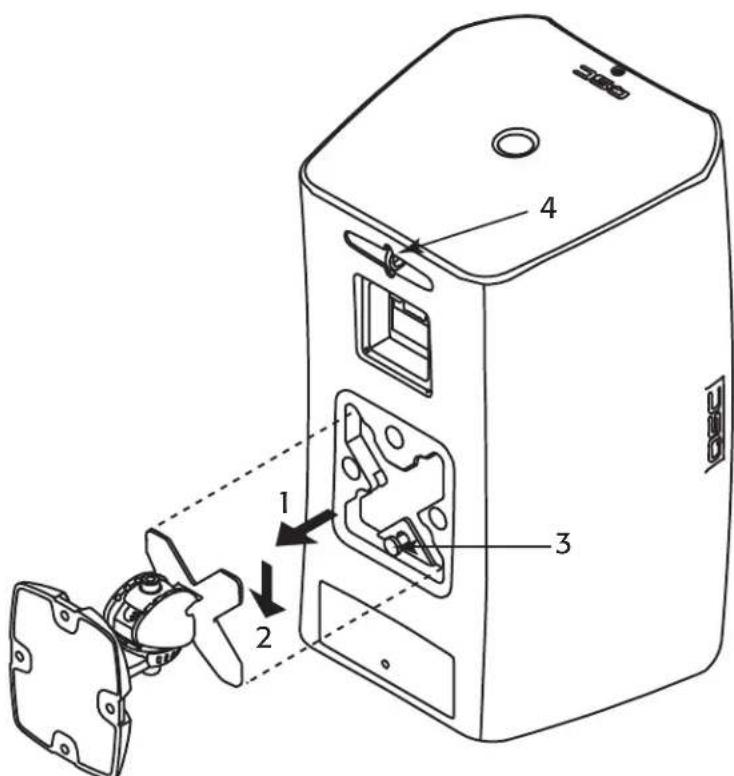
Figure 6
EN
Suspend the Loudspeaker
Refer to - Figure 7

WARNING!: Suspend the loudspeaker in accordance with local building codes and regulations. Use a licensed contractor or professional engineer. QSC Audio Products is not responsible for damages resulting from the negligent installation of suspension cabling, or loudspeaker.
The AcousticDesign loudspeakers (models AD-S8T, AD-S10T and AD-S12) may be suspended using the pullback point and M10 eyebolts you install at the bottom of the enclosures.

NOTE: Suspending the enclosure woofer side up positions the HF closer to the listener and helps improve bass response when coupled against the ceiling and wall planes.
- Remove 2 M10 plugs (not shown) from the bottom of the loudspeaker enclosure.
- Install two M10 -1.5 eyebolts (2) (accessory M10 Kit-C) in the M10 installation points on the bottom of the loudspeaker enclosure.
- Attach an appropriate cable to the tether Safety Ring (3) for the pull-back point.
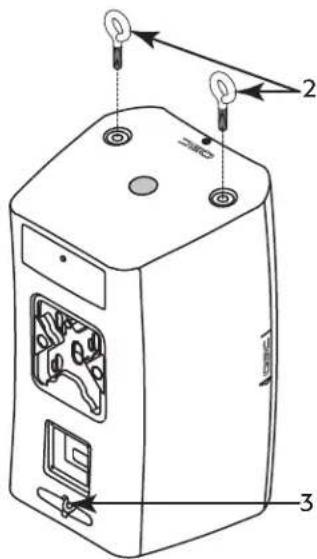
Figure 7
Yoke-mount the Loudspeaker
In addition to the mounting methods listed above, you can mount the loudspeaker using the optional Yoke mounting kit Refer to instructions provided in the Yoke kit. See the "Specifications" on page 12 for information.
Install the Weather Cover (Optional)
Refer to - Figure 8
- Slide the nut (1), compression gasket (2), and weather cover / gasket (3) over the wiring for the loudspeaker.
- Terminate the wiring to the Euro-style connector, refer to "Wire the Loudspeaker" on page 6
- Install the Euro-style connector.
- Slide the weather cover/gasket (3) up next to the connection box, use a small amount of wire, inside the cover, to provide strain relief.
- Attach the weather cover to the enclosure with four screws (supplied).
- Slide the compression gasket (2) into the weather cover receptacle.
- Slide the nut over the weather cover receptacle and tighten.
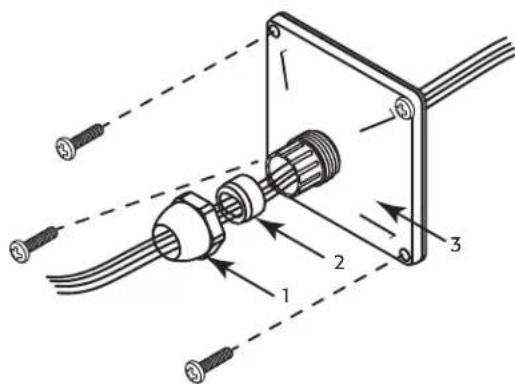
Figure 8
Wire the Loudspeaker
Use up to 12 gage wiring as appropriate. Refer to - Figure 9.
- If you are using the optional weather cover, make sure the wiring is inserted through all three parts of the weather cover in the proper order.
- Install the negative and positive wires in the "Input" +/- as shown. Tighten the wire-clamp screws.
- Install the daisy-chaining wires into the "Thru" +/- as shown. These wires go to the next loudspeaker in the daisy-chain.
EN
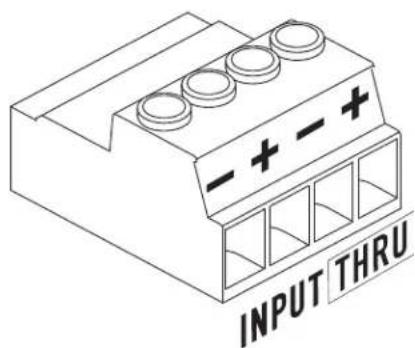
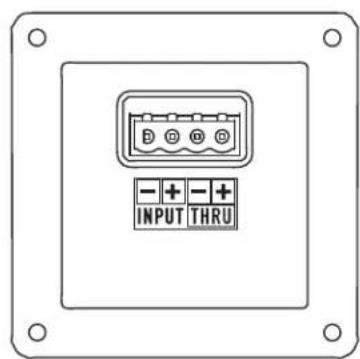
Figure 9
Remove the Loudspeaker
- Make sure all the wiring is disconnected, and the safety tether is removed.
- If the security tab, located at the base of the loudspeaker mount, has NOT been removed, push the tab in and slide the loudspeaker in the opposite direction of how it was installed.
- If the security tab has been removed, re-insert it, or use a small rod (< 4mm / 0.16^ ) to push in and release the mount lock.
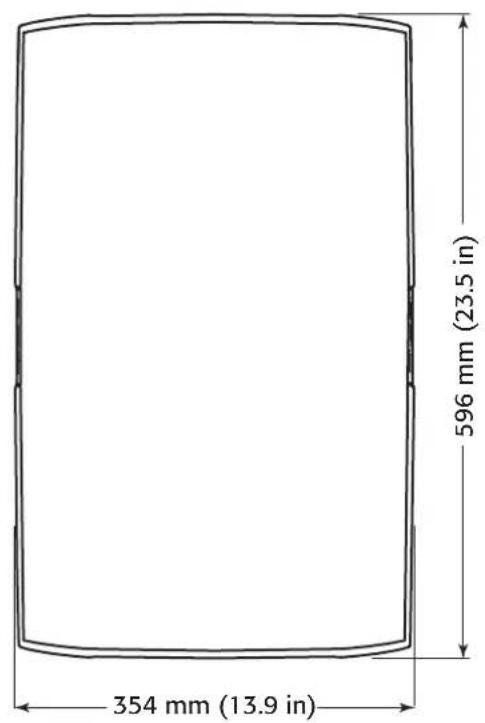
AD-S12 Dimensions
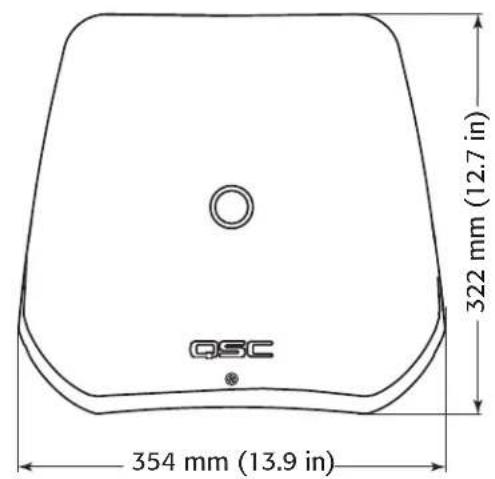
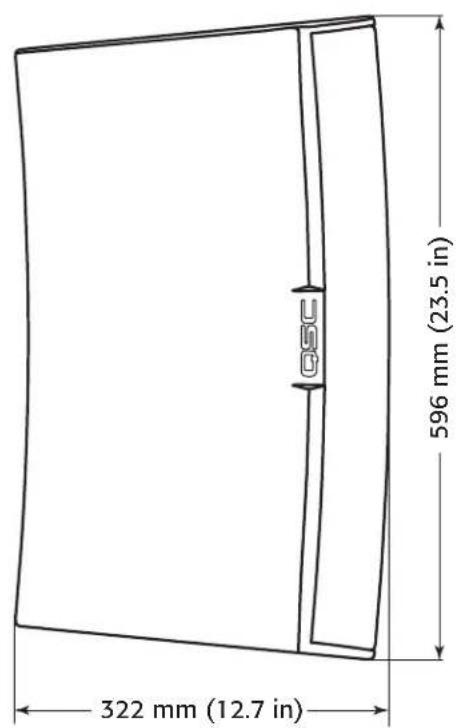
Figure 10
EN
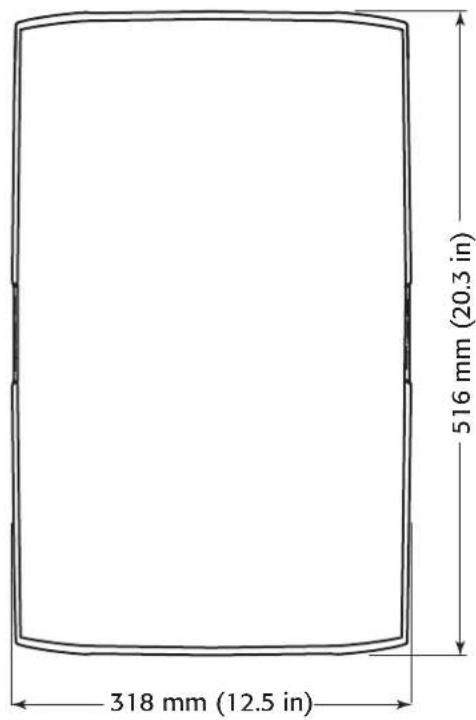
AD-S10T Dimensions
EN
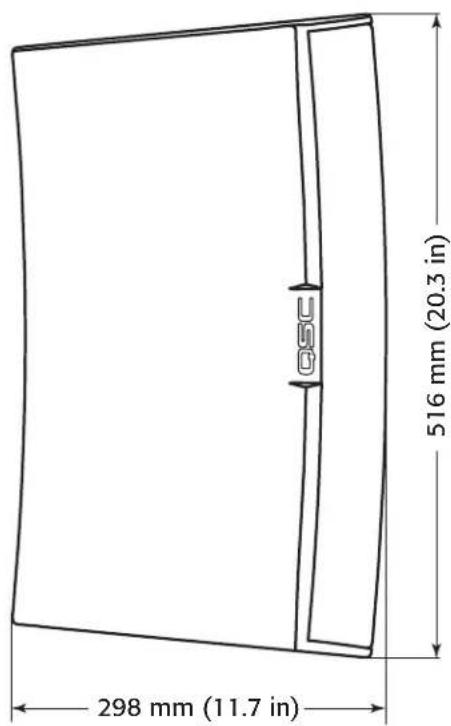
Figure 11
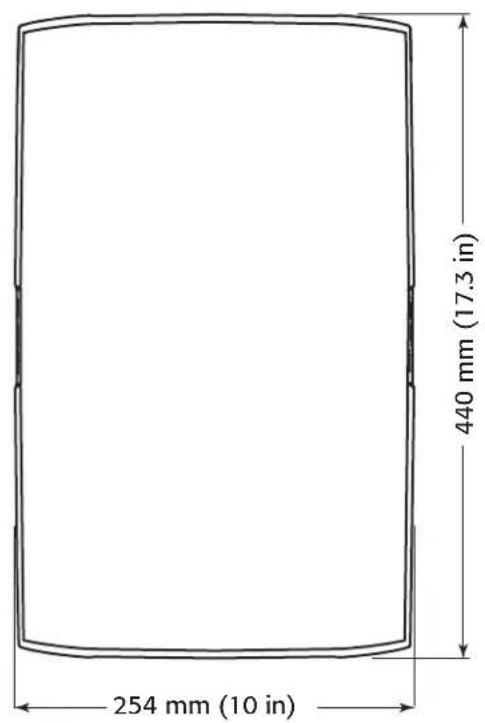
AD-S8T Dimensions
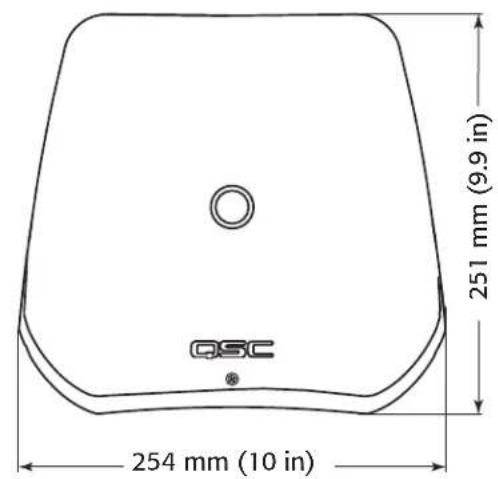
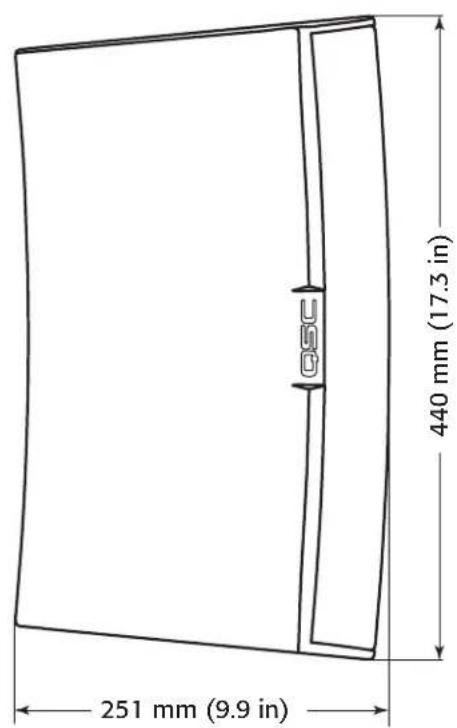
Figure 12
EN
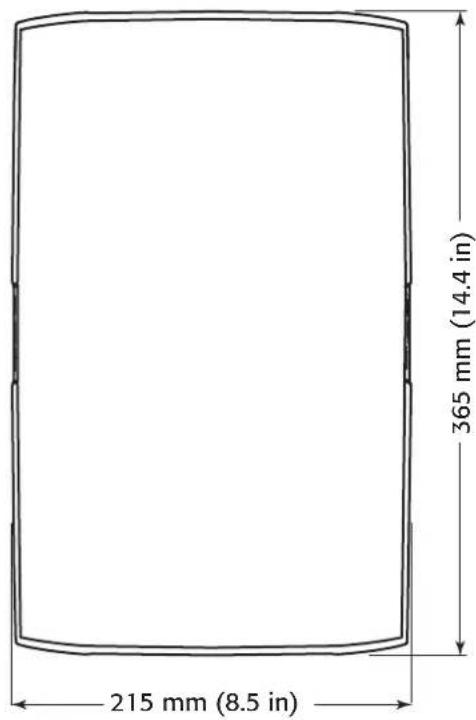
AD-S6T Dimensions
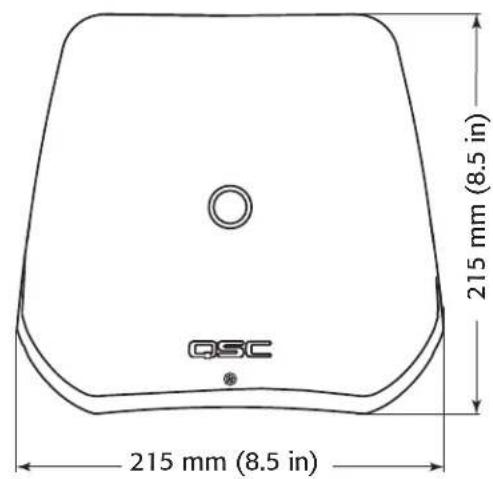
EN
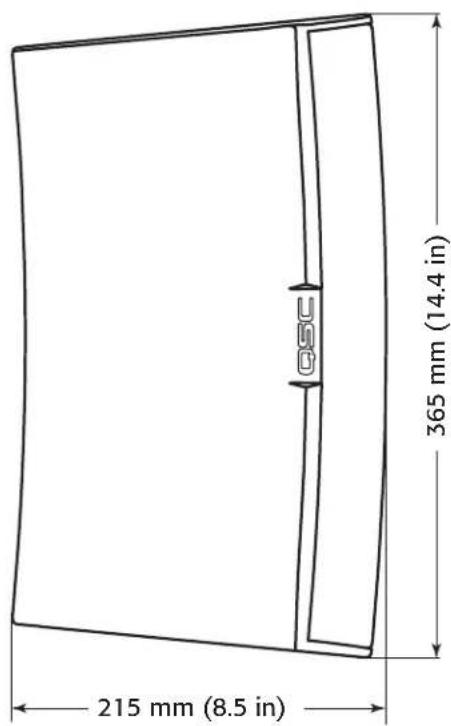
Figure 13
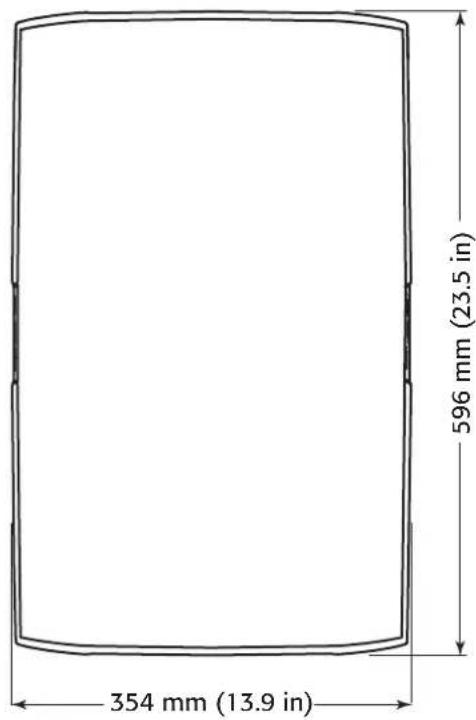
AD-S112sw Dimensions
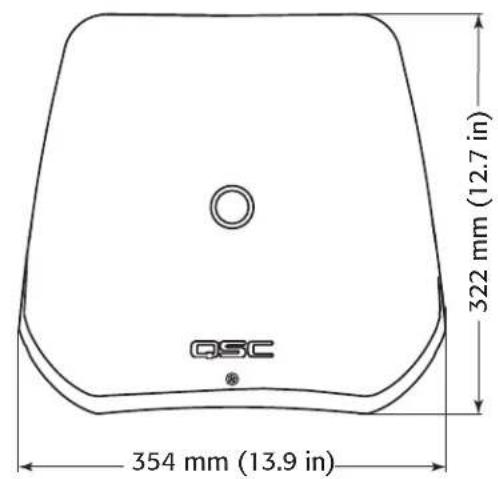
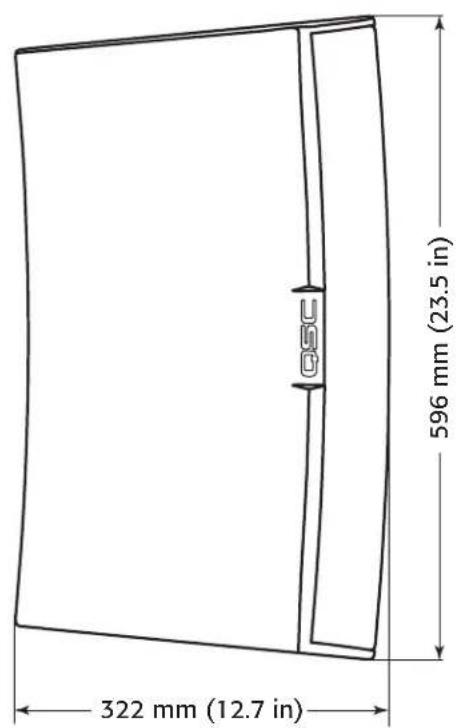
Figure 14
EN
Specifications
AD-S6T AD-S8T AD-S10T
| Confi guration 6" 2-way with transformer 8" 2-way with transformer 10" 2-way with transformer |
| Effective Frequency Range (-10 dB)1 | 60 - 20 kHz 55 - 20 kHz 50 - 19 kHz |
| Rated Voltage / Power2 | 35 Vrms / 150 W 40 Vrms / 200 W 45 Vrms / 250 W |
| Broad-band Sensitivity3 | 89 dB SPL 90 dB SPL 92 dB SPL |
| Coverage Angle (-6 dB)4 | 105° 105° 90° |
| Directivity Factor (Q) 5 | 7 | 10 |
| Directivity Index | 7 dB 9 dB | 10 dB |
| Maximum SPL Continuous (1 m)5 | 110 dB | 113 dB | 116 dB |
| Maximum SPL Peak (1 m)5 | 116 dB | 119 dB | 122 dB |
| Nominal Impedance | 8Ω | 8Ω | 8Ω |
| Recommended Amplifier Power | 300 W | 400 W | 500 W |
| Transformer Tap 70 V | 60, 30, 15, 7.5 W and 8Ω bypass | 60, 30, 15, 7.5 W and 8Ω bypass | 100, 50, 25, 12.5 W and 8Ω Bypass |
| Transformer Tap 100 V | 60, 30, 15 W and 8Ω bypass | 60, 30, 15 W and 8Ω bypass | 100, 50, 25 W and 8Ω Bypass |
| High-frequency Transducer | 1" silk dome tweeter / 1" voice-coil horn loaded | 1" Exit / 1.4" Voice-coil Compression Driver | 1" Exit / 1.4" Voice-coil Compression Driver |
| Low-frequency Transducer | 6" weather resistant paper cone woofer, 38 mm / 1.5" voice-coil | 8" Weather Resistant Paper Cone Woofer, 50 mm / 2" Voice-coil | 10" Weather Resistant Paper Cone Woofer, 64 mm / 2.5" Voice-coil |
| Input Connector | Euro-style Connector with Parallel Output |
| Enclosure Details |
| Material | ABS Polymer |
| Finish | Black RAL 9011 or White RAL 9010 Paint |
| Grille | Powder-coated Aluminum |
| X-Mount Material | Powder-coated Aluminum |
| Ingress Protection | Meets IP-54 for dust and splash resistance. |
| Operating Environment | Designed for indoor and outdoor use |
| Operating Temperature Range | -20 to 50 °C / -4 to 122 °F |
| Testing: Qualifi ed for outdoor use using the following tests: | Salt fog: MIL-STD-810G Method 509.5 for 100 hrs. |
| Humidity: MIL-STD-810G Method 507.5, Natural cycle B2, cyclic high RH for 7 days |
| High and low temperature: tested to QSC internal standards between -20° and 50°C |
| Weight (Net) | 6.2 kg / 13.6 lbs | 11 kg / 24 lbs | 14 kg / 31 lbs |
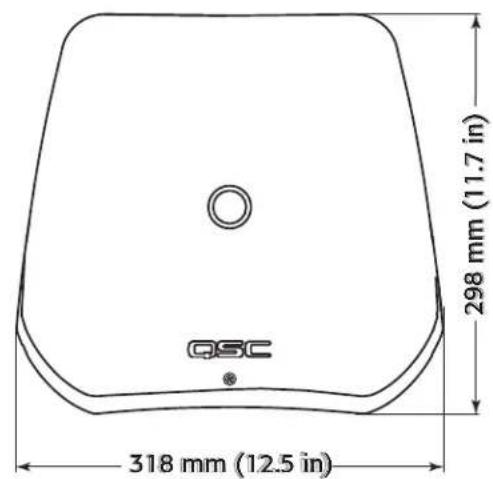
| Dimensions (HWD) | 365 mm x 215 mm x 215 mm | 440 mm x 254 mm x 251 mm | 516 mm x 318 mm x 298 mm |
| 14.4" x 8.5" x 8.5" | 17.3" x 10.0" x 9.8" | 20.3" x 12.5" x 11.7" |
| Included Accessories | X-MountTM system, Euro-style connector, input panel cover | X-MountTM system, Euro-style connector |
| Y-axis Mount Bracket Kit – YMS8T-WHT / YMS8T-BLK M10 Kit-C | Y-axis Mount Bracket Kit – YMS10T-WHT / YMS10T-BLK M10 Kit-C |
| Optional Accessories | N/A | Yoke Mount Bracket Kit – YMS8T-WHT / YMS8T-BLK M10 Kit-C | Yoke Mount Bracket Kit – YMS10T-WHT / YMS10T-BLK M10 Kit-C |
1 Free-fi eld, -10 dB from on-axis sensitivity
2 IEC60268-1 noise signal for 2 Hrs
3 On-Axis, free-field sensitivity, 2.83V, 1 m
4 Coverage angle measured with 3 - 10 kHz bandwidth
5 Calculated from rated noise voltage and sensitivity
Specifications
| AD-S12 AD-S112sw |
| Confi guration 12" 2-way 12" direct-radiating subwoofer |
| Effective Frequency Range (-10 dB)1 | 52 - 20 kHz 30 - 135 Hz | |
| Rated Voltage / Power2 | 50 Vrms / 300 W 50 Vrms / 300 W | |
| Broad-band Sensitivity3 95 dB SPL 90 dB SPL |
| Coverage Angle (-6 dB)4 | 75° M10 Kit-C | |
| Directivity Factor (Q) 12 N/A |
| Directivity Index 11 dB | N/A |
| Maximum SPL Continuous (1 m)5 | 120 dB | 115 dB |
| Maximum SPL Peak (1 m)5 | 126 dB | 121 dB |
| Nominal Impedance | 8Ω 8Ω | |
| Recommended Amplifier Power | 600 W | 600 W |
| Transformer Tap 70 V | N/A | N/A |
| Transformer Tap 100 V | N/A | N/A |
| High-Frequency Transducer | 1" Exit / 1.4" Voice-coil Compression Driver | N/A |
| Low-frequency Transducer | 12" Weather Resistant Paper Cone Boofer, 64 mm / 2.5" Voice-coil | 12" weather resistant paper cone woofer, 64 mm / 2.5" voice-coil |
| Input Connector | Euro-style Connector with Parallel Output |
| Endorse Details |
| Material | ABS Polymer |
| Finish | Black RAL 9011 or White RAL 9010 Paint | Black RAL 9011 Paint |
| Grille | Powder-coated Aluminum |
| Yoke Material | Powder coated galvanized steel |
| Ingress Protection Meets IP-54 for dust and splash resistance. |
| Operating Environment | Designed for indoor and outdoor use |
| Operating Temperature Range | -20 to 50 °C / -4 to 122 °F |
| Testing: Qualifi ed for outdoor use using the following tests: | Salt fog: MIL-STD-810G Method 509.5 for 100 hrs. |
| Humidity: MIL-STD-810G Method 507.5, Natural cycle B2, cyclic high RH for 7 days |
| High and low temperature: tested to QSC internal standards between -20° and 50°C |
| Weight (Net) | 16 kg / 35.0 lbs | 13.2 kg / 29 lbs |
| Dimensions (HWD) | 596 mm x 354 mm x 323 mm | 596 mm x 354 mm x 322 mm |
| 23.5" x 13.9" x 12.7" | 23.5" x 13.9" x 12.7" |
| Included Accessories | X-MountTM system, Euro-style connector | Yoke Mount (White or Black), Euro-style Connector |
| Optional Accessories | Yoke Mount Bracket Kit - YMS12-WHT / YMS12-BLK M10 Kit-C | M10 Kit-C |
1 Free-field, -10 dB from on-axis sensitivity
4 Coverage angle measured with 3 - 10 kHz bandwidth
2 IEC60268-1 noise signal for 2 Hrs
5 Calculated from rated noise voltage and sensitivity
3 On-Axis, free-fi eld sensitivity, 2.83V, 1 m
QSC
Mailing Address:
QSC Audio Products, LLC
1675 MacArthur Boulevard
Costa Mesa, CA 92626-1468 USA
Telephone Numbers:
Main Number: (714) 754-6175
Sales & Marketing: (714) 957-7100 or toll free (USA only) (800) 854-4079
Customer Service: (714) 957-7150 or toll free (USA only) (800) 772-2834
Facsimile Numbers:
Sales & Marketing FAX: (714) 754-6174
Customer Service FAX: (714) 754-6173
World Wide Web:
www.qsc.com
E-mail:
info@qsc.com
service@qsc.com
Serie AscousticDesign™
QSC
Guía del usuario
QSC Audio Products, LLC
1675 MacArthur Boulevard
Installation du support X-Mount
Voir Figure 4.

QSC Audio Products, LLC
1675 MacArthur Boulevard
QSC Audio Products, LLC
1675 MacArthur Boulevard
Costa Mesa, CA 92626-1468 USA
Telefonnummern:
QSC Audio Products, LLC
1675 MacArthur Boulevard
Costa Mesa, CA 92626-1468 USA
电话:
总机:(714) 754-6175