
SW8 AM2C KAR - Refrigerator WHIRLPOOL - Free user manual and instructions
Find the device manual for free SW8 AM2C KAR WHIRLPOOL in PDF.
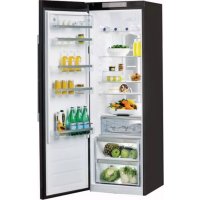

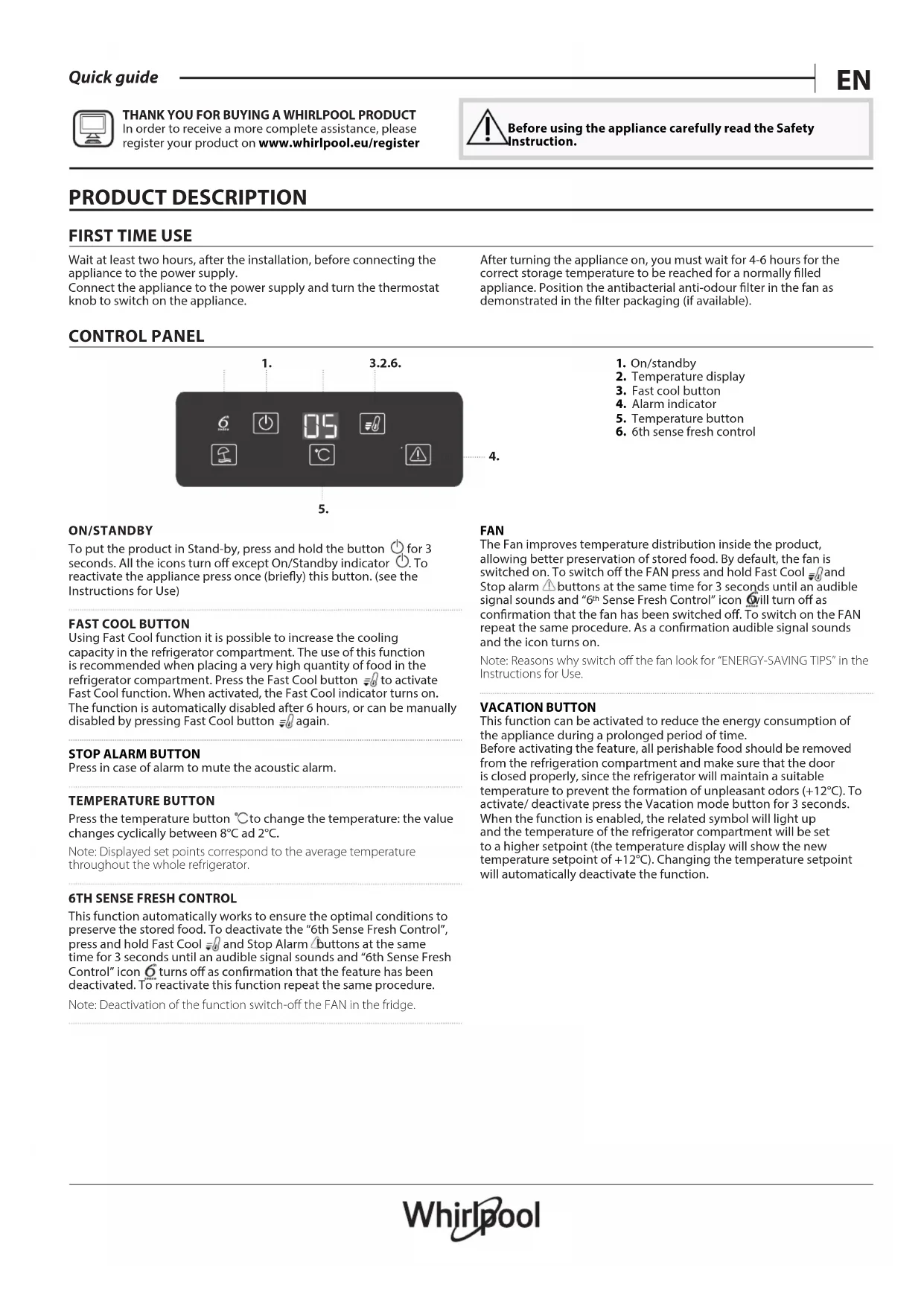


| Product type | Refrigerator-freezer |
| Brand | Whirlpool |
| Model | SW8 AM2C KAR |
| Control panel | Digital with touch keys |
| Temperature display | Yes, adjustable from +2°C to +8°C |
| Fast cooling function | Yes, manual activation, automatic deactivation after 6 hours |
| Alarm function | Yes, with mute button |
| 6th Sense freshness control | Yes, manual activation/deactivation (3 seconds on Fast cooling + Alarm) |
| Internal fan | Yes, even temperature distribution, manually activated/deactivated |
| Holiday mode | Yes, reduces consumption, temperature set to +12°C |
| Zero degree drawer | Yes, manual activation/deactivation, internal temperature ~0°C |
| Interior lighting | Yes, replaceable (contact after-sales service) |
| Power supply | 220-240 V, 50 Hz |
| Delay before plugging after installation | 2 hours minimum |
| Temperature wait time after start-up | 4 to 6 hours to reach storage temperature |
| Recommended storage zone | Temperate, cold, coldest zone, fruit/vegetable drawer |
| Maintenance | Regular cleaning of the defrost water drain |
| Basic troubleshooting | Check power supply, door closure, temperature setting, ventilation |
| Manual available in | French and many other languages |
Frequently Asked Questions - SW8 AM2C KAR WHIRLPOOL
User questions about SW8 AM2C KAR WHIRLPOOL
0 question about this device. Answer the ones you know or ask your own.
Ask a new question about this device
Download the instructions for your Refrigerator in PDF format for free! Find your manual SW8 AM2C KAR - WHIRLPOOL and take your electronic device back in hand. On this page are published all the documents necessary for the use of your device. SW8 AM2C KAR by WHIRLPOOL.
USER MANUAL SW8 AM2C KAR WHIRLPOOL
Wait at least two hours, after the installation, before connecting the appliance to the power supply.
Connect the appliance to the power supply and turn the thermostat knob to switch on the appliance.
After turning the appliance on, you must wait for 4-6 hours for the correct storage temperature to be reached for a normally filled appliance. Position the antibacterial anti-odour filter in the fan as demonstrated in the filter packaging (if available).
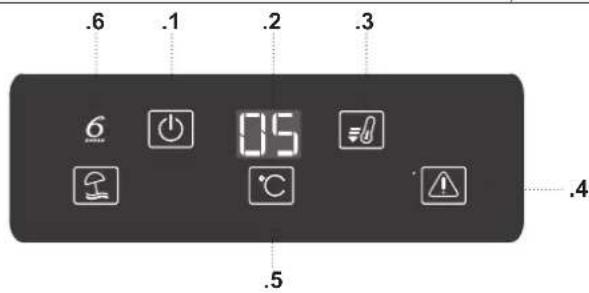
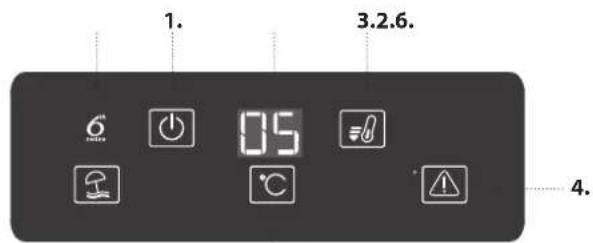
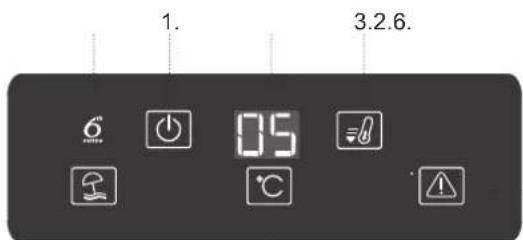
CONTROL PANEL
5.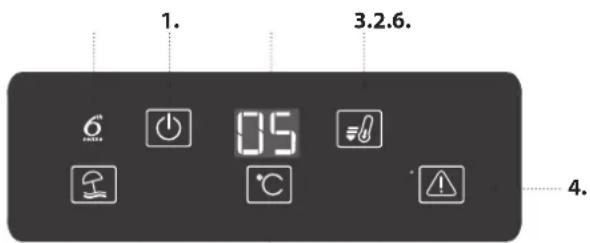
- On/standby
- Temperature display
- Fast cool button
- Alarm indicator
- Temperature button
- 6th sense fresh control
ON/STANDBY
To put the product in Stand-by, press and hold the button O for 3 seconds. All the icons turn off except On/Standby indicator O. To reactivate the appliance press once (briefly) this button. (see the Instructions for Use)
FAST COOL BUTTON
Using Fast Cool function it is possible to increase the cooling capacity in the refrigerator compartment. The use of this function is recommended when placing a very high quantity of food in the refrigerator compartment. Press the Fast Cool button to activate Fast Cool function. When activated, the Fast Cool indicator turns on. The function is automatically disabled after 6 hours, or can be manually disabled by pressing Fast Cool button again.
STOP ALARM BUTTON
Press in case of alarm to mute the acoustic alarm.
TEMPERATURE BUTTON
Press the temperature button ° C to change the temperature: the value changes cyclically between 8°C and 2°C
Note: Displayed set points correspond to the average temperature throughout the whole refrigerator.
6TH SENSE FRESH CONTROL
This function automatically works to ensure the optimal conditions to preserve the stored food. To deactivate the "6th Sense Fresh Control", press and hold Fast Cool and Stop Alarm buttons at the same time for 3 seconds until an audible signal sounds and "6th Sense Fresh Control" icon turns off as confirmation that the feature has been deactivated. To reactivate this function repeat the same procedure.
Note: Deactivation of the function switch-off the FAN in the fridge.
FAN
The Fan improves temperature distribution inside the product, allowing better preservation of stored food. By default, the fan is switched on. To switch off the FAN press and hold Fast Cool l and Stop alarm l buttons at the same time for 3 seconds until an audible signal sounds and "6th Sense Fresh Control" icon will turn off as confirmation that the fan has been switched off. To switch on the FAN repeat the same procedure. As a confirmation audible signal sounds and the icon turns on.
Note: Reasons why switch off the fan look for "ENERGY-SAVING TIPS" in the Instructions for Use.
VACATION BUTTON
This function can be activated to reduce the energy consumption of the appliance during a prolonged period of time. Before activating the feature, all perishable food should be removed from the refrigeration compartment and make sure that the door is closed properly, since the refrigerator will maintain a suitable temperature to prevent the formation of unpleasant odors (+12°C) . To activate/ deactivate press the Vacation mode button for 3 seconds. When the function is enabled, the related symbol will light up and the temperature of the refrigerator compartment will be set to a higher setpoint (the temperature display will show the new temperature setpoint of +12°C ). Changing the temperature setpoint will automatically deactivate the function.
HOW TO STORE FOOD AND BEVERAGE
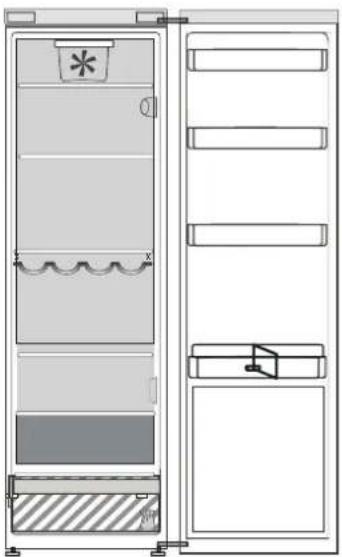
ZERO DEGREES DRAWER*
The Zero Degrees Painter is specifically designed to maintain a low temperature and a suitable humidity level, in order to keep foods fresher for longer (e.g. meat, fish, fruit and winter vegetables).
ACTIVATING AND DEACTIVATING THE BOX
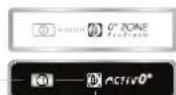
To activate/deactivate the box, press the button as illustrated in the figure.
When the box has been activated, the symbol lights up.
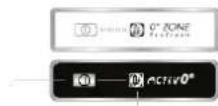
The temperature inside the box, when active, is approximately 0° . The following factors are vital for the "Zero Degrees" box to work properly:
- the refrigerator compartment must be switched on
- the temperature of the refrigerator compartment must be between +2°C and +5°C
- the box must be inserted to enable activation
- no special functions must have been selected (Standby, Vacation – where applicable).
If one of these special functions has been selected, the "Zero Degrees" box must be deactivated manually, and any fresh food inside it removed. If manual deactivation does not take place, the box will be deactivated automatically after 8 hours.
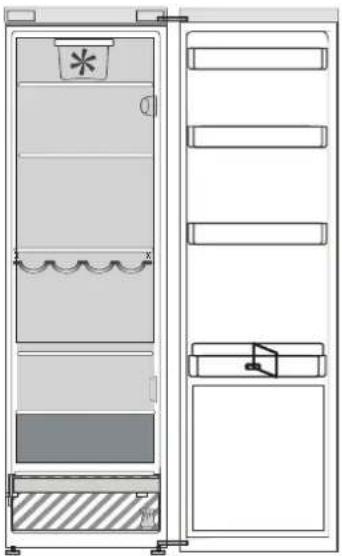
Legend
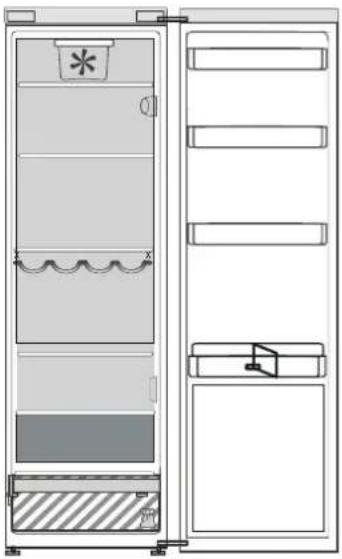
FREEZER ZONE
TEMPERATE ZONE Suggested for the storage of tropical fruit, cans, drinks, eggs, sauces, pickles, butter, jam
COOL ZONE Suggested for the storage of cheese, milk, daily food, delicatessen, yogurt

COOLEST ZONE Suggested for the storage of cold cuts, desserts, fish and meat

FRUIT & VEGETABLE DRAWER
Note:
- if the symbol does not light up when the function is activated, check that the drawer is properly inserted; if the problem persists, contact your nearest authorized After-sales Service
- if the function is active and the drawer open, the symbol on the control panel may be deactivated automatically. If the drawer is inserted, the symbol will become active again
irrespective of the state of the function, a slight noise may be heard: this is normal and is not a cause for concern.
- when the function is not active, the temperature in the drawer depends on the general temperature inside the refrigerator.
In this case, we recommend it is used to store fruit and vegetables which are not sensitive to cold temperatures (fruits of the forest, apples, apricots, carrots, spinach, lettuce, etc.).
Important: when the function is activated and there are foodstuffs with a high water content, condensation may form on shelves. In this case, disable the function temporarily.
What to do if... Possible reasons Solutions
| The appliance doesn't work. There may be an appliance power supply problem. | Make sure: · there is not a power failure; · the plug is properly inserted in the power socket and the double- pole switch (if present) is in the correct position (on); · the household electrical system protection devices function; · the power cable is not broken; |
| The inside light does not work. It may be necessary to replace the light bulb. | Disconnect the appliance from the power supply and contact the Technical Assistance Service if you need a replacement. |
| The internal temperature of the compartments is not cold enough. | Check that: · the doors are closed properly; · the appliance is not installed near a heat source; · the temperature is appropriately set; · the circulation of air through the ventilation grilles on the base of the appliance is not obstructed. |
| There is water on the bottom of the refrigerator compartment. | Clean the defrosting water drain (see section "Cleaning and Maintenance"). |
| The front edge of the appliance that the door gaskets seal against is hot. | A solution is not needed. |
| The temperature of the refrigerator compartment is too cold. | set a less cold temperature. · Turn off the fan (if present) described in the paragraph "FAN". |
6th sense fresh control
1.15 20114 3 4 5j .6jblaiablaiaibj
a
a aaii 1 1 1 1 1 1 1 1 1 1 1 1 1 1 1 1 1 1 1 1 1 1 1 1 1 1 1 1 1 1 1 1 1 1 1 1 1 1 1 1 1 1 1 1 1 1 a 1
A
J 1
J 1
Vacation 1111111111111111111111111111111111
a 12+ 12
1
3 1 1 1 1 1 1 1 1 1 1 1 1 1 1 1 1 1 1 1 1 1 1 1 1 1 1 1 1 1 1 1 1 1 1
J
aaii aill o jy i yll aol j Sall ao ayall ayll abg piaiie 1 jle baii ayll o yag aie y lao ayls gao, ie ayll alo prnlae jye aay caiy aal o ae ydi s ie ayll ayll aeg yail baically ygi ybi jay jiele6 ayl aaj agyall jyai jzai
j#
aannn nnnn nn nnnn nnnn nnnn nnnn nnnn
The refrigerator is designed to operate in a hot and humid climate.
TEMPERATURE SETTINGS
For temperature adjustment, the temperature setting button should be pressed between 2°C and 8°C.
Note: The temperature setting may vary depending on the ambient temperature.
6TH SENSE FRESH ZONE CONTROL ELEMENT
To activate the function, press the button for 3 seconds. The "6th Sense Fresh Zone Control" function will emit a beep and the indicator will light up. To deactivate, repeat the same procedure.
Note: The function will be deactivated automatically after a certain time.
FRESH ZONE
The Fresh Zone is designed to keep vegetables and fruits fresh for a longer time. To activate, press the button for 3 seconds. The "6th Sense Fresh Zone" indicator will light up. To deactivate, repeat the same procedure. The indicator will turn off.
Note: For cleaning the Fresh Zone, refer to the "CLEANING AND MAINTENANCE" section.
STOP FROST FUNCTION
The Stop Frost function is used to prevent frost buildup in the freezer. When the function is activated, the compressor will stop for a certain period, and the temperature will rise to about +12°C. To activate, press the Stop Frost button for 3 seconds. The indicator will light up. The function will automatically deactivate after a certain time.
STORING FOOD AND BEVERAGES
For cooking, frying, baking, boiling, stewing, grilling, roasting, and for preserving food.
For salting.
For pickling, soups, broths, sauces, and for preserving food.

For salting meat.
For salted fish, meat, and for preserving fish and meat.

Cooking and baking temperature table.
Temperature table*
For temperature table, the recommended storage temperature for perishable foods (meat, fish, poultry, dairy products, and eggs) is between 0°C and 4°C.
Cleaning and maintenance.
Before cleaning, unplug the appliance.
When cleaning, do not use abrasive cleaners.
The temperature of the refrigerator should be set to 0°C. The following table is for storing food in the refrigerator:
The temperature of the freezer compartment should be between +2°C and +5°C. The freezer is intended for freezing fresh and cooked food. The freezer can be used for long-term storage of frozen food (for example, meat, fish, etc.).
If the functions are not used for a long time, unplug the appliance, remove all food, and defrost the freezer. If the appliance is not defrosted, the automatic defrosting process will take about 8 hours.
Expert:
- If the appliance is not cooling properly, check the temperature settings. If the problem persists, contact the nearest service center.
- If the appliance is making unusual noises, it may be due to the automatic defrosting process. If the noise continues, contact the service center.
- If the functions are not working properly, it may be due to a power outage. Check the power supply.
- If the appliance is not working properly, the ambient temperature should be within the specified range. High ambient temperatures can cause the appliance to work harder and consume more energy.
Note: If the functions are not working properly, the appliance may need to be reset. To do this, unplug the appliance and plug it back in after a few minutes.
TROUBLESHOOTING
If the problem persists, contact the service center.
| Курьлгы жуmbic ICTeMeид. | Курьлгыны КУатпен Кам tamасьз eTuDE MecSeе бap сolyы мукIH. | КениердіTekceperiH3: • КУТКаБЕЛБуЗВIMаган; • КСOCKБИУАБИКСДурьс OpнATБИРагынЖэHe KOC noJIIOCTi He bip noIIOCTI КСOCKБИ (бap сolyнгхжагдайда) ТИСТКУДe (Kocybl) eKehdɪgɪH; • ТурмьICTык ЗЛЕКТу КУЕСИн Корray Куралдары КУМыс ICTeɪTɪHɪN; • КУТСБИМЗAKБIMДaLMAfAHbIH; |
| Iшкшam_JжмбIC ICTeMeид. | Шam Лamпасьн aybICTbIPу кajET бolyы мукIH. | Курьлгыны КУТКЕЗИн АжырathынБ3ЖэHe OНы aybICTbIPу КajETБОнca TExHnKaIbIK KOLday Kbl3MeTIne Xa6aplacbIH3. |
| БелIMderdiH iшк TempepaTyrpacbl КожетIHше cybIK emec. | Себен ap TyprNi Бolyы мукIH ("WeuIM" SaRaHbIN KaraHbI3). | КениердіTekceperiH3: • ecikтЕр дурьс КэБИrAнын; • Курьlгы КБИУ Ke3IHN JxahBHyDA opHAtБIIMaFahN; • TempepaTура TИсİHNe opHAtБIINFaH; • Курьlгын HerizIHDerI JxelDEtU Topnapы apKbIbI JxacalatbH ayaцRPKnyraIcBбeTeIIMereH. |
| ToHa3bITKbIIsh 6eJIIMiHIn actbHda cy xinHaNDbI. | ЕрітінгсcydIN hayacBs beteRhen.Ерireн cydBu arby3y caHbIaybH TazapTBH3 ("Kурьlгыfa TEXHnKaIbIK KbI3MET KepCetUжэHe Ta3aIaay"БeJIIMH KapaHbI3). | |
| Kурьlгыны ecik TbIFbIzDaTbIbITapbl OKшaynaH anDbIHbI 6eti bIcTbIK. | Бун kaTe Бolyы tablmaДbl. Бун кONDecATTbH Tγ3IpyH БоLDbIPMaДbl. | Шewim кajETemec. |
| ToHa3bITKbIIsh 6eJIIMiHIn TempepaTyrpacbl TbIM cybIK. | • Oрнатылган TempepaTура TbIM cbyk. | • Саŋжorapьak TempepaTураын opHAtbIN KepiH3. •ЖeNsTeKlIbTI (erep sbap bonca) "ЖЕДETKIlS" taraybHah cinnattanraldai ewipiniz. |
INSTALLATION INSTRUCTIONS
FIRST USE
After installation, wait at least two hours before connecting the appliance to the power supply.
Connect the appliance to the power supply and turn the thermostat switch to turn on the appliance.
After turning on the appliance, wait 4-6 hours to reach the storage temperature required for a normally filled appliance. Place the antibacterial odor filter (if available) on the fan as shown on the filter packaging.
VADIBAS PANELIS
5.
ON/OFF STANDBY MODE
To set the appliance to standby mode, press and hold the On/Off button for 3 seconds. All icons will turn off except the On/Off indicator. To switch the appliance back on, press this button briefly once. (See User Manual)
QUICK COOLING BUTTON
The quick cooling function increases the cooling capacity of the refrigerator compartment. It is recommended to use this function when a very large quantity of food has been placed in the refrigerator compartment. Press the quick cooling button to activate this function. When activated, the quick cooling indicator lights up. The function automatically switches off after 6 hours, but it can also be switched off manually by pressing the quick cooling button again.
ALARM RESET BUTTON
Press to switch off the audible alarm.
TEMPERATURE BUTTON
Press the temperature button to change the temperature in °C. The value cycles between 8°C and 2°C.
Note: These settings indicate the average temperature throughout the refrigerator.
6TH SENSE FRESH CONTROL
This function operates automatically to ensure optimal conditions for longer food storage. To switch off "6th Sense Fresh Control", press and hold the quick cooling and alarm reset buttons simultaneously for 3 seconds until an audible signal sounds and the "6th Sense Fresh Control" icon turns off, confirming that the function is deactivated. To switch the function back on, repeat the above steps.
Note: When this function is switched off, the fan in the refrigerator will also be switched off.
- On/Standby mode
- Temperature display
- Fast cooling button
- Alarm indicator
- Temperature button
- 6th Sense freshness control
VENTILATOR
The ventilator improves temperature distribution inside the refrigerator, thus ensuring longer storage of products. By default, the ventilator is on. To turn off the VENTILATOR, simultaneously press and hold the fast cooling and alarm stop buttons for 3 seconds until a sound signal is heard and the "6th Sense freshness control" icon turns off, confirming that the ventilator is off. To turn on the VENTILATOR, repeat the previous actions. As confirmation, a sound signal will be heard and the icon will turn on.
Note: The reasons for turning off the ventilator can be found in the "TIPS FOR ENERGY SAVING" section of the instruction manual.
VACATION MODE BUTTON
This function can be turned on to reduce energy consumption during longer periods of time.
Before turning on this function, remove all perishable products from the refrigerator and make sure the door is properly closed - the refrigerator will maintain an appropriate temperature to avoid unpleasant odors (+12°C) . To turn the function on/off,
hold the vacation mode button for 3 seconds.
When the function is enabled, the corresponding symbol will light up and the refrigerator compartment temperature will be set to a higher position (the temperature display will show the new temperature position +12°C) . Changing the temperature settings will automatically turn off the function.
HOW TO STORE FOOD AND DRINKS
"ZERO DEGREE" DRAWER*
The "Zero degrees" drawer is specially designed to maintain a low temperature and appropriate humidity level, which would allow food products (for example, meat, fish, fruits and winter vegetables) to be kept fresh for longer.
ACTIVATING AND DEACTIVATING THE COMPARTMENT
To activate/deactivate the compartment, press the button as shown in the figure. When the compartment is activated, the symbol lights up.
When the compartment is active, the temperature in it is approximately 0°. For the "Zero degrees" compartment to work properly, it is important to observe the following conditions:
- the appliance must be switched on;
- the refrigerator compartment temperature must be set between +2°C and +5°C;
- to enable the activation of the function, the compartment must be installed;
- other special functions must be switched off (for example, holiday mode, vacation function - if available). If one of these special functions is selected, the "Zero degrees" compartment must be deactivated manually and all fresh food must be removed from it. If manual deactivation is not performed, the compartment will be automatically deactivated after 8 hours.
Designation
FREEZER COMPARTMENTS
CHILL ZONE
Intended for storing tropical fruits, canned goods, drinks, eggs, sauces, pickled cucumbers, butter, jam
COOL ZONE
Intended for storing cheese, milk, everyday products, delicatessen, yogurt

COOLER ZONE
Designed for storing ready meals and desserts, as well as fish and meat.

FRUIT AND VEGETABLE DRAWER
Note.
- If, when activating the function, the symbol does not light up, check that the drawer is properly inserted; if the problem is not resolved, contact the nearest authorized after-sales service.
- If the function is active and the drawer is open, this symbol on the control panel may deactivate automatically. When the drawer is inserted, the symbol becomes active again.
- Regardless of the function status, a slight noise is possible: this is normal and is not considered a defect.
- If the function is not active, the temperature inside depends on the general temperature of the refrigerator compartment. In this case, it is recommended to store fruits and vegetables that are not sensitive to cold (wild berries, apples, apricots, carrots, spinach, lettuce, etc.).
Recommended for storing meat, milk, ready meals, snacks, and desserts.

COLD ZONE
Recommended for storing fresh cuts, desserts, and fish.

FRUIT AND VEGETABLE DRAWER
Note:
- If, when the function is switched on, the symbol does not light up, check that the drawer is correctly inserted. - If the function is switched on and the drawer is open, the symbol on the control panel may go out automatically. When the drawer is put back in place, the symbol lights up again. - Regardless of the state of this function, a slight noise may be heard: this is normal and should not be considered a defect. - If the function is not active, the temperature in the drawer depends on the general temperature of the refrigerator compartment.
In this case, it is recommended to use the drawer for storing fruits and vegetables that are not sensitive to low temperatures (wild berries, apples, apricots, carrots, spinach, lettuce, etc.).
Important: If the compartment is switched on and products with a high moisture content are stored in it, condensation may form on the shelves. In this case, temporarily switch off the function.
To eliminate possible causes of malfunction
STORAGE OF PRODUCTS
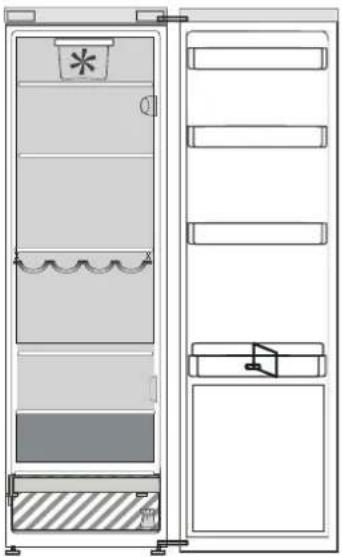
CONTAINER "NULL GRADUS"
The "Null Gradus" container is designed specifically for maintaining low temperature and the necessary level of humidity required for fresh storage of products (vegetables, meat, fish, fruits and vegetables).
Recommended storage of tropical fruits, canned goods, beverages, forest berries, sauces, salt, oil, jam.
COOLING ZONE
Recommended storage of cheese, dairy products, desserts, delicacies.

FRESH ZONE
Recommended storage of vegetables, desserts, fish, meat.

CONTAINER FOR FRUITS AND VEGETABLES
Note.
- The symbol lights up when the function is active; check the correct installation of the container; if the problem persists, contact an authorized service center after-sales service. - When the container is open, the symbol may turn off automatically. When the container is installed, the symbol turns on. Regardless of the structure, you can turn on the function manually. This is also considered normal and does not indicate a malfunction. - When the mode is on, the temperature inside the container depends on the general temperature and the ambient temperature. In this case, it is recommended to store fruits and vegetables that normally react to low temperature conditions (for example, forest berries, melon, apricots, carrots, spinach, lettuce, etc.).
Important: When the mode is on and there are products with high water content in the container, condensation may form. In this case, the mode must be turned off.
What to do if... Possible malfunctions
| Прилад не пацюс. Можимьо, виноклп пообlemи з[elektropoilestachnam праладу. | П配电онься, с:• elektroponь leнься на Вддочец;•штениь на вилka bctablena в розту elektroponь leнься на Вддоч� (за наразыност);3нхорься у ралынбому поожен; • захши писто ябунов оеекрочи состему phункциону. Налжимчим чином;•шнухшлийся на пошкошени; |
| He пацюс освітleness в rearpondу.Можимьо, по triбно замін'tи лamп. | Ящо винокл по tradeь викоати замін, вд'едайся пралад вд elektroponepeşki i зерпілься до Zeentу Тхнічого obchynу obchynу Кліcent. Кліcent. Кліcent. Кліcent. Кліcent. Кліcent. Кліcent. Кліcent. Кліcent. Кліcent. Кліcent. Кліcent. Кліcent. Кліcent. Кліcent. Кліcent. Кліcent. Кліcent. Кліcent. Кліcent. Кліcent Кліcent. Кліcent. Кліcent. Кліcent. Кліcent. Кліcent. Кліcent. Кліcent. Кліcent. Кліcent. Кліcent. Кліcent. Кліcent. Кліcent. Кліcent. Кліcent. Кліcent. Кліcent. Кліcent. Кліzent. Кліcent. Kліcent. Kліcent. Kліcent. Kліcent. Kліcent. Kліcent. Kліcent. Kліcent. Kліcent. Kліcent. Kліcent. Kліcent. Kліcent. Kліcent. Kліcent. Kліcent. Kліcent. Kліcent. Kліcent. Kліcent. Кліcent. Kліcent. Kліcent. Kліcent. Kліcent. Kліcent. Kліcent. Kліcent. Kліcent. Kліcent. Kліcent. Kліcent. Kліcent. Kліcent. Kліcent. Kліcent. Kліcent. Kліcent. Kліcent. Kлі cent. Kліcent. Kліcent. Kліcent. Kліcent. Kліcent. Kліcent. Kліcent. Kліcent. Kліcent. Kліcent. Kліcent. Kліcent. Kліcent. Kліcent. Kліcent. Kліcent. Kліcent. Kліcent. Kліcent. Kлі cent. Кліcent. Kліcent. Kліcent. Kліcent. Kліcent. Kліcent. Kліcent. Kліcent. Kліcent. Kліcent. Kліcent. Kліcent. Kліcent. Kліcent. Kліcent. Kліcent. Kліcent. Kліcent. Kліcent. Kліzent. Kліcent. Kліcent. Kліcent. Kліcent. Kліcent. Kліcent. Kліcent. Kліcent. Kліcent. Kліcent. Kліcent. Kліcent. Kліcent. Kліcent. Kліcent. Kліcent. Kліcent. Kліcent. Kліcent. Kліzent. Кліcent. Kліcent. Kліcent. Kліcent. Kліcent. Kліcent. Kліcent. Kліcent. Kліcent. Kліcent. Kліcent. Kліcent. Kліcent. Kліcent. Kліcent. Kліcent. Kліcent. Kліcent. Kліcent. Кліcent. Кліcent. Kліcent. Kліcent. Kліcent. Kліcent. Kліcent. Kліcent. Kліcent. Kліcent. Kліcent. Kліcent. Kліcent. Kліcent. Kліcent. Kліcent. Kліcent. Kліcent. Kліcent. Kліcent. Клі cent. Kліcent. Kліcent. Kліcent. Kліcent. Kліcent. Kліcent. Kліcent. Kліcent. Kліcent. Kліcent. Kліcent. Kліcent. Kліcent. Kліcent. Kліcent. Kліcent. Kліcent. Kліcent. Kліcent. Клі cent. Кліcent. Kліcent. Kліcent. Kліcent. Kліcent. Kліcent. Kліcent. Kліcent. Kліcent. Kліcent. Kліcent. Kліcent. Kліcent. Kліcent. Kліcent. Kліcent. Kліcent. Kліcent. Kліcent. Кліzent. Kліcent. Kліcent. Kліcent. Kліcent. Kліcent. Kліcent. Kліcent. Kліcent. Kліcent. Kліcent. Kліcent. Kліcent. Kліcent. Kліcent. Kліcent. Kліcent. Kліcent. Kліcent. Kліcent. Кліzent. Кліcent. Kліcent. Kліcent. Kліcent. Kліcent. Kліcent. Kліcent. Kліcent. Kліcent. Kліcent. Kліcent. Kліcent. Kліcent. Kліcent. Kліcent. Kліcent. Kліcent. Kліcent. Кліcent. Kліcent. Кліcent. Kліcent. Kліcent. Kліcent Kліcent Kліcent Kліcent Kліcent Kліcent Kліcent Kліcent Kліcent Kліcent Kліcent Kліcent Kліcent Kліcent Kліcent Kліcent Kліcent Kліcent Kліcent Kліcent Kліcent. Kліcent Kліcent Kліcent Kліcent Kліcent Kліcent Kліcent Kліcent Kліcent Kліcent Kліcent Kліcent Kліcent Kліcent Kліcent Kліcent Kліcent Kліcent Kліcent |
4.
- Ujummi/Umummi
- 2pwnunhug htpn 3.Upuqunruchgufi 4.Uhuqufghuqhy
- 2pumunhfnih fnmnl
- 6th sense pupunpjuhulnnnpu
5.
U+U.3nU/UQUUU
Upuuuppuf Uuuuuiutduuui uunum utnqutf h 3 qmuu piu quhulip Fnp gngshpiu wusunlnti li, puquunlpiuip Hugm/ Uuuuua gmghy: Uupfuunpup npg uwhuuggl nuhuup lph (lmp) uttuf hnluu: (fum L Oquaqnupnn gngnuk
UUGUUUUGUUU
Oqnnpnl Upuu uunnguf qnpwnnppnlf npnnl f unnuupuif loghmu npnpgbl umntguf hqpump: Uuu npduumppnlp uulnou oqnnnpal uui duunuul, lpp uunnuupuuf hglnhd f uunuunpupuuf uptyf h qnf: Upuu umntguf hnluu: Upuq 0 nmmuguf qqnunnpi uunhugfbl hauu: bpp uui uunuunufni L Upuq unnmuguf gnyhp dhuunl; 9 npounnnpfl mnnnnl pquip mynnnmnl 6 Jun uig qum npn pf wsgumbl dhfm] lphl utubn Upuq umntguf 8 hnwhp:
Operating temperature range: from -8°C to +2°C.
Warning. Do not use if damaged.
- CONTROL PANEL
- ON/STANDBY
- FAST COOL BUTTON
- STOP ALARM BUTTON
- TEMPERATURE BUTTON
- TH SENSE FRESH CONTROL
- FAN
- VACATION BUTTON
- HOW TO STORE FOOD AND BEVERAGE
- ZERO DEGREES DRAWER
- ACTIVATING AND DEACTIVATING THE BOX
- FREEZER ZONE
- FRUIT & VEGETABLE DRAWER
- TEMPERATURE SETTINGS
- TH SENSE FRESH ZONE CONTROL ELEMENT
- FRESH ZONE
- STOP FROST FUNCTION
- STORING FOOD AND BEVERAGES
- FOR SALTING
- FOR SALTING MEAT
- COOKING AND BAKING TEMPERATURE TABLE
- TEMPERATURE TABLE
- CLEANING AND MAINTENANCE
- EXPERT
- TROUBLESHOOTING
- INSTALLATION INSTRUCTIONS
- FIRST USE
- VADIBAS PANELIS
- ON/OFF STANDBY MODE
- QUICK COOLING BUTTON
- ALARM RESET BUTTON
- VENTILATOR
- VACATION MODE BUTTON
- HOW TO STORE FOOD AND DRINKS
- ZERO DEGREE" DRAWER
- ACTIVATING AND DEACTIVATING THE COMPARTMENT
- DESIGNATION
- FREEZER COMPARTMENTS
- CHILL ZONE
- COOL ZONE
- COOLER ZONE
- FRUIT AND VEGETABLE DRAWER
- COLD ZONE
- STORAGE OF PRODUCTS
- CONTAINER "NULL GRADUS
- COOLING ZONE
- CONTAINER FOR FRUITS AND VEGETABLES
- NOTE
- U+U.3NU/UQUUU
- UUGUUUUGUUU
Brand : WHIRLPOOL
Model : SW8 AM2C KAR
Category : Refrigerator