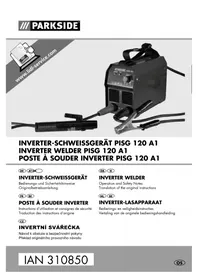
PISG 120 A1 - Welding machine PARKSIDE - Free user manual and instructions
Find the device manual for free PISG 120 A1 PARKSIDE in PDF.



| Product type | Inverter welding machine |
| Brand | Parkside |
| Model | PISG 120 A1 |
| Weight | 3,2 kg |
| Power supply | 230 V ~ 50 Hz |
| Max. welding current | 120 A |
| Open-circuit voltage | 70 V |
| Duty cycle (X) | 30 % (at 120 A) |
| Protection class | IP21S |
| Compatible electrode diameters | 1,6 mm, 2,0 mm, 2,5 mm, 3,2 mm |
| Main functions | Manual arc welding (MMA), current adjustment, thermal protection, cooling fan |
| Delivery contents | Welding machine, welding helmet, 2 welding cables, metal brush with chipping hammer, transport strap, 5 electrodes, instruction manual |
| Maintenance and cleaning | Clean the exterior with a dry cloth; regularly check cables and connections; internal maintenance reserved for a professional |
| Safety | Use a welding helmet with DIN 9-10 shade, insulating gloves, protective clothing; do not use in rain or humid environment |
| Spare parts and repairability | Contact customer service (service.fr@cmc-creative.de); repairs by a qualified electrician |
| Warranty | 3 years (commercial warranty) |
| Standards | EN 60974-1:2012, EN 60974-10:2014/A1:2015 |
Frequently Asked Questions - PISG 120 A1 PARKSIDE
User questions about PISG 120 A1 PARKSIDE
0 question about this device. Answer the ones you know or ask your own.
Ask a new question about this device
Download the instructions for your Welding machine in PDF format for free! Find your manual PISG 120 A1 - PARKSIDE and take your electronic device back in hand. On this page are published all the documents necessary for the use of your device. PISG 120 A1 by PARKSIDE.
USER MANUAL PISG 120 A1 PARKSIDE
Operation and Safety Notes Translation of the original instructions
NL BE
INVERTER-LASAPPARAAT
Before reading, unfold the page containing the illustrations and familiarise yourself with all functions of the device.
FR BE
service.at@cmc-creative.de
service.ch@cmc-creative.de
Telefon: +49 (0) 6894 9989751
List of pictograms used
Introduction 25
Intended use.. 25
Parts Description 25
Technical specifications.. 25
Scope of delivery.. Page 25
Safety instructions.. 26
Safety hazards during arc welding.. Page 27
Safety notices specific to the welding shield . Page 30
Tight and moist spaces.. 30
Protective clothing 31
Protecting againststrays and burns 31
Prior to commissioning . Page 31
Installing the welding shield . Page 31
Start up 32
Welding. 33
Maintenance and Cleaning 33
Information about warranty and service processing.. Page 34
Warranty terms.. 34
Extent of warranty.. 34
Processing of warranty claims.. 35
Environmental instructions and disposal information.. Page 35
EU Conformity Declaration.. 35
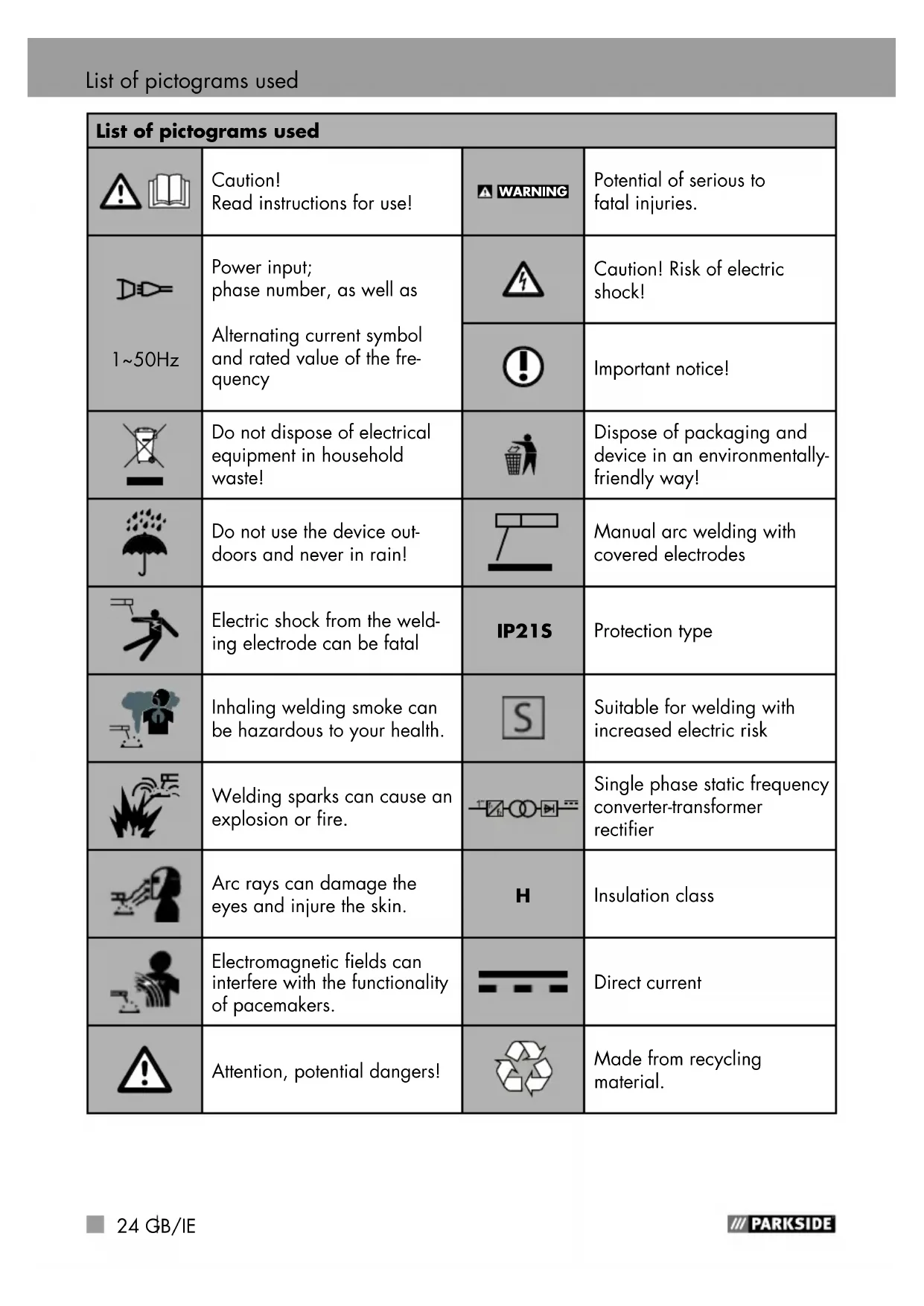
| List of pictograms used | |||
| Caution! Read instructions for use! | WARNING | Potential of serious to fatal injuries. | |
| 1~50Hz | Power input; phase number, as well as Alternating current symbol and rated value of the frequency | Caution! Risk of electric shock! | |
| Important notice! | |||
| Do not dispose of electrical equipment in household waste! | Dispose of packaging and device in an environmentally-friendly way! | ||
| Do not use the device out-doors and never in rain! | Manual arc welding with covered electrodes | ||
| Electric shock from the welding electrode can be fatal | IP21S | Protection type | |
| Inhaling welding smoke can be hazardous to your health. | S | Suitable for welding with increased electric risk | |
| Welding sparks can cause an explosion or fire. | -∅∅- | Single phase static frequency converter-transformer rectifier | |
| Arc rays can damage the eyes and injure the skin. | H | Insulation class | |
| Electromagnetic fields can interfere with the functionality of pacemakers. | Direct current | ||
| Attention, potential dangers! | Made from recycling material. | ||
INVERTER WELDER PISG 120 A1
Introduction
Congratulations! You have chosen a high-quality unit from our company. Familiar
ise yourself with the product before using it for the first time. In addition, please carefully refer to the instructions for use and the safety instructions below. Initial operation of this tool must be performed by trained personel.
KEEP OUT OF THE REACH OF CHILDREN!
- Intended use
This welding tool is suitable for welding metals such as carbon steel, alloy steel, other stainless steels, copper, aluminium, titanium, etc. The product has a control lamp, a thermal protection indicator, and a cooling fan. It further has a strap to safely lift and move the product. Improper product handling can be dangerous to persons, animals and objects. Only use the product as described and for its indicated purpose. Keep these instructions in a safe place. When passing this product on to others, please also include all the documents. Any use other than the intended is prohibited and potentially dangerous. Damages resulting from non compliance or misuse are not covered by the warranty and are not included in the manufacturer's liability.
Note: Classification per EMV standard: Class A per IEC 60974-10
Warning: Equipment categorised Class A are intended for industrial use. When used in other areas, electromagnetic tolerance may not be warranted or failures may occur.
- Parts Description
1 Carrying strap
Overheating control lamp
3 Control knob
4 Earth terminal
5 Electrode holder
Combination wire brush with chipping hammer
7 Welding shield
Grip
ON/OFF switch
10 Mains lead
Protection glass
- Technical specifications
Mains connection: 230V 50Hz Max.welding current
and the respective
conventional load voltage: 10 A/20,4 V - 120 A/24,8 V Rated value of the
Mains voltage: U 1:230 V Highest rated value of the mains current: I 1max:25,2 A Maximum effective input current: I 1eff:13,8A Rated value of the no-load voltage: U 0:70 V Protection class: IP21S Weight:3,2 kg Duty cycle X: 30% Falling characteristic
- Scope of delivery
1 Inverter welder
1 Welding shield
2 Welding cables
1 Combination wire brush with chipping hammer
1 Carrying strap
5 Welding electrodes (2× 1.6mm; 2× 2.0mm;1× 2.5mm)
1 Instructions for use
- Safety instructions
Please carefully read the instructions for use and follow the specified notices. Familiarise yourself with the tool, its proper use and the safety notices using these instructions for use. The nameplate contains all the technical data for this welding tool, please learn about the technical facts of this tool.
This device may be used by children aged 16 years and up, as well as by persons with reduced physical, sensory or mental capacities, or lacking experience and / or knowledge, so long as they are supervised or instructed in the safe use of the device and understand the associated risks. Do not allow children to play with the appliance. Cleaning and user maintenance should not be performed by children without supervision.
Only have repairs and / or maintenance performed by electrically skilled persons.
Only use the welding cables included (PISG 120 A1, H01N2-D1x10 mm²).
During use the equipment should not be located directly
against a wall, be covered, or be jammed between other equipment to ensure ample air can be taken in through the ventilation louvres. Verify the equipment is correctly connected to the mains voltage. Avoid any tensile load on the mains. Unplug the mains plug from the socket before transferring the equipment to a different location.
Always switch the equipment off with the ON/OFF switch when not in use. Set the electrode holder down on an insulated pad and allow to cool for 15 minutes before removing the electrodes from the holder.
Pay attention to the condition of the welding cables, the electrode holders and the earth terminals. Worn insulation and conducting parts can produce hazards and reduce the welding quality.
Arc welding produces sparks, melted metal parts and smoke. Therefore note: Remove any flammable substances and / or materials from the work area and its immediate surroundings.
Ensure the work area is ventilated.
- Do not weld atop containers, receptacles or pipes, which do or did contain flammable liquids or gasses.
WARNING Avoid any direct contact with the welding circuit. The no-load voltage between the electrode holder and earth terminal can be dangerous, there is a risk of electric shock.
Do not store or use the equipment in a moist or wet environment or in the rain. The Protection Provision IP21S applies in this respect.
- Protect the eyes with the appropriate safety glass (DIN Grad 9-10) to be installed in the included welding shield. Use gloves and dry protective clothing free from oil and grease to protect the skin from ultraviolet rays and the arc.
WARNING Do not use the welding power source to thaw pipes.
Remember:
The arc ray can damage the eyes and cause burns to the skin.
Arc welding produces sparks and drops of molten metal, the welded work piece begins to glow and remains very hot for
a relatively long time. Therefore do not touch the work piece with bare hands.
Arc welding releases noxious fumes. Be careful not to inhale these as best possible.
Protect yourself from the dangerous effects of the arc and keep persons not involved in the work at least 2 m away from the arc.
ATTENTION!
Depending on mains conditions at the connection point, operating the welding equipment may interfere with the voltage supply for other loads. When in doubt, please contact your power supply company.
Operating the welding equipment may interfere with the functionality of other devices, e.g. hearing aids, pacemakers, etc.
- Safety hazards during arc welding
Arc welding produces a variety of safety hazards. It is therefore particularly important for the welder to observe the following rules to avoid putting himself and others in danger and to prevent damage to persons and the equipment.
Only have work to the mains voltage end, e.g. to cables, plugs, outlets, etc. performed by a electrically skilled person in accordance with national and local regulations.
In the event of an accident, immediately disconnect the welding equipment from the mains voltage.
If electrical contact voltage occurs, immediately switch the equipment off and have it inspected by an electrically skilled person.
Always ensure good electrical contacts on the welding current end.
Always wear insulating gloves on both hands whilst welding. These will protect from electric shock (no-load voltage of the welding current), from hazardous rays (heat and UV rays) and glowing metal and weld splashes.
Wear solid, insulating shoes. The shoes should also insulate when exposed to moisture. Low shoes are not suitable, as glowing metal drops falling could cause burns.
Wear suitable protective clothing, no synthetic garments.
Do not look into the arc with
unprotected eyes, only use a welding shield with approved protective glass per DIN. In addition to light- and heat rays which could result in blinding or burns, the arc also emits UV rays. Without adequate protection, this invisible ultraviolet radiation causes very painful conjunctivitis which is only noticed a few hours later. UV rays further cause burns similar to a sunburn in unprotected areas of the body.
Persons near the arc or assistants must also be informed of the risks and outfitted with the necessary protection. If necessary, set up protective panels.
Ensure an adequate supply of fresh air whilst welding, particularly in small spaces, as it produces smoke and harmful gasses.
Do not weld containers in which gasses, fuels, mineral oils, etc. were stored - even if emptied a long time ago - as residue poses an explosion hazard.
Special regulations apply in rooms posing fire- and explosion hazards.
Welded joints exposed to great strain and needing to meet certain safety require
ments must be made by spe-ci-ally trained and certified welders. Examples are pressure vessels, running rails, tow couplings, etc.
ATTENTION! Always connect the earth terminal as close as possible to the point of weld to provide the shortest possible path for the welding current from the electrode to the earth terminal. Never connect the earth terminal to the housing of the welding equipment!
Never connect the earth terminal to earthed parts far away from the work piece, e.g. a water pipe in another corner of the room. This could otherwise damage the protective bonding system of the room you are welding.
Danger of electric shock:
4 Electric shock from a welding electrode can be
fatal. Do not weld in rain or snow. Wear dry insulating gloves. Do not touch the electrode with bare hands. Do not wear wet or damaged gloves. Protect yourself from electric shock by insulating from the work piece. Do not open the equipment housing.
Danger due to welding smoke:
Inhaling welding smoke can jeopardize your health. Keep your head out of the smoke. Use facilities in open areas. Use ventilation to remove smoke.
Danger due to welding sparks:
Welding sparks can cause an explosion or fire. Keep flammables away from the welding area.
Do not weld next to flammables. Welding sparks can cause a fire.
iKeep a fire extinguisher nearby and an observer ready to use it. Do not weld on top of drums or any closed containers.
Danger due to arc rays: Arc rays can damage the eyes
and injure the skin. Wear a hat and safety goggles. Wear hearing protection and a closed, high shirt collar. Wear welding helmets and proper filter sizes. Wear full personal protection.
Danger due to electromagneticfields:
Welding current produces electromagnetic fields. Do not use along with medical implants. Never wrap the welding cables around the body. Consolidate welding cables.
Also refer to the safety instructions of your welding equipment.
Always use the welding shield when welding. Failure to use the shield may result in serious injuries to the retina.
Always wear protective clothing when welding.
Never use the welding shield without protective glass, as the optics can otherwise be damaged.
Replace the protective glass early to ensure good visibility and fatigue-proof working.
- Safety notices specific to the welding shield
Using a hot light source (e.g. lighter) always check the welding shield is working properly before starting to weld.
Welding splashes can damage the glass shield. Replace damaged or scratched glass shields immediately.
- Promptly replace damaged or heavily soiled / splashed components.
The equipment may only be operated by persons who have turned 16.
Familiarise yourself with the safety instructions for welding.
- Tight and moist spaces
When working in tight, moist or hot spaces, use insulating pads and intermediate layers in addition to gauntlet gloves made from leather or other insulating materials to insulate the body from earth.
When using welding equipment in electrically dangerous conditions, e.g. in tight spaces from conductive walls (kettles, pipes, etc.), in wet spaces (soaking of work clothes), the output voltages of the welding equipment may not be higher than 48 Volts (rms value) in
open loop. Based on the output voltage this welding equipment may be used in these conditions.
- Protective clothing
Whilst working the welder must be protected against rays and burns all over the body with the appropriate clothing and face protection. Remember the following steps:
Put on protective clothing before welding.
Put on gloves.
- Open windows or vent to ensure air supply.
- Wear safety goggles and a mask.
Wear gauntlet gloves made from suitable material (leather) on both hands. These must be in good condition.
Wear suitable aprons to protect the clothing from sparks and burns. When required based on the working method, e.g. welding overhead, wear a protective suit and, if necessary, a head guard.
- Protecting against rays and burns
Mark the work area with a
sign „Danger! Do not look into flames!" to indicate the risk to the eyes. If possible, shield the work areas to protect persons nearby. Keep unauthorised persons away from the welding area.
Walls in the direct vicinity of fixed work areas should be neither light coloured nor glossy. Protect windows against rays passing through or reflecting at a minimum to head height, e.g. with suitable paint.
Prior to commissioning
Take the device and accessories out of the packaging and check
for damages (e.g. transport damages).
- Fasten the carrying strap to the device (see Fig. C1-C4).
Connect the electrode holds and the earth terminal 4 to the welding machine.
Insert an electrode into the electrode clamp device (see Fig. D).
- Installing the welding shield
Install the hand on the welding shield 7 as shown in Fig. A.
Install the protective glass on the welding shield 7 as shown in Fig. B.
- Start up
Note: The welding tool is suitable for welding with electrodes.
Use electrode retaining clips without protruding retaining screws meeting today's safety standards.
- Be sure the ON/OFF switd is set to position "O" ("OFF") or the main supply cable is not plugged into the mains socket.
Connect the welding cables according to polarity and electrode manufacturer instructions.
To do so, connect the port of the earth terminal 4 (black) with the appropriate outlet on the inverter welding machine (black, marked with "-").
Connect the port of the electrode holder (red) with the appropriate outlet on the inverter welding device (red, marked with "+"
Put on suitable protective clothing according to provisions and prepare the work area.
Connect the earth terminal to the workpiece.
- Secure the electrode in the electrode holder 5.
Switch on the device by setting the ON OFF switch to the "I" ("ON") position.
Set the welding current with the control knob 3 according to the electrode used.
Note: Please see the table below for the welding current according to electrode diameter.
| Ø Electrode welding current | |
| 1.6 40-55 A | |
| 2.055-65 A | |
| 2.565-80 A | |
| 3.280-120 A |
Note: For the welding currents of 80 A to 120 A, please use welding electrodes with a diameter of 3.2mm (not included in the scope of delivery).
Attention: Do not bring the earth terminal 4 and the electrode holder 5 / electrodes into direct contact with one another.
Attention: When welding with electrodes (MMA - manual metal arc welding) the electrode holder 5 and the earth terminal 4 lug must be connected to positive (+) or negative (-) according to the welding rod specifications.
Hold the welding shie in front of your face and begin welding.
To stop working, set the ON/OFF switch to the "O" ("OFF") position.
ATTENTION!
When the thermal overload protection is triggered, the yellow control lamp 2 lights up. In this case, no further welding is possible. The device is still in operation for the fan to cool the device. As soon as the device is ready for use again, the yellow control lamp 2 switches off automatically. The welding function is now given again.
ATTENTION!
Be careful not to rub the welding rod against the workpiece. This could damage the workpiece and make it difficult to strike an arc. Maintain the proper distance to the workpiece after striking the arc. The distance should correlate to the diameter of the welding rod used. Maintain this distance as accurately and consistently as possible whilst welding. The angle between the welding rod and the working direction should be between 20 and 30irc .
ATTENTION!
After welding, the welding clamp and the welding rod must be set down on the insulated holder. The fusion slag can only be removed once the rod has cooled down. To re-weld the interrupted weld, the fusion lag must first be removed from the welding position.
ATTENTION!
A voltage 10% below the rated input voltage of the welding tool may result in:
A drop in the current of the tool.
The arc stopping or becoming unstable.
ATTENTION!
The arc radiation may cause inflammation of the eye and skin burns.
Spray and fusion slag may cause eye injuries and burns.
Wear tinted eye goggles or a face shield.
The face shield must comply with safety standard EN175.
Only use welding cables included in delivery (10 mm2).
Welding
Choose from welding with the tool directed towards the unwelded or the welded part. The following illustrates how the direction of movement has on the quality of the weld:
| Towards the unwelded part: | Towards the welded part: | |
| Weld penetration | less greater | |
| Weld width | larger smaller | |
| Welding bead | flatter higher | |
| Weld imperfections | greater less |
Note: Determine which welding method is more suitable for yourself after welding a test piece.
Note: Once it has worn down completely, the electrode must be replaced.
- Maintenance and Cleaning
Note: The welding tool requires regular maintenance and reconditioning to work properly and to comply with safety requirements. Improper and incorrect operation may result in malfunctions and damage the tool.
Before performing maintenance work or repairs on the welding tool, disconnect the power cable [10] from the power outlet to ensure the tool is safely isolated from the power supply.
Clean the exterior of the welding tool regularly. Use compressed air, cotton waste or a brush to remove dirt and dust.
Note: The following kinds of maintenance work must be performed only by suitably-qualified personnel.
Current regulators, earthing equipment, internal cables, the blowpipe coupler and adjusting screw should be maintained regularly. Tighten loose screws and replace rusty screws (M4 × 10 replacement screws are available from your local DIY store.).
Regularly check the leakage resistance of the welding tool. Use suitable measuring instruments for this purpose.
In the event of a defect or if components need to be replaced, please contact the corresponding professional.
Information about warranty and service processing
Creative Marketing & Consulting GmbH warranty
Dear customer, the warranty for this device is 3 years from the date of purchase. In the event of product defects, you have legal rights against the retailer of this product. Your statutory rights are not limited in any way by our warranty detailed below.
Warranty terms
The warranty period begins on the date of purchase. Please retain the original receipt
safely. This document is required as your proof of purchase.
Should this device show any fault in materials or manufacture within three years from date of purchase, it will be repaired or replaced - at our choice - by us free of charge. This warranty is conditional on the defective device and the receipt of purchase (store receipt) being presented within the three year warranty period, and that there is a brief written description of the nature of the defect and of the date it arose.
If the defect is covered by our warranty, we will return the repaired equipment or replacement thereof. A repair or exchange of the equipment does not extend a new warranty period.
- Extent of warranty
The appliance has been manufactured to strict quality guidelines and meticulously examined before delivery.
The warranty applies to faults in material or manufacture. This warranty does not apply to product parts subject to normal wear and tear and which can therefore be considered as wear items, or to damage to fragile parts, e.g. switches, storage batteries or glass parts.
This warranty becomes void if the device has been damaged or improperly used or maintained. All instructions provided in the operating instructions must be followed strictly to constitute proper use of the product. Purposes and practices which the operating instructions warn of or advise against must be avoided without fail.
This product is intended for private, non-commercial use only. Any incorrect or improper use of the device, use of force and changes
not performed by our authorized service branch will void the warranty.
- Processing of warranty claims
Please follow the instructions below to ensure your claim is processed quickly:
When inquiring about your product please have your receipt and product number (e.g. IAN) ready as your proof of purchase.
The product number can be found on the type plate, an engraving, the cover page of your instructions (bottom left) or the decal at the back or bottom. In the event of malfunctions or other defects please first contact the service department below by phone or e-mail.
A product recorded as defective, along with the proof of purchase (sales receipt) and a description of the defect and when it occurred, can then be returned free of charge to you to the service address provided.
Notice:
Download this and many other manuals, product videos and software from www.lidl-service.com.
How to contact us:
GB/IE
Name: C.M.C. GmbH
Website: www.cmc-creative.de
E-mail: service.gb@cmc-creative.de
service. ie@cmc- creative.de
Phone:0-808-189-0652
(£0,10/Min.)
Registered office: Germany
IAN 310850
Please note that the following address is not a service address.
Please first contact the service point named above.
Address:
C. M. C. GmbH
- Environmental instructions and disposal information

Don't waste, recycle!

Device, accessories and packaging should be recycled in an environmentally friendly manner.
According to European Directive 2012/19/EU, used electrical devices must be collected separately for environmentally compatible recycling or recovery. Please return this device to an approved waste management company or use your municipal waste collection service. Please ensure you comply with local regulations. If you have any questions, please contact your local authority or waste management company.
EU Conformity Declaration
We,
C. M. C. GmbH
Responsible for documentation:
Alexander Hoffmann
Katharina-Loth-Str. 15
DE-66386 St. Ingbert
GERMANY
declare in our sole responsibility that the product
Inverter welder
Art.-No.: 2177
Year of manufacture: 2019/15
IAN: 310850
Model: PISG 120 A1
meets the basic safety requirements of European Directives
EC Low Voltage Directive
2014/35/EU
EC Directive for Electromagnetic
Compatibility
2014/30/EU
RoHS Directive
2011/65/EU
and its amendments.
The object of the declaration described above meets the requirements of Directive 2011 / 65 / EU of the European Parliament and Council dated 8th June 2011, restricting the use of certain hazardous substances in electrical appliances and electronics.
The conformity assessment is based on the following harmonised standards:
EN 60974-1:2012
EN 60974-10:2014/A1:2015
On behalf of M. Sc. Alexander Hoffmann - Quality Assurance -


Legendede sptogrammesutilis e.. Page 40
Introduction
Telephone:0387847234
Siège:FR
BE
Nom:ITSA
Site Internet : itsw@planet.nl
Telephone: 035413760
Siège : NL
IAN 310850


- INVERTER-LASAPPARAAT
- FR BE
- List of pictograms used
- Introduction 25
- Safety instructions.. 26
- Prior to commissioning . Page 31
- Installing the welding shield . Page 31
- Start up 32
- Welding. 33
- Maintenance and Cleaning 33
- Information about warranty and service processing.. Page 34
- Environmental instructions and disposal information.. Page 35
- EU Conformity Declaration.. 35
- INVERTER WELDER PISG 120 A1
- Introduction
- KEEP OUT OF THE REACH OF CHILDREN!
- - Intended use
- - Parts Description
- - Technical specifications
- - Scope of delivery
- - Safety instructions
- Remember:
- ATTENTION!
- - Safety hazards during arc welding
- Danger of electric shock:
- Danger due to welding smoke:
- Danger due to welding sparks:
- Danger due to electromagneticfields:
- - Safety notices specific to the welding shield
- - Tight and moist spaces
- - Protective clothing
- - Protecting against rays and burns
- Prior to commissioning
- - Installing the welding shield
- - Start up
- Welding
- - Maintenance and Cleaning
- Information about warranty and service processing
- Creative Marketing & Consulting GmbH warranty
- Warranty terms
- - Extent of warranty
- - Processing of warranty claims
- Notice:
- How to contact us:
- GB/IE
- IAN 310850
- Address:
- M. C. GmbH
- - Environmental instructions and disposal information
- Don't waste, recycle!
- EU Conformity Declaration
- Inverter welder
- Legendede sptogrammesutilis e.. Page 40
- BE
Brand : PARKSIDE
Model : PISG 120 A1
Category : Welding machine