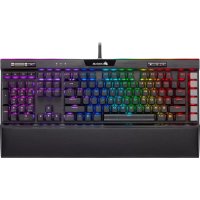
CH9127411NA - Keyboard CORSAIR - Free user manual and instructions
Find the device manual for free CH9127411NA CORSAIR in PDF.


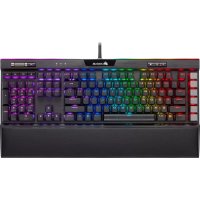
| Product Type | Gaming Keyboard |
| Brand | CORSAIR |
| Model | CH9127411NA |
| Connectivity | USB (two connectors: keyboard and passthrough) |
| Number of Keys | 104 standard keys + 6 programmable macro keys |
| Key Type | Double-shot PBT |
| Built-in Memory | 8 MB for storing profiles |
| Backlighting | Customizable RGB via iCUE |
| Multimedia Keys | Dedicated: mute, volume wheel, media control keys |
| Wrist Rest | Removable, cushioned |
| Compatibility | Windows, Mac OS, Xbox One |
| Software | iCUE and Stream Deck (download required) |
| USB Passthrough Port | USB 2.0 |
| Power Supply | 5 V DC via USB |
| Dimensions (approximate) | 445 x 170 x 35 mm |
| Weight (approximate) | 1.1 kg |
| Material | Plastic, PBT keycaps |
| Reset | Hold the Escape key while plugging in USB |
| Maintenance | Clean with a soft, lint-free cloth. Avoid liquids. |
| Safety | Do not expose to water or moisture. Use in a temperate environment. |
| Included Accessories | Keycap sets for FPS and MOBA, additional macro keycaps |
| Warranty | See manufacturer's terms |
Frequently Asked Questions - CH9127411NA CORSAIR
User questions about CH9127411NA CORSAIR
0 question about this device. Answer the ones you know or ask your own.
Ask a new question about this device
Download the instructions for your Keyboard in PDF format for free! Find your manual CH9127411NA - CORSAIR and take your electronic device back in hand. On this page are published all the documents necessary for the use of your device. CH9127411NA by CORSAIR.
USER MANUAL CH9127411NA CORSAIR
© 2019 CORSAIR MEMORY Inc. All rights reserved. CORSAIR and the sails logo are registered trademarks in the United States and/or other countries. All other trademarks are the property of their respective owners. Product may vary slightly from those pictured. 49-001965 AA

K95 RGB PLATINUM XT
Mechanical Gaming Keyboard
SETTING UP YOUR KEYBOARD
Connect both keyboard USB Connectors (Q, R) to available USB 3.0 or USB 3.1 Type-A ports on your Windows*PC, Apple Mac* or Microsoft Xbox One *
www.corsair.com/xbox-one-support
NOTE: For use only with Nationally Recognized Testing Laboratory listed end product and USB output rate at 5Vdc = 900mAx2.
SOFTWARE

Install ICUE on a Windows * PC to connect all of your CORSAUR ICUE compatible products together in a single interface, giving you complete control of everything from lighting to powerful macros. Download ICUE from www.corsair.com/downloads.

Additionally, install the Stream Deck software to program the macro keys (A) to take command of your stream through powerful integrations with OBS Studio, Twitch, Twitter, and more, then swap to the included S-key keycaps (N) to suit your streaming style. Download Stream Deck from www.algato.com/gaming/downloads.
HARDWARE PLAYBACK
With iCUE you can create custom profiles and then save them to the keyboard with 8MB of onboard storage. Once saved to the keyboard, your macros, settings, and backlighting effects will be available without the software or when connected to other devices. There are five hardware profiles available to customize which can be cyclad through with the profile switch key (C) and have pre-programmed lighting effects.
FACTORY RESET
To clear the onboard memory, hold the ESC key while plugging in the USB keyboard connector (Q), then release the ESC key after two seconds. The keyboard will then power on normally and be reset to factory defaults.
GETTING TO KNOW YOUR KEYBOARD
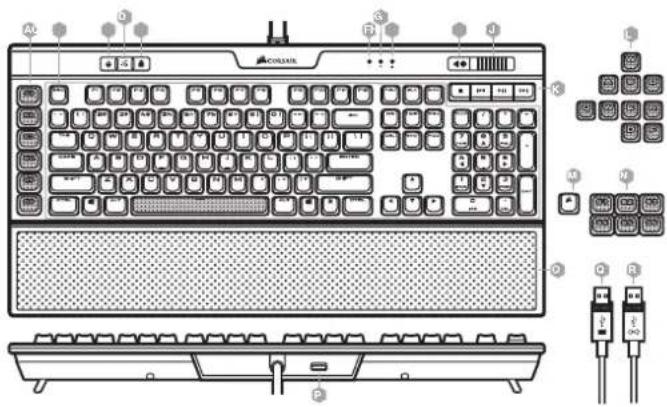
A - SIX PROGRAMMABLE MACRO G KEYS
B - 104-KEY PBT DOUBLE-SHOT KEYCAP SET
C - PROFILE SWITCH KEY
D-BRIGHTNESS KEY
E-WINDOWS KEY LOCK
F - NUM LOCK LED INDICATOR
G - CAPS LOCK LED INDICATOR
H - SCROLL LOCK LED INDICATOR
1-MUTEKEY
J - VOLUME ROLLER
K - DEDICATED MULTIMEDIA KEYS
L - FPS AND MOBA KEYCAP SETS
M-CORSAIR LOGO ESC KEYCAP
N-ALTERNATE MACRO S-KEY KEYCAPS
0- DETACHABLE, CUSHIONED
LEATHERETTE PALM REST
P-USB2.0PASS-THROUGHPORT
Q-USBKEYBOARDCONNECTION
R - USB PASS-THROUGH CONNECTOR

FRANÇAIS
CONFIGURATION DE VOTRE CLAVIER
Acknowledgements of COPII

WARNING: Changes or modifications not expressly approved by CORSAIR MEMORY. Inc could void the user's authority to operate the equipment.
This device complies with Part 15 of the FCC Rules. Operation is subject to the following two conditions: (1) this device may not cause harmful interference, and
(2) this device must accept any interference received, including interference that may cause undesired operation.
This equipment has been tested and found to comply with the limits for a Class B digital device, pursuant to Part 15 of the FCC Rules. These limits are designed to provide reasonable protection against harmful interference in a residential installation. This equipment generates, uses and can radiate radio frequency energy and, if not installed and used in accordance with the instructions, may cause harmful interference to radio communications. However, there is no guarantee that interference will not occur in a particular installation. If this equipment does cause harmful interference to radio or television reception, which can be determined by turning the equipment off and on, the user is encouraged to try to correct the interference by one of the following measures:
Reorient or relocate the receiving antenna.
Increase the separation between the equipment and receiver.
Connect the equipment into an outlet on a circuit different from that to which the receiver is connected.
Consult the dealer or an experienced radio/TV technician for help.
This device must not be co-located or operating in conjunction with any other antenna or transmitter. Operation is subject to the following two conditions:
(1) this device may not cause harmful interference, and
(2) this device must accept any interference received, including interference that may cause undesired operation.
This Class B digital apparatus meets all requirements of the Canadian Interference-Causing Equipment Regulations. CAN ICES-3(B)/NMB-3(B).


Brand : CORSAIR
Model : CH9127411NA
Category : Keyboard