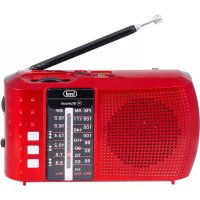
RA 7F20 BT - Radio Trevi - Free user manual and instructions
Find the device manual for free RA 7F20 BT Trevi in PDF.



| Product type | Portable radio with MP3 player and Bluetooth |
| Brand | Trevi |
| Model | RA 7F20 BT |
| Dimensions (W x H x D) | 135 x 75 x 35 mm |
| Weight | 215 g |
| Power supply | Rechargeable lithium battery 3.7 V, 1200 mAh; charges via micro-USB 5 V / 1 A |
| Radio bands | FM (87.5–108 MHz), AM (530–1600 kHz), SW (5.9–18 MHz) |
| Bluetooth | Version not specified, typical range 10 m, PIN code "0000" |
| Supported audio formats | MP3 (via USB and microSD) |
| Bluetooth transmission power | 2.5 mW |
| Bluetooth frequency | 2.4 GHz |
| Connectivity | 3.5 mm headphone jack, micro-USB input (charging), USB-A port, microSD slot |
| Antenna | Telescopic |
| Controls | On/off + volume (rotary), band/function selector, tuning, PREV, PLAY/PAUSE, NEXT buttons |
| Main functions | FM/AM/SW radio, MP3 player (USB/microSD), Bluetooth music, play/pause, next/previous track, fast forward |
| Care and cleaning | Soft cloth slightly damp; do not use solvents or abrasive products |
| Safety instructions | Do not listen at high volume; avoid magnetic fields, heat sources, humidity, dust, vibrations; maintain 5 cm space for ventilation |
| Battery | Built-in rechargeable lithium; do not dispose of with household waste |
| Repairability | Contact an authorized TREVI assistance center |
| Included accessories | USB cable (not specified in manual, but probable) |
Frequently Asked Questions - RA 7F20 BT Trevi
User questions about RA 7F20 BT Trevi
0 question about this device. Answer the ones you know or ask your own.
Ask a new question about this device
Download the instructions for your Radio in PDF format for free! Find your manual RA 7F20 BT - Trevi and take your electronic device back in hand. On this page are published all the documents necessary for the use of your device. RA 7F20 BT by Trevi.
USER MANUAL RA 7F20 BT Trevi
EN If you will not find your language on the instruction manual, please go on our website www.trevi.it to find it
Do not listen at high volume for a long time may damage your hearing.
Avoid placing the player:
- Close to magnetic fields.
- Near heat sources such as heaters and stoves.
- In places with high humidity such as bathrooms, swimming pools, etc...
- In dusty places.
- In areas subject to strong vibration.
- Place the set on its side so that there is always enough space for the free movement of air (at least 5 cm).
- If any water gets inside the unit, immediately disconnect the power plug from the outlet and take it to the nearest authorized service center TREVI.
- Always check that the power cables are installed correctly.
- No naked flame sources, such as lighted candles, should be placed on the device.
- The appliance must not be exposed to dripping or splashing water and no objects filled with liquid, such as vases, must be placed on the appliance.
- Keep this manual for future reference.
CARE AND MAINTENANCE
For cleaning we recommend the use of a soft, slightly damp cloth. Avoid solvents or abrasives.
IMPORTANT
The good construction of this machine guarantees the perfect functioning for a long time. However, should any problem arise, you should consult your nearest authorized service center.
TREVI pursues a policy of continuous research and development. Therefore, the products may have different features from those described.
Precautions for correct disposal of the product.
The symbol shown on the equipment indicates that waste must be disposed of in “separate collection” and so the product must not be disposed of together with urban waste.
The user must take the product to special “separate waste collection centres” provided by local government, or deliver it to the retailer against the purchase of a new product.
Separate collection of waste and subsequent treatment, recycling and disposal operations promotes the production of equipment with recycled materials and limits negative effects on the environment and on health caused by improper handling of waste.
Illegal disposal of the product leads to the enforcement of administrative penalties.
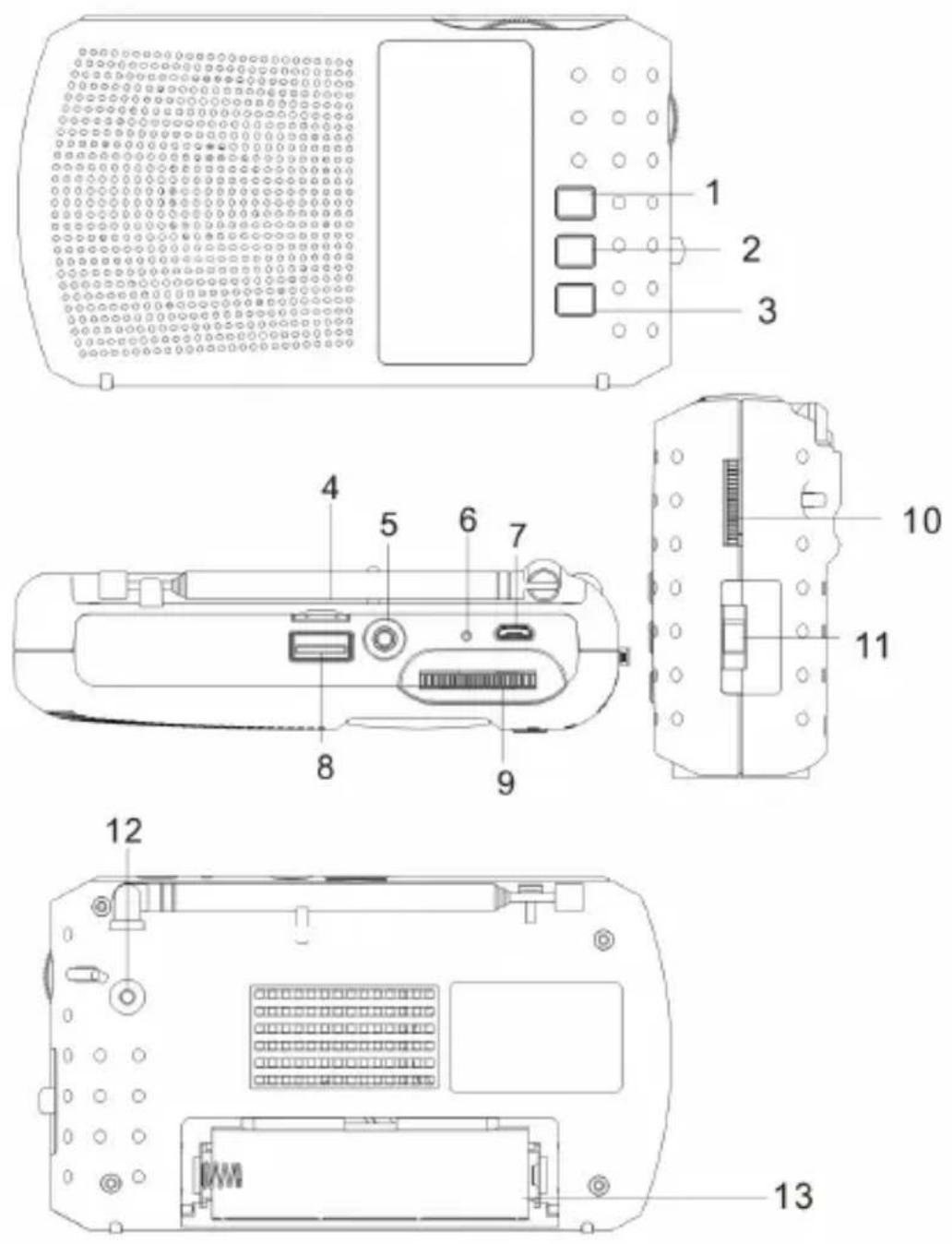
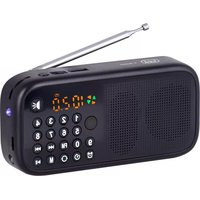
- PREV button, previous track
- PLAY/PAUSE button, play/pause mp3 player
- NEXT button, next track
- MicroSD memory input
- Headphone jack
- Charge LED indicator
-
5V --- power supply/charging socket
-
USB memory input
- Tuning control
- Power On/Off and volume adjustment
- Radio band/function selector
- Antenna
- Battery compartment
POWER SUPPLY
The appliance works with a rechargeable lithium battery (supplied).
Open the battery compartment and insert the battery taking care to carefully observe the indicated polarities. Remove it if you do not plan to use the appliance for a long time.
BATTERY RECHARGE
- Connect a USB cable to the micro-USB power socket (7) of the device.
Connect the other plug to an external power supplier (not supplied) with USB port;
- The charge indicator (6) will light up to indicate the charging phase;
- When charging is completed, the charge indicator (6) will go off.
In case of sudden shutdown or abnormal operation of the appliance, proceed with the complete recharge of the battery.
Note: For a good battery life it is recommended to keep the device switched off during the charging phase.
ON/OFF AND VOLUME
- To turn on the appliance, turn the volume adjustment (10) clockwise until you hear a “click”.
- To switch off, turn the volume control (10) anticlockwise until you hear a "click".
- Turn the volume adjustment (10) clockwise or anti-clockwise to increase or decrease the volume.
SOURCE
Use the function selector (11) to select the Bluetooth/USB/MicroSD/Radio FM/AM/SW function.
RADIO OPERATION
- Set the function selector (11) to the FM/AM/SW position according to the waveband you wish to listen to;
- Open the telescopic antenna along its entire length;
- Tune to the desired station by turning the tuning knob (9);
- To adjust the volume rotate the volume control (10).
Note: To obtain the best FM reception extend and orient the antenna. If the reception is not good try to adjust the length and orientation of the antenna differently, however the quality of the FM reception depends very much on the place where the device is placed.
MP3 PLAYER
- Insert a USB memory in the input (8) or a micro SD memory in the input (4) respecting the direction of insertion;
- Set the function selector (11) to the USB/TF position;
- Wait a few seconds, playback will start automatically;
- Press the PLAY/PAUSE button (2) to stop playing the tracks, press it again to resume playback;
- Press the PREV (1) button to play the previous track;
-
Press the NEXT button (3) to play the next track;
-
Press and hold the PREV and NEXT buttons to quickly scroll the track you are listening to, release the buttons to return to normal playback.
Note: in case of USB and microSD memory present at the same time, remove and insert the memory you want to play.
BLUETOOTH
- Set the function selector (11) to the USB/TF position without USB memory and SD card inserted;
- Follow the instructions on your device to search for the device;
- Search for the device named "RA 7F20 BT", perform the pairing and enter the PIN "0000" if required;
- Once the coupling has been completed, the device will issue a confirmation message;
- Start playing the music from your device to start listening; press the NEXT (3) or PREV (1) keys to select the next/previous track;
- Press the PLAY/PAUSE button (2) to stop playing the tracks, press it again to resume playback.
HEADPHONE
- Plug the headphones into the headphone jack (5);
- Turn on the device and adjust the volume.
TECHNICAL FEATURES
Power supply: .... Rechargeable 3.7V 1200mAh Lithium ..... battery via microUsb 5V --- 1A socket
Reception range: FM 87.5 - 108.0 MHz .....AM 530 - 1600 KHz .....SW 5.9 - 18.0 MHz
Bluetooth transmission power: 2.5mW
Bluetooth transmission frequency: .....2.4GHz
Dimensions: 135 x 75 x 35 mm
Weight: 215 gr.
INFORMATION ON THE REMOVAL AND DISPOSAL OF BATTERIES
Attention: the removal and disposal operation is reserved exclusively for specialized technical personnel!
- Remove the battery compartment cover;
- Remove the battery.
Whatever the type of exhausted battery, it must not be thrown in the household waste, in the fire or in the water. Each type of exhausted battery must be recycled or disposed of in the appropriate dedicated collection centers.
NOTES D'EMPLOI
SIMPLIFIED EU DECLARATION OF CONFORMITY
Hereby TREVI Spa declares that the radio equipment type RA 7F20 BT is in compliance with directive 2014/53/EU.
The full text of the EU declaration of conformity is available at the following internet address: https://www.trevi.it/dms/zidi/TREVI/DOCRA7F20BT.pdf
Made in CHINA


- CARE AND MAINTENANCE
- IMPORTANT
- Precautions for correct disposal of the product.
- POWER SUPPLY
- BATTERY RECHARGE
- ON/OFF AND VOLUME
- SOURCE
- RADIO OPERATION
- MP3 PLAYER
- BLUETOOTH
- HEADPHONE
- TECHNICAL FEATURES
- INFORMATION ON THE REMOVAL AND DISPOSAL OF BATTERIES
- Attention: the removal and disposal operation is reserved exclusively for specialized technical personnel!
- NOTES D'EMPLOI
- SIMPLIFIED EU DECLARATION OF CONFORMITY
Brand : Trevi
Model : RA 7F20 BT
Category : Radio