
CYBER-SHOT DSC-W350D - Camera SONY - Free user manual and instructions
Find the device manual for free CYBER-SHOT DSC-W350D SONY in PDF.


| Brand | Sony |
| Model | Cyber-shot DSC-W350D |
| Product Type | Compact digital camera |
| Sensor | 14 megapixel CCD (1/2.3-inch) |
| Lens | 4x optical zoom (26-105mm equivalent 35mm) |
| Digital Zoom | Up to 8x (precision zoom) |
| LCD Screen | 2.7-inch, 230,000 dots |
| Image Stabilization | Optical (SteadyShot) |
| Dimensions (W x H x D) | Approx. 93.3 x 55.6 x 22.4 mm |
| Weight | Approx. 120 g (with battery and memory card) |
| Power Source | Rechargeable NP-BN1 battery (lithium-ion, 3.6 V) |
| Charger | Included mains charger (BC-CSN/BC-CSNB) |
| Internal Memory | 45 MB |
| Compatible Memory Cards | Memory Stick Duo, Memory Stick PRO Duo, Memory Stick PRO-HG Duo, SD, SDHC (Class 4 or faster for HD video) |
| Maximum Resolution (photo) | 4,320 x 3,240 (14M) |
| Video Recording | MP4 (MPEG-4 AAC) 1,280 x 720 (Fine/Standard), VGA 640 x 480 |
| Main Features | Smile Detection, Sweep Panorama, Scene Modes, Program Auto, Intelligent Auto, Face Detection, White Balance, Exposure Compensation (±2 EV), ISO 80-3200, Built-in Flash |
| Maintenance and Cleaning | Clean the screen and lens with a soft cloth; avoid condensation; do not expose to excessive pressure |
| Safety | Do not disassemble the camera; avoid shocks and moisture; use only the specified battery and charger |
| Spare Parts and Repairability | NP-BN1 battery, charger, multi-use cable, wrist strap, AC adapter (sold separately); repair by a Sony authorized service center |
Frequently Asked Questions - CYBER-SHOT DSC-W350D SONY
User questions about CYBER-SHOT DSC-W350D SONY
0 question about this device. Answer the ones you know or ask your own.
Ask a new question about this device
Download the instructions for your Camera in PDF format for free! Find your manual CYBER-SHOT DSC-W350D - SONY and take your electronic device back in hand. On this page are published all the documents necessary for the use of your device. CYBER-SHOT DSC-W350D by SONY.
USER MANUAL CYBER-SHOT DSC-W350D SONY
The flash strobes two or more times before shooting using the flash.
to reduce the red-eye phenomenon when
1 Set the camera to shooting mode.
2 MENU → 📁 (Settings) → 🌐 (Shooting Settings) → [Red Eye Reduction] → desired mode → ● on the control button
| Auto | When the Face Detection function is activated, the flash strobes automatically to reduce the red-eye phenomenon. |
| On | The flash always strobes to reduce the red-eye phenomenon. |
| Off | Does not use Red Eye Reduction. |

- To avoid blurring of images, hold the camera firmly until the shutter is released. It usually takes a second after you press the shutter button. Be also sure not to allow the subject to move during this period.
- Red Eye Reduction may not produce the desired effects. It depends on individual differences and conditions, such as distance to the subject, or if the subject looked away from the pre-strobe.
- If you do not use the Face Detection function, Red Eye Reduction does not work, even when you select [Auto].
What causes the red-eye phenomenon?
Pupils become dilated in dark environments. Flash light is reflected off the blood vessels at the back of the eye (retina), causing the "red-eye" phenomenon.
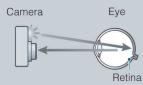

Other ways to reduce red-eye
- Select (High Sensitivity) mode in Scene Selection. (The flash is set to [Off] automatically.)
- When the eyes of the subject turn out red, correct the image with [Retouch] [Red Eye Correction] on the viewing menu or with the supplied software "PMB".
natural_image
Diagram of a rectangular device with a label pointing to its side (no text or symbols present)12 Touche ▶ (Lecture) (42)
13 Touche (Supprimer) (45)
14 Touche MENU (11)
11 Touche ▶ (Lecture) (42)
12 Touche (Supprimer) (45)
13 Touche MENU (11)
flowchart
graph TD
    A["Family Image"] --> B["Digital Camera"]
    C["Mémoire interne"] --> B
natural_image
Landscape photo of a green agricultural field with scattered trees under a blue sky with clouds (no text or symbols visible)natural_image
Landscape photo of a green agricultural field with scattered trees under a blue sky with white clouds (no text or symbols visible)natural_image
Panoramic view of the Sydney Waterfowl with an arched steel arch bridge spanning a river, surrounded by urban buildings and trees (no visible text or signage)DSC-W380/W390 :
natural_image
Exterior view of a waterfront cityscape with buildings and water, no visible text or symbolsRemarques
text_image
STOP ZOOM W EXITnatural_image
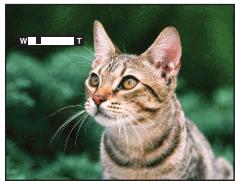
Close-up of a tabby cat's face with yellow eyes and whiskers (no text or symbols visible)Touche W
natural_image
Close-up photo of a tabby cat with visible whiskers and green foliage background (no text or symbols)Remarques
natural_image
Close-up photo of a smiling baby in a pink shirt, with a blurred background showing toys and a circular graphic element (no text or symbols)natural_image
Close-up of a smiling child's face with a camera interface overlay (no text or symbols on the image itself)text_image
Close-up photo of a smiling child with numbered annotations pointing to facial featuresnatural_image
Illustration of two children taking a selfie with a camera (no text or symbols)natural_image
Interior view of a dimly lit room with hanging lights and ceiling-mounted equipment (no visible text or symbols)

natural_image
Interior view of a dimly lit room with ornate chandelier and three hanging lanterns (no visible text or symbols)natural_image
Interior view of a room with hanging lights and ceiling-mounted equipment (no visible text or symbols)
natural_image
Interior view of a dimly lit room with ornate chandelier and three hanging lanterns (no visible text or symbols)natural_image
Close-up portrait of a tabby cat with green eyes and striped fur (no text or symbols visible)natural_image
Grid of 20 nature and tourism photos including flowers, cats, landscapes, and beach scenes (no text or symbols)natural_image
Close-up photo of a bird perched on a rock with a magnified inset showing pixel grid (no text or symbols)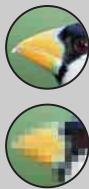
Nombreux pixels
natural_image
Flowers in black and orange containers with a yellow tag, placed outdoors (no visible text or symbols)natural_image
Flowers in black and orange containers with a yellow tag, no visible text or symbolsExposition correcte

natural_image
Flowers in black and pink pots with a yellow tag, placed outdoors (no visible text or symbols)natural_image
Three colorful flowers in black, orange, and yellow cups placed on a surface (no visible text or symbols)natural_image
Flowers in black and orange containers with a yellow tag, placed outdoors (no visible text or symbols)natural_image
Man standing on a balcony overlooking a cityscape at night, illuminated with city lights (no visible text or symbols)

natural_image
Man standing on a balcony overlooking a cityscape at night (no visible text or symbols)natural_image
Close-up photo of a cat holding an object outdoors, no visible text or symbolsnatural_image
Black and white cat standing on a bench outdoors near water, with blurred greenery in the background (no text or symbols visible)natural_image
Close-up photo of a cat in a black-and-white striped jacket, outdoors with blurred greenery background (no text or symbols visible)
natural_image
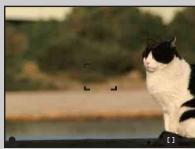
Black and white cat standing on a bench outdoors near water, with blurred greenery in the background (no text or symbols visible)Mode de mesure
natural_image
Three smiling children outdoors, framed by geometric outlines (no text or symbols)natural_image
Two adults and a child reading together (no visible text or symbols)
natural_image
Two children looking at a book, one with a face detection bounding box (no visible text or symbols)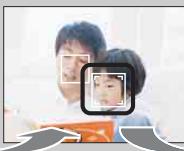
natural_image
Close-up of a person holding a tablet with a child's face highlighted (no text or symbols visible)
natural_image
Two adults and a child reading a book together (no visible text or symbols)natural_image
Exterior view of modern skyscrapers at dusk, showing a building with illuminated facade and a cityscape below (no visible text or signage)natural_image
Close-up of a smiling child's face with red markings, showing eye area and eyelid application (no text or symbols visible)Language Setting....90
Lecture....42
Lecture continue....72
Logiciel 114
M
Mesure multi-zone 63
Mesure spot....63
Mise au P....61
Music Transfer....114, 115
N
Neige....34
NTSC 95
Recadrage (redimension.)....76
MPEG Layer-3 audio coding technology and patents licensed from Fraunhofer IIS and Thomson.