FX3040 - Lamp Dörr - Free user manual and instructions
Find the device manual for free FX3040 Dörr in PDF.


User questions about FX3040 Dörr
0 question about this device. Answer the ones you know or ask your own.
Ask a new question about this device
Download the instructions for your Lamp in PDF format for free! Find your manual FX3040 - Dörr and take your electronic device back in hand. On this page are published all the documents necessary for the use of your device. FX3040 by Dörr.
USER MANUAL FX3040 Dörr
LED FLEX PANEL BI-COLOR FX-3040 BC
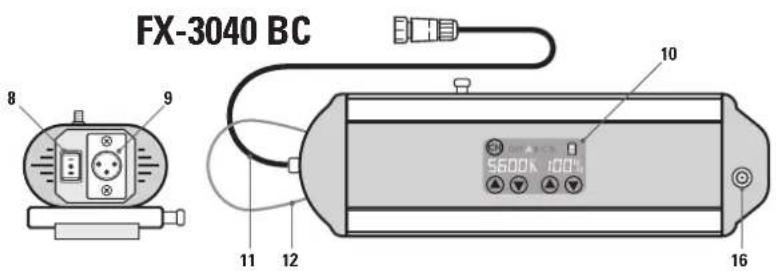
FX-3040 BC
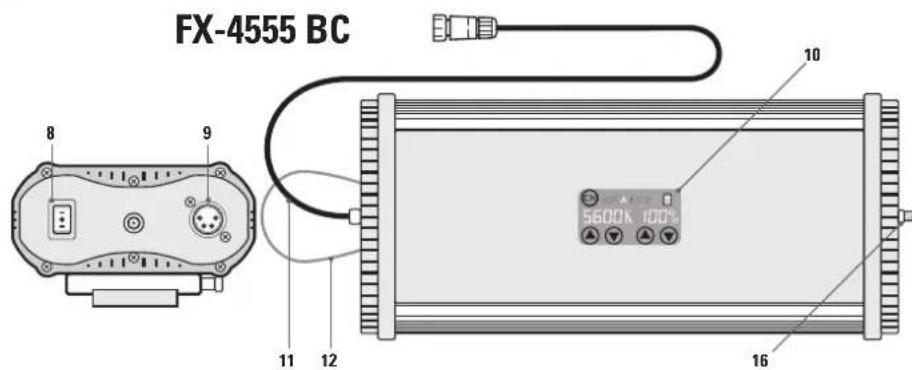
FX-4555 BC
GB INSTRUCTION MANUAL LED Light Panel
FR NOTICE D'UTILISATION Panneau LED flexible
ES MANUAL DE INSTRUCCIONES Panel LED flexible
IT MANUALE D'ISTRUZIONI Pannello a Luci LED
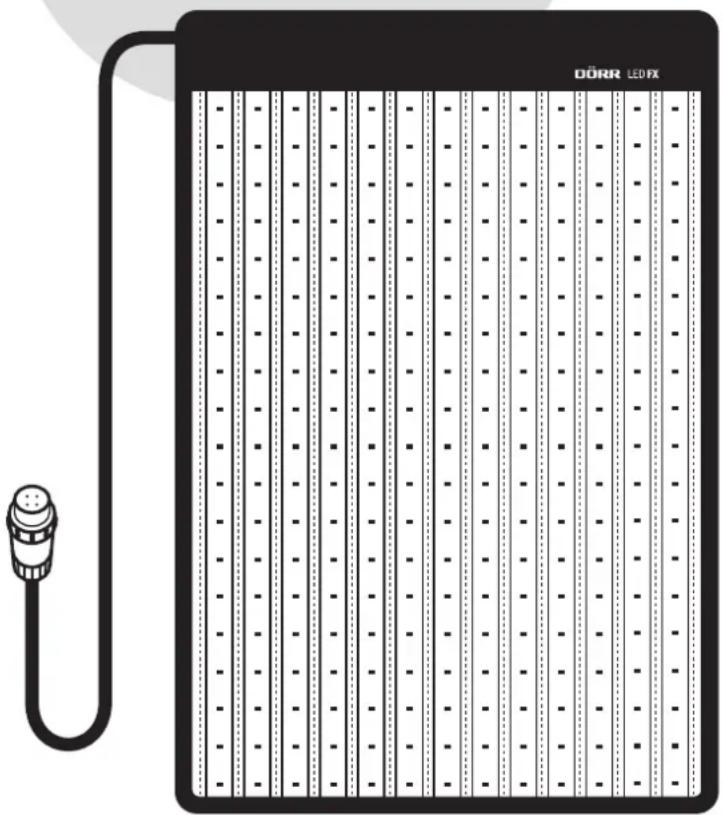

LED Flex Panel FX-3040 BC / FX-4555 BC Bi-Color
LED Leuchtmatte
POSITION I = BETRIEB MIT V-MOUNT AKKU
POSITION II = BETRIEB MIT NETZTEIL
POSITION 0 = AUS
11|OPTIONALES DORR ZUBEHOR
LED Flex Panel FX-3040 BC / FX-4555 BC Bi-Color
LED Light Panel
THANK YOU for choosing this DORR quality product.
Please read the instruction manual and safety hints carefully before fi rst use. Keep this instruction manual together with the device for future use. If other people use this device, make this instruction manual available. This instruction manual is part of the device and must be supplied with the device in case of sale.
DORR is not liable for damages caused by improper use or the failure to observe the instruction manual and safety hints.
01 SAFETY HINTS
- Only for the illumination for photographic purposes. Not suited for permanent room lighting.
- Only operate with the supplied power supply and the original cables. Do not use an extension cord. Alternatively, the light panel can be operated with a suitable V-Mount Li-Ion battery (optional).
- Ensure sufficient ventilation during operation. After use, please switch the device off.
- Make sure to turn off the device at main switch before disconnecting from power.
- LED Bulbs cannot be replaced.
- Protect the device from rain, moisture, direct sunlight and extreme temperatures.
- Do not operate or touch the device with wet hands.
Do not apply pressure to the light panel and do not place heavy objects on it. - Protect the LED surface from sharp objects. Do not use the light panel if it is damaged. In this case a qualified electrician should inspect the device before you use it again.
- Do not attempt to repair the device by yourself. Risk of electric shock! When service or repair is required, contact qualified service personnel.
- Do not use the device nearby mobile phones and devices that generate strong electromagnetic fields (e.g. electric engines).
People with physical or cognitive disabilities should use the device with supervision.
People with cardiac pacemakers, defibrillators or any other electrical implants should maintain a minimum distance of 15 to 20~cm as the device generates magnetic fields.
This device is not a toy. To prevent accidents and suffocation keep the device, the accessories and the packing materials away from children and pets. - Protect the device against dirt. Never use aggressive cleansing agents or benzine to clean the device. We recommend a soft, slightly damp microfiber cloth to clean the outer parts of the device. Make sure to take off the device from power before cleaning!
- Store the device in a dust-free, dry and cool place.
If the device is defective or without any further use, dispose of the device according to the Waste Electrical and Electronic Equipment Directive WEEE. For further information, please contact your local authorities.
02 | PRODUCT DESCRIPTION
The DORR LED FX Flex Panels are equipped with the latest bi-colour LEDs and are fully fl exible in their application. The LED Flex Panels ensure a bright illumination even in hard to reach areas or in the smallest spaces. With the "One-Control" function, several LED Flex Panels can be connected and controlled by only one control unit.
With a height of only 10 mm, they can be folded or rolled up and are easy to transport.
Well suited for portrait, product and video shootings.
03 FEATURES
Colour temperature stepless from min. 3000 K to max. 5600 K (daylight)
Fully flexible and ultra-flat
- Environmentally friendly, long-lasting bi-colour LEDs
Low energy consumption
- Brightness variably adjustable with dimmer
Operation with supplied power supply or V-mount Li-Ion battery (optionally from DORR)
- With the "One-Control" function, several LED Flex Panels can be connected and controlled by only one control unit.
04.1 LED Flex Panel
1 LEDilluminated area
2 Connection cable (to control unit)
3 Velcro border
4 Elastic strips
5 Fastening corners
6 X-Frame
7 Light stand adapter (inclinable)
04.2 Control Unit
8 Main switch
POSITION I = OPERATION WITH V-MOUNT
LI-ION BATTERY
POSITION II = OPERATION WITH POWER SUPPLY
POSITION 0 = OFF
9 Socket for power supply
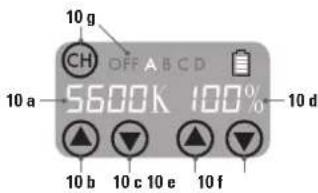
10 Touch display
10 a) Indication of the selected colour temperature
10b)Colour temperature up
10 c) Colour temperature down
10 d) Indication of the selected illuminance
10 e) Illuminance up
10f) Illuminance down
10 g) Channel selection (A, B, C, D, OFF)
11 Connection cable (to LED Flex Panel cable)
12 Suspension cord
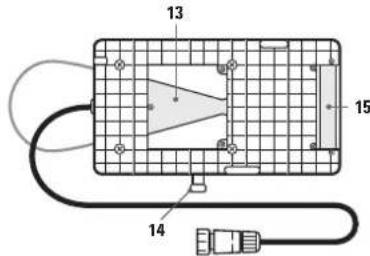
13 V-mount
14 Release button V-mount
15 Battery contacts +/-
16 Antenna socket
04.3 Power Supply
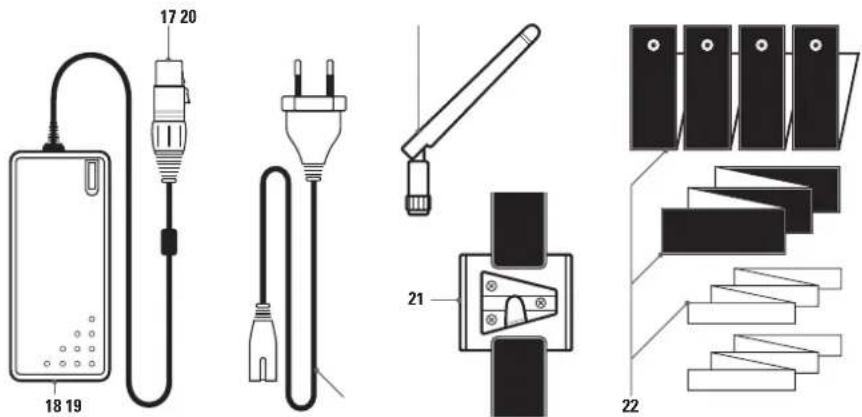
17 Connection cable (to control unit) with release button
18 Socket for power cable
19 Power cable
04.4 Accessories included
20 Antenna
21 Velcro strap with V-mount adapter
22 Velcro mounting straps
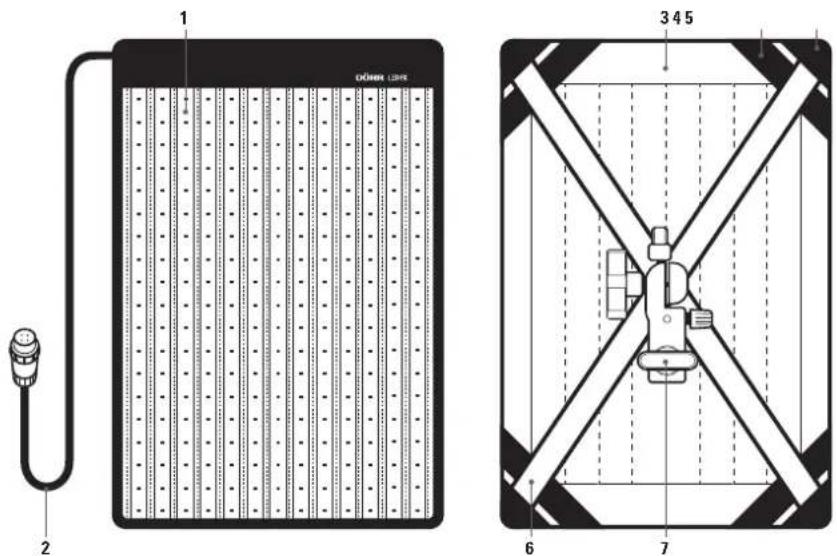
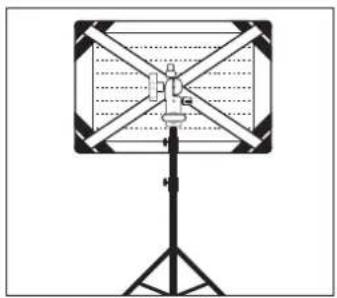
X-Frame
Unfold the X-frame (6) and insert the rods into the fastening corners (5). With the light stand adapter (7) the LED Flex Panel can be mounted horizontally or vertically onto a light stand (optional) and it is inclinable.
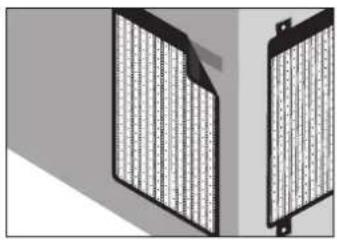
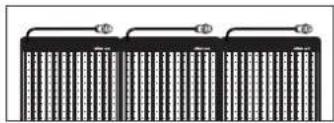
Velcro mounting straps
With the various Velcro straps (20), the LED Flex Panel can be attached to the wall, to the ceiling etc. or you can connect several LED Flex Panels with each other.
06|OPERATION
CAUTION
Before connecting or disconnecting cable connections, make sure that the control unit is switched off (main switch (8) on position 0 = off ).
06.1 Power connection
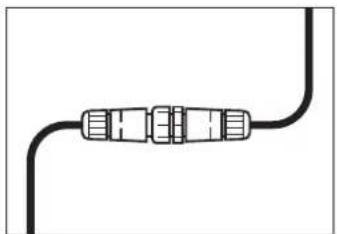
Plug the connection cable of the LED Flex Panel (2) into the connection cable of the control unit (11). Pay attention to the pins and holes. Screw the blue cap down. To disconnect the cable connection, unscrew the blue cap first!
06.2 Operation with power supply
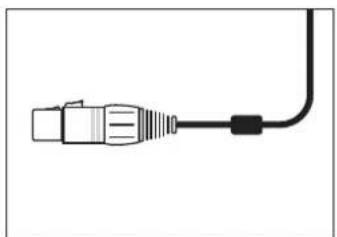
- Plug the connection cable (17) of the power supply into the power socket (9) of the control unit, until the plug audibly clicks into place. Pay attention to the pins and holes. To disconnect the plug, always press the release button!
- Plug the power cable (19) into the power cable socket (18) and connect the power supply to a socket outlet.
- Turn on the LED Flex Panel with the main switch (8) at the control unit: Main switch (8) position II = Operation with power supply
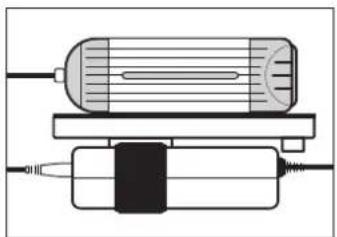
With the suspension cord (12) or with the supplied Velcro strap with V-mount adapter (21) you can attach the control unit e.g. to a light stand (optional) or fi x the power supply to the control unit. Just slide the V-mount adapter (21) into the V-mount (13). Use the Velcro straps to hold the control unit or to fi x the power supply. To remove the V-mount adapter, press the release button (14).
06.3 Operation with V-mount battery (optional)
V-mount Li-lon batteries are optionally available from DORR. See capture 11 | OPTIONAL ACCESSORIES.
CAUTION
Before operating with V-mount battery, make sure that the control unit is switched off (main switch (8) on position 0 = off ) and then disconnect the power supply from the control unit. To disconnect the plug, always press the release button!
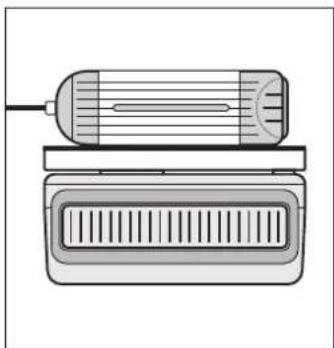
- Slide the V-mount battery into the V-mount (13) until the battery clicks into place. Pay attention to the battery contacts +/- (15).
- Turn on the LED Flex Panel with the main switch (8) at the control unit: Main switch (8) position I = Operation with V-mount battery
- Before removing the V-mount battery, turn the control unit off (main switch (8) on position 0). Press the release button (14) and slide out the battery.
06.4 Setting of colour temperature and of illuminance
To adjust the colour temperature, press the buttons on the touch panel (10) as follows:
10b) colour temperature up
10c) = colour temperature down
The indication 10 a) shows the selected colour temperature.
To adjust the illuminance, press the buttons on the touch panel (10) as follows:
10e) 品 -illuminance up
10f) -illuminancedown
The indication 10 d) shows the selected illuminance in %
Examples for settings:
a) Setting for warmest light (3000 K)
Press the buttons on the touch panel (10) as follows:
10c) = colour temperature down
10 e) ④ illuminance up
Touch display indicates: 3000 K 100%
b) Setting for daylight temperature (5600 K)
Press the buttons on the touch panel (10) as follows:
10b) ④= colour temperature up
10 e) = illuminance up
Touch display indicates: 5600 K 100%
CAUTION
After use please turn off the LED fl ex panel (main switch 8 = position 0).
07 | WORKING WITH SEVERAL LED FLEX PANELS BC / "ONE-CONTROL" FUNCTION
If you are using several LED Flex Panels, you have the possibility to operate them synchronously using one control unit only. No matter if you are operating one LED Flex Panel with power supply and the other one/ the other ones with V-Mount battery. Just make sure that the main switch (8) of control units is on corresponding position (position I = operation with V-mount battery, position II = operation with power supply).
CAUTION
The prerequisite is that all LED Flex Panels are of the BC series (bi-colour). The maximum distance for connection between the LED Flex Panels is up to 20 m in an open area.
- Screw the supplied antenna (20) into the antenna socket (16) of all LED Flex Panels to be operated.
- Switch on all control units on their main switch (8) (position I = operation with V-mount battery, position II = operation with power supply).
- With the touch panel (10), select the same setting on all LED Flex Panels separately.
- Use the channel selection button (10g) to select the same channel (A, B, C or D) on all LED Flex Panels. Now all LED Flex Panels with same channel, can be controlled synchronously via one control unit only.
Hint
It is also possible to connect the small FX-3040 BC LED Flex Panels with the large FX-4555 BC LED Flex Panels and to control them synchronously with one control unit only, provided that all LED Flex Panels are of the BC series (bi-colour).
CAUTION
After use please turn off the LED flex panels (main switch 8 = position 0).
08 CLEANING AND STORAGE
Never use aggressive cleansing agents or benzine to clean the device. We recommend a soft, slightly damp microfiber cloth to clean the outer parts of the device and the LED surface. Make sure to take off the device from power before cleaning! Store the device in a dust-free, dry and cool place. This device is not a toy - keep it out of reach of children. Keep away from pets.
09 SPECIFICATIONS
| Model FX-3040 BC FX-4555 BC Item No. 373621 373626 | ||
| Number of LEDs 280/bi-colour 504/bi-colour | ||
| Colour temperature 3000 - 5600 K | ||
| Power 50 W 100 W | ||
| Beam angle 10 - 360° | ||
| Colour rendering index (CRI) 95 R | a | |
| Illuminance 0,5 m: 6400 Lux 0,5 m: 9920 Lux 1,0 m: 1989 Lux 1,0 m: 3360 Lux | ||
| Range of antenna (radio range) approx. 20 m (2,4 GHz) | ||
| Operating voltage DC 15 V 5 A | DC 15 V 7 A | |
| Operation with or V-mount Li-lon battery (optional) | Power supply AC 100 ~ 240 V 50/60 Hz (included) | |
| Dimensions | approx. 315x450x10mm | approx. 460x600x10mm |
| Dimensions illuminated area | approx. 300x395mm | approx. 445x545mm |
| Weight LED panel | approx. 290 g | approx. 448 g |
| Weight control unit | approx. 795 g | approx. 1095 g |
| Weight power supply incl. power cable | approx. 395 g | approx. 565 g |
10 | CONTENT
1x LED Flex Panel
1x Control unit with V-mount battery mounting plate
1x Power supply
1x Power cable
1x Antenna
1x X-Frame
1x Light stand adapter
1x Velcro strap with V-mount adapter
1x Velcro mounting straps
11|OPTIONAL DORR ACCESSORIES
Special accessories for DORR LED FX Flex Panels available in stores:
| Description | Item No. |
| DORR Softbox for FX-3040 DL/BC | 373630 |
| DORR Softbox for FX-4555 DL/BC | 373631 |
| DORR Flag Panel Diffusor for FX-3040 DL/BC | 373632 |
| DORR Flag Panel Diffusor for FX-4555 DL/BC | 373633 |
| DORR Compact V-Mount Li-Ion Battery CVL-65 14.8V, 65Wh | 980715 |
| DORR Compact V-Mount Li-Ion Battery CVL-98 14.8V, 98Wh | 980716 |
12 | MOUNTING OF THE OPTIONAL ACCESSORIES
DORR Softbox (optional)
The DORR Flex Panel Softbox provides soft and diffuse light.
The softbox is simply fixed to the Velcro border of the LED Flex panel (3). The supplied diffusor cover is placed over the front of the softbox.
DORR Flag Panel Diffuser [options]
The metal flag panel frame is ideal for filming. Attach the LED Flex Panel to the Flag Panel using the elastic strips (4) and mount the Flag Panel e.g. onto a camera slider.
The DORR Flag Panel comes with a fabric cover so the flag panel can also be used as a diffusor.
![Dörr FX3040 - DORR Flag Panel Diffuser [options] - 1](/content/2026/03/480171/images/8b6cdc705da575cc79a508d177bfa1f1c6d4008632f49ac4f04a06dc23671cfa.jpg)
![Dörr FX3040 - DORR Flag Panel Diffuser [options] - 2](/content/2026/03/480171/images/b5df840d864f3dd5e48491ce1245852a7aa94d0198073c18645b26e93e01747e.jpg)
![Dörr FX3040 - DORR Flag Panel Diffuser [options] - 3](/content/2026/03/480171/images/26ddd77fec12456c534c6a1439e626542cbd9d7099fe851c7d0d24653081d59a.jpg)
DISPOSAL OF BATTERIES/ACCUMULATORS
Batteries are marked with the symbol of a crossed out bin. This symbol indicates that empty batteries or accumulators which can no longer be charged, should not be disposed of with household waste. Waste batteries may contain harmful substances that can cause damage to health and to the environment. Please use the return and collection systems available in your country for the disposal of the waste batteries.

WEEE INFORMATION
The Waste Electrical and Electronic Equipment Directive (WEEE Directive) is the European community directive on waste electrical and electronic equipment, which became European law in February 2003. The main purpose of this directive is to prevent electronic waste. Recycling and other forms of waste recovery should be encouraged to reduce waste. The symbol (trash can) on the product and on the packing means that used electrical and electronic products should not be disposed of with general household waste. It is your responsibility to dispose of all your electronic or electrical waste at designated collection points. Disposing of this product correctly will help to save valuable resources and it is a signifi cant contribution to protect our environment as well as human health. For more information about the correct disposal of electrical and electronic equipment, recycling and collection points please contact your local authorities, waste management companies, your retailer or the manufacturer of this device.
ROHS CONFORMITY
This product is compliant with the European directive 2011/65/EU of June 08, 2011 for the restriction of use of certain hazardous substances in electrical and electronic equipment (RoHS) and its amendments.
CE MARKING The CE marking complies with the European directives.
EU DECLARATION OF CONFORMITY
We (DORR GmbH) herewith declare that the device complies with the EU Directive 2014/53/EU for radio equipment. The full text of EU Declaration of Conformity is available at the following internet address: http://www.doerrphoto.de/info/EG-Konformitätserklärungen
POSITION1 = FONCTIONNEMENT AVEC
ACCUMULATEUR
POSITION II = FONCTIONNEMENT AVEC BLOC
D'ALIMENTATION
POSITION 0 = ÉTEINT
1,0m:1989 Lux 1,0m:3660 Lux
Portee de I'antenne (portee radio) environ 20 m (2,4 GHz)
11 ACCESSORIES DORR EN OPTION
04.1 Panel LED flexible
8 Interruptor principal
Modello FX-3040 BC FX-4555 BC
Numero di série 373621 373626
1,0m:1989Lux1,0m:3660 Lux