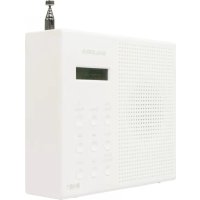
DAB3015FM - Radio SALORA - Free user manual and instructions
Find the device manual for free DAB3015FM SALORA in PDF.


User questions about DAB3015FM SALORA
0 question about this device. Answer the ones you know or ask your own.
Ask a new question about this device
Download the instructions for your Radio in PDF format for free! Find your manual DAB3015FM - SALORA and take your electronic device back in hand. On this page are published all the documents necessary for the use of your device. DAB3015FM by SALORA.
USER MANUAL DAB3015FM SALORA
natural_image
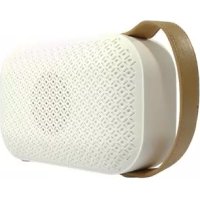
White portable electronic device with textured surface and a small screen (no visible text or symbols)IMPORTANT: Please read all instructions carefully before use and keep for future reference
General Safety Instructions
Read this manual thoroughly before first use and keep it in a safe place for future reference, along with the warranty card, purchase receipt and carton. The safety precautions enclosed herein reduce the risk of fire, electric shock and injury when correctly adhered to.
Important warnings and cautions
- Protect from moisture: To reduce the risk of fire or electric shock, do not expose this product to water or moisture. Do not use it where it could fall into or get splashed by water.
- Do not open: To prevent contact with high voltage components or hazardous radiation exposure, do not attempt to open the equipment.
- Charger Cord: Only use the adaptor that is provided with the unit.
- Servicing: Refer all servicing to qualified service personnel. Servicing is required if any of the following have occur red: the power cord or plug has been damaged, the unit has been exposed to rain or moisture, objects have fallen into the unit, the unit has been dropped or is not working correctly.
- Elect rostatic discharge: When electrostatic discharge (ESD) occurs at the front surface or near any part or any button of this unit, there may be a possibility that the product may stop operation and/or shut down immediately. This is a normal condition and intended to protect the unit and internal components against damage. In such a case, please reset the unit (by turning Off and On the radio) to revert the unit to normal operation.
- Protect from heat: This radio (and its internal battery) should not be exposed to excessive heat such as sunshine, fire or the like.
General Safety Instructions (Cont.)
General precautions
- Install the unit in accordance with the manufacturer's instructions. Do not install it near any heat sources such as radiators, heat registers, stoves or other objects (including amplifiers) that produce heat.
- Only use the unit with the accessories that are sold with the unit.
- Avoid putting extensive stress on adaptor, especially at the connection points.
- To ensure proper ventilation and operation, do not block any ventilation openings.
- Unplug the unit from the charging power source during lightning storms.
- Excessive sound pressure from earphones and headphones can cause hearing loss. For the sake of your health, always keep the volume at a low to moderate level when using earphones/headphones.
- Keep candles or other open flames away from this product at all times.
- Placing this radio near a TV, refrigerator, microwave oven, amplifier or DVD player and may adversely affect the sound quality. In such a case, move the radio away from the device that causes the interference.
- Do not install or place this radio in a bookcase, built-in cabinet or in another confined space. Ensure the unit is well ventilated.
- This product is not intended for use by persons (including children) with reduced physical, sensory or mental capabilities, or lack of experience and knowledge, unless they have been given supervision or instruction concerning the use of the appliance by a person responsible for their safety.
- Supervise children to ensure they do not play with the appliance.
- Keep the original packaging for future transport of the radio. For maximum protection, repack the unit as it was originally packaged.
- Ensure to unplug the adaptor from the unit before cleaning.
- Only use a soft, dry cloth for cleaning the unit and the display screen.
- Do not use any type of solvent, such as thinner and benzene, as they may cause damage to the surface of the radio.
Product Overview
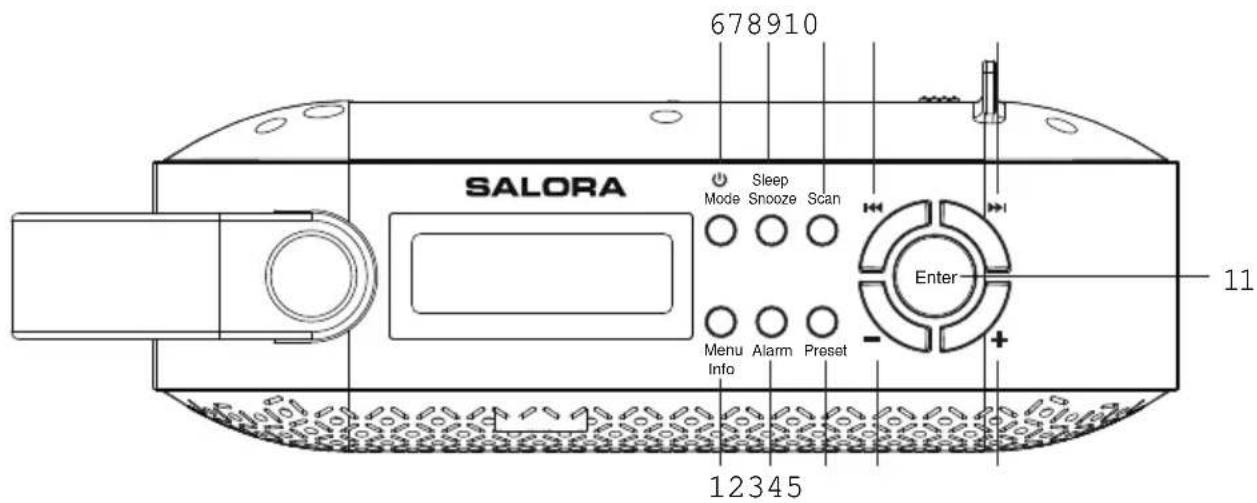
Top View
text_image
678910 SALORA Sleep Mode Snooze Scan Enter Menu Alarm Preset Info 12345 111 Menu /Info Press repeatedly to access station information and Menu settings
2 Alarm Press to do alarm setting
3 Preset Store and access up to 10 DAB+ and 10 FM Station Presets.
4/5 Vol +/- Increase/decrease the volume.
6 Power / Mode Press to turn on the radio from standby mode. While the radio is on, press to switch between DAB+ and FM modes. Press and hold to place the radio in Standby.
7 Sleep/Snooze Press to activate 9 minute snooze mode when the alarm is sounding.
8 Scan Auto-scan all DAB+ and FM stations.
9/10 Prev/Next Select previous/next frequency, station, preset station or menu option.
11 Enter Press to confirm your option
Product Overview (Cont.)
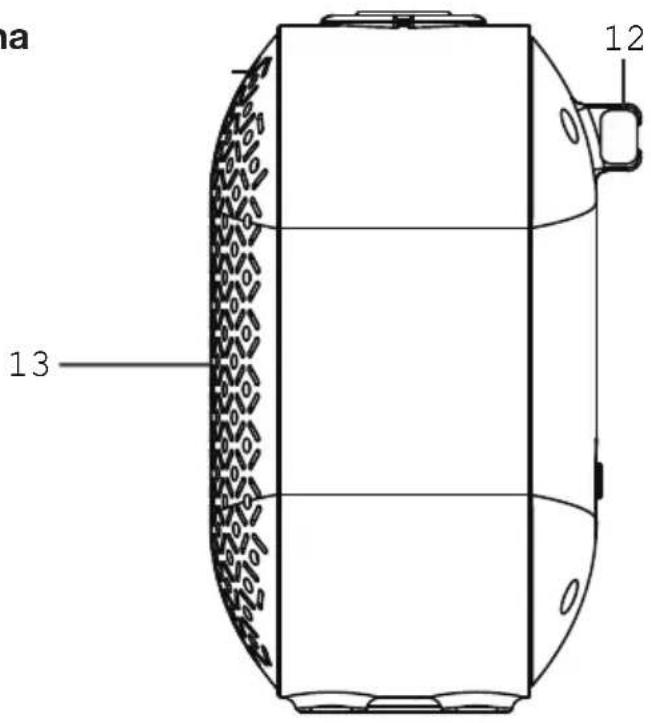
Side view
12 Telescopic Antenna
13 Speaker
text_image
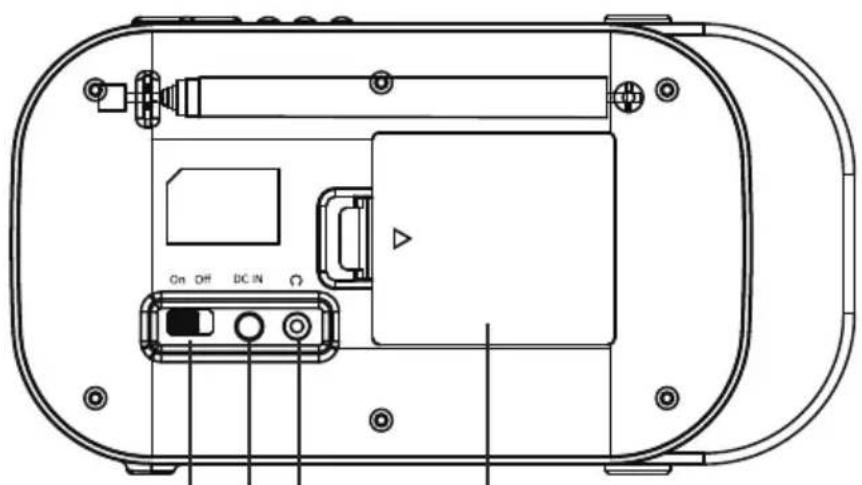
12 13Rear view
14 On/Off Switch button
15 DC IN socket
16 Earphone Socket
17 Battery Compartment
natural_image
Technical line drawing of a device rear panel with labeled ports and buttons (no readable text or symbols)14151617
Instructions
Before first use
- Unpack the appliance but keep all packaging materials until you have made sure your new DAB+ Radio is undamaged and in good working order. Plastic wrapping can be a suffocation hazard for babies and young children, so ensure all packaging materials are out of their reach.
- Do not use the product if the product or its cord have been damaged or are not working properly.
Instructions (Cont.)
Basic operations
Switching on your DAB+ Radio for the first time
- Slide the OFF/ON switch to the ON position on the back of your DAB+ Radio to power up the DAB+ Radio.
- Extend the telescopic antenna for the best reception possible.
- Then press the Power/Mode button to turn the radio on.
- When DAB+ mode is activated for the first time, a full scan will automatically commence, or will play the last station before the unit was turned off.
- Once the radio has been switched ON, press the Power/Mode button to switch between DAB+ and FM modes.
- During scanning the screen will display a slide bar that indicates the progress of the scan, and the amount of radio stations that have been found so far. Once the scan has finished, the radio will select the first alphanumeric station.
- Slide the ON/OFF switch to the OFF position to turn the DAB+ Radio off.
Selecting modes
- When the DAB+ Radio is turned on, press the Power/Mode button repeatedly to switch between DAB+ and FM modes.
Adjusting volume
- Press the + or - button to increase/decrease the volume.
Instructions (Cont.)
DAB+ operation
- To listen to the tuned stations press either the PREV or NEXT buttons. Each time you press the PREV/NEXT buttons, you will skip to the previous or next stored station.
• The radio will display the station name.
Memory
When you power ON the radio again after it has been switched off, it will automatically tune into the same station (DAB+ or FM) that was last selected.
Storing stations
You can store up to 10 DAB+ stations to the memory presets for quick and easy recall of your favourite stations.
- To store a preset station, you must first be listening to the station that you would like to save. Press and hold the PRESET button. The display will show “Preset Store # empty”. If a station is already stored, the display will show “
#”. - Press the PREV/NEXT buttons to select the preset station number 1-10.
- To save the selected preset station number, press the ENTER button. The display will then show "Preset # stored".
Recalling a stored station
Once you have saved a station to one of the preset buttons, you can:
- Press the PRESET button and press the PREV/NEXT buttons to select your desired preset station's number.
- Press the ENTER button to recall a preset station number.
Instructions (Cont.)
Station information on DAB+ mode
Press the INFO button repeatedly to show the different program information.
- Dynamic Label Segment (DLS): Displays scrolling text information supplied by the broadcaster.
• Signal Strength: Displays a signal bar with the strength of the current station. - Bit Error Rate (BER): Provides details of the signal error rate.
- Channel and Frequency: Displays the station's transmission channel number and frequency.
- PTY (Program Type): Shows the type and description of the program provided by the DAB+ station.
- Time and Date: Displays the time and date information provided by the broadcaster.
- Bit Rate: The data rate which the signal is being transmitted.
FM operation
In order to switch the radio from DAB+ to FM mode, press the Power/Mode button once.
Auto scan
- To search for an FM station, press the SCAN button. This will start scanning up the frequency band.
- To scan down the frequency band, press and hold the SCAN button.
- Once a station has been found, the scanning will stop automatically. If no station is found, then the tuning will stop once it has cycled through the entire FM band (87.5 - 108 MHz).
Manual scan
- To search FM stations manually, press the PREV/NEXT buttons repeatedly until your desired frequency is reached.
Instructions (Cont.)
Storing stations
You can store up to 10 FM stations to the memory presets for quick and easy recall of your favourite stations.
- To store a preset, you must first be listening to the station that you would like to save. Press and hold the PRESET button. The display will show "Preset Store # empty". If a station is already stored, the display will show "
#". - Press the PREV/NEXT buttons to select the preset station number 1-10.
- To save to the selected preset station number, press the ENTER button. The display will then show "Preset # stored".
Recalling a stored station
Once you saved a station to one of the preset buttons, you can:
- Press the PRESET button and press the PREV/NEXT buttons to select your desired preset station's number.
- Press the ENTER button to recall a preset station number.
Station information on FM mode
Press the INFO button repeatedly to show the different program information.
- Program Type: Displays a description of the type of program provided by the broadcaster.
- Signal Strength: Displays a signal bar with the strength of the current station.
• Time and Date: Displays the time and the date. - Frequency: Displays the station's transmission frequency.
- Audio Type: Displays the audio type of the station you are listening to. The audio type will either be Stereo or Mono.
Note: You can press Enter button to switch between stereo or mono.
• Radio Text: Displays scrolling text information supplied by the broadcaster.
Instructions (Cont.)
System Settings
- With the unit turned on press and hold the Menu button. This will open the "System Menu Settings"
- Press the PREV/NEXT buttons to select your desired Sub-option between;
Setting the Time/Date
- Press the ENTER button, the hour digits will flash.
- Press the PREV/NEXT buttons to set the hour correctly.
- Press the ENTER button to confirm.
- Repeat the last two steps to set the minutes, then the date.
System Version
You can check the software version number.
Resetting the radio
Resetting the radio will delete all the tuned DAB+ stations and all the preset memory stations in FM and DAB+ modes. To reset the radio:
- Press and hold the INFO button.
- Press the NEXT button repeatedly until ‘Factory Reset’ is displayed on the screen.
- Press the ENTER button and the display will show 'Factory Reset?'. Use the NEXT button to choose Yes.
- Press the ENTER button again, this will reset the radio.
Sleep setting
- Press and hold the Sleep button.
- Press the PREV or NEXT button to select either OFF-120-90-60-45-30-15-5 minutes.
- Press the ENTER button to confirm your selection.
Instructions (Cont.)
Using the alarm
Alarm Setting
With radio in working mode:
- Press and hold Alarm button to go to Alarm 1 Set and press ENTER button to confirm
- Press the NEXT button so the word "ON" is flashing and press ENTER to confirm.
- The hour digits for the alarm will flash, press the PREV or NEXT to change the hour and press the ENTER button to confirm.
- Press the PREV or NEXT button to change the minute and press the ENTER button to confirm.
- Press the PREV or NEXT button to change the volume and press the ENTER button to confirm.
- Press the PREV or NEXT button to change between Alarm-DAB-FM and press the ENTER button to confirm.
- To set the Alarm 2, follow the Alarm 1 instructions.
Turning off the alarm
- Press and hold Alarm button to go to Alarm 1 Set and press ENTER button to confirm
- To turn off the alarm, press the NEXT button so the word "OFF" is flashing and press ENTER. The alarm is now OFF.
Turning off the alarm when sounding
- Press the Power/Mode button to turn off the alarm when sounding.
Snooze function
- When the alarm sounds, press the SNOOZE button to delay the alarm for another 9 mins. The radio will go to Standby mode.
- You can press the Power/Mode button to stop the Snooze function and go to the operation mode before the alarm rings.
Other Useful Information
Specifications
| Power supply 4*AA battery or power adaptor | |
| Audio power output 1W RMS | |
| Frequency ranges FM 87.5 - 108 MHzDAB+ 174 - 240 MHz | |
| Output connector 3.5mm earphone socket | |
| Aerial Integral telescopic aerial | |
| Pre-sets FM mode: 10 | DAB+ mode: 10 |
FAQs
| Problem Solution | |
| No sound • The station is not tuned in. Fine tune the station.• The volume is set to a low position. Increase the volume.• Headphones may be connected. Disconnect the headphones. | |
| Buttons are not working | Turn off the unit and turn on after a few seconds. |
| FM: Static sound DAB+: Burbling/ intermittent cut-out | • Signal reception is too low. Adjust the aerial or move the unit to a stronger signal location.• Rescan stations. |
| Sound is distorted The volume is too high. Adjust the volume control. | |
| Desired station not found | Weak signal. Use the manual tune function. |
| Display shows “No Service” | There is no DAB+ coverage in your area, or poor reception. Adjust the position of the aerial, or move the unit to a stronger signal location. |
| Display is blank This may occur if the broadcaster changes the label of a service or removes a label while tuned. The radio will try to retune or perform a scan. | |