ManualGo.com
DW7231 - Saw DEWALT - Free user manual and instructions
Find the device manual for free DW7231 DEWALT in PDF.



Download the instructions for your Saw in PDF format for free! Find your manual DW7231 - DEWALT and take your electronic device back in hand. On this page are published all the documents necessary for the use of your device. DW7231 by DEWALT.
USER MANUAL DW7231 DEWALT
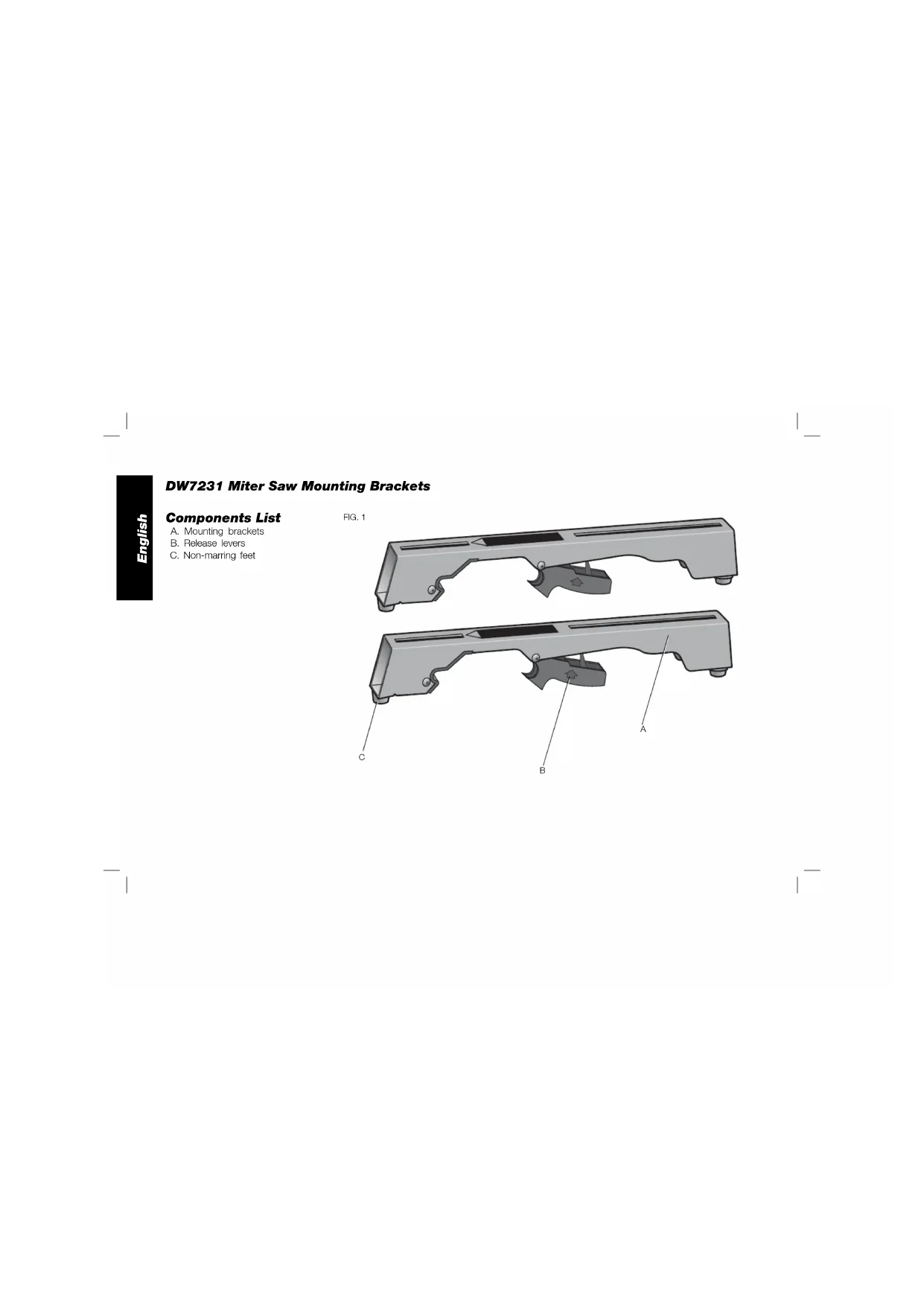
FIG. 1 Components List A. Mounting brackets B. Release levers C. Non-marring feet1 English IF YOU HAVE ANY QUESTIONS OR COMMENTS ABOUT THIS OR ANY D
WARNING: For your own safety, read the miter stand
instruction manual before using any accessory. Failure to heed these warnings may result in personal injury and serious damage to the miter stand and the accessory. When servicing this tool, use only identical replacement parts. Tools Required
- Drill with 3/8" (9.5 mm) drill bit (Not required for DEWALT Miter Saws)
- Crosshead #2 screwdriver
- 1/2" (13mm) Wrench General Safety Instructions for Stand Accessories
WARNING: To reduce the risk of personal injury:
- ALWAYS use eye protection. All users and bystanders must wear eye protection that conforms to ANSI Z87.1.
- ALWAYS check the stability of the miter saw stand and the miter saw attached to it before putting the stand or the saw into use.
- DO NOT mount any power tool other than a miter saw to this stand. Mounting other power tools to this stand could result in severe personal injury.
- DO NOT exceed the weight these brackets can hold. Each bracket can support up to 250 lbs. (113 kg) when loaded directly over the stand main beam. Do not exceed weight rating of the stand.
- Follow the mounting instructions carefully. Fasten the miter saw to the saw mounting brackets securely as instructed.
- DO NOT modify or use stand for operations for which it is unintended.
- DO NOT use the stand on uneven surfaces. The stand is designed to be used on a flat, stable surface.
- DO NOT use on a slippery surface. The stand load capacity is greatly reduced when used on slippery surfaces. Components (Fig. 1)
WARNING: Never modify the stand or any part of it. Damage or
personal injury could result. Refer to Figure 1 for Components List. Defi nitions: Safety Guidelines The definitions below describe the level of severity for each signal word. Please read the manual and pay attention to these symbols.
DANGER: Indicates an imminently hazardous situation which,
if not avoided, will result in death or serious injury.
WARNING: Indicates a potentially hazardous situation which, if
not avoided, could result in death or serious injury. CAUTION: Indicates a potentially hazardous situation which, if not avoided, may result in minor or moderate injury. NOTICE: Indicates a practice not related to personal injury which, if not avoided, may result in property damage.2 English ASSEMBLY DW7231 D EWALT Miter Saw Mounting Method (Fig. 2, 3)
WARNING: To reduce the risk of injury, turn unit off,
disconnect machine from power source before assembling the miter saw to the miter saw stand. An accidental start-up can cause injury.
WARNING: Stability Hazard. You must use the Universal
Miter Saw Mounting Method when mounting a miter saw not manufactured by D EWALT to this miter saw stand.
WARNING: To reduce the risk of personal injury, be sure the miter
saw is fully anchored on the stand.
WARNING: For your own safety, read and understand the miter saw
instruction manual before using. Failure to heed these warnings may result in personal injury and serious damage to the miter saw and the accessory.
1. Place saw in operational position with blade facing you. Align with
label on the mounting bracket showing front.
2. Place a spacer, such as a 2 x 4, under one side of the miter saw
to hold the saw’s mounting feet above the work surface.
3. Hold a mounting bracket under the saw and feed a carriage bolt
(hardware bag) up through the bracket and the foot of the saw. NOTE: See DW7231 Hardware Selection Chart for the correct mounting hardware procedures for D EWALT miter saws. Follow all instructions properly, otherwise the miter saw's table rotation may be obstructed.
DW7231 HARDWARE SELECTION CHART
Left Side Right Side DW703 1 1 DW705 1 1 DW706 1 1 DW708 1 2 DW712 1 2 DW713 1 1 DW715 1 1 DW716 1 1 DW717 2 1 DW718 3 2 DWS780 3 2 1 = Long screw, Head on bottom 2 = Short screw, Head on bottom 3 = Long screw, Head on top
4. Once the carriage bolt (hardware bag) is installed per DW7231
Hardware Selection Chart, assemble a flat washer, lock washer and nut onto the bolt. Tighten the bolts finger tight.3 English
5. Repeat procedure on the other end of the bracket.
6. Move the 2x4 to the other side of the saw to hold the other end
of the saw up in order to access the saw base.
7. Feed carriage bolts through the other bracket and the base of the
saw as before. Ensure both brackets are parallel to each other.
8. To place the saw onto the stand, grasp and lift saw by mounting
bracket assembly by the release levers. These levers do not lock the saw laterally in place but merely serve as a means of mounting the saw to the beam. FIG. 2
9. Approach the beam with saw/bracket
FIG. 3 assembly tilting toward your body slightly. Engage the concave front lip of the mounting bracket with rounded edge of beam. One of the brackets must engage the locator clip (D) to prohibit lateral movement of the saw during use.
10. When front edge of the beam and locking locator clip are
engaged, a slight downward pivot will allow secure engagement of the release levers to the back of the beam. Rock the saw gently on the brackets to verify locking in position.
11. Adjust the saw position as necessary to have the blade
perpendicular to the beam when in the 0 degree miter position.
12. Tighten the four nuts holding the saw to the brackets securely.
WARNING: For your own safety, read and understand the miter saw
instruction manual before using. Failure to heed these warnings may result in personal injury and serious damage to the miter saw and the accessory. DW7231 Universal Miter Saw Mounting Method (Fig. 1, 3–5)
WARNING: To reduce the risk of injury, turn unit off,
disconnect machine from power source before assembling the miter saw to the miter saw stand. An accidental start-up can cause injury.
WARNING: Stability Hazard. You must use the plywood mounting
method described in the following instructions when mounting a miter saw not manufactured by D EWALT to this miter saw stand.
WARNING: To reduce the risk of personal injury, be sure the miter
saw is fully anchored on the stand.
WARNING: For your own safety, read and understand the miter saw
instruction manual before using. Failure to heed these warnings may result in personal injury and serious damage to the miter saw and the accessory. NOTE: If you do not have a D EWALT miter saw, you must use 3/4" (19mm) plywood to mount your miter saw. The plywood must be a minimum of 4" (101.6mm) wider than the the largest width of the miter saw base. The plywood should be at least as deep as the smallest depth of the miter saw base or a minimum of 16" (406.4mm) if miter saw base is smaller. Ensure the plywood is square.
1. Once the Plywood size has been determined, drill 3/8" (9.5mm)
holes 1" (25.5 mm) from the front corners of plywood, 15" (355mm) apart and 1" (25.5mm) from the sides.
2. Place DW7231 mounting brackets onto the stand:
a. Grasp and squeeze release levers (B).4 English
6. The miter saw should be mounted to plywood using holes in the
miter saw base. The hardware size will be determined by the holes in the miter saw base. Hardware should be 1-1/4" (31.8 mm) longer than the maximum height of the miter saw base at each mounting location. a. Transfer location of mounting holes from miter saw base to plywood. b. Drill holes accordingly to the size of the hardware chosen. NOTE: Hardware must be purchased to mount miter saw to plywood. All purchased hardware should be a minimum of Grade 5 or Class 8.8. c. Secure miter saw to plywood as shown in Figure 5. Saw base (E), 3/4" (19 mm) plywood (I), flat washer (F), lock washer (H) and nut (G). b. Engage the concave front lip of the mounting bracket with rounded front edge of beam. One of the mounting brackets must be engaged in the locator clip (D) to prohibit lateral movement of the saw during use.
3. When the front edge of beam and locator clip are engaged, a slight
downward pivot will allow secure engagement of the release levers to the back of the beam. Follow same procedure with second mounting bracket at the appropriate position on the beam for the size of the plywood.
4. Place plywood onto mounting brackets and align drilled holes
with slots in mounting brackets. Refer to DW7231 Hardware Selection Chart and use either Method 1 or 2 to secure plywood to mounting brackets.
5. Use 1/2" (13mm) wrench to tighten hardware.
SAW BEING MOUNTING 1" (25.5mm) 1" (25.5mm) MOUNT MITER
FIG. 55 English NOTE: Ensure a flat washer (F) is used between plywood (I)and lock washer (G). d. Tighten all hardware. Removing the Saw Once the miter saw is fastened to the brackets, it can be removed by grasping the release levers, pulling up slightly to clear the beam and can be set down on the rubber feet for transportation or cleaning. Accessories
WARNING: Since accessories, other than those offered by
EWALT, have not been tested with this product, use of such accessories with this tool could be hazardous. To reduce the risk of injury, do not create unstable conditions and use only with D EWALT miter saws and work stands. Recommended accessories for use with your tool are available at extra cost from your local dealer or authorized service center. If you need assistance in locating any accessory, please contact D EWALT Industrial Tool Co., 701 East Joppa Road, Baltimore, MD 21286, call 1-800-4-D EWALT (1-800-433-9258) or visit our website www. dewalt.com. COMPATIBLE PRODUCTS DW723 – Heavy-Duty miter saw stand DWX723 – Heavy-Duty miter saw stand DWX724 – Compact miter saw stand DWX725 – Heavy-Duty work stand Repairs To assure product SAFETY and RELIABILITY, repairs, maintenance and adjustments should be performed by a D EWALT factory service center, a D EWALT authorized service center or other qualified service personnel. Always use identical replacement parts. Register Online Thank you for your purchase. Register your product now for:
- WARRANTY SERVICE: Registering your product will help you obtain more efficient warranty service in case there is a problem with your product.
- CONFIRMATION OF OWNERSHIP: In case of an insurance loss, such as fire, flood or theft, your registration of ownership will serve as your proof of purchase.
- FOR YOUR SAFETY: Registering your product will allow us to contact you in the unlikely event a safety notification is required under the Federal Consumer Safety Act. Register online at www.dewalt.com/register. Three Year Limited Warranty DEWALT will repair, without charge, any defects due to faulty materials or workmanship for three years from the date of purchase. This warranty does not cover part failure due to normal wear or tool abuse. For further detail of warranty coverage and warranty repair information, visit www.dewalt.com or call 1-800-4-D EWALT (1-800-433-9258). This warranty does not apply to accessories or damage caused where repairs have been made or attempted by others. This warranty gives you specific legal rights and you may have other rights which vary in certain states or provinces. In addition to the warranty, D EWALT tools are covered by our:
EWALT will maintain the tool and replace worn parts caused by normal use, for free, any time during the first year after purchase.6 English
90 DAY MONEY BACK GUARANTEE
If you are not completely satisfied with the performance of your
EWALT Power Tool, Laser, or Nailer for any reason, you can return it within 90 days from the date of purchase with a receipt for a full refund – no questions asked. LATIN AMERICA: This warranty does not apply to products sold in Latin America. For products sold in Latin America, see country specific warranty information contained in the packaging, call the local company or see website for warranty information. FREE WARNING LABEL REPLACEMENT: If your warning labels become illegible or are missing, call 1-800-4-D
EWALT DW7231 (Fig.2, 3)
Para servicio y ventas consulte “HERRAMIENTAS ELECTRICAS” en la sección amarilla.DEWALT Industrial Tool Co., 701 East Joppa Road, Baltimore, MD 21286 (AUG13) Part No. N346019 DW7231 Copyright © 2010, 2013 D EWALT The following are trademarks for one or more D EWALT power tools: the yellow and black color scheme; the “D” shaped air intake grill; the array of pyramids on the handgrip; the kit box configuration; and the array of lozenge-shaped humps on the surface of the tool.