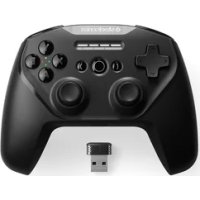
Stratus Duo - Controller STEELSERIES - Free user manual and instructions
Find the device manual for free Stratus Duo STEELSERIES in PDF.



| Feature | Details |
|---|---|
| Controller Type | Wireless controller |
| Compatibility | Compatible with Android, iOS, PC, and some gaming devices |
| Connectivity | Bluetooth and USB-C |
| Battery Life | Up to 20 hours |
| Charging Time | About 2 hours |
| Dimensions | 150 x 100 x 60 mm |
| Weight | 250 g |
| Button Type | Analog and digital |
| Usage | Ideal for mobile and PC gaming |
| Maintenance | Clean with a soft cloth, avoid moisture |
| Safety | Do not expose to extreme temperatures |
| Included Accessories | USB-C charging cable |
| Warranty | 1 year |
Frequently Asked Questions - Stratus Duo STEELSERIES
User questions about Stratus Duo STEELSERIES
0 question about this device. Answer the ones you know or ask your own.
Ask a new question about this device
Download the instructions for your Controller in PDF format for free! Find your manual Stratus Duo - STEELSERIES and take your electronic device back in hand. On this page are published all the documents necessary for the use of your device. Stratus Duo by STEELSERIES.
USER MANUAL Stratus Duo STEELSERIES
PRODUCT INFORMATION GUIDE
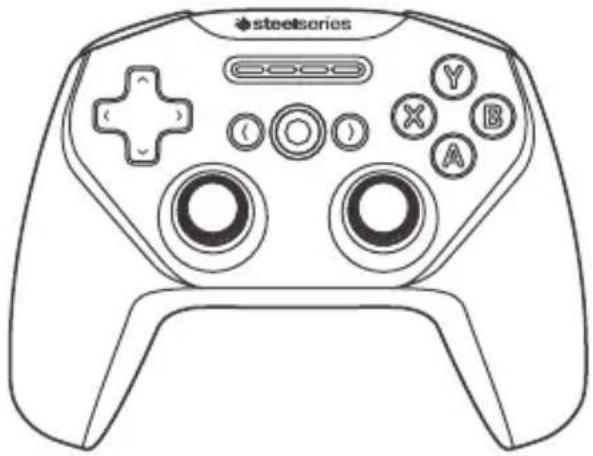
natural_image
Line drawing of a stylus device with labeled buttons (X, Y, A, B) and a plus button, no text or symbols present.CONTENTS
Product overview 3–4
Setup
Connection modes 5
Getting started on
Windows & Steam 6
Getting started on Android,
Samsung Gear VR & Oculus Go 7
Charging 9
Translations
Español 11
简体中文 13
繁體中文 15
日本語 18
한국어 20
Deutsch 23
Русский 26
Français 29
Italiano 32
Português 35
Regulatory 39
find help at support.steelseries.com
PACKAGE CONTENTS
Stratus Duo Controller
USB Cable
USB Wireless Adapter
Product Information Guide
PLATFORM COMPATIBILITY
Windows 7 +
Steam & Steam Big Picture Mode
Oculus Rift & Oculus Go
Samsung Gear VR
Android 4+
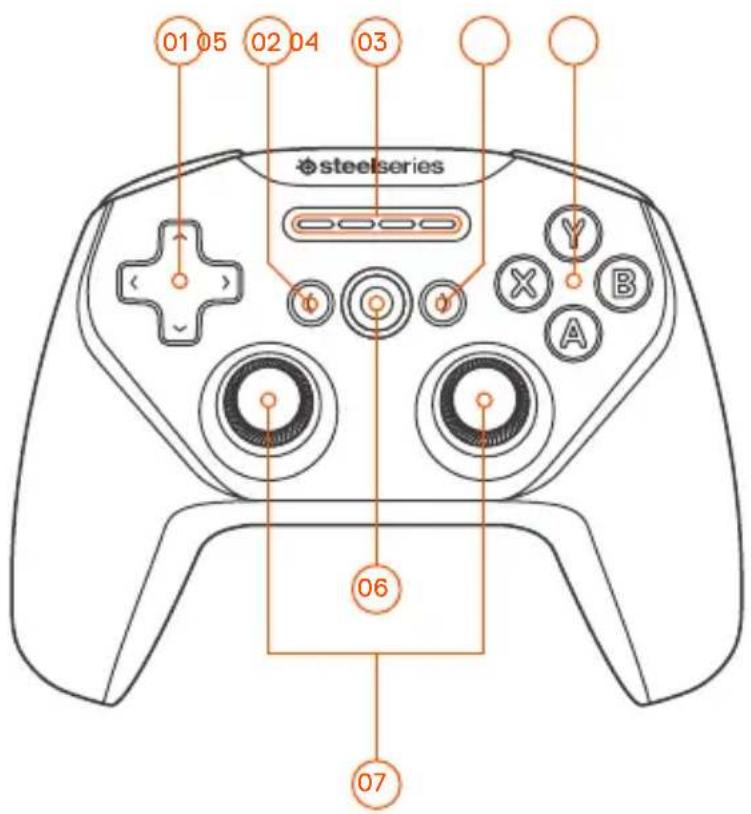
PRODUCT OVERVIEW
01 8-way Directional Pad
02 Back/Select Button
03 Player Indicator LEDs
04 Forward/Start Button
05 A, B, X, Y Buttons
06 Home Button
07 Analog Joysticks
08 USB Wireless Adapter

09 USB Cable

text_image
01 05 02 04 03 steelseries Y B A 06 07* Find accessories and replacement parts at steelseries.com/gaming-accessories
10 Wireless Mode Switch

11 Wireless Pairing Button

12 Micro-USB Port
13 Battery Level Button

14 Power Switch

15 R1, L1 Shoulder Buttons
16 R2, L2 Analog Triggers

text_image
10 12 14 11 13 17 15 16 12 R2 R1SETUP
CONNECTION MODES
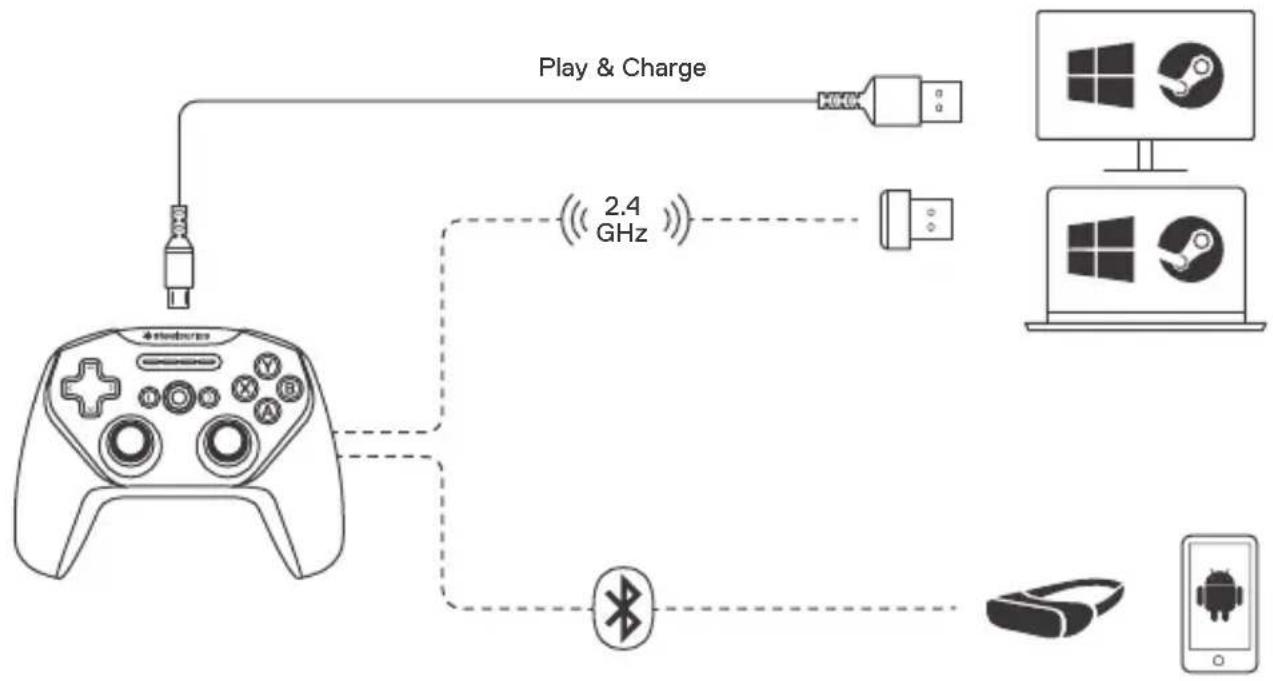
flowchart
graph TD
    A["Game Controller"] -->|Play & Charge| B["Play & Charge"]
    A -->|2.4 GHz| C["2.4 GHz"]
    C --> D["Play & Charge"]
    C --> E["Mac OS"]
    C --> F["Windows"]
    C --> G["Android"]
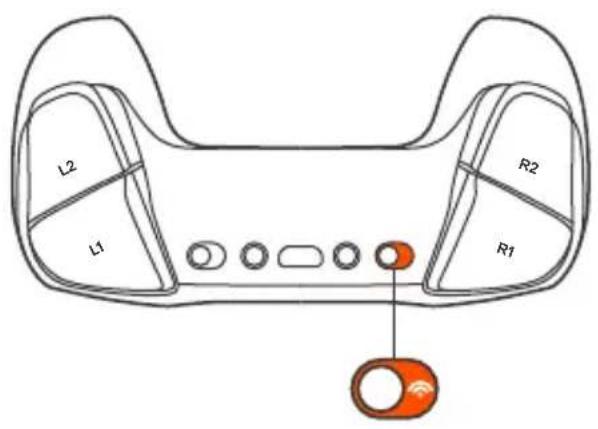
GETTING STARTED ON WINDOWS & STEAM
text_image
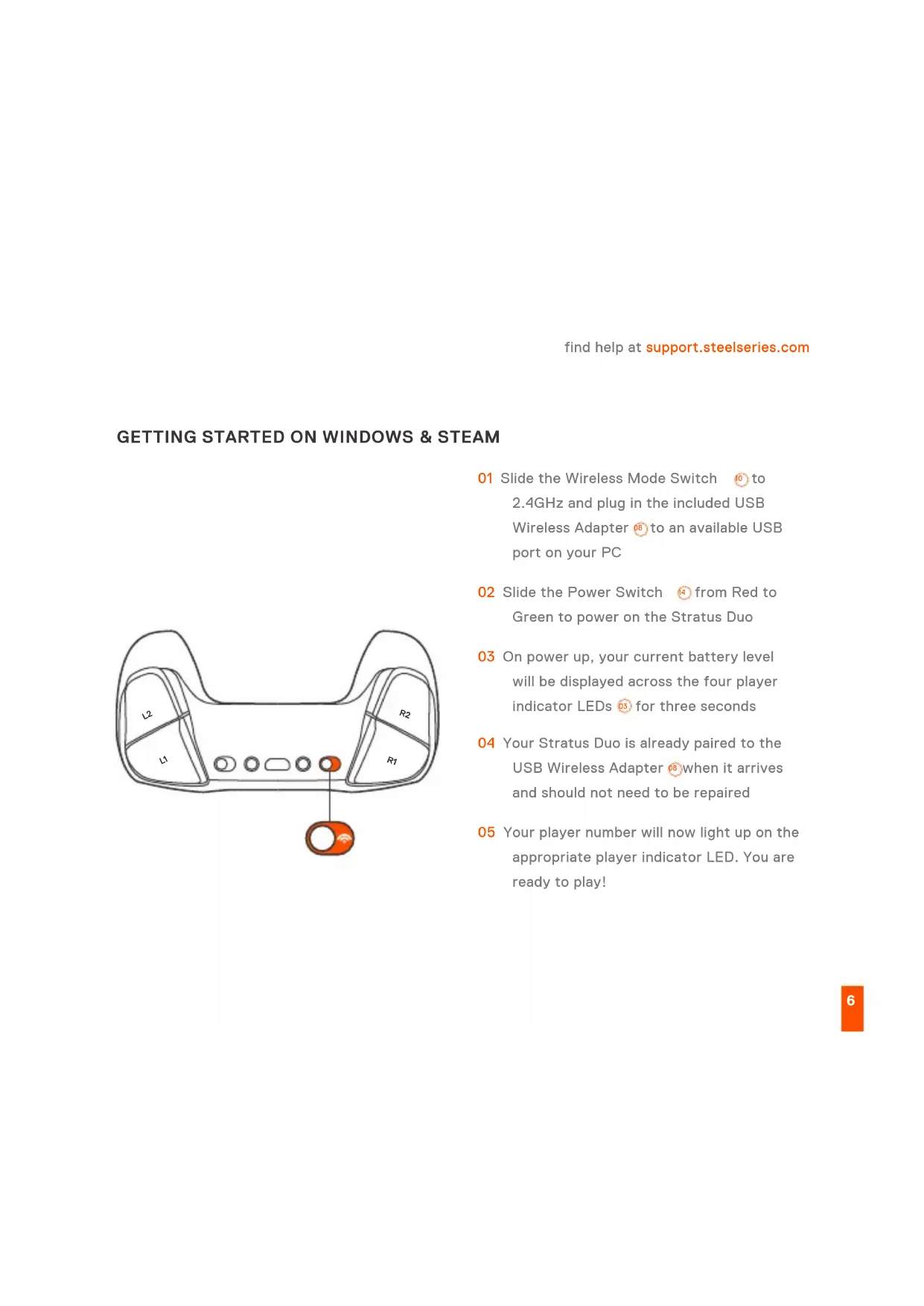
L2 R2 L1 R101 Slide the Wireless Mode Switch ⑩ to 2.4GHz and plug in the included USB Wireless Adapter ⑨ to an available USB port on your PC
02 Slide the Power Switch ⑭ from Red to Green to power on the Stratus Duo
03 On power up, your current battery level will be displayed across the four player indicator LEDs 05 for three seconds
04 Your Stratus Duo is already paired to the USB Wireless Adapter when it arrives and should not need to be repaired
05 Your player number will now light up on the appropriate player indicator LED. You are ready to play!
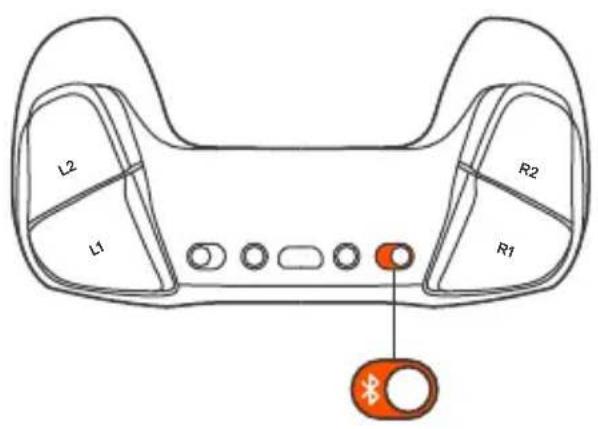
GETTING STARTED ON ANDROID, SAMSUNG GEAR VR & OCULUS GO
text_image
L2 R2 L1 R101 Slide the Wireless Mode Switch 10 to Bluetooth
02 Slide the Power Switch ^14 from Red to Green to power on the Stratus Duo
03 On power up, your current battery level will be displayed across the four player indicator LEDs 05 for three seconds
04 All four LEDs will flash On and Off rapidly when the controller is in pairing mode
05 To pair the Stratus Duo, go to your Bluetooth Control Panel on your intended device and connect SteelSeries Stratus Duo
06 If the controller has paired successfully, the four player indicator LEDs will flicker ON/OFF every 2 seconds to indicate Connected Status. You are now ready to play!
RE-PAIRING YOUR STRATUS DUO IN BLUETOOTH MODE
Your Stratus Duo will remember the last device that it connected to via Bluetooth and automatically repair. If you would like to force the Stratus Duo to re-enter pairing mode:
01 Press the Wireless Pairing Button ⑪ to re-enter pairing mode
OR – to erase previous Bluetooth connections
01 Press & Hold the Wireless Pairing Button for 5 seconds to erase previous Bluetooth connection and re-enter pairing mode
02 All four LEDs will flash ON/OFF rapidly when in pairing mode
03 Go to your Bluetooth Control Panel on your device and choose SteelSeries Stratus Duo
04 Once paired successfully, the four LEDs will flicker ON/OFF every 2 seconds.
PAIRING YOUR STRATUS DUO TO A NEW USB WIRELESS ADAPTER
Note: Your Stratus Duo is already paired to the included USB Wireless Adapter ^08 .
01 Slide the Wireless Mode Switch ⑩ to 2.4GHz and and Slide the Power Switch ⑭ from Red to Green to power on the Stratus Duo
02 Press the Wireless Pairing button 11
03 Plug in the USB Wireless Adapter ☐ to a USB port on your PC
04 Once paired, your player number will light up on the appropriate player indicator LED.
CHARGING
find help at support.steelseries.com
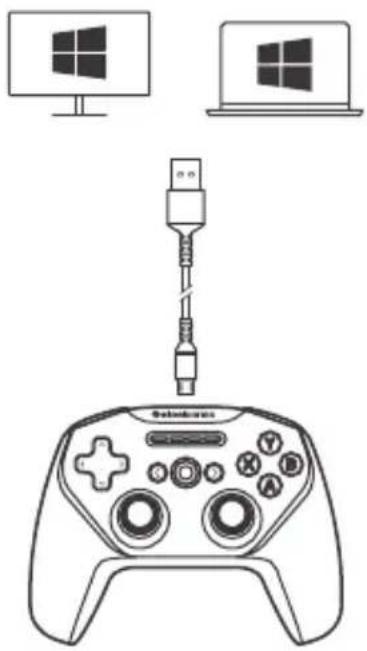
To charge your Stratus Duo connect the included USB cable ^99 . You are able to Play & Charge via the USB Cable on Windows PCs.
natural_image
Line drawing of a game controller with a USB cable connected to two monitors (no text or symbols)On power on, your current battery level will be displayed across the four player indicator LEDs for three seconds.
To manually show the battery level, press the Battery Level Button ^13 at any time to view your current Battery level on the four player indicator LEDs ^03
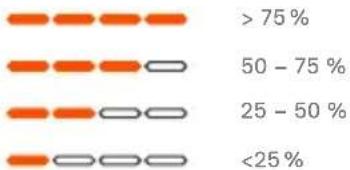
bar
| Range | Percentage (%) | |---|---| | > 75 | > 75 | | 50 - 75 | 75 | | 25 - 50 | 50 | | < 25 | 25 |ESPAÑOL
support.steelseries.com
製品概要
01 8方向 D-パッド
02 Back/Selectボタン
03 プレイヤーインジケーターLED
steelseries.com/gaming-accessories
設定
接 続モード
接続&充電 / 2.4GHz / Bluetooth
support.steelseries.com
support.steelseries.com
充電
充電のセットアップ
한국어
패키지 구성품
Stratus Duo 컨트롤러
USB 케이블
USB 무선 어댑터
제품 정보 안내
플랫폼 호환성
Windows 7 이상
Steam & Steam Big Picture Mode
Oculus Rift & Oculus Go
support.steelseries.com
충전
충전 설정
support.steelseries.com
DEUTSCH
LIEFERUMFANG
Stratus Duo Controller
USB-Kabel
USB-Wireless-Adapter
Produktinformationshandbuch
PLATTFORM-KOMPATIBILITÄT
Windows 7 und neuer
Steam & Steam Big Picture
Oculus Rift & Oculus Go
Samsung Gear VR
Android 4+
VUE D'ENSEMBLE DU PRODUIT
Europe – EU Declaration of Conformity
Hereby, SteelSeries ApS. declares that the equipment which is compliance with directive RoHS 2.0 (2015/863/EU), R.E.D (2014/53/EU), EMC Directive (2014/30/EU), and LVD (2014/35/EU) which are issued by the Commission of the European Community.
The full text of the EU declaration of conformity is available at the following internet address: https://steelseries.com/
SteelSeries ApS. hereby confirms, to date, based on the feedback from our suppliers indicates that our products shipping to the EU territory comply with REACH (Registration, Evaluation, Authorization, and Restriction of Chemicals - (EC) 1907/2006) compliance program. We are fully committed to offering REACH compliance on the products and posting accurate REACH compliance status for the all of products.
Frequency bands and Powers (Gaming Controller and Transceiver)
a. Frequency band(s) in which the radio equipment operates:
•BT and WIFI: 2.400 - 2.4835 GHz
b. Maximum radio-frequency power transmitted in the frequency band(s) in which the radio equipment opera
•BT: GFSK: 6.09 dBm ± 2 dBm (Gaming Controller)
•GFSK: 5.64 dBm ± 2 dBm (Gaming Controller)
•GFSK: 3.11 dBm ± 2 dBm (Transceiver)
c. Software Version: V1.72
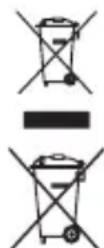
WEEE
This product must not be disposed of with your other household waste or treat them in compliance with the local regulations or contact your local city office, your household waste disposal service or the shop where you purchased the product
Safety Guideline for Lithium Battery
Please keep follow all listed important warnings and cautions below while using this battery pack to avoid any damage or hazard.
This product must not be disposed of with your other household waste or treat them in compliance with the local regulations or contact your local city office, your household waste disposal service or the shop where you purchased the product.
"CAUTION!" Risk of explosion if battery pack is not replace by same type as specified by the manufacturer.
- The battery polarity (+) and (-) shall not be connected and charged reversely. Risk of explosion if the battery polarity (+) and (-) is reversed.
- Please keep this battery pack away from fire and high heat sources due to explosion might happen. Do not place your battery pack close to any heater or hot location.
- This battery pack shall not be hit or impacted. This battery pack shall not be dealt with any sharp or keen objects either.
- This battery pack shall not be exposed to moisture, dripping or splashing.
- If any electrolyte flow out of this battery pack when touch the user's eyes and skin, please seek medical advice immediately.

Federal Communication Commission Interference Statement
This device complies with Part 15 of the FCC Rules. Operation is subject to the following two conditions: (1) This device may not cause harmful interference, and (2) this device must accept any interference received, including interference that may cause undesired operation.
This equipment has been tested and found to comply with the limits for a Class B digital device, pursuant to Part 15 of the FCC Rules. These limits are designed to provide reasonable protection against harmful interference in a residential installation. This equipment generates, uses and can radiate radio frequency energy and, if not installed and used in accordance with the instructions, may cause harmful interference to radio communications. However, there is no guarantee that interference will not occur in a particular installation. If this equipment does cause harmful interference to radio or television reception, which can be determined by turning the equipment off and on, the user is encouraged to try to correct the interference by one of the following measures:
- Reorient or relocate the receiving antenna.
- Increase the separation between the equipment and receiver.
- Connect the equipment into an outlet on a circuit different from that to which the receiver is connected.
- Consult the dealer or an experienced radio/TV technician for help.
FCC Caution: Any changes or modifications not expressly approved by the party responsible for compliance could void the user's authority to operate this equipment.
This transmitter must not be co-located or operating in conjunction with any other antenna or transmitter.
Note: The country code selection is for non-US model only and is not available to all US model. Per FCC regulation, all WiFi product marketed in US must fixed to US operation channels only.
Gaming Controller FCC ID: ZHK-GC00005
Transceiver FCC ID: ZHK-GC00005TX
| Regions Contact Information | ||
| USA | SteelSeries ApS.656 W Randolph St., Suite 3E Chicago, IL 60661, USA | +1-312-258-9467 |
More information and support from https://steelseries.com/
Industry Canada Statement:
Radiation Exposure Statement:
This equipment complies with IC radiation exposure limits set forth for an uncontrolled environment.
This Class B digital apparatus complies with Canadian ICES-003.
| 設備名稱Equipment name | 遊戲搖桿Gaming Controller | 型號(型式)Type designation | GC-00005 | |||
| 單元Unit | 限用物質及其化學符號Restricted substances and its chemical symbols | |||||
| 鉛Lead (Pb) | 汞Mercury (Hg) | 镉Cadmium (Cd) | 六個格Hexavalent-chromium ( C_f^2 ) | 多溴聯苯Polybrominated biphenyls (PBB) | 多溴二苯醚Polybrominated diphenyl ethers (PBDE) | |
| 塑膠部件Plastic | ○ | ○ | ○ | ○ | ○ | ○ |
| 電路板及元件PCBA | - | ○ | ○ | ○ | ○ | ○ |
| 線材Cables | - | ○ | ○ | ○ | ○ | ○ |
| 金屬部件Metal | - | ○ | ○ | ○ | ○ | ○ |
| 備考1. “超出0.1 wt %”及“超出0.01 wt %”係指限用物質之百分比含量超出百分比含量基準值。Note 1: “Exceeding 0.1 wt %” and “exceeding 0.01 wt %” indicate that the percentage content of the restricted substance exceeds the reference percentage value of presence condition.借考2. “○”係指該項限用物質之百分比含量未超出百分比含量基準值。Note 2: “○” indicates that the percentage content of the restricted substance does not exceed the percentage of reference value of presence.備考3. “—”係指該項限用物質為排除項目。Note 3: The “—”indicates that the restricted substance corresponds to the exemption | ||||||
The RoHS test method is based on the standards JIS C 0950 and CNS 15663
Custom Union Compliance.
(Russia / Belarus / Kazakhstan)
Singapore approval (IMDA)

ACMA Compliance (Australia/ New-Zealand)

Direct Current
| Regions Contact Information | ||
| Asia亞洲 | 16F, No.150, Jian-Yi Rd., Chung-Ho Dist, New Taipei City, Taiwan, R.O.C.(235)丹麥商賓睿有限公司台灣分公司新北市中和區建一路150號16樓 | +886 2 8226 3858 |
| USA | 656 W Randolph St, Suite 3EChicago, IL 60661, USA | +1 312 258 9467 |
| Europe Dirch Passers Allé 27, 5.Sal 2000 Frederiksberg, Denmark +45 702 500 75 | ||
More information and support at steelseries.com
Operating Temperature: 0 to +40 °C
CAN ICES-3(B)/NMB-3(B)
learn more at steelseries.com
