
J808 - Wristwatch JAGUAR - Free user manual and instructions
Find the device manual for free J808 JAGUAR in PDF.


| Product type | Quartz wristwatch |
| Brand | Jaguar |
| Model | J808 |
| Movement type | Quartz with chronograph |
| Display | Hands (hours, minutes, central seconds) + subdials (minutes at 9 o'clock, hours at 6 o'clock) |
| Main functions | Time display, chronograph (simple measurement, totalizer, split times), date (window at 3 o'clock) |
| Time setting | Crown in position III, stop seconds hand |
| Quick date correction | Crown in position II, rotate |
| Chronograph | Start/stop with pusher A, reset with pusher B, totalizer possible |
| Zero position adjustment of chronograph hands | Crown in III, press A and B simultaneously for >2s, step-by-step or continuous correction |
| Power supply | Button cell battery (type CR2016 or equivalent, not explicitly specified) |
| Estimated battery life | Approximately 2 to 3 years depending on use |
| Water resistance | Not specified, daily use recommended (avoid high pressure) |
| Case material | Stainless steel (common estimate) |
| Case diameter | Approximately 40 mm (estimate) |
| Thickness | Approximately 10 mm (estimate) |
| Weight | Approximately 80 g (estimate) |
| Strap | Leather or metal depending on version (not specified) |
| Maintenance and cleaning | Soft dry cloth, avoid chemicals |
| Battery replacement | Entrust to a watchmaker or follow date/time setting procedure |
| Warranty | 2 years (standard, not specified) |
Frequently Asked Questions - J808 JAGUAR
User questions about J808 JAGUAR
0 question about this device. Answer the ones you know or ask your own.
Ask a new question about this device
Download the instructions for your Wristwatch in PDF format for free! Find your manual J808 - JAGUAR and take your electronic device back in hand. On this page are published all the documents necessary for the use of your device. J808 by JAGUAR.
USER MANUAL J808 JAGUAR
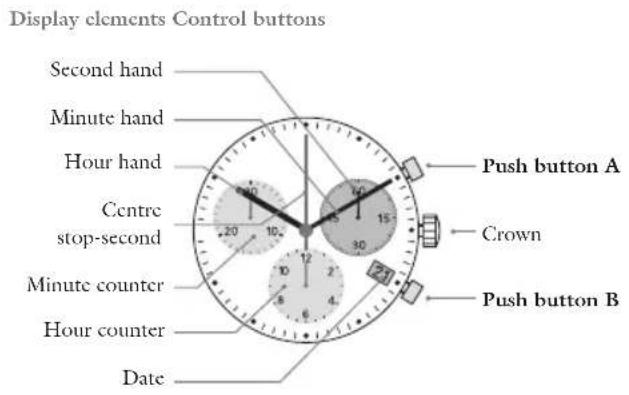
- Description of the display and control buttons. 14
-Chronograph 15
-Setting the time 20
-Setting the date (quick mode) 21 - Setting the date time following a battery change. 22

By virtue of the regulations pursuant to the handling of waste products deriving from electronic and electrical equipment, end of life cycle watch making
products must be selectively collected for processing. You may therefore dispose of your quartz watch making products at any of our retail outlets or any other authorized collection point.
The selective collection, processing, rating and recycling of these products helps contribute to safeguarding the environment and protecting our health.
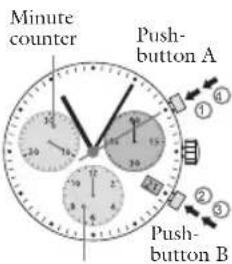
Description of the dislay and control buttons
Chronograph: Basic function
START/STOP/RESET
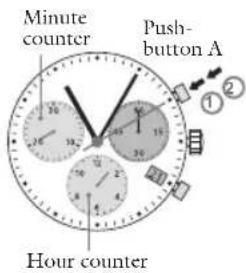
Example:
① Start: Press push button A.
Stop: to stop the timing, press pushbutton A once more and read the three chronograph hand: 1h / 20min / 10scc
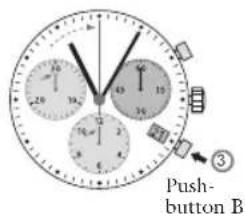
③ Zero positioning:
Press push-button B. (The three chiorograph hands will be reset to their zero positions).
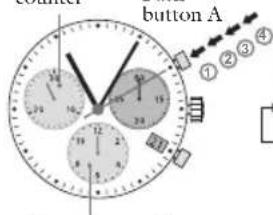
Chronograph: Accumulated timing
Minute counter
Hour counter Hour counter
Example: Example:
① Start: (start timing)
② Stop: (c.g. 15 min 5 sec following ①)
Restart: (timing is resumed)
*Stop:c.g.13 min 5 scc following 28 min 10 sec (the accumulated measured time is shown).
⑤ Reset:
The three chronograph hands are returned to their zero positions

PushbuttonB
Please note:
Following*4, the accumulation of the timing can be continued by pressing push button A (Rstart/Stop, Rstart/ Stop,...)
Chronograph Intermediate or interval timing
Start: (start timing)
Display interval: c.g. 10 minutes, 10 seconds (timing continues in the background).
Making up the measured time: (the 3 chronograph hands are quickly advanced to the ongoing measured time).
Stop: (Final time is displayed)
④ Reset:
The 3 chronograph hands are returned to their zero position.
Please note:
Following 6 further intervals or intermediates can be displayed by pressing push-button B (display interval/make up measured time,...)
Adjusting the chronograph hands to zero position
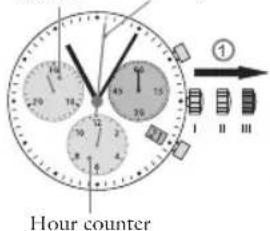
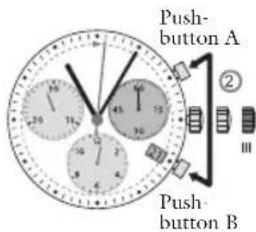
Minute counter Center stop-second
Example:
One or several chronograph hand are not in their correct zero positions and have to be adjusted (c.g. following a battery change).
Pull out the crown to position III (all 3 chronograph hands are in their correct or incorrect zero position).
2 Keep push Buttons A and B depressed simultaneously for at least 2 seconds (the centre stop-second rotates by 360^ corrective mode is activated)
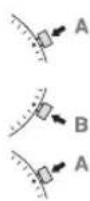
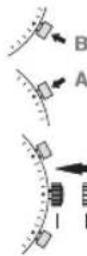
Adjusting the centre stop second: Single step A1 x short Continuous long
Adjusting the next hand
Adjusting the hour counter hand (position 6h)
Single step A1 x short
Continuous long
Adjusting the next hand B
Adjusting the minute counter hand (position 9h)
Single step dA short
Continuous Long
Returning the crown to position 1 Termination of the chronograph hands adjustment (can be carried out at any time)
Setting the time
Setting the date (quick mode)
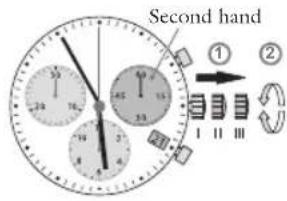
① Pull out the crown to position III * (the watch stops).
② Turn the crown until you reach the correct time 8:45.
Push the crown back into position I.*
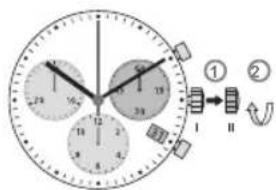
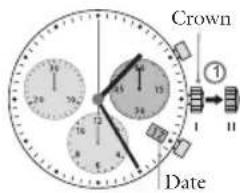
Pull out the crown to position II (the watch continues to run).
Turn the crown until the correct date 1 appears.
Push the crown back into position I.
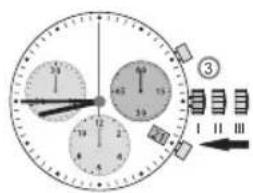
Please note: Please note:
In order to set the time to the exact * second, ① must be pullet out when the second hand is in position "60" (I). Once the hour and minute hands have been set, ③ must be pushed back into position I at the exact second.
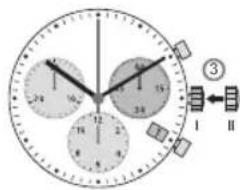
During the date changing phase between 9 PM and 12 PM; the date must be set to the date of the following day.
Setting the date/time
Following a battery change
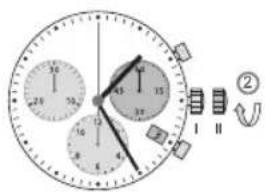
Example:
Date/time on the watch:17/1:25 AM Present date/time:4/8:30PM
Pull out the crown to position II (the watch continues to run).
Turn the crown until yesterday's date appears 3.

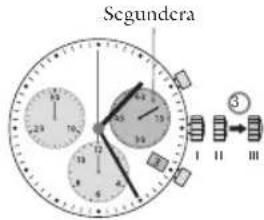
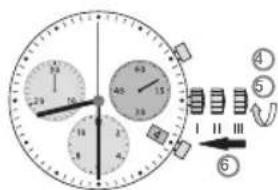

Pull out the crown to position
III (the watch stops).
Turn the crown until the correct date appears.
5 Continue to turn the crown * until the correct time 8:30 PM appears.
Push the crown back into position 1.
Please note:
To set your watch to the exact * second please refer to the chapter entitled "setting the time".
* Please observe the AM/PM clock * rhythm.

Mode d'emploi


- Description of the dislay and control buttons
- Chronograph: Basic function
- START/STOP/RESET
- Example:
- Chronograph: Accumulated timing
- Example: Example:
- Please note:
- Chronograph Intermediate or interval timing
- Adjusting the chronograph hands to zero position
- Setting the time
- Setting the date (quick mode)
- Please note: Please note:
- Setting the date/time
- Following a battery change
- Mode d'emploi
Brand : JAGUAR
Model : J808
Category : Wristwatch