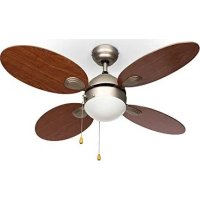
10029347 - Fan Klarstein - Free user manual and instructions
Find the device manual for free 10029347 Klarstein in PDF.


| Product type | Ceiling fan |
| Brand | Klarstein |
| Model | 10029347 |
| Power supply | 220-240 V~ 50-60 Hz |
| Number of speeds | 3 (high, medium, low) |
| Integrated lighting | Yes, max. 42 W, E27 socket (bulb not included) |
| Control | By pull chain (speed and light) |
| Reversible rotation direction | Yes (summer: LEFT, winter: RIGHT) |
| Minimum mounting height | 2.3 m |
| Minimum load capacity of support | 100 kg |
| Grounding required | Yes |
| Circuit breaker required | All-pole, contact gap ≥ 3 mm |
| Installation area | Dry indoor only |
| Cleaning | Soft damp cloth, no abrasive products |
| Blade material | Not specified |
| Weight | Not specified |
Frequently Asked Questions - 10029347 Klarstein
User questions about 10029347 Klarstein
0 question about this device. Answer the ones you know or ask your own.
Ask a new question about this device
Download the instructions for your Fan in PDF format for free! Find your manual 10029347 - Klarstein and take your electronic device back in hand. On this page are published all the documents necessary for the use of your device. 10029347 by Klarstein.
USER MANUAL 10029347 Klarstein
ONNNNNNNNNNNNNNNNNNNNNNNNNNNNNNNNNNNNNNNNNNNNNNNNNNNNNNNNNNNNNNNNNNNNNNNNNNNNNNNNNNNNNNNNNNNNNNNNNNNNNNNNNNNNNNNNNNNNNNNNNNNNNN
KLARSTEIN
www.klarstein.com


Unit 6 Riverside Business Centre
Brighton Road
Shoreham-by-Sea
BN43 6RE
United Kingdom
Dear Customer,
Congratulations on purchasing this device. Please read the following instructions carefully and follow them to prevent possible damages. We assume no liability for damage caused by disregard of the instructions and improper use. Scan the QR code to get access to the latest user manual and more product information.

CONTENT
Safety Instructions 10
Installation 11
Commissioning and Operation 13
Disposal Considerations 14
Manufacturer & Importer (UK) 14
TECHNICAL DATA
| Item number 10029347, 10029348 | |
| Power supply 220-240 V~ 50-60 Hz |
SAFETY INSTRUCTIONS
- Never attach the fan to a power point, but to the ceiling itself.
- The minimum distance between the blades of the fan and the floor must be more than 2.3m . The minimum carrying capacity of the hook from which the fan is hung must be 100kg .
- Make sure to install all poles disconnection switch having a contact separation of at least 3mm between poles in the supply wiring to the ceiling fan.
- The model or type reference of luminaries which may be installed in fans which are constructed for his purpose.
- Switch off the power before connecting.
- The electrical wiring must be in accordance with the local regulation.
- The fan must be properly earthed to avoid the risk of electric shocks.
- Never mount the fan in a moist or wet room.
- Be careful when working near the rotating blades.
- This device may be only used by children 8 years old or older and persons with limited physical, sensory and mental capabilities and / or lack of experience and knowledge, provided that they have been instructed in use of the device by a responsible person who understands the associated risks.
Note: Always have your fan installed by someone who is knowledgeable about electrical wiring.
INSTALLATION
| 123 | ||
| Fasten the mounting plate to a ceiling joist with two screws, lock washers and washers. The ceiling joist must be strong enough to support the weight of the moving fan. | Attach the fan components to the mounting plate. Align the ball joint of the fan with the suspension lug of the mounting plate. | Connect the cables from the power source and mounting bracket to the terminals as follows: Brown cable: “L” Blue cable: “N Green/Yellow cable: |
| 456 | ||
| Connect the lamp cables by plugging the two plastic connectors together until they snap into place. | Align the side holes of the cover with the brackets. Lift the cover until the screws reach the bottom of the slots. Turn the cover clockwise until the screws are in the recess. | Slide the cover over the mounting plate. Make sure that you do not disconnect any cables in the process. |
| 789 | ||
| Fasten the blade holder and the cover plate to the fan blade with three screws and spring washers. | Fasten the fan bracket to the motor with spring washers and screws. | Attach the bulbs to the lamp holder (max. 42 W E27, not included). |
| 10 11 | ||
| Tighten all screws and make sure that the screen is tight and that no cables are trapped. Attach the nylon chain to the guide pin of the upper bracket. | Attach the two pull cords and make sure that the retaining clip holds the cord properly. |
COMMISSIONING AND OPERATION
- Turn on the power before starting the fan.
- The fan will start as soon as you operate the 3-position switch, which is connected to the motor via the extension chain.
- Pull the light switch extension chain to turn the light on and off.
The fan will rotate at 3 different speeds depending on how many times you pull the extension chain:
- Pull once = high speed
Pull twice = medium speed
Pull three times = low speed
Pull four times = Off
The switch on the motor housing can be used to influence the direction of the airflow generated by the rotor blades.
- Cold weather: Set the switch to RIGHT so that the blades distribute the warm air under the ceiling to the room below.
- Warm weather: Set the switch to LEFT so that the blades create a cooling airflow and distribute it into the room.
Note: Make sure the blades have come to a stop before changing the direction of the blades. To avoid damaging yourself and the motor, the switch should be in the UP or DOWN position when the fan is running.
DISPOSAL CONSIDERATIONS
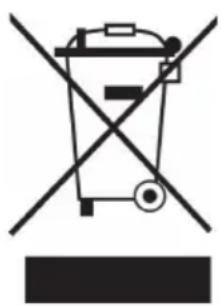
If there is a legal regulation for the disposal of electrical and electronic devices in your country, this symbol on the product or on the packaging indicates that this product must not be disposed of with household waste. Instead, it must be taken to a collection point for the recycling of electrical and electronic equipment. By disposing of it in accordance with the rules, you are protecting the environment and the health of your fellow human beings from negative consequences. For information about the recycling and disposal of this product, please contact your local authority or your household waste disposal service.
MANUFACTURER & IMPORTER (UK)
Manufacturer:
Chal-Tec GmbH, Wallstrasse 16, 10179 Berlin, Germany.
Importer for Great Britain:
Chal-Tec UK limited
Unit 6 Riverside Business Centre
Brighton Road
Shoreham-by-Sea
BN43 6RE
United Kingdom
Chere cliente, cher client.
Unit 6 Riverside Business Centre
Brighton Road
Shoreham-by-Sea
BN43 6RE
United Kingdom
Gentile Cliente,
PRODUTTORE E IMPORTATORE (UK)
Produttore:
Chal-Tec GmbH, Wallstraße 16, 10179 Berlin, Germania.
Unit 6 Riverside Business Centre
Brighton Road
Shoreham-by-Sea
BN43 6RE
United Kingdom


KLARSTEIN

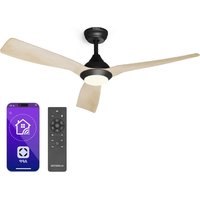
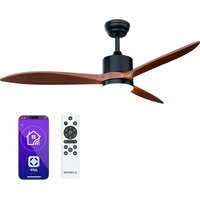
Brand : Klarstein
Model : 10029347
Category : Fan