
Echo - Smartphone NGM - Free user manual and instructions
Find the device manual for free Echo NGM in PDF.


| Product Type | Smartphone |
| Brand | NGM |
| Model | Echo |
| Power | Rechargeable lithium-ion battery via micro USB or charging base |
| SIM card type | Standard SIM card (inserted under battery) |
| Main functions | Calls, SMS, FM Radio, Flashlight, Emergency SOS, Alarm, Calculator, Calendar |
| Keys | Numeric keypad, navigation keys, SOS key, FM key, flashlight key |
| Key lock | Mechanical slider on the right side |
| FM Radio | Built-in, with automatic search and playback via speaker or earphones |
| Flashlight | Built-in flashlight, activated by a dedicated side key |
| SOS function | Emergency call and SMS sending to 5 programmed numbers (press and hold 3-4 seconds) |
| Memory | Storage on phone and SIM card (capacities not specified) |
| Connectivity | Micro USB port for charging and data |
| Languages | Multilingual (French, Italian, etc.) |
| Maintenance and cleaning | Clean with a dry cloth; recharge in a dry and covered place |
| Safety | Use original charger and battery; do not expose to water or extreme temperatures |
| Spare parts and accessories | Battery, charger, charging base (original NGM recommended) |
| Factory reset | Code 1122 in Settings > Reset |
| Warranty | Manufacturer warranty (conditions not detailed) |
Frequently Asked Questions - Echo NGM
User questions about Echo NGM
0 question about this device. Answer the ones you know or ask your own.
Ask a new question about this device
Download the instructions for your Smartphone in PDF format for free! Find your manual Echo - NGM and take your electronic device back in hand. On this page are published all the documents necessary for the use of your device. Echo by NGM.
USER MANUAL Echo NGM
Welcome to the NGM world. Thank you for purchasing NGM Echo. With this device you can easily make phone calls, send and receive SMS. Thanks to the SOS key you can start an automatic procedure to call some previously set numbers in case of emergency. By visiting the official website www.ngm.euyou can browse though the whole range of NGM mobile phones, ask for after sales assistance, access the forum for technical assistance and download software updates.
22ENGLISH
echo
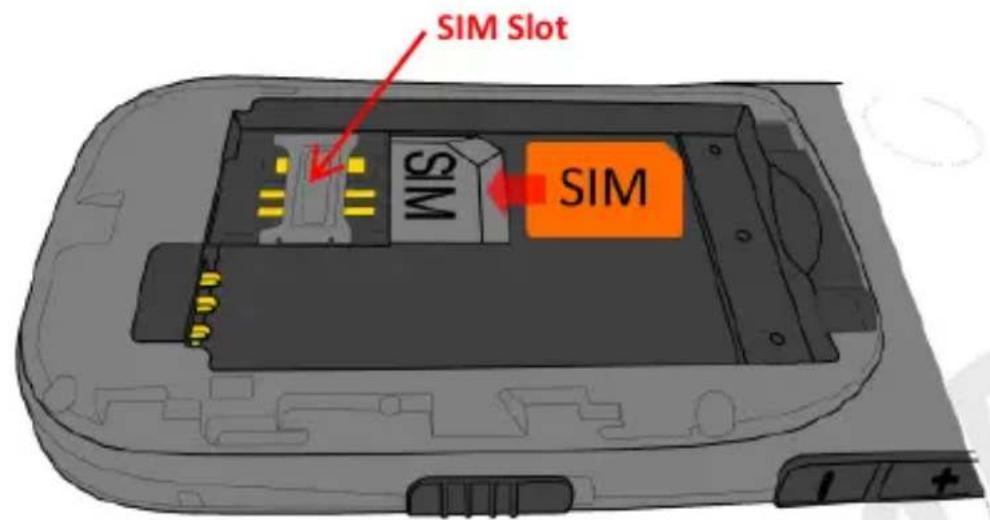
Inserting the SIM card: The SIM card contains your phone number, PIN code, links to operator services, contacts and SMS messages. To access the compartment containing the SIM slot, turn off the phone and slide down the cover. Remove the battery. Insert the SIM card into the slot with its gold contacts facing down.
echo
23E
Inserting the Battery: Your device is provided with a lithium-ion battery and is designed to be used exclusively with original NGM batteries and chargers. The battery must be inserted into the backside of the phone. Insert the battery into the battery compartment with the contacts facing down, matching with those of the phone. When done, put the hind cover back into position as shown in the following illustrations.
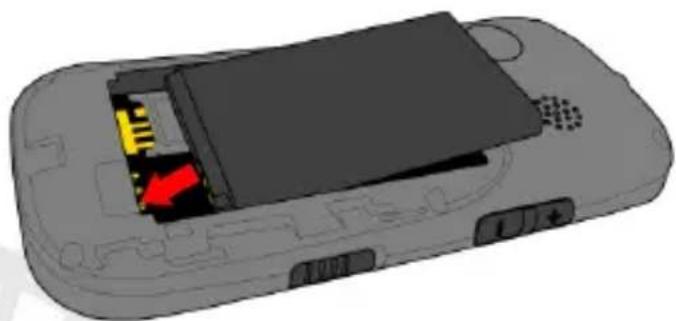
Inserting the battery
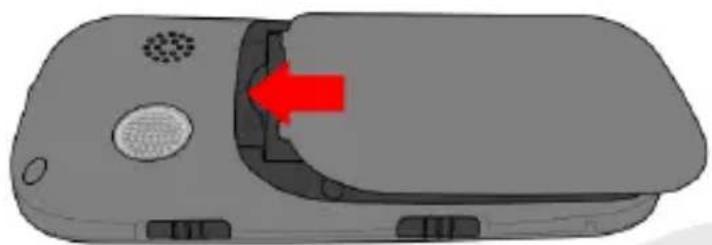
Placement of the cover
24ENGLISH

Charging the battery: Charge the battery before starting to use the device. Connect the charger to a provided wall socket adaptor and then plug the jack into the charging base or insert it directly into its connector on the lower side of the phone. The charging base can also be connected to a micro USB cable to charge your phone. When the battery is charging, an animated icon on the screen shows the charging progress. Once the battery icon is filled, it is fully charged and the phone can be disconnected from the grid or from the charging base.
Warning: To preserve the functionality of the product and the integrity of the warranty, we recommend the use of original NGM chargers. Please charge the battery indoors, in a dry and favorable environment. It's normal for the battery to get slightly warm during the charging process. The battery will reach its full capacity when cycled several times.
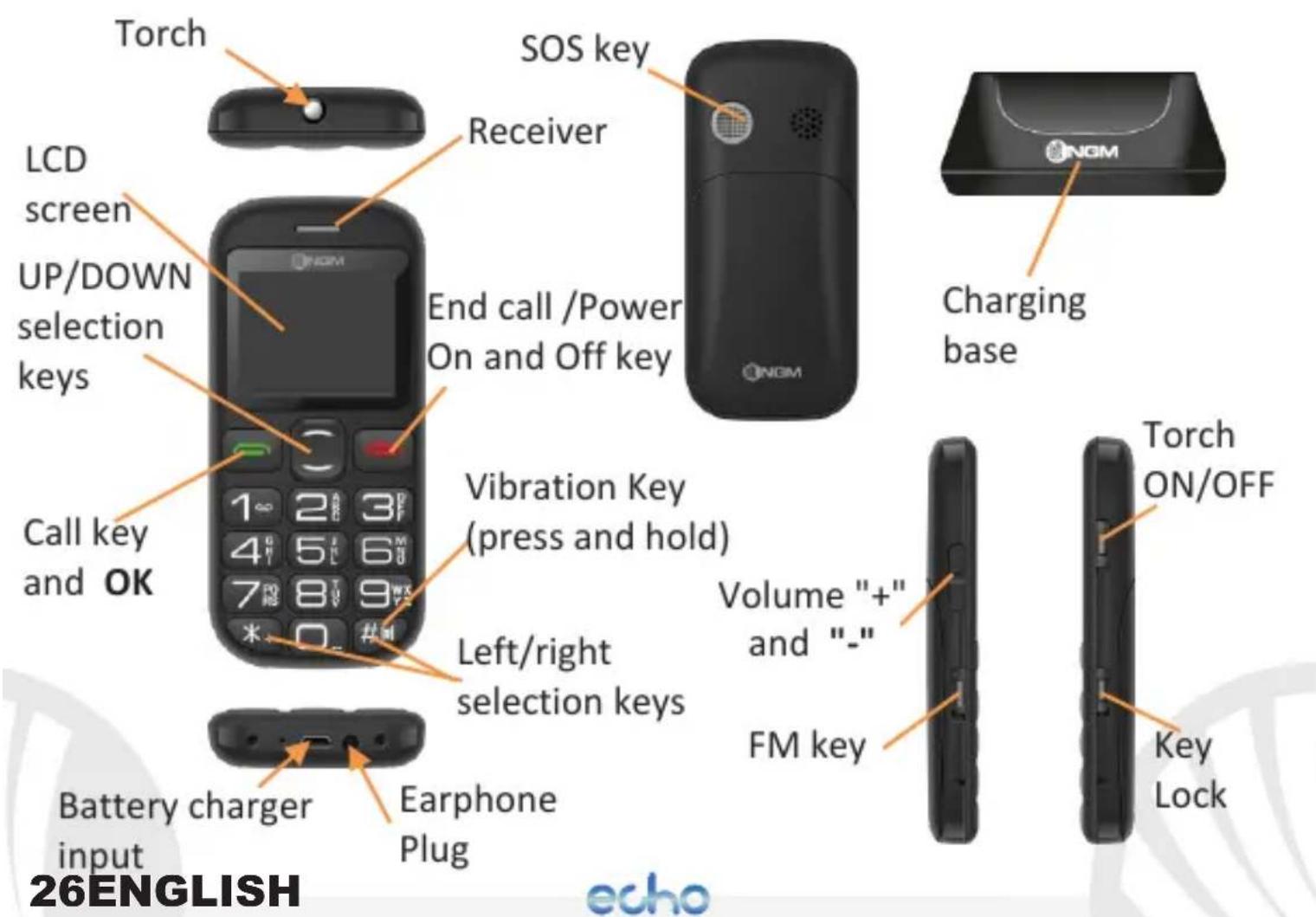
Turn ON, Turn OFF, and key lock: To turn on and turn off the phone, press and hold the red end call key. To avoid the accidental pressing of the keys when the phone is not in use (e.g. in a pocket), push downwards the lock key that you find on the right side of the phone. To unlock the keypad, push it upwards.
FM radio: To turn ON the FM radio, push upwards the FM key on the left side of the phone, or directly access it from the main menu. With the Up and Down selection keys, you can move through the stations, while with the * and # keys you can adjust the volume. By pressing Options with the green call key, you can access the following functions:
- Pause to pause the FM Radio
- Quick Search to quickly search for radio channels
- Channel list to manually browse through the saved channels
- Save to rename a saved channel
echo
- Manual search to enable the manual searching of a station
- Speaker: to play the FM Radio from the speaker instead of the earphones
- Background play to play FM radio in the background, while staying on the main menu or the home screen
Main Menu:
To access the phone Main Menu, press the UP or DOWN selection key from the main screen.
- Messaging: to write and read SMS text messages
- Calls: to see all calls
- Settings: to customize your phone
- Tools: Calendar, SIM Toolkit and Calculator
- FM radio: to access FM Radio
- Phonebook: to manage and save contacts
28ENGLISH
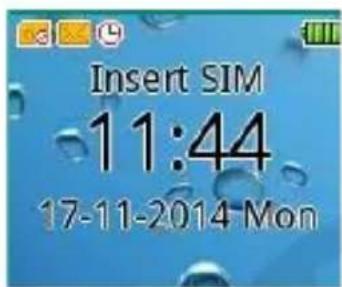
Home Screen
- Alarm: To activate alarm
- SOS: to enable and customize the SOS function
Torch: to turn on and off the torch, use the torch button on the right side of the phone when the phone is turned on.
Making a call: to make a call from the Home screen, select the desired number using the keypad and then press the green call button. To end the call, press the red end call key.
Call a number from phonebook: from the main screen, press the red end call key, this will automatically open the Phonebook. Scroll through contacts with the UP and DOWN keys and press twice the green call button to call the desired contact.
Call a number from the call log: From the main screen, press the green call key; the missed, received, and outgoing calls will be automatically displayed. Scroll them with UP and DOWN keys and press again the green call button twice when you found the number you want to call.
Add contacts in the Phonebook: select Menu > Phonebook>
Options > Add new. Choose if you want to store the contact on your SIM card or on the Phone and press Edit to insert name and new number. At the end, confirm with Save.
Speed dial: in Menu > Phonebook > Options > Speed Dial, you can assign to the 2-9 keys any phone numbers that will be called automatically if you push and hold the related key. To add a number, select Options > Edit and insert it manually, or select Phonebook to choose it from Contacts.
30ENGLISH
echo
Memory status: This feature on Menu > Contacts > Options > Others allows you to see how much free storage there is on the phone and SIM card.
Send and read SMS
Send SMS: From the main screen, choose Menu > Messaging > Write message to write a new message. Press Options > Send and enter the number using the numeric keypad or Send > Options > Contacts to select from Phonebook the contact you want to text.
Read SMS: when you receive a new text message, the phone displays an envelope icon on the top bar (as long as the message is unread) and a notification pop up appears on the main screen. Press the green key to enter the Inbox or access it from the main screen by selecting Menu > Messages > Inbox.
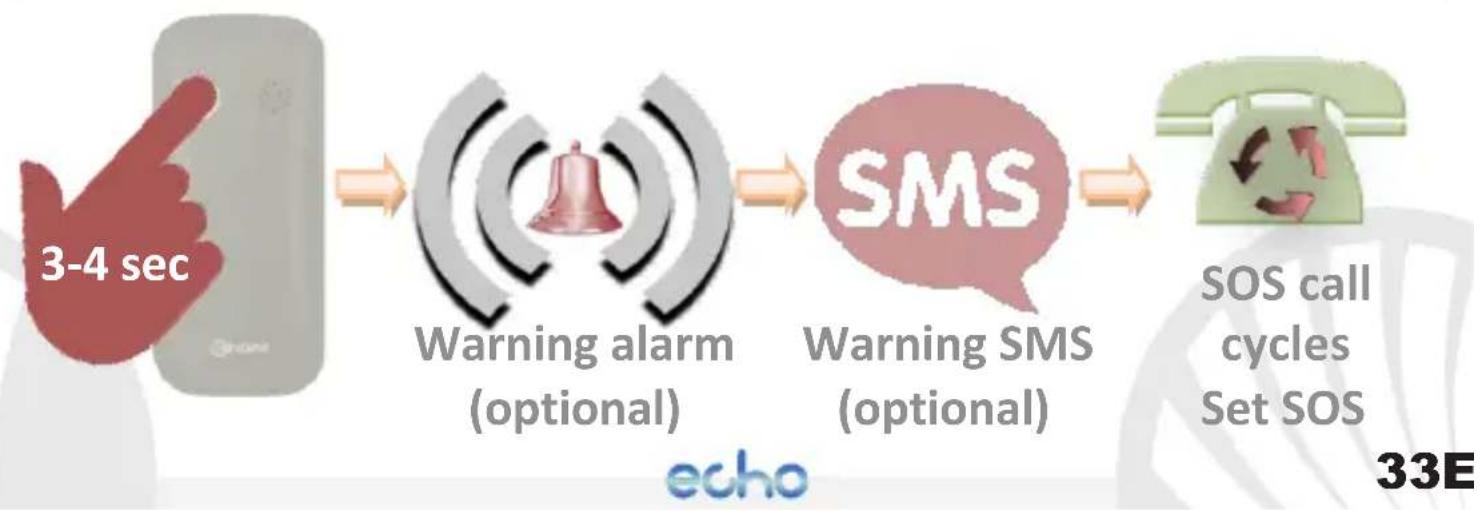
S.O.S. Function: NGM Echo is equipped with a dedicated button for fast forwarding emergency calls (*). This feature can be turned on and off by selecting Menu > SOS > Active. The SOS function will be activated only if at least one SOS number is set.
The SOS button is located at the back of the phone and is activated by pressing and holding it for 3-4 seconds, even if the key lock is enabled.
In case of emergency, use this function to ask for help up to five phone numbers, previously set in Menu > SOS > SOS numbers.
As soon as the SOS function is activated, the phone will send out a high volume alarm (that can be turned on and off in SOS > SOS alarm On/Off) Then, the phone will send an SOS message to the previously set SOS numbers (only if this function was activated in Menu > SOS > Send SMS > Active ).
32ENGLISH
echo
Then, the phone will call the five SOS numbers, for about 20 seconds each. If there is no answer, there will be a second cycle of calls. This procedure will be repeated for 5 times. If one of the called numbers answers, the cycle will be interrupted and the call will automatically switch to speaker phone (handsfee).
Warning: The SOS calls cycle will be interrupted if the answering machine or voicemail of one of the called SOS numbers takes the call.
Set Ringtones:
From the main screen, select Menu > Settings > Profiles > General > Options > Settings > Ringtones. Select Call Ringtone and set the desired tone from those available. Within Settings you can also customize the following features: Alert type, Ringtones volume, Key tone (you can activate or deactivate the Voice dialer function), moreover you can enable or disable the low Battery alert.
Quickly turn on/off the vibration mode: To turn off all the phone ringtones and activate the vibration mode for calls and messages, press and hold the # key. By pressing # again, the phone will return to the previous mode.
Phone Settings: from the Settings menu you can access Security, Display, Phone (language), Network and the Call settings.
34ENGLISH
echo
With Settings > Restore factory settings, you can revert Echo to its default settings by entering the 1122 password, when requested.
* Limitation of Liability:
this is not a life-saving device but a mobile phone. NGM will not be liable for any indirect, special, incidental or consequential damage arising from, or in connection with the use of this product.
Warning: The manufacturer assumes no responsibility for any failure of the policies set out above, or for any misuse of the phone. NGM reserves the right to modify any of the content in this user guide without previous public announcement. The content of this manual may vary from the actual content displayed in the mobile phone. In that case, the latter shall govern.
Copyright © 2014 NGM Italia: no part of this manual may be reproduced, distributed, translated, or transmitted in any form or by any means, electronic or mechanical, including photocopying, recording, or storing in any information storage and retrieval system, without the prior written permission of NGM Italia.
36ENGLISH
echo
echo
Brand : NGM
Model : Echo
Category : Smartphone