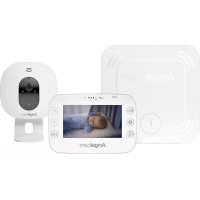
AC315 - Baby monitors ANGELCARE - Free user manual and instructions
Find the device manual for free AC315 ANGELCARE in PDF.


| Product type | Baby monitor with breathing movement detector and video |
| Brand | Angelcare |
| Model | AC315 |
| Parent unit power supply | Rechargeable Li-ion battery (included), 100-240 V AC / 5 V DC adapter |
| Camera power supply | 100-240 V AC / 5 V DC adapter |
| Parent unit screen | Color touchscreen LCD |
| Range (open field) | Up to 250 meters |
| Transmission frequency | 2.4 GHz |
| Number of channels | 24 channels (US/Canada/Europe) |
| Camera viewing angle | 68° |
| Main functions | Breathing movement detection, two-way communication, VOX mode, digital zoom, temperature monitoring, movement/temperature reports, screen saver |
| Movement detector | Sensor under mattress with alarm after 20 seconds without movement |
| Operating temperature | 10 °C to 40 °C (50 °F to 104 °F) |
| Cleaning and maintenance | Unplug before cleaning; clean with a dry cloth; do not immerse |
| Safety | Risk of strangulation with cords; keep camera and cords more than 1 m away from baby; use only supplied adapters |
| Spare parts | Rechargeable Li-ion battery for parent unit (contact Angelcare) |
| Warranty | 1 year (North America) |
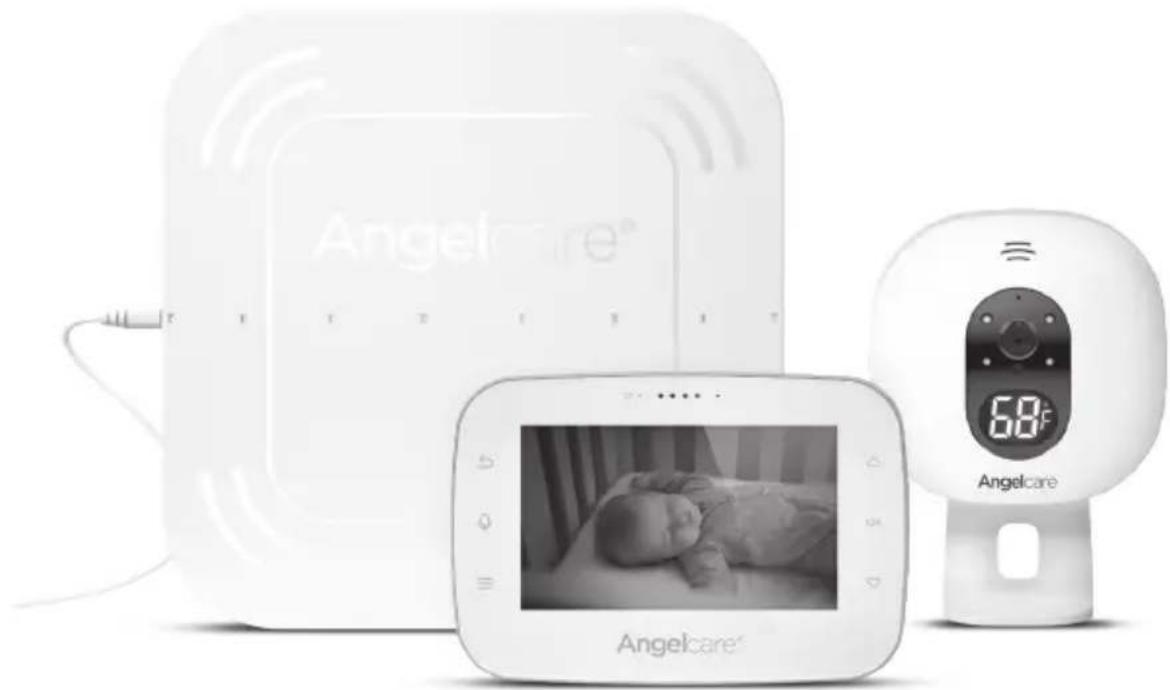
| Included accessories | Parent unit, camera, movement detector with cord, 2 AC adapters, table stand, 6 cord protection strips, Li-ion battery |
Frequently Asked Questions - AC315 ANGELCARE
User questions about AC315 ANGELCARE
0 question about this device. Answer the ones you know or ask your own.
Ask a new question about this device
Download the instructions for your Baby monitors in PDF format for free! Find your manual AC315 - ANGELCARE and take your electronic device back in hand. On this page are published all the documents necessary for the use of your device. AC315 by ANGELCARE.
USER MANUAL AC315 ANGELCARE
Baby Breathing Monitor, with Video
natural_image
Product display of Angelcare medical device with infant photo and digital display (no visible text or symbols on main components)
WARNINGS
KEEP USER'S GUIDE FOR FUTURE REFERENCE. PLEASE READ THE WARNINGS AND SAFETY INSTRUCTIONS CAREFULLY BEFORE ASSEMBLING & USING THE PRODUCT. FAILURE TO FOLLOW THE WARNINGS AND THE INSTRUCTIONS COULD RESULT IN SERIOUS INJURY OR DEATH OR DAMAGE TO THE PRODUCT.
TABLE OF CONTENTS

WARNINGS 2
Setup requirements....4
Charging the Parent Unit (9 hours) 4
Positioning the movement Sensor Pad....5
Setting up the Camera 8
Turning on your monitor....9
Getting to know your monitor....10
Activating and deactivating additional functions ....13
Adding accessories....18
Troubleshooting....19
Limited warranty....21
Technical specifications 21
FRENCH....23
SPANISH 45
This baby monitor is compliant with all relevant standards regarding electromagnetic fields and is, when handled as described in the User's Guide, safe to use.

WARNINGS
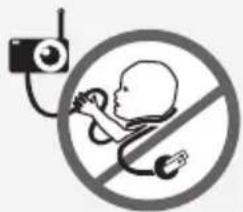
Because of the serious strangulation risk to infant & toddlers, parents & caregivers should note the following Warnings.
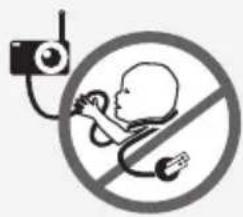
⚠️ WARNINGS - Strangulation Hazard – Children have STRANGLED in cords.
text_image
Safety warning symbol for child using a stethoscope and no sign, commonly used in neonatal care.- KEEP the Camera Unit and adapter cords out of the reach of children more than 3 feet or 1 meter away.
- NEVER attempt to use the Sensor Pad(s) cord without the protective cord covers supplied.
- CHECK protective cord covering before each use:
-Ensure there is no slack in cords and exposure of cord to child is minimised (see further instructions within).
-Immediately discontinue use of Sensor Pad(s) if protective covering is damaged or broken.
- NEVER use extension cords with adaptors. ONLY use adaptors provided.
-
This product is NOT a Toy. NEVER allow children to play with it.
-
The Sensor Pad is not suitable for use above age 24 months.
-
This product cannot replace responsible adult supervision.
-
This product is designed to aid in the monitoring of your child. When using the monitor, you must still provide the supervision necessary for the continued safety of your child.
-
Use this appliance ONLY for its intended use as described in this manual.
-
The sensor Pad is not intended to be used for to determine if a child is out of the crib.
-
This monitor should not be used as a medical device, nor as a device to prevent Sudden Infant Death Syndrome (SIDS) - Monitoring of premature babies, or those considered to be at risk, should always be carried out under the supervision of a health professional.
- ALWAYS be sure to immediately check on baby whenever an alarm sounds.
- Keep cords out of reach of ANY children.
- ONLY use the chargers and power adaptors provided. Do not use other types as this may damage the device and battery pack (if included in your model).
- Adult assembly required. Keep small parts away from children when assembling.
- Follow instructions and test this monitor and its functions so you are familiar with it prior to actual use. ALWAYS be sure that both the transmitter and receiver are working properly and are within range of each other – check periodically and when changing location of the Nursery Unit.
-
DO NOT touch the plug contacts and especially with sharp or metal objects.
-
DO NOT use the baby monitor near water. Care should be taken so that objects DO NOT fall onto units and that liquids are not spilled into either unit or Sensor Pad through its openings.
CAUTION
RISK OF ELECTRIC SHOCK DO NOT OPEN

DO NOT EXPOSE TO RAIN OR MOISTURE
-
Keep monitor AWAY from heat sources (such as stoves, radiators, etc.). Heat can damage the case or electrical parts.
-
ALWAYS place both the Camera Unit and the Parent Unit on a flat solid surface in an upright position that allows for proper VENTILATION. DO NOT place on sofas, cushions, beds, etc. which may block ventilation or anywhere that would muffle the sound or interfere with the normal flow of air.
- The baby monitor can only be used between 10°C and 40°C (50°F and 104°F).
⚠️ WARNINGS and Safety Instructions - Battery Specific
- ALWAYS keep all batteries away from children.
- The Parent Unit battery is a replaceable Li-Ion battery. Only use the Angelcare recommended replacement battery (see Technical specification).
- Danger of explosion if the wrong battery is used or if replaced incorrectly. Refer to User's Guide for correct battery installation.
- DO NOT short circuit supply terminals.
- DO NOT mix old and new batteries and only use Angelcare recommended replacement batteries (see Technical Specification)
- Dispose of batteries responsibly according to the User's Guide
- Charge the batteries for 9 hours prior to first use. Be sure to have the monitor in the OFF position during this period.
- Exercise care in handling batteries in order not to short out the batteries with conducting materials such as rings, bracelets and keys.
- Overcharging, short circuiting, reverse charging, mutilation, or incineration of batteries must be avoided to prevent one or more of the following occurrences: release of toxic materials, release of hydrogen and/or oxygen, gas and rise in surface temperature.
- DO NOT attempt to recharge batteries provided with or identified for use with this product that are not intended to be charged. The batteries may leak corrosive electrolyte or explode.
- Incorrect polarity installation of the batteries in the end product must be avoided. Reverse insertion of batteries can cause charging, and that may result in leakage or explosion.
- Remove batteries from units if you store the product over 30 days because the batteries could leak and damage the product.
-
Discard 'dead' batteries as soon as possible since 'dead' batteries are more likely to leak in a product. If a battery has leaked or vented, discard product responsibly.
-
DO NOT store this product, or the batteries provided with or identified for use with this product, in high-temperature & high humidity environments and avoid direct sunlight.
IMPORTANT SAFETY INSTRUCTIONS
- This monitor uses public airwaves to transmit signals. The Parent Unit may pick up signals or interference from other nursery monitors in your area. Your monitor may even be picked up by other households. To protect your privacy, make sure both units are turned OFF when not in use. If you experience interference, change the channel on both units.
- Power cord protection - Protect the Sensor Pad, cord and Adapter's power cord from being walked on or pinched by furniture or other items
- Power supply cords should be routed so that they are not likely to be walked on or pinched by items upon or against them, paying particular attention to cords and plugs, convenience receptacle, and the point where they exit from the product. The socket outlet shall be installed near the equipment and shall be easily accessible. Make sure to plug the adapter to the socket outlet nearest to the equipment and that is easily accessible. To disconnect from mains, unplug the adapter.
-
Only use attachments/accessories and replacement parts specified by the manufacturer. Any mounting of the product should follow the manufacturer's instructions.
-
DO NOT position this product on an unstable cart, stand, tripod, bracket or table. The product may fall, causing serious injury to a child or adult and serious damage to the product.
- Use ONLY with a cart, stand, tripod, bracket or table recommended by the manufacturer or sold with the product.
-
Be sure replacement parts are supplied by Angelcare and have the same characteristics as original part. Unauthorised substitution may result in fire, electric shock or fire.
-
Unplug this appliance during lightning storms or when not used for long periods of time
-
Servicing - DO NOT attempt to service this product yourself as opening or removing covers (except battery door) may expose you to dangerous voltage or other hazards.
- Power Supply - see Technical Specification within this guide.
- Overloading - DO NOT overload wall outlets, extension cords or integral convenience receptacles as this can result in a risk of fire or electric shock.
- Camera Unit Antenna - The antenna used for this transmitter must be installed to provide a separation distance of at least 8" (20 cm) from all persons and must not be collocated or operating in conjunction with any other antenna or transmitter.
- Cleaning - Disconnect all units before cleaning. DO NOT immerse in water any part of the monitor. Clean only with dry cloth.
-
Sensor Pad -
-
Vibration Source/interference - When the Sensor Pad is in use, DO NOT use a crib mobile, other crib accessories that may produce vibrations. Other sources of vibrations may include fans, washing machines, loud music, etc. These sources of vibration may interfere with the performance of your Angelcare® monitor and the alarm will not sound if it continues to detect any movement other than your baby's. Be sure all vibration sources are eliminated before using the monitor.
- If your crib does not have a solid, stationary, completely flat, firm surface including a spring or slat base, place a hard board between the crib base and the Sensor Pad, to ensure correct operation. The hardboard support must measure at least 33 x 33 cm (13" x 13") and 6 mm (1/4") thick. This hardboard support must be larger than the Sensor Pad surface area.
- The Sensor Pad functions with any size and type of mattress except memory-foam mattresses, hollow frame mattresses and water beds. The hardboard maintains a constant pressure on the Sensor Pad, enabling it to detect the baby's movements even when the baby is at the edges of the crib.
-
The sensor pad is made of plastic and does not permit the air to circulate. Therefore, mildew build up could develop underneath the mattress in the sensor pad area. We suggest rotating the mattress regularly to prevent any mildew.
-
False alarms may happen for several reasons:
-
Camera Unit has not been turned OFF after you have removed your baby from the crib.
- Sensor Pad has not been placed under the mattress properly. Be sure the Sensor Pad is on a flat, firm surface with the printed side facing up.
- The sensitivity level may also need to be adjusted. Refer to User's Guide. Always be sure to immediately check on baby whenever an alarm sounds.
! F#ARNINGS
-
Modifications not authorized by the manufacturer may void users authority to operate this device.
38.1 NOTE: This equipment has been tested and found to comply with the limits for a Class B digital device, pursuant to Part 15 of the FCC Rules. These limits are designed to provide reasonable protection against harmful interference in a residential installation. This equipment generates, uses and can radiate radio frequency energy and, if not installed and used in accordance with the instructions, may cause harmful interference to radio communications.
38.2 However, there is no guarantee that interference will not occur in a particular installation. If this equipment does cause harmful interference to radio or television reception, which can be determined by turning the equipment OFF and ON, the user is encouraged to try to correct the interference by one or more of the following measures: -
Reorient or relocate the receiving antenna.
- Increase the separation between the equipment and receiver.
- Connect the equipment into an outlet on a circuit different from that to which the receiver is connected.
- Consult the dealer or an experienced radio/TV technician for help.
38.3 This device complies with the part 15 of the FCC Rules and the Industry Canada license - exempt RSS standards(s). Operation is subject to the following two conditions:
(1) This device may not cause harmful interference, and
(2) This device must accept any interference received, including interference that may cause undesired operation.
IC Warning :
- This device complies with industry Canada RSS standard(s). Operation is subject to the following two conditions:
(1) this device may not cause interference, and
(2) this device must accept any interference, including inferences that may cause undesired operation of the device.
39.1 Changes or modifications not expressly approved by the party responsible for compliance could void the user's authority to operate the equipment.
FCC AND IC REGULATIONS
RF radiation exposure statement
The Nursery Unit complies with FCC RF radiation exposure limits set forth for an uncontrolled environment.
Caution: To maintain the compliance with the FCC's and Industry Canada's RF exposure guideline, install the Nursery Unit at least 7.9" (20 cm) from ALL persons. The transmitter of this device must not be co-located or operating in conjunction with any other antenna or transmitter.
Industry Canada
This product meets the applicable Industry Canada technical specifications.
CAN ICES-3 (B)/NMB-3 (B)
SETUP REQUIREMENTS
Model AC315
Baby Breathing Monitor, with Video
INCLUDED:
text_image
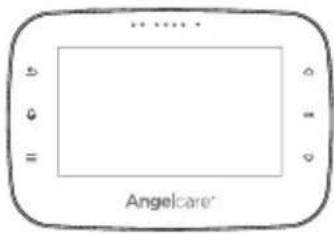
AngelcareTouch control Parent Unit
text_image
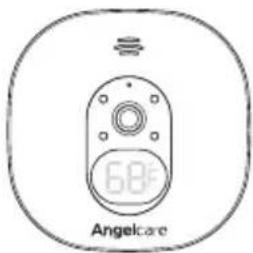
68 AngelcareCamera Unit
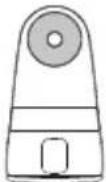
Tabletop stand with removable wall mount metal ball (for Camera Unit)
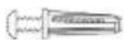
Hardware
(Screwdriver required
for wall mounting)
text_image
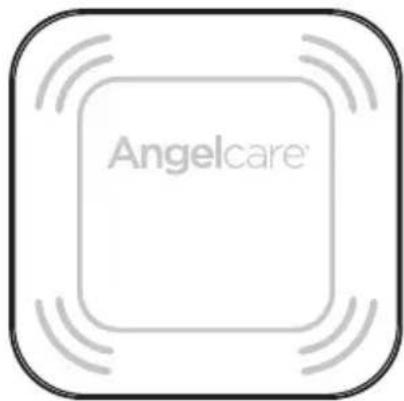
Angelcare®Wired movement Sensor Pad * Always place Angelcare logo side up *
natural_image
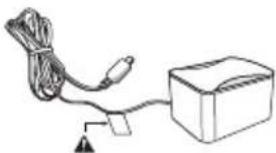
Simple line drawing of a cable and box connected by wires, with no text or symbols present.AC adapter (for Parent Unit)
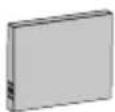
Lithium ion battery pack (for Parent Unit)
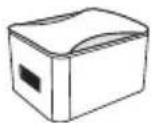
AC adapter (for Camera)
natural_image
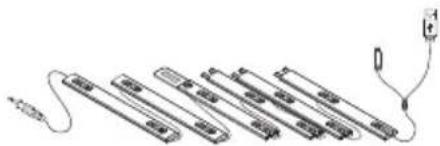
Pure electrical circuit lines without any symbols6 Pre-threaded cord covers with Split USB cable
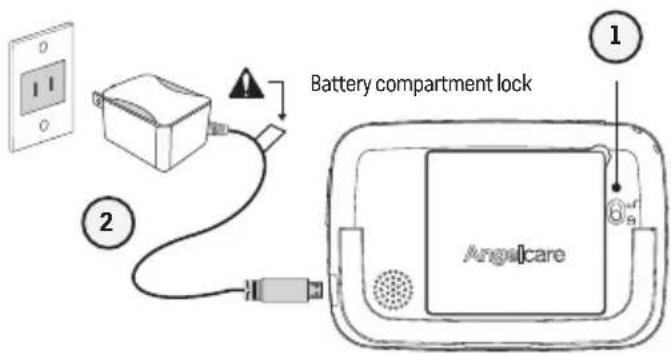
STEP 1 - CHARGING THE PARENT UNIT (9 HOURS)
text_image
Battery compartment lock AngsicareRear View
1) Unlock the battery compartment on the rear and remove the cover. Insert the provided rechargeable battery into the compartment. Contacts of the battery and the contacts in the compartment must be aligned.
2) Connect the USB plug to the Parent Unit and connect the power adapter with an electrical outlet.
3) Charge the unit for 9 continuous hours prior to first use.
text_image
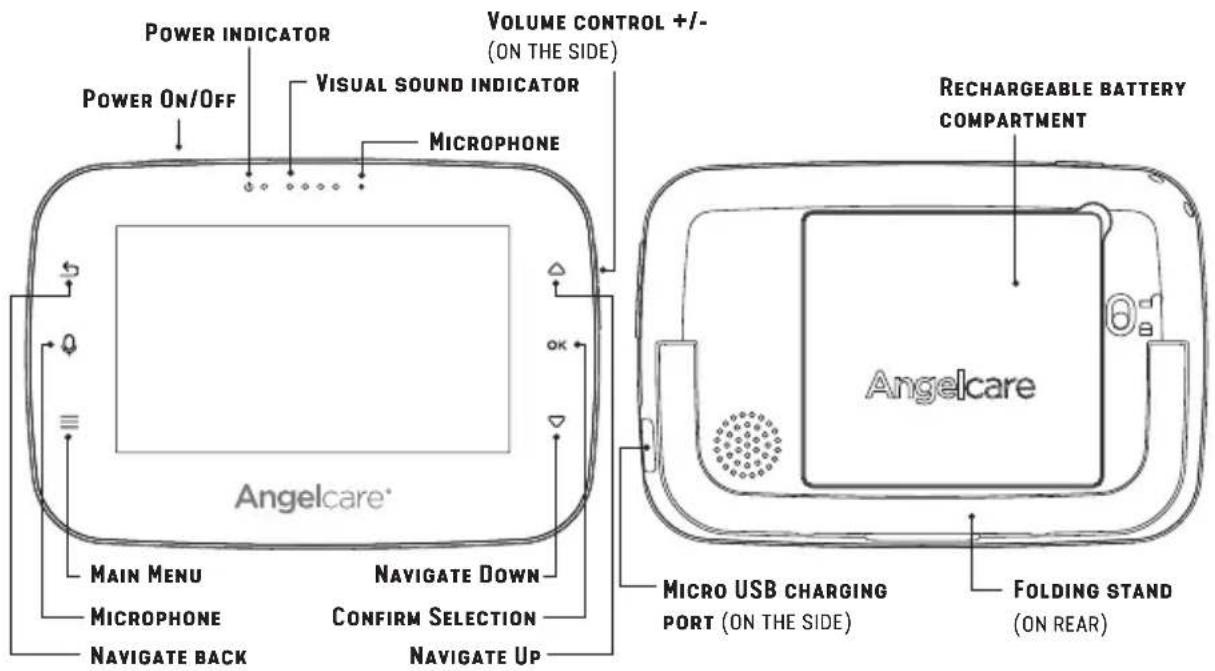
POWER INDICATOR POWER On/OFF VISUAL SOUND INDICATOR MICROPHONE VOLUME CONTROL +/- (ON THE SIDE) ReCHARGEABLE BATTERY COMPARTMENT Angelcare® Main MENU MICROPHONE Navigate Back Navigate Down CONFIRM SELECTION Navigate Up Micro USB CHARGING PORT (ON THE SIDE) FOLDING STAND (ON REAR)⚠️ WARNINGS - Strangulation Hazard – Children have STRANGLED in cords.
- KEEP the Camera Unit and adapter cords out of the reach of children more than 3 feet or 1 meter away.
- NEVER attempt to use the Sensor Pad(s) cord without the protective cord covers supplied.
- CHECK protective cord covering before each use:
-Ensure there is no slack in cords and exposure of cord to child is minimised (see further instructions within).
-Immediately discontinue use of Sensor Pad(s) if protective covering is damaged or broken.
- NEVER use extension cords with adaptors. ONLY use adaptors provided.
- This product is NOT a Toy. NEVER allow children to play with it.
text_image
Safety warning symbol for child using a camera and no phone, indicating no protection or disinfection.STEP 2 - POSITIONING THE MOVEMENT SENSOR PAD
2.1 - SELECT A LOCATION FOR THE CAMERA
Camera can be installed on the wall (see included parts) or using the tabletop stand. Depending on the position you choose, you'll need to remove the metal ball from the stand to wall mount Camera.
IMPORTANT
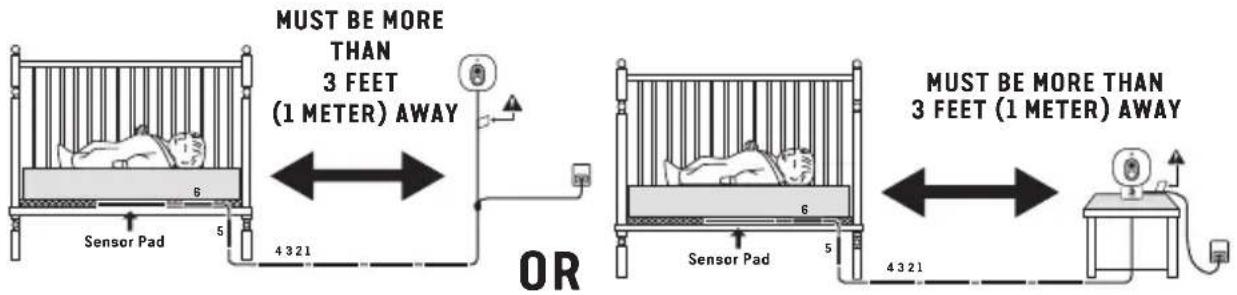
Place the crib near a supporting wall and far from air currents. Install the Camera on a flat, stable surface facing the crib at a distance of at least 3 feet (1 meter). Make sure to plug the adapter to the socket outlet nearest to the equipment and that is easily accessible.
text_image
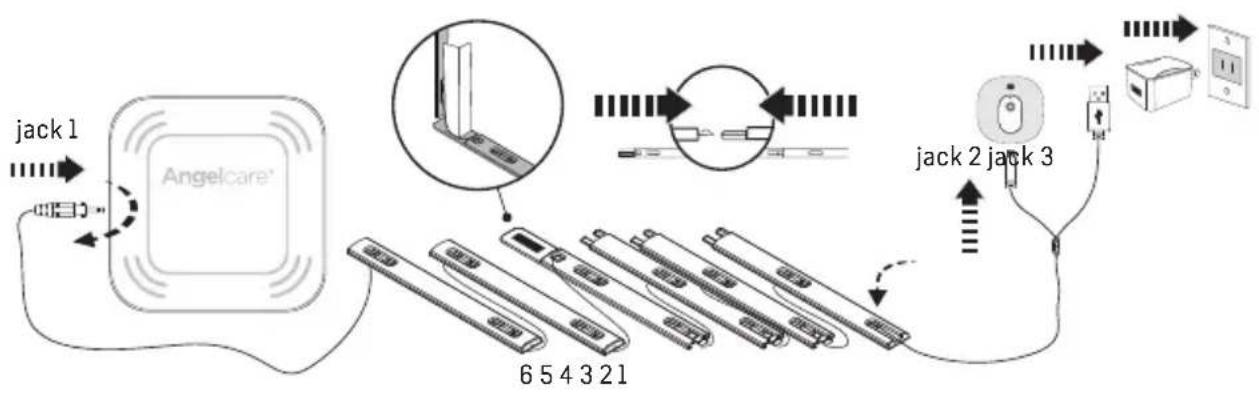
MUST BE MORE THAN 3 FEET (1 METER) AWAY OR MUST BE MORE THAN 3 FEET (1 METER) AWAY1) Insert jack 1 into the Sensor Pad and twist it clockwise to lock it. Gently pull on the cord to ensure it is locked.
flowchart
graph TD
    A["Jack 1"] --> B["Angelcare"]
    B --> C["654321"]
    C --> D["Switch"]
    D --> E["jack 2"]
    E --> F["Power outlet"]
    F --> G["Switch"]
    G --> H["Switch"]
    H --> I["jack 3"]
    I --> J["Switch"]
    J --> K["Switch"]
    K --> L["Switch"]
    L --> M["jack 2"]
    M --> N["Switch"]
    N --> O["Switch"]
    O --> P["jack 3"]
    P --> Q["Switch"]
    Q --> R["Switch"]
    R --> S["jack 2"]
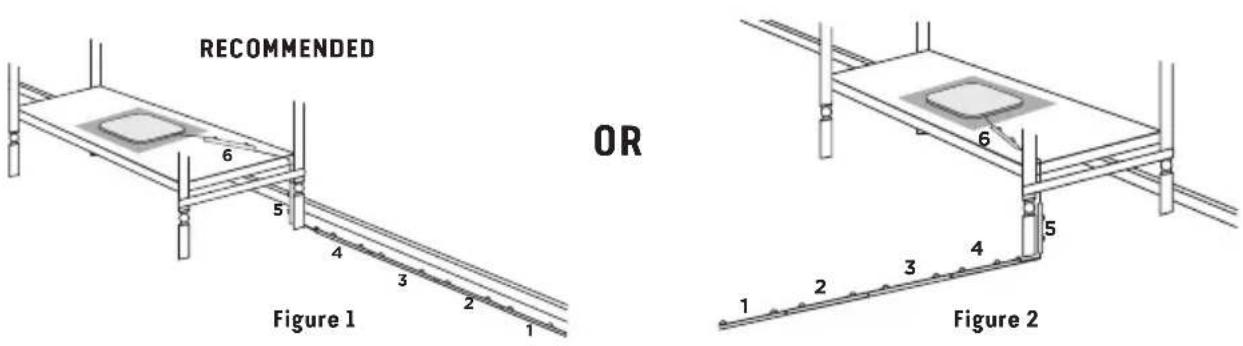
2.2 - SELECT THE CRIB LEG TO SECURE THE CORD COVERS
text_image
RECOMMENDED OR Figure 1 Figure 2Use the crib leg by the wall closest to the Camera (Figure 1). In cases where the Camera is across the room, use the leg closest to the Camera to position the covered wire (Figure 2). It is always preferable that the covered cord run along a wall.
2.3 - INSTALL THE SENSOR PAD ON THE MATTRESS SUPPORT
IMPORTANT
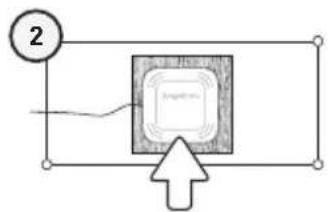
- If your crib does not have a solid, stationary, completely flat, firm surface including a spring or slat base, place a hard board between the crib base and the Sensor Pad, to ensure correct operation. The hardboard support must measure at least 33 x 33 cm (13" x 13") and 6 mm (1/4") thick. This hardboard support must be larger than the Sensor Pad surface area.
- The Sensor Pad functions with any size and type of mattress except memory-foam mattresses, hollow frame mattresses and water beds. The hardboard maintains a constant pressure on the Sensor Pad, enabling it to detect the baby's movements even when the baby is at the edges of the crib.
Hardboard
flowchart
graph TD
    A["2"] --> B["Program"]
    B --> C["Next"]
Sensor Pad
text_image
6 5 4 3 2 1 34
text_image
Diagram illustrating three different mechanical or structural states with numbered annotations and symbols, including a prohibition sign.6
text_image
3" (8 cm)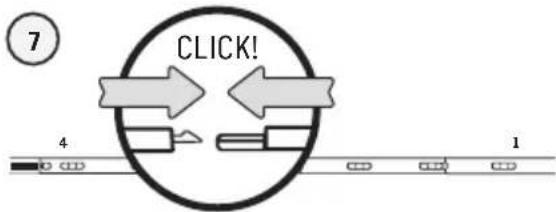
flowchart
graph TD
    A["Start"] --> B{CLICK!}
    B --> C["Step 1"]
    B --> D["Step 2"]
    C --> E["End"]
    D --> F["End"]
text_image
8 4 3 2 1 91) Remove the mattress from the crib.
2) Place the Sensor Pad - Angelcare logo side up - on top of the hardboard.
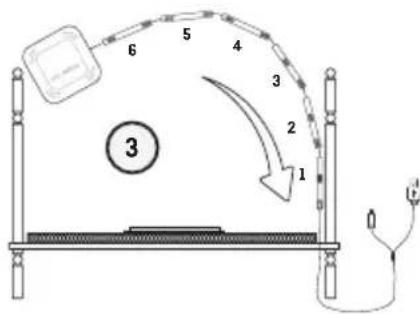
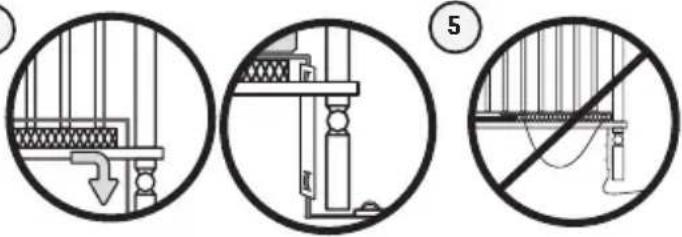
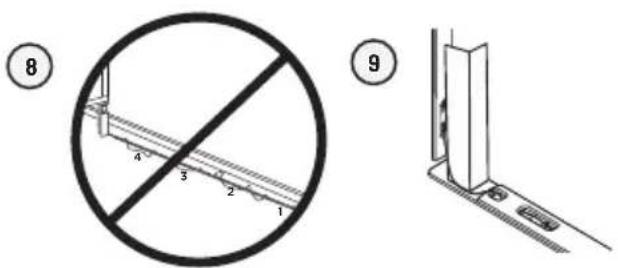
3) Run the connection pin, warning label and the first 5 cord covers down along the backside of the crib leg, between the mattress support and the inside edge of the crib.
4) Bring the first 4 cord covers down the floor, and keep the 5th cord cover vertically, along the backside of the crib leg, between the mattress and the inside edge of the crib.
5) Remove any cord slack to make sure no parts of the cord are loose.
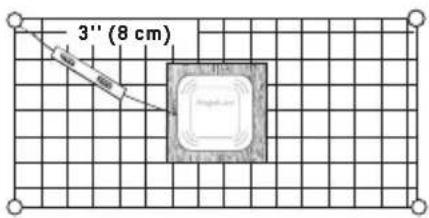
6) Place the 6th cord cover approximately 3" (8 cm) from the edge of the mattress support.
7) Snap together the remaining cord covers that will run along the floor.
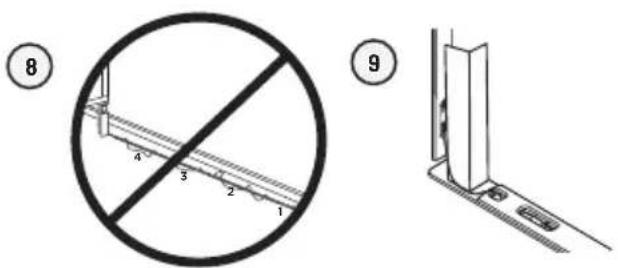
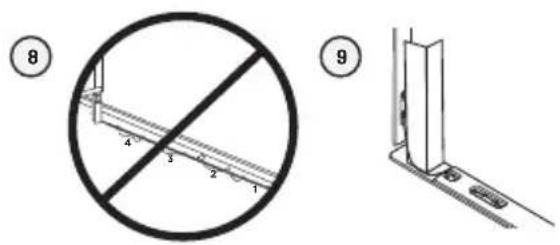
8) Remove any cord slack to make sure no parts of the cord are loose.
9) Peel off the double-sided tape on the 4th cord cover and place it securely under the crib leg.
10) Check to make sure the Sensor Pad has not moved from position and place the mattress back inside the crib.
IMPORTANT! ENSURE THE CORD PROTECTIVE COVER IS SECURELY PLACED UNDER THE LEG OF THE CRIB
- Ensure the Sensor Pad cable connector is locked into the Sensor Pad - check before each use.
- Ensure the Sensor Pad is in the center of the Crib – printed or Logo side up – on top of the hardboard. Check the position is central before each use.
- Ensure there is no slack in cords and exposure of cord to child is minimised (see further instructions within).
- When re-positioning the mattress support as your child grows, adjust the position of the vertical cord cover (on the leg of the crib) by threading the cord through the cover and ensure the cover is always vertically central about the leg. Remove any slack in the cord.
- BEFORE FIRST TIME USE: Test that the unit is ready for use – refer to to the Full User Manual to check installation is correct.
STEP 3 - SETTING UP THE CAMERA UNIT
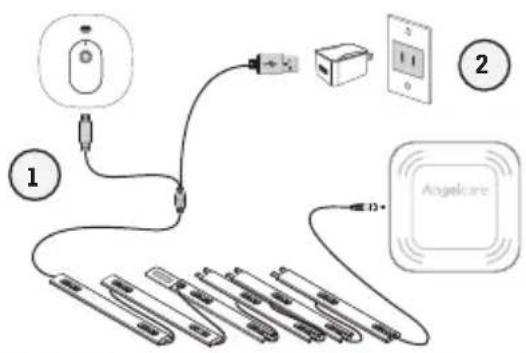
text_image
Diagram showing connections between a device, cable, and power supply with labeled components1) Connect the USB plug to the Camera.
2) Connect the USB plug with the power adapter and then with an electrical outlet.
3) Adjust the Camera using the magnetic mount to get the best view of baby in the crib.
Note: Each time you power ON your Camera, the internal thermometer will need to calibrate to ensure accuracy. This automatic process will take approximately 30 minutes. The colour changing temperature display, by default, will be turned "OFF". You may turn this feature "ON" in the settings mode on your Parent Unit.
CAMERA UNIT
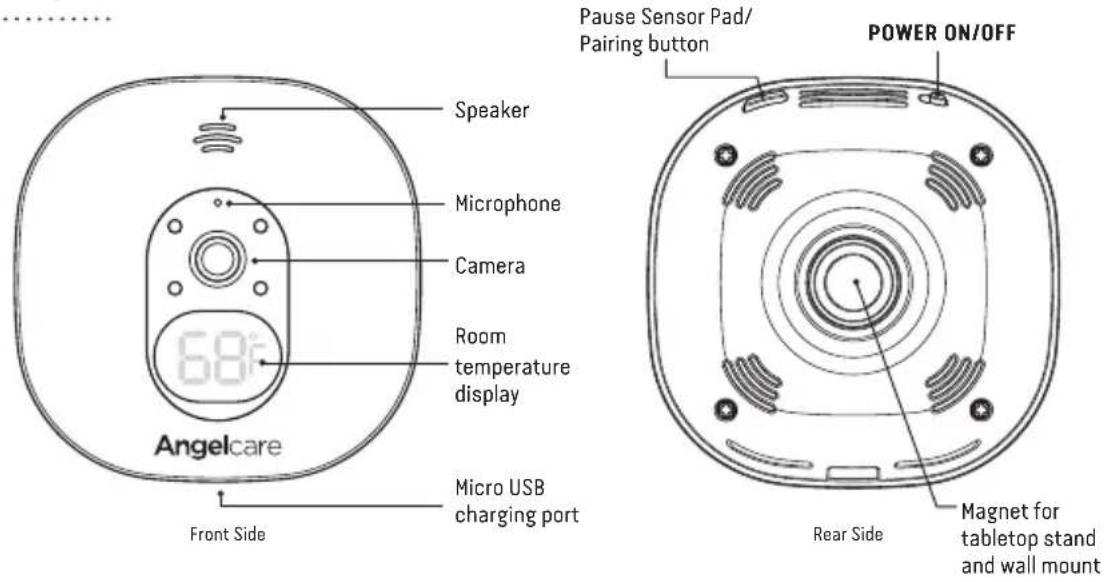
text_image
Speaker Microphone Camera Room temperature display 68° Front Side Angelcare Micro USB charging port Pause Sensor Pad/ Pairing button POWER ON/OFF Rear Side Magnet for tabletop stand and wall mountSTEP 4 - TURNING ON YOUR MONITOR
Your Camera Unit and Parent Unit come pre-paired.
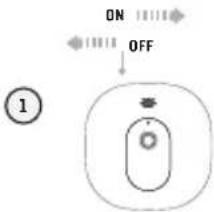
text_image
ON OFF ①1) Slide the Camera ON/OFF switch to the ON position.
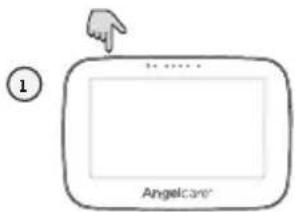
text_image
① Angelcare1) Press and hold the Parent Unit ON/OFF button for 2 seconds until LCD screen is turned ON. Angelcare's logo will be shown for 1 second.
The Camera connection signal strength icon will appear in the status bar.
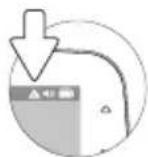
When Parent Unit is turned ON and Camera is OFF, Parent Unit will display Out-of-Range icon.

If there is a lost connection between the two units after 15 seconds, the Out-of-Range alarm will sound on the Parent Unit (refer to Troubleshooting section):
- The Out-of-Range icon will appear on the screen and on the info bar.
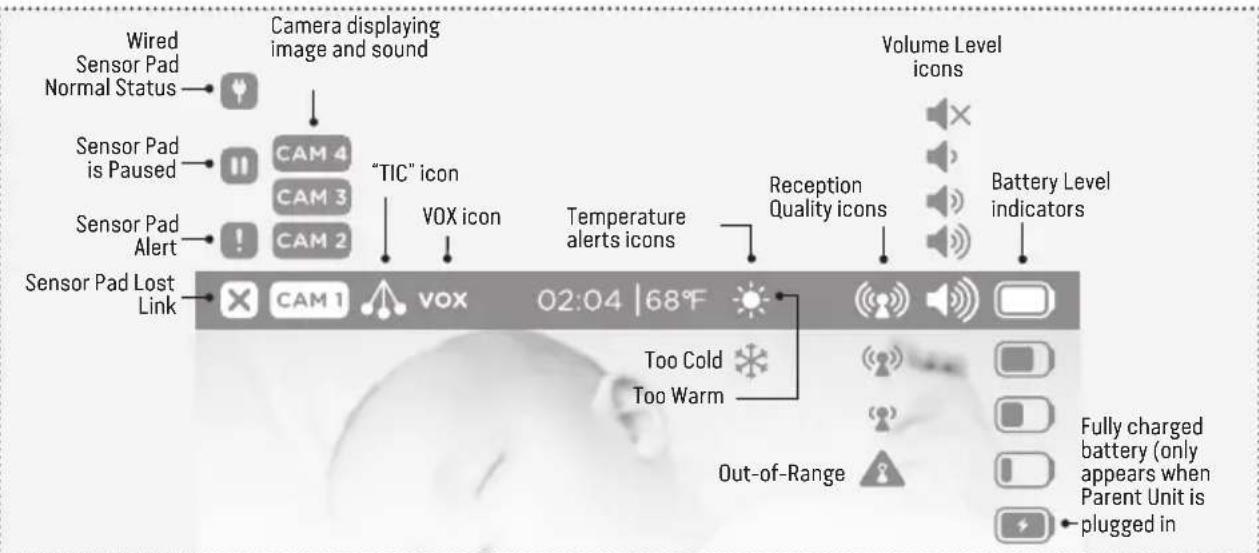
INFO BAR IMPORTANT ICONS
text_image
Wired Sensor Pad Normal Status Camera displaying image and sound "TIC" icon CAM 4 CAM 3 CAM 2 "TIC" icon VOX icon Sensor Pad Alert Sensor Pad Lost Link CAM 1 vox 02:04 | 68°F Volume Level icons Reception Quality icons Battery Level indicators Too Cold Too Warm Out-of-Range Fully charged battery (only appears when Parent Unit is plugged in4.1 - HOW TO SET THE DATE
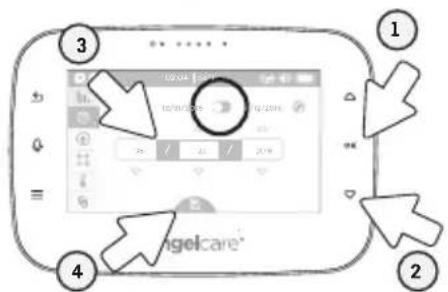
When activating the Parent Unit for the first time, you'll be asked to set the date and time in order to record movement & temperature data. If you choose to skip this step, you can always go back later by accessing the settings menu 🔒.
text_image
3 1 4 2 ngelcare1) Press to switch between Month/Day/Year and Day/Month/Year display.
2) Press the down arrow ▽ once and then set the date.
3) Set the day with the up/down arrows △▽ and confirm with OK
Do the same for the month and year and confirm with OK
4) Press the down arrow ▽, the Save icon at the bottom is highlighted in blue then Press the OK button to save the settings.
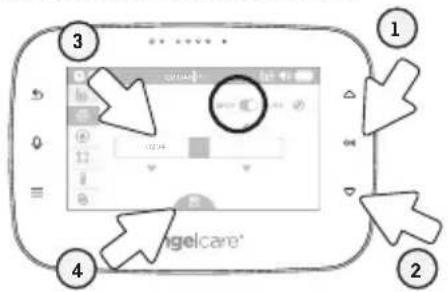
4.2 - HOW TO SET THE TIME
text_image
3 4 1 2 ngelcare*1) Press to switch between 12 h and 24 h mode.
2) Press the down arrow ▽ once and then to set the time.
3) Set the hours with the up/down arrows △▽ and confirm with OK. Do the same for the minutes and am/pm display and confirm with OK.
4) Press the down arrow ▽, the Save icon at the bottom is highlighted in blue then Press the OK button to save the settings.
IMPORTANT
The Sensor Pad will be automatically ACTIVATED when the screen returns to video display view. If no movement is detected on the surface of the Sensor Pad after 20 seconds, a series of loud beeps will emit from the Parent Unit & Camera - this is the movement alarm. When activating any functions on your monitor, to prevent this alarm either:
1) Gently tap the surface of the pad
2) De-activate the movement function, see below for information
STEP 5 - GETTING TO KNOW YOUR MONITOR
TOUCH CONTROL KEYS

Access to the different operation settings

Exit or to go back to main menu when in sub-menu


Navigate the different functions

Confirm a selection or setting and allows you to access to a quick menu
The Angelcare ^® monitor can be used with the pre-programmed factory settings or you can also customize your settings to your preference.
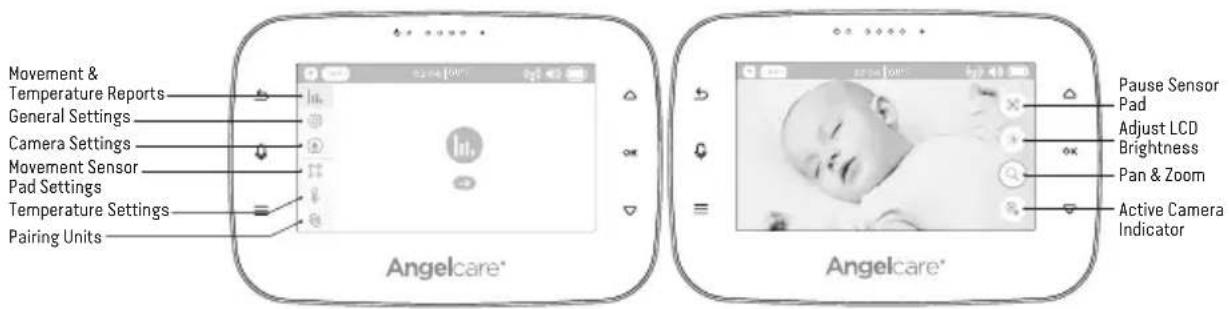
text_image
Movement & Temperature Reports General Settings Camera Settings Movement Sensor Pad Settings Temperature Settings Pairing Units Angelcare* Pause Sensor Pad Adjust LCD Brightness Pan & Zoom Active Camera Indicator Angelcare*IMPORTANT
When in menu or sub-menu modes, sound transmission between the Parent Unit and the Camera will be temporarily deactivated. ONLY movement-detection alarm will remain active (if function is activated).
TO ACTIVATE/DEACTIVATE THE SENSOR PAD:
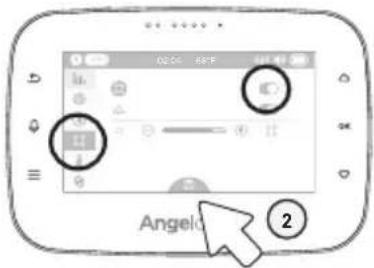
text_image
0204 68F Angelo ②1) In the Sensor Pad settings, press the ON to activate/deactivate the Sensor Pad (when activated the toggle will turn blue).
2) Press the down arrow ▽ till the Save icon at the bottom will be highlighted in blue then Press the OK button to save the settings.
TO TEST THE SENSOR PAD:
IMPORTANT
- Test your monitor before first use.
- Test your monitor regularly to ensure it is functioning correctly.
- Test your monitor every time you move the Sensor Pad to a different place.
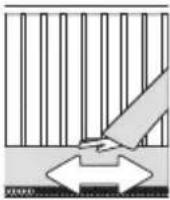
1) After activating the Sensor Pad, the alarm will sound after 20 seconds.
2) Rub you hand over the mattress to confirm the alarm stops.
MOVEMENT ALARM
- If NO movement is detected after 15 seconds you will hear a single 'TIC' pre-alarm sound from the Camera.
- If after a further 5 seconds there is still NO movement detected both the Parent Unit and Camera speakers will emit loud continuous beeps. - this is the movement alarm.
- Movement Alarm icon will show on the LCD screen.
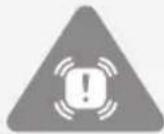
IF THE ALARM DOES NOT SOUND
- Avoid contact with the crib while Sensor Pad is in operation.
- Place the crib near a supporting wall to reduce vibrations.
- Adjust the Sensor Pad sensitivity level.
- Turn OFF crib mobile, fans, loud music or anything else that may cause vibration.
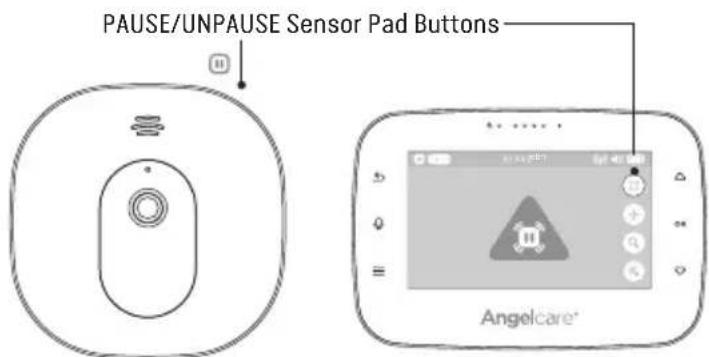
PAUSING AND RESTARTING THE SENSOR PAD:
Allows you to pause the Sensor Pad if you remove baby from the crib, e.g. for feeding or comforting.
text_image
PAUSE/UNPAUSE Sensor Pad Buttons Angelcare®IMPORTANT
- If you do not pause the Sensor Pad, the alarm will sound if there is no movement after 20 seconds/if baby is removed from the crib.
- Ensure to unpause the Sensor Pad before putting baby in the crib.
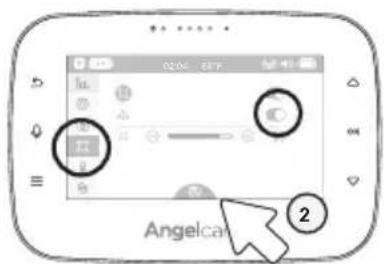
TO ACTIVATE/DEACTIVATE TIC FUNCTION:
Allows you to detect baby's movements as well as hear a TIC sound.
text_image
Angelca1) In the Sensor Pad settings, press the OK on to activate/deactivate the Tic function (when activated the toggle will turn blue).
2) Press the down arrow ▽ until the Save icon at the bottom is highlighted in blue then Press the OK button to save the settings.
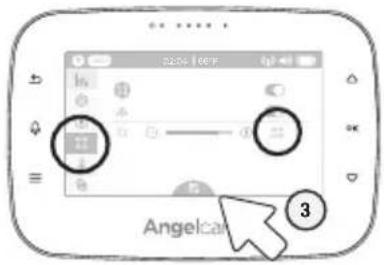
TO ADJUST THE SENSOR PAD SENSITIVITY LEVEL:
To ensure adequate monitoring of your child's movements, you can adjust the sensitivity of the Sensor Pad in the main settings menu. Set a high sensitivity for a newborn and a lower sensitivity as the child grows and gains weight. A thicker mattress will also need a higher sensitivity.
text_image
AngelCar 31) In the Sensor Pad settings, select the Sensor Pad sensitivity bar.
2) Use the up/down arrows △▽ to adjust the sensitivity level and confirm by pressing OK.
3) Press down arrow ▽ until the Save icon at the bottom is highlighted in blue then Press the OK button to save the settings.
5.2 - SOUND
TO ADJUST/MUTE SOUND:
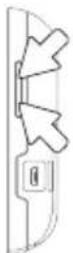
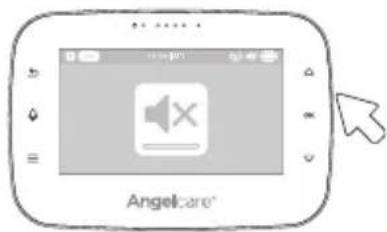
Press the Volume up / Volume down button to adjust the sound level.
text_image
Angel:are®To mute the sound level press the Volume down button until the mute symbol is displayed.
5.3 - BATTERY
HOW TO CHECK THE BATTERY:
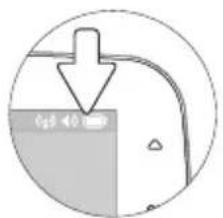
Unplug the adapter from the Parent Unit and check the battery level indicator.
text_image
0.5 < 0.11/4 full 1/2 full 3/4 full full


HOW TO CHARGE THE BATTERY IN THE PARENT UNIT:
Leave the Parent Unit plugged in to fully charge the unit. Although the battery at 1/4 capacity works normally, we recommend that you fully recharge it.
PARENT UNIT BATTERY ALERT
- Alert activates when the battery needs to be recharged.
- Parent Unit will emit a beep sound every 30 seconds.
- Battery Alert icon will show on LCD screen.
YOU ARE NOW READY TO USE YOUR MONITOR
DEFAULT SETTINGS

Parent Unit Volume: Level 3 (of 4)

Camera Speaker Volume: Level 3 (of 4)

Movement Mode: ON Sensor Pad Sensitivity: Level 2 (of 4)

"TIC" Function OFF

Temperature Unit: Fahrenheit (United States) Celcius (Canada) Temperature Alert: OFF

Camera Temperature Indicator: ON

Camera Colour Changing Mode: OFF (White color)

Movement and Temperature Monitoring: OFF

Voice Activation (VOX): OFF (United States) ON (Canada)

VOX Sensitivity: Level 2 (of 4)

Screen Saver Timer:

LCD Brightness:
30 seconds
Level 3 (of 5)
STEP 6 - ACTIVATING AND DEACTIVATING ADDITIONAL FUNCTIONS
6.1 - TWO WAY TALK
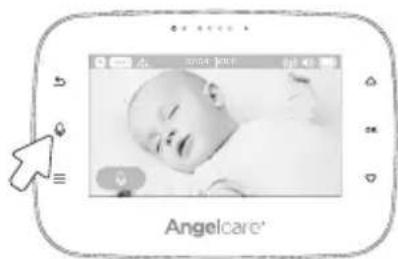
Your Parent Unit is equipped with Two Way Talk. This feature allows you to talk to baby without being in the nursery.
TO ACTIVATE TWO WAY TALK:
text_image
Angelcare'Press the Microphone button 🔔 to activate/deactivate the Two Way Talk.
The Microphone icon appears in the Screen when the microphone is active.
6.2 - VOICE ACTIVATION (VOX) OR CONTINUOUS SOUND MODE
Allows you to select your option on how you monitor sound:
Sound Activated (VOX ON): Voice activation picks up sound based on the setting of the sensitivity level. The sound transmission will stop if no sound is detected. This setting allows to save power, after 10 seconds.
'Continuous Sound' (VOX OFF): Sound monitoring is continuously on, picking up all sounds.
NOTE: By deactivating VOX, Continuous Sound setting will turn ON.
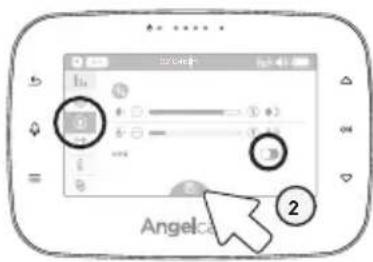
TO ACTIVATE/DEACTIVATE VOX:
text_image
Angelca 21) In the Camera settings, press the down arrow ▽ to the VOX toggle and press OK to activate/deactivate the VOX function.
2) Press the down arrow ▽ until the Save icon at the bottom is highlighted in blue then Press the OK button to save the settings.
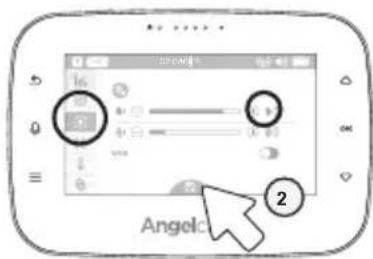
TO ADJUST THE CAMERA SPEAKER VOLUME:
text_image
Angelo1) In the Camera settings, adjust the Camera speaker volume level with the up/down arrows △▽ and confirm by pressing OK
2) Press the down arrow ▽ until the Save icon at the bottom is highlighted in blue then Press the OK button to save the settings.
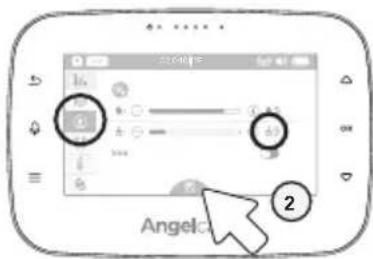
TO ADJUST THE SOUND SENSITIVITY (VOX):
text_image
Angel ②1) In the Camera settings, adjust the microphone sensitivity level with the up/down arrows △▽ and confirm by pressing OK
2) Press the down arrow ▽ until the Save icon at the bottom is highlighted in blue then Press the OK button to save the settings.
6.3 - ROOM TEMPERATURE DISPLAY
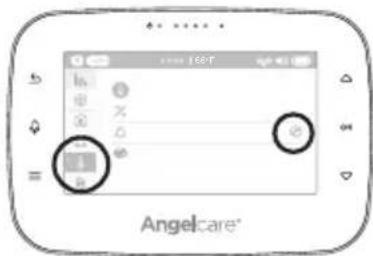
TO ACTIVATE THE ROOM TEMPERATURE ALERT:
text_image
Angelcare1) In the temperature settings menu, select the alarm settings by pressing OK.
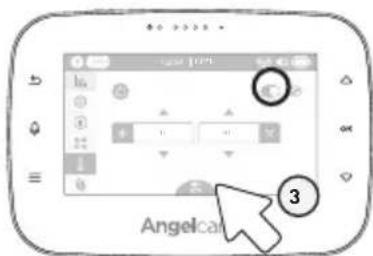
text_image
Angelcat 32) Press OK to switch the temperature alarm ON/OFF.
3) Press the down arrow ▽ until the Save icon at the bottom is highlighted in blue then Press the OK button to save the settings.
TO SET THE ROOM TEMPERATURE RANGE:
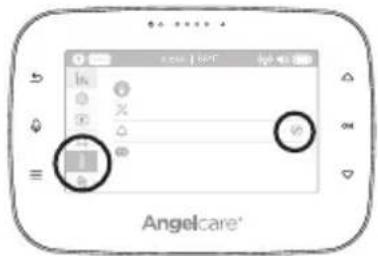
text_image
Angelcare®1) In the temperature settings menu, select the alarm settings by pressing OK.
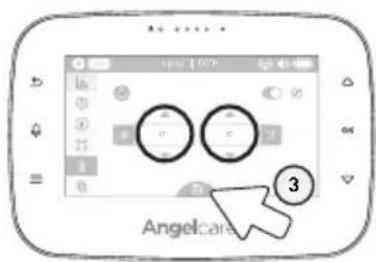
text_image
Angelcare 32) Set the lower temperature limit with the up/down arrows and confirm with OK Do the same for the upper limit and confirm with OK.
3) Press the down arrow ▽, the Save icon at the bottom is highlighted in blue then Press the OK button to save the settings.
TO ACTIVATE/DEACTIVATE THE CAMERA TEMPERATURE DISPLAY AND COLOR CHANGING MODE:
Allows you to set the LCD display on your Camera. You can completely turn OFF the display, or set the color temperature color display on the Camera. With this option the Camera digits light up in colour when the temperature goes above or below your preferences. The Camera LCD will turn to red if temperature is too hot, blue if too cold and white if correct.
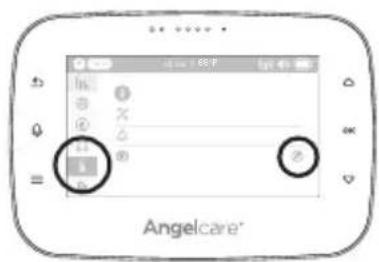
text_image
Angelcare1) In the temperature settings menu, select the Camera LCD display setting menu.
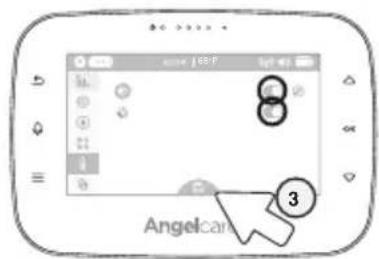
text_image
Angelcan 32) Press OK to turn the LCD display mode activate/deactivate then press the down arrow ▽ once and then OK turn the colour changing mode activate/deactivate.
3) Press the down arrow ▽, the Save icon at the bottom is highlighted in blue then Press the OK button to save the settings.
TO CHANGE BETWEEN CELSIUS AND FAHRENHEIT:
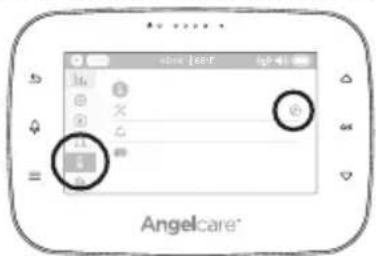
text_image
Angelcare1) In the temperature settings menu, select the temperature unit setting.
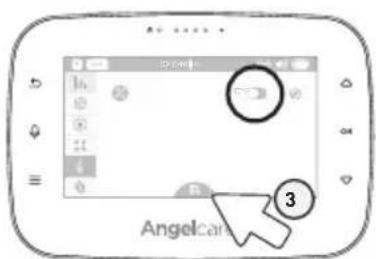
text_image
Angel 32) Press OK to switch between °C and °F.
3) Press the down arrow ▽ until the Save icon at the bottom is highlighted in blue then Press the OK button to save the settings.

natural_image
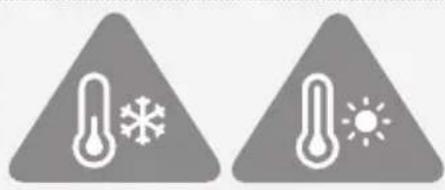
Two gray triangular warning symbols: one with thermometer and snowflake, the other with thermometer and sun (no text or numbers)TEMPERATURE ALERT
- Alert activates when temperature reaches maximum or minimum set temperature.
- Parent Unit will emit 4 consecutive beeps, every 5 seconds.
• Temperature Alert icon will show on LCD screen.
6.4 - SCREEN SAVER

text_image
Angelcare1) In the general settings menu, select the screen saver settings menu.
text_image
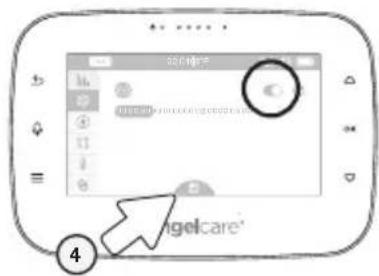
Screenshot of a mobile app interface showing a screen with a circular button labeled 'C' and an arrow pointing to the label '4'.2) Press OK to switch the screen saver ON or OFF.
3) Press the down arrow ▽ once and then Ⓒ set the time after the screen saver will be activated.
Select between 30 seconds to 3 minutes.
4) Press the down arrow ▽, the Save icon at the bottom is highlighted in blue then Press the OK button to save the settings.
MANUAL SETTING:
To manually activate the Screen Saver Mode, quickly press & release the Parent Unit POWER ON/OFF button.
NOTE:
The LCD screen will turn black when video is in Screen Saver mode. Press any button to return to Video mode.
6.5 - MOVEMENT AND TEMPERATURE MONITORING
Activity analysis and room temperature tracking give you insight into your little one's activity level during sleep, helping you to better adapt routines and respond to their needs. The movement monitoring records data every ten seconds. Three times every hour the system compiles the collected data and a "movement activity report" can be viewed on the Parent Unit.
TO ACTIVATE OR DEACTIVATE MOVEMENT AND TEMPERATURE MONITORING:
IMPORTANT
In order to record the movement and temperature data, ensure you have set the date and time in STEPS 4.1 and 4.2.
The graphing function is not available during the first 20 minutes of use as the system is collecting the first set of data that will be displayed. During this time, the graphing icon 📁 will not be operational.
text_image
Stop Angelcare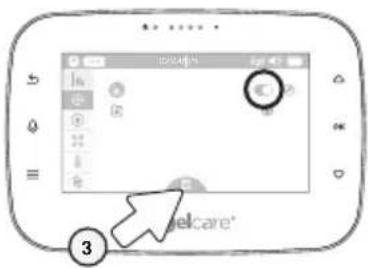
text_image
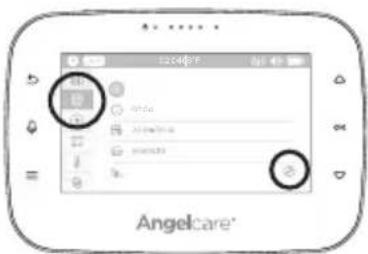
Screenshot of a mobile app interface showing a user profile with a highlighted circular button and numbered annotation '3'1) In the general settings menu, select the monitoring settings.
2) Press OK to select monitoring ON or OFF toggle.
3) Press the down arrow ▽, the Save icon at the bottom is highlighted in blue then Press the OK button to save the settings.
DELETE GRAPHING DATA:
This option will not be available until 20 minutes from activation of this function.
text_image
Angelcare®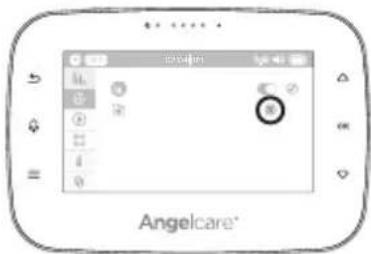
text_image
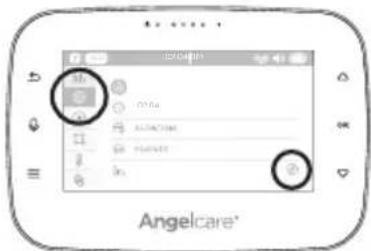
Angelcare®1) In the general settings menu, select the graph delete menu.
2) Press the down arrow ▽ and then OK to delete previously saved graph data.
NAVIGATING MOVEMENT AND TEMPERATURE REPORTS:
text_image
In In Angelcare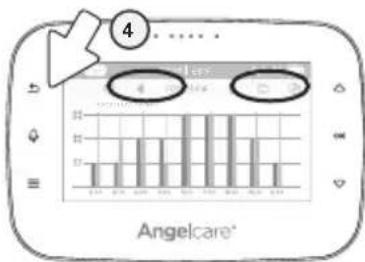
text_image
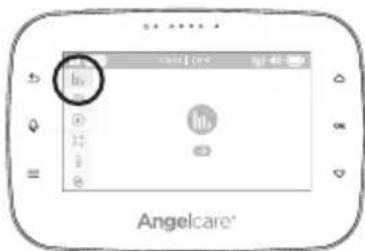
4 Angelcare®1) In the movement & temperature reports, press to highlight/select the first set of arrows. Use the up/down arrows △▽ to navigate page by page.
2) Press ⓄKlight/select the second set of arrows (double arrows). Use the up/down arrows △▽ to navigate day by day.
3) Press OK to deselect the arrows.
4) Press the arrow back ↩ to go back to the Menu.
MONITORING IMPORTANT BUTTONS AND ICONS
Navigation Icons:
Go to previous page Go to next page Go to previous day Go to next day

Temperature indicator: The blue bar indicates the temperature in the room.
Sensor Pad Movement Levels: The red bar indicates the amount of movement from your Sensor Pad.
□ Low Movement 0-20 movements
Medium Movement 20-30 movements
High Movement Over 30 movements
Graphing Icons:
! Indicates an alert during the period Indicates the system was turned OFF during the period
6.6 - DIGITAL PAN AND ZOOM
natural_image
Digital photo of a baby with a circular button overlay, no readable text or symbols in the main image area.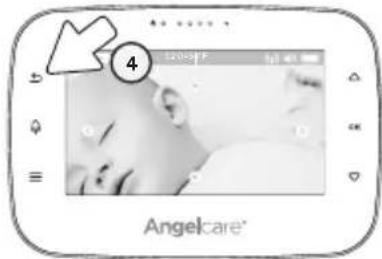
text_image
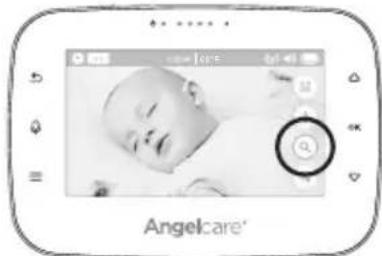
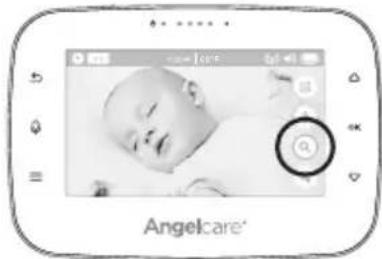
4 Angelcare1) Select the zoom function.
2) Press OK to activate the zoom.
3) Use the up/down arrows to zoom in on what you want to see more closely. Press OK to switch between vertical and horizontal movement.
4) Press the arrow back ↩ to switch back to normal viewing mode. Zoom is deactivated.
6.7 - LCD SCREEN BRIGHTNESS
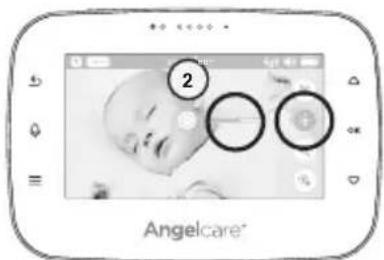
text_image
2 Angelcare®1) Select the brightness control and Press . OK
2) Use the up/down arrows △▽ to decrease/increase the brightness level.
STEP 7 - ADDING ACCESSORIES
Your Angelcare monitor allows you to add additional Cameras. Please contact your local distributor to check availability in your country.
IMPORTANT
- If you have a Sensor Pad connected to your Angelcare Monitor, it can ONLY be paired with Camera 1. The alarm on the Parent Unit will only sound if Camera 1 is selected or in split view. If another Camera is selected only the Camera 1 will sound the alarm.
- You will only be able to hear audio from one camera at a time. When in split screen, the sound transmitted from the Parent Unit will be from the Camera number highlighted in the info bar.
TROUBLESHOOTING
- Ensure that you fully charge your battery for 9 hours before its first use.
- To maintain maximum battery life it is recommended that you fully discharge your battery periodically. If your Parent Unit is not in use, please turn it OFF.
LOSS OF CONNECTIVITY
- If your Camera becomes un-paired from your Parent Unit, please follow the steps below to re-pair them.
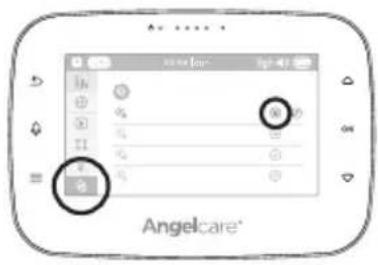
text_image
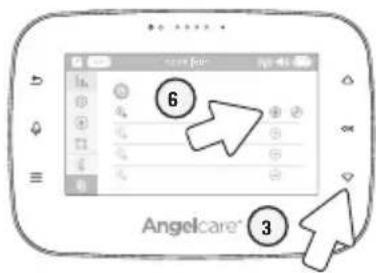
Angelcare®1) Select the pairing settings menu and then to access it.
2) Press the down arrow ▽ once and press OK to select/highlight CAMERA (the Edit icon will turn to blue). Press OK to delete the paired camera as the Trash icon 📊 appears, and then Press OK to confirm. The +icon will appear, then Press OK re-pair the camera.
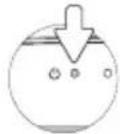
The Parent Unit Power Indicator will flash to indicate it's in linking mode.
text_image
6 3 Angelcare®3) Plug in and turn your Camera ON.
4) Press and hold the Pause/Pairing button on the top right of the Camera for 2-3 seconds.
5) When the Trash can icon 📄 shows up, the Camera is now paired.
NO SOUND IS BEING TRANSMITTED
- Check the volume level on the Parent Unit and the Camera to ensure they are set to an appropriate level.
- Try bringing the Parent Unit closer to the Camera to see if you get sound.
- Charge the Parent Unit.
WEAK RECEPTION
- Bring units closer together.
- Change the position of one or both units.
- Place units on a flat surface away from baby's reach.
- Recharge the Parent Unit.
STATIC, DISTORTION, INTERFERENCES
(FROM OTHER MONITORS, WIRELESS PHONES, WALKIE-TALKIES, ETC.)
- Rotate Parent Unit or move it away from source of interference.
FEEDBACK (LOUD NOISES EMITTED FROM THE PARENT UNIT)
- Move units farther apart (at least 10 foot [3 meters]).
- Decrease volume on Parent Unit.
THE PARENT UNIT SCREEN IS BLACK (PARENT UNIT IS OFF)
• Turn the Parent Unit back ON by pushing and holding the POWER ON/OFF button for 2 seconds.
- Recharge the Parent Unit.
FALSE ALARMS
- Turn OFF the Camera.
- Verify the connection between the Sensor Pad and the Camera. Unplug and reconnect the cord.
- Make sure there is no bedding between the mattress and the Sensor Pad.
- If the crib has a spring or slat base, place a hardboard between the crib base and the Sensor Pad measuring at least 1/4" (6 mm) thick and should have minimum dimensions of 13" x 13" (33 x 33 cm).
- Make sure the Sensor Pad is positioned as described under the setup requirements. Sensitivity may need to be adjusted. Refer to STEP 5.1 for more information.
ALARM WILL NOT SOUND
- Avoid contact with the crib when the monitor is ON.
- Place crib near a solid supporting wall to avoid Sensor Pad from detecting movement from outside the crib.
- You may need to decrease the sensitivity. Refer to STEP 5.1 for more information.
THE PARENT UNIT DOESN'T SHOW MOVEMENT AND TEMPERATURE REPORTS
- Make sure the time and date is set up. Refers to STEP 4.1 & 4.2.
- Make sure the movement and temperature function is activated. Refers to STEP 6.5.
LIMITED WARRANTY
Angelcare ^® warrants to the original owner of this product that Angelcare ^® monitor is free from any material and workmanship defects for the term of the warranty period (see warranty table below to determine the warranty for your country). If this monitoring system fails to function properly when used as directed under normal conditions and during the warranty period, Angelcare ^® will either repair or replace the product, at our discretion, free of charge. Please contact your local distributor to validate warranty and warranty period.
The product must be accompanied by a proof of purchase, either a bill of sale or other proof that the monitoring system is within the warranty period. Angelcare ^® will bear the cost of repairing or replacing the product and shipping it back to you.
This warranty does not apply to a product which has been damaged as a result of improper maintenance, an accident, improper voltage supply or any other form of misuse. The warranty is also void if the owner repairs or modifies the product in any way. Angelcare* is not liable for any incidental or consequential damages with regard to this product. The warranty also excludes any liability other than what is stated above. No other warranty is given.
This warranty does not cover products and accessories which are not Angelcare ^® -branded, or any problems that result from usage that is not in accordance with product instructions, failure to follow the product instructions, or problems caused by using accessories, parts or components not supplied by Angelcare.
LEGAL RIGHTS VARY FROM COUNTRY TO COUNTRY. SOME COUNTRIES DO NOT ALLOW THE EXCLUSION OR LIMITATION OF INCIDENTAL OR CONSEQUENTIAL DAMAGES, SO THE ABOVE LIMITATIONS MAY NOT APPLY TO YOU.
WE ARE NOT IN ANY WAY RESPONSIBLE FOR ANY OUTCOME RESULTING FROM THE USE OF THIS PRODUCT.
WARRANTY TERM PER COUNTRY
North America 1 year
IMPORTANT! This Angelcare ^x monitor is a personal care product. Please do not return this product to the store. If you have questions or need help, please call your distributor before returning this product.
We, at Angelcare®, stand behind all of our products. If you are not completely satisfied or have any questions, please contact your distributor before returning this product:
United States and Canada:
Please contact us at: angelcare@cdecinc.ca
Other countries:
Find your local distributor by visiting our website: international.angelcarebaby.com.
TECHNICAL SPECIFICATIONS
Range:
Open field (Open area without obstructions): up to 820 feet (250 metres).
Number of Channels:
USA/Canada: 24 channels. Europe: 24 channels.
Power Supply:
1 included rechargeable Li-Ion battery (Parent Unit) 100 - 240 VAC / 5 VDC adapter for the Parent Unit 100 - 240 VAC / 5 VDC adapter for the Camera
Caution: To reduce the risk of electric shock, do not expose this product to rain or moisture.
Danger of explosion if batteries are incorrectly replaced. The battery included for the Parent Unit is a user replaceable Li-ion rechargeable battery, manufactured by manufactured by Icon Energy System (Shenzhen) Co Ltd. Only use the Angelcare recommended replacement battery. To obtain information on replacement batteries please contact Angelcare customer service: www.angelcarebaby.com or contact your local distributor. Instructions will be included with the replacement battery. Keep all batteries away from children.
Batteries:
- CAUTION: RISK OF EXPLOSION IF BATTERY IS REPLACED BY AN INCORRECT TYPE.
Transmission:
Transmission between the Parent Unit and the Camera Unit is made on 2.4 GHz frequency
Maximum RF Power Transmitted:
- 20dBm (100mW) between Camera and Parent Unit
PROTECT THE ENVIRONMENT
The wheelie bin symbols mean that according to local laws and regulations your product and/or its battery shall be disposed of separately from household waste. When the product/battery reaches its end of life take it to a collection point designated by local authorities. The separate disposal and recycling will help conserve natural resources and protect human health and the environment. Refer to User's Guide for removal of batteries.
SAR Information Statement
Your baby monitor Parent Unit is a radio transmitter and receiver. It is designed and manufactured not to exceed the emission limits for exposure to radiofrequency (RF) energy set by the Federal Communications Commission of the U.S. Government. These limits are part of comprehensive guidelines and establis permitted levels of RF energy for the general population. The guidelines are based on standards that were developed by independent scientific studies. The standards include a substantial safety margin designed to assure all persons, regardless of age and health. The exposure standard for the Parent Unit employs a unit of measurement known as the Specific Absorption Rate, or SAR. The SAR limit set by the FCC is 1.6W/kg. Test for SAR are conducted with the Parent Unit transmitting at its highest certified power level in all tested frequency bands.
Although the SAR is determined at the highest certified power level, the actual SAR level of the Parent Unit while operating can be well below the maximum value. This is because the Parent Unit is designed to operate at multiple power levels so as to use only the power required to reach the Nursery Unit. In general, the closer you are to Nursery Unit, the lower the power output. Before a baby monitor model is available for sale to the public, it must be tested and certified to the FCC that it does not exceed the limit established by the government adopted requirement for safe exposure. The tests are performed in positions and locations (e.g., in front of face and worn on the body) as required by the FCC for each model. The highest SAR value for the Parent Unit when tested for use in front of face is 0.043W/Kg and when worn on the body is 0.125W/Kg (Body-worn measurements differ among various models, depending upon available accessories and FCC requirements). While there may be differences between the SAR levels of various Parent Units and various positions, they all meet the government requirement for safe exposure. The FCC has granted an Equipment Authorization for this model Parent Unit with all reported SAR levels evaluated in compliacne with the FCC RFexposure guidelines. SAR information on this model Parent Unit is on file with the FCC and can be found under the Display Grant section of http://www.fcc.goc/oet/fccid after searching on FCC ID:N7TAC117R
In the United States and Canada, the SAR limit for the Parent Unit is 1.6 watts/kg (W/kg) averaged over one gram of tissue. The standard incorporates a substantial margin of safety to give additional protection for the public and to account for any variations in measurements.
IC STATEMENT
This device complies with Industry Canada licence-exempt RSS standard(s)
Operation is subject to the following two conditions:
(1) This device may not cause interference, and
(2) This device must accept any interference, including interference that may cause undesired operation of the device.
This equipment complies with IC radiation exposure limits set forth for satisfying RF exposure compliance. This transmitter must not be co-located or operation in conjunction with any other antenna or transmitter.
These requirements set a SAR limit of 1.6 W/kg averaged over one gram of tissue.
The highest SAR value for this Parnet Unit when tested for use in front of face is 0.043W/Kg and when worn on the body is 0.125W/Kg. This device was tested for typical body-worn operations. To comply with RF exposure requirements, Omm testing separation distance was done between testing BODY and the Parent Unit, including antenna. Third-party belt-clips, holsters, and simialr accessories used by this device should not contain any metallic components. Body-worn accessories that do not meet these requirements may not comply with RF exposure requirements and should be avoided. Use only the supplied antenna.
MANUEL DE L'UTILISATEUR
Modèle AC315
natural_image
Product display of Angelcare medical device with infant image and digital temperature sensor (no text or symbols on main components)⚠️ AVERTISSEMENTS
VEUILLEZ CONSERVER CE GUIDE D'UTILISATION POUR CONSULTATION ULTÉRIEURE. LISEZ ATTENTIVEMENT LES MISES EN GARDE ET LES INSTRUCTIONS DE SÉCURITÉ AVANT D'ASSEMBLER ET D'UTILISER CE PRODUIT. LE NON-RESPECT DES INSTRUCTIONS OU DE TOUT AVERTISSEMENT POURRAIT ENTRAÎNER DES BLESSURES GRAVES OU LA MORT, OU ENDOMMAGER CE PRODUIT.
TABLE DES MATIÈRES
AVERTISSEMENTS 24
INSTRUCTIONS D'INSTALLATION....26
text_image
Safety warning symbol showing a child with a stethoscope inside a circle, indicating no protection or disinfection.-
Modifications not authorized by the manufacturer may void users authority to operate this device.
38.1 NOTE: This equipment has been tested and found to comply with the limits for a Class B digital device, pursuant to Part 15 of the FCC Rules. These limits are designed to provide reasonable protection against harmful interference in a residential installation. This equipment generates, uses and can radiate radio frequency energy and, if not installed and used in accordance with the instructions, may cause harmful interference to radio communications.
38.2 However, there is no guarantee that interference will not occur in a particular installation. If this equipment does cause harmful interference to radio or television reception, which can be determined by turning the equipment OFF and ON, the user is encouraged to try to correct the interference by one or more of the following measures: -
Reorient or relocate the receiving antenna.
- Increase the separation between the equipment and receiver.
- Connect the equipment into an outlet on a circuit different from that to which the receiver is connected.
- Consult the dealer or an experienced radio/TV technician for help.
38.3 This device complies with the part 15 of the FCC Rules and the Industry Canada license - exempt RSS standards(s). Operation is subject to the following two conditions:
(1) This device may not cause harmful interference, and
(2) This device must accept any interference received, including interference that may cause undesired operation.
IC Warning :
- This device complies with industry Canada RSS standard(s). Operation is subject to the following two conditions:
(1) this device may not cause interference, and
(2) this device must accept any interference, including inferences that may cause undesired operation of the device.
39.1 Changes or modifications not expressly approved by the party responsible for compliance could void the user's authority to operate the equipment.
FCC AND IC REGULATIONS
RF radiation exposure statement
The Nursery Unit complies with FCC RF radiation exposure limits set forth for an uncontrolled environment.
Caution: To maintain the compliance with the FCC's and Industry Canada's RF exposure guideline, install the Nursery Unit at least 7.9" (20 cm) from ALL persons. The transmitter of this device must not be co-located or operating in conjunction with any other antenna or transmitter.
Industry Canada
This product meets the applicable Industry Canada technical specifications.
CAN ICES-3 (B)/NMB-3 (B)
INSTRUCTIONS D'INSTALLATION
Modèle AC315
text_image
68h AngelcareCaméra
natural_image
Simple line drawing of a cable and a box connected by wires, with no text or symbols present.natural_image
Pure electrical circuit lines without any symbolstext_image
Safety warning symbol for child using no phone to avoid live births, with a camera and circular backgroundtext_image
Diagram illustrating three different mechanical or electrical installation methods: enclosed, with, and without a diagonal line.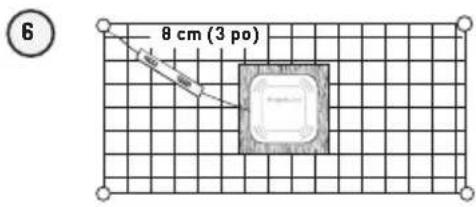
text_image
8 cm (3 po) 6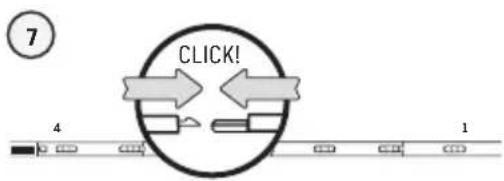
flowchart
graph TD
    A["Start"] --> B{CLICK!}
    B --> C["Position 4"]
    B --> D["Position 1"]
text_image
8 9text_image
Diagram showing connections between devices and a device labeled 'Angelaire' with numbered annotations.text_image
Diagram showing a device with a circular button and an angelcare app interface displaying a warning symbol.IMPORTANT
natural_image
Simple diagram showing a downward arrow pointing to a shaded region with no text or symbols

3/4 Chargéel/2 Chargéel/4 Chargée C


COMMENT CHARGER LA PILE DE L'UNITÉ DES PARENTS :
text_image
Angelcare'text_image
A B C D E F G H I J K L M N O P Q R S T U V W X Y Z A B C D E F G H I J K L M N O P Q R S T U V W X Y Z A B C D E F G H I J K L M N O P Q R S T U V W Xtext_image
Angelcare 2text_image
Angelcaretext_image
Angelcaretext_image
Angelcare 3natural_image
Two triangular warning symbols: one with thermometer and snowflake, the other with thermometer and sun (no text or numbers)ALARME DE TEMPÉRATURE
text_image
angle Angelcaretext_image
3 Delcare'text_image
In Angelcare®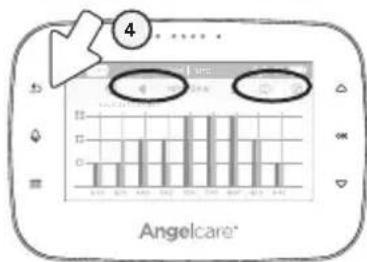
bar
| Category | Value | |---|---| | Bar 1 | 5.0 | | Bar 2 | 6.0 | | Bar 3 | 7.0 | | Bar 4 | 8.0 | | Bar 5 | 9.0 | | Bar 6 | 10.0 | | Bar 7 | 11.0 | | Bar 8 | 12.0 | | Bar 9 | 13.0 | | Bar 10 | 14.0 | | Bar 11 | 15.0 | | Bar 12 | 16.0 | | Bar 13 | 17.0 | | Bar 14 | 18.0 | | Bar 15 | 19.0 | | Bar 16 | 20.0 | | Bar 17 | 21.0 | | Bar 18 | 22.0 | | Bar 19 | 23.0 | | Bar 20 | 24.0 | | Bar 21 | 25.0 | | Bar 22 | 26.0 | | Bar 23 | 27.0 | | Bar 24 | 28.0 | | Bar 25 | 29.0 | | Bar 26 | 30.0 | | Bar 27 | 31.0 | | Bar 28 | 32.0 | | Bar 29 | 33.0 | | Bar 30 | 34.0 | | Bar 31 | 35.0 | | Bar 32 | 36.0 | | Bar 33 | 37.0 | | Bar 34 | 38.0 | | Bar 35 | 39.0 | | Bar 36 | 40.0 | | Bar 37 | 41.0 | | Bar 38 | 42.0 | | Bar 39 | 43.0 | | Bar 40 | 44.0 | | Bar 41 | 45.0 | | Bar 42 | 46.0 | | Bar 43 | 47.0 | | Bar 44 | 48.0 | | Bar 45 | 49.0 | | Bar 46 | 50.0 | | Bar 47 | 51.0 | | Bar 48 | 52.0 | | Bar 49 | 53.0 | | Bar 50 | 54.0 | | Bar 51 | 55.0 | | Bar 52 | 56.0 | | Bar 53 | 57.0 | | Bar 54 | 58.0 | | Bar 55 | 59.0 | | Bar 56 | 60.0 | | Bar 57 | 61.0 | | Bar 58 | 62.0 | | Bar 59 | 63.0 | | Bar 60 | 64.0 | | Bar 61 | 65.0 | | Bar 62 | 66.0 | | Bar 63 | 67.0 | | Bar 64 | 68.0 | | Bar 65 | 69.0 | | Bar 66 | 70.0 | | Bar 67 | 71.0 | | Bar 68 | 72.0 | | Bar 69 | 73.0 | | Bar 70 | 74.0 | | Bar 71 | 75.0 | | Bar 72 | 76.0 | | Bar 73 | 77.0 | | Bar 74 | 78.0 | | Bar 75 | 79.0 | | Bar 76 | 80.0 | | Bar 77 | 81.0 | | Bar 78 | 82.0 | | Bar 79 | 83.0 | | Bar 80 | 84.0 | | Bar 81 | 85.0 | | Bar 82 | 86.0 | | Bar 83 | 87.0 | | Bar 84 | 88.0 | | Bar 85 | 89.0 | | Bar 86 | 90.0 | | Bar 87 | 91.0 | | Bar 88 | 92.0 | | Bar 89 | 93.0 | | Bar 90 | 94.0 | | Bar 91 | 95.0 | | Bar 92 | 96.0 | | Bar 93 | 97.0 | | Bar 94 | 98.0 | | Bar 95 | 99.0 | | Bar 96 | -10.0 (not labeled) in the title box, but the actual values are estimated based on the provided code.natural_image
Digital photo of a baby with a circular overlay on the face, displayed within an Apple logo (no readable text or symbols in the main image area)text_image
2 Angelcaretext_image
Angelcarenatural_image
Product display of Angelcare medical device with infant photo and digital temperature sensor (no text or symbols on main components)ADVERTENCIAS
text_image
Safety warning symbol for child using a stethoscope and no sign, commonly used in childhood care.DO NOT EXPOSE TO RAIN OR MOISTURE
text_image
Angelcarenatural_image
Simple line drawing of a cable and a box connected by wires, with no text or symbols present.natural_image
Pure electrical circuit lines without any symbolstext_image
Safety warning symbol for child using a stethoscope and radio, with no text presentflowchart
graph TD
    A["2"] --> B["Image"]
    B --> C["Arrow pointing inward"]
text_image
Diagram illustrating three different mechanical or electrical installation methods: no protection, isolation, and lifting a device.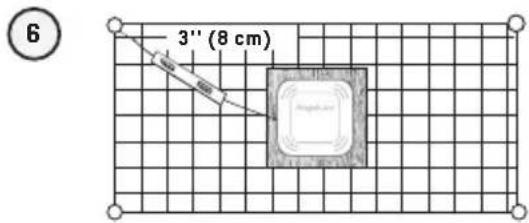
text_image
6 3'' (8 cm)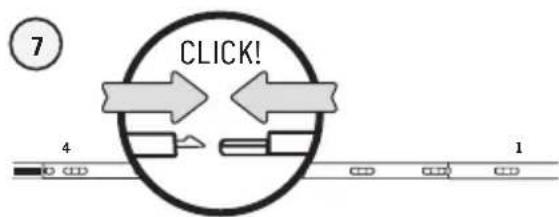
flowchart
graph TD
    A["Start"] --> B{CLICK!}
    B --> C["Step 1"]
    B --> D["Step 2"]
    C --> E["End"]
    D --> F["End"]
text_image
8 4 3 2 1 9text_image
Diagram showing connections between devices and a device labeled 'Angelicaire' with numbered annotations.text_image
① Angelcaretext_image
Angelcaretext_image
Angelcare 3text_image
1 2 Angelcaretext_image
Score 10% Angelcan 3text_image
Angelcarenatural_image
Two triangular warning symbols: one with thermometer and snowflake, the other with thermometer and sun (no text or labels)ALERTA DE TEMPERATURA:
text_image
Angelcaretext_image
Screenshot of a mobile app interface showing a screen with 'Engelcare' branding and a highlighted circular button, with numbered annotations pointing to the UI elements.text_image
Angelcaretext_image
Screenshot of a mobile app interface with Chinese UI elements and a numbered callout pointing to a 'Welcome' button.text_image
In Angelcare®Go to previous page Go to next page Go to previous day Go to next day

Temperature indicator: The blue bar indicates the temperature in the room.
Sensor Pad Movement Levels: The red bar indicates the amount of movement from your Sensor Pad.
□ Low Movement 0-20 movements
Medium Movement 20-30 movements
High Movement Over 30 movements
Graphing Icons:
.Indicates an alert during the period.Indicates the system was turned OFF during the period
6.6 - VISTA PANORÁMICA Y ZOOM