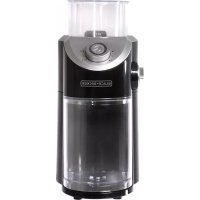
CBM310BD - Coffee grinder BLACK & DECKER - Free user manual and instructions
Find the device manual for free CBM310BD BLACK & DECKER in PDF.



| Product Type | Burr Coffee Grinder |
| Brand | Black & Decker |
| Model | CBM310BD |
| Power Supply | 120 V, 60 Hz |
| Bean Hopper Capacity | Up to MAX line (about 12 cups of beans) |
| Grind Selection | Rotary dial with fine to coarse settings |
| Cup Selector | From 1 to 12 cups |
| Grind Types | Filter, espresso, percolator, plunger |
| Burr Material | Tempered steel |
| Dishwasher-safe parts | Hopper lid, grounds bin lid, grounds bin |
| Housing Cleaning | Wipe with a damp cloth |
| Safety Features | Lid and grounds bin lock, grounded plug |
| Use | Household use only |
| Warranty | 2-year limited (US and Canada) |
| Dimensions (approx.) | 20 × 15 × 30 cm |
| Weight (approx.) | 1.5 kg |
| Customer Service | 1 800 231-9786 (US and Canada) |
Frequently Asked Questions - CBM310BD BLACK & DECKER
User questions about CBM310BD BLACK & DECKER
0 question about this device. Answer the ones you know or ask your own.
Ask a new question about this device
Download the instructions for your Coffee grinder in PDF format for free! Find your manual CBM310BD - BLACK & DECKER and take your electronic device back in hand. On this page are published all the documents necessary for the use of your device. CBM310BD by BLACK & DECKER.
USER MANUAL CBM310BD BLACK & DECKER
natural_image
Exterior view of a modern kitchen grater with glass lid and control panel (no visible text or symbols)CBM310BD

natural_image
Close-up of a pile of brown coffee beans on a white background (no text or symbols visible)Thank you for your purchase!
Rate and review your products at
Share your pictures & stories with us online
Should you have any questions or concerns with your new product, please call our Customer Service Line at 1-800-231-9786 (US and Canada). Please do not return to the store.
Please Read and Save this Use and Care Book.
IMPORTANT SAFEGUARDS.
When using electrical appliances, basic safety precautions should always be followed to reduce the risk of fire, electric shock, and/or injury, including the following:
- Read all instructions prior to use.
- To protect against fire, electrical shock and injury to persons, do not immerse cord, plugs or appliance in any liquids.
- Close supervision is necessary when any appliance is used by or near children.
- Unplug appliance from outlet when not in use.
- Avoid contacting moving parts.
- To reduce the risk of severe injury to persons or damage to the appliance, keep hands and utensils out of the grinding bowl while grinding, and when the appliance is plugged in.
- Blades are sharp. Handle carefully.
- Be certain cover is securely locked in place before operating appliance.
- Do not attempt to defeat the cover interlock mechanism.
- Check container for presence of foreign objects before using.
-
Do not operate any appliance with a damaged cord or plug, or after the appliance malfunctions or has been damaged in any manner. Contact consumer support at the number listed in this manual.
-
The use of accessory attachments that have not been recommended by the appliance manufacturer may result in fire, electric shock or injury to persons.
- Do not use outdoors.
- Do not let cord hang over edge of table or counter, or touch hot surfaces.
- Do not place appliance on or near a hot gas or electric burner, or in a heated oven.
- To disconnect, turn the unit OFF, then remove plug from wall outlet.
- Do not use this appliance for anything other than its intended use.
- This appliance is not intended for use by persons (including children) with reduced physical, sensory or mental capabilities, or lack of experience and knowledge, unless they have been given supervision or instruction concerning use of the appliance by a person responsible for their safety.
- Children should be supervised to ensure that they do not play with the appliance.
SAVE THESE INSTRUCTIONS.
This product is for household use only.
POLARIZED PLUG (120V models only)
This appliance has a polarized plug (one blade is wider than the other). To reduce the risk of electric shock, this plug is intended to fit into a polarized outlet only one way. If the plug does not fit fully into the outlet, reverse the plug. If it still does not fit, contact a qualified electrician. Do not attempt to modify the plug in any way.
TAMPER-RESISTANT SCREW
Warning: This appliance is equipped with a tamper-resistant screw to prevent removal of the outer cover. To reduce the risk of fire or electric shock, do not attempt to remove the outer cover. There are no user-serviceable parts inside. Repair should be done only by authorized service personnel.
ELECTRICAL CORD
- A short power-supply cord is provided to reduce the risk resulting from becoming entangled in or tripping over a longer cord.
- Extension cords may be used if care is exercised in their use.
- If a long detachable extension cord is used:
a) The marked electrical rating of the power cord or extension cord should be at least as great as the electrical rating of the appliance.
b) If the appliance is of the grounded type, the extension cord should be a grounding-type 3-wire cord.
c) The cord should be arranged so that it will not drape over the countertop or tabletop where it can be pulled on by children or tripped over.
Note: If the power cord is damaged, please contact the warranty department listed in these instructions.
WELCOME!
Congratulations on your purchase of the Black + Decker Burr Mill grinder! We have developed this guide to ensure optimal product performance for your complete satisfaction. Save this use and care manual and be sure to register your appliance online at www.prodprotect.com/applica.
CONTENTS
Important Safeguards....3
Table of Contents 4
Getting to know your Burr Mill Grinder 5
Before Grinding....6
Grinding Operations 6
Grinding Guidelines....7
Care and Cleaning 7
Troubleshooting....8
Warranty and Customer Service Information 9
SAVE THESE INSTRUCTIONS.
This product is for household use only.
GETTING TO KNOW YOUR BURR MILL GRINDER\*
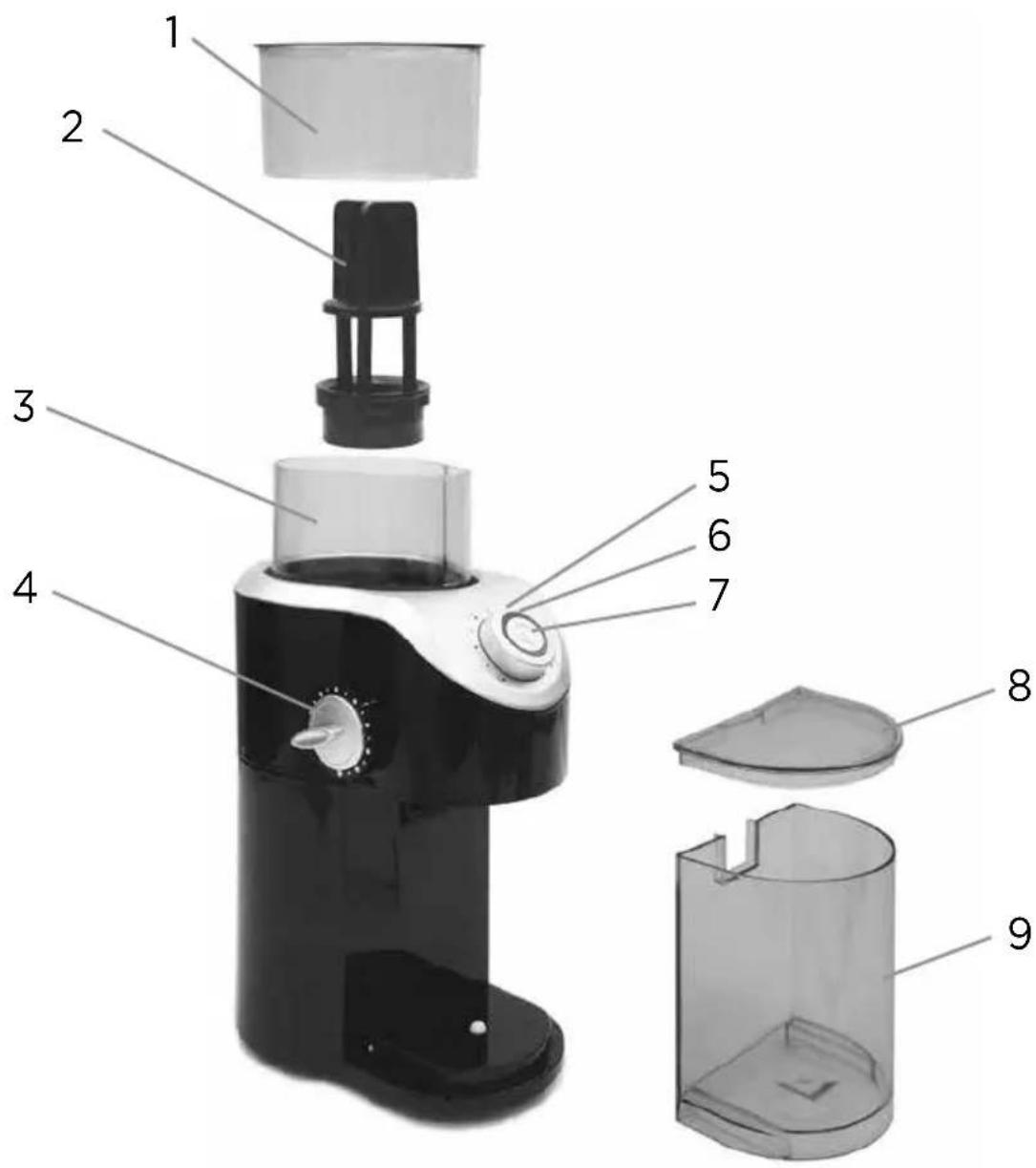
*Product image may vary slightly from actual product appearance.
- Grinding chamber lid (Part # CBM310-01)
- Grinding wheel (Part # CBM310-02)
- Grinding chamber
- Grind selection dial
-
Cup amount selector
-
Power indicator light
- Power button
- Grinding chamber lid (Part # CBM310-03)
- Grounds container (Part # CBM310-01)
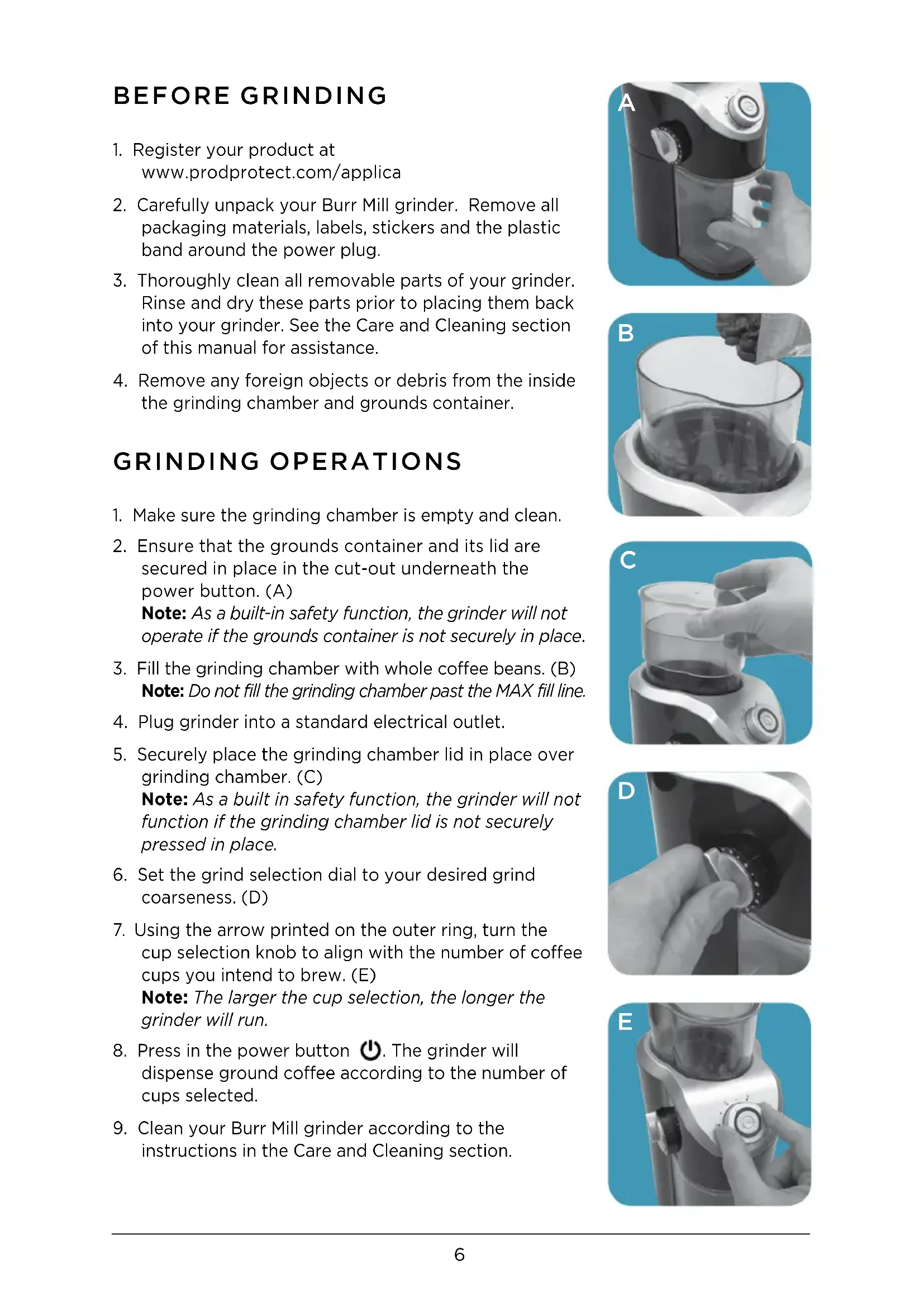
BEFORE GRINDING
- Register your product at www.prodprotect.com/applica
- Carefully unpack your Burr Mill grinder. Remove all packaging materials, labels, stickers and the plastic band around the power plug.
- Thoroughly clean all removable parts of your grinder. Rinse and dry these parts prior to placing them back into your grinder. See the Care and Cleaning section of this manual for assistance.
- Remove any foreign objects or debris from the inside the grinding chamber and grounds container.
GRINDING OPERATIONS
- Make sure the grinding chamber is empty and clean.
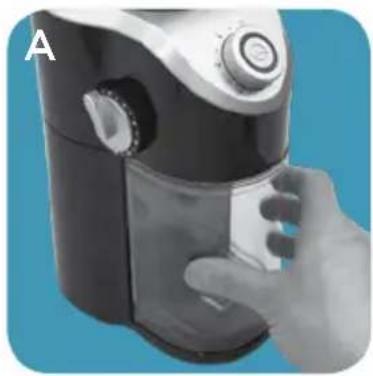
- Ensure that the grounds container and its lid are secured in place in the cut-out underneath the power button. (A)
Note: As a built-in safety function, the grinder will not operate if the grounds container is not securely in place. - Fill the grinding chamber with whole coffee beans. (B)
Note: Do not fill the grinding chamber past the MAX fill line. - Plug grinder into a standard electrical outlet.
- Securely place the grinding chamber lid in place over grinding chamber. (C)
Note: As a built in safety function, the grinder will not function if the grinding chamber lid is not securely pressed in place. - Set the grind selection dial to your desired grind coarseness. (D)
- Using the arrow printed on the outer ring, turn the cup selection knob to align with the number of coffee cups you intend to brew. (E)
Note: The larger the cup selection, the longer the grinder will run. - Press in the power button ⏻. The grinder will dispense ground coffee according to the number of cups selected.
- Clean your Burr Mill grinder according to the instructions in the Care and Cleaning section.
natural_image
Hand holding a black and white portable food blender with control panel (no visible text or symbols)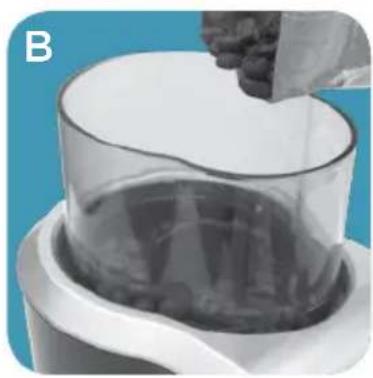
natural_image
Close-up of a hand pouring liquid into a transparent cylindrical container (no text or symbols visible)
natural_image
Hand holding a glass container over a dark liquid, next to a white blender with control buttons (no visible text or symbols)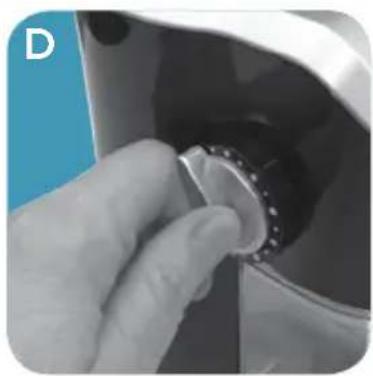
natural_image
Close-up of a hand pressing down on a mechanical component with a knob (no visible text or symbols)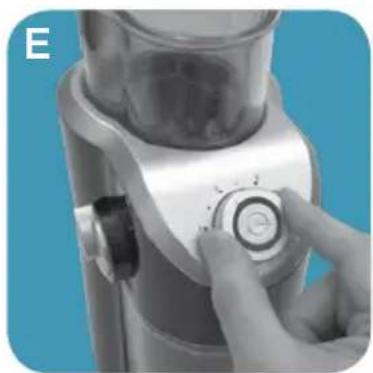
natural_image
Close-up of a hand pressing a button on a mechanical device (no visible text or symbols)GRINDING GUIDELINES
Selecting Grind Setting:
The proper grind is important for the best coffee flavor. The quicker the brewing process, the finer the grind used. Coffee that is ground too fine for a particular brewing process will result in bitter tasting coffee. Coffee that is ground too coarse will result in weak, watery coffee.
| BREW METHOD GRIND APPEARANCE | ||
| Percolator or French Press | Coarse Like Kosher salt | |
| Drip or Vacuum | Medium Like coarse-ground pepper | |
| Espresso | Fine Like fine bread crumbs | |
CARE AND CLEANING
Basic Cleaning
Follow the directions below to clean your Burr Mill grinder after each use.
- Make sure your grinder is unplugged.
- Discard any remaining whole beans from the grinding chamber.
-
Discard any remaining grounds from the grounds container.
-
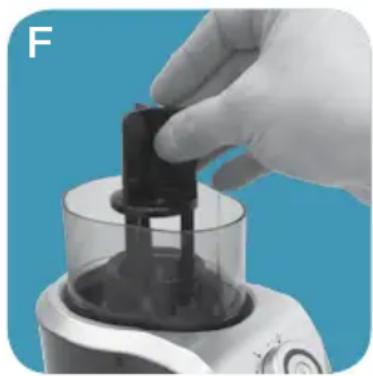
Remove grinding chamber lid, grinding wheel (F), grounds container and grinding chamber lid.
natural_image
Close-up of a hand holding a black plastic container over a kitchen blender (no visible text or symbols)Note: To remove grinding wheel, simultaneously pull and twist grinding wheel clockwise. To insert grinding wheel back into the grinding chamber, push and twist the grinding wheel counter-clockwise.
-
Wipe the outside of the grinder and power cord with a damp cloth.
-
Wash each part of the grinder using the directions in the chart below.
Caution: Do not use abrasive cleansers or scouring pads on this product.
Never immerse this product in water. Do not oil or sharpen the grinding blades.
| GRINDER PART CLEANING INSTRUCTIONS | |
| HousingPower cordGrinding chamberGrinding wheel | Wipe with a soft, damp cloth. |
| Grinding chamber lidGrounds container lidGrounds container | Wash by hand in warm soapy water, or in the dishwasher (top rack only). |
TROUBLESHOOTING
| PROBLEM POSSIBLE | CAUSE SOLUTION | |
| Grinder will not start. | The grinder is not plugged in or outlet is not working. | Plug grinder into a working outlet. |
| The grinding chamber lid is not secured firmly over the grinding chamber. | Align grinding chamber lid over grinding chamber and press down firmly. | |
| The grounds container is not securely placed into the unit. | Remove and replace the grounds container securely into the grinder. | |
| Ground coffee is ejecting from grounds container. | The grounds container lid may not be in place in the unit, on the grounds container. | Ensure the grounds container lid is secured onto the grounds container within the unit. |
| Excessive amount of coffee beans are used. | Do not fill grinding chamber past the MAX fill line to eliminate overflows. | |
| Coffee tastes like nuts or spices or other foods. | Grinder has been used for other grinding operations. | Grinder will share flavors; consider purchasing an additional grinder for grinding other items. |
| Coffee has a poor taste. | Oil in the coffee beans will become rancid if left in the grinder. | Be sure to clean the grinder immediately following each use. |
| The fine/coarse selector is not working. | The grinding wheel is not correctly positioned into the unit. | Remove, clean, and replace the grinding wheel in the grinder. Ensure that it is securely in place. |
If additional assistance is needed, please contact our consumer service team at 1-800-231-9786.
WARRANTY AND CUSTOMER SERVICE INFORMATION
For service, repair or any questions regarding your appliance, call the appropriate 800 number listed within this section. Please DO NOT return the product to the place of purchase. Also, please DO NOT mail product back to manufacturer, nor bring it to a service center. You may also want to consult the website listed on the cover of this manual.
Two-Year Limited Warranty (Applies only in the United States and Canada)
What does it cover?
- Any defect in material or workmanship provided; however, Spectrum Brands, Inc.'s liability will not exceed the purchase price of product.
For how long?
- Two years from the date of original purchase with proof of purchase.
What will we do to help you?
- Provide you with a reasonably similar replacement product that is either new or factory refurbished.
How do you get service?
- Save your receipt as proof of date of sale.
- Visit the online service website at www.prodprotect.com/applica, or call toll-free 1-800-231-9786, for general warranty service.
- If you need parts or accessories, please call 1-800-738-0245.
What does your warranty not cover?
• Damage from commercial use
- Damage from misuse, abuse or neglect
- Products that have been modified in any way
- Products used or serviced outside the country of purchase
- Glass parts and other accessory items that are packed with the unit
- Shipping and handling costs associated with the replacement of the unit
- Consequential or incidental damages (Please note, however, that some states do not allow the exclusion or limitation of consequential or incidental damages, so this limitation may not apply to you.)
How does state law relate to this warranty?
- This warranty gives you specific legal rights. You may also have other rights that vary from state to state or province to province.
natural_image
Hand holding a black and white portable food blender against a blue background (no text or symbols visible)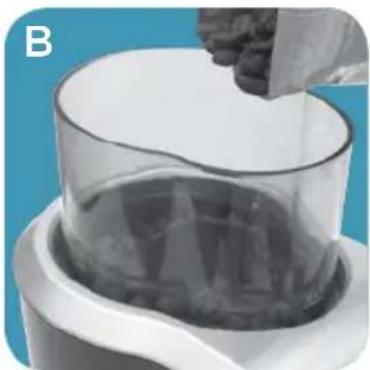
natural_image
Close-up of a hand pouring dark granular material into a transparent cylindrical container (no text or symbols visible)
natural_image
Hand holding a glass container with liquid, next to a kitchen blender (no visible text or symbols)
natural_image
Close-up of a hand pressing down on a mechanical component with a knob (no visible text or symbols)
natural_image
Close-up of a hand pressing a button on a kitchen blender (no visible text or symbols)GUÍA PARA LA MOLIENDA
natural_image
Close-up of a hand holding a black plastic container over a digital kitchen appliance (no visible text or symbols)MISES EN GARDE IMPORTANTES.
natural_image
Hand holding a kitchen blender with control panel (no visible text or symbols)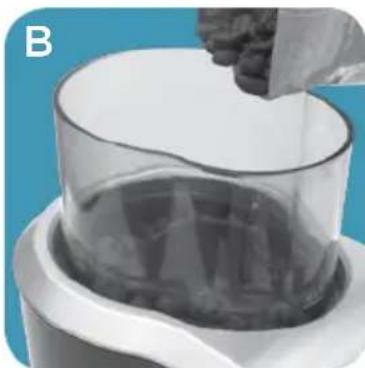
natural_image
Close-up of a hand pouring liquid into a transparent cylindrical container (no text or symbols visible)
natural_image
Hand holding a glass container over a coffee maker, against a blue background (no text or symbols visible)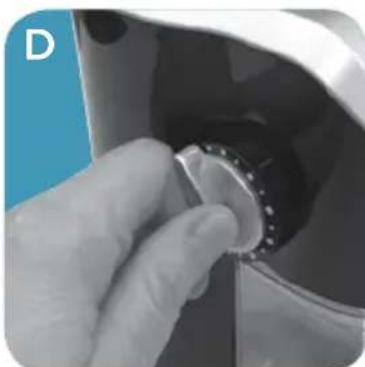
natural_image
Close-up of a hand turning a circular knob into a black container (no text or symbols visible)
natural_image
Close-up of a hand operating a kitchen blender with a circular button (no visible text or symbols)LIGNES DIRECTRICES POUR EFFECTUER LA MOUTURE
natural_image
Close-up of a hand holding a small black object into a clear container, against a blue background (no text or symbols visible)DÉPANNAGE
San Jose, Costa Rica
Tel. (506) 257-5716 / 223-0136
administracion@masterecuador.com
Ecuador
Col. Centro, Cuauhtemoc,
México, D.F.
Tel. 01 800 714 2503
Nicaragua
ServiTotal
City Market Nivel Plaza Local 153
Diagonal Hotel Melia,
Caracas.
Tel. (582) 324-0969
www.applicaservice.com
servicio@applicamail.com
natural_image
Glass mug filled with dark coffee, showing a gentle smile and foam covering (no text or symbols visible)© 2014 The Black + Decker Corporation and Spectrum Brands, Inc., Middleton, WI 53562
Made in People's Republic of China Fabricado en la República Popular de China Fabriqué en République populaire de Chine
BLACK+DECKER and the BLACK+DECKER logo are trademarks of The Black + Decker Corporation and are used under license. All rights reserved. BLACK+DECKER y el logo tipo BLACK+DECKER son marcas registradas de The Black + Decker Corporation y son utilizados bajo licencia. Todos los derechos reservados. BLACK + DECKER et le logo BLACK &+DECKER sont des marques de commerce de The Black + Decker Corporation, et sont utilisés sous licence. Tous droits réservés.

- Thank you for your purchase!
- Please Read and Save this Use and Care Book.
- IMPORTANT SAFEGUARDS.
- SAVE THESE INSTRUCTIONS.
- POLARIZED PLUG (120V models only)
- TAMPER-RESISTANT SCREW
- ELECTRICAL CORD
- WELCOME!
- CONTENTS
- GETTING TO KNOW YOUR BURR MILL GRINDER\*
- BEFORE GRINDING
- GRINDING OPERATIONS
- GRINDING GUIDELINES
- Selecting Grind Setting:
- CARE AND CLEANING
- Basic Cleaning
- WARRANTY AND CUSTOMER SERVICE INFORMATION
- Two-Year Limited Warranty (Applies only in the United States and Canada)
- What does it cover?
- For how long?
- What will we do to help you?
- How do you get service?
- What does your warranty not cover?
- How does state law relate to this warranty?
- GUÍA PARA LA MOLIENDA
- MISES EN GARDE IMPORTANTES.
- LIGNES DIRECTRICES POUR EFFECTUER LA MOUTURE
- Ecuador
- Nicaragua
Brand : BLACK & DECKER
Model : CBM310BD
Category : Coffee grinder