CMNET 6182XWIFI - Fridge CANDY - Free user manual and instructions
Find the device manual for free CMNET 6182XWIFI CANDY in PDF.



| Brand | Candy |
| Model | CMNET 6182XWIFI |
| Product type | Refrigerator with freezer |
| Power supply | 220-240 V, 50 Hz |
| Climate class | SN, N, ST, T (see label) |
| Gross capacity of refrigerator | Approximately 400 L (estimate) |
| Gross capacity of freezer | Approximately 100 L (estimate) |
| Refrigerant gas | R600a (isobutane) |
| Insulation gas | Cyclopentane |
| Main functions | SmartFIT+ Wi-Fi, touch screen, Fast Cooling, Fast Freezing, Smart ECO, Vacation, antibacterial (depending on model), water dispenser |
| Temperature control | Electronic via control panel |
| Defrost type | Automatic (No Frost) |
| Alarms | Open door, freezer overheating, sensor error |
| Child safety | Touch lock (Lock) |
| Interior maintenance | Water with baking soda |
| Exterior maintenance | Standard cleaning product |
| Door reversal | Possible, recommend contacting a technician |
| Repairability | Authorized after-sales service |
Frequently Asked Questions - CMNET 6182XWIFI CANDY
User questions about CMNET 6182XWIFI CANDY
0 question about this device. Answer the ones you know or ask your own.
Ask a new question about this device
Download the instructions for your Fridge in PDF format for free! Find your manual CMNET 6182XWIFI - CANDY and take your electronic device back in hand. On this page are published all the documents necessary for the use of your device. CMNET 6182XWIFI by CANDY.
USER MANUAL CMNET 6182XWIFI CANDY
SAFETY INFORMATION 29
COMBI REFRIGERATOR CANDY 36
Climate Class 36
TRANSPORTATION INSTRUCTIONS 36
INSTALLATION INSTRUCTIONS 37
STARTING TO USE 37
COMBI OPERATION 38
VERTICAL DISPLAY 38
ROUNDED DISPLAY 40
INTERNAL USER INTERFACE 41
TECHNICAL FEATURES 42
Freshness Control 42
ANTIBACTERIAL SYSTEM (if present) 42
WATER DISPENSER 42
Tips for keeping food perfect in the Fridge 43
Where to store your foods in the fridge 43
Storing Frozen Food 44
ENERGYSAVING 45
TAKE CARE. 45
Defrosng 45
Cleaning and Care 45
CHANGING THE INTERNAL LIGHT 46
REVERSING THE DOOR SWING 46
TROUBLESHOOTING 51
Thank you for purchasing this product.
Before using your refrigerator, please carefully read this instrucon manual in order to maximize its performance. Store all documentaon for subsequent use or for other owners. This product is intended solely for household use or similar applicaons such as:
- the kitchen area for personnel in shops, oces and other working environments
- on farms, by clientele of hotels, motels and other environments of a residential type
- at bed and breakfasts (B & B)
- for catering services and similar applicaons not for retail sale.
This appliance must be used only for purposes of storage of food, any other use is considered dangerous and the manufacturer will not be responsible for any omissions. Also, it is recommended that you take note of the warranty conditions. Please, to obtain the best possible performance and trouble free operation from your appliance it is very important to carefully read these instrucons. Failure to observe these instrucons may invalidate your right to free service during the guarantee period.
SAFETY INFORMATION
This guide contains many important safety informaon. Please, we suggest you keep these instrucons in a safe place for easy reference and a good experience with the appliance.
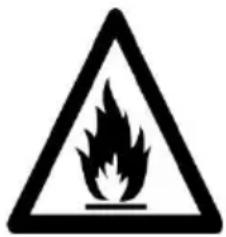
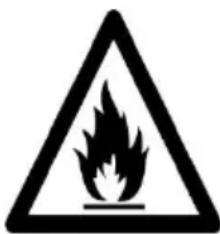
The refrigerator contains a refrigerant gas (R600a: isobutane) and insulang gas (cyclopentane), with high compatibility with the environment, that are, however, inammable.
Cauon: risk of re
If the refrigerant circuit should be damaged:
- Avoid opening ames and sources of ignion.
Thoroughly venlate the room in which the appliance is situated
WARNING!
- Care must be taken while cleaning/carrying the appliance to avoid touching the condenser metal wires at the back of the appliance, as you might injure your ngers and hands or damage your product.
- This appliance is not designed for stacking with any other appliance. Do not aempt to sit or stand on top of your appliance as it is not designed for such use. You could injure yourself or damage the appliance.
- Make sure that mains cable is not caught under the appliance during and aer carrying/moving the appliance, to avoid the mains cable becoming cut or damaged.
- When posing your appliance take care not to damage your ooring, pipes, wall coverings etc. Do not move the appliance by pulling by the lid or handle. Do not allow children to play with the appliance or tamper with the controls. Our company declines to accept any liability should the instrucons not be followed.
- Do not install the appliance in humid, oily or dusty places, nor expose it to direct sunlight and to water.
- Do not install the appliance near heaters or inammable materials.
- If there is a power failure do not open the lid.
Frozen food should not be aected if the failure lasts for less than 20 hours. If the failure is longer, then the food should be checked and eaten immediately or cooked and then refrozen.
- If you nd that the lid of the chest freezer is difficult to open just aer you have closed it, don't worry. This is due to the pressure dience which will equalize and allow the lid to be opened normally aer a few minutes.
- Do not connect the appliance to the electricity supply uncl all packing and transit protectors have been removed.
- Leave to stand for at least 4 hours before switching on to allow compressor oil to sele if transported horizontally.
- This freezer must only be used for its intended purpose (i.e. storing and freezing of edible foodstu).
- Do not store medicine or research materials in the Wine Coolers. When the material that requires a strict control of storage temperatures is to be stored, it is possible that it will deteriorate or an uncontrolled beacon may occur that can cause risks.
- Before performing any operacon, unplug the power cord from the power socket.
- On delivery, check to make sure that the product is not damaged and that all the parts and accessories
are in perfect condition.
- If in the refrigereraon system a leak is noted, do not touch the wall outlet and do not use open ames. Open the window and let air into the room. Then call a service center to ask for repair.
- Do not use extension cords or adapters.
- Do not excessively pull or fold the power cord or touch the plug with wet hands.
- Do not damage the plug and/or the power cord; this could cause electrical shocks or res.
- If the supply cord is damaged, it must be replaced by the manufacturer, its service agent or similarly qualified person in order to avoid a hazard.
- Do not place or store inammable and highly volale materials such as ether, petrol, LPG, propane gas, aerosol spray cans, adhesives, pure alcohol, etc. These materials may cause an explosion.
- Do not use or store inammable sprays, such as spray paint, near the Wine Coolers. It could cause an explosion or re.
- Do not place objects and/or containers lled with water on the top of the appliance.
- We do not recommend the use of extension leads and mul-way adapters.
- Do not dispose of the appliance on a re. Take care not to damage, the cooling circuit/pipes of the appliance in transportaon and in use. In case of
damage do not expose the appliance to re, potenal ignion source and immediately venlate the room where the appliance is situated.
- The refrigeration system posioned behind and inside the Wine Coolers contains refrigerant. Therefore, avoid damaging the tubes.
- Do not use electrical appliances inside the food storage compartments of the appliance, unless they are of the type recommended by the manufacturer.
- Do not damage the refrigerant circuit.
- Do not use mechanical devices or other means to accelerate the defrosng process, other than those recommended by the manufacturer.
- Do not use electrical appliances inside the food storage compartments, unless they are of the type recommended by the manufacturer.
- Do not touch internal cooling elements, especially with wet hands, to avoid cracks or injuries.
- Maintain the venlaon openings in the appliance enclosure or in the built-in structure, free of obstrucon.
- Do not use pointed or sharp-edged objects such as knives or forks to remove the frost.
- Never use hairdryers, electrical heaters or other such electrical appliances for defrosng.
- Do not scrape with a knife or sharp object to
remove frost or ice that occurs. With these, the refrigerant circuit can be damaged, the spill from which can cause a re or damage your eyes.
- Do not use mechanical devices or other equipment to hasten the defrosng process.
- Absolutely avoid the use of open ame or electrical equipment, such as heaters, steam cleaners, candles, oil lamps and the like in order to speed up the defrosng phase.
- Never use water wash the compressor posion, wipe it with a dry cloth thoroughly aer cleaning to prevent rust.
It is recommended to keep the plug clean, any excessive dust residues on the plug can be the cause re. - The product is designed and built for domestic household use only.
- The guarantee will be void if the product is installed or used in commercial or non-residential domesc household premises.
- The product must be correctly installed, located and operated in accordance with the instrucons contained in the User Instrucons Booklet provided.
- The guarantee is applicable only to new products and is not transferable if the product is resold.
-
Our company disclaims any liability for incidental or consequential damages.
-
The guarantee does not in any way diminish your statutory or legal rights.
- Do not perform repairs on this Wine Coolers. All intervenons must be performed solely by qualified personnel.
- If you are discarding an old product with a lock or latch ed to the door, ensure that it is le in a safe condion to prevent the entrapment of children.
- This appliance can be used by children aged from 8 years and above and by persons with reduced physical, sensory or mental capabilities or with a lack of experience and knowledge; provided that they have been given adequate supervision or instrucon concerning how to use the appliance in a safe way and understand the hazards involved.
Children should not play with the appliance.
Cleaning and user maintenance should not be made by children without supervision.
- Locks: If your Fridge/Freezer is ed with a lock, to prevent children being entrapped keep the key out of reach and not in the vicinity of the appliance. If disposing of an old Fridge/Freezer break o any old locks or latches as a safeguard.
COMBI REFRIGERATOR CANDY
Climate Class
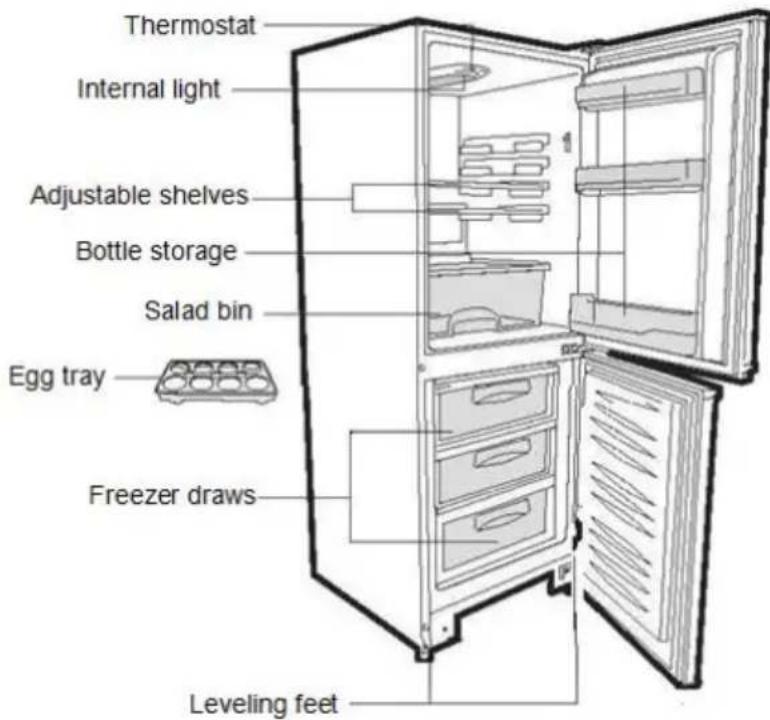
The appliance is designed to operate at the limited range of ambient temperature, depending on climate zones. Do not use the appliance at the temperature out of the limit. Climate class of your appliance is indicated on the label with technical descripon inside the fridge compartment.
| Climate Class | Amb. T. (°C) | Amb. T. (°F) |
| SN | From 10 to 32 | From 50 to 90 |
| N | From 16 to 32 | From 61 to 90 |
| ST | From 16 to 38 | From 61 to 100 |
| T | From 16 to 43 | From 61 to 110 |
TRANSPORTATION INSTRUCTIONS
The appliance should be transported only in a vercal upright posion. The packing as supplied must be intact during transportaon. If during the course of transport the product has been transported horizontally, it must only be laid on its le hand side (when facing the door front) and it must not be operated for at least 4 hours to allow the system to sele aer the appliance is brought back to upright posion.
- Failure to comply with the above instrucons could result in damage occurring to the appliance. The manufacturer will not be held responsible if these instrucons are disregarded.
- The appliance must be protected against rain, moisture and other atmospheric influences.
INSTALLATION INSTRUCTIONS
- If possible avoid placing the appliance near cookers, radiators or in direct sunlight as this will cause the compressor to run for long periods. If installed next to a source of heat or refrigerator, maintain the following minimum side clearances:
From Cookers 4^ (100 mm)
From Radiators 12" (300 mm)
From Fridges 4^ (100 mm)
- Make sure that sufficient room, with an average temperature of between 16^ and 32^ , is provided around the appliance to ensure free air circulaon. Ideally, a space of no less than 9cm on the back and 2cm on the sides.
- The appliance should be located on a smooth surface.
- It is forbidden to use the refrigerator outdoors.
- Protecon from moisture. Do not locate the freezer in moist space to avoid the metal parts rusty. And do not spray water to the freezer, otherwise it will weaken the insulaon and causes current leakage.
- Refer to "Cleaning and Care" secon to prepare your appliance for use.
- If the freezer is installed in unheated areas, garages etc., in cold weather condensaon may form on the outer surfaces. This is quite normal and is not a fault. Remove the condensaon by wiping with a dry cloth.
- Never place Refrigerator in a wall recessed or into fied cabinets or furniture when it is working, the grille at the back may become hot and the sides warm. Do not drape the Refrigerator with any covering.
STARTING TO USE
Before you starng to use the freezer, please check that:
- The interior is dry and air can circulate freely at the rear.
- Clean the interior as recommended under "TAKE CARE" secon (electric parts of the refrigerator can only be wiped by dry cloth).
- Do not switch on unl 4 hours aer moving the fridge/freezer. The coolant uid needs me to sele. If the appliance is switched o at any me, wait 30 minutes before switching back on to allow the coolant uid to sele.
- Before connecng the Refrigerator to the mains supply posion. The thermostat control dias is located inside the Fridge compartment.
- Turn the thermostat knob to the "3" posion and turn on the electricity. The compressor and the light inside the refrigerator will begin to work.
- Before storing foods in your refrigerator, turn the refrigerator on and wait for 24 hours, to make sure it is working properly and to allow the Fridge/Freeze to fail to the correct temperature.
- Open the door 30 minutes later, if the temperature in the refrigerator decreased obviously, it shows that the refrigerator system works well. When the refrigerator operates for a period of me, the temperature controller will automatically set the temperature within limits it opens.
COMBI OPERATION
Appliance connected to power at the rst me: When the appliance is connected to power at the rst me, the display will be lit for 2 seconds before going normal and the appliance runs with intelligence funcon.
Display Control: When the refrigerator door is closed and there is no buon operaoon in 3 minutes, the display light goes o.
When the display light is o, open the refrigerator door or click any buon to light it up.
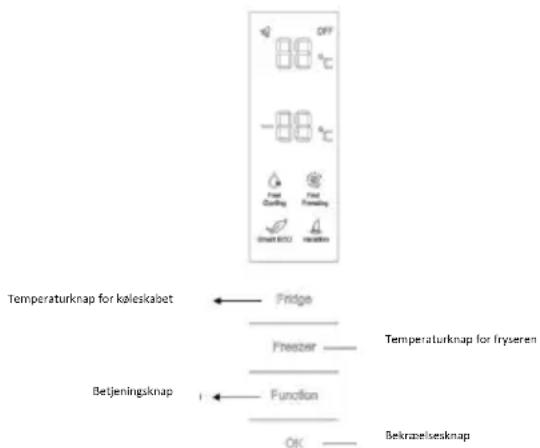
VERTICAL DISPLAY
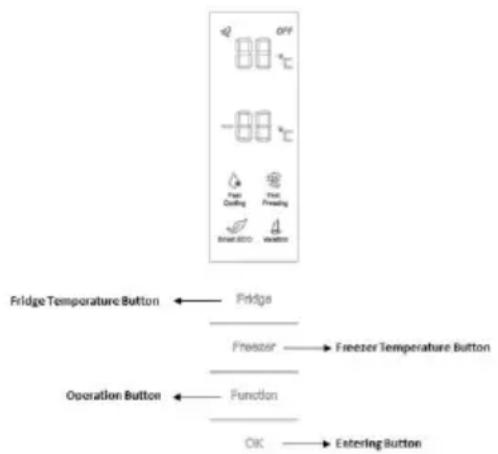
TEMPERATURE SETTING: Click the "Fridge" or "Freezer" buon and when it ickers in the symbol, temperatures can be set. Each me when the buon is clicked, the temperature changes accordingly. Temperatures cannot be set under funcons of fast cooling, fast freezing, Smart ECO and vacaon. Under temperature seng, if there is no buon operaoin 5 seconds, the buon stops ickering and the set temperature comes into eect.
SMART ECO: Acvate the Smart Eco buoy to set the temperatures of the fridge in max. energy ciency conditions (+4^ for fridge temperature, -18^ for freezer temperature).
To enter Smart Eco: Click "opon" unll it ickers and then click "OK" to enter this funcon.
To deactivate Smart Eco: Click "open" until it goes to Smart ECO, click "OK" to quit this function and the light goes o.
FAST COOLING: Acvate Fast Cooling mode to start an additional pulse for a fast freezing of the fridge compartment. The funcon is acvated and conmed by the switching on of the dedicated LED icon.
To enter Fast Cooling: Click "opon" unl it ickers in "Fast Cooling" and then click "OK" to enter this funcon.
To deactivate Fast Cooling: Click "opon" unl it goes to "fast cooling" and then click "OK" to deactivate this funcon.
FAST FREEZING: Acvate Fast Freezing to rapidly freeze big quanes of food keeping intact nutritional food properes. When the light in Fast Freezing goes o and the freezer temperature goes back to the value before fast freezing. When Fast Freezing me is up (26 hours), it deacvates automatically. When it goes to Vacaon, Fast Freezing stops.
To enter Fast Freezing: Click "opon" unll it ickers in "Fast Freezing" and then click "OK" to enter
this funcon.
To deactivate Fast Freezing: Click "open" until it goes to "fast freezing" and then click "OK" to quit this funcon.
VACATION: In case of long stops, the Vacaon funcon can be used. This funcon deacvates the fridge compartment, while leaving the freezer on. Ensure that there is no food inside the fridge compartment before using this funcon. The funcon is acvated and conrrmed by the switching on of the dedicated LED icon. The light in Vacaon goes o and the refrigerator temperature goes back to the value before Vacaon.
Vacacon quits under funcons of Smart ECO and Fast Cooling.
To enter Vacaon: Click "open" unll it ickers in "Fast Freezing" and then click "OK" to enter this funcon.
To deactivate Vacaon: Click "opon" unl it goes to "Vacaon" and then click "OK" to quit this funcon.
POWER OFF MEMORY: Refrigerator can automatically keep all the seng in case of power o.
When the unit is plugged in again, the refrigerator will run with the seng before power o.
POWER-ON DELAY: To prevent harm to the refrigerator in case of sudden power cut and power on, the unit does not start immediately if the power o me is less than 5 minutes.
FREEZER OVER-TEMPERATURE ALARM (only in case of power on): When the freezer temperature is higher than 10^ Cat the rst me connected to power, the symbol light of the freezer chamber goes on and the number representing temperature ickers.
Press any buoy or wait for 5 seconds, ickering stops and it goes back to the temperature that was set.
REFRIGERATOR DOOR OPENING ALARM: When the refrigerator is open over 3 minutes, the buzzer will buzz. Close the door or press any buoy to stop the alarm, but for the laer, the alarm will go o again aer 3 minutes.
SENSOR FAULT ALARM: When it shows "E0", "E1", "E2" or other abnormal symbols, it means sensor faults and the refrigerator needs repair.
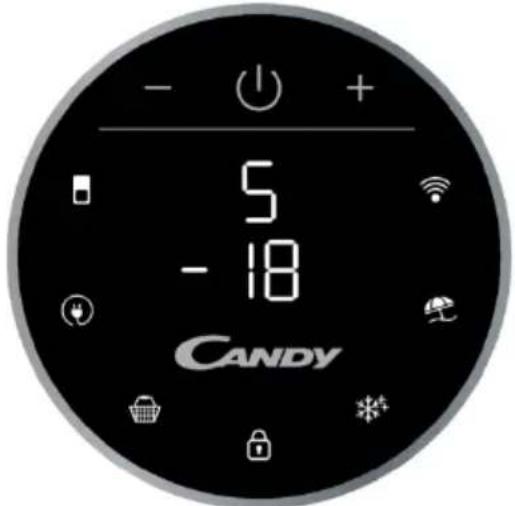
ROUNDED DISPLAY
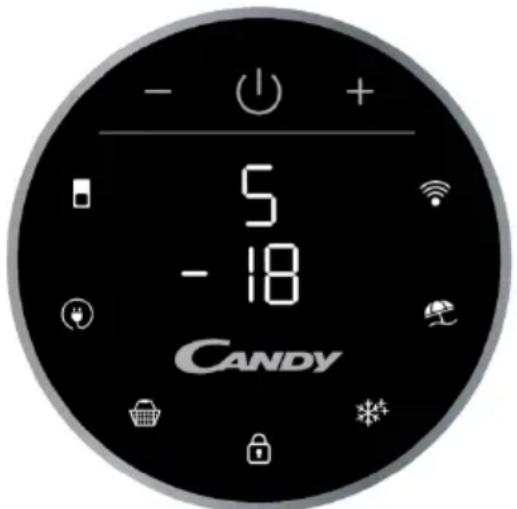
Rounded Display is a touch user interface. When the refrigerator is turned on, white LED lights will be enlightened. When the funcons is pressed the icon lights change from white to blue.
SETTING TEMPERATURE: Press MODE icon to change the temperature
- Refrigerator Temperature: Press one me MODE icon, refrigerator digit blinks, and manage temperature of refrigerator with "+" and "-" buons.
-Freeze Temperature: Press two mes MODE icon, freezer digit blinks, and manage temperature of freezer with "+" and "-" buons.
ECO MODE Icon: Press Eco Mode icon to set temperatures of the fridge in max. energy eciency conditions (+5^ for fridge temperature, -18^ for freezer temperature). The funcon is acvated and conrrmed when the icon LED changes from white to blue.
If you want to exit the ECO mode funcon, you need to press the Eco Mode icon again and the refrigerator temperature turns back to normal operaoon.
SUPER COOLING Icon: Press Super Cooling icon to start an additional pulse for a fast freezing of the fridge compartment. The funcon is acvated and conrrmed when the icon LED changes from white to blue.
If you want to exit the Super Cooling funcon, you need to press the Super Cooling icon again and refrigerator temperature turns back to normal operaoon.
LOCK Icon: Press Lock icon to block display user interface. If the lock funcon is selected, the icon (LED) should turn into blue. When Lock funcon is turned on the user cannot set any new funcons. To turn o Lock funcon, the user must perform a long press on the icon for 3 seconds to unlock display.
SUPER FREEZING Icon: Press Super Freezing icon to rapidly freeze big quanes of food keeping intact nutritional food properes. The funcon is acvated and conrrmed when the icon LED changes from white to blue.
If you want to exit the Super Freezing funcon, you need to press the Super Freezing icon again and the freezer temperature turns back to normal operaoon.
HOLIDAY Icon: In case of long stops, the Holiday funcon can be used. This funcon deacvates the fridge compartment, while leaving the freezer on. Ensure that there is no food inside the fridge compartment before using this funcon. The funcon is acvated and conrrmed when the icon LED changes from white to blue.
If you want to exit the Holiday funcon, you will need to press the Holiday icon again, the light in Holiday goes o and the refrigerator temperature goes back to the value before Holiday.
Wi-Fi Icon: This appliance is equipped with SmartFi+ technology that allows you to control it remotely via App. Press Wi-Fi icon for 3 seconds to acvate Wi-Fi funcon and the icon light changes from white to blue.
Machine Enrollment (on App): Download the SimplyFi App on your device. The Candy SimplyFi App is available for devices running both Android and iOS, both for tablets and for smartphones. Get all the details of the SmartFi+ funcons by browsing the App in DEMO mode.
Open the App, create the user prole and enroll the appliance following the instrucons on the device display or the "Quick Guide" aached on the machine. This operacon is necessary just for the rst installaon. To finalize the enrollment following the instrucon on the smartphone's screen.
Refrigerator usage from remote by App: When the enrollment is completed, there will be Wi-Fi LED switched on. From now on it will be possible to manage the product by using the buons on the display or using the App: both of them will be aligned according to the last command given.
INTERNAL USER INTERFACE

SET Buon: Press SET button for setting the temperature until you reach the level you want where level 1 is the warmest and level 4 is the coldest. Under normal operating conditions, we recommend using an intermediate setting (level 2).
Once the seng takes eect, it immediately enters the corresponding stall for operon control, and the stall indicator lights up 3s3min and then goes out. Factory default temperature is set to 2. Long press "SET" key to exceed 3s and enter the hardware self-check program. The hardware self-check operon is eecve within 10min, and the long buon operon aer 10min is invalid.
Wi-Fi Buon: This appliance is equipped with SmartFi+ technology that allows you to control it remotely via App. Press Wi-Fi icon for 3 seconds to acvate Wi-Fi funcon and the icon light changes from white to blue.
Machine Enrollment (on App): Download the SimplyFi App on your device. The Candy SimplyFi App is available for devices running both Android and iOS, both for tablets and for smartphones. Get all the details of the SmartFi+ funcons by browsing the App in DEMO mode.
Open the App, create the user prole and enroll the appliance following the instrucons on the device display or the "Quick Guide" aached on the machine. This operacon is necessary just for the rst installaon. To finalize the enrollment following the instrucon on the smartphone's screen.
Refrigerator usage from remote by App: When the enrollment is completed, there will be Wi-Fi LED switched on. From now on it will be possible to manage the product by using the buons on the display or using the App: both of them will be aligned according to the last command given.
FAST COOL Button: when "FAST COOL" buon is pressed, rapid cooling funcon is acvated, according to the 21^ to refrigereraon control gear. Maximum running me is 3h, aer this me temperature will be set to 1.
If the "SET" buon is pressed in the process of speed cooling, the instant cooling funcon is immediately withdrawn and the default is entered into the next gear.
TECHNICAL FEATURES
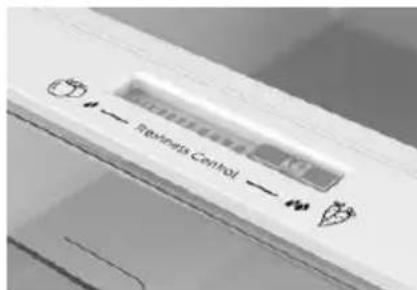
FRESHNESS CONTROL
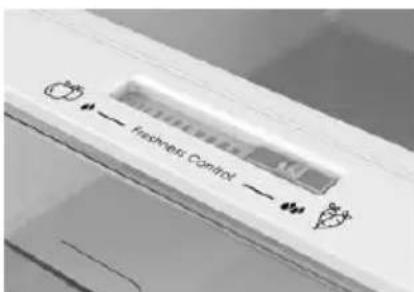
Thanks to freshness control, you can guarantee the right humidity level for vegetables and fruits in the risper drawer (Fresh drawer). The humidity gets bigger as the rod goes from le to right.
ANTIBACTERIAL SYSTEM (if present)
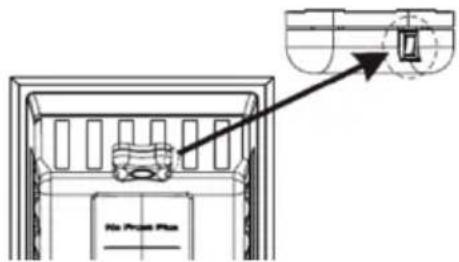
LED UVA Lights acvate a Titanium Filter producing a "photocatalysis" reacon which will destroy bacteria within the refrigerator air. This reacon works when the refrigerator door is closed to avoid puried air leakage.
In Total No Frost products, it is inserted in sky box and it works every me the compressor works. Filter is permanent and therefore does not need changing.
The antibacterial system has to be turned o during the energy consumpon test.
WATER DISPENSER
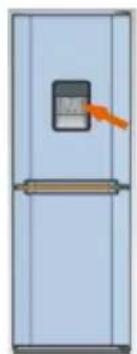
The water dispenser allows you to get chilled water without opening the fridge compartment door.
Before rst use
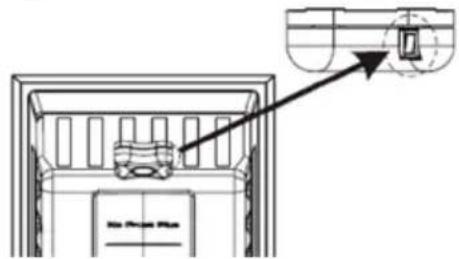
Before using the water dispenser for the rst me, remove and clean the water tank located inside the fridge compartment.
-
Li the water tank out of the fridge compartment.
-
Open the water tank cover and then clean the water tank and cover in warm soapy water. Rinse thoroughly.
-
Aer cleaning, aach the cover to the water tank and then replace the water tank back on the fridge door.
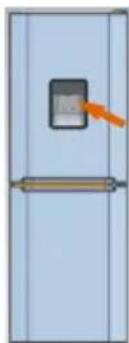
- Clean the dispenser pad outside the fridge door.
Filling the water tank with water
- Open the small cover.
- Fill the water tank with drinkable water up to the Max line.
- Close the small cover.
Dispensing
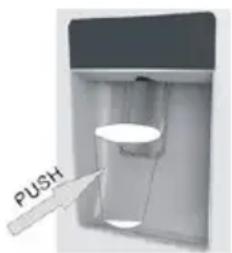
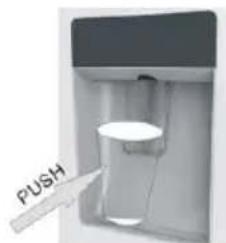
To dispense water, push the dispenser pad gently, using a glass or container. To stop the ow of water, pull your glass away from the dispenser pad.
Tips for keeping food perfect in the Fridge
Take extra care with meat and sh: cooked meats should always be stored on a shelf above raw meats to avoid bacterial transfer. Keep raw meats on a plate which is large enough to collect juices and cover it with cling Im or foil.
Leave space around food: this allows cold air to circulate around the Fridge, ensuring all parts of the Fridge are kept cool.
Wrap up food! to prevent transfer of avors and drying out, food should be separately packed or covered. Fruit and vegetables need not be wrapped.
Pre-cooked food should be cooled properly: allow pre-cooked food to cool down before placing in the Fridge. This will help to stop the internal temperature of the Fridge from rising.
Shut the door! to prevent cold air escaping, try to limit the number of mes you open the door. When retuning from shopping, sort foods to be kept in your Fridge before opening the door. Only open the door to put food in or take it out.
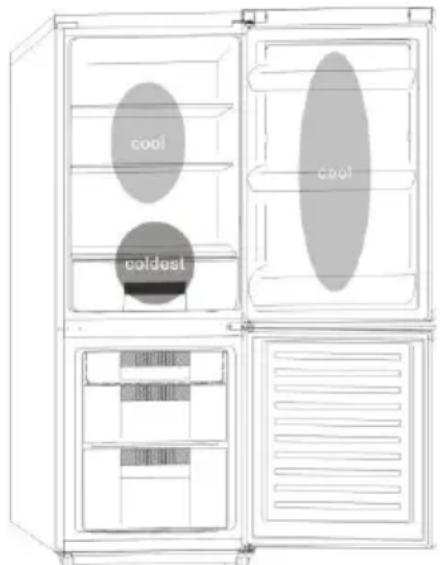
Where to store your foods in the fridge
Cool area: this is where to store foods which will keep longer if they are kept cool. Milk, eggs, yogurt, fruit juices, hard cheeses eg. Cheddar. Opened jars and boles of salad dressings, sauces and jams. Fats, eg. Buer, margarine, low-fat speads, cooking fats and lard.
Coldest area (0^ to 5^) : this is where foods which must be cold to keep them safe should be kept:
Raw and uncooked foods should always be wrapped.
-Pre-cooked chilled foods, eg. Ready meals, meat pies, so cheeses.
-Pre-cooked meats eg. Ham,
- Prepared salads(including pre-packed mixed green salads, rice, potato salad etc).
Desserts, eg. Fromage frais, home-prepared food and leovers or cream cakes.
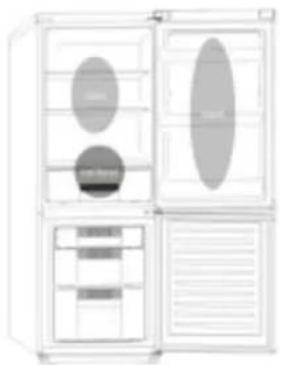
Crisper: this is the most humid part of the Fridge. Vegetables, fruit, fresh salad items, Unwashed whole lettuce, whole tomatoes, radishes etc can be stored here.
WE RECOMMEND THAT ALL PRODUCE KEPT IN THE SALAD BIN IS WRAPPED.
NOTES: Always wrap and store raw meat, poultry and fish on the lowest shelf at the bottom of the fridge. This will stop them dripping onto, or touching other foods. Do not store inflammable gasses or liquids in the fridge.
Electrical operation after 3h on the freezer, the temperature in the cabinet above -12°C, the alarm light is lit, and buzzer sounds.
Storing Frozen Food
| Clean and defrost your refrigerator regularly. | Freeze zzy drinks. |
| Prepare fresh food for freezing in small porons to ensure rapid freezing. | Consume ice-cream and water ices direct from freezer. It may cause “freezer burns” on lips. |
| Always choose high quality fresh food and be sure it is thoroughly clean before you freeze it. | Store poisonous or dangerous substances in the freezer. |
| Wrap all foods in aluminum foil or freezer quality plasc bags and make sure any air is excluded. | |
| Wrap frozen food when you buy it and put it into the freezer shortly. | |
| Keep food for as short a me as possible and adhere to “Best Before”, “Use By” dates. |
For more about storing, download the App and visit "Tips & Hints".
ENERGY SAVING
For beer energy saving we suggest:
- Installing the appliance away from heat sources and not exposed to direct sunlight and in a well-ventilated room.
- Avoid putting hot food into the refrigerator to avoid increasing the internal temperature and therefore causing connuous functionalizing of the compressor.
- Do not excessively stu foods so as to ensure proper air circulaon.
- Defrost the appliance in case there is ice to facilitate the transfer of cold.
- In case of absence of electrical energy, it is advisable to keep the refrigerator door closed.
- Open or keep the doors of the appliance open as life as possible.
- Avoid adjusng the seng to temperatures too cold.
- Remove dust present on the rear of the appliance.
TAKE CARE
Defrosting
This appliance has automac defrosng system, no need to defrost by hand.
Cleaning and Care
Aer defrosng you should clean the Fridge/Freezer internally with a weak soluon of bicarbonate of soda. Then rinse with warm water using a damp sponge or cloth and wipe dry. Wash the baskets in warm soapy water and ensure they are completely dry before replacing in the Fridge/Freezer. Condensaon will form on the back wall of the Fridge; however it will normally run down the back wall and into the drain hole behind the salad bin.
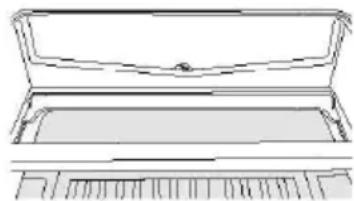
The drain hole will have a "cleaning spike" inserted into it. This ensures that small pieces of food can not enter the drain. Aer you have cleaned the inside of your Fridge and removed any food residues from around the whole, use the "cleaning spike" to make sure that there are no blockages. Use standard furniture polish to clean the Fridge/Freezer exterior. Make sure that the doors are closed to prevent polish geng on the magnec door seal or inside.
The grille of the condenser at the back of the Fridge/Freezer and the adjacent components can be vacuumed using a so brush aachment.
Do not use harsh cleaners, scouring pads or solvents to clean any part of the Fridge/Freezeer.
CHANGING THE INTERNAL LIGHT
- Before carrying out the LED replacement always disconnect the mains supply.
- Hold and li up the LED light cover.
- Remove the old LED by unscrewing it in an an-clockwise direcon.
- Replace with a new LED light by screwing it in a clockwise direcon marking sure that it is secure in the light holder.
- Ret the light cover and re-connect your Fridge to the mains supply and switch on.
REVERSING THE DOOR SWING
Dissemble the Refrigerator Door
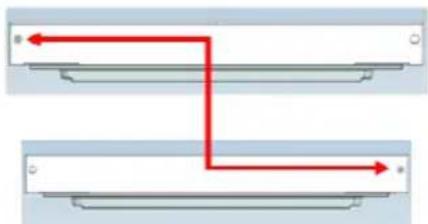
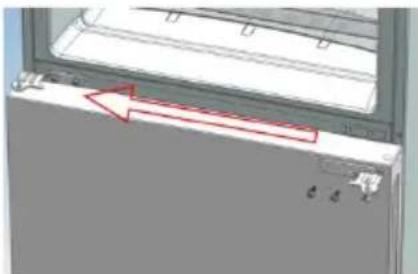
- a. Use a tool to remove the screw o the hinge cover, and then remove the laer. Insert the communicaon line to the hole on the cabinet top.
b. Use a tool to remove the 4 screws o the upper hinge cover and then remove the laer. Pry up the door bush and small end cap cover on the door.
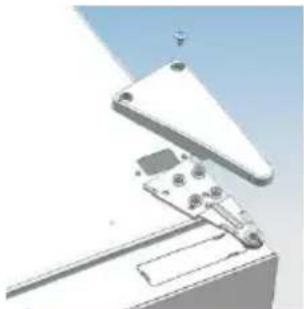
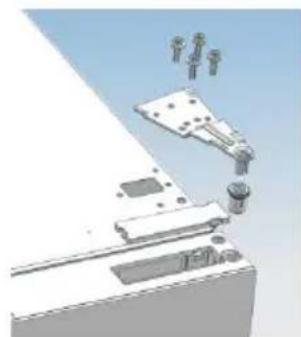
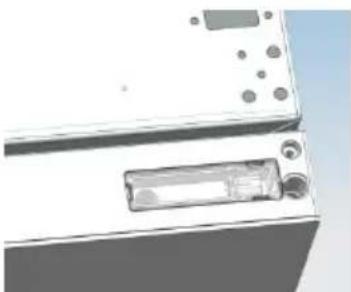
c. Insert the door bush and door communicaon line into the hole on the door and then put on the small end cap cover.
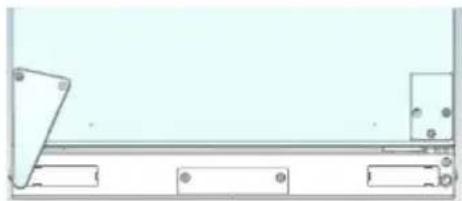
d. Use a tool to remove the 2 screws as shows in the below gure to remove the hole cover on the cabinet top and get the
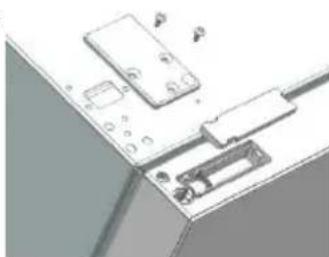
cabinet communicaon line out of the hole.
Pry up the small end cap cover on the door and get out the door bush and door communicaon line.
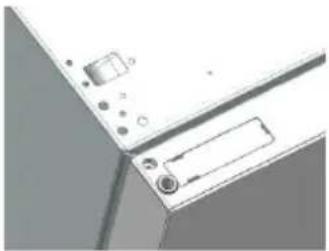
e. Insert the door bush into the round hole on the door and then put on the small end cap cover.
f. Move the refrigerator door upward over 500mm to remove the door.
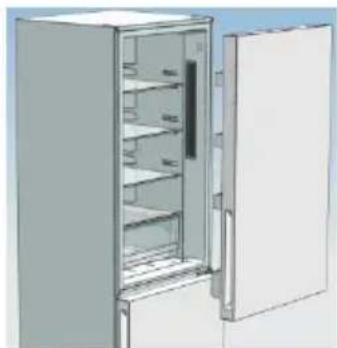
- a. Use a tool to remove the 3 screws o the middle hinge cover and then remove the middle hinge.
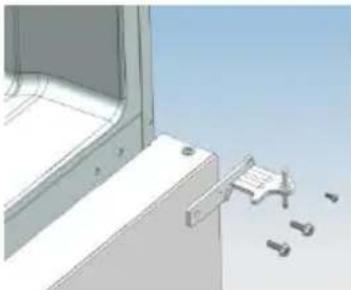
b. move the freezer door upward over 500mm to remove the door.
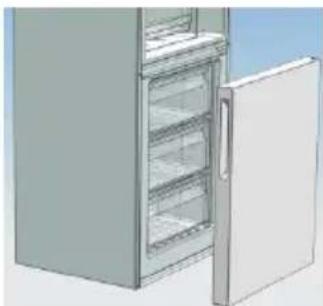
c. Remove the adjustable front feet under the lower hinge; use a tool to remove the 4 screws from the lower hinge and then disassemble the lower hinge. Door disassembly is nished.
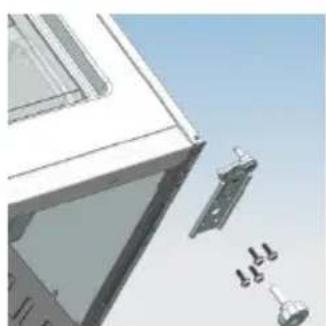
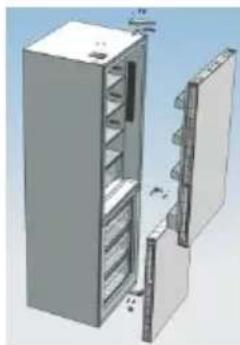
Assemble door, lower hinge accessories to the corresponding positions
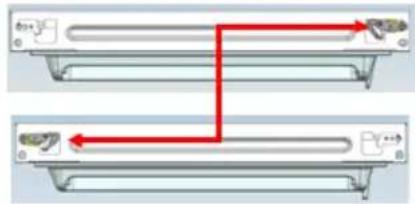
- a. Use a tool to get the door bush out as shown in the below gure and assemble it to the corresponding posion of the other side.
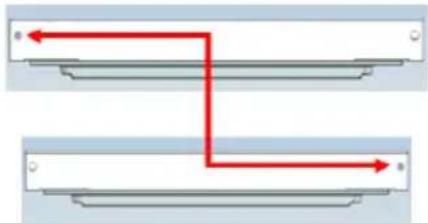
b. Use a tool to remove the screws o the stopper ass as shown in the below gure and then assemble them to the other side of the door.
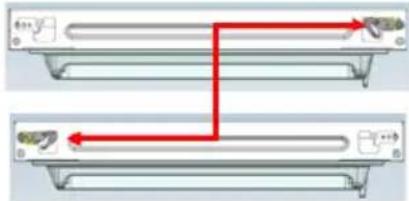
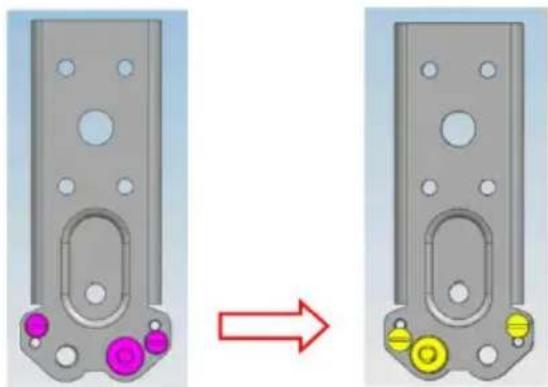
c. Use a tool to remove the axle and two stoppers on the lower hinge and then assemble them to the posion as shown in the below gure.
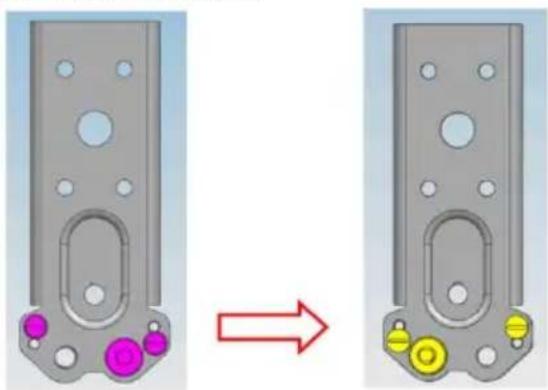
This situaon apply to open door in right side This situaon apply to le side
Assemble the refrigerator door and freezer door to the opposite side
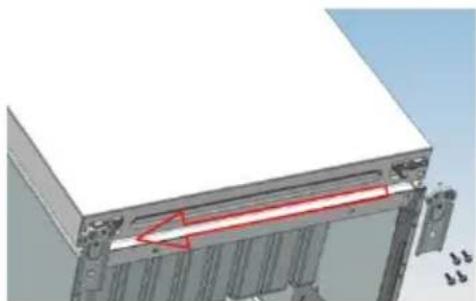
- a. Remove the adjustable front foot as shown below by hand and then assemble the lower hinge to the other side of the cabinet and x the screws by using a tool.
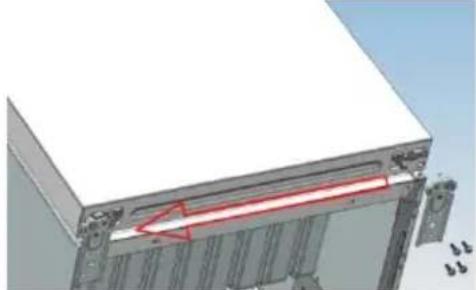
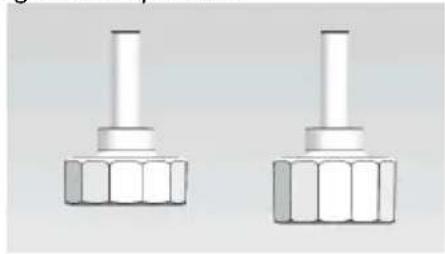
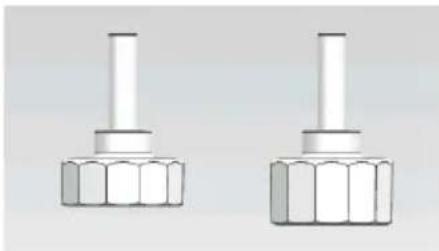
b. Assemble the shorter adjustable front foot to the lower hinge side and adjust the height of the foot to make the refrigerator stay in level.
- Put on the freezer door and turn the middle hinge by 180^ and then assemble it to the other side of the cabinet; use a tool to screw up the 3 screws to x the middle hinge.
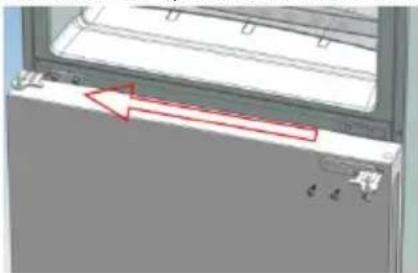
- Put on the refrigerator door and assemble the upper hinge to the other side of the cabinet; use a tool to screw up the 4 screws to x the upper hinge.
Aer that, connect the door communicaon line and the cabinet communicaon line and then put on the upper hinge cover and x it using a screw.
- Assemble the hole cover to the other side of the cabinet and use a tool to screw up the hole cover.
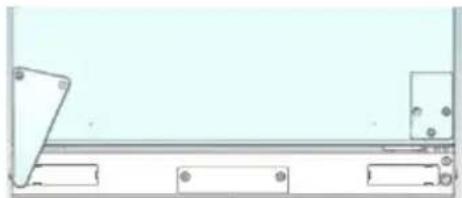
Door disassembly is nished here.
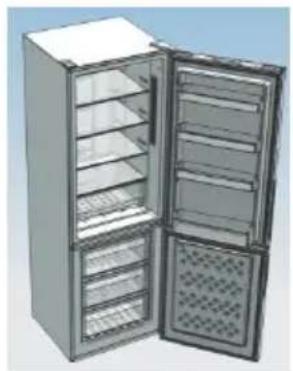
gure of door opening from the right
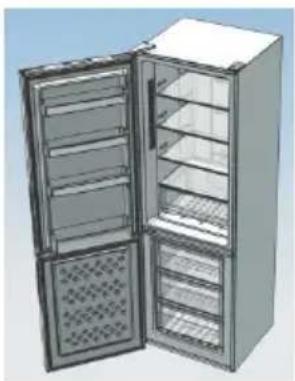
figure of door opening from the left

Double check that the door is aligned correctly and all the seals are closed on all sides. If necessary, re-adjust the levelling feet.
NOTE: If you want to have the door swing reversed, we recommend that your contact a qualified technician. You should only try to reverse the door yourself if you believe that you are qualified to do so. All parts removed must be saved to do the reinstallaon of the door. You should rest the fridge freezer on something solid so that it will not slip during the door change process. Do not lay the fridge freezer at as this may damage the coolant system. Ensure the fridge freezer is unplugged and empty. We recommend that 2 people handle the fridge freezer during assembly.
TROUBLE SHOOTING
- If the appliance does not operate when switched on, check.
- Power cut: If the internal temperature of the Fridge/Freezer compartment is -18^ or less when the power returns, your food is safe. The food in your Fridge/Freezer will remain frozen for approx 16 hours with the door closed. Do not open the Fridge/Freezer door more than necessary.
The product is designed and built for domesc household use only. - The plug is inserted properly in the socket and that the power supply is on. (To check the power supply to the socket, plug in another appliance).
- The fuse has blown/circuit breaker has tripped/main distribuon switch has been turned off.
- The temperature control has been set correctly.
If the refrigerator is exceptionally cold, you may have accidentally adjusted the thermostat control dial to a higher posion. - If the refrigerator is exceptionally warm, the compressor may not be working. Turn the thermostat control dial to the maximum seng and wait a few minutes. If there is no humming noise, it is not working. Contact the local store where your purchase was made.
- If condensaoon appears outside of the Refrigerator, this may be due to a change in the room temperature. Wipe o any residue of moisture. If the problem connues contact the local store where your purchase was made.
If the provided plug has been replaced, make sure the new plug is properly connected. If the appliance is sll not operang aer the above checks, please contact Customer Service.
SCRAPPING OLD APPLIANCES
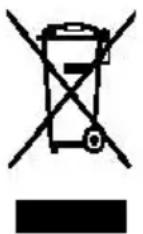
This appliance is marked according to the European directive 2012/19/EU on Waste Electrical and Electronic Equipment (WEEE).
WEEE contains both pollung substances (which can cause negative consequences for the environment) and basic components (which can be re-used). It is important to have WEEE subjected to specific treatments, in order to remove and dispose properly all pollutants, and recover and recycle all materials.
Individuals can play an important role in ensuring that WEEE does not become an environmental issue; it is essenal to follow some basic rules:
WEEE should not be treated as household waste.
WEEE should be handed over to the relevant collecon points managed by the municipality or by registered companies. In many countries, for large WEEE, home collecon could be present.
In many countries, when you buy a new appliance, the old one may be returned to the retailer who has to collect it free of charge on a one-to-one basis, as long as the equipment is of equivalent type and has the same funcons as the supplied equipment.
Conformity
By placing the mark on this product, we are conrming compliance to all relevant European safety, health and environmental requirements which are applicable in legisllaon for this product.
TABLE DES MATIÈRES
INFORMATIONS SUR LA SECURITE 54
COMBI CANDY 62
Classe climaque 62
INSTRUCTIONS DE TRANSPORT 62
INSTRUCTIONS D'INSTALLATION 63
DÉMARRAGE 63
FONCTIONNEMENT COMBINED. 64
UNITE D'AFFICHAGE VERTICALE 64
UNITE D'AFFICHAGE RONDE. 66
INTERFACE UTILISATEUR INTERNE 67
CHARACTERISTIQUES TECHNIQUES 68
FRESHNESS CONTROL 68
A funcão Holiday connua sob as funções Smart ECO e Fast Cooling.
DET VERTIKALE DISPLAY
SKROTNING AV GAMLA APPARATER
SIGURNOSNE INFORMACije
Ovaj prisučnik sadržava važne sigurnosne informacije.
RIESENIE PROBLEMOV 456
Kakujane za zakuparietohortoproductu
Predzacsim poulivania chladnkiy sddklnne prete tento na odna obluhu, kory vam pombse wulf ykonspotrebic a vine mire. Vlukdokumentaduodolhe, ay bolak dispozi na budice poitie alebo pre datich vlastnikov. Terto prodite je unenjivilune na poultie v domi stale alebo na podobene uve, ak npariklat.
- luchyndie prestoey pre personal v obchodoch, uradoch a injch pracownj ch prostradiach,
- na farnach, pre hosti ubtyovanjch v hoteloch, moteloch a injch oybytnjch zariadeniach,
- v zariadeniach ponukajucich nofah s raiakami,
- na posytovanie stravovacich slubieb a slutieb podobneho charalateru, ktoranie suurcen na malocbohady (predaj).
Temo sporebiet sa amie poulaiv f vuiune na usktdifovanie potavn. Aikkoef knl poulitie sa povlue je na nebepezne a viroba neponies zodpovedost za lidine zanedana. Ziroen odponuame dobre sa obozamir so zaiunjni podmienkarni.Vauijme zaistania naJIepleho molnoho viliou a bezchynje prevaldtky spoereba je veilmi dlalit,aby stsi dkladine predtali tieto pkiyny.Nedodranie tchto polynov moe viest k zamiensutu naroku na beplatny seris pocec zaiunchej doby.
BEZPECNOSTNEINFORMACE
Tento námov obsahuje mnoho dóležitych bezpečnostnych informáci. Tieto poucny odporucame ulozit na bezpečnom mieste, aby sluzili ak zo zdroj informáci na ulahcenie a zefektivenie pouzivania spotrebica.
BHHMaHHe: onaCHOCT OT NOJap
Ako oxlaanTeHaTa Bepra ce nobpei:
- Избаян Te OTКрпТ ORьН ИЗTOчнци На 3апалвае. Гпжлво поветре стаят, В КОТо ce hamupa урedingT.
ПЕДУПЕЖДECHNE!
-БыдeteВнмateлни ри
почистваhtо/прehасянetoHaуpeда и
и36ягbaiteда дOKOCBaTeMeTaHnTeЖициHa
КомпесорaВзадня КрайHaуpeда,Тькato
Можеда наразанITEnpbCTnteИрьцeteСи Илида
ПоврдenteВашяпpoodykt.
To3n ypei He e npedHa3HaueH 3a cbxpaHeHneTo Ha KaKBInTO n Da e DpyrN ypei. He ce ONTBaIte Da cyaTe Nn Da Ce N3npaBYe Bbpxy Ba7nay ypei, Tb' Kato He e npedHa3HaueH 3a TaKaBa ynoTpe6a. Moxe Da ce HapAHnte Nn Da NOBpeiTe ypeia.
- Ybepete ce, ye 3axpaHbauT Ka6eI He e 3akleueH IOypeDa IIO BpeMe Ha N CLeI npenacraHTo/npemecTbaHeTo My, 3a Da Ce npedOTBpaTu npeKbcBaHe IIn NOBpeJdaHe Ha 3axpaHbauTka6eI.
Korato no3nioHnpaTe ypeDa cn, BnImaBaIte da He nobpeDInTe nOIOBInTe HacTnIKn, Tpb6nte, CTeHInTe nOKpITnIy T.H. He MeCTe Te ypeDa ype3 DbPnaHe Ha KaNaka nn dpBXKkata. He N03BOJRAIte Ha deca Da cn irpaTc ypeDa nn Da nnat KOHTPOJHnI naHeI. Hawata oHrpMa OTXBbPJIg BcKaKBA OTROBOPHOCT, B clyuaiYe He ce CLeDBaT INCTpyKcnIte.
He montpaTe ypeHa Ha BlaJHn, Ma3Hn IIn npaun MeCTa, HnTO rO n3JaTaTe Ha dIapeKTHa
CJIbHueBa CBeTInHa N BOda.
He montpaTe ypeDa 6n3o Do OTOpIeHn TeLa nn 3aapanMm MaTePnaJI.
- Ako TOKbT cnpe, He OTBaprIte KanaKa. 3aMPa3eHaTa xpaHa He 6n Tpr6BaNo Da 6bJe 3aceHaTa, aKO LIncata Ha 3axpaHbAHe e 3a NoMaJIko ot 20 Yaca. Ako LIncata Ha 3axpaHbAHe e NO-PrOdBJIxKITeJIHa, XpaHaTa Tpr6Ba Da 6bJe npOBepHa n N3raDeHa BeDHa rIi CrotBeHa n 3aMPa3eHa OTHOBO.
He ce npitecnBaIte, aKO yCTaHOBInTe, ye KaNaKbT Ha XOpn3oHTaIIHnA φpns3ep ce OTbApr TpydNo BeDHaRa cIeI KaTO cTe rO 3aTBOpnIi. ToBa e TaKa IopaIpa3JIkKaTa BvB Bb3dUshOTO HalaRaHe, KoEtO ⅢpaBnI n Ⅲe N03BOJN KaNaKbT da 6bJe OTbOpEN cIeI HЯKOLKO MNHyTu.
He cBbP3BaIte ypeJa KbM eIeKTpUcEckoTo 3aXpaHbaHe,doKaTO BCnUckn npeJna3HN eIeMeHTN OT OnaKOBkata n 3a TpaHcnpTa He 6bDaT npemaxHaTn.
OCTaBeTe ro B nOKoI noHe 4 uaca npeI da ro BKIOUHTe, 3a da MoKe KOMnPecOpHTo MaCNo da ce pa3npedeIi, aKO e npehacn XOpN3OHTaJIHo.
To3n φprn3ep Tp86Ba Da ce n3noJ3Ba cAmO 3a npedBnIeHaTa yNoTpe6a (r.e. cbxpanHeHne n 3ampa3raBaHe Ha xpaHntelHn npoDyKtN).
He cxbxaHЯBaITe IeKapCTBa IJIH HayuHOn3CleIeIOBaTeIcKn MaTePnaJI N
oxlaNTeIte 3a BnHO. KOrato Tp6Ba Da ce CbXpaHЯBa MaTePnaJ, KoTo n3NcKBa CTpNKTeH KOHTpoI Ha TempepaTypaTa Ha cBxpaHeHne, e Bb3MOxHTo ToJ Da Ce pa3BaJIu IJIu Da HAcTbII N HeKOHTpOJInpaHa peakzua, KOrTO Da IpreDn3BnKa pNCKOBe.
- Праздддддддддддддддддддддддддддддддддддддддддддддддддддддддддддддддддддддддддддддддддддддддддддддддддддд徴ацьпсундае оретаць.
- ИЗКЛЮЧЕТЕ 3axpaHbaцькабел OT KOHTaKТа.
- Пи достаькata поверete далл пюдуктн He e nOBpeHи далл BCnчКITE MyЧаCTи n akcecoapn caВпрфeKTHO cbCTOЯHne.
- Ако се завелени Teч В охладителната сисема, He ппайт e контakta Ha cteнata n He n3ралзваite otkpnt orbH. OТворе прозорец n octabete B ctaят a da bileze Bb3duyx. Послес CBbpжete C ceHTbp 3a подрьжka, 3aда 3aЯВNTe peMOHT.
He n3noJ3BaIte ydbJIxKInTeIN nn aadantepn.
HeDbpnaTe pekaleHo cnIHO nIe He npereBaTe 3axpaHbauNja Ka6eI, IIN He DOKOCBaTe uencela c MOKpn pbue.
He nobpejdaite uencela n/niln 3axpaHbaun Ka6eI;TOBa MoKe Da npuHnTOKOB ydap nn noJkap.
He nocTaBraITe nIcBxpaHbAitTe 3aIaIMn I cnJIHO letTINMaTePnaI NaTo eTePN, nEtpoI npOan-6yTaH, ra3 npOan, aepo30JN, leIIa, YnCT aIKoxoI n T.H. Te3n MaTePnaI MoRaT da
MoHTHpaHe Ha BpaTHTe H DoJIHaTa NaHTa Ha CbOTBeTHHTe HM MecTa
- a). C NOMOuTa Ha OTBepTka H3BaJeTe BTyIkaTa, KaKTo e NOKa3aHo Ha NIOCTpaunrTa noDOLy, n CLEe TOBa J MOHTnpaIte Ha MrcTOTO J Ha OTCpeUHaTa cTpaHa.
6). C NOMOHTa Ha OTBepTka pa3BnTe BnHTOBeTe Ha cTonepa, KaKTo e NOKa3aHo Ha HIOCTpauTtA NO-DOJy, INcE ToBa rN 3aBnTe Ha OTCpeuHaTa CTpHa.
B). C nOMOHTa Ha OTBepTKa CBaleTe OCTa N DBaTa CTonepa Ha DoJHaTa NaHTa, KaTO cIeT ToBa Tn 3aBneTe Ha MCTOTO IM Ha OTCpeUHaTa CTpHa, KaKTo e NOKa3aHo Ha NIIIOCTpaUraT a NO- DOLy.
TaN NIOCTpaunI NOKa3Ba IaCHO pa3noJoxHe BpTa. TaN NIOCTpaunI NOKa3Ba IaBO pa3noJoxHe BpTa.
MoHTHpaHe Ha BpaTaTa Ha XlaIaIIHnKa H φpH3epa Ha oTcpeIHaTa cTpapaHa
- a). C pbKa cBaIeTe npedHnpeynpem KpaK, KaKTo e noka3aHo NO-dOly, n cJeT TOBa MOHTnpaTe DOHaTa NaHTa Ha OTCpeuHaTa CTpaHa N 3aBnTe BnHTOBeTe C NOMoTuHa OTBePka.
6). MoNTnpaIte no-KbCna peryInpyem npedeH kpaK Ha cTpaHaTa Ha doJIHaTa NaHTa n HacTpOte BnCOUHaTa Ha Kpaka, 3a Da ocTaHe xJaDInHKnBb T BbB BoDopabHO NOLOKeHne.
- Пoctabete Вратata Na Фризера и 3abptete cpeнота naHTa Ha 180 rpaDyca, cneTToBaЯ MOHTIPAte Ha OTCpeuHaTa CTpaHa Na Kopnyca. ИзпалЗВайТе OTBepTKa, 3a Дa 3abHNTe 3-Te BnHTa, c KOnTO DA 3akpenite cpeHATA naHTa.
- NocTabete BpataHa XlaIaHnHa KMOHTnpaTe rOpHaTa NaHt Ha OTCpeuHaTa CtpHaHa Kaopnyca. H3noJ3BaIne OTBepTKa, 3a Da 3aBnHTne 4-Te BnHTa, c KOnto Da 3akpenTe rOpHaT aNaHTa.
CleTToBa CbPjKeTe KOMyHnKaUOHHN Ka6eHa BpaTaTa C KOMyHnKaUOHHN Ka6eHa KOpnyCa, a NocIe NoCTaBeTe KaNaKa Ha rOpHata NaHTa I rO 3aBnHTeTe C nOmoTu Ha OTBepTKa.
- MoHTnpaIte Kanaka Ha OTbopa Ha OTcpeuHaTa CTpaHa Ha Kopnyca N 3nNoJ3BaIte OTBepTKa, 3a Da rO 3aBnHTnte.
CTOBA MOHTaKbT Ha BpaTne PnPKIIOUba.
Ta3n NIOCTpaunI NOKa3Ba OTBapraIca ce O T JAcHO Bpata
Ta3n nIIOCTpaunn oKa3Ba OTbapaa ce ot IyBO Bpata
PnOBepeTe BnHMaTeJIHO daJIbBpaTATAe eo6pe noDpaBHeHa daJIb BCNkUyIbTHHeHrCa NoCTaBeHr Ha MeCtA rM.Ako e Heo6xOJMo, peryIpaTHe HBeJIpaUHTe KpaHTa.
3A6EJIEXKKA: Ako nCKaTe da o6bPHeTe BpaTte Ha xHaDiHnKa, npenOpbUBaMe Bn da ce o6bpeHe KbM KBaIINΦuIpaH TexnK. He ce onNTBaIe camn Da o6pbIaTe BpaTte, aKO He npitexbaTe DOCTaTBuH N03HaHn I yMeHn. BcNkN OTCpaHEn uactn Tp6Ba Da ce 3ana3r Do NOBTOPO MOHTIPAhe Ha BpaTa. Tp6Ba Da noDnpTe XlaDiHnKa Ha Heo CTabHNO, Taka Ye da He ce npinlb3He, DOKaTo o6bIaTe BpaTa. He noJaRaTe XlaDiHnKa B IerHaNo pIoJKeHne, Tb KaTO ToBA MoKe Da NobpeDuOxJaDaIaTa CnCTema. YBepTe Ce, Que XlaDiHnKbT e N3KlIOueH ot KOHTAKa I e npa3eH. PpenOpbUBaMe DeMOHTaKa I MOHTaKa Ha BpaTaTa Ha XlaDiHnKa Da ce N3BbPbBa OT DbAma DySh.
OTCTPAHЯBAHE HA ПЮБЛЕМN
Ako ypeBt He pa60TN, KOraTo e BkIIOueH, npOBepTe.
- П配电ьсане Ha eelenKtpnuecTBo: Ako BbTppeHHaTa TemnepaTypa Ha OTdeJeHHeTo XlaIINHk/Φpns3ep e -18°C nll no-Hncka, KoraTO ce Bb3ctaHOBn eIeKtpnueckoto 3axpaHbAne, xpaHATA ue 6bde 3ana3eHa. XpaHATA B XlaIINHka/Φpns3epa ue ocTaHe 3ampa3eHn 3a OKoLo 16 yaca cbc 3aTbOpeHa Bpata. He OTbapnyTe BpataTa Ha XlaIINHka/Φpns3epa nobee ot Heo6xOdmOTO.
- IpoDyKtBt e npoeKtnpaH n npOn3BeDeH cAmO 3a DomaHa yNOTpe6a.
- ⅢeNcIbT e nocTaBEN npaBnIHOB KOHTaTn DaIIIN 3axpaHbaHeTo e BkIoueHo. (3a da npoBepnte 3axpaHbaHETo B KOHTaT, BkIoueTe dpyr ypeD).
- PpeNa3nteIe n3ropaI/npeKbCbaT e n3KlIOuIN/rlaBHNr pekcbay e n3KIOUey.
TemnepaTyPNrKoHTpoJeHaCTpoeH npabuHIO.
Ako XlaanHnKbTe npekaleHo CtyeH, MoKe cnyaHOn Da cTe HarglacNIO KOJeITo HA KOHTPOHNIE TepMOCTaT Ha No-BnCOKa NO3uZna.
Ako xlaanHHkBt e npekaJIeHO TOnbJI, KOMnpecOpBT MoKe da He pa6oTH. 3aBbptTepeYlataopa Ha TepMOCTaTa Ha MaKcIMaJIHa cToHOCr N 3uKaaiTe HraKOJIko MmHTN. Ako He bde uT yM, ToI He pa6oTH. CbbpKeTe ce c MeCTHnMaRa3nH, KbDeTo e HanpaBeHa NOKyNKata.
Ako ce noBn KOHDeH 3 N3BbH XlaDnHnKa, TOBa MoKe Da ce DbJNn Ha npomHa B cTaNHa TEmpepaTy. N36bpweTe BCnKn OCTaTbU nO T Blra. Ako npo6IeMbT npoDbJIkAba, CbPKeTe ce MeCTHn MaarHa, KbJeTo e HAnpabeHa NOKyPkata.
Ako npedoctabeHnT uencel e 6nI cmeH, npOBepTe daHIOBnT e CbP3aH npabnlo. Ako cIeN 3BbPwBaHe Ha npOBepKnte no-rope ypeDbT BCE oUe He pa6oTu, MoJc CbPKeTe ce c OTdeN O6cnykBaHe Ha KIneHTN.
N3XBbPJIaHE HA CTAPn YPeDn
To3n ype, e Mapknipan B cbOTBeTCTBne C EbPoneNcKaTa dnpKeTnBa 2012/19/EC OTHOCHO tnaDbuNTe OT eNeKtpnuecko n eNeKtpoHNO obOpyDbaHe (OEEO).
OEO cbbpxka KaKTO 3aMbpcaBauN BeueCTBa (KOHTOMoRAT da npuHrT OTPuTeHN NOcEduzna 3a Okohata cpe), Taka N OCHOBH N KOMnoHENT (KOHTOMoRAT da 6bDaT NOBTOHO n3NoJBAHn). Baxho e OEoDA 6bDe noDIOKeHo Ha CneuΦuH No TpeHpaHe, 3a Da ce OTCTpaHrT yHnOxKaT npabHNO BCNUK 3aMbpCteJIu N da ce cb6epaT neuklnpaT BCNUK MaTePuaII.
OTdEnHnTe rpaKaJaHm MoaT Da n3nRpaT BaKHa poJa KaTo rapaHTnpaT, ye OEo Hma da ce npebbPbAT B npo6IeM 3a OKoJHaTa CpeJa; BaXHo e Da ce CneDbaT HAKO OCHOBn npabNla: OEo He Tp8Ba Da ce TpeTpat KaTo 6ntobN otNaDbu.
OEO Tp6Ba Da ce npedabat Ha cboTBeTHnTe NyKTOBe 3a cb6npaHe, ynpablaBaHn ot o6uHaTa nn ot pernctpupaHn dpykeCTba. 3a rolemn OEOE B MHOrO dprkABN MoKe da nMa Bb3MOXHOCT 3a B3mHaHe OT Doma.
B MHO O Dbpxabn, KOrato 3aKynite HOB ypei, CTapnT MoKe da 6bDe BbpHaT Ha TbproBa, KOITo Tp8Ba Da ro B3eMe 6e3nlaTHo HA OCHOBa eHNO 3a eHNO, CTnra 063aBeJdaHeTo da e OT EKBVAJIeHTEN TIN N da NMa CbInte cyHKuN KaTO npedocTaBeHOTaKOba.
CboTBetCTBHe
C noctabareto Ha MapknpoBka Bbpxy To3n npOdyKT n0TbbpJdaBaMe cboTBeTCTBneTo Ha BCnUKN eBponeckn 3a6e3oNaChocT, 3dpabeN ona3BaHe Ha OKoJIHaTa CpeDa, npINOxHMN OT 3aKOHOdaTeJCTBOTo 3a To3n npOdyKT.
ÖSSZEGZÉS
BIZTONSAGI INFORMÁCIÖK 511
CANDY COMBI. 518
Klimaosztaly 518
SZÁLLITÁSRA VONATKOZÓ INFORMÁCIÖK 518
TELEPITESRE VONATKOZO ELOIRASOK 519
A FAGYASZTOLAsA HASZNALATA 519
A COMBI HUTOSZEKRENY UZEMELTETESE 520
FUGGOLEGES KIJELZO 520
KEREK KIJELZO 522
BELSO FELHASNZALOI INTERFESZ 523
KJIHMaTHUeCKH KJIacc
3JIeKtpnpn6op npEHa3NaueH Ia pa6oTb IB orpaHnueHHOM dHaana3OHe Tempepatyp Okpykaioe Cpebl, B 3aBncmocTN OT KInMaTnuecknx 30H. He nCpOJb3yIte 3JIeKtpnpn6op npi TemnepaTpyax, BbIXoJaunx 3a yCTaHOBLeHHbIe npedeJIb. KInMaTnueckn Klacc 3JIeKtpnpn6opa Yka3AH Ha Ta6NIuKe cTexHnueckm OOncaHem BHyTpN XOLOdINbHOrO OTDeJeHn.
Pn yctahOBke TemnepaTpybl,ecnn B TeueHne 5 ckyHn He 6ynd HaaKaTa Hn OHa KHonKa, KhoNka nepecTaet MuraTb, n YcTaHOBLeHHa TEmnpaTpya BCTynaet B cnly.
SMART ECO: AKTINBnpyte KhoNky Smart Eco, yTO6bI yCTaHOBnTB TempepaTyPy XoIoAnlbHnka B peKIme MaKcImaJIbHoN 3HePROaΦeKTHBnOCTn (+4°C dJa TEmpepaTypbXoIoAnlbHOJ KaMepbl, - 18^ dJa TempepaTypb MOpO3InbHoN KaMepbl).
Ymo6bI Boumu 6 Smart Eco: HaxmMaTe "opon", noka He Haunet MuraTb CBeToIOoD, a 3aTeM HaxmTe "OK" dIy BxOda B daHHyO fYHKUHO.
Ymo6bI omKIOHUMb Smart Eco: HAnmMaTe "opon", noka fynKun He nepeiDeT B Smart ECO, HAnKMnTE "OK", UTO6bI BbiITN 3 ToTOn fynKUn, NODCBETKa rachET.
БbvICTPOE OXIAJXDEHNE: AkTbUpyTe peKIM 6bvCTporO oxJaXDeHnДЯ 3anycka DoONHHTeBHoro IMnyIbca DЯ 6bvCTporO oxJaXDeHn XOLOdINbHO KnAmebl.
ФункцяakTNBnpyeTcIиpoTbepKJaetcBKNIOueHHeM COOTBeTCTByIOUeI INKOHKn CO CBETOIODOM.
Ymo6bI Boum 6peKUM 6bICmpo2O oxJaXKeHua: HaKmAte Ha "opon", noka He HaHHeT MInraTb "Fast Cooling", a 3aTeM HaxMMTe "OK" dIe BxOda B daHHyIO yHKUHO.
Ymobb omKIOUcMb bIcmpoe oxlaJckDeHue: HauKMaIte Ha "opon", noka cncTeMa He nepeiJeB TpeKIM "Fast Cooling", a 3aTeM hauKMIte "OK" dJa DeaKaTbAciu N daHHoF yHKciu.
БьICTPOE 3AMOPAXKINBAHNE: AKTNBpyItepexim6bICtporo 3amopaxinBaHn, YTO6bl 6bICTpo 3amopaxinBaTb 60JIbJooe KOJIuYeCTBO IPOdyKTOB C COXpaHeHEm IN NIIueBbIX CBOiCTB. Korda CBET Bpexime 6bICTporo 3amopaxinBaHn OTKIOUaEcTcA, a TEMpepaTypa MOpO3NlBHOI KAmepbl BO3BpaaTeCk 3NaueHIO nepeD 6bICTpbIM 3amopaxinBaHnem. Korda Bpemr 6bICTporo 3amopaxinBaHn yBeInuHBaTeCt (26 YacOB), OHO ABTOMaTIueCKN OTKIOUaEtC.
Pn nepexode B peKm otnycka "Vacaon", yHKu8 6bictp0rO 3aOpaxnBaHn npnoctahablnBaetc.
ДяБхODaBpeKUM6bIcmpo2O3amOpaKubAnuHa:HaJIMaTeHa"opon",NOKaHeHauHETMnTaTb "Fast Freezing",a 3aTeM HaxMMte"OK"ДЯ BXODaBdaHHyIOФуHKUIO.
Дя omknuehenya 6bicmpo2o 3amopauuhaunr: HaxmMaTe Ha "opon", noka cnctema He nepeiDet bpeKIM "Fast freezing", a 3aTe m HaxmTe "OK"ДЯ BbyOda n3 daHHOJФyHKUH.
PEKIM OTNYCKA: При Heo6xOДMOCTN ДЛNTeIbHOrO OTKLIOUeHЯ MOKHO NcNoIb3OBaTb ΦYHKUHO Vacaon. 3Ta ΦYHKUЯ OTKLIOUaET XOLOdINbHyIQU KaMEpy, OCTaBnIa MOpO3NlBHyIO KaMEpy BKNIOUeHHo. Pered IncNoIb3OBaHnEM 3ToI ΦYHKUIN y6eDInTeCb, YTO B XOLOdINbHO KaMEpe OTCyTCTByOT IPOdYKtBI PITAHnI. ΦYHKUЯ AKTINBnPyEtCry IN IOdTBePjDaETCR BKNIOUeHHeM COOTBeTCTByIOUeI INOHKn Co CBToDINOOM.
CBETBpeKImeOTnyska rachet,NTempepatypaXoIOndbHnKaBO3BpaaaetcKBeIuHHe DO BXOda BpeKIMOTnyska.
Pekim OTnycka OTKIOUaTeTc npn akTbauuN fynkuN Smart ECO n Fast Cooling.
ДяIxoda a peKum omnycka: HaKmAJte Ha "opon", noka He haHHT MuraTb "Fast Freezing", a 3aTeM HauKMITE "OK" ДЯ BXODa B DaHHyIO yHKUIO.
Ymobbi omknoumb pekum omnycka: Haxnmaite Ha "opon", noka cnctema He nepeiJeT B fHKNUO "VacaON", a 3aTeM hakmTe OK"ДЯ BBIXOda n3 daHHOf fHKUN.
COXPAHEHNE HACTPOEK INP NOKIOUOEHN NITAHN: XoIoOnJIbHNK MoKeT aBTOMaTHueCKN COxpaHnTB Bce NaCTpoiKN B cIyuae OTKIOUOEHN NITAHN. Korda npOn3oJTeB OBCTaHOBLeHne NITAHN, XoIoOnJIbHNK 6yJeT pa6OtaTc napaMeTpamN, IcNoJIb3OBaBWMnCra nepeD OTKIOUOEHN M NITAHN.
3ADEPJKBAKIOUeHNAITAHN:Bo n36eKaHne NOBpeKeHnXoIoNbHnKa B cIyae BHe3aHOrO OTKIOUeHn NHTAHN I NOBtOPHO BKIOUeHn NITAHN yCTPOIcTBo He 3aNyccaTeC HMeJdLeHHO,ecnBpeM,KOJa NITAHne OTCyTcBOBaI0,CocTaBJIeT MeHee 5 MInHyT.
CNHAIIN3AUINIPEPPEBAMOPO3INbHOJKAMEPbl (ToIbko npn BkIOueHHOM nITAHIN):
Ecn TEmnepaTpa MOp03nBHO KAmepb Bblwe 10°C B nepBbI pa3 npn noKnUoyen H K
3JIeKtpocTe, 3aropaeTcBcToNDcMbOJa KaMepb MOp03nBHO KAmepb, a cHpTa,
npedTablaIOuSa TEmnepaTpy, Mtraet.
HaKMTe IIO6yI KHOJky IIN NOdoXdTe 5 cekyH, MiraHne npekpaTntc, N CnCTema BepHeTc K 3aDaHHo TEMnepaType.
CNHJIN3AUJN OTKPbITNA DBEPN XOJIOJNBHKA: Ecnn DBepb XOJIOJNBHKa OCTaETCnOTKpbl0n 6oJIe 3 MNHT, nOJaETcra 3ByKOBoi CnIHal. 3aKpoTe DBepb Nn HaKMnTe IIO6yIO KHOKNy, YTO6bl OCTaHOBNTb NOdau TpeBOXHOrO CnIHala, B NOcneHem Clyae TpeBOXHbI CNrHaJI
6ytdt cHOBa npekpaueen Hepe3 MnHytbI.
CINHAJIH3AUJHENCNPABHOCTN DAUHKA: KOrda OTo6paKaIoTcra "E0", "E1", "E2" NII INHbIe CIMBOJbI HeOpMaJIbHOJ pa6Otbl, 3TO O3Haayet HeNCnPaBHOCTb DaTuHKa. XoIoJNbHNIK HxJdaETcR B peMOHTe.
KPYIbI INCJIeI
KpyrlbI dncnne - 3TO ceHcOpHbI NOlb3OBAteJIbCKN INHTeppeC. KOrda XoJIoDInbHNK BKNIOUeH, ropT 6eIbIe cBeToaNoDbI. Korda HaXIMaIOCTc KHOKn FyHKuN, ZBET NKOHN MeHReTc C 6eIoro Ha roLyboi.
YCTAHOBKA TEMNEPATyPbI:HaKmTe NkOHky MODE,HTo6blN3MeHnTb TempeaTy p
- TemnepaTpy xoIounlbHoi KaMepbl: HxMMte OOnH pa3 Ha NkOHky MODE, uNphi xOLOnlbHoi KaMepbl Mmraet, a ee TemnepaTpy MoKHO OTpeyIINPOBaTB KHNKaMNI " ^+ " n "-".
- TemnepaTpa Mop03HbHO Kamepbi: HaaMnte OIN Ha N KOH Ky MODE, uNpma Mop03HbHO KamepbI MIRAE,T, n ee TemnpaTpy MOKHO OTpeYInPOBaTb KONKaMn "+" n "-".
ИконкаECO MODE:
HaKMnTe Ha IKOHky Eco Mode, yTo6bI 3a4aTb Tempeatpy XoIoAnlbHOJ KaMepbI BMakcMaJIbHO 3Hepro3ΦΦeKTHBHom dHaNa3OHe (+5°C dJa TempeatpyXoIoAnlbHnka,-18°C dJa TempeatpybI MOp03NbHOJ KaMepbI). DaHHaYfHKUIAAKTNBUPyeTcra NODTBepxdaeTcra, KOrDa CBeToIOHO INKOHKe MeHReT cBET c 6eIoro Ha cINHn.
EcnBbXOTnTe BblTn 3fYHKunpeKIma ECO, Bam cIeJeT BHOBb HkaTb NkOHky Eco Mode, IN TempePaTypa XoIoDnIbHnKa BepHeTcK HopMaIbHoi pa6Ote.
MkoHka SUPER COOLING:
HaMMte Ha IKOHky Super Cooling, yTo6bl 3aNyCTnTb dOnoHHTeBHyI NMnyIbc dJa 6bICTporo 3aMopaxuBaHna XOLOdNlBHOK kAmepbI.
JaHHa yHKnna aKTHBnpyeTcra n NOtBepXdaetcra, KOrda cBeToNOd INKOHKn MeHReT CBeTc 6enoro Ha cnHn.
EcnBbXOTnTe BbIHTn 13 fynKun Super Cooling, Bam CneDyeT BHOb HaKaTb NKOHky Super Cooling, n TemnepaTypa xoJOnuNbHka BepHeTc K HopMaIbHoH.
IkoHka LOCK:HaKmnte IKOHKy Lock dIJI 6JIOKNPOBKn DcNpIe NOnb3OBAteJIbCKOrIoHTepFeJa.
EcnI Bbl6paHa cyHKzna 6JIOKNPOBKn,IKOHKa (CBetoDnO)doJKeH rOpTe bToJy6bIM cBeTom.Korda
fYHKzna 6JIOKNPOBKn BkIIOUeHa,NoJIb3OBAteIb He MoKeT 3aDaBaTb KaKe-Im6o HObIe fYHKznn.
HTo6bl OTKJIIOHTb cyHKznu 6JIOKNPOBKn,NOJIb3OBAteIb DOJKeH HaKaTa H Na IKOHky UydepXNBaTbe HaxaToB TeueHne 3ceKHyD,HTo6bl pa36JIOKNPOBaTb DcNpIe.
IkoHka SUPER FREEZING:HaKmTe HaIKoHky Super Freezing, yTo6bI 6bICtpo 3aMop0HTb 6OJIbJIOe KOJInueCTBO IpoDyKTOB C COxpaHeHnEM HeN3MeHHbIMN IN NIIuEByX CBOiCTB. DaHnaI _YHKU aKTHBnpyETcN IOdTBepXJaETcR, KOrDa CBetOnoD IKOHKn MeHReT cBeT c BeLoRo Ha cnHni.
EcnBbXOTnTe BbIuTn I3 0yHKun Super Freezing, Bam CJIeJyET BHOb HaKAtb NKOHky Super Freezing, n TemnepaTypa MOpOzNlbHo Kamepbi BepHeTc K HopMaIbHo.
HOLIDAY: Pn Heo6xOIOMOCTN OTKIOUeHn Ha dIITbHbI cpoK MoKHO nCNOJIb3OBA Tb KAMIO OTycka Holiday. 3Ta fYHKUaOTKIOUaET XOLOINbHyIO KaMepy, OcTabJRA MOpO3INbHyIO KAMEpy BKIOueHHo. IpeE NcNoJB3OBAHnEM 3TOI fYHKUIN y6eINTecb, YTO B XOLOINbHOI KAMEpe OTCyTCTBYOT npOdykTBI NHTAHn. DaHHa fYHKUIN aKTINBpyeTcN i NOITBePjDaTeC, KOrda CBToIOND INKOHm MeHReT CBeT C6eLORHa CnHn.
EcnBbIXOTnTe BbInTN H3 FyHKuIN OTnYcKa, Bam NOrpe6yeTc CHOBa HaKaTb Ha IKOHky OTnYcKa, CBET BpeXmte OTnYcKa Norachet, a TemnepaTypa XoIoJNbHnKa BepHeTc K 3HaueHnIO nepeD OTnYcKOM.
Иконka WI-FI: устюство осано TextногиSmartFi+, поьлгошей дuctанционноуправлъ ИМ чере з паложен. HabKMITE И уdeckжьайт ИКОнКу Wi-FiВтуени 3 секунд,чTo6blakTNBIPOBaTBФУнкциwoWi-Fi,цБетИКОнКиИЗмEHNTcRcбел�оHa rOly6oN.
Pezucmpaun Mauhbu (b npunoKeHu): 3arpynte npunoKeHne SimplyFi Ha cBoe yctpoiCTBO. PnploKeHne Candy SimplyFi doctyno dny yctpoiCTB noD ynpabIeHem Android n iOS, ka dIy IlaHweT, TaK n dIy cMaprfoHOB. Y3haIte 6OJIbWe O oFyHKuIax SmartFi+, npocMOTpeB npunoKeHne B peKmE DEMO.
OTKpoTe npnloKeHne, co3daIte npofoNb noIb3ObaTeIa 3apeRncTpnpyIte yctpoiCTBO B COOTBeTcTBn C yka3aHnMa H a dinCnIee yctpoiCTBa nIb B "KpaTKom pyKOboDcTbe", npilraeMOM K yctpoiCTBy. 3Ta onepaunr Heo6xOdIma TolbKO dIy nepBoY cTaHOBKn. YTo6bl 3aBepuNTb perictpaunIO, cIeNyIte yka3aHnMa H a ekpaHe cMapTfoHa.
YnpaBHeue XoIodunbHukom cydaenHNo npunoKeHua: NocLe 3aBepSeHHn perncTpaunn 3aRopaetcra CBeToDIOd Wi-Fi. C 3TOrO MOMeHTa yCTpoiCTbOM MoJHo 6yJeT ynpaBnTb c NOMOsbKHOJOK Ha dncJIee nIc NOMOsbU npINOKeHna: npnoptTe HMeet NocJeHNRA BBeDeHHa KOMaHda Ha IIObOM n3 ycTpoiCTB.
BHYTPEHHI NOJIb3OBATEJIbCKH NHTEPΦEIC

Khonka SET: Haxmamte KhONky SET, yTo6bI yCTaHOBnTB Tempeatpy Ha HyxHbI yPOBeHb: yPOBeHb 1 - camaa Bbcokay, a yPOBeHb 4 - camaa Hn3kay. Pn HOpMaJIbHbIX ycIOBnx EKnlyatauMbl peKOMeHdyem NcNoJIb3OBAtbp npOMeKyTOHyU BeINuHny (yPOBeHb 2). KaT OJIbKO HAcTPOKa BCTynrB CnLY, cnCTema HeMeJdIeHNO nepExoDIT B COOTBeTCTByOuSi peXIM OctaHOBa dIy UnpaBHeHnra pa6Otou, INDikatop octaHOBa 3aropaetcHa 3 cB TeueHne 3 MNHT, a 3aTeM rachET. 3aOdcKa TEmpepatypa no YMOnuaHIO - 2. Haxmite u YdePknBaIte KhONky "SET" 60JeE 3 cekYnd, BblIOJIHReTcB XOD B npOrpaMMy camOdnarHoctnK o6OpyDoBaHnA. OepauncaMoOdnarHochtnK o6OpydoBaHn IpOnCxOdNT B TeueHne 10 MNHT, nocLe Yero BbIKIQUaETc.
Khonka WI-Fi: Ucpoctbo Ochaueho TexhOnornei SmartFi+, no3BoJIouee iNCTaHIOHO ynpabIbIbIbIbIbIbIbIbIbIbIbIbIbIbIbIbIbIbIbIbIbIbIbIbIbIbIbIbIbIbIbIbIbIbIbIbIbIbIbIbIbIbIbIbIbIbIbIbIbIbI bHTO6blAOKHcUHIO Wi-Fi, UBET NOKOHn N3MeHHTc c 6eJoro Ha rOy6oB.
Pezumpaunu Mauhui (6 npunoKeHu): 3arpynte npunoKeHne SimplyFi Ha cBoe yctpoiCTBO. PnpnoKeHne Candy SimplyFi doctyno dny yctpoiCTB noD ynpabIeHnem Android n iOS, ka dn pnaHseTob, TAK n dya CmapTfoHOB. Y3haIte 6olbwe o fynkCnX SmartFi+, npocmoTpeB npunoKeHne B peKmme DEMO.
OTKpoTe npHIOKeHne, co3dAte npoOHNb NOB3OBaTeJI N 3apeNCTpnpyIte yctpoiCTBO B COOTBeTcBn C yKa3aHnMn Ha dncnlee yCTpoiCTBa nIn B "KpaTkom pkyoBODCTBe", npnlaerom K yCTpoiCTBy. 3ta onepaunr Heo6xOdIma ToIbKO dIra nepBoY cTaHOBKn. TTo6bl 3abepuNTb pernctpaunO, cIeDyTe yKa3aHnM Ha 3kpaHe cMapTfoHa.
YnpabneHue XoIooBnukom cydaeneHHO2 npunoKeHua: Nocle 3aBepseHna perncTpaun 3aropaetc cBeToIOu Wi-Fi. C 3toro MOMeHTa yCTpoiCTBOM MOJHO 6yJeT YnpabNt b c NOMObK HONOK Ha IINCIIee HnC NOMOUsbIO npINOxHeHNA: npOpNTe T IMeET NocJeHNRA BBeDeHHa KOMaHda Ha IIObOM n3 yCTPOiCTB.
Khonka FAST COOL: npn haKaTHN KhONkN "FAST COOL" aKTINBnpyetc4 yHKUa 6bICTporo oxJaXeHn B COOTBeTCTBn c 21°C dIy UcTPOJCTBa ynpaBHeHn OXlaXeHnEM. MaKcMaJIbHOe Bpem pa6Obl - 3 Yaca, nocIe 3TOrTo TEMpepaTypa 6yDet yctAHOBLeHa Ha 1. EcIn B pnocece 6bICTporo oxJaXeHn HaKaTb KhONky "SET", yHKUa MRHOBeHHoro oxJaXeHn HEmeJeHHO BvIKlOuayetc I NO yMOJIuaHNIO BBOIDTC SNeDyUOuI peKIM.
TEXHNUECKHE XAPAKTEPUCTUKN FRESHNESS CONTROL
Blaorapra KOHTpOIO CBexKecTN, Bbl NOLyHaTe npaBnIbHbI ypoBeH BnaXHOCTN B KOHTeHHepe IJRA OBOUeN φpyKTOB. BnaXHOCTb CTAHOBITc8 60JIbWe, KOrda WkaJa DnIXKeTc CneBa HnPaBO.
AHTHBAKTEPNAJIbHAA CNCTEMA (ecn nmeetc)
CBeToNDHbE YΦ-JaMnbl AKTNBpyOT TtAHOBbI ΦNlTp, co3daIOUm peAKUO "ΦOTOKaTALHa", Bpe3yNbTaTe KOTOpOI r6HyT 6aKTePNB BO3DyXe XoLOdINbHOJ KAMEpbI. DaHHa peAKU npOnCxOHT, KOrDa DBePb XoLOdINbHnka 3aKpIta, BO n36ExAHne YTeuKN OUYSeHHORO Bo3DyXa. Bn3DeJInx Tnla Total No Frost daHHa CnCTema BMOHTnpOBaHa B BepxHee OKHO n pa6oTaET KaKDbI pa3, KorDa BkLIooaTcR KomnPpeccop. ΦNlTp paccuHTan Ha dInTeIbHyO pa6Otu H He Tpe6yET 3aMeHbI. ANTn6aKTePNAbHna CnCTema DOJXHa 6bITb OTKIOUeHa BO BpeMa Tecta Ha NOTpe6JeHne 3Heprn.
HNCIEHCEPДЯ BOДы
Iinncncep IJI BODI N03BOJAE T OLYAeB OxJaXeHHyIO BOy, He OTKpbIBa JBepb XoNoHbHO KamepbI.
Ipepe npepbim ucnnoa3o8aHueM
Ipejde yem nCnoJb3OBA Tb dncneHcep Ira BOdbI B nepBbI pa3, n3BleKeNTe OoNCTte pe3epByap Ira BOdbI, pacnoJooKeHHbI BHyTpIxOIoDnJbHO KamepbI.
-ИЗБЕКТЕ ВВЕРХ pe3ePByap ДЯ BOДы ИЗ XOЛОДиьн КМЕрь.
-OTKpoIte KpbIshky pe3epByapa Iy BOdbI, 3aTeM OUHCTnte pe3epByap Iy BOdbI IN 3aJeIte erO TeNIOB MbIbHO BDOJ. TuaTeJIbHO ONOLOCHNTe.
-После ouнstkn npнкpenite Крblшky K pe3epByapy Дя BODbl N BHOb yCTaHOBnTe pe3epByap Дя BObl Ha DBepuy XOLOdnilbHnka.
- OuHCTnTe ONOpy IucneHcepa 3a DBebpbO XOIOOnlbHnka.
3anonHeHue pe3ep6yapa bdoou
- OTKpoIte MaJIeHbKyIO KpbIuKy.
-3anJHHTpeepByapIyBObI NITBeBOB BOOJIOHNMaKc.
-3aKpoIte MaIeHbKyIO KpbIiKy.
Nonb0aHue duencepom
Дя noлуеня Xолдов BODbl OCTOPOKHNO HadabnBaTe Ha onopy DicneHepa c NOMObCtakaHa nI KHTeHepa. TTo6bl OCTaHOBtB Body, 13BleKIne CTaKaHn I3 DiCneHepa.
CobetbI IO XpaHeHHIO npOdyKToB B XOJIoHNJIbHNKe
YdelaIte oco6oe BnMaHne Mcy npbIe: npiroToBHeHHbe MAcHbIe 6Iouda CneDyET
063aTeBHO XpaHbHa noJIke BblIe cbIporo Mca, YTO6bi NCKJIOUHTb 6aKTepeNaIbHoE
3aŋpa3HeHne. XpaHnte cblpbe McoInpOdyktbHa TapeIke DocTaToUHO 6oBwOro pa3Mepa, 7o6bI n3 Hee He BbTEkAI McHbIe COKN; TAKHe ee CNeDyET 3akpbBaTb NIIeBOI pJIeHKOI IIIfoBtroi.
OctabIyte BOKpy npOdyKTOB DOCTaTOHo MecTa: TAKIM O6pa3OM XOLOHbI BO3dYx 6yJeT UINPKUInPOBaTB B XOLOHbHKe, NOIDepKJBAB Hn3KOJ Tempeatypy BCex KOMNOHETOB BHHTPN Hero.
3abopauBaIe npOdyKtbI: yTo6bI n36eKaTb nepeaun 3anaxOB n BbICbIXaHn npOdyKTob, IN CLeDyET pa3deJIbHO ynaKOBbIBaTb IIN npNKpbIBaTb. PpyKtbi N OBOUH He HxKHO 3abopauBaTb B ynaKOBky.
TOTOBbIe 6JIIOda cIeMyET npaBnIbHO OXlaJdA Tb: npexJe Yem NOMEuTaB npiroTOBHeHoe 6JIIOo B XOLOINbHK, NOIOxDNTe, NOKa OHO OCTbIHet. 3TO N03BOInr N36EkaTb NOBbIeHnra TeMnepaTypbl BHyTpN XOLOINbHKa.
3aKpbIbAte DBepu!: yTo6bI n36ExaTb yTeuKn XOJOnHOro BO3dyxa, noCTapaTecb peXe OTKpbIBaTb DBepuy xOJOniNbHnka. IpeXe Yem NOMEuaTb KynIeHHbIe npOyKTbI B XOJOniNbHnK, paccopTpPyte Hx. OTKpbIbAte DBepu TolbKO dJa TORO, yTo6bl BbHyTb nnNoLoXHTb npOyKTbl.
30hI XpaHeHHI npOdyKTOB B XOJIOHNJIbHNKe
PpoxlaHn 30Ha: MeTo, rIe npOyKtbl 6dyT xpaHntbCra Dolbwe, ecn OHn 6dyT npOxlaHbIM. MoIoko, yuca, Iorgptbl, ppykTOBbIe cOKN, TBepdbIe cbipbl, TaKe KaK yeJeep. OTKpbITbIe baHKn n 6ytblKn 3anpaBOK dJa caIaTOB, coycOB n BapeHn. KInpOBBIe npOyKtbl, HapnpMeP, CInBOUHOe MaCNo, MaprapHn, MaIOxHpHbIe cpeDbI, KYNHApHbIe Xnpbl n CmaLeu.
XoHa 30a (ot 0^ +5°C): MeTo, rIe cJeIyET XpaHHTb npOyKtbl, TeMnepaTypa KOTopbIXdoJxHa 6bITb HN3Ko:
CbIbIe HnepnroTOBLeHHbI npOdyKtbl Heo6xOaMIO o6raTeJIbHO xpaHnTb B ynaKOBke.
-rotobbIe oxnaJdeHHbIe npOdyktbl, TaKne KaK rotOBbIe 6HIOda, MaChbIe nIpOrn, MaRKnE cbipbl.
-TOOBble MRCONPOdykTbI, HanpImep, BeTuHa.
-TOOBbIe cAlaTbI (B TOM YnCNe yNaKOBAHHbIe 3eJIeHbIe cAlaTbI-CMecN, pUCOBbIe N KApToΦeJIbHbIe cAlaTbI n T.D).
DecepTbI, HapnMpE, HeKnHbMЯrKn cBip, DomawHne 6LHa n OCTaTKn IIn6o TopTbC Kpeom.
KoHTeHepIyOBoE HpyKToB: 3TO cMaB BnaXHa 30Ha XoIoAnbHnKa. OBOuN, ppyKtbl, CBexHne npOdyKtbl dJa cAlaTa N T.D. 3DeCb MOxHO xpaHnTb HeMbItbIc aLaT-natYk, cJIbHbIe TOMaTbI, peDInC n T.D.
PEKOMEHyETcXPAHHTb BCE PNOyKTbI JIJI CAJIATOB BYNAKOBKE.
PIMMEYAHNE. Cbipoe Mco, nTnuy n pb6y cneDyeT oBra3aTeNbHO 3aBopauBaTb B oBepTKy H xpaHt b Ha cAmo HnKHe NpIke B HnKHe yactN XoIoDnIbHnka. 3To npEDoTbPaTNT KOHTaKT N nonaDaHne cokOB Ha dpyrne npOdyktbl. He cTabbTe B XoIoDnIbHnK BocnIaMeHaIOuIeCra3blnn KNDKOCTN.
EcnI TemnepaTpa B MOpOzHbHoi KaMepe nocne 3 yacob pa6oTbI Bblwe -12°C, zaropaetcnaHaJIbHbI INDnKaTOP I 3ByHT 3yMMep.
XpaHeHne 3aMopoJKeHHbIX IpoJyKToB
YnakoBaHHbI npOdyKbI, npeBapuTeJbHO 3aMOpOgeHHbI B npOMblJeHHbIX ycIOBnIX, cneDyET XpaHnTb B COOTBeTcTBn C IHCTpyKzmaN INx pOn3BOJnteJn Dnra NlbHbIX OTdelenHn.
YTo6bI Do6nTbcra HauLyUWeRo KaueCTBa npOdyKTOB,doCTnHryTORo npOn3BOuNTeJeM 3aMOpOxeHHbIX npOdyKTOB, INoDnepXnBaBWeOcpeaIn3aTopom npOdyKTOB nHTaHn, cNeDuTe NOMHnTB cLeDyUoSe:
- NomeuTe NaKeTbI B MOpO3nIbHnK kak MoJHo 6bICTpe nocne nx npno6peTeHHa.
- He npeBbIaIte cpoKxpaHeHna («UcnoJIb3OBA Tb I0...», «CpOK roJHOCTn»), yka3aHHbIe Ha yNaKOBKe.

- SAFETY INFORMATION
- WARNING!
- COMBI REFRIGERATOR CANDY
- Climate Class
- TRANSPORTATION INSTRUCTIONS
- INSTALLATION INSTRUCTIONS
- STARTING TO USE
- COMBI OPERATION
- VERTICAL DISPLAY
- INTERNAL USER INTERFACE
- TECHNICAL FEATURES
- FRESHNESS CONTROL
- ANTIBACTERIAL SYSTEM (if present)
- WATER DISPENSER
- Before rst use
- Filling the water tank with water
- Dispensing
- Tips for keeping food perfect in the Fridge
- Where to store your foods in the fridge
- ENERGY SAVING
- TAKE CARE
- Defrosting
- Cleaning and Care
- CHANGING THE INTERNAL LIGHT
- REVERSING THE DOOR SWING
- Dissemble the Refrigerator Door
- Assemble door, lower hinge accessories to the corresponding positions
- Assemble the refrigerator door and freezer door to the opposite side
- TROUBLE SHOOTING
- SCRAPPING OLD APPLIANCES
- Conformity
- TABLE DES MATIÈRES
- DET VERTIKALE DISPLAY
- SKROTNING AV GAMLA APPARATER
- SIGURNOSNE INFORMACije
- BEZPECNOSTNEINFORMACE
- BHHMaHHe: onaCHOCT OT NOJap
- ПЕДУПЕЖДECHNE!
- MoHTHpaHe Ha BpaTHTe H DoJIHaTa NaHTa Ha CbOTBeTHHTe HM MecTa
- MoHTHpaHe Ha BpaTaTa Ha XlaIaIIHnKa H φpH3epa Ha oTcpeIHaTa cTpapaHa
- OTCTPAHЯBAHE HA ПЮБЛЕМN
- N3XBbPJIaHE HA CTAPn YPeDn
- CboTBetCTBHe
- ÖSSZEGZÉS
- KJIHMaTHUeCKH KJIacc
- KPYIbI INCJIeI
- ИконкаECO MODE:
- MkoHka SUPER COOLING:
- BHYTPEHHI NOJIb3OBATEJIbCKH NHTEPΦEIC
- TEXHNUECKHE XAPAKTEPUCTUKN FRESHNESS CONTROL
- AHTHBAKTEPNAJIbHAA CNCTEMA (ecn nmeetc)
- HNCIEHCEPДЯ BOДы
- Ipepe npepbim ucnnoa3o8aHueM
- 3anonHeHue pe3ep6yapa bdoou
- Nonb0aHue duencepom
- CobetbI IO XpaHeHHIO npOdyKToB B XOJIoHNJIbHNKe
- 30hI XpaHeHHI npOdyKTOB B XOJIOHNJIbHNKe
- XpaHeHne 3aMopoJKeHHbIX IpoJyKToB
Brand : CANDY
Model : CMNET 6182XWIFI
Category : Fridge