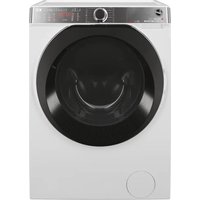
VHD 9163ZI86S - Washing machine HOOVER - Free user manual and instructions
Find the device manual for free VHD 9163ZI86S HOOVER in PDF.


| Product type | Front-loading washing machine |
| Brand | Hoover |
| Model | VHD 9163ZI86S |
| Washing capacity | 9 kg (cotton) |
| Maximum spin speed | 1600 rpm |
| Electrical connection | 230 V ~ 50 Hz, minimum power 3.0 kW |
| Dimensions (H x W x D) | 85 cm x 60 cm x 60 cm |
| Net weight | 75 kg |
| Display type | Inter@ct digital display |
| Wash programs | Cotton, Synthetic, Acrylics, Silk, Wool, Quick 29', A 59', Rinses, Spin, Drain |
| Options | Prewash, Aquaplus, Delayed start/End of cycle, Night quiet, Wash time, Temperature selection, Spin speed selection |
| Detection system | Load and balancing sensor, automatic half load |
| Motor type | Asynchronous inverter motor |
| Memory function | Yes, saves the last settings |
| Child safety | Secure door with indicator light, automatic lock |
| Noise level | Variable depending on program, Night quiet option reduces noise |
| Water connection | Cold water inlet only with supplied hoses |
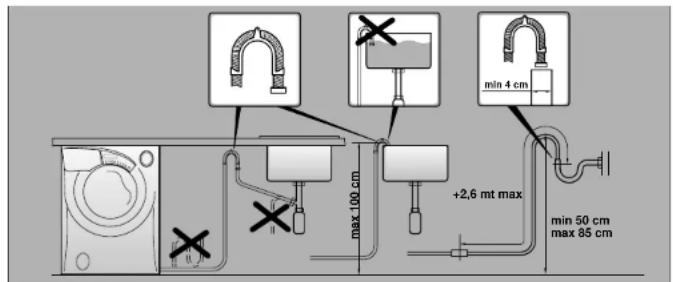
| Drainage | Outlet height between 50 cm and 85 cm from the ground |
| Routine maintenance | Cleaning of detergent drawer and pump filter |
| Displayed error code | Codes 0,1,2,3,4,5,7,8,9 depending on fault |
| After-sales service | Hoover technical support, 1 year warranty |
| Spare parts | Available from Hoover after-sales service |
Frequently Asked Questions - VHD 9163ZI86S HOOVER
User questions about VHD 9163ZI86S HOOVER
0 question about this device. Answer the ones you know or ask your own.
Ask a new question about this device
Download the instructions for your Washing machine in PDF format for free! Find your manual VHD 9163ZI86S - HOOVER and take your electronic device back in hand. On this page are published all the documents necessary for the use of your device. VHD 9163ZI86S by HOOVER.
USER MANUAL VHD 9163ZI86S HOOVER
| 16 | KOGEVASK PAUSE I PROGR. | 90 |
General delivery notes 42
Notes on safety 42
Quick start 43
Useful advice for the user 44
Using Inter@ct for the first time 45
Description of controls 50
Detergent drawer 56
Programme selector 57
The main wash 59
Programme guide 62
Detergents, washing aids and amounts to use 64
Cleaning and routine maintenance
Trouble shooting
Customer service 70
Technical data
Setting up, installation
Before switching on the appliance make sure it is correctly installed and that the transit brackets are removed as shown in page 71.
Preface
Read these instructions for use and all other information enclosed with the washing machine and act accordingly.
Keep all documentation for future reference or for any future owners.
Note: this machine is solely for domestic use.
Notes on disposal
All packaging material used is environmentally-friendly and recyclable. Please help dispose of the packaging via environmentally-friendly means.
Your supplier or local council will be able to give you details of current means of disposal.
Appliances which are finished with are not worthless rubbish! Valuable materials can be salvaged via scrap reprocessing.
Note: pull out the mains plug from appliances which are finished with. Cut the power cable and dispose of it, together with the plug.
When disposing of an old washing machine, please ensure that the porthole lock is rendered inoperable to prevent children shutting themselves in the appliance.
General delivery notes
On delivery check that there is the following with the appliance:
- nstruction manual
Certificate of guarantee
-Caps
-Inlet hose
L liquid detergent or liquid bleach compartment (container)
and check that no damage has occurred during transit, and if so, call your nearest Authorised
Technical Support Service agent (see Customer Service)
Safety notes.
Note: for any cleaning or maintenance procedure for the washing machine
A) Pull out the plug
B) Turn off the tap
C) Hoover equips all its appliances with earthing. Ensure that the mains supply is earthed, and if it is not, seek assistance from a qualified person.
D) Do not touch the appliance when hands or feet are wet or damp. Do not use the appliance with bare feet.
E) The use of adapters, multiple connectors and/or extensions is not recommended.
Note: water temperature can reach 90°C during the wash cycle
F) Check there is no water left in the drum before opening the door.
G) Do not allow children or unauthorised persons to use the appliance without supervision.
H) Do not pull the power cable or the appliance itself to remove the plug from the socket.
I) The appliance must not be exposed to weather conditions (rain, direct sun, etc.
L) When moving the appliance never lift it by the controls or by the detergent drawer.
When in transit never rest the porthole against the trolley.
M) N.B!
If the appliance is installed on a carpeted floor ensure that the ventilation holes on the base of the appliance are not obstructed.
N) The appliance should be lifted by two people.
O) If the appliance is not running properly or breaks down, switch it off, turn off the tap and do not tamper with the appliance.
Consult only the Authorised Technical Support Service for possible repair and ask them to use original spare parts.
Failure to comply with the above can compromise the safety of the appliance.
P) If the appliance's power cable should ever need replacing, consult the Authorised Technical Support Service.
Q) After the machine has been installed, ensure that the mains plug and water supply valves are easily accessible.
R) Glass fibre curtains should never be put into this machine.
S) Lint or fluff must not be allowed to collect on the floor around the outside of this machine.
T) Always ensure that the door locked indicator neon has switched itself off before opening the door. By doing so the machine is allowed to cool down before the laundry is handled.
U) Always ensure that the base panel is fitted to the machine.
Quick Start
Washing
- Press the button inside the door handle to open the door.
- Select laundry and put it in the machine.
- Close the door.
Put detergent in the dispenser compartments, compartment 1 for pre wash and compartment 2 for all other programmes. - Select programme by turning the programme knob (Your desired programme may be seen on the display).
- Adjust the wash temperature if necessary
- Select any function buttons required and then press the Start/Pause button (D).
- There may be a short time delay from pressing the start/pause bottom to the start of the programme, while the machine senses the water required and sets the parameters for the programme.
When the programme has finished
- The display will read "DOOR LOCKED-WAIT TO OPEN".
- After 2 minutes the display will read "PROGRAM ENDED - DOOR OPEN".
- S witch off the machine by turning the control knob to the off position.
- Open the door and remove the laundry
Disconnect the plug from the mains power supply and turn off the water supply after every use.
Useful advice for users
Tips on using your domestic appliance in the most environmentally-friendly and economical way
Do a full load in your washing machine
To prevent any possible waste of energy, water or detergent we recommend that you put a full load in your washing machine, not exceed the maximum load size.
Save up to 50% energy by washing a full load instead of 2 half loads.
When is prewashing really needed?
Only with particularly dirty loads! Energy savings of 5 to 15% are made by not selecting the prewash option for normally soiled laundry.
Which wash temperature should you choose?
Using stain removers before machine washing reduces the need to wash at temperatures over 60°C . Energy savings of up to 50% can be made by using a 60°C wash temperature.
When using your new Inter@ct for the first time
A quick guide around your Hoover Inter@ct menu:
Connect product up to the electric / water supplies and drainage (see pag.72). Select any wash programme. After a short time a message will be displayed:
| WELCOME 0.00 |
accurate time can be reset later
| 16 | COTTON <<1:50>> | 90 |
this is displayed if prog. 1 is selected
Prior to entering the Inter@ct pre set, remember time is limited while you decide on your options (30 sec. i section). If you run out of time start from this point again. Hold down at the same time the (αC) and (x + 100) buttons for 5 sec. until screen changes to:
| ADOPT LANGUAGE ENGLISH |
Your washing machine is automatically set to English.
Press (^ ° C _ Tem.)
| SET NEW TIME hh: |
to change hours press the ( 100) until correct
Press ( ° C Temp . )
| SET NEW TIME mm: |
to change mins press the ( 100) until correct
Press ( ° C temp . )
| SET TIME MODE ABSOLUTE |
if RELATIVE is displayed press ( 100) (This changes a menu option)
Press ( ° Temp . )
| SET FINAL BEEP YES | if NO is displayed press ( *100 ) | |
| Press ( °C ) Temp. | ||
| ENABLE MEMORY ? YES | if NO is displayed press the ( *100 ) | |
| Press ( °C ) Temp. | ||
| SET DEMO MODE ? NO | always select NO, if YES press ( *100 ) | |
| Press ( °C ) Temp. | ||
| EXIT MENU? YES | if NO is displayed press the ( *100 ) | |
| Press ( °C ) Temp. | ||
| 16 | COTTON <<1:50>> | 90 |
You are now able to select any wash programme. You can if you wish also set a delay start. Where more detailed information is required refer to the relevant section from the following pages.
A detailed guide around your Inter@ct menu
This machine will operate prior to programming the Inter@ct set up. However, this machine has Start Delay and Programme End functions and for these functions to work efficiently the Inter@ct set must be programmed. This is a simple operation and special care has been taken during manufacture to ensure that the user can operate this machine simply and effectively.
Programming the machine
Inter@ct needs to be programmed so that the correct clock setting, language and personal requirements are set. When the machine is turned on and the programme dial is moved away from the "off" position to the programme selections a welcome message will appear.
| WELCOME 00.00 |
This message is displayed for a short time while the machine recognises which programme has been selected. When the machine is ready, the programme details will appear on the display and from here you may now beging programming the machine.
| 16 | COTTON <<1:50>> | 90 |
Example
Enter the Menu
Prior to entering the Inter@ct menu please note you have 30 seconds per operation to make your selection. Should you run out of time the display will return to the start screen, and you simply have to re-enter the Inter@ct menu at continue with the programming. From this stage the menu can be programmed. Hold down the (°C) and the (×100) buttons together for 5 seconds or until the beep sounds.
The menu options can be changed by pressing the (× 100) button.
To confirm and enter an option press the (°CTemp) button.
Setting the language
Your washing machine is automatically set to English. If you require another language (it is this language you will read when utilising the machine) follow this procedure:
Scroll through the language options by pressing the ( 100 ) button until you reach the language of your choice.
Release the (x*100) button and press the (°) button to enter your selection.
When you have entered your chosen language, the display will then ask for the "New time" to be set.
Set New Time
This function needs to be set for two reasons: firstly to display the current time of day on the screen and secondly for the programme end/delay start settings to work correctly.
You will notice in the display window that the hours on the clock will be flashing.
Set the hours by continually pressing the ( 100) button and then press the (°C) button to enter the hour.
Next the minutes on the clock will begin to flash, again press the *100 button until the required minutes are displayed and press to input the selection.
When you have Set the New Time, the display will then ask if you wish to "Setting the time mode".
Setting the time mode
There are two ways to select the time mode.
The first is if you wish programme end or delay start to be programmed by starting the actual time you want the programme to end or begin, e.g., programme to end 18.00. This is called Absolute Time Mode.
When utilising the programme end function (or start delay), an example can be seen below when the Absolute Time Mode has been selected in the menu set-up stage.
PROGRAM END AT18:00
Therefore, when setting the Programme end time the programme (as shown above) will end at 18.00.
The second is if you wish programme end time or delay start to be programmed by adding hours; e.g., programme to end in 1½ hours. This is called Relative Time Mode.
When utilising the programme end function (or start delay), an example can be seen below when the Relative Time Mode has been selected in the menu set-up stage.
PROGRAMEND IN 1H30M
Both options are very useful, but we feel that the Absolute Time Mode will be more beneficial and easier to use since there will be no need to calculate how many hours you will need to leave before you want the machine to end or start.
On reaching the set time mode you will be asked if you would like to select "Relative" time or by scrolling through using the ( 100 ) button - "Absolute" time.
Enter the preferred setting by pressing the (°C) button.
When you have entered your preferred time-mode, the display will then ask for the Enable Final Beeping to be set.
Enable Final Beeping
Here you have the option to have a beeping alarm to let you know the wash cycle has finished. By pressing the ( 100) button you can scroll through the "yes" and "no" options.
To enter your selection press the (°C) button and the screen will then move to the next stage and ask you to "Enable memory"
Enable Memory
This is a useful feature if you frequently wash laundry using the same programme.
Selecting "Enable Memory" will tell the machine to remember the last programme/functions used and set them in the memory. This function works only on cottons, delicates, synthetics and woolens programme. The memory does not retain settings within the special programme group. Select "Yes" or "No" to this option by using the x100 and xw0 button to input the selection.
The display will then shown a message that asks if you require demo mode to be set.
Demo mode (default setting - NO)
Please set this option to "No" if not done so already - as this is for SERVICE use only.
If the demo mode option is not set on "NO" when exiting the Inter@ct menu the wash programme WILL NOT commence. Demo Mode must be set at "NO" for the wash cycle to commence. On entering "No" via the ( ° Temp.) button you will then be asked if you wish to "Exit Menu".
Exit Menu
If you are happy with the settings you have selected, you can now exit the menu by selecting "Yes" via the (*100) and (°C) buttons.
However, if you are not happy with any of the settings selected you must select "No" to the exit menu command and you can then commence the programming from the beginning. By pressing the (aCTemp.) button you are able to enter and bypass each option individually until you reach the option you would like to re-set.
When you are completely satisfied with your menu selection, you may exit the menu and testing of the installation may now commence.
If, after the initial installation you may want to change of any of the menu at a later date, again run through the menu options from the beginning and change the options you want to reset.
This may be useful to change the "Set New Time" when the clocks go forward or back.
Once set, the menu options will remain in the memory of the machine even if the machine is unplugged or if a power cut occurs.
Description of controls
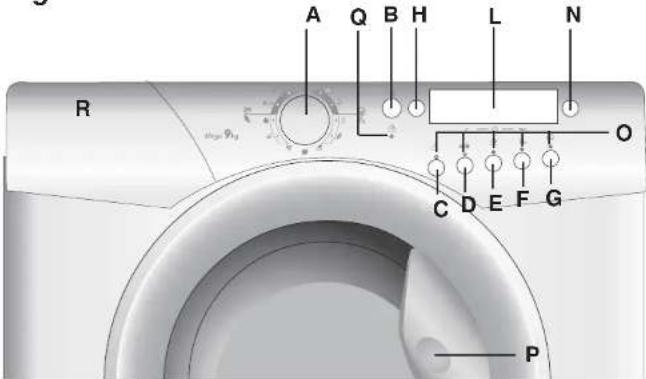
Fig. 1
Programme Selector Dial A
"Wash Temperature" button N
Buttons indicator light O
Door Handle P
Door locked indicator light Q
Detergent Painter R
All of the buttons and dials on the washing machine control panel are listed below.
When you have selected the desired programme and any option buttons, the information you have selected will appear on the screen in the Inter@ct.
When programmes and option buttons are compatible a sleeping sound will be heard and the light above the option button selected remain illuminated. If you select an option button that is not compatible with the programme you require, a buzzing sound will be heard and the button light will not illuminate. To select an option button press it once; to deselect an option button, press it again.
Carefully read the relevant descriptions detailed below:
Programme Selector Dial
A
Rotates in both directions
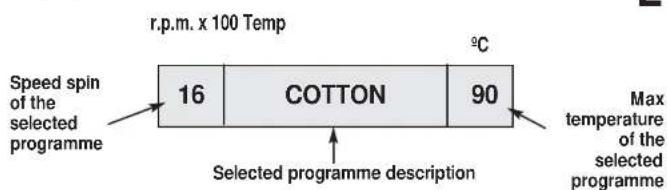
When you turn the programme selector dial and after the welcome message has disappeared, you will see a display showing the following details:
Reading from left to right:
- The spin speed
- The programme name
- The wash temperature
Example
| 16 | COTTON | 90 |
Start/Pause Button

B
START
To start a programme press this button once.
The machine will now be sensing the wash load and ask you to please wait.
Example
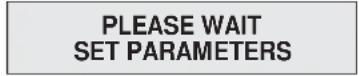
The Inter@ct panel will then display the time to complete the programme and then the wash cycle will commence. Inter@ct calculates the time to the end of the selected programme based upon a standard 9 Kg load, during the cycle. Inter@ct corrects the time to that applicable to the size and composition of the load.
Example

PAUSE
The programme may be paused at any time during the wash cycle by holding down the Start/Pause button for about 3 seconds and a beep will sound. A message will appear on the display to inform you that the programme has been paused.
Example

If you wish to add or remove items during washing, wait 2 minutes until the safety device unlocks the door.
To restart the programme press the Start/Pause button once again. The display will inform you that the programme will continue.
CANCEL A PROGRAMME
To cancel the programme turn the programme selector dial to the "OFF" position and then select a different programme. The display will inform you that the programme has been cancelled.
Example

Return the programme selector dial to the "OFF" position.
Pre-wash Button


This option is particularly useful for heavily soiled loads and can be used only on some programmes as shown in the programmes table.
Detergent for this programme should be added to the compartment of the soap drawer labelled "1" (Please refer to Detergent Drawer Section of manual). We recommend you use only 20% of the recommended quantities shown on the detergent pack and fabric conditioner should not be used for this programme.
"Aquaplus" button


By pressing this button you can activate a special new wash cycle in the Cotton and Mixed Fabrics programs, thanks to the new Sensor System. This option treats with care the fibres of garments and the delicate skin of those who wear them.
The load is washed in a much larger quantity of water and this, together with the new combined action of the drum rotation cycles, where water is filled and emptied, will give you garments which have been cleaned and rinsed to perfection. The amount of water in the wash is increased so that the detergent dissolves perfectly, ensuring an efficient cleaning action. The amount of water is also increased during the rinse procedure so as to remove all traces of detergent from the fibres. This function has been specifically designed for people with delicate and sensitive skin, for whom even a very small amount of detergent can cause irritation or allergy.
You are advised to also use this function for children's clothing and for delicate fabrics in general, or when washing garments made of towelling, where the fibres tend to absorb a greater quantity of detergent. To ensure the best performance for your wash, this function is always activated on the Delicates and Wooliens programs.
This button is not available when the "Night option" button is selected.
Set Programme Delay start/End Time


The programme end time/delay start options can be used if you want the washing to be ready at a later time (but within 24 hours).
1. Set delay start
Press delay start/set end time button once and press the hours and minutes buttons (to the left and right) until the required time is set. The display returns to the programme option if the button is pressed within 5 seconds.
Press the start button.
To cancel delay start, hold down the button for 5 seconds.
2. Programme end time
Press delay start/set end time button twice and press the hours and minutes buttons (to the left and right) until the required time is set. When entering the programme end option, the display will show the minimum time which you can set the programme to end by. This time may only be extended as you require.
NOTE: When using the delay start/set end time functions, only use detergents and laundry also via the dispenser drawer. Adding detergents etc. to the drum and then leaving them to stand for long period of time may damage your laundry.
Night Option Button

F
Press this button (available for all the washing programmes) to reduce the intermediate spin speed to 400 rpm, where applicable; the water level is increased during rinsing and the washing is kept immersed in water after the final rinse in order to spread the fibres evenly. During the phase in which the water is held in the tub, the indicator lights to show that the machine is at a standstill.
Release the button to end the cycle with a spin dry (which may be reduced or cancelled using the appropriate button) and emptying phase.
Thanks to electronic control, the water in the intermediate phases is emptied silently, making this option very useful for washing at night.
"Wash Time" button

G
By selecting this button (active only on COTTON and MIXED FIBRES programmes) there is a choice of 3 levels of wash intensity, depending on how much the fabrics are soiled. Once the programme and wash temperature have been selected the degree of soiling level is automatically set to the minimum allowed: pressing the button increases the level and the settings for the cycle duration are also adjusted accordingly.
The 3 levels of wash intensity shown in the display are:

Select Spin x100
H
On selecting the wash programme the display will inform you of the maximum spin speed permitted for that programme. By repeatedly pressing the select spin button the speed will decrease by increments of 100 rpm. The minimum speed permitted is 400 rpm, or by continuously pressing the select spin option the spin may be cancelled if desired.
Note: this model is fitted with an electronic "sensor" device that checks the load is balanced correctly. If the load is slightly unbalanced the machine will re-balance it automatically to then carry out the normal spin.
If, after several attempts, balance is not restored a reduced spin speed will be used. If loads are seriously unbalanced the spin stage will be cancelled.
This helps limit vibration, reduce noise and improve the washing machine's reliability and life.
Display INTER@CT
"Wash Temperature" button ° C Temp.
N
The Wash Temperature button allows a reduction in the wash temperature in each programme. Each time the button is pressed the temperature decreases by 10°C until a minimum of 15°C (cold wash).
Note: The temperature must be adjusted before selecting WASH TIME.
Buttons indicator light
0
The indicator light buttons will light when specific options are selected.
Door Handle
P
Press the button inside the door handle to open the door.
DOOR SECURITY indicator light

Q
The "Door Security" indicator light is illuminated when the door is fully closed and the machine is ON. When "Start/Pause" is pressed on the machine with the door closed the indicator will flash momentarily and then illuminate.
If the door is not closed the indicator will continue to flash.
A special safety device prevents the door from being opened immediately after the end of the cycle. Wait for 2 minutes after the wash cycle has finished and the "Door Security" light has gone out before opening the door. At the end of the cycle turn the programme selector to "OFF".
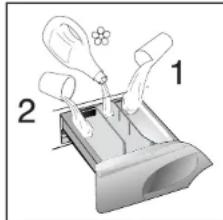
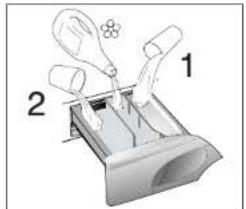
Detergent drawer

The detergent drawer is split into 3 compartments:
- the compartment labelled "1" is for prewash detergent;
- t he compartment labelled is for special additives, fabric softeners, fragrances, starch, brighteners etc;
- the compartment labelled "2" is for main wash detergent.
If liquid detergents are used, please insert the special container supplied into the compartment marked "2" in the detergent drawer. This ensures that the liquid detergent enters the drum at the right stage of the wash cycle.
This special container must be inserted into the compartment marked "2" in the detergent drawer, also when you wish to use the "RINSE" programme as BLEACHING cycle.
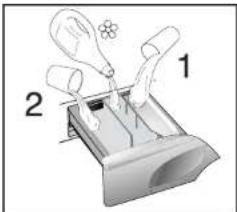
NOTE: Some Detergents are Difficult to utilise. Ensure to use an in drum dispenser if recommended by the detergent Manufacturer.
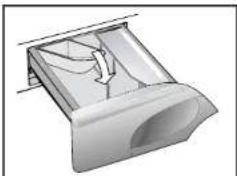
Note: only put liquid products in the compartment labelled " Ⓒ". The machine is programmed to automatically take up additives during the final rinse stage for all wash cycles.
Programme selector
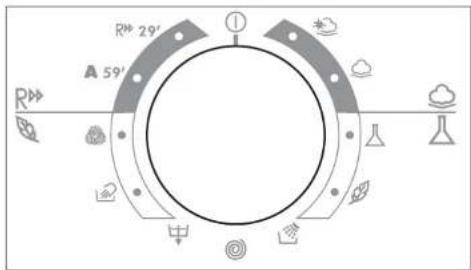
For the various types of fabrics and various degrees of dirt the washing machine has 4 different programme bands according to: wash cycle, temperature and lenght of cycle (see table of washing cycle programmes).
The programmes have been designed for a maximum wash and the rinses, with spin intervals, ensure perfect rinsing.
The final spin gives more efficient removal of water.
2 MIXED AND SYNTHETIC FABRICS
The main wash and the rinse gives best results thanks to the rotation rhythms of the drum and to the water levels.
A gentle spin will mean that the fabrics become less creased.
3 SPECIAL DELICATE FIBRES
This is a new wash cycle which alternates washing and soaking and is particularly recommended for very delicate fabrics.
The wash cycle and rinses are carried out with high water levels to ensure best results.
4. SPECIALS
SPECIAL "RINSE" PROGRAMME
This programme carries out three rinses with a intermediate spin (which can be reduced or excluded by using the correct button). It can be used for rinsing any type of fabric, eg. use after hand-washing.
This program can be also used as cycle of Bleaching (see table of washing cycle programmes).
SPECIAL "FAST SPIN" PROGRAMME
Programme "FAST SPIN" carries out a maximum spin (which can be reduced by using the correct button).
DRAIN ONLY
This programme drains out the water.



PULSE TECHNOLOGY
Thanks to the new generation of 3 phase motors controlled by a sophisticated electronic system, we have developed a new washing mode which simulates, inside the drum, the hand washing action.
For the first time, the tub does not carry out complete rotations but uses pulse movements with pauses inbetween.
Specifically, the tub does there delicate clock wise movements. pauses, and then does 3 anti clock wise movements.
This type of washing action guarantees a care and delicately only equalled by hand washing and is applied to the programmes below identified with the symbol
SPECIAL SILK PROGRAMME
This washing machine also has a gentle Silk and Hand Wash programme cycle. This programme allows a complete washing cycle for garments specified as 'Hand Wash only' and laundry items made from Silk on the fabric label.
The programme has a maximum temperature of 30° and concludes with 3 rinses and no final spin.
WOOLMARK PROGRAMME
The special cycle, certified by WOOLMARK, enables to thoroughly wash garments without damaging them. The cycle comprises of alternate periods of activity and pauses. The programme has a maximum temperature of 40° and concludes with 3 rinses and a short spin.
"A" WASH 59
This specially designed programme maintains the high quality wash performance identified with the "A" rating whilst greatly reducing the wash time. The programme is designed for a maximum load of 4,5kg with a temperature of 60°C and concludes with 2 rinses and a high speed spin sequence.
29 MINUTE RAPID PROGRAMME
The 29 minute rapid programme allows a complete washing cycle to be carried out in approximately 30 minutes, with up to a maximum load of 3kg and a temperature of 40°C .
When selecting the "29 minute rapid" programme, please note that we recommend you use only 20% of the recommended quantities shown on the detergent pack.



A 59
R 29
Main wash
Auto half load
The washing machine is fitted with a self adjusting water level system.
This system enables the machine to use the amount of water needed to wash and rinse the laundry in relation to the particular load.
This results in a reduction of the water and electricity used, without in any way compromising the washing and rinsing performance.
In fact the amount of water and electricity used will always be appropriate for the clothes load. The washing machine automatically ensures excellent washing results at minimum cost whilst respecting the environment.
Sorting the laundry
- It is recommended you wash only items which are washable with water and detergent and not dry-clean items.
- If you need to wash rugs, bedspreads or other heavy items, it is best not to spin them.
- Sort the laundry according to fabric type, degree of soiling and wash temperature: follow the labelling in the garments.
Laundry for hot wash 95
Coloured, easy-care mate


Delicates and wool 49
- Items labelled with the following symbols are not suitable for machine washing:
Dry clean P
For very delicate items, such as net curtains, underwear, tights etc., you are advised to use a laundry net or wash bag.
- W oollen items must be labelled with the «Pure New Wool» symbol to be washed in the machine and must also be labelled «non-matting» or «machine washable».
Colour often leaks from new coloured items.
This can then colour other lighter items being washed.
We therefore recommend that coloured items should be washed for the first time separately. For future washes, colourfast items can only be washed with white laundry up to 40°C .
Do not wash
Note: when sorting laundry
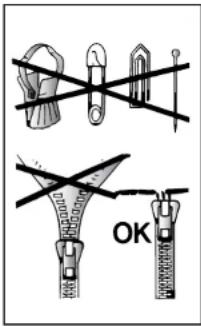
- check there are no metal objects in the laundry (such as paper clips, safety pins, pins, coins etc...);
In the event of a machine failure during the warranty period and foreign objects are found to be the cause of the failure a labour charge may be made for the call out an engineer. - button up pillowcases, fasten zips, hook & eye fasteners, belts and long dressing gown cords;
remove curtain hook; - pay close attention to the labels on items
- if you notice stubborn stains whilst sorting the laundry, remove them using a special detergent or a special stain remover.
We recommend that you do not do a full load of just towelling items as these become too heavy since they absorb a lot of water, and may become too heavy for the drum.
The correct way to wash
Preparing the laundry
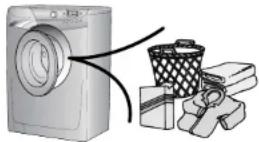
A) Select and sort the laundry according to the wash care labels found on each garment. Always check the care labels.
Loading the laundry
B) Open the door.
C) Put the laundry in the washing machine. Close the door again, ensuring that no items of laundry are obstructing the lock, or door seal.
Putting detergent in machine
D) Open the drawer, choose the detergent and put in the correct amount, according to the manufacturer's instructions and the advice on page 64. Add any other laundry aids (see page 64). Close the drawer again.
Liquid detergents that are to be placed directly into the drum should use the recommended dispensing device.
Selecting the wash programme
Refer to the programme guide to select the most suitable programme.
The programme is selected by turning the programme selector clockwise and aligning the programme number with the indicator.
Check that the tap is turned on and that the discharge hose is positioned correctly.
Adjust the wash temperature if necessary
Press additional function buttons if you require.
Press the start button, the programme will begin.
When the programme has finished
-
The display will read "DOOR LOCKED-WAIT TO OPEN".
-
After 2 minutes the display will read "PROGRAM ENDED - DOOR OPEN".
-
S witch off the machine by turning the control knob to the off position.
-
Open the door and remove the laundry.
Disconnect the plug from the mains power supply and turn off the water supply after every use.
TABLE OF PROGRAMMES
| PROGRAM FOR: | PROGRAMME SELECTOR ON: | DISPLAY INTERCEPT | WEIGHT MAX kg | TEMP. °C | CHARGE DETERGENT | ||
| 2 | 1 | ||||||
| Resistant fabrics Cotton, linen | COTTON | 9 | Up to: 90° | · | · | () | |
| Cotton, mixed resistant, Coloureds | COTTON | 9 | Up to: 60° | · | · | () | |
| Mixed fabrics and synthetics Cotton, mixed fabrics. synthetics | SYNTHETICS | 4,5 | Up to: 60° | · | · | () | |
| Very delicate fabrics | ACRYLICS | 2 | Up to: 40° | · | · | ||
| Rinse | RINSES ONLY | - | - | Δ | · | ||
| Fast spin | SPIN ONLY | - | - | ||||
| Drain only | DRAIN ONLY | - | - | ||||
| Silk/Hand wash | SILK | 1 | Up to: 30° | · | · | ||
| "MACHINE WASHABLE" woollens | WOOLLENS | 2 | Up to: 40° | · | · | ||
| Resistant fabrics | A 59' | 59' CLASS A | 4,5 | Up to: 60° | · | · | |
| Resistant fabrics Mixed fabrics and synthetics | R 29' | DAILY FAST 29' | 3 | Up to: 40° | · | · | |
Please read these notes
When washing heavily soiled laundry it is recommended the load is reduced to 4kg maximum.
**Programme tested in accordance with CENELEC EN 60456 with the maximum wash time selected.
Programme also recommended for low-temperature washes (lower than the max.shown).
The spin speed may also be reduced to match any guidelines suggested on the fabric label, or for very delicate fabrics cancel the spin completely this option is available with a spin speed button.
() Only with the Prewash button selected. (Programmes with Prewash button available)
Pressing the wash temperature button makes it possible to wash at any temperature below the maximum allowed.
For the programmes shown you can adjust the duration and intensity of the wash using the wash time button.
When only a limited number of articles have stains which require treatment with liquid bleaching agents, preliminary removal of stain can be carried out in the washing machine.
Pour the bleach into the liquid bleach container, inserted into the compartment marked "2" in the detergent drawer, and set the special programme "RINSE".
When this phase has terminated, turn the programme selector on the "OFF" position, add the rest of the fabrics and proceed with a normal wash on the most suitable programme.
Detergents, washing aids and amounts to use
Choice of detergent
General purpose detergents
Powder detergents, for a thorough wash, with bleaching agent, particularly suitable for use in hot wash programmes (60°C and over), for heavily soiled and stained laundry.
Liquid detergents, particularly suitable for grease stains, such as greasy skin marks, cosmetics and oil.
- These detergents are not suitable for washing stained laundry, as they do not contain bleach.
Biological detergents, not all the products available give a really through wash.
Special detergents
- Detergents for coloureds and delicates, without added bleach, also often without any optical brightening agents, to preserve the colour.
- Detergents for a thorough wash, without added bleach or enzymes, particularly suitable for handling woolen fibres.
- Detergents for curtains with optical brightening agents, resistant to light, to prevent yellowing from sunlight.
- Special detergents for programmed use of chemical substances, depending on fabric type, degree of soiling and water hardness.
Here basic detergents, softeners, bleaches/stain removers can be added separately.
Additional laundry aids
Water softener, means less detergent can be used where water hardness is classed as hard to very hard.
- Prewash substances. for the programmed treatment of stains prior to the main wash. Using them means the subsequent wash can be at a low temperature or with bleach-free detergents.
- Fabric softener, prevents static build-up in synthetic fabrics and softens fabrics. If you own a tumble dryer, clothes are softened even without the use of a fabric softener.
Do not put solvents in the washing machine!
Keep detergents and other laundry products out of children's reach.
Before pouring in the detergent check that there are no foreign bodies in the detergent drawer. Dosage details are usually shown on the detergent packaging. Follow those instructions.
Dosages
Only use detergents which are suitable for use in a washing machine.
You will obtain the best results from your wash with the minimum use of chemical products and the best care for your laundry if you take into consideration the degree of soiling as well as the type of detergent to choose.
The amount of detergent to use depends on:
water hardness, depending on the hardness of the water and the type of detergent used, it is possible to reduce the amount of detergent.
the degree of soiling, it is possible to reduce the amount of detergent used depending on the degree of soiling.
amount of laundry, it is possible to reduce the amount of detergent when washing only a small amount of laundry.
The amounts shown on pack for detergents for washing delicates often already refer to a reduced wash size.
Follow the dosage instructions!
Dosage for powder detergent
For normal and low concentration detergents: for normally soiled laundry choose a programme without prewash.
Put the detergent in compartment 2 of the drawer.
For heavily soiled laundry, choose a programme with prewash.
Put 1 / 4 of the detergent in compartment 1, 3 / 4 in compartment 2 of the drawer. When using water softeners, first put in the detergent, then add the softener to compartment 2. For highly concentrated detergents not in single dose format, follow what is shown on pack exactly as regards type and amount of dosage.
To avoid the difficulty of checking if the detergent has been taken up, use the dosage aids provided in the detergent packaging.
Liquid detergent dosage
Liquid detergents may be used in accordance with the instructions on the relevant packaging, for all programmes without prewash, by using the special container which is placed in the drum or, for those models that have it, in the special insert for liquid detergents.
Cleaning and routine maintenance
Do not use alcohol-based scourers and/or thinners on the outside of your washing machine. Just a wipe with a damp cloth will suffice. The washing machine needs very little maintenance:
- C leaning the drawer compartments.
- C leaning the filter.
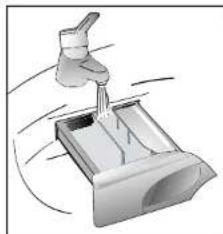
Cleaning the drawer compartments
Even if it is not strictly necessary, it is good to clean the compartments for bleaching detergents and additives occasionally.
A) To do this you just need to pull them out firmly, but without forcing them.
B) Clean everything in the compartment under running water.
C) Put everything back in its proper place.
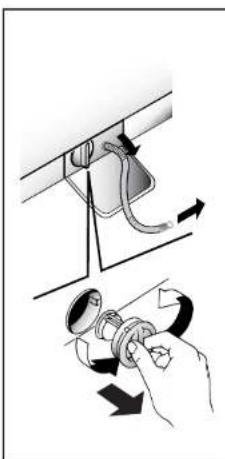
FILTER CLEANING
The washing-machine is equipped with a special filter to retain large foreign matter which could clog up the drain, such as coins, buttons, etc. These can, therefore, easily be recovered. The procedures for cleaning the filter are as follows:
A. Open the flap
B. Only available on certain models: Pull out the corrugated hose, remove the stopper and drain the water into a container.
C. Before removing the filter, place an absorbent towel below the filter cap to collect the small amount of water likely to be inside the pump
D. Turn the filter anticlockwise till it stops in vertical position. Remove and clean.
E. After cleaning, replace by turning the notch on the end of the filter clockwise. Then follow all procedures described above in reverse order.
Transporting storing the appliance for long periods when appliance is not in use
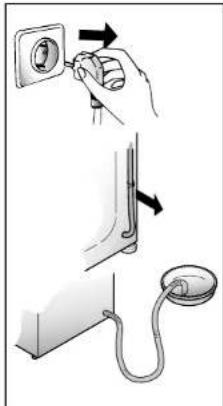
If the appliance is being transported or is out of use for long periods in unheated places, all remaining water must be completely removed from all hoses.
Ensure mains power is off, then unclip the hose and point it downwards into a basin until all the water has emptied out.
When finished, repeat the operation in the reverse order.
Trouble shooting
What might be the cause of... Defects you can remedy yourself
Before calling GIAS Service for technical advice please run through the following checklist. A charge will be made if the machine is found to be working or has been installed incorrectly or used incorrectly. If the problem persists after completing the recommended checks, please call the GIAS Service, they may be able to assist you over the telephone.
| CAUSE REMED | YPROBLEM | |
| 1. Does not work on any programme | Plug not in socket.Not switched on.Power failure.Fuse blown.Door open.RCD tripped (trip switch)Has the Delay start been set. | Plug it in.Switch on.Check and refer to 'Power Failure' section.Check.Close door.Rest Reset RCD.Check. |
| 2. Does not fill with water | See cause 1.Water supply turned off.Programme selector not correctly positioned. | Check.Turn on water supply.Position programme selector correctly. |
| 3. Water does not drain away | Kink in discharge hose.Foreign bodies In filterThe machine has been plumbed in incorrectly. | Straighten discharge hose.Examine filter.Check installation. |
| 4. Water on floor around the washing machine | Leaking gasket between tap and water inlet hose.Strand of clothing or dirt between door rubber gasket and door glass.Incorrect plumbing. | Replace gasket and tighten connection.Ro load the machine and keep rubber door gasket/door glass clean.Check plumbing. |
| 5. Does not spin | Water has not yet drained away."Spin Cancel" option selected(certain models only).Unbalanced load. | Wait a few minutes for machine to empty.Check.Rearrange load evenly. |
| 6. Machine vibrates a lot during spin | Washing machine not completely level.Load not distributed evenly.Transit brackets not removed. | Adjust the special adjustable feet.Rearrange the laundry evenly.Remove transit brackets (see installation section). |
| 7. Door will not open | Two minutes have not elapsed since the programme finished. | Wait two minutes. |
| 8. Display reads error0,1,5,7,8 | - | Call service. |
| 9. Display reads error 2 | No water fill. | Check water supplies are on. |
| 10. Display reads error 3 | No pump out. | Check drain is clear.Check drain hose is not kinked. |
| 11. D display reads error 4 | Machine overfilled with water. Turn off water supply. | To machine.Call service. |
| 12. Display reads error 9 | - | Cancel the programme by returning the selector to the OFF position. Select again the programme and press the START/PAUSE button to switch the machine on. |
It is unlikely that water will be visible in the drum! This is due to the latest technology that achieves the same standard of washing and rinsing but with far less water consumption.
Note:
The use of environmentally-friendly, phosphate-free detergents (check detergent information on pack) can have the following effects:
- waste water from rinsing may be cloudbier because of the presence of a white powder (zeolites) held in suspension, without the rinse performance being adversely affected;
- presence of white powder on laundry after washing, which is not absorbed by the fabric and does not alter the colour of the fabric.
- The presence of foam in the final rinsing water is not necessarily an indication of poor rinsing.
- Carrying out more rinse cycles does not serve any purpose in such cases.
Customer Service
The appliance is covered by a certificate of guarantee which allows you free use of the Gias Technical Support Service. Remember to send off the guarantee certificate for validation within 10 days of the date of purchase.
You should retain the receipt issued by the retailer when you purchased the machine to show to the call out engineer, should you need to consult one.
If your washing machine shows signs of a defect or is not working properly, before you contact GIAS Service we recommend you carry out the checks detailed on page 68 within the Trouble shooting section.
If the problem with the machine persists after completing all the recommended checks, please dial the GIAS Service number on the rear cover of this manual.
For the cost of a telephone call, you will be connected directly to GIAS. It is important you tell the GIAS advisor your product's model number and serial number, which you will find on the rating label (16 characters, beginning with the number 3), found on the front of the washing machine (door area). By doing this, your enquiry will be responded to more efficiently.
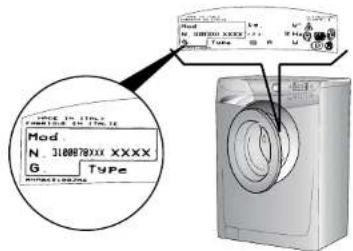
Fig. 2
| Technical data | |||
| ■ Max. load of dry laundry ■ Water pressure Measurements ■ Width ■ Depth ■ Height | 9 kg (0.5 ÷ 10 bar) 0.05 ÷ 1 MPa | ||
| 60 cm 60 cm 85 cm |
NB: For specifications regarding electrical data, see the data panel on the front of the washing machine (porthole area).
CC Appliance complies with European Directives 73/23/EEC and 89/336/EEC, replaced by 2006/95/EC and 2004/108/EC, and subsequent amendments.
Installation
After removing the machine from the packaging, proceed as follows:
On the back of the machine
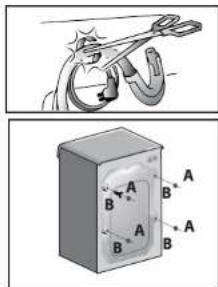
1) Carefully cut the securing strap that holds the main cord and the drain hose.
2) Remove the 4 fixing screws marked (A) and remove the 4 spacers marked (B)
3) Cover the 4 holes using the caps provided in the instruction booklet pack.
4) Fix the sheet of corrugated material on the bottom as shown in picture.
5) Use the 4 feet to level the machine with the floor:
a) Turn the nut clockwise to release the screw adjuster of the foot.
b) Rotate foot to raise or lower it until it stands firmly on the ground.
c) Lock the foot in position by turning the nut anti-clockwise until it comes up against the bottom of the machine.
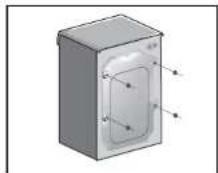
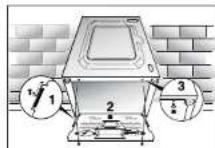
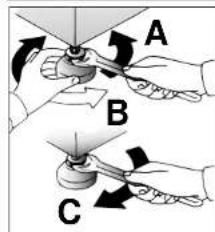
Note: we recommend you keep the spacers and screws to immobilise the machine for future transit. The Manufacturers will not be responsible for any possible damage to the machine caused by not following the rules relating to releasing the mechanism. The user is responsible for all costs of installation.
Water supply
The machine has an inlet hose with 3/4 threaded ferrules fitted to the ends to attach between the threaded connector on the appliance and the cold water supply.
The appliance must be connected to the water mains using new hose-sets. The old hose-sets should not be reused.
The appliance must only be connected to the cold water supply.
Connection to a warm water supply, that is over 40° , may damage certain delicate fabrics.
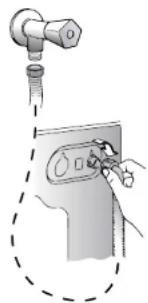
Note: it is advisable to turn off the tap after each wash to isolate the washing machine from the water supply.
If the inlet hose's connection point is changed, check that the 3/4 threaded ferrule on the inlet hose is firmly attached to the electrovalve connector.
For the washing machine to function properly the terminal end of the discharge hose (mouth) must be at a minimum of 50 cm and a maximum of 85 cm from the ground.
Electricity supply and safety advice
Washing machines are supplied to operate at a voltage of 230V , 50 Hz single-phase. Check that the conductor is powerful enough to supply at least 3.0 kW, then connect the plug to a 10A earthed socket.
After installation, the appliance must be positioned so that the plug is accessible.
Check that the electricity supply to your home has an earthing system.
The socket in your home and the plug on the appliance must be of the same type.
It is generally not advisable to use multiple adapters and/or extension leads.
All Hoover washing machines comply with the safety requirements laid down by the Quality Trademark Institute.
Introduction
Touche "Selection Essorage" H
Ecran Inter@ct L
Touche "Selection Température" N
ANNULATION D'UN PROGRAMME
The manufacturer declines all responsibility in the event of any printing mistakes in this booklet. The manufacturer also reserves the right to make appropriate modifications to its products without changing the essential characteristics.
This appliance is marked according to the European directive 2002/96:EC on Waste Electrical and Electronic Equipment (WEEE).
By ensuring this product is disposed of correctly, you will help prevent potential negative consequences for the environment and human health, which could otherwise be caused by inappropriate waste handling of this product.
The symbol on the product indicates that this product may not be treated as household waste. Instead it shall be handed over to the applicable collection point for the recycling of electrical and electronic equipment. Disposal must be carried out in accordance with local environmental regulations for waste disposal.
For more detailed information about treatment, recovery and recycling of this product, please contact your local city office, your household waste disposal service or the shop where you purchased the product.
eepd-eppeeppeepoeepoeepoeepoeepoeepoeepoeepoeepoeepoeepoeepoeepoeepoeepoeepoeepoeepoeepoeepoeepoeepoeepoeepoeepoeepoeepoeepoeepoeepoeepoeepoeepoeepoeepoeepoeepoe

- PREFACE
- NOTES ON DISPOSAL
- GENERAL DELIVERY NOTES
- SAFETY NOTES
- NOTE: FOR ANY CLEANING OR MAINTENANCE PROCEDURE FOR THE WASHING MACHINE
- NOTE: WATER TEMPERATURE CAN REACH 90°C DURING THE WASH CYCLE
- QUICK START
- WASHING
- WHEN THE PROGRAMME HAS FINISHED
- USEFUL ADVICE FOR USERS
- DO A FULL LOAD IN YOUR WASHING MACHINE
- WHEN IS PREWASHING REALLY NEEDED
- WHICH WASH TEMPERATURE SHOULD YOU CHOOSE
- WHEN USING YOUR NEW INTER@CT FOR THE FIRST TIME
- A QUICK GUIDE AROUND YOUR HOOVER INTER@CT MENU
- A DETAILED GUIDE AROUND YOUR INTER@CT MENU
- PROGRAMMING THE MACHINE
- EXAMPLE
- ENTER THE MENU
- SETTING THE LANGUAGE
- SET NEW TIME
- SETTING THE TIME MODE
- PROGRAM END AT18:00
- PROGRAMEND IN 1H30M
- ENABLE FINAL BEEPING
- ENABLE MEMORY
- DEMO MODE (DEFAULT SETTING - NO)
- EXIT MENU
- DESCRIPTION OF CONTROLS
- PROGRAMME SELECTOR DIAL
- ROTATES IN BOTH DIRECTIONS
- START/PAUSE BUTTON
- START
- PAUSE
- CANCEL A PROGRAMME
- PRE-WASH BUTTON
- AQUAPLUS" BUTTON
- SET PROGRAMME DELAY START/END TIME
- SET DELAY START
- PROGRAMME END TIME
- NIGHT OPTION BUTTON
- WASH TIME" BUTTON
- SELECT SPIN X100
- DISPLAY INTER@CT
- WASH TEMPERATURE" BUTTON ° C TEMP
- BUTTONS INDICATOR LIGHT
- DOOR HANDLE
- DOOR SECURITY INDICATOR LIGHT
- DETERGENT DRAWER
- PROGRAMME SELECTOR
- 2 MIXED AND SYNTHETIC FABRICS
- 3 SPECIAL DELICATE FIBRES
- SPECIALS
- SPECIAL "RINSE" PROGRAMME
- SPECIAL "FAST SPIN" PROGRAMME
- DRAIN ONLY
- PULSE TECHNOLOGY
- SPECIAL SILK PROGRAMME
- WOOLMARK PROGRAMME
- A" WASH 59
- 29 MINUTE RAPID PROGRAMME
- MAIN WASH
- AUTO HALF LOAD
- SORTING THE LAUNDRY
- NOTE: WHEN SORTING LAUNDRY
- THE CORRECT WAY TO WASH
- PREPARING THE LAUNDRY
- LOADING THE LAUNDRY
- PUTTING DETERGENT IN MACHINE
- SELECTING THE WASH PROGRAMME
- PLEASE READ THESE NOTES
- DETERGENTS, WASHING AIDS AND AMOUNTS TO USE
- CHOICE OF DETERGENT
- GENERAL PURPOSE DETERGENTS
- SPECIAL DETERGENTS
- ADDITIONAL LAUNDRY AIDS
- DO NOT PUT SOLVENTS IN THE WASHING MACHINE
- DOSAGES
- DOSAGE FOR POWDER DETERGENT
- LIQUID DETERGENT DOSAGE
- CLEANING AND ROUTINE MAINTENANCE
- CLEANING THE DRAWER COMPARTMENTS
- FILTER CLEANING
- TRANSPORTING STORING THE APPLIANCE FOR LONG PERIODS WHEN APPLIANCE IS NOT IN USE
- TROUBLE SHOOTING
- WHAT MIGHT BE THE CAUSE OF... DEFECTS YOU CAN REMEDY YOURSELF
- NOTE
- CUSTOMER SERVICE
- INSTALLATION
- WATER SUPPLY
- NOTE: IT IS ADVISABLE TO TURN OFF THE TAP AFTER EACH WASH TO ISOLATE THE WASHING MACHINE FROM THE WATER SUPPLY
- ELECTRICITY SUPPLY AND SAFETY ADVICE
- INTRODUCTION
- ANNULATION D'UN PROGRAMME
Brand : HOOVER
Model : VHD 9163ZI86S
Category : Washing machine