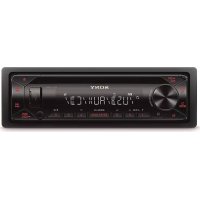
CDXG1300U - Car stereo SONY - Free user manual and instructions
Find the device manual for free CDXG1300U SONY in PDF.


| Product type | Car radio |
| Brand | Sony |
| Model | CDX-G1300U |
| Dimensions (W × H × D) | Approx. 178 × 50 × 176 mm |
| Weight | Approx. 1.2 kg |
| Power supply | Vehicle battery 12 V DC (negative ground) |
| Rated current consumption | 10 A |
| Maximum output power | 55 W × 4 (at 4 Ω) |
| Speaker impedance | 4 Ω - 8 Ω |
| Radio reception | FM (87.5 - 108 MHz), MW (531 - 1602 kHz), LW (153 - 279 kHz) |
| CD player | CD, CD-R, CD-RW (MP3/WMA) |
| USB port | Yes (AOA 2.0, MSC/MTP) |
| AUX input | Stereo mini jack (3.5 mm) |
| Equalizer | EQ10 presets and customization |
| RDS system | AF, TA, PTY, regional |
| Detachable front panel | Yes, with anti-theft alarm |
| Display | Adjustable brightness, sound synchronization |
| Maintenance and cleaning | Clean connectors with a cotton swab; avoid liquids |
| Safety | 10 A fuse, automatic shutdown, battery alert |
| Spare parts and repairability | Replaceable fuse, mounting bracket and release keys supplied |
| General information | Made in Thailand, laser class 1, EU compliance |
Frequently Asked Questions - CDXG1300U SONY
User questions about CDXG1300U SONY
0 question about this device. Answer the ones you know or ask your own.
Ask a new question about this device
Download the instructions for your Car stereo in PDF format for free! Find your manual CDXG1300U - SONY and take your electronic device back in hand. On this page are published all the documents necessary for the use of your device. CDXG1300U by SONY.
USER MANUAL CDXG1300U SONY
FM/MW/LW CD Car Audio
FM/MW/LW CD ABTOMO6nJIbHoe Aydno
Operating Instructions
GB
Bedienungsanleitung
DE
Mode d'emploi
FR
To cancel the demonstration (DEMO) display, see page 12.
For the connection/installation, see page 21.
For safety, be sure to install this unit in the dashboard of the car as the rear side of the unit becomes hot during use. For details, see "Connection/Installation" (page 21).
Made in Thailand
This product is classified as a Class 1 Laser product under IEC/EN 60825-1:2007 and IEC/ EN 60825-1:2014.
- Emission Duration: Continuous
- Laser Output: Less than 55.8 W
Wavelength: 775 nm to 800 nm
The nameplate indicating operating voltage, etc., is located on the bottom of the chassis.
The validity of the CE marking is restricted to only those countries where it is legally enforced, mainly in the countries EEA (European Economic Area).
CE
Hereby, Sony Corporation declares that this equipment is in compliance with Directive 2014/53/EU.
The full text of the EU declaration of conformity is available at the following internet address:
http://www.compliance.sony.de/
This equipment is intended to be used with the approved version(s) of software that are indicated in the EU Declaration of Conformity.
The software loaded on this equipment is verified to comply with the essential requirements of the Directive 2014/53/EU.
The software version can be checked in the firmware setup item of the general setup menu.
Notice for customers: the following information is only applicable to equipment sold in countries applying EU Directives
This product has been manufactured by or on behalf of Sony Corporation.
EU Importer: Sony Europe B.V.
Inquiries to the EU Importer or related to product compliance in Europe should be
sent to the manufacturer's authorized representative, Sony Belgium, bijkantoor van Sony Europe B.V., Da Vincilaan 7-D1, 1930 Zaventem, Belgium.
Disposal of waste batteries and electrical and electronic equipment (applicable in the European Union and other countries with
separate collection systems)
This symbol on the product, the battery or on the packaging indicates that the product and the battery shall not be treated as household waste. On certain batteries this symbol might be used in combination with a chemical symbol. The chemical symbol for lead (Pb) is added if the battery contains more than 0.004% lead. By ensuring that these products and batteries are disposed of correctly, you will help to prevent potentially negative consequences for the environment and human health which could be caused by inappropriate waste handling. The recycling of the materials will help to conserve natural resources. In case of products that for safety, performance or data integrity reasons require a permanent connection with an incorporated battery, this battery should be replaced by qualified service staff only. To ensure that the battery and the electrical and electronic equipment will be treated properly, hand over these products at end-of-life to the appropriate collection point for the recycling of electrical and electronic equipment. For all other batteries, please view the section on how to remove the battery from the product safely. Hand the battery over to the appropriate collection point for the recycling of waste batteries. For more detailed information about recycling of this product or battery, please contact your local Civic Office, your household waste disposal service or the shop where you purchased the product or battery.
CAUTION
The following frequency 65 - 74 MHz range is not allocated to sound broadcasting in the European Common Allocations table and cannot be used in Europe.
Warning if your car's ignition has no ACC position
Be sure to set the AUTO OFF function (page 12). The unit will shut off completely and automatically in the set time after the unit is turned off and the clock is displayed (i.e. press and hold OFF for 1 second), which prevents battery drain. If you do not set the AUTO OFF function, press and hold OFF until the display disappears each time you turn the ignition off.
Disclaimer regarding services offered by third parties
Services offered by third parties may be changed, suspended, or terminated without prior notice. Sony does not bear any responsibility in these sorts of situations.
Table of Contents
Guide to Parts and Controls. 5
Getting Started
Detaching the Front Panel 7
Resetting the Unit. 7
Setting the Clock. 7
Checking the Battery Voltage 8
Connecting a USB Device. 8
Connecting Other Portable Audio Device 8
Listening to the Radio
Listening to the Radio 9
Using Radio Data System (RDS). 9
Playback
Playing a Disc 10
Playing a USB Device 10
Searching and Playing Tracks 11
Settings
Canceling the DEMO Mode 12
Basic Setting Operation 12
General Setup (GENERAL) 12
Sound Setup (SOUND) 13
Display Setup (DISPLAY). 14
Additional Information
Updating the Firmware 15
Precautions 15
Maintenance 16
Specifications 16
Troubleshooting 18
Messages. 19
Connection/Installation
Cautions 21
Parts List for Installation. 21
Connection 22
Installation. 24
Guide to Parts and Controls
Main unit
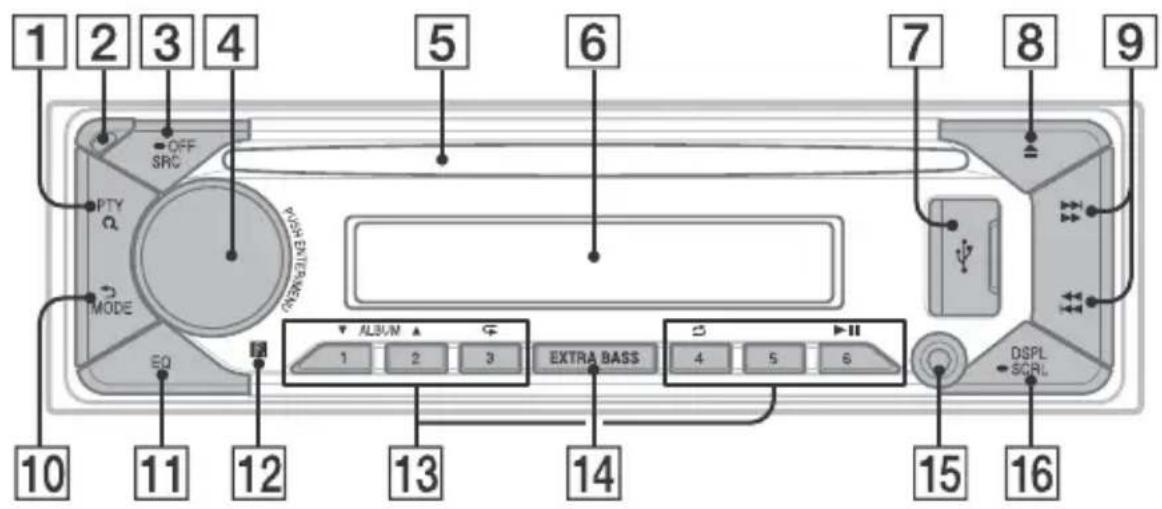
1 PTY (program type)
Select PTY in RDS.
Q (browse) (page 11)
Enter the browse mode during playback.
Not available when a USB device in
AndroidTM mode is connected.)
2 Front panel release button
3 SRC (source)
Tum on the power.
Change the source.
OFF
Press and hold for 1 second to turn the source off and display the clock.
Press and hold for more than 2 seconds to turn off the power and the display.
4 Control dial
Rotate to adjust the volume.
PUSH ENTER
Enter the selected item.
Press SRC, rotate then press to change the source (timeout in 2 seconds).
MENU
Open the setup menu.
5 Disc slot
6 Display window
USB port
8 (disc eject)
9 S E E K - / + )
Tune in radio stations automatically. Press and hold to tune manually.
1/prev/next)
( fast-reverse/fast-forward)
10 (back)
Return to the previous display.
MODE (page 9)
11 EQ (equalizer)
Select an equalizer curve.
12 Receptor for the remote commander
Number buttons (1 to 6)
Receive stored radio stations. Press and hold to store stations.
ALBUM ▼/▲
Skip an album for audio device. Press and hold to skip albums continuously.
(Not available when a USB device in Android mode is connected.)
(repeat)
(Not available when a USB device in Android mode is connected.)
(shuffle)
(Not available when a USB device in Android mode is connected.)
II (play/pause)
14 EXTRA BASS
Reinforces bass sound in synchronization with the volume level. Press to change the EXTRA BASS setting: [1], [2], [OFF].
15 AUX input jack
DSPL(display)
Press to change display items.
SCRL (scroll)
Press and hold to scroll a display item.
Getting Started
Detaching the Front Panel
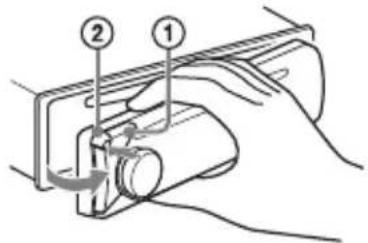
You can detach the front panel of this unit to prevent theft.
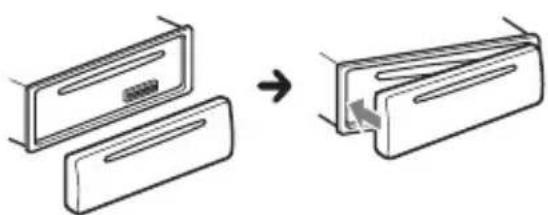
1 Press and hold OFF ① until the unit turns off, press the front panel release button ②, then pull the panel towards you to remove.
Caution alarm
If you turn the ignition switch to the OFF position without detaching the front panel, the caution alarm will sound for a few seconds. The alarm will only sound if the built-in amplifier is used.
Attaching the front panel
Resetting the Unit
Before operating the unit for the first time, after replacing the car battery, or changing the connections, you must reset the unit.
1 Press DSPL and EQ for more than 2 seconds.
Note
Resetting the unit will erase the clock setting and some stored contents.
Setting the area/region
After resetting the unit, the area/region setting display appears.
1 Press ENTER while [SET AREA] is displayed. The area/region currently set appears.
2 Rotate the control dial to select [EUROPE] or [RUSSIA], then press it.
3 Rotate the control dial to select [YES] or [NO], then press it. If the setting area/region is changed, the unit is reset, then the clock is displayed.
This setting can be configured in the general setup menu (page 12).
Setting the Clock
1 Press MENU, rotate the control dial to select [GENERAL], then press it.
2 Rotate the control dial to select [SET CLOCK], then press it.
3 Rotate the control dial to select [MANUAL], then press it. The hour indication flashes.
4 Rotate the control dial to set the hour and minute. To move the digital indication, press 1 / (SEEK-/+).
5 After setting the minute, press MENU. The setup is complete and the clock starts.
To display the clock
Press DSPL.
To set the clock automatically
Select [AUTO
Checking the Battery Voltage
You can check the current battery voltage. (Not available while the source is off and the clock is displayed.)
1 Press DSPL repeatedly until the battery voltage display appears.
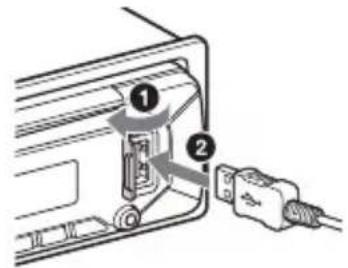
Connecting a USB Device
1 Turn down the volume on the unit.
2 Connect the USB device to the unit.
Connecting Other Portable Audio Device
1 Turn off the portable audio device.
2 Turn down the volume on the unit.
3 Connect the portable audio device to the AUX input jack (stereo mini jack) on the unit with a connecting cord (not supplied)*.
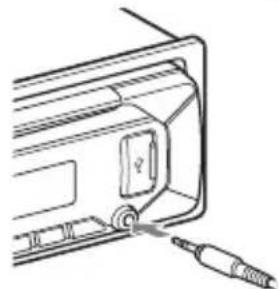
4 Press SRC to select [AUX].
To match the volume level of the connected device to other sources
Start playback of the portable audio device at a moderate volume, and set your usual listening volume on the unit. Press MENU, then select [SOUND] SET AUX VOL.
Listening to the Radio
Listening to the Radio
To listen to the radio, press SRC to select [TUNER].
Storing automatically (BTM)
1 Press MODE to change the band (FM1, FM2, FM3 or MW/LW).
2 Press MENU, rotate the control dial to select [GENERAL], then press it.
3 Rotate the control dial to select [SET BTM], then press it.
The unit stores stations in order of frequency on the number buttons.
Tuning
1 Press MODE to change the band (FM1, FM2, FM3 or MW/LW).
2 Perform tuning.
To tune manually
Press and hold 1 / > (SEEK-/+ to locate the approximate frequency, then press 1 / > (SEEK-/+ ) repeatedly to fine adjust to the desired frequency.
To tune automatically
Press / (SEEK-/+).
Scanning stops when the unit receives a station.
Storing manually
1 While receiving the station that you want to store, press and hold a number button (1 to 6) until [MEM] appears.
Receiving the stored stations
1 Select the band, then press a number button (1 to 6).
Using Radio Data System (RDS)
Setting alternative frequencies (AF) and traffic announcement (TA)
AF continuously retunes the station to the strongest signal in a network, and TA provides current traffic information or traffic programs (TP) if received.
1 Press MENU, rotate the control dial to select [GENERAL], then press it.
2 Rotate the control dial to select [SET AF/TA], then press it.
3 Rotate the control dial to select [SET AF-ON], [SET TA-ON], [SET AF/TA-ON] or [SET AF/TA-OFF], then press it.
To store RDS stations with the AF and TA setting
You can preset RDS stations along with an AF/TA setting. Set AF/TA, then store the station with BTM or manually. If you preset manually, you can also preset non-RDS stations.
To receive emergency announcements
With AF or TA on, emergency announcements will automatically interrupt the currently selected source.
To adjust the volume level during a traffic announcement
Level will be stored into memory for subsequent traffic announcements, independently from the regular volume level.
To stay with one regional program (REGIONAL)
When the AF and REGIONAL functions are on, you will not be switched to another regional station with a stronger frequency. If you leave this regional program's reception area, set [SET REGIONAL] in [GENERAL] to [SET REG-OFF] during FM reception (page 13).
This function does not work in the UK and some other areas.
Local Link function (UK only)
This function enables you to select other local stations in the area, even if they are not stored on your number buttons.
During FM reception, press a number button (1 to 6) on which a local station is stored.
Within 5 seconds, press again a number button of the local station. Repeat this procedure until the local station is received.
Selecting program types (PTY)
1 Press PTY during FM reception.
2 Rotate the control dial until the desired program type appears, then press it.
The unit starts to search for a station broadcasting the selected program type.
Type of programs
NEWS (News), AFFAIRS (Current Affairs), INFO (Information), SPORT (Sports), EDUCATE (Education), DRAMA (Drama), CULTURE (Culture), SCIENCE (Science), VARIORED (Varied), POP M (Pop Music), ROCK M (Rock Music), EASY M (M.O.R. Music), LIGHT M (Light classical), CLASSICS (Serious classical), OTHER M (Other Music), WEATHER (Weather), FINANCE (Finance), CHILDREN (Children's program), SOCIAL (Social Affairs), RELIGION (Religion), PHONE IN (Phone In), TRAVEL (Travel), LEISURE (Leisure), JAZZ (Jazz Music), COUNTRY (Country Music), NATION M (National Music), OLDIES (Oldies Music), FOLK M (Folk Music), DOCUMENT (Documentary)
Playback
Playing a Disc
1 Insert the disc (label side up).
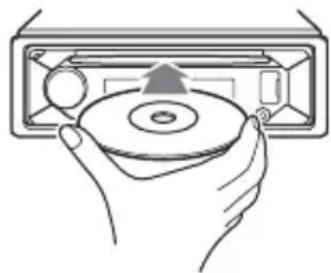
Playback starts automatically.
Playing a USB Device
AOA (Android Open Accessory) 2.0, MSC (Mass Storage Class) and MTP (Media Transfer Protocol) type USB devices* compliant with the USB standard can be used. Depending on the USB device, the Android mode or MSC/MTP mode can be selected on the unit.
Some digital media players or Android smartphones may require setting to MTP mode.
- e.g., a USB flash drive, digital media player, Android smartphone
Notes
- For details on the compatibility of your USB device, visit the support site on the back cover.
- Smartphones with Android OS 4.1 or higher installed support Android Open Accessory 2.0 (AOA 2.0). However, some smartphones may not fully support AOA 2.0 even if Android OS 4.1 or higher is installed.
For details on the compatibility of your Android smartphone, visit the support site on the back cover.
- Playback of the following files is not supported. MP3/WMA/FLAC:
copyright-protected files
- DRM (Digital Rights Management) files
Multi-channel audio files
MP3/WMA:
- lossless compression files
Before making a connection, select the USB mode (Android mode or MSC/MTP mode) depending on the USB device (page 13).
1 Connect a USB device to the USB port (page 8).
Playback starts.
If a device is already connected, to start playback, press SRC to select [USB].
2 Adjust the volume on this unit.
To stop playback
Press and hold OFF for 1 second.
To remove the device
Stop playback, then remove the device.
Searching and Playing Tracks
Repeat play and shuffle play
Not available when a USB device in Android mode is connected.
1 During playback, press (repeat) or (shuffle) repeatedly to select the desired play mode.
Playback in the selected play mode may take time to start.
Available play modes differ depending on the selected sound source.
Searching a track by name (QuickBrowZerTM)
Not available when a USB device in Android mode is connected.
1 During CD or USB playback, press (browse) to display the list of search categories.
When the track list appears, press (back) repeatedly to display the desired search category.
- During USB playback, press (browse) for more than 2 seconds to directly return to the beginning of the category list.
2 Rotate the control dial to select the desired search category, then press it to confirm.
3 Repeat step 2 to search the desired track.
Playback starts.
To exit the Quick-BrowZer mode
Press (browse).
Searching by skipping items (Jump mode)
Not available when a USB device in Android mode is connected.
1 During CD or USB playback, press (browse).
2 Press (SEEK +).
3 Rotate the control dial to select the item.
The list is jumped in steps of 10% of the total number of items.
4 Press ENTER to return to the QuickBrowZer mode.
The selected item appears.
5 Rotate the control dial to select the desired item, then press it.
Playback starts.
Settings
Canceling the DEMO Mode
You can cancel the demonstration display which appears when the source is off and the clock is displayed.
1 Press MENU, rotate the control dial to select [GENERAL], then press it.
2 Rotate the control dial to select [SET DEMO], then press it.
3 Rotate the control dial to select [SET DEMO-OFF], then press it. The setting is complete.
4 Press (back) twice.
The display returns to normal reception/ play mode.
Basic Setting Operation
You can set items in the following setup categories:
General setup (GENERAL), Sound setup (SOUND), Display setup (DISPLAY)
1 Press MENU.
2 Rotate the control dial to select the setup category, then press it. The items that can be set differ depending on the source and settings.
3 Rotate the control dial to select the options, then press it.
To return to the previous display
Press (back).
General Setup (GENERAL)
AREA (area)
Specifies the area/region to use this unit: [EUROPE], [RUSSIA].
If the area/region currently set is changed, this unit is reset, then the clock is displayed.
(Available only while the source is off and the clock is displayed.)
DEMO (demonstration) Activates the demonstration: [ON], [OFF].
CLOCK (clock) (page 7) Sets the clock: [AUTO
CAUT ALM (caution alarm) Activates the caution alarm: [ON], [OFF] (page 7). (Available only while the source is off and the clock is displayed.)
BEEP (beep) Activates the beep sound: [ON], [OFF].
AUTO OFF (auto off) Shuts off automatically after a certain time when the unit is turned off and the clock is displayed (i.e. press and hold OFF for 1 second): [ON] (30 minutes), [OFF].
STEERING (steering) Registers/retsets the setting of the steering wheel remote control. (Available only while the source is off and the clock is displayed.) STR CONTROL (steering control) Selects the input mode of the connected remote control. To prevent a malfunction, be sure to match the input mode with the connected remote control before use. CUSTOM (custom) Input mode for the steering wheel remote control PRESET (preset) Input mode for the wired remote control excluding the steering wheel remote control (Automatically selected when [RESET CUSTOM] is performed.) EDIT CUSTOM (edit custom) Registers the functions (SOURCE, ATT, VOL + / - ,SEEK + / - ) to the steering wheel remote control:
1 Rotate the control dial to select the function you want to assign to the steering wheel remote control, then press it.
While [REGISTER] is blinking, press and hold the button on the steering wheel remote control you want to assign the function to. When registration is complete, [REGISTERED] is displayed.
3 To register other functions, repeat steps 1 and 2.
(Available only when [STR CONTROL] is set to [CUSTOM].)
RESET CUSTOM (reset custom)
Resetstheregisteredfunctions of the steering wheel remote control: [YES], [NO].
(Available only when [STR CONTROL] is set to [CUSTOM].)
Notes
- While making settings, only button operation on the unit is available. For safety, park your car before making this setting.
If an error occurs while registering, all the previously-registered information remains. Restart registration from the function where the error occurred. - This function may not be available on some vehicles. For details on the compatibility of your vehicle, visit the support site on the back cover.
USB MODE (USB mode)
Changes the USB mode: [ANDROID], [MSC/MTP].
(Available only when the USB source is selected.)
AF/TA (alternative frequencies/traffic announcement)
Selects the alternative frequencies (AF) and traffic announcement (TA) setting: [AF-ON], [TA-ON], [AF/TA-ON], [AF/TA-OFF].
(Available when any source is selected.)
REGIONAL (regional)
Restricts reception to a specific region: [ON], [OFF].
(Available only when FM is received.)
BTM (best tuning memory) (page 9)
(Available only when the tuner is selected.)
FIRMWARE (firmware)
(Available only while the source is off and the clock is displayed.)
Checks/updates the firmware version. For details, visit the support site on the back cover.
FW VERSION (firmware version)
Displays current firmware version.
FW UPDATE (firmware update)
Enters firmware update process: [YES], [NO].
Updating the firmware takes a few minutes to complete. During the update, do not turn the ignition to the OFF position, nor remove the USB device.
Sound Setup (SOUND)
This setup menu is not available when the source is off and the clock is displayed.
EQ10 PRESET (EQ10 preset)
Selects an equalizer curve from 10
equalizer curves or off:
[OFF], [R&B], [ROCK], [POP], [HIP-HOP],
[EDM], [JAZZ], [SOUL], [COUNTRY], [KARAOKE]*, [CUSTOM].
The equalizer curve setting can be memorized for each source.
- [KARAOKE] reduces the vocal sound but cannot fully remove it during playback. Also, using a microphone is not supported.
EQ10 CUSTOM (EQ10 custom)
Sets [CUSTOM] of EQ10.
Setting the equalizer curve: [BAND1] -
[BAND10] (32 Hz, 63 Hz, 125 Hz, 250 Hz,
500 Hz, 1 kHz, 2 kHz, 4 kHz, 8 kHz, 16 kHz).
The volume level is adjustable in 1 dB
steps, from -6 dB to +6 dB.
BALANCE (balance)
Adjusts the sound balance: [RIGHT-15] - [CENTER] - [LEFT-15].
FADER (fader)
Adjusts the relative level: [FRONT-15] -
[CENTER] - [REAR-15].
([ATT] is displayed at the lowest setting.)
Selects the subwoofer phase: [SUB NORM], [SUB REV].
LPF FREQ (low pass filter frequency)
Selects the subwoofer cut-off frequency: [80Hz], [100Hz], [120Hz].
HPF FREQ (high pass filter frequency)
Selects the front/rear speaker cut-off
frequency: [OFF], [80Hz], [100Hz], [120Hz].
AUX VOL (AUX volume)
Adjusts the volume level for each connected auxiliary device:
[+18 ~dB] - [0 dB] - [-8 dB].
This setting negates the need to adjust the volume level between sources.
(Available only when the AUX is selected.)
Display Setup (DISPLAY)
DIMMER (dimmer)
Change the display brightness: [OFF], [ON], [CLK] (clock).
To set this function to be active only during a fixed period, select [CLK], then set the start and end times.
- To set the brightness when the dimmer function is activated:
Set [DIMMER] to [ON], then adjust [BRIGHTNESS].
- To set the brightness when the dimmer function is deactivated:
Set [DIMMER] to [OFF], then adjust [BRIGHTNESS].
The brightness setting is stored and applied when the dimmer function is activated or deactivated.
BRIGHTNESS (brightness)
Adjusts the display brightness. The brightness level is adjustable: [1] - [10].
SND SYNC (sound synchronization)
Activates the synchronization of the illumination with the sound: [ON], [OFF].
Not available when no source is selected and the clock is displayed.)
AUTO SCR (auto scroll)
Scrolls long items automatically: [ON], [OFF].
(Not available when the AUX or tuner is selected.)
Additional Information
Updating the Firmware
To update the firmware, visit the support site on the back cover, then follow the online instructions.
Note
During the update, do not remove the USB device.
Precautions
- Do not leave the front panel or audio devices on the dashboard.
- When the unit is turned on, the power antenna (aerial) extends automatically.
- Do not splash liquid onto the unit.
Moisture condensation
Do not splash liquid onto the discs. When moisture condensation occur inside the unit, remove the disc and wait for about an hour for it to dry out; otherwise the unit will not operate properly.
Notes on discs
-
Do not expose discs to direct sunlight or heat sources such as hot air ducts, nor leave it in a car parked in direct sunlight.
-
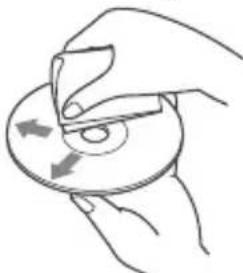
Wipe the discs with a cleaning cloth from the center out. Do not use solvents such as benzine, thinner, commercially available cleaners.
This unit is designed to play discs that conform to the Compact Disc (CD) standard. DualDiscs and some of the music discs encoded with copyright protection technologies do not conform to the Compact Disc (CD) standard, therefore, these discs may not be playable by this unit.
-
Discs that this unit CANNOT play
-
Discs with labels, stickers, or sticky tape or paper attached. Doing so may cause a malfunction, or may ruin the disc.
- Discs with non-standard shapes (e.g., heart, square, star). Attempting to do so may damage the unit.
-8cm(1B4in)discs.
Notes on CD-R/CD-RW discs
- If the multi-session disc begins with a CD-DA session, it is recognized as a CD-DA disc, and other sessions are not played.
-
Discs that this unit CANNOT play
-
CD-R/CD-RW of poor recording quality.
- CD-R/CD-RW recorded with an incompatible recording device.
- CD-R/CD-RW which is finalized incorrectly.
- CD-R/CD-RW other than those recorded in music CD format or MP3 format conforming to ISO9660 Level 1/Level 2, Joliet/Romeo or multi-session.
Playback order of audio files
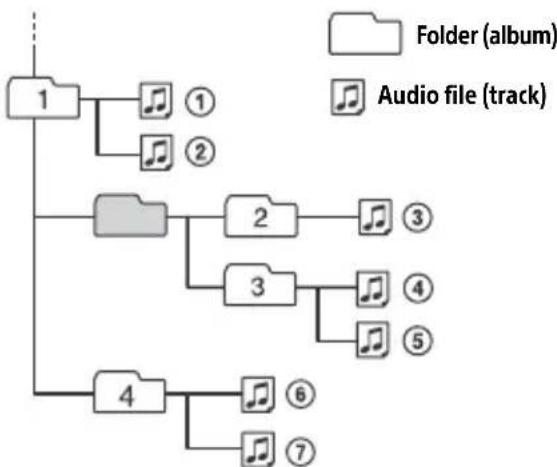
If you have any questions or problems concerning your unit that are not covered in this manual, consult your nearest Sony dealer.
Maintenance
Cleaning the connectors
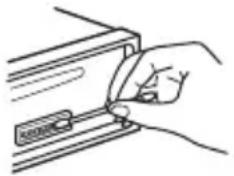
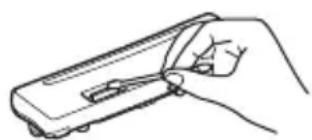
Avoid touching the connectors directly. The unit may not function properly if the connectors between the unit and the front panel are not clean. In order to prevent this, detach the front panel (page 7) and clean the connectors with a cotton swab. Do not apply too much force. Otherwise, the connectors may be damaged.
Note
For safety, do not remove the front panel while driving.
Specifications
Tuner section
FM
Tuning range: When [AREA] is set to [EUROPE]: 87.5 MHz - 108.0 MHz When [AREA] is set to [RUSSIA]: FM1/FM2: 87.5 MHz - 108.0 MHz (at 50 kHz step) FM3:65 MHz - 74 MHz (at 30 kHz step) Usable sensitivity: 7 dBf
Signal-to-noise ratio: 73 dB
Separation: 50 dB at 1 kHz
MW/LW
Tuning range: 531 kHz - 1,602 kHz (MW), 153 kHz - 279 kHz (LW)
Sensitivity: MW: 26 V , LW: 50 V
CD Player section
Signal-to-noise ratio: 95 dB
Frequency response: 20Hz - 20,000Hz Maximum number1 of:
- Folders (albums)2: 150
- Files (tracks) and folders*3: 300
- Displayable characters for a folder/file name: 32 (Joliet)/64 (Romeo)
Corresponding codec: MP3 (.mp3), WMA (.wma)
1 CD-R/CD-RW only
2 including the root folder
*3 may be less than the measured value if folder/file names contain many characters
USB Player section
Interface: USB (Full speed)
Maximum current: 500mA
Maximum number of recognizable folders and files:
Folders (albums): 256
Files (tracks) per folder: 256
Compatible Android Open Accessory protocol (AOA): 2.0
Corresponding codec:
MP3 (.mp3)
Bit rate: 8 kbps - 320 kbps (Supports VBR (Variable Bit Rate))
Sampling rate: 16 kHz - 48 kHz
WMA (.wma)
Bit rate: 32 kbps - 192 kbps (Supports VBR (Variable Bit Rate))
Sampling rate: 32 kHz, 44.1 kHz, 48 kHz
FLAC(.flac)
Bit depth: 16 bit, 24 bit
Sampling rate: 44.1 kHz, 48 kHz
Supported file system: FAT16, FAT32
Power amplifier section
Output: Speaker outputs
Speaker impedance: 4 -8
Maximum power output: 55W× 4 (at 4
General
Power requirements: 12 V DC car battery (negative ground (earth))
Rated current consumption: 10 A
Dimensions:
Approx. 178mm× 50mm× 176mm
(7 1/8 in × 2 in × 7 in) (w/h/d)
Mounting dimensions:
Approx. 182mm× 53mm× 159mm
(7 1/4 in × 2 1/8 in × 6 3/8 in) (w/h/d)
Mass: Approx. 1.2kg (2 lb 11 oz)
Package contents:
Main unit (1)
Parts for installation and connections (1 set)
Ask the dealer for detailed information.
Design and specifications are subject to change without notice.
Copyrights
Windows Media is either a registered trademark or trademark of Microsoft Corporation in the United States and/or other countries.
This product is protected by certain intellectual property rights of Microsoft Corporation. Use or distribution of such technology outside of this product is prohibited without a license from Microsoft or an authorized Microsoft subsidiary.
Android is a trademark of Google LLC.
libFLAC
Copyright (C) 2000-2009 Josh Coalson
Copyright (C) 2011-2013 Xiph.Org Foundation
Redistribution and use in source and binary forms, with or without modification, are permitted provided that the following conditions are met:
- Redistributions of source code must retain the above copyright notice, this list of conditions and the following disclaimer.
- Redistributions in binary form must reproduce the above copyright notice, this list of conditions and the following disclaimer in the documentation and/or other materials provided with the distribution.
- Neither the name of the Xiph.org Foundation nor the names of its contributors may be used to endorse or promote products derived from this software without specific prior written permission.
THIS SOFTWARE IS PROVIDED BY THE COPYRIGHT HOLDERS AND COLNTRIBUTORS "AS IS" AND ANY EXPRESS OR IMPLIED WARRANTY, INCLUDING, BUT NOT LIMITED TO, THE IMPLIED WARRANTY OF MERCHANTABILITY AND FITNESS FOR A PARTICULAR PURPOSE ARE DISCLAIMED. IN NO EVENT SHALL THE FOUNDATION OR COLNTRIBUTORS BE LIABLE FOR ANY DIRECT, INDIRECT, INCIDENTAL, SPECIAL, EXEMPLARY, OR CONSEQUENTIAL DAMAGES (INCLUDING, BUT NOT LIMITED TO, PROCEDURE OF SUBSTITUTE GOODS OR SERVICES; LOSS OF USE, DATA, OR PROFITS; OR BUSINESS INTERRUsION) HOWEVER CAUSED AND ON ANY THEORY OF LIABILITY, WHETHER IN CONTRACT, STRICT LIABILITY, OR TORT (INCLUDING NEGLIGENCE OR OTHERWISE) ARISING IN ANY WAY OUT OF THE USE OF THIS SOFTWARE, EVEN IF ADVISED OF THE POSSIBILITY OF SUCH DAMAGE.
Troubleshooting
The following checklist will help you remedy problems you may encounter with your unit. Before going through the checklist below, check the connection and operating procedures.
For details on using the fuse and removing the unit from the dashboard, see "Connection/Installation" (page 21). If the problem is not solved, visit the support site on the back cover.
General
No sound or the sound is very low.
The position of the fader control [FADER] is not set for a 2-speaker system.
The volume of the unit and/or connected device is very low.
- Increase the volume of the unit and connected device.
No beep sound.
An optional power amplifier is connected and you are not using the built-in amplifier.
Stored stations and correct time are erased.
The fuse has blown.
Makes a noise when the position of the ignition is switched.
The leads are not matched correctly with the car's accessory power connector.
During playback or reception, the demonstration mode starts.
If no operation is performed for 5 minutes with [DEMO-ON] set, the demonstration mode starts.
- Set [DEMO-OFF] (page 12).
The display disappears from/does not appear in the display window.
The connectors are dirty (page 16).
The display/illumination flashes.
The power supply is not sufficient.
- Check that the car battery supplies enough power to the unit. (The power requirement is 12VDC .)
The operation buttons do not function. The disc will not eject.
The connection is not correct.
- Press DSPL and EQ for more than
2 seconds to reset the unit.
The contents stored in memory are erased.
The clock set automatically is not accurate.
The clock data on radio waves is not accurate.
- Set the clock manually (page 7).
Radio reception
The radio reception is poor.
Static noise occurs.
Connect the antenna (aerial) firmly.
65 MHz to 74 MHz in FM3 cannot be tuned in.
[AREA] is set to [EUROPE].
- Set [AREA] to [RUSSIA] (page 12).
RDS
RDS services cannot be received (when [AREA] is set to [RUSSIA]).
FM3 is selected.
- Select FM1 or FM2.
RDS services are unavailable in the current region.
The SEEK starts after a few seconds of listening.
The station is non-TP or has weak signal.
- Deactivate TA (page 9).
No traffic announcements.
Activate TA (page 9).
The station does not broadcast any traffic announcements despite being TP.
- Tune in another station.
PTY displays [- - - -]
The current station is not an RDS station, or the radio reception is poor.
Program service name flashes.
There is no alternative frequency for the current station.
- Press / (SEEK -/+ ) while the program service name is flashing. [PI SEEK] appears and the unit starts searching for another frequency with the same PI (program identification) data.
CD playback
The disc does not play.
Defective or dirty disc.
The CD-R/CD-RW is not for audio use (page 15).
MP3/WMA files cannot be played.
The disc is incompatible with the MP3/WMA format and version. For details on playable discs and formats, visit the support site on the back cover.
MP3/WMA files take longer to play than others.
The following discs take a longer time to start playback.
- A disc recorded with a complicated tree structure.
- A disc recorded in Multi Session.
- A disc to which data can be added.
USB device playback
A USB device takes longer to play.
The USB device contains files with a complicated tree structure.
The audio file cannot be played.
For details on supported formats, see "Specifications" (page 16). If the audio file still cannot be played, refer to the operating instructions supplied with the USB device, or contact the manufacturer of the USB device.
Operations for skipping an album, skipping items (Jump mode), and searching a track by name (QuickBrowZer) cannot be performed.
Set [USB MODE] to [MSC/MTP] (page 13).
The sound cannot be output during playback in Android mode.
Check the status of the audio playback application on the Android smartphone.
Messages
The following messages may appear or flash during operation.
INVALID: The selected operation could be invalid.
READ
Wait until reading is complete and playback starts automatically. This may take some time depending on the file organization.
(underscore): The character cannot be displayed.
For CD playback:
CD ERROR
Clean or insert the disc correctly, or make sure the disc is not blank or defective.
CD NO DISC
Insert a disc containing playable files (page 16).
CD NO MUSIC
Insert a disc containing playable files (page 16).
CD PUSH EJT: The disc could not be ejected properly.
Press (eject).
L L L or :The beginning or the end of the disc has been reached.
For USB device playback:
HUB NO SUPRT: USB hubs are not supported.
NOT SUPPORT ANDROID MODE
A USB device not supporting AOA (Android Open Accessory) 2.0 is connected to the unit while [USB MODE] is set to [ANDROID]. - Set [USB MODE] to [MSC/MTP] (page 13).
USB ERROR
Connect the USB device again.
USB NO DEV
Make sure the USB device or USB cable is securely connected.
USB NO MUSIC
Connect a USB device containing playable files (page 16).
USB NO SUPRT
For details on the compatibility of your USB device, visit the support site on the back cover.
USB OVERLOAD: The USB device is overloaded.
Disconnect the USB device, then press SRC to select another source.
The USB device has a fault, or an unsupported device is connected.
For RDS operation:
NO AF: No alternative frequencies.
Press 144 / 10 (SEEK-/+)while the program service name is flashing. The unit starts searching for another frequency with the same PI (program identification) data ([PI SEEK] appears).
NO PI: No program identification. The selected station has no PI (program identification) data.
Select another station.
NO TP: No traffic programs.
The unit will continue searching for available TP stations.
For steering wheel remote control operation:
ERROR
Register again from the function where the error occurred (page 12).
TIMEOUT
Try completing the registration while [REGISTER] is blinking (about 6 seconds) (page 12).
For firmware update operation:
FILE ERROR: The updater is not stored in the USB device.
Store the updater in the USB device, then try again (page 15).
UPDATE ERROR PRESS ENTER: Firmware update is not completed properly.
Press ENTER to clear the message, then try again. During the update, do not turn the ignition to the OFF position, nor remove the USB device (page 15).
If these solutions do not help improve the situation, consult your nearest Sony dealer. If you take the unit to be repaired because of device playback trouble, bring the device that was used at the time the problem began.
Connection/Installation
Cautions
- Run all ground (earth) leads to a common ground (earth) point.
- Do not get the leads trapped under a screw, or caught in moving parts (e.g., seat railing).
- Before making connections, turn the car ignition off to avoid short circuits.
- Connect the power supply lead ⑥ to the unit and speakers before connecting it to the auxiliary power connector.
- Be sure to insulate any loose unconnected leads with electrical tape for safety.
Precautions
- Choose the installation location carefully so that the unit will not interfere with normal driving operations.
- Avoid installing the unit in areas subject to dust, dirt, excessive vibration, or high temperature, such as in direct sunlight or near heater ducts.
- Use only the supplied mounting hardware for a safe and secure installation.
Note on the power supply lead (yellow)
When connecting this unit in combination with other stereo components, the amperage rating of the car circuit to which the unit is connected must be higher than the sum of each component's fuse amperage rating.
Mounting angle adjustment
Adjust the mounting angle to less than 30^ .
Parts List for Installation
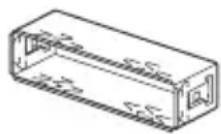
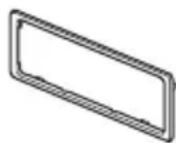
①
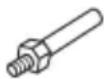
(2)
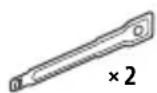
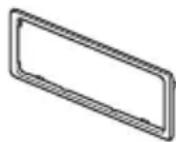
(3)
(4)
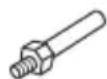

(5)
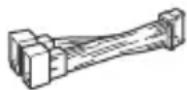
(6)
- This parts list does not include all the package contents.
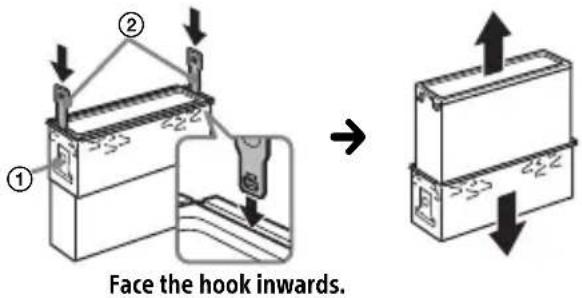
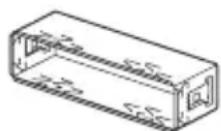
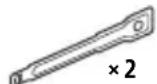
- The bracket ① and the protection collar ③ are attached to the unit before shipping. Before mounting the unit, use the release keys ② to remove the bracket ① from the unit. For details, see "Removing the protection collar and the bracket" (page 24).
- Keep the release keys ② for future use as they are also necessary if you remove the unit from your car.
Connection
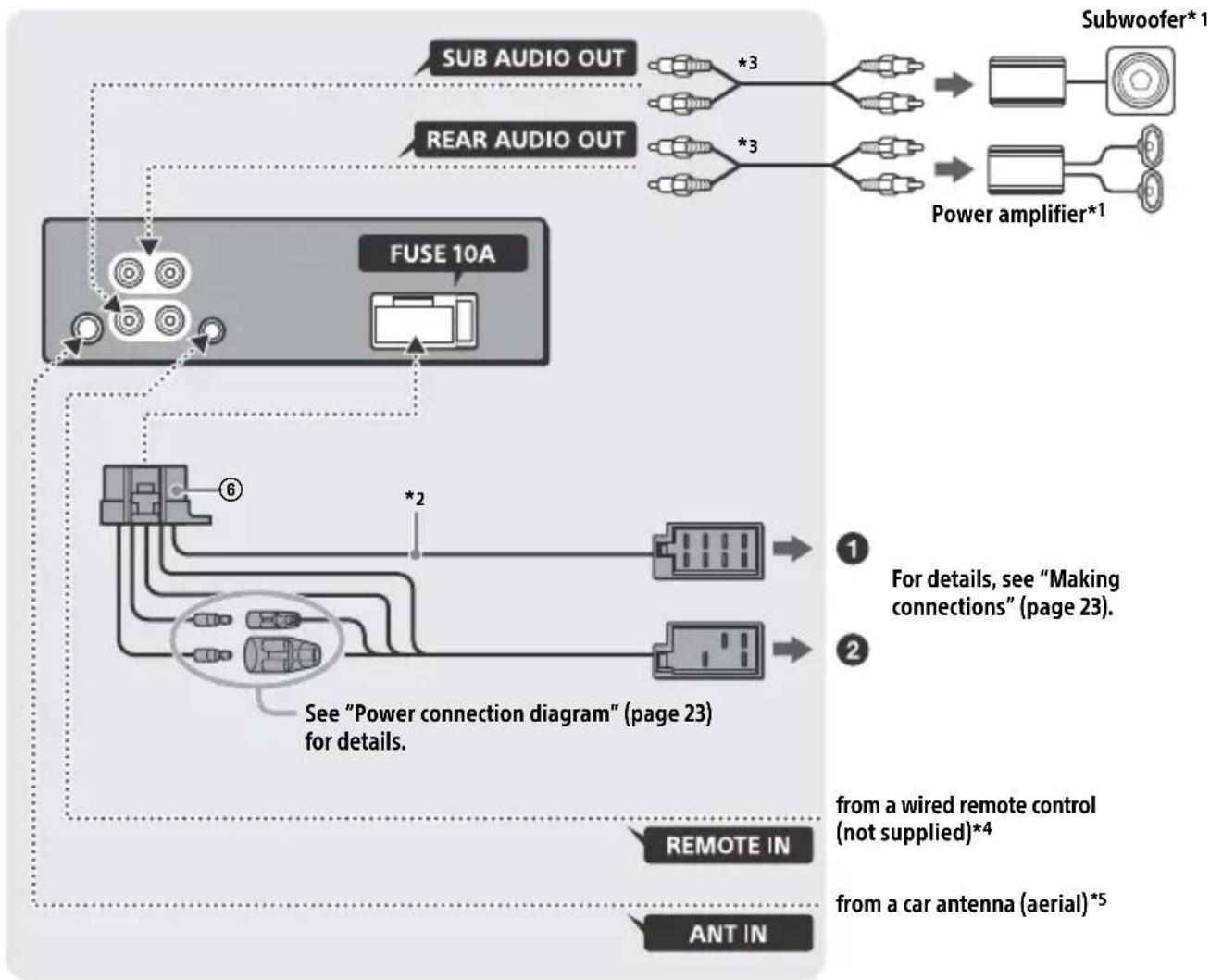
1 Not supplied
2 Speaker impedance: 4 - 8 × 4
3 RCA pin cord (not supplied)
4 Depending on the type of car, use an adaptor for a wired remote control (not supplied). For details on using the wired remote control, see "Using the wired remote control" (page 24).
*5 Depending on the type of car, use an adaptor (not supplied) if the antenna (aerial) connector does not fit.
Making connections
If you have a power antenna (aerial) without a relay box, connecting this unit with the supplied power supply lead ⑥ may damage the antenna (aerial).
To the car's speaker connector
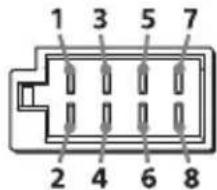
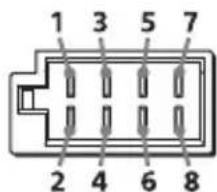
| 1 | Rear speaker (right) | ⊕ | Purple |
| 2 | Purple/black striped | ||
| 3 | Front speaker (right) | ⊕ | Gray |
| 4 | Gray/black striped | ||
| 5 | Front speaker (left) | ⊕ | White |
| 6 | White/black striped | ||
| 7 | Rear speaker (left) | ⊕ | Green |
| 8 | Green/black striped |
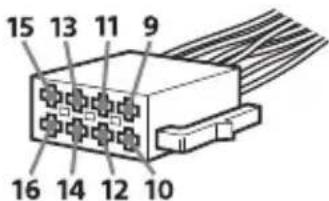
To the car's power connector
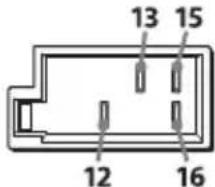
| 12 | continuous power supply | Yellow |
| 13 | power antenna (aerial) / power amplifier control (REM OUT) | Blue/white striped |
| 15 | switched power supply | Red |
| 16 | ground (earth) Black |
Subwoofer Easy Connection
You can use a subwoofer without a power amplifier when it is connected to a rear speaker lead.
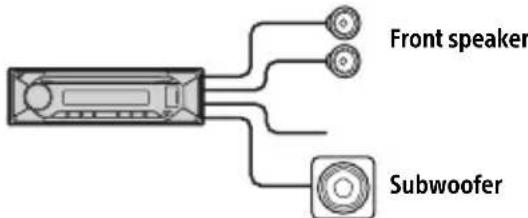
Notes
- Preparation of the rear speaker leads is required.
- Use a subwoofer with an impedance of 4 to 8 and with adequate power handling capacities to avoid damage.
Memory hold connection
When the yellow power supply lead is connected, power will always be supplied to the memory circuit even when the ignition switch is turned off.
Speaker connection
Before connecting the speakers, turn the unit off.
- Use speakers with an impedance of 4 to 8 , and with adequate power handling capacities to avoid damage.
Power connection diagram
Check your car's auxiliary power connector, and match the connections of leads correctly depending on the car.
Auxiliary power connector
Common connection
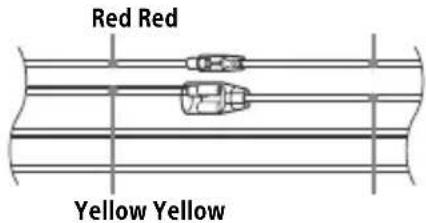
| 12 | continuous power supply | Yellow |
| 15 | switched power supply Red |
When the positions of the red and yellow leads are inverted
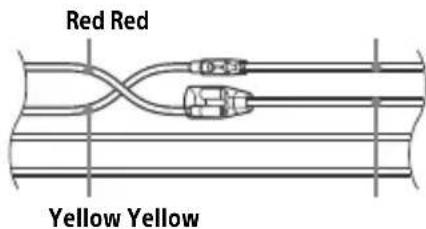
| 12 | switched power supply | Yellow |
| 15 | continuous power supply | Red |
When the car without ACC position
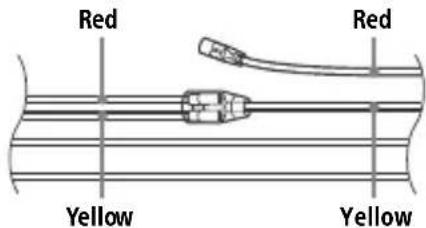
After matching the connections and switching power supply leads correctly, connect the unit to the car's power supply. If you have any questions and problems connecting your unit that are not covered in this manual, consult the car dealer.
Using the wired remote control
1 To enable the wired remote control, set [STR CONTROL] in [SET STEERING] to [PRESET] (page 12).
Installation
Removing the protection collar and the bracket
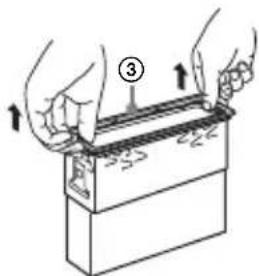
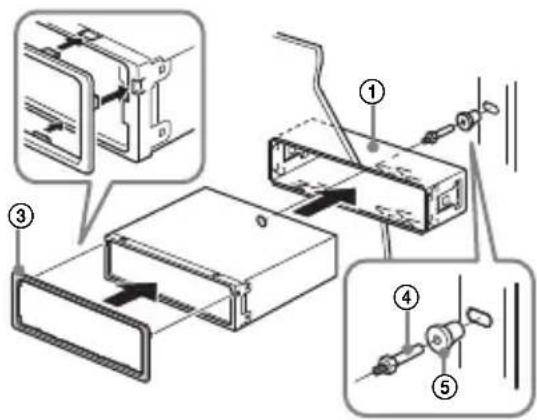
Before installing the unit, remove the protection collar ③ and the bracket ① from the unit.
1 Pinch both edges of the protection collar ③ then pull it out.
2 Insert both release keys ② until they click, and pull down the bracket ①, then pull up the unit to separate.
Mounting the unit in the dashboard
Before installing, make sure the catches on both sides of the bracket ① are bent inwards 2mm (3/32 in).
1 Position the bracket ① inside the dashboard, then bend the claws outward for a tight fit.
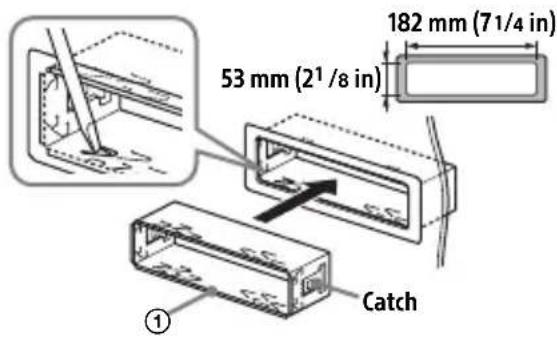
2 Mount the unit onto the bracket ①, then attach the protection collar ③.
Notes
- If the catches are straight or bent outwards, the unit will not be installed securely and may spring out.
Make sure the 4 catches on the protection collar are properly engaged in the slots of the unit.
Detaching and attaching the front panel
For details, see "Detaching the Front Panel" (page 7).
Resetting the unit
For details, see "Resetting the Unit" (page 7).
Fuse replacement
When replacing the fuse, be sure to use one matching the amperage rating stated on the original fuse. If the fuse blows, check the power
connection and replace the fuse. If the fuse blows again after replacement, there may be an internal malfunction. In such a case, consult your nearest Sony dealer.
FW VERSION (Firmwareversion)
Raccordement/Installation
Attention 23
La lecture commence.
DEMO (demonstration)
Permet d'activer la démonstration : [ON], [OFF].
CLOCK (Horloge) (page 7)
EDIT CUSTOM (modifier personnalisation)
[OFF], [R&B], [ROCK], [POP], [HIP-HOP], [EDM], [JAZZ], [SOUL], [COUNTRY], [KARAOKE]*, [CUSTOM].
[BAND1] - [BAND10] (32 Hz, 63 Hz, 125 Hz, 250 Hz, 500 Hz, 1 kHz, 2 kHz, 4 kHz, 8 kHz, 16 kHz).
Raccordement/Installation
Attention
[OFF], [R&B], [ROCK], [POP], [HIP-HOP], [EDM], [JAZZ], [SOUL], [COUNTRY], [KARAOKE]*, [CUSTOM].
Interfaccia: USB (Full speed)
Corrente massima: 500 mA
Cartelle (album): 256
Copyright (C) 2000-2009 Josh Coalson
Copyright (C) 2011-2013 Xiph.Org Foundation
EDIT CUSTOM (editor personalizacion)
[OFF], [R&B], [ROCK], [POP], [HIP-HOP], [EDM], [JAZZ], [SOUL], [COUNTRY], [KARAOKE]*, [CUSTOM].
[BAND1] - [BAND10] (32 Hz, 63 Hz, 125 Hz, 250 Hz, 500 Hz, 1 kHz, 2 kHz, 4 kHz, 8 kHz, 16 kHz).
Copyright (C) 2000-2009 Josh Coalson
Copyright (C) 2011-2013 Fundación Xiph.Org
Pon3Bovntelb: CoHn KopnpoeuH, 1-7-1
KoHaH MnHaTo-Ky TokNo, 108-0075 JnoHna
B ueJx 6e30nacHocTn o6aTeIbHo yCTaHaBnBaIte 3TO yCTpoiCTBO Ha np6OpHO nAHeJI n ABTomO6nJI, TaK KaK erO 3aDnJa YAcTb HArpeBaETcR BO BpEm pa60Tbl.
Ioppo6Hee cm. "YcTaHOBka/ npKlOyuHne" (ctp. 25).
3TOT npOdyKT nMeet Klaacc 1 na3epnoro n3nyeHnCOrIaCNo cTaHdapTam IEC/EN 60825-1:2007 n IEC/EN 60825-1:2014.
-ДиnteIbHOCTb n3JnyeHn: NOCTOHHOE
MoUHocTbJa3epa:MeHee55,8 MKBT
Динha BOЛны:775HM-800 HM
Tabnukc cyka3aHneM pa6oeryo HnnpjKeHnI npyInx xapaKTepcntk HaxOuNTcHa HxKHe naneHn Kopnyca.
MapknpoBka CE DeiCTBnTeIbHa IuMb B Tex CTpaHax, B KOToPbIX npHraTa Ha 3aKHOdaTeIbHOM yPoBHe. B OCHOBHom 3TO CTpaHbE3 (EBpOeNcKoJ KOnHomuecko3OHbl).
ДаТа n3rTOBJIeHЯ yKa3aHa Ha TOBape, a TAKKHe Ha yNaKOBKe B CJIeDyIouIeM φOpMaTe:
MM.YYYY, rnde MM-Mecra u YYYYY-roD n3rotOBJIeHn.
AByTomOmbnIbHna ayuNocnCTema c noIepKko paNo FM/MW/LW
HΦopMaunIyKpaHne
YnoHOMOeHHbI npedCTaBnteB BV KpanHe nO BOpocam COOTBeTCTBnA Tpe6oBaHnM TexHnuecknx peIamaHTOB: OOO "COnn YKpaHa", yI. NlbuHcKa, 8, r.KneB,04070,YkpanHa.
YcIOBxpaHeHn
TobapbcoxpaHOT ByynaKOBaHHOM BnDe B TeMHbIX, cyNX, YnCTbIX, XopoSo BeHTUNpyeMbIX NOMEuEHNrX, N3OJInpoBaHHbIX OT MeCt XpaHeHnKNCJOT nIeIoueY.
TemnepaTpa xpaHHeNHa: ot -20 do +60 °C. OTHocnteIbHna BlaXHoCTb XpaHHe He 6oJee < 80 %, 6e3 o6pa3OBAHnKaONHeHCata.
Pa6o7a TemnepaTypa: ot 0 do 40^ Pa6o7a OTHOCHTbHa BnaXHOCTb: 40-60%.
Cpok xpaHeHn He yCTaHOBneH.
YTNn3aun
NCIOJIb30BaHHhIX
3JIeMeHTOB NITaHnI N
OTCJyKnBWeRo
JIeKTpNuecKOrOu
3JIeKTPoHOrO O6OpUdoBaHnA (DInpeKTHBa npIMeHmAb CtpaHax EbpocOIO3a n DpyrNxC TpaHax, rDe DeIcTByIOT CNCTeMbI pa3dJeBHorO c6opa OTXODOB)
IpeynpexKdHne IJcIyuaEB, KOrdaB3aMKe 3axnraHnHerT noLoXKeHHAACC
Y6eHNTecb, YTO HAcTpoEHa FyHKcIa AUTO OFF (ctp. 14). YCTpoiCTBO NOJHOCtBIO OTKJIIOUHTCra ABTomaTHueCKn IIO NCTeueHnn 3aDaHHoro BpeMeHi, KOrJa YCTPOICTBO BByIKIIOuHTCra I OTO6pa3rTcraacbl (HaIprImep, npn HaxKatN KNOpKn OFF n ydePkaHnn ee B TeueHne 1cekyndbl). 3To npedOTBpaAaet pa3pIky aKKymJlTopa. EcIn FyHKcIa AUTO OFF He HAcTpoEHa, npn KaJdOM OTKJIIOUeHnn 3aXnIgAHHa HaxMnte n ydePknBaIte OFF, noka ekpan He NotyxHeT.
OTka3 OT OTBETCTBeHHoCTN B OTHOWeHmYcIyr, npeIOCTaBJIeMbIX CTOpOHHMn NOCTaBUnkamN
Cnyk6bl, npdeOCTaBIAReMbIe CTOpOHHMn NOCTaBUnKaMn, MOryt 6bITb N3MeHeHbl, npnoctaHOBLeHbl NII OTMeHeHbl 6e3 npedBapntbHoro yBeDOMJeHna. Kompanya Sony He Hecet OTBETCTBHeHHocTn 3a cnTyauuPiNo6Horo poJa.
IIMnopTeP Ha TeppuTOpn CTpaH TamOxKeHHoro coIO3a AO "CoHn 3JeKtpoHnKc", PocCn, 123103, MockBa, KapamblweBckn npoe3d, 6
Opran3aun, yonHOMoehna npHHMaTb npeTeHNOTnOtpe6nteJeHa TeppITOpu Ka3axCTaHa AO "COnn 3NeKtpOnHK" PpeDCTabNTeJIbCTBO B Ka3axCTaHe, 050010, Pecny6nka Ka3axCTaH, r. AImatbl, np. DocTBk, dom 117/7
Ka3aKCTAH JepiHderi TyTbIHyBilapDbIH
waFBIM-TanantapbIH Ka6blndayfya yKeJneTTi
YbIM «COHN 3JeKTPOHnKC» AK
Ka3aKCTAHdaftI ΘkiNdiiri, 050010, Ka3aKCTAH
Pecny6nKacbl, AnMaTbIK., DocTBk DaHfbINbl,
117/7y
Copepkanhe
CnpaBoUHnK nO DeTajm N opraHaM ynpaBHeHn 5
Haualo pa60tbl
ChraTne npeDnei naHei 7
IpeepaRpy3ka yctpoiCTBa 7
YcTaHOBka YacOB 8
PnoBepka HapprKeHnB aKKymyIaTope. 8
PoiKJIIOUeHne yCTpoNCTBa USB 8
IopKlnHueHne npyroro nepenocchoro ayDnOuycTpoiCTBa 9
PpocnyuBauHne padno
PpocnyuBbHne paDnO 9
CnCTembl paIIOaHHbIX (RDS) 10
Bocnpon3BeDeHne
Bocnpon3BeJeHne nncka 11
Bocnpoun3BeJeHne yCtpoiCTBa USB. 11
Поньи Воспpon3ВeДeне КомпоЗици 12
NapaMeTpbl
OTmeHa pexnma DEMO 13
OchOBhIe Oepaunn HacTpoiKn npapaMeTpOB 13
HactpoKa o6ux npaMeTpoB (GENERAL) 14
HactpoikKa 3Byka (SOUND) 15
HactpoJa nucnpea (DISPLAY) 16
Для OCTaHOBKN BOCnpon3BeDEHnA
Haxmte u ydepxmbaTe Khonky OFF TeueHne 1ceyHdbI.
Bocnpoun3BedeHne B Bb6paHHom pexkme MoKeT HaaTbcr He cpa3y.
IocTyHbIepeKIMblBOcPpOu3BeJeHnO TlHuAOTcB3aBucMOCtNOT BbI6paHHOrIO NCTOCHNka 3ByKa.
ПОИСК KOMПОЗИЦИ NO Ha3BaHиЮ (Quick-BrowZer™)
HeocTyHNo,ecnnoKIOueHo yCTpoNCTBO USBBpeKmE Android.
1 Bo BpemBocnpOn3BeDeHnC DnCKa CD nIy yctpoiCTBa USB haxmTe KHOKNy (0630p)*, YTO6bl OTo6pa3ntb CnncOK kateropn IONCKa.
Korda noaBtca cnncok KOMno3nui, HaxmMaTe KHONky Ba3aI), noka He OTO6pa3ntc HxHna KaTeropn noncka.
*Bo BpemBaBocPon3BeJeHnC yCTpoNCTBa USB HaxMnte n ydepxnBaIte KhoNky (o630p) 6OJIee 2 cekyHn, YTO6bI BepHyTbcr HeNocepEaCTBeHHo K Haayany CnNcKa KaTEROpn.
2 NobopaunBaJ DNCKOBbI peYJIaTOp, BbIbePte Tpe6yEmyIO KaTeropnIO noncKa, 3aTeM HaXMMTe DNCKOBbI peYJIaTOp dJa NOdTBePxKdEHHa.
3 NOBTOPHe 2 JIa nonka Tpe6yemO KOMNo3u. HauHETc BocPOn3BeDeHne.
1HaXMMTe KhoNky MENU.
2 NOBOPaUNBaI DnCKOBbI peRyJIaTOp, Bbl6epnte KaTeropnIO HacTppoNkN, a 3aTeM HaxMNTe DnCKOBbI peRyJIaTOp. HAcTpanBaemble 3JeMeHTbI OTnUaOTcB B 3aBNCUMOCTN OT nCTOuHnKa I npaMeTPOB.
3 NobopaunBaJ dNcKOBbI peYJrTOp, BbI6epnte npaMeTpbl, a 3aTeM HaxMMTe dNcKOBbI peYJrTOp.
CLOCK (uacbl) (CTp. 8)
YcTaHOBka Yacob: [AUTO
CAUT ALM (npedynpeiTeIbHbI 3ByKOBoCnHaI)
BkIIOueHne npeDynpeDHTeNbHOrO 3BykoBOro cHnHa: [ON], [OFF] (cTp.7).
(OCTyHToTbko npn BbIKIOueHHOM nTOUHNKe, KOrda OTo6paXaIOTcYacbl.)
BEEP(3ByKOBOcHnHaJ)
AknBn3aun 3ByKOBOrO cnHaJa: [ON], [OFF].
AUTO OFF (aBtOMaTnueckoe OTKJIIOUeHne)
ABTOMATnuecko OTKIOUeHne uepe3
ONpeIeJIeHHoe BpeM, KOrda yCTpOietBO
BbIKIOUeHO N OTo6paXaOTcY aCbl
(HaXMnTe KHOJky OFF n IepXnTe ee
HaKaTo1 cekyHny): [ON] (30 MInHyT),
[OFF].
STEERING (pylb)
PereTpaun/In3MeHHe HacrpoKn pyIbTa DnCTaHcIOHOrO ynpabEnHa
(OCTyHNO TOJbKO npu BbIKNIOueHHOM NTOUHNKe, KOrDa OTo6paKaIOTcYacbl.)
STR CONTROL (nybT dntaHcnoHHoro ynpablenHa pyne)
Bb6op pexkma BBOda noKluoyehHoro nyIbTa nCTaHcuONHoro ynpabLeHna.Bo
n36ekahne HeNCnpaBHOCTe nepei NCNoJIb3OBAHHeM NOIDepNTe COOTBeTCTByIOUpiN peXIM BBOJaДЯ NOdkJIIOUeHHORO NylTa
ДиСТанцИОНHOrOУ npaВлeнЯ.
CUSTOM (cneuaNbHbI)
Pexm BBOda IJnIyIbTa IInCTaHcNoHHOrO ynpaBHeHnHa pyne.
PRESET (CTaHdapTbI)
Pexm BBOda IJn npoBOnHO nglbTa
IncTahUHNOHOrO ynpabHeHna 3a
NCKJIIOUeHNEm nglbTa
Дистанционногу npablenHa pyne (BbIbupaetc abTomatnueckn npn BblonHeHn [RESET CUSTOM].)
EDIT CUSTOM (HactpoNka cneuaJIbHOpeXIma)
Perectpaunya yHKn (SOURCE,ATT, VOL + / - ,SEEK + / - )JyIyIbTa
[OFF], [R&B], [ROCK], [POP], [HIP-HOP],
[EDM], [JAZZ], [SOUL], [COUNTRY], [KARAOKE]*, [CUSTOM].
Bb6paHnyIO JIA KaKdoRO NCTOCHNKA KpNByIO 3KBaJAA3epa MOXHO 3aHeCTN B NaMAYb.
*PnBb6ope[KARAOKE]3ByK BOKaJa BO BpeMaBOcnpOn3BeDeHn nprJnywaetc,HO He yCTpaHareTcNoHocTbIO.1CpONb3ObaHne MKNkofoHaHe NoDnepXNBaETcR.
EQ10 CUSTOM (cpeuaJIbHbIe HacTpoKn
KBaJau3epa EQ10)
Bb6op BapnaHTa [CUSTOM] dIy EQ10.
HaCTpoJa Ka KpIBoN 3KBaJau3epa:
[BAND1] - [BAND10] (32 T, 63 T, 125 T, 250 T, 500 T, 1 K T, 2 K T, 4 K T, 8 K T, 16 K T).
UPOBeHb rPOMKOCTn HAcTpaUNBaETcB
dIuana3OHe oT -6 dB do +6 dB c WaROM
1 dB.
BALANCE (6aJaHc) PeryIinpoBka 3BykoBOro 6aJaHca: [RIGHT-15] - [CENTER] - [LEFT-15].
FADER (pacnpedeelenne cnrgana) PerynipOBka OTHocntelbHoro ypOBn: [FRONT-15] - [CENTER] - [REAR-15].
S.WOOFER (ca6ByΦep) SW LEVEL (уровень ca6ByΦepa) Perулровka урOBня Гомкоctn ca6ByΦepa: [+6 dB] - [0 dB] - [-6 dB]. ([ATT] оTOбражаETС, ecIn yCTaHOBJIeHo MInHMaJIbHoe 3HaueHne.) SW PHASE (fa3a ca6ByΦepa) BbI6op fa3bI ca6ByΦepa: [SUB NORM], [SUB REV]. LPF FREQ (чacToTa ФильТра НИЗКИX чacToT) Bbl6opЧacToTы ФильТра ca6ByΦepa: [80Hz], [100Hz], [120Hz].
HPF FREQ (caCTOta fNbTpRa BbICOKNX
yactOT) Bb6op 3HaueHnra rpaHnUHOu cACTOTbl nepeDnX/3aDnX rPOMKOrOBOpnteJeN: [OFF], [80Hz], [100Hz], [120Hz].
HacrtpoiKa dncnpej (DISPLAY)
DIMMER (perynpoBka noCBeTKn)
I3meHne npKocTn DncJIeR: [OFF], [ON], [CLK] (acbl).
YTo6bI 3Ta yHKcNya 6bla aKTNBHa
TOJbKO B TeueHne OnpedeJeHHoro
BpeMeH, BbIbepnte [CLK], a 3aTeM
3aJaTe Bpem Haayala n OKOHuaHna.
- YTo6bI 3aDaTb npKocTb npn BKIOUeHHo FyHKcN ynpabLeHna
NoCDBeTKOJ:
yCTaHOBtE dJa [DIMMER] 3NaueHne [ON] n OTpeyIInpyuTe [BRIGHTNESS].
- YTo6bI 3aDaTb npKocTb npn BbIKIOUeHHo FyHKcN ynpabLeHna
NoCDBeTKOJ:
yCTaHOBtE dJa [DIMMER] 3NaueHne [OFF] n OTpeyIInpyuTe [BRIGHTNESS].
HaCtpoKa npKocTn coxpaHaeTc n
IIpIMHeHReTc npn BkIOUeHNn IIN
BbIKIOUeHNn FyHKcN ynpabLeHna
NoCDBeTKOJ.
Ecn HeCnpaBHOCTb He ydaetc yctpaHntb CneDy DaHHo INHCTpyKuIN - 6paTnTeCb B 6nnKaaMn ABTopN3OBaHHb SNY ceHTp no peMOHTy n O6CnyXnBaHHIO.
Abtopckne npaba
Windows Media KBJIETCB TOBapHbIM 3HaKOM nnn 3apernctpnpoBaHHbIM TOBapHbIM 3HaKOM Kopnpaunn Microsoft Corporation B CLUA n/nnn dpynx CTpaHax.
Данhoeи3делпьзшениопрденинblm npabaMu INHTeJIkeKTyajbHOB co6CTbeHHOCTN Microsoft Corporation.Испльбовни распостраенп пообнй ТхнOLORn,Кром кв ДаднHomnpodukTe,6e3лцeнЗи Корnapaunu Microsoft nAn ABTOpI3OBAHHoro npedctabntelbCTBa Koprnapaunu Microsoft 3anpeseHo.
Android JBnEeTcTOBapHbIM 3HaKOM Kopnpaunn Google LLC.
libFLAC
Abtopckoe npaBo (C) 2000-2009 rr. JxkoW KoalcoH Abtopckoe npaBo (C) 2011-2013 rr. Xiph.Org Foundation
PacnpoctpaHeHne n IcNoJIb3ObaHne B IcxOJbIx n DBOUHybIX φOpMax C n3MeHeHnMa N 6e3 HNX pa3peWaeTc npN BblONHeHn CneDyUoInx ycNoBn:
-BpacnpocptpaHReMOMNCXODHomKoideDOnJXHO coxpaHnTbcraYka3aHHoeBbIe yBeDMJeHne 06 abTOPCKNX npaBax, daHHbICNcOK ycIOBn IN cJeNyUoee 3aABLeHne 06 OTKa3eOT rapaHTn.
-PacnpocpahnembeB DBOuHOn φOpMe faJIbI DOJXHbI COxpaHNTb yKa3aHHoe BblSe yBeDOMJIeHne 06 ABTopCKNX npabax, daHHbI CNICOK YCIOBNI CNEyUOJIee 3aABJIeHne 06 OTka3E OT rapaHTN B DOKyMeHTaUN N/IN IN dpyrNX MaTePnaJAX, ppeoCTaBnREMbIX C pacnpocpahnemblm NaKeTOM.
-ИмяфОнда Xiph.org Foundation Иимeha yuaCTHnKOB ФОнда HeIb3Я ICNoIb3OBAТь ДлЯ NOOupeHnI NII npOdBnIXeHnI npOdyKTOB, COZdAHHbIX Ha OCHOBE 3TOTO pOgPamMHOro obecneueHn6e3npedBapntelbHOro nICsbMeHOro pa3peWeHnI.
DAHHOE NPOPGAMMHOE OBCNEYEHNE
PPEOCTABJARETC DEPKATEJIAMN ABTOPCKNX
PNAB N UYACTHnikAM "KAK ECTb". PPN 3TOM HE
PPEOCTABJARETC HNKAKNE FAPAHNTN, RHBbie
NJIN NOJPA3YMBAEMbIE, B TOM YNCJIe
NOJPA3YMBAEMbIE FAPAHNTN KOMMEPUECKO
PNIROHOCTN IN PIPINOHOCTN DJIa
OPPEJEHHOH UCEJI. HN PPIN KAKIX
OBCTOReTbCTBAX FOHN. INJN UYACTHNIK
FOHDA HE BYUYT HECTN OTBETCTBEHHOCb 3A
JIIOBbI INPMAbIE, KOCBEHHbIE, CJUYAHbIE,
CNEUALbHbIE, INPYCUXDEHHbIE B NOPADKE
HAKA3AHN INIIN IONCEYIOUIIE Y5BITKN (B
TOM YNCJI E PNI0BpETHE TOBAPOB INJN YCLVT
DJIAR 3AMEHbI, NOTEPRA INPFOHOCTN, DAHHbIX
NJIN INPISBJIN, INPEPBIBAHNE DEYTEJBHOCTN),
BO3NHKWHNE IN JIOBOIN PNUHNE, IN 3A JIOBbIE
O6R3ATEJbCTBA, KAK KOHTPAKTbIE, CTPOIe
NJIN DEJNKATHBIE (BKJIIOUAY XAIATHOCTb NT.
D.), KOTOPBIE BO3HNKJIIN PIP JIOBOM
NCIOJIb3OBAHIN 3TOTO NPOPGAMMHOTO
OBCNEYEHNA, DAXE ECIN bblNO COOBUHEO O
BO3MOXHOCTN IOIOBHOrO UIePBA.
Поск и устараенье немправност
IpnBODnMbHnXe npOBepOHybI
IpeueHb NOMoKet yCTpaHNTb
60JIbShnHCTBO npObJem, KOToPbIE MOyT
BO3HNKHyTB pN 3KcNlyaTaUuN yCTpoiCTBa.
IpeD O3HaKOMJIeHMe C
HnXeepnBVeDEHHo TaBnuei O6paTntEc b K
pa3dJamno No NOkLIOUeHHU O
3KcNlyaTaUuN yCTpoiCTBa.
IpyoLyehn IOnoJHnTeJbHbIX
CBeDeHm O npIMeHnn PpeOxpaHTeJIa
a TaKxe n3BLeueHHN yCTpoiCTBa N3
pnp6OpHO nnHeJIu CM. "YctaHOBka/
NoDKluOeHne" (cTp.25).
Ecn HenoJaKy He ydaLoCb yCTpaHNTb,
NoCeTtTe Be6-caIT noJepejKKu, Yka3aHHbI
Ha 3aAdHe CTopoHE o6loXXKn.
067aHΦopMaun
3BYKOTCYTCTBYETNINOeHbTNXn.
→ PerynTop pacnpedeHnna CnHaJa [FADER] He yctaHOBJeH dIa CnCTeMbI c 2 rpoMkoROBOpTeJMaN.
OueHb Hn3Kn ypoBeHb rPOMKOCTn DaHHoro yCTpOuCTBa n/nnn POnkJIooHeHHoro yCTpOuCTBa. -YBeJIuCyTe rPOMKOCTb DaHHoro yCTpOuCTBa n POnkJIIOUeHHoro yCTpOuCTBa.
He cIbIweH 3ByKOBoCnHaJI.
ΠoДКЛЮЧЕн ДОПOLНИТЕЛБНБИ YСИЛТЕЛБ MOШЮСТи, a BCTPOЕHHБИ He NCПОЛБ3YETСЯ.
I3 namrtn ydaJIeHbI 3anporpaMMnpoBaHHbIe paNocTaHcHm N yCTaHOBka BpeMeHN. Ipeperopel npedoxpAHntelb. CbliSeH wym npn nepeKJIoueHm noLOXeHn KIOUa 3aXnraHn.
→Пювова He npaBnIbHNo NOdcoeINHeHbIK pa3bemy 3JIeKTPoPNTAHNBAcNOMORAteIbHOrO O6OpyIOBaHNA aBTOMO6nJI.
Bo Bpemra Bocnpon3BedeHn nn npema NaHHaETcJeMoHCTpaZna.
EcIn npn BkIIOueHHOM
dEmOHCTpaUHOHHoHmpeKIme [DEMO-ON]
B TeueHne 5 MNHyT He BbIOJNHaOTcra
HnKaKHe ONEpaUH, HauINHaETcra
dEmOHCTpaUH.
-YctaHOBrTe 3NaueHne [DEMO-OFF] (cTp.14).
Ipona/He oTo6paXaeTcHnDnKaunB OKoUke nucnne.
KOHTaKTbI 3arpa3HeHbI (CTp.18).
Ducnnei/npcbetka Muraet.
HeoctaToHnaNodaa NHTAHn. -Y6eNTecb,TOHa yCTpOInCTBO nOdaTcAIOCTaTOUHO NHTAHn OT aBTOMo6NJIbHO rAKyMylrTopa. (Tpe6oBaHne K nCTouHnky NHTAHn: 12B noCToHHoro Toka.)
He pa6oTaIOT KHONKn ynpaBLeHn. Nsck He n3BNeKaETc.
→ HenpaBnIbHoe coeDInHeHne.
- HaxMnte u ydepxuBaIte KhoNk DN SPL n EQ 6oJee 2 cekyH, uTo6bl nepe3aRpy3ntb yCTpOiCTBO. Coepxmoe naMrtn 6yDet ydaJeHo.
ABTOMaTnuecka yCTaHOBka yacob 6bila HeTOUHOI.
→ДаHHbIe yacOB Ha paAnIOBOLHax
YBJIaIOTcHETOCHbIMN.
-YCTaHOBnte Yacbl BpyHy
PpneM paNocTaHcN
Плoxoe kayecTBo npneMa paNocTaHcN. Bo3nkaIOT cTaNueckne nomexn.
→ПлOTнОпДКЛЮЧиTe aHTeHHY.
B dnaana3oHe FM3 He ydaTcHacptpntb 65 M7 - 74 M7.
→ДЯ [AREA] Вьбрано [EUROPE]. -Установпеш [AREA] Знayене [RUSSIA] (стр.14).
RDS
He ydaetc npnHryb ycnyr RDS (korda dlya napametpa [AREA] 3aDaHO 3HaueHne [RUSSIA]).
→ BbI6paH dnaana3OH FM3. -BbI6epnte FM1 nJn FM2.
YcnyrRDS HeocTyHbI B daHHom pernohe.
Pocne HeckoIbKnx CekyHd npocnyuWbAHnB KJIIOUaEcTcA yHKunr SEEK.
→ CtaHnue He nepeaet daHbIe TP nJI npepaet cIIuKOM cIa6bI cnHaJI. -OTKnIOUHTe TA (cTp.10).
DopoxKhble coo6ueHn He nepeaotcra.
BkJIIOuHTe TA (cTp. 10).
→ CtaHnna He TpaHCnIpyeT DOpOxHbIX coo6uHen, XOTa N OTHocntcK Tnny TP. -HacptpoInTecb Ha dpyrTu cTaHcuio.
PnBkIIOueHnn FyHKcH N PTY oTo6paXkaeTcN HdNkaun [---].
Tekyuaa CTAHnHe yBnEeCTcAHTneRDSnn KaueCTBO npnemapaNocTaHnYBnEeTc NIOXM.
Ha3BaHne nporpamMHOyCnyr MnraeT.
→Дя ВьбраHHоВ ДаHHь MОмeHT CTaHци He ИСпОЛьЗуETсаЛБТЕРHaTINBнЯЧАТOA.
- HaKMnte KhoNky /I (SEEK -/+), noka miraet Ha3BaHne nporpaMMHO cnYx6bl. NOBuNTc HndnKaUa [PI SEEK], u yctpoiCTBO NaHcT nonck dpyroJyactOTbI c TaKIMn Je daHHbIMNI PI (nporpaMMHa nJeHTnФkaUa).
Bocnpon3BeJeHne nckOB CD
KomnakT-undK He BOCnpOn3BODNTc.
→ДиCK3aFp3HeHnINNOBpeKdEh.
→ДиСКИ CD-R/CD-RW He npeДнa3нaчeнblдЯ BOCnpoU3BedeHnЯ 3Byka (cTp.18).
HeBo3MOxHOBocpOu3BeCTnФaJIbI MP3/WMA.
→ДиСК He COBmecTm C φOpMaTOM n BepCnei MP3/WMA. YTo6bI noJyUHTb NOdpo6HbIe CBeJeHnO BOcPOn3BODnMbIX DnCKaX N φOpMaTAX, NocTe Be6-caT, aJpeC KOTOpOro yKa3aH Ha 3aDHei O6IoXKe.
Длг Вороньдених ралов MP3/ WMA Tpe6yETc60JIbWe BpemeHn,чem Длг дугнх ралов.
MoXeT nOTpe6oBaTbC8 6OJIbWe BpeMeHn Do NaHaIa BocPpON3BeDeHn CNeDyUOuNX DnCKOB:
-ДИСК,ЗАПИСАНБИСИСПОЛБ3OBAHиEM CLOXHо pa3BETBJIeHHOHTpyKТурьI naOK;
-ДИСК,ЗАПИСАНHBIВФОРМATEMulti Session;
-ДИСК,HaKOTOpbIMMOXHOДОБaBЯТыдaHHbIe.
Bocnpo3BeDeHne cYcTpoiCTBa USB
YcIpoNCTBO USB Tpe6yET 6OJIbWe BpemeHn IJRA BOCIpOn3BeDeHnA.
YCTPOINCTBO USB coepxnt fainbI cO CLOXHO pa3BETBHeHHoN CTpykTypoN nAnOK.
He ydaetc Bocnpoun3Bectn aydnofaJ.
Дононnteьнtie cBeDEHnO O noДeрЖиBaembIX φOpMaTAX CM.В pa3dene "TexHnueckne xapaKTepeNCTNKn"(cTp.19). EcnBocPon3BecTN ayDnOΦaJl no- npexKHeMy He ydaetC, CM.ИHCTpyKuIN No 3KcPnyaTuIN, NOCTabLЯEmbIe C ycToPoiCTBOM USB, ИлОбРТeCB K пpon3BoiNTeIIO 3tOrO yctpoiCTBa USB.
He ydaetcBbINOJHHTb onepaunn nponycka aIb60Ma, nponycka 3JeMeHTOB (peKIM nepeXoJa) n noncka komno3nucn no Ha3BaHnIO (QuickBrowZer).
→Дляnapametpa[USB MODE]yctaHOBNTe 3HaueHne MSC/MTP.
B pexnme Android 3Byk c annapaTa He BocnpOn3BODNTc.
→ ПоберпсocToHnne npInIoXeHnЯ Дя BOCIpOn3BeDeHnЯ aydno Ha cMapTfoHe C OC Android.
Co06eHn
Bo BpempaObIyCTpoiCTBaMoryT OTo6paXaTbcNIMMraTbCJeDyUoune coo6uHn.
INVALID: BbIbpaHnA onepaCnMy MoKeT He NOIDepXnBaTbcra.
READ
Doxntecb 3aBepweHnCHTbHaHn. Bocnpo3BeDHeN HeuHETcA bTOMaTneCK. To MoKet 3aHrTb HeKOTOpoe BpemB 3aBucmOCTn OT ctpyKTypbl aJla.
(3нak почеркваня): He ydaetca OTO6pa3NTb CnMBOJ.
Bocnpo3BeDeHne nckOB CD:
CD ERROR
→ПоунстпЕ ИИnpaВиьНВ BCTаБТeДИСК,ЛИбОуБeДиТecь,ЧТОДИСК He YBЯETcIpyCTbIM IINIOVBpeKDeHHbIM.
CD NO DISC
BCTaBbTe DnCK C BOCnpon3BOIDMbIMN aJ lamn (cTp.19).
CD NO MUSIC
BCTaBbTe DnCK C BOCnpon3BOIDMbIMN aJ lamn (cTp.19).
CD PUSH EJT: He ydaIocb npaBnIbHO n3BJIeY bNCK.
→ HaKmTe KHOnKy (n3BneYb).
L L L Nnn TnHytbHaayano NN KOHeu DnCKa.
Bocnpo3BepeHne cyctpoCTBa USB:
HUB NO SUPRT: He noДeрЖиВaIOTcKoHuceHTpaTOpbl USB.
NOT SUPPORT ANDROID MODE
Kaannapaty nodklouheNo yctpoiCTBO USB, He noDaepeKnBaIOoee npotoKOJ AOA (Android Open Accessory) 2.0, kOrda nI npametpa [USB MODE] 3aDaHO 3NaueHne [ANDROID]. -Ira napametra [USB MODE] ycTaHOBnte 3NaueHne [MSC/MTP] (cTp.15).
USB ERROR
CHOBA NOДКЛIOUHTe yCTpoIcTBO USB.
USB NO DEV
Y6eIntecb, yTO yCTpoiCtBO USB nnn Ka6eJIb USB hAdexKHO nOdkNIOUeHbl.
USB NO MUSIC
→ПоДсоeДиНTe yCTpoIcTBo USB c BOCpOu3BOdIMbIMnФaIJaMn (CTp.19).
USB NO SUPRT
→Дяпoly ueня порбьix cbe deHn o coBmecTUMocTN yctpoiCTBa USB nocetTe Be6-caNT noDepKKn, yKa3aHHbI Ha 3aDHeN CTOpOHe O6JoxKn.
USB OVERLOAD: yctpoiCTBO USB nepenolHeNo.
→ OTKIIOUHTe yCTpOoiCTBO USB, a 3aTeM HaxMMTE KHOIIky SRC IJIy Bbl6opa dpyrTO IVCTOuHnka.
YcTpoiCTBO USB noBpeJdeHo, nIIN IOdCoeDnHeH HeNoIepKnBaemoe YcTpoiCTBO.
ФункционпованneRDS:
NO AF:OTCYTCTBYOT aJIbTePHaTINBHBie yaCTOTbl.
→Haxmnte KhoNky I/(SEEK-/+), noka mnaet Ha3BaHne nporpaMMHO cnJx6bl. YcTpoiCTBO NaHHaET NOIC kpyrou yaCTOTbI C TeM JKe daHHbIMn PI (nporpaMMHa NdeHTnΦnKaζn) (noBlaeTcNnDnKaζn [PI SEEK]).
NO PI:OTCYTCTBYeT npoRpaMMHa nDeHTnФИKaUЯ.Y Bbl6paHHo CTaHcNn OTCYTCTBYIOT DaHHbIe PI (npoRpaMMHa nDeHTnФИKaUЯ).
→ BbI6epnte npyuryo cTaHnIO.
NOTP: Het coo6eHn o Tekye en CNTyaun Ha doporax.
YcTpoiCTBO npoIoJXHT nonCK cTaHcN, nepedaIOuix nporpaMMy TP.
MepblnpedoctopoXhOCTn
TuaTeJIbHO BbIbnpaIte MeTo dJa yCTaHOBKn aPnapaTa, YTObI OH He MeJauynpaBLeHnIO aBTOMoBnIeM.
- He yctaHaBnBaIe Taannapat TaM, rde OH 6ydt NOBepXeH BO3DeiCTBIO nbln, rpa3n, Ype3MePHO Bn6paCnN nlln BbICOKNX TempeaTpy, HApPIMep B MeCTax, Kyda NOnaDaiOT npAble COJIHeuHbIe JyuN, nlln B6JIn3N BeHTINLAUONHHbIX peWetOK o6OrpeBaTeJeN.
B ueJx o6eNeueHn HaedXHoN i 6e3OnaChoYcTaHOBKn NcNoJIb3yIte IINb BXOJaUne B KOMPJIeKT MOHTaXHbIe DeTaN.
PnmeaHne OTHocnteIbHo npoBoda nTaHna (KeIb)
Pn noKIOueHn DaHHoro yCTpOcTbBA BMeCTe C DpyrMM nTepeOKOMNOHeHTaM HOMHaJIbHOE 3NaueHne CNbl TOKa B KOHType NtTaHn ABTOMOUIA DoJXHO pReBbIaTb CymMapHOE 3NaueHne CNbl TOKa, YKa3aHHoe Ha npdeOxpaHnteJx BCex KOMNoHETOB.
Peynilpobka yrna yctaHOBKn
OtperynipyTe yroJ yctaHOBKn TaK, UTo6bI OH coCTaBJI MeHee 30^
Ipeuehb deTaJe dJa yCTaHOBKn
①
②
(3)
(4)
⑤

(6)
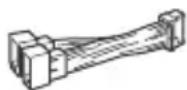
B 3TOT cncOK BXOINT He BCE coJepeKmOe KOMNJIeKTA NOCTaBKN.
-KpoHwTeH ① 3aUHTHaMaHKeTa ③ npKpeJIeHbI K yCTpOuCTBy IO NOCTaBKn. Ipeed yCTaHOBkoYCTPOINCTBa BOCNoJIb3yITecb KJIIOUaMn DnIaDemOHTaKa ② ,TO6bl OTcoEduHNbKPOHwTeH ① OT yCTpOInCTBa.DoONHInTeJbHbIE CBeJeHnA cm.B pa3dJe "OTcoeDInHeHne 3aUHTHOm MaHXKeTbN KPOHwTeHa" (cTp.29).
-CoxpaHnte KJIIOU INI JIe MoHTaJa ② IINCPOJb3OBAHN B6yDyuSEm, NOCKoJIbky OHI TaKKe NOTpe6yIOTc npN DeMOHTaKe aannapata n3 aBTOMo6nJI.
Поклоченье
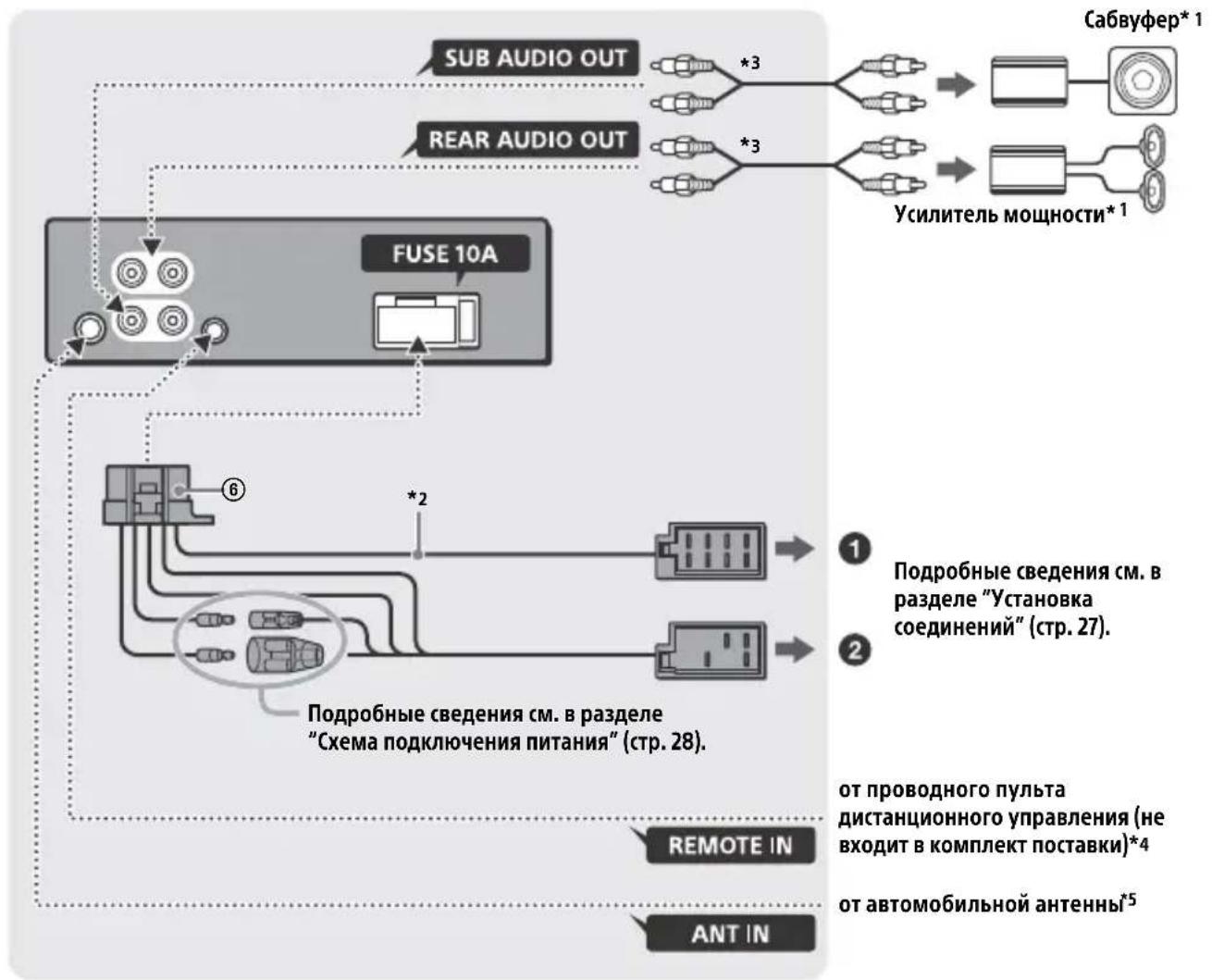
1 He BXOДNT B KOMПЛЕКТ NOCTaВК.
2 Полhoe copotnbIeHne rpoMkorOBopuTeJe: 4Ω-8Ω×4
3 Ka6eNb c pa3bemAmu RCA (He BXoIIT B KOMNJIeK T NOCTaBkU).
^4 B 3aBucmocTn OT Tuna aBTOMO6nla, BO3MOxHO, NOTpe6yETcra NCNoIb3OBaTb aAnTeP dJa npoBOdHoro NylTa INCTaHIOHO YnpaBHeHna (He BXoNT B KOMNKeT NOCTaBK). IOnONHHTeJIbHbIe CBeDeHnO bNCNoJb3OBaHn INPOBOHDoro NylTa DInCTaHcNOHoro ynpaBHeHn CM. B pa3dene "NcNoJb3OBaHne npoBOHDoro NylTa INCTaHcNOHHO ynpaBHeHna" (CTp.28).
*5 B 3aBncuMoCTn OT Tnna ABTomo6nla
NcNoJIb3yIte aAnTep (He BXoJIT B KOMnJIeKT
NocTaBKn), ecJI na pa3bem paIIOaHTehHbI He
NODxOJNT.
YcTaHOBka coeHHeHn
EcnncnoB3yETcBHeuHna aHTeHHa C 3JeKtpoPnBODom6e3peJeHoro6Ioka, NODcoeINHeHne 3TOrO yCTpoiCTBa C NOMObIO npNlaRaEMO rPOBOda NITAHN ⑥ MOxET nPvBeCTN K NOBpeXdEHNO aHTeHHbl.
Kpa3bemy rpOMKOROBOpTeJra aBTOMO6nla
EcnKpaChbI N XeJIbI npoBoda nepeCTaBHeHbI MeCTaMn
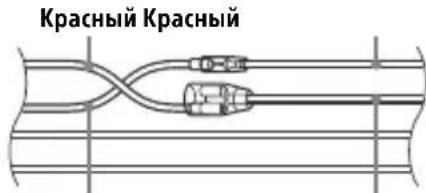
XeIbI XeIbI
"Pepe3arpy3ka yctpoiCTBa" (ctp. 7).
6paTecbK 6bnXaIWeMy dIlepy Sony.
BbIrapckn
СпостяшоTo, Sony Corporation Декларupa,
ЧЕ TOВа оборудвае в СьотBetCTBис
ДиpeктИва 2014/53/EU.
LJIIOCTHnT TeKCT Ha EC JeKnapaunTa 3a CbOTBETCTBne MoKe Da ce HamepHa CNeHNr INHTepHeT aDpeC:
http://www.compliance.sony.de/
Hrvatski
Sony Corporation ovime izjavljuje da je ova oprema u skladu s Direktivom 2014/53/EU. Cjeloviti tekst EU izjave o sukladnosti dostupan je na sljedecoj internetskoj adresi: http://www.compliance.sony.de/
Cesky
Hereby, Sony Corporation declares that this equipment is in compliance with Directive 2014/53/EU. The full text of the EU declaration of conformity is available at the following internet address: http://www.compliance.sony.de/
Eesti keel
If you have any questions or for the latest support information on this product, please visit the web site below:
Site d'assistance
Register your product online now at:
Support by Sony app - Find information and get notification about your product: