
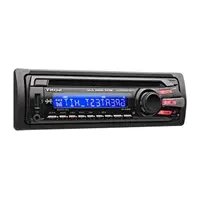
CDXG1301U - Car radio SONY - Free user manual and instructions
Find the device manual for free CDXG1301U SONY in PDF.
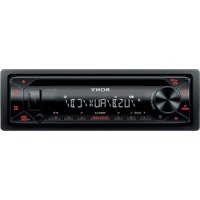


| Product Type | Car Stereo |
| Brand | Sony |
| Model | CDXG1301U |
| Dimensions (W x H x D) | 178 mm x 50 mm x 176 mm |
| Weight | 1.2 kg |
| Power Supply | 12 V DC battery (negative ground) |
| Rated Current Consumption | 10 A |
| FM Frequency Range | 87.5 - 108 MHz (Europe) ; 65 - 74 MHz (Russia) |
| MW Frequency Range | 531 - 1602 kHz |
| LW Frequency Range | 153 - 279 kHz |
| CD Player | Yes, compatible MP3/WMA |
| USB Port | Yes, compatible MP3/WMA/FLAC, max current 500 mA |
| Max Output Power | 55 W x 4 (at 4 Ω) |
| Speaker Impedance | 4 - 8 Ω |
| RDS Functions | AF, TA, PTY, Regional |
| Equalizer | EQ10 with presets and customization |
| Extra Bass | Yes, 3 levels |
| Detachable Front Panel | Yes, anti-theft |
| AUX Input | Yes (stereo mini-jack) |
| Steering Wheel Remote Compatibility | Yes |
| Firmware Update | Via USB |
| Laser Class | 1 (IEC/EN 60825-1) |
Frequently Asked Questions - CDXG1301U SONY
User questions about CDXG1301U SONY
0 question about this device. Answer the ones you know or ask your own.
Ask a new question about this device
Download the instructions for your Car radio in PDF format for free! Find your manual CDXG1301U - SONY and take your electronic device back in hand. On this page are published all the documents necessary for the use of your device. CDXG1301U by SONY.
USER MANUAL CDXG1301U SONY
FM/MW/LW CD Car Audio
FM/MW/LW CD Car Audio
Operating Instructions
GB
Bedienungsanleitung
DE
Mode d'emploi
FR
To cancel the demonstration (DEMO) display, see page 12.
For the connection/installation, see page 21.
For safety, be sure to install this unit in the dashboard of the car as the rear side of the unit becomes hot during use. For details, see "Connection/Installation" (page 21).
Made in Thailand
This product is classified as a Class 1 Laser product under IEC/EN 60825-1:2007 and IEC/ EN 60825-1:2014.
- Emission Duration: Continuous
- Laser Output: Less than 55.8 μW Wavelength: 775 nm to 800 nm
The nameplate indicating operating voltage, etc., is located on the bottom of the chassis.
The validity of the CE marking is restricted to only those countries where it is legally enforced, mainly in the countries EEA (European Economic Area).
CE
Hereby, Sony Corporation declares that this equipment is in compliance with Directive 2014/53/EU.
The full text of the EU declaration of conformity is available at the following internet address:
http://www.compliance.sony.de/
This equipment is intended to be used with the approved version(s) of software that are indicated in the EU Declaration of Conformity.
The software loaded on this equipment is verified to comply with the essential requirements of the Directive 2014/53/EU.
The software version can be checked in the firmware setup item of the general setup menu.
Notice for customers: the following information is only applicable to equipment sold in countries applying EU Directives
This product has been manufactured by or on behalf of Sony Corporation.
EU Importer: Sony Europe B.V.
Inquiries to the EU Importer or related to product compliance in Europe should be
sent to the manufacturer's authorized representative, Sony Belgium, bijkantoor van Sony Europe B.V., Da Vincilaan 7-D1, 1930 Zaventem, Belgium.
Disposal of waste batteries and electrical and electronic equipment (applicable in the European Union and other countries with
separate collection systems)
This symbol on the product, the battery, or on the packaging indicates that the product and the battery shall not be treated as household waste. On certain batteries, this symbol might be used in combination with a chemical symbol. The chemical symbol for lead (Pb) is added if the battery contains more than 0.004% lead. By ensuring that these products and batteries are disposed of correctly, you will help to prevent potentially negative consequences for the environment and human health which could be caused by inappropriate waste handling. The recycling of the materials will help to conserve natural resources. In case of products that for safety, performance, or data integrity reasons require a permanent connection with an incorporated battery, this battery should be replaced by qualified service staff only. To ensure that the battery and the electrical and electronic equipment will be treated properly, hand over these products at end-of-life to the appropriate collection point for the recycling of electrical and electronic equipment. For all other batteries, please view the section on how to remove the battery from the product safely. Hand the battery over to the appropriate collection point for the recycling of waste batteries. For more detailed information about recycling of this product or battery, please contact your local Civic Office, your household waste disposal service, or the shop where you purchased the product or battery.
CAUTION
The following frequency 65 - 74 MHz range is not allocated to sound broadcasting in the European Common Allocations table and cannot be used in Europe.
Warning if your car's ignition has no ACC position
Be sure to set the AUTO OFF function (page 12). The unit will shut off completely and automatically in the set time after the unit is turned off and the clock is displayed (i.e., press and hold OFF for 1 second), which prevents battery drain. If you do not set the AUTO OFF function, press and hold OFF until the display disappears each time you turn the ignition off.
Disclaimer regarding services offered by third parties
Services offered by third parties may be changed, suspended, or terminated without prior notice. Sony does not bear any responsibility in these sorts of situations.
Table of Contents
Guide to Parts and Controls. 5
Getting Started
Detaching the Front Panel 7
Resetting the Unit. 7
Setting the Clock. 7
Checking the Battery Voltage 8
Connecting a USB Device. 8
Connecting Other Portable Audio Device 8
Listening to the Radio
Listening to the Radio 9
Using Radio Data System (RDS). 9
Playback
Playing a Disc 10
Playing a USB Device 10
Searching and Playing Tracks 11
Settings
Canceling the DEMO Mode 12
Basic Setting Operation 12
General Setup (GENERAL) 12
Sound Setup (SOUND) 13
Display Setup (DISPLAY). 14
Additional Information
Updating the Firmware 15
Precautions 15
Maintenance 16
Specifications 16
Troubleshooting 18
Messages. 19
Connection/Installation
Cautions 21
Parts List for Installation. 21
Connection 22
Installation. 24
Guide to Parts and Controls
Main unit
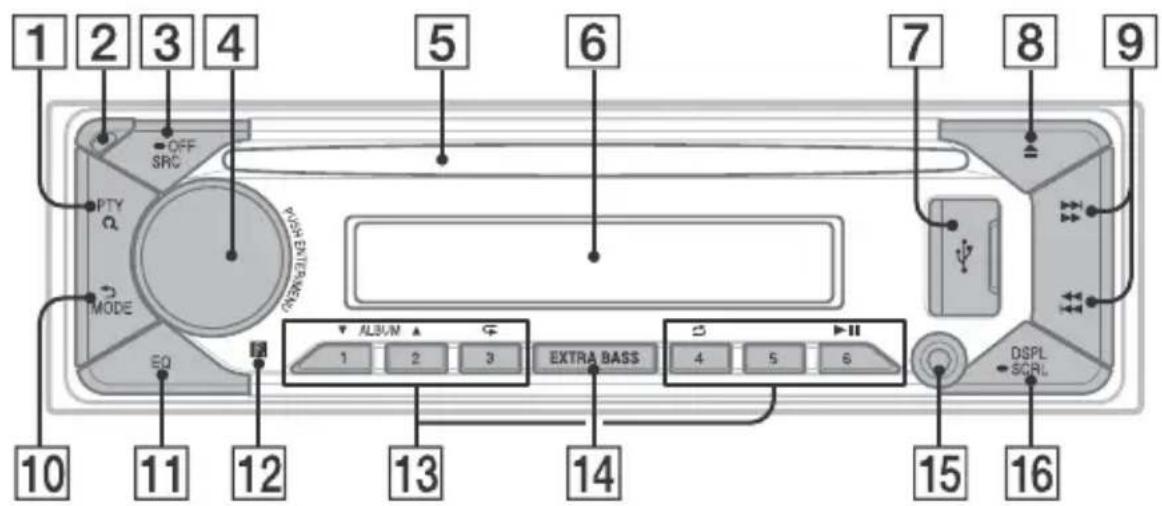
1 PTY (program type)
Select PTY in RDS.
Q (browse) (page 11)
Enter the browse mode during playback.
Not available when a USB device in
AndroidTM mode is connected.)
2 Front panel release button 3 SRC (source)
Turn on the power.
Change the source.
OFF
Press and hold for 1 second to turn the source off and display the clock.
Press and hold for more than 2 seconds to turn off the power and the display.
4 Control dial
Rotate to adjust the volume.
PUSH ENTER
Enter the selected item.
Press SRC, rotate then press to change the source (timeout in 2 seconds).
MENU
Open the setup menu.
5 Disc slot 6 Display window USB port 8 (disc eject)
9 SEEK - / +
Tune in radio stations automatically. Press and hold to tune manually.
1/prev/next) (fast-reverse/fast-forward)
10 (back)
Return to the previous display.
MODE (page 9)
11 EQ (equalizer) Select an equalizer curve. 12 Receptor for the remote commander Number buttons (1 to 6)
Receive stored radio stations. Press and hold to store stations.
ALBUM ▼/▲
Skip an album for audio device. Press and hold to skip albums continuously.
(Not available when a USB device in Android mode is connected.)
(repeat)
(Not available when a USB device in Android mode is connected.)
(shuffle)
(Not available when a USB device in Android mode is connected.)
II (play/pause)
14 EXTRA BASS Reinforces bass sound in synchronization with the volume level. Press to change the EXTRA BASS setting: [1], [2], [OFF]. 15 AUX input jack 16 DSPL (display) Press to change display items. SCRL (scroll) Press and hold to scroll a display item.
Getting Started
Detaching the Front Panel
You can detach the front panel of this unit to prevent theft.
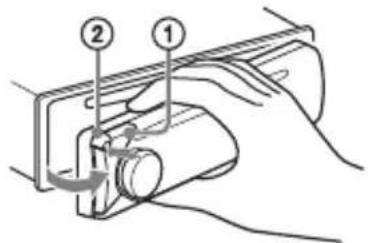
1 Press and hold OFF ① until the unit turns off, press the front panel release button ②, then pull the panel towards you to remove.
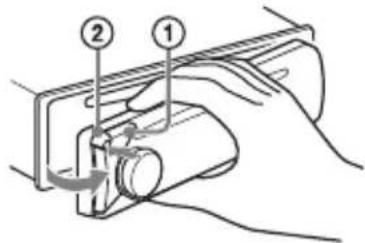
Caution alarm
If you turn the ignition switch to the OFF position without detaching the front panel, the caution alarm will sound for a few seconds. The alarm will only sound if the built-in amplifier is used.
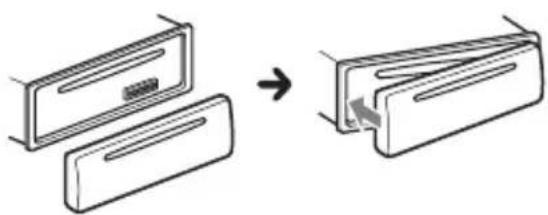
Attaching the front panel
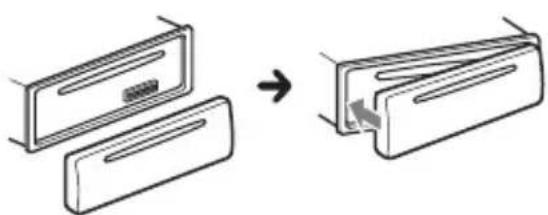
Resetting the Unit
Before operating the unit for the first time, after replacing the car battery, or changing the connections, you must reset the unit.
1 Press DSPL and EQ for more than 2 seconds.
Note
Resetting the unit will erase the clock setting and some stored contents.
Setting the area/region
After resetting the unit, the area/region setting display appears.
1 Press ENTER while [SET AREA] is displayed. The area/region currently set appears. 2 Rotate the control dial to select [EUROPE] or [RUSSIA], then press it. 3 Rotate the control dial to select [YES] or [NO], then press it. If the setting area/region is changed, the unit is reset, then the clock is displayed.
This setting can be configured in the general setup menu (page 12).
Setting the Clock
1 Press MENU, rotate the control dial to select [GENERAL], then press it. 2 Rotate the control dial to select [SET CLOCK], then press it. 3 Rotate the control dial to select [MANUAL], then press it. The hour indication flashes. 4 Rotate the control dial to set the hour and minute. To move the digital indication, press 1 / 2 (SEEK-/+). 5 After setting the minute, press MENU. The setup is complete and the clock starts.
To display the clock
Press DSPL.
To set the clock automatically
Select [AUTO ] in step 3.
Checking the Battery Voltage
You can check the current battery voltage. (Not available while the source is off and the clock is displayed.)
1 Press DSPL repeatedly until the battery voltage display appears.
Connecting a USB Device
1 Turn down the volume on the unit. 2 Connect the USB device to the unit.
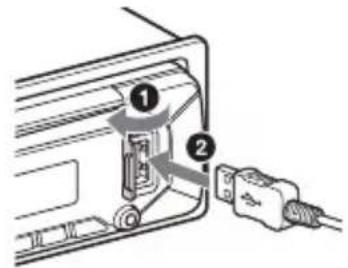
Connecting Other Portable Audio Device
1 Turn off the portable audio device. 2 Turn down the volume on the unit. 3 Connect the portable audio device to the AUX input jack (stereo mini jack) on the unit with a connecting cord (not supplied)*.
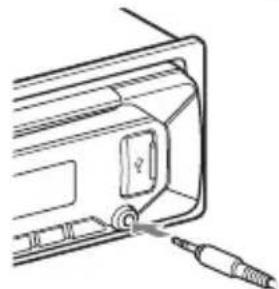
4 Press SRC to select [AUX].
To match the volume level of the connected device to other sources
Start playback of the portable audio device at a moderate volume, and set your usual listening volume on the unit. Press MENU, then select [SOUND] → SET AUX VOL.
Listening to the Radio
Listening to the Radio
To listen to the radio, press SRC to select [TUNER].
Storing automatically (BTM)
1 Press MODE to change the band (FM1, FM2, FM3 or MW/LW). 2 Press MENU, rotate the control dial to select [GENERAL], then press it. 3 Rotate the control dial to select [SET BTM], then press it.
The unit stores stations in order of frequency on the number buttons.
Tuning
1 Press MODE to change the band (FM1, FM2, FM3 or MW/LW). 2 Perform tuning.
To tune manually
Press and hold ■ / ▶ (SEEK-/+ to locate the approximate frequency, then press ■ / ▶ (SEEK-/+ ) repeatedly to fine adjust to the desired frequency.
To tune automatically
Press ■ / ▶ (SEEK-/+).
Scanning stops when the unit receives a station.
Storing manually
1 While receiving the station that you want to store, press and hold a number button (1 to 6) until [MEM] appears.
Receiving the stored stations
1 Select the band, then press a number button (1 to 6).
Using Radio Data System (RDS)
Setting alternative frequencies (AF) and traffic announcement (TA)
AF continuously retunes the station to the strongest signal in a network, and TA provides current traffic information or traffic programs (TP) if received.
1 Press MENU, rotate the control dial to select [GENERAL], then press it. 2 Rotate the control dial to select [SET AF/TA], then press it. 3 Rotate the control dial to select [SET AF-ON], [SET TA-ON], [SET AF/TA-ON] or [SET AF/TA-OFF], then press it.
To store RDS stations with the AF and TA setting
You can preset RDS stations along with an AF/TA setting. Set AF/TA, then store the station with BTM or manually. If you preset manually, you can also preset non-RDS stations.
To receive emergency announcements
With AF or TA on, emergency announcements will automatically interrupt the currently selected source.
To adjust the volume level during a traffic announcement
Level will be stored into memory for subsequent traffic announcements, independently from the regular volume level.
To stay with one regional program (REGIONAL)
When the AF and REGIONAL functions are on, you will not be switched to another regional station with a stronger frequency. If you leave this regional program's reception area, set [SET REGIONAL] in [GENERAL] to [SET REG-OFF] during FM reception (page 13).
This function does not work in the UK and some other areas.
Local Link function (UK only)
This function enables you to select other local stations in the area, even if they are not stored on your number buttons.
During FM reception, press a number button (1 to 6) on which a local station is stored.
Within 5 seconds, press again a number button of the local station. Repeat this procedure until the local station is received.
Selecting program types (PTY)
1 Press PTY during FM reception. 2 Rotate the control dial until the desired program type appears, then press it.
The unit starts to search for a station broadcasting the selected program type.
Type of programs
NEWS (News), AFFAIRS (Current Affairs), INFO (Information), SPORT (Sports), EDUCATE (Education), DRAMA (Drama), CULTURE (Culture), SCIENCE (Science), VARIORED (Varied), POP M (Pop Music), ROCK M (Rock Music), EASY M (M.O.R. Music), LIGHT M (Light classical), CLASSICS (Serious classical), OTHER M (Other Music), WEATHER (Weather), FINANCE (Finance), CHILDREN (Children's program), SOCIAL (Social Affairs), RELIGION (Religion), PHONE IN (Phone In), TRAVEL (Travel), LEISURE (Leisure), JAZZ (Jazz Music), COUNTRY (Country Music), NATION M (National Music), OLDIES (Oldies Music), FOLK M (Folk Music), DOCUMENT (Documentary)
Playback
Playing a Disc
1 Insert the disc (label side up).
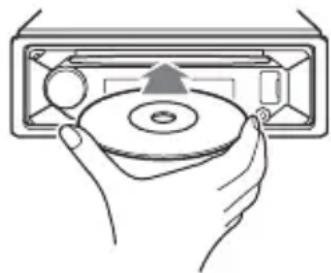
Playback starts automatically.
Playing a USB Device
AOA (Android Open Accessory) 2.0, MSC (Mass Storage Class) and MTP (Media Transfer Protocol) type USB devices* compliant with the USB standard can be used. Depending on the USB device, the Android mode or MSC/MTP mode can be selected on the unit.
Some digital media players or Android smartphones may require setting to MTP mode.
- e.g., a USB flash drive, digital media player, Android smartphone
Notes
- For details on the compatibility of your USB device, visit the support site on the back cover.
- Smartphones with Android OS 4.1 or higher installed support Android Open Accessory 2.0 (AOA 2.0). However, some smartphones may not fully support AOA 2.0 even if Android OS 4.1 or higher is installed.
For details on the compatibility of your Android smartphone, visit the support site on the back cover.
- Playback of the following files is not supported. MP3/WMA/FLAC:
copyright-protected files - DRM (Digital Rights Management) files Multi-channel audio files
MP3/WMA:
- lossless compression files
Before making a connection, select the USB mode (Android mode or MSC/MTP mode) depending on the USB device (page 13).
1 Connect a USB device to the USB port (page 8).
Playback starts.
If a device is already connected, to start playback, press SRC to select [USB].
2 Adjust the volume on this unit.
To stop playback
Press and hold OFF for 1 second.
To remove the device
Stop playback, then remove the device.
Searching and Playing Tracks
Repeat play and shuffle play
Not available when a USB device in Android mode is connected.
1 During playback, press (repeat) or (shuffle) repeatedly to select the desired play mode.
Playback in the selected play mode may take time to start.
Available play modes differ depending on the selected sound source.
Searching a track by name (QuickBrowZerTM)
Not available when a USB device in Android mode is connected.
1 During CD or USB playback, press (browse) to display the list of search categories.
When the track list appears, press (back) repeatedly to display the desired search category.
- During USB playback, press (browse) for more than 2 seconds to directly return to the beginning of the category list.
2 Rotate the control dial to select the desired search category, then press it to confirm. 3 Repeat step 2 to search the desired track.
Playback starts.
To exit the Quick-BrowZer mode
Press (browse).
Searching by skipping items (Jump mode)
Not available when a USB device in Android mode is connected.
1 During CD or USB playback, press (browse). 2 Press (SEEK +). 3 Rotate the control dial to select the item.
The list is jumped in steps of 10% of the total number of items.
4 Press ENTER to return to the QuickBrowZer mode.
The selected item appears.
5 Rotate the control dial to select the desired item, then press it.
Playback starts.
Settings
Canceling the DEMO Mode
You can cancel the demonstration display which appears when the source is off and the clock is displayed.
1 Press MENU, rotate the control dial to select [GENERAL], then press it. 2 Rotate the control dial to select [SET DEMO], then press it. 3 Rotate the control dial to select [SET DEMO-OFF], then press it. The setting is complete. 4 Press (back) twice.
The display returns to normal reception/play mode.
Basic Setting Operation
You can set items in the following setup categories: General setup (GENERAL), Sound setup (SOUND), Display setup (DISPLAY)
1 Press MENU. 2 Rotate the control dial to select the setup category, then press it. The items that can be set differ depending on the source and settings. 3 Rotate the control dial to select the options, then press it.
To return to the previous display
Press (back).
General Setup (GENERAL)
AREA (area) Specifies the area/region to use this unit: [EUROPE], [RUSSIA]. If the area/region currently set is changed, this unit is reset, then the clock is displayed. (Available only while the source is off and the clock is displayed.)
DEMO (demonstration) Activates the demonstration: [ON], [OFF].
CLOCK (clock) (page 7) Sets the clock: [AUTO], [MANUAL].
CAUTION ALM (caution alarm) Activates the caution alarm: [ON], [OFF] (page 7). (Available only while the source is off and the clock is displayed.)
BEEP (beep) Activates the beep sound: [ON], [OFF].
AUTO OFF (auto off) Shuts off automatically after a certain time when the unit is turned off and the clock is displayed (i.e. press and hold OFF for 1 second): [ON] (30 minutes), [OFF].
STEERING (steering) Registers/resets the setting of the steering wheel remote control. (Available only while the source is off and the clock is displayed.) STR CONTROL (steering control) Selects the input mode of the connected remote control. To prevent a malfunction, be sure to match the input mode with the connected remote control before use. CUSTOM (custom) Input mode for the steering wheel remote control PRESET (preset) Input mode for the wired remote control excluding the steering wheel remote control (Automatically selected when [RESET CUSTOM] is performed.) EDIT CUSTOM (edit custom) Registers the functions (SOURCE, ATT, VOL +/-, SEEK +/-) to the steering wheel remote control:
1 Rotate the control dial to select the function you want to assign to the steering wheel remote control, then press it. While [REGISTER] is blinking, press and hold the button on the steering wheel remote control you want to assign the function to. When registration is complete, [REGISTERED] is displayed.
3 To register other functions, repeat steps 1 and 2.
(Available only when [STR CONTROL] is set to [CUSTOM].)
RESET CUSTOM (reset custom)
Resets the registered functions of the steering wheel remote control: [YES], [NO].
(Available only when [STR CONTROL] is set to [CUSTOM].)
Notes
- While making settings, only button operation on the unit is available. For safety, park your car before making this setting. If an error occurs while registering, all the previously-registered information remains. Restart registration from the function where the error occurred.
- This function may not be available on some vehicles. For details on the compatibility of your vehicle, visit the support site on the back cover.
USB MODE (USB mode)
Changes the USB mode: [ANDROID], [MSC/MTP].
(Available only when the USB source is selected.)
AF/TA (alternative frequencies/traffic announcement)
Selects the alternative frequencies (AF) and traffic announcement (TA) setting: [AF-ON], [TA-ON], [AF/TA-ON], [AF/TA-OFF].
(Available when any source is selected.)
REGIONAL (regional)
Restricts reception to a specific region: [ON], [OFF].
(Available only when FM is received.)
BTM (best tuning memory) (page 9)
(Available only when the tuner is selected.)
FIRMWARE (firmware)
(Available only while the source is off and the clock is displayed.)
Checks/updates the firmware version. For details, visit the support site on the back cover.
FW VERSION (firmware version)
Displays current firmware version.
FW UPDATE (firmware update)
Enters firmware update process: [YES], [NO].
Updating the firmware takes a few minutes to complete. During the update, do not turn the ignition to the OFF position, nor remove the USB device.
Sound Setup (SOUND)
This setup menu is not available when the source is off and the clock is displayed.
EQ10 PRESET (EQ10 preset)
Selects an equalizer curve from 10
equalizer curves or off:
[OFF], [R&B], [ROCK], [POP], [HIP-HOP],
[EDM], [JAZZ], [SOUL], [COUNTRY], [KARAOKE]*, [CUSTOM].
The equalizer curve setting can be memorized for each source.
- [KARAOKE] reduces the vocal sound but cannot fully remove it during playback. Also, using a microphone is not supported.
EQ10 CUSTOM (EQ10 custom)
Sets [CUSTOM] of EQ10.
Setting the equalizer curve: [BAND1] -
[BAND10] (32 Hz, 63 Hz, 125 Hz, 250 Hz,
500 Hz, 1 kHz, 2 kHz, 4 kHz, 8 kHz, 16 kHz).
The volume level is adjustable in 1 dB
steps, from -6 dB to +6 dB.
BALANCE (balance)
Adjusts the sound balance: [RIGHT-15] - [CENTER] - [LEFT-15].
FADER (fader)
Adjusts the relative level: [FRONT-15] -
[CENTER] - [REAR-15].
([ATT] is displayed at the lowest setting.)
Selects the subwoofer phase: [SUB NORM], [SUB REV].
LPF FREQ (low pass filter frequency)
Selects the subwoofer cut-off frequency: [80Hz], [100Hz], [120Hz].
HPF FREQ (high pass filter frequency)
Selects the front/rear speaker cut-off
frequency: [OFF], [80Hz], [100Hz], [120Hz].
AUX VOL (AUX volume)
Adjusts the volume level for each connected auxiliary device:
[+18 dB] - [0 dB] - [-8 dB].
This setting negates the need to adjust the volume level between sources.
(Available only when the AUX is selected.)
Display Setup (DISPLAY)
DIMMER (dimmer)
Change the display brightness: [OFF], [ON], [CLK] (clock).
To set this function to be active only during a fixed period, select [CLK], then set the start and end times.
- To set the brightness when the dimmer function is activated:
Set [DIMMER] to [ON], then adjust [BRIGHTNESS].
- To set the brightness when the dimmer function is deactivated:
Set [DIMMER] to [OFF], then adjust [BRIGHTNESS].
The brightness setting is stored and applied when the dimmer function is activated or deactivated.
BRIGHTNESS (brightness)
Adjusts the display brightness. The brightness level is adjustable: [1] - [10].
SND SYNC (sound synchronization)
Activates the synchronization of the illumination with the sound: [ON], [OFF].
Not available when no source is selected and the clock is displayed.)
AUTO SCR (auto scroll)
Scrolls long items automatically: [ON], [OFF].
(Not available when the AUX or tuner is selected.)
Additional Information
Updating the Firmware
To update the firmware, visit the support site on the back cover, then follow the online instructions.
Note
During the update, do not remove the USB device.
Precautions
- Do not leave the front panel or audio devices on the dashboard.
- When the unit is turned on, the power antenna (aerial) extends automatically.
- Do not splash liquid onto the unit.
Moisture condensation
Do not splash liquid onto the discs. When moisture condensation occurs inside the unit, remove the disc and wait for about an hour for it to dry out; otherwise the unit will not operate properly.
Notes on discs
- Do not expose discs to direct sunlight or heat sources such as hot air ducts, nor leave them in a car parked in direct sunlight.
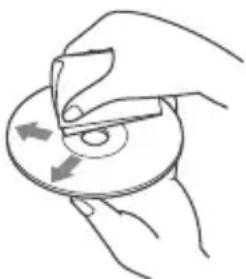
- Wipe the discs with a cleaning cloth from the center out. Do not use solvents such as benzine, thinner, or commercially available cleaners. This unit is designed to play discs that conform to the Compact Disc (CD) standard. DualDiscs and some music discs encoded with copyright protection technologies do not conform to the Compact Disc (CD) standard; therefore, these discs may not be playable by this unit.
- Discs that this unit CANNOT play
- Discs with labels, stickers, or sticky tape or paper attached. Doing so may cause a malfunction or ruin the disc.
- Discs with non-standard shapes (e.g., heart, square, star). Attempting to do so may damage the unit. -8cm (1 3/4 in) discs.
Notes on CD-R/CD-RW discs
- If the multi-session disc begins with a CD-DA session, it is recognized as a CD-DA disc, and other sessions are not played.
- Discs that this unit CANNOT play
- CD-R/CD-RW of poor recording quality.
- CD-R/CD-RW recorded with an incompatible recording device.
- CD-R/CD-RW which is finalized incorrectly.
- CD-R/CD-RW other than those recorded in music CD format or MP3 format conforming to ISO9660 Level 1/Level 2, Joliet/Romeo or multi-session.
Playback order of audio files
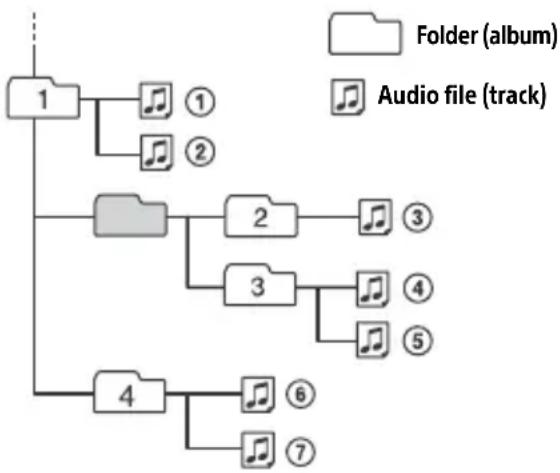
If you have any questions or problems concerning your unit that are not covered in this manual, consult your nearest Sony dealer.
Maintenance
Cleaning the connectors
Avoid touching the connectors directly. The unit may not function properly if the connectors between the unit and the front panel are not clean. In order to prevent this, detach the front panel (page 7) and clean the connectors with a cotton swab. Do not apply too much force. Otherwise, the connectors may be damaged.
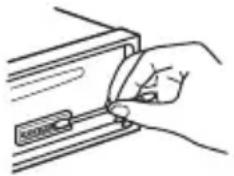
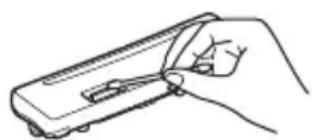
Note
For safety, do not remove the front panel while driving.
Specifications
Tuner section
FM
Tuning range: When [AREA] is set to [EUROPE]: 87.5 MHz - 108.0 MHz When [AREA] is set to [RUSSIA]: FM1/FM2: 87.5 MHz - 108.0 MHz (at 50 kHz step) FM3: 65 MHz - 74 MHz (at 30 kHz step) Usable sensitivity: 7 dBf Signal-to-noise ratio: 73 dB Separation: 50 dB at 1 kHz
MW/LW
Tuning range: 531 kHz - 1,602 kHz (MW), 153 kHz - 279 kHz (LW) Sensitivity: MW: 26 μV, LW: 50 μV
CD Player section
Signal-to-noise ratio: 95 dB Frequency response: 20 Hz - 20,000 Hz Maximum number of: - Folders (albums) 2: 150 - Files (tracks) and folders*3: 300 - Displayable characters for a folder/file name: 32 (Joliet)/64 (Romeo) Corresponding codec: MP3 (.mp3), WMA (.wma)
1 CD-R/CD-RW only 2 including the root folder *3 may be less than the measured value if folder/file names contain many characters
USB Player section
Interface: USB (Full speed) Maximum current: 500 mA Maximum number of recognizable folders and files: - Folders (albums): 256 - Files (tracks) per folder: 256 Compatible Android Open Accessory protocol (AOA): 2.0
Corresponding codec:
MP3 (.mp3)
Bit rate: 8 kbps - 320 kbps (Supports VBR (Variable Bit Rate))
Sampling rate: 16 kHz - 48 kHz
WMA (.wma)
Bit rate: 32 kbps - 192 kbps (Supports VBR (Variable Bit Rate))
Sampling rate: 32 kHz, 44.1 kHz, 48 kHz
FLAC (.flac)
Bit depth: 16 bit, 24 bit
Sampling rate: 44.1 kHz, 48 kHz
Supported file system: FAT16, FAT32
Power amplifier section
Output: Speaker outputs
Speaker impedance: 4 Ω - 8 Ω
Maximum power output: 55 W × 4 (at 4 Ω)
General
Power requirements: 12 V DC car battery (negative ground (earth))
Rated current consumption: 10 A
Dimensions:
Approx. 178 mm × 50 mm × 176 mm
(7 1/8 in × 2 in × 7 in) (w/h/d)
Mounting dimensions:
Approx. 182 mm × 53 mm × 159 mm
(7 1/4 in × 2 1/8 in × 6 3/8 in) (w/h/d)
Mass: Approx. 1.2 kg (2 lb 11 oz)
Package contents:
Main unit (1)
Parts for installation and connections (1 set)
Ask the dealer for detailed information.
Design and specifications are subject to change without notice.
Copyrights
Windows Media is either a registered trademark or trademark of Microsoft Corporation in the United States and/or other countries.
This product is protected by certain intellectual property rights of Microsoft Corporation. Use or distribution of such technology outside of this product is prohibited without a license from Microsoft or an authorized Microsoft subsidiary.
Android is a trademark of Google LLC.
libFLAC
Copyright (C) 2000-2009 Josh Coalson
Copyright (C) 2011-2013 Xiph.Org Foundation
Redistribution and use in source and binary forms, with or without modification, are permitted provided that the following conditions are met:
- Redistributions of source code must retain the above copyright notice, this list of conditions and the following disclaimer.
- Redistributions in binary form must reproduce the above copyright notice, this list of conditions and the following disclaimer in the documentation and/or other materials provided with the distribution.
- Neither the name of the Xiph.org Foundation nor the names of its contributors may be used to endorse or promote products derived from this software without specific prior written permission.
THIS SOFTWARE IS PROVIDED BY THE COPYRIGHT HOLDERS AND CONTRIBUTORS "AS IS" AND ANY EXPRESS OR IMPLIED WARRANTIES, INCLUDING, BUT NOT LIMITED TO, THE IMPLIED WARRANTIES OF MERCHANTABILITY AND FITNESS FOR A PARTICULAR PURPOSE ARE DISCLAIMED. IN NO EVENT SHALL THE FOUNDATION OR CONTRIBUTORS BE LIABLE FOR ANY DIRECT, INDIRECT, INCIDENTAL, SPECIAL, EXEMPLARY, OR CONSEQUENTIAL DAMAGES (INCLUDING, BUT NOT LIMITED TO, PROCUREMENT OF SUBSTITUTE GOODS OR SERVICES; LOSS OF USE, DATA, OR PROFITS; OR BUSINESS INTERRUPTION) HOWEVER CAUSED AND ON ANY THEORY OF LIABILITY, WHETHER IN CONTRACT, STRICT LIABILITY, OR TORT (INCLUDING NEGLIGENCE OR OTHERWISE) ARISING IN ANY WAY OUT OF THE USE OF THIS SOFTWARE, EVEN IF ADVISED OF THE POSSIBILITY OF SUCH DAMAGE.
Troubleshooting
The following checklist will help you remedy problems you may encounter with your unit. Before going through the checklist below, check the connection and operating procedures.
For details on using the fuse and removing the unit from the dashboard, see "Connection/Installation" (page 21). If the problem is not solved, visit the support site on the back cover.
General
No sound or the sound is very low.
The position of the fader control [FADER] is not set for a 2-speaker system. The volume of the unit and/or connected device is very low. - Increase the volume of the unit and connected device.
No beep sound.
An optional power amplifier is connected and you are not using the built-in amplifier.
Stored stations and correct time are erased.
The fuse has blown. Makes a noise when the position of the ignition is switched.
The leads are not matched correctly with the car's accessory power connector.
During playback or reception, the demonstration mode starts.
If no operation is performed for 5 minutes with [DEMO-ON] set, the demonstration mode starts.
- Set [DEMO-OFF] (page 12).
The display disappears from/does not appear in the display window.
The connectors are dirty (page 16).
The display/illumination flashes.
The power supply is not sufficient.
- Check that the car battery supplies enough power to the unit. (The power requirement is 12 VDC.)
The operation buttons do not function. The disc will not eject.
The connection is not correct.
- Press DSPL and EQ for more than
2 seconds to reset the unit.
The contents stored in memory are erased.
The clock set automatically is not accurate.
The clock data on radio waves is not accurate.
- Set the clock manually (page 7).
Radio reception
The radio reception is poor.
Static noise occurs.
Connect the antenna (aerial) firmly.
65 MHz to 74 MHz in FM3 cannot be tuned in.
[AREA] is set to [EUROPE].
- Set [AREA] to [RUSSIA] (page 12).
RDS
RDS services cannot be received (when [AREA] is set to [RUSSIA]).
→ FM3 is selected. - Select FM1 or FM2. → RDS services are unavailable in the current region.
The SEEK starts after a few seconds of listening.
The station is non-TP or has weak signal.
- Deactivate TA (page 9).
No traffic announcements.
Activate TA (page 9). The station does not broadcast any traffic announcements despite being TP.
- Tune in another station.
PTY displays [-- -- --]
The current station is not an RDS station, or the radio reception is poor.
Program service name flashes.
There is no alternative frequency for the current station.
- Press ⟨⟩ / ⟨⟩ (SEEK -/+) while the program service name is flashing. [PI SEEK] appears and the unit starts searching for another frequency with the same PI (program identification) data.
CD playback
The disc does not play.
Defective or dirty disc. The CD-R/CD-RW is not for audio use (page 15).
MP3/WMA files cannot be played.
The disc is incompatible with the MP3/WMA format and version. For details on playable discs and formats, visit the support site on the back cover.
MP3/WMA files take longer to play than others.
The following discs take a longer time to start playback.
- A disc recorded with a complicated tree structure.
- A disc recorded in Multi Session.
- A disc to which data can be added.
USB device playback
A USB device takes longer to play.
The USB device contains files with a complicated tree structure.
The audio file cannot be played.
For details on supported formats, see "Specifications" (page 16). If the audio file still cannot be played, refer to the operating instructions supplied with the USB device, or contact the manufacturer of the USB device.
Operations for skipping an album, skipping items (Jump mode), and searching a track by name (QuickBrowZer) cannot be performed.
Set [USB MODE] to [MSC/MTP] (page 13).
The sound cannot be output during playback in Android mode.
Check the status of the audio playback application on the Android smartphone.
Messages
The following messages may appear or flash during operation.
INVALID: The selected operation could be invalid.
READ
Wait until reading is complete and playback starts automatically. This may take some time depending on the file organization.
(underscore): The character cannot be displayed.
For CD playback:
CD ERROR
Clean or insert the disc correctly, or make sure the disc is not blank or defective.
CD NO DISC
Insert a disc containing playable files (page 16).
CD NO MUSIC
Insert a disc containing playable files (page 16). CD PUSH EJT: The disc could not be ejected properly. Press the eject button.
L L L or : The beginning or the end of the disc has been reached.
For USB device playback:
HUB NO SUPRT: USB hubs are not supported.
NOT SUPPORT ANDROID MODE
A USB device not supporting AOA (Android Open Accessory) 2.0 is connected to the unit while [USB MODE] is set to [ANDROID]. - Set [USB MODE] to [MSC/MTP] (page 13).
USB ERROR
Connect the USB device again.
USB NO DEV
Make sure the USB device or USB cable is securely connected.
USB NO MUSIC
Connect a USB device containing playable files (page 16).
USB NO SUPRT
For details on the compatibility of your USB device, visit the support site on the back cover.
USB OVERLOAD: The USB device is overloaded.
Disconnect the USB device, then press SRC to select another source. The USB device has a fault, or an unsupported device is connected.
For RDS operation:
NO AF: No alternative frequencies.
Press ┐ 144 / 10 ┑ (SEEK-/+)while the program service name is flashing. The unit starts searching for another frequency with the same PI (program identification) data ([PI SEEK] appears).
NO PI: No program identification. The selected station has no PI (program identification) data.
Select another station.
NO TP: No traffic programs. The unit will continue searching for available TP stations.
For steering wheel remote control operation:
ERROR
Register again from the function where the error occurred (page 12).
TIMEOUT
Try completing the registration while [REGISTER] is blinking (about 6 seconds) (page 12).
For firmware update operation:
FILE ERROR: The updater is not stored in the USB device. Store the updater in the USB device, then try again (page 15).
UPDATE ERROR PRESS ENTER: Firmware update is not completed properly.
Press ENTER to clear the message, then try again. During the update, do not turn the ignition to the OFF position, nor remove the USB device (page 15).
If these solutions do not help improve the situation, consult your nearest Sony dealer. If you take the unit to be repaired because of device playback trouble, bring the device that was used at the time the problem began.
Connection/Installation
Cautions
- Run all ground (earth) leads to a common ground (earth) point.
- Do not get the leads trapped under a screw, or caught in moving parts (e.g., seat railing).
- Before making connections, turn the car ignition off to avoid short circuits.
- Connect the power supply lead ⑥ to the unit and speakers before connecting it to the auxiliary power connector.
- Be sure to insulate any loose unconnected leads with electrical tape for safety.
Precautions
- Choose the installation location carefully so that the unit will not interfere with normal driving operations.
- Avoid installing the unit in areas subject to dust, dirt, excessive vibration, or high temperature, such as in direct sunlight or near heater ducts.
- Use only the supplied mounting hardware for a safe and secure installation.
Note on the power supply lead (yellow)
When connecting this unit in combination with other stereo components, the amperage rating of the car circuit to which the unit is connected must be higher than the sum of each component's fuse amperage rating.
Mounting angle adjustment
Adjust the mounting angle to less than 30° .
Parts List for Installation
① (2)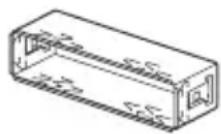
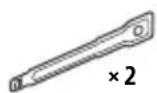
(3) (4)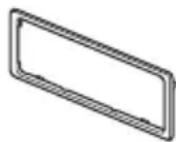
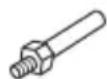
(5)
(6)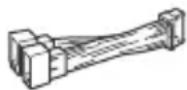
- This parts list does not include all the package contents.
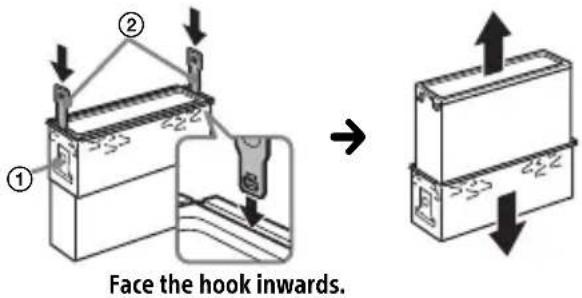
- The bracket ① and the protection collar ③ are attached to the unit before shipping. Before mounting the unit, use the release keys ② to remove the bracket ① from the unit. For details, see "Removing the protection collar and the bracket" (page 24).
- Keep the release keys ② for future use as they are also necessary if you remove the unit from your car.
Connection
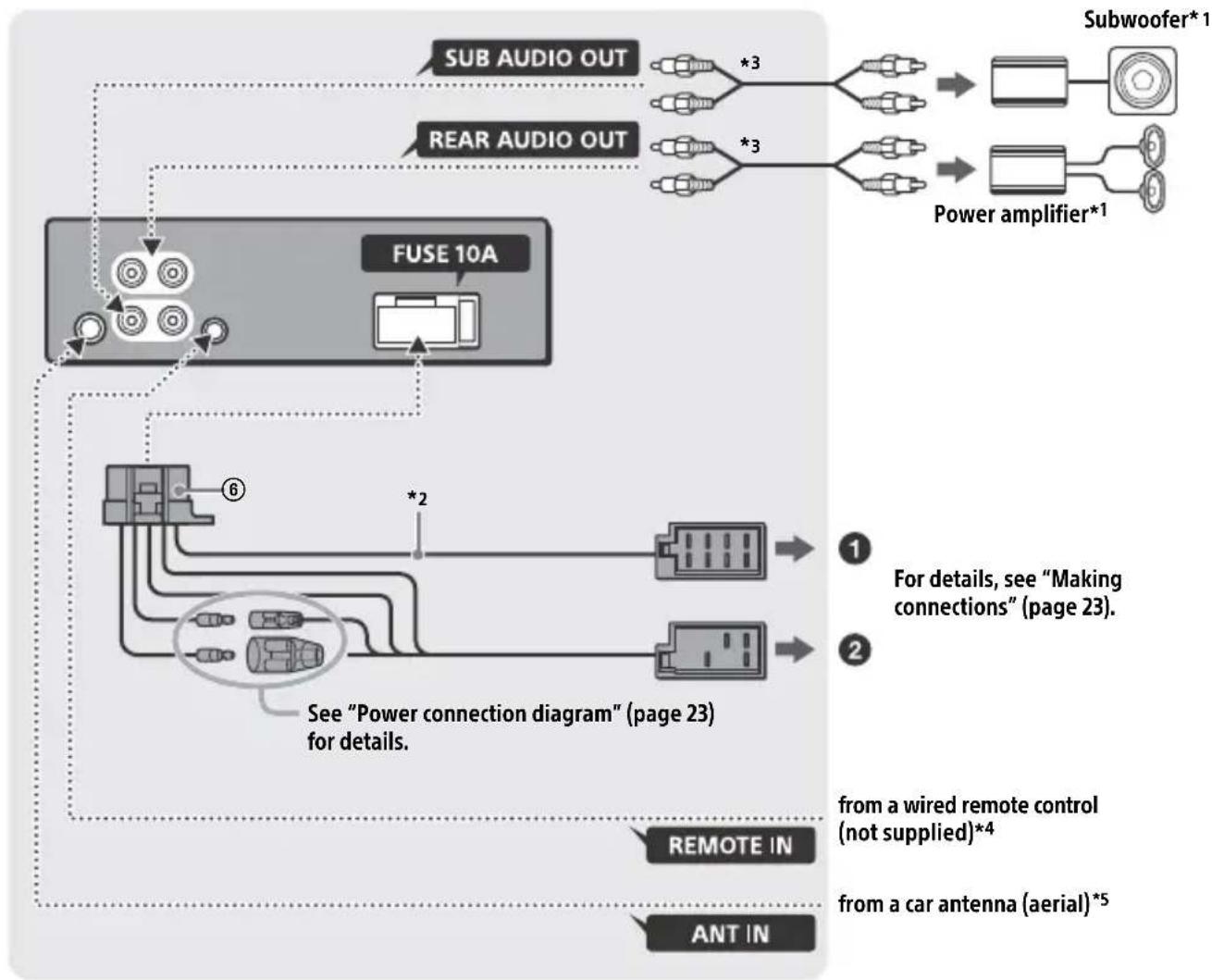
1 Not supplied 2 Speaker impedance: 4Ω - 8Ω × 4 3 RCA pin cord (not supplied) 4 Depending on the type of car, use an adaptor for a wired remote control (not supplied). For details on using the wired remote control, see "Using the wired remote control" (page 24). *5 Depending on the type of car, use an adaptor (not supplied) if the antenna (aerial) connector does not fit.
Making connections
If you have a power antenna (aerial) without a relay box, connecting this unit with the supplied power supply lead ⑥ may damage the antenna (aerial).
To the car's speaker connector
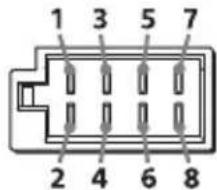
| 1 | Rear speaker (right) | ⊕ | Purple |
| 2 | Purple/black striped | ||
| 3 | Front speaker (right) | ⊕ | Gray |
| 4 | Gray/black striped | ||
| 5 | Front speaker (left) | ⊕ | White |
| 6 | White/black striped | ||
| 7 | Rear speaker (left) | ⊕ | Green |
| 8 | Green/black striped |
To the car's power connector
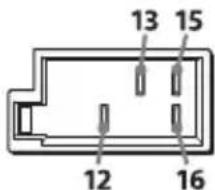
| 12 | continuous power supply | Yellow |
| 13 | power antenna (aerial) / power amplifier control (REM OUT) | Blue/white striped |
| 15 | switched power supply | Red |
| 16 | ground (earth) Black |
Subwoofer Easy Connection
You can use a subwoofer without a power amplifier when it is connected to a rear speaker lead.
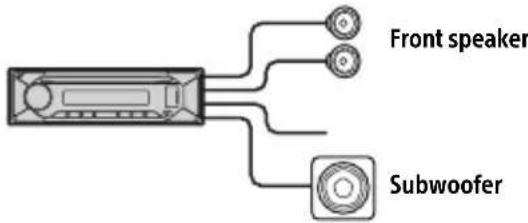
Notes
- Preparation of the rear speaker leads is required.
- Use a subwoofer with an impedance of 4Ω to 8Ω and with adequate power handling capacities to avoid damage.
Memory hold connection
When the yellow power supply lead is connected, power will always be supplied to the memory circuit even when the ignition switch is turned off.
Speaker connection
Before connecting the speakers, turn the unit off. Use speakers with an impedance of 4Ω to 8Ω, and with adequate power handling capacities to avoid damage.
Power connection diagram
Check your car's auxiliary power connector, and match the connections of leads correctly depending on the car.
Auxiliary power connector
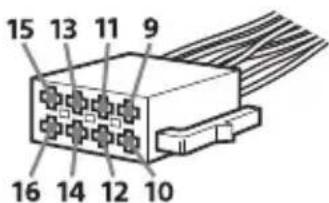
Common connection
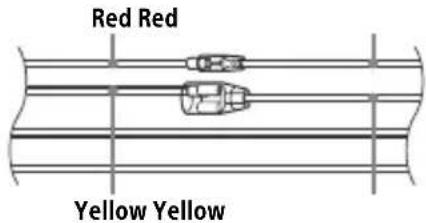
| 12 | continuous power supply | Yellow |
| 15 | switched power supply Red |
When the positions of the red and yellow leads are inverted
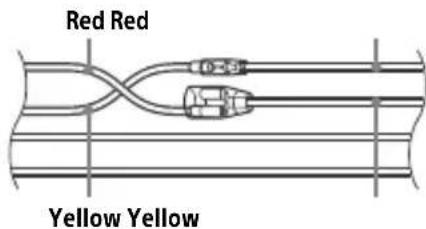
| 12 | switched power supply | Yellow |
| 15 | continuous power supply | Red |
When the car without ACC position
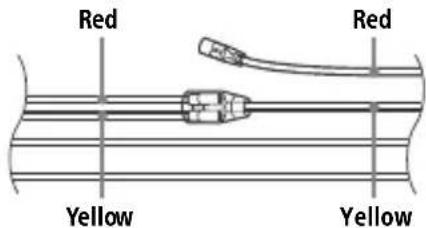
After matching the connections and switching power supply leads correctly, connect the unit to the car's power supply. If you have any questions and problems connecting your unit that are not covered in this manual, consult the car dealer.
Using the wired remote control
1 To enable the wired remote control, set [STR CONTROL] in [SET STEERING] to [PRESET] (page 12).
Installation
Removing the protection collar and the bracket
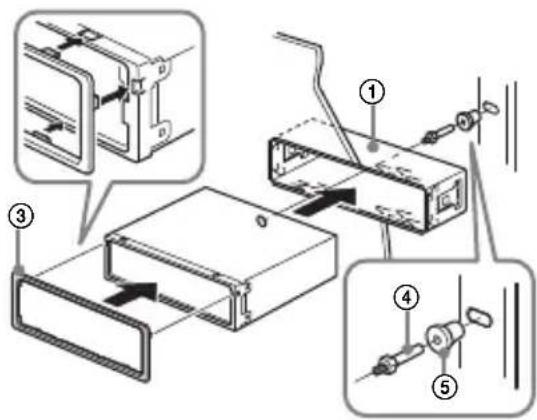
Before installing the unit, remove the protection collar ③ and the bracket ① from the unit.
1 Pinch both edges of the protection collar ③ then pull it out.
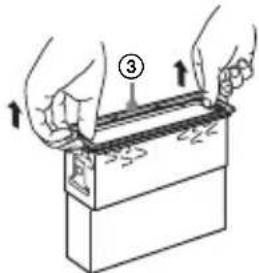
2 Insert both release keys ② until they click, and pull down the bracket ①, then pull up the unit to separate.
Mounting the unit in the dashboard
Before installing, make sure the catches on both sides of the bracket ① are bent inwards 2 mm (3/32 in).
1 Position the bracket ① inside the dashboard, then bend the claws outward for a tight fit.
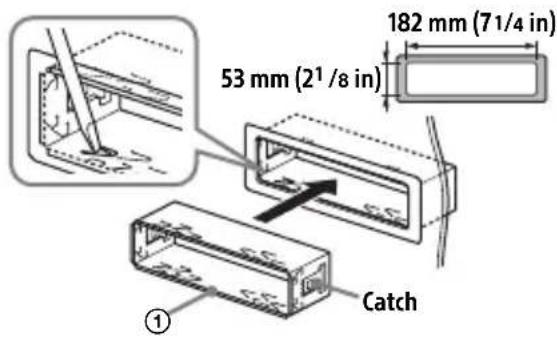
2 Mount the unit onto the bracket ①, then attach the protection collar ③.
Notes
- If the catches are straight or bent outwards, the unit will not be installed securely and may spring out. Make sure the 4 catches on the protection collar are properly engaged in the slots of the unit.
Detaching and attaching the front panel
For details, see "Detaching the Front Panel" (page 7).
Resetting the unit
For details, see "Resetting the Unit" (page 7).
Fuse replacement
When replacing the fuse, be sure to use one matching the amperage rating stated on the original fuse. If the fuse blows, check the power connection and replace the fuse. If the fuse blows again after replacement, there may be an internal malfunction. In such a case, consult your nearest Sony dealer.
connection and replace the fuse. If the fuse blows again after replacement, there may be an internal malfunction. In such a case, consult your nearest Sony dealer.
Connection/Installation
Attention 23
Playback starts.
DEMO (demonstration)
Allows activating the demonstration: [ON], [OFF].
CLOCK (Clock) (page 7)
EDIT CUSTOM (customize)
[OFF], [R&B], [ROCK], [POP], [HIP-HOP], [EDM], [JAZZ], [SOUL], [COUNTRY], [KARAOKE]*, [CUSTOM].
[OFF], [R&B], [ROCK], [POP], [HIP-HOP], [EDM], [JAZZ], [SOUL], [COUNTRY], [KARAOKE]*, [CUSTOM].
[BAND1] - [BAND10] (32 Hz, 63 Hz, 125 Hz, 250 Hz, 500 Hz, 1 kHz, 2 kHz, 4 kHz, 8 kHz, 16 kHz).
AOA (Android Open Accessory) protocol compatible: 2.0
Connection/Installation
Caution
[OFF], [R&B], [ROCK], [POP], [HIP-HOP], [EDM], [JAZZ], [SOUL], [COUNTRY], [KARAOKE]*, [CUSTOM].
Interface: USB (Full speed)
Maximum current: 500 mA
Folders (albums): 256
Copyright (C) 2000-2009 Josh Coalson
Copyright (C) 2011-2013 Xiph.Org Foundation
EDIT CUSTOM (editorialization)
[OFF], [R&B], [ROCK], [POP], [HIP-HOP], [EDM], [JAZZ], [SOUL], [COUNTRY], [KARAOKE]*, [CUSTOM].
[BAND1] - [BAND10] (32 Hz, 63 Hz, 125 Hz, 250 Hz, 500 Hz, 1 kHz, 2 kHz, 4 kHz, 8 kHz, 16 kHz).
Copyright (C) 2000-2009 Josh Coalson
Copyright (C) 2011-2013 Xiph.Org Foundation.
For safety reasons, this device must be installed on the instrument panel of the vehicle, as its rear part heats up during operation.
For more details, see "Installation/Connection" (p. 25).
This product has laser class 1 according to IEC/EN 60825-1:2007 and IEC/EN 60825-1:2014.
Radiation duration: continuous. Laser power: less than 55.8 mW. Wavelength: 775 nm - 800 nm.
The table with the operating voltage and other characteristics is located on the bottom panel of the housing.
The CE marking is valid only in those countries where it is required at the legislative level. Basically, these are the countries of the European Economic Area.
The date of manufacture is indicated on the product and also on the packaging in the following format:
MM.YYYY, where MM is the month and YYYY is the year of manufacture.
Car audio system with FM/MW/LW radio support.
Information storage
Authorized representative in Ukraine on compliance with technical regulations: LLC "Sony Ukraine", 8 Ilyinskaya St., Kyiv, 04070, Ukraine.
Storage conditions
The product should be stored in its original packaging in dark, dry, clean, well-ventilated rooms, isolated from places where acids and alkalis are stored.
Storage temperature: from -20 to +60 °C. Relative storage humidity: no more than 80%, without condensation.
Operating temperature: from 0 to 40 °C. Operating relative humidity: 40-60%.
Storage location not set.
Utilization
of used
elements of power supply
served
electrical
electronic equipment (Directive applies in EU countries and other countries where separate collection systems operate)
If the key is not in the lock, the device will not turn on.
Make sure the AUTO OFF function is set (p.14). The device will turn off automatically after a set time, when the device turns off, the display will go blank (for example, when pressing the OFF button and holding it for 1 second). This prevents battery discharge. If the AUTO OFF function is not set, when turning off the ignition, press and hold OFF until the screen goes dark.
Disclaimer regarding services provided by third-party suppliers
Services provided by third-party suppliers may be changed, suspended, or terminated without prior notice. Sony Corporation is not responsible for situations of this kind.
Importer in the territory of the Customs Union: "Sony Electronics", Russia, 123103, Moscow, Karamyshevsky proezd, 6
Organization authorized to accept claims from consumers in the territory of Kazakhstan: "Sony Electronics" Representative Office in Kazakhstan, 050010, Republic of Kazakhstan, Almaty, Dostyk Avenue, building 117/7
Kazakhstan consumer claims acceptance organization: "Sony Electronics" AK Kazakhstan representative office, 050010, Republic of Kazakhstan, Almaty, Dostyk Avenue, 117/7
Contents
Contents
Getting started
Power supply 7
Restarting the device 7
Setting the clock 8
Checking the battery voltage 8
Connecting a USB device 8
Connecting another portable audio device 9
Listening to the radio
Listening to the radio 9
Radio Data System (RDS) 10
Playback
Playing a disc 11
Playing a USB device 11
Searching and playing tracks 12
Contents
Exiting DEMO mode 13
Basic operations and parameter settings 13
Setting general parameters (GENERAL) 14
Setting the sound (SOUND) 15
Setting the display (DISPLAY) 16
Press to change the display indication.
SCRL (scroll)
Press and hold for scrolling the indication.
Getting started
Removing the front panel
To avoid damaging the device, you can remove the front panel from it.
1 Press and hold the OFF button ① until the device turns off. Press the release button for the front panel ②, then pull the panel towards you and remove it.
Warning beep
If, after turning the switch to the OFF position, the front panel has not been removed from the device, a warning beep will sound within a few seconds. The beep will sound only if the built-in amplifier is used.
Front panel setup
Device reset
Before using the device for the first time, after replacing the car battery, or for reconnecting the device, it is necessary to reset the device.
1 Press and hold the DSPL and EQ buttons for more than 2 seconds.
Note
Resetting the device will delete the settings for clocks and some saved content elements.
Country/region setting
After resetting the device, the country/region settings menu will open.
1 When [SET AREA] is displayed, press the ENTER button. The current country or region will be displayed. 2 Turn the rotary encoder to select [EUROPE] or [RUSSIA], then press the rotary encoder. 3 Turn the rotary encoder to select [YES] or [NO], then press the rotary encoder. When the region or country is changed, the device will reset, and then the clock will be displayed on the screen.
This parameter can be set in the option parameters menu (p.14).
Clock setting
1 Press the MENU button, turn the rotary encoder to select [GENERAL], then press the rotary encoder. 2 Turn the rotary encoder to select [SET CLOCK], then press the rotary encoder. 3 Turn the rotary encoder to select [MANUAL], then press the rotary encoder. The clock indicator will blink. 4 Turn the rotary encoder to set the hour and minute values. To select the setting digit, use the (SEEK-/+ ) buttons. 5 After setting the minutes, press the MENU button. The setting is complete, and the clock will start counting time.
The volume level will be stored in memory for the last received traffic announcement, regardless of the normal volume level.
For listening to a regional program (REGIONAL)
When the REGIONAL function is turned on, the device will not switch to other regional stations as long as the reception is within the region. When leaving the region, the regional program will be set for tuning [SET REGIONAL] in the [GENERAL] menu, parameter [SET REG-OFF] during FM radio reception (p.15). This function does not work in Great Britain and some other regions.
Local station preset function (UK only)
This function allows you to tune in to the frequencies of other local stations in the area, even if they are not stored in the preset buttons. While in FM mode, press the number button (1-6) for which a local station has been programmed. Within no more than 5 seconds, press the number button of the local station again. Repeat the procedure until the desired local station is found.
Selecting program types (PTY)
1 Press PTY during FM reception. 2 Turn the dial control until the desired program type is displayed, then press the dial control. The device will start searching for stations broadcasting the selected program type.
Program types
NEWS (News), AFFAIRS (Current affairs), INFO (Information), SPORT (Sport), EDUCATE (Education), DRAMA (Drama), CULTURE (Culture), SCIENCE (Science), VARIED (Various topics), POP M (Pop music), ROCK M (Rock music), EASY M (Easy listening music), LIGHT M (Light classical music), CLASSICS (Serious classical music), OTHER M (Other music), WEATHER (Weather), FINANCE (Finance), CHILDREN (Children's programs), SOCIAL (Social affairs), RELIGION (Religion), PHONE IN (Phone-in programs), TRAVEL (Travel), LEISURE (Leisure), JAZZ (Jazz music), COUNTRY (Country music), NATION M (Ethnic music), OLDIES (Oldies music), FOLK M (Folk music), DOCUMENT (Documentaries)
Playback
Playing a disc
1 Insert a disc (label side up).
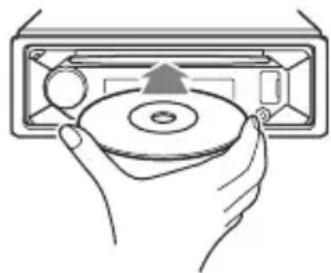
Playback starts automatically.
Playing USB devices
USB devices of type AOA (Android Open Accessory) 2.0, MSC (mass storage class), and MTP (Media Transfer Protocol) that are compatible with the USB standard can be used. Depending on the type of USB device used, you can select Android or MSC/MTP mode on the device.
For some digital audio players or Android smartphones, MTP mode may be required.
- For example, USB flash drives, digital players, Android smartphones.
Examples
Check the Sony website listed on the back cover for compatibility of the USB device. Smartphones with Android 4.1 or later installed support Android Open Accessory 2.0 (AOA 2.0). However, some smartphones may not fully support AOA 2.0, even if Android 4.1 or later is installed. For detailed information on the compatibility of your smartphone with the Android OS, visit the support website listed on the back cover.
Playback of the following files is not supported. MP3/WMA/FLAC:
- Files protected by copyright; -Files with DRM (Digital Rights Management); -Multichannel audio files.
To stop playback
Press and hold the OFF button for about 1 second.
Playback in the selected mode may not start immediately.
Available playback modes depend on the selected audio source.
Searching for a track by name (Quick-BrowZer™)
Not available if the USB device is disconnected from the Android device.
1 During playback of a CD or USB device, press the (BROWSE)* button to display the search category list. When the track list appears, press the (BACK) button repeatedly until the search category list appears. *During playback of a USB device, press and hold the (BROWSE) button for more than 2 seconds to return directly to the beginning of the category list. 2 Turn the rotary encoder to select the desired search category, then press the rotary encoder to confirm. 3 Repeat step 2 to search for the desired track. Playback will start.
1 Press the MENU button. 2 Turn the rotary encoder to select the settings category, then press the rotary encoder. The adjustable items vary depending on the source and parameters. 3 Turn the rotary encoder to select the parameters, then press the rotary encoder.
[OFF], [R&B], [ROCK], [POP], [HIP-HOP],
[EDM], [JAZZ], [SOUL], [COUNTRY], [KARAOKE]*, [CUSTOM].
The selected equalizer curve for each source can be stored in memory.
*When [KARAOKE] is selected, the vocal sound during playback is attenuated, but not completely eliminated. Use of the microphone is not supported.
EQ10 CUSTOM (custom equalizer settings EQ10) Selecting the [CUSTOM] option for EQ10. Adjusting the equalizer curve: [BAND1]-[BAND10] (32Hz, 63Hz, 125Hz, 250Hz, 500Hz, 1kHz, 2kHz, 4kHz, 8kHz, 16kHz). The volume level is adjusted in the range from -6dB to +6dB in steps of 1dB.
BALANCE Adjusting the sound balance: [RIGHT-15] - [CENTER] - [LEFT-15].
FADER (signal distribution) Adjusting the relative level: [FRONT-15] - [CENTER] - [REAR-15].
Display settings (DISPLAY)
DIMMER (backlight adjustment) Changing the display brightness: [OFF], [ON], [CLK] (clock). To make this function active only for a certain time, select [CLK], then set the start and end times. - To set the brightness when the backlight control function is on: set the [DIMMER] value to [ON] and adjust [BRIGHTNESS]. - To set the brightness when the backlight control function is off: set the [DIMMER] value to [OFF] and adjust [BRIGHTNESS]. The brightness setting is saved and applied when the backlight control function is turned on and off.
Open Accessory (AOA): 2.0
Supported codecs:
MP3 (.mp3)
Data transfer rate: 8kbps-320kbps (supports VBR (variable bitrate))
Sampling frequency: 16 kHz - 48 kHz
WMA (.wma)
Data transfer rate: 32 kbps-192 kbps (supports VBR (variable bitrate))
Sampling frequency: 32 kHz, 44.1 kHz, 48 kHz
FLAC (.flac)
Bit depth: 16-bit, 24-bit
Sampling frequency: 44.1 kHz, 48 kHz
Supported file systems: FAT16, FAT32
Power amplifier
Output: speaker outputs
Speaker impedance
Speaker impedance: 4 Ω - 8 Ω
Maximum output power: 55 W × 4 (at 4 Ω impedance)
Other information
Power supply requirements: 12 V DC car battery (with negative ground)
Rated current: 10 A
Dimensions:
Mounting dimensions:
If the malfunction cannot be resolved according to this instruction manual, contact your nearest authorized Sony service center for repair and maintenance.
Copyright
Windows Media is a trademark or registered trademark of Microsoft Corporation in the United States and/or other countries.
This document is protected by intellectual property rights of Microsoft Corporation. Use and distribution of this document, except for this product, without a license from Microsoft or an authorized representative of Microsoft is prohibited.
Android is a trademark of Google LLC.
libFLAC
Copyright (C) 2000-2009 Josh Coalson Copyright (C) 2011-2013 Xiph.Org Foundation
Redistribution and use in source and binary forms, with or without modification, are permitted provided that the following conditions are met:
- Redistributions of source code must retain the above copyright notice, this list of conditions and the following disclaimer. - Redistributions in binary form must reproduce the above copyright notice, this list of conditions and the following disclaimer in the documentation and/or other materials provided with the distribution.
- Neither the name of the Xiph.org Foundation nor the names of its contributors may be used to endorse or promote products derived from this software without specific prior written permission.
THIS SOFTWARE IS PROVIDED BY THE COPYRIGHT HOLDERS AND CONTRIBUTORS "AS IS" AND ANY EXPRESS OR IMPLIED WARRANTIES, INCLUDING, BUT NOT LIMITED TO, THE IMPLIED WARRANTIES OF MERCHANTABILITY AND FITNESS FOR A PARTICULAR PURPOSE ARE DISCLAIMED. IN NO EVENT SHALL THE FOUNDATION OR CONTRIBUTORS BE LIABLE FOR ANY DIRECT, INDIRECT, INCIDENTAL, SPECIAL, EXEMPLARY, OR CONSEQUENTIAL DAMAGES (INCLUDING, BUT NOT LIMITED TO, PROCUREMENT OF SUBSTITUTE GOODS OR SERVICES; LOSS OF USE, DATA, OR PROFITS; OR BUSINESS INTERRUPTION) HOWEVER CAUSED AND ON ANY THEORY OF LIABILITY, WHETHER IN CONTRACT, STRICT LIABILITY, OR TORT (INCLUDING NEGLIGENCE OR OTHERWISE) ARISING IN ANY WAY OUT OF THE USE OF THIS SOFTWARE, EVEN IF ADVISED OF THE POSSIBILITY OF SUCH DAMAGE.
Troubleshooting
The checks below can help resolve most problems that may arise during device operation. Before reviewing the table below, refer to the section on connecting and operating the device. For additional information on using the fuse and removing the device from the mounting panel, see "Installation/Connection" (p.25). If the problem cannot be resolved, visit the support website indicated on the back of the unit.
Information
No sound or it is too low.
→ The signal distribution control [FADER] is not set for a 2-speaker system. → The volume level of this device and/or the connected device is very low. - Increase the volume of this device and the connected device.
No audio signal is heard.
→ A power amplifier is connected, and the built-in one is not used.
The programmed radio stations and time settings have been lost. The fuse has blown. The sound is too loud when switching the ignition key position.
→ The radio is not connected correctly to the vehicle's electrical auxiliary equipment.
During playback, the demonstration starts.
→ If, with the demonstration mode [DEMO-ON] switched on, no operations are performed within 5 minutes, the demonstration starts. - Set the value [DEMO-OFF] (p.14).
The display is not shown in the display window.
→ The contacts are dirty (p.18).
The display/backlight flickers.
Insufficient power supply. - Make sure that the device receives sufficient power from the vehicle battery. (Power supply requirement: 12 V DC.)
The control buttons do not work. The disc is not ejected.
→ Incorrect connection. - Press and hold the DN, SPL, and EQ buttons for more than 2 seconds to reset the device. The memory contents will be deleted.
The automatic time setting was inaccurate.
Traffic messages are not transmitted.
→ Switch on TA (p. 10). → The station does not transmit traffic messages, although it is of the TP type. - Tune to another station.
When the PTY function is switched on, the indication [--] is displayed.
The current station is weak, and the number of receivable stations is poor.
The name of the program service is displayed.
→For the selected data at the moment, the station does not use the alternative frequency.
- Press the /I (SEEK -/+) button until the name of the program service appears. The [PI SEEK] indicator appears, and the device starts searching for another station with the same PI data (program identification).
Playing audio CDs
The compact disc does not play.
→The disc is scratched or dirty. →CD-R/CD-RW discs are not intended for audio playback (p.18).
MP3/WMA files cannot be played.
→The disc is not compatible with the MP3/WMA format and version. To obtain detailed information about playable discs and formats, visit the website whose address is indicated on the back cover.
An audio file cannot be played.
→For additional information on supported formats, see the "Technical specifications" section (p.19). If the audio file still cannot be played, refer to the operating instructions supplied with the USB device, or contact the manufacturer of this USB device.
Album skip, element skip (jump mode), and title search by name (QuickBrowZer) operations cannot be performed.
→For the [USB MODE] parameter, set the value to MSC/MTP.
In Android mode, sound from the device is not played.
→Install an application for playing audio on a smartphone with the Android OS.
Message
Bo BpempaobtbyyctpoiCTBaMoryT OTo6paXaTbCnN MInMaTb CJeDyUOuNe COo6uHn.
INVALID: BbIbpaHnA onepaCnMy MoKeT He NOIDepXnBaTbcra.
READ
Wait for the operation to complete. Playback will start automatically. This may take some time depending on the file structure.
(Underline symbol): Unable to display symbol.
Playback of CD files:
CD ERROR
Insert a disc with playable files (p. 19).
CD NO MUSIC
Insert a disc with playable files (p. 19).
CD PUSH EJT: Unable to eject the disc correctly. Press the eject button.
Pull the disc by the edges, not the center.
Playback of USB devices:
HUB NO SUPRT: USB concentrators are not supported.
NOT SUPPORT ANDROID MODE
Connect a USB device that does not support the Android Open Accessory (AOA) 2.0 protocol when [USB MODE] is set to [ANDROID]. Set [USB MODE] to [MSC/MTP] (p.15).
USB ERROR
Reconnect the USB device.
USB NO DEV
Make sure the USB device or USB cable is securely connected.
USB NO MUSIC
Connect a USB device that contains playable files (p.19).
USB NO SUPRT
For information about USB device compatibility, visit the support website listed on the back cover.
USB OVERLOAD: The USB device is overloaded.
Disconnect the USB device, then press the SRC button to select another source. The USB device may be damaged or not supported.
RDS operation:
NO AF: No alternative frequencies available. Press the I/▶I (SEEK -/+) button until the program service name appears. The device starts searching for another frequency with the same PI (program identification) data (the [PI SEEK] indicator appears).
NO PI: No program identification. The selected station does not have PI data. Select another station.
NOTP: No traffic announcements. The device continues searching for stations that broadcast TP programs.
Carefully choose the installation location for the device so that it does not interfere with vehicle control. Do not install the device where it will be exposed to dust, dirt, excessive vibration, or high temperatures, for example in places where direct sunlight falls or near ventilation grilles of heaters. To ensure reliable and safe installation, use the mounting parts included in the kit.
Note regarding the power cord (cable)
When connecting this device together with other audio components, the nominal current value in the vehicle's power circuit must not exceed the total current value indicated on the fuses of all components.
Adjusting the installation angle
Adjust the installation angle so that it is less than 30°
List of parts for installation
①
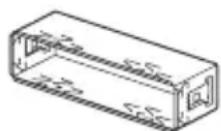
②
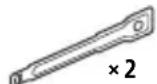
(3)
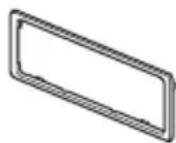
(4)
⑤

(6)
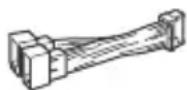
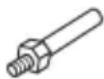
This list does not include all contents of the delivery kit. -The protective cap ① and mounting bracket ③ are attached to the device at the time of delivery. Before installing the device, use the keys for mounting ② to detach the protective cap ① from the device. For additional information, see the section "Detaching the protective cap and mounting bracket" (p.29). -Keep the keys for mounting ② for future use, as they will also be needed when removing the device from the vehicle.
Connection
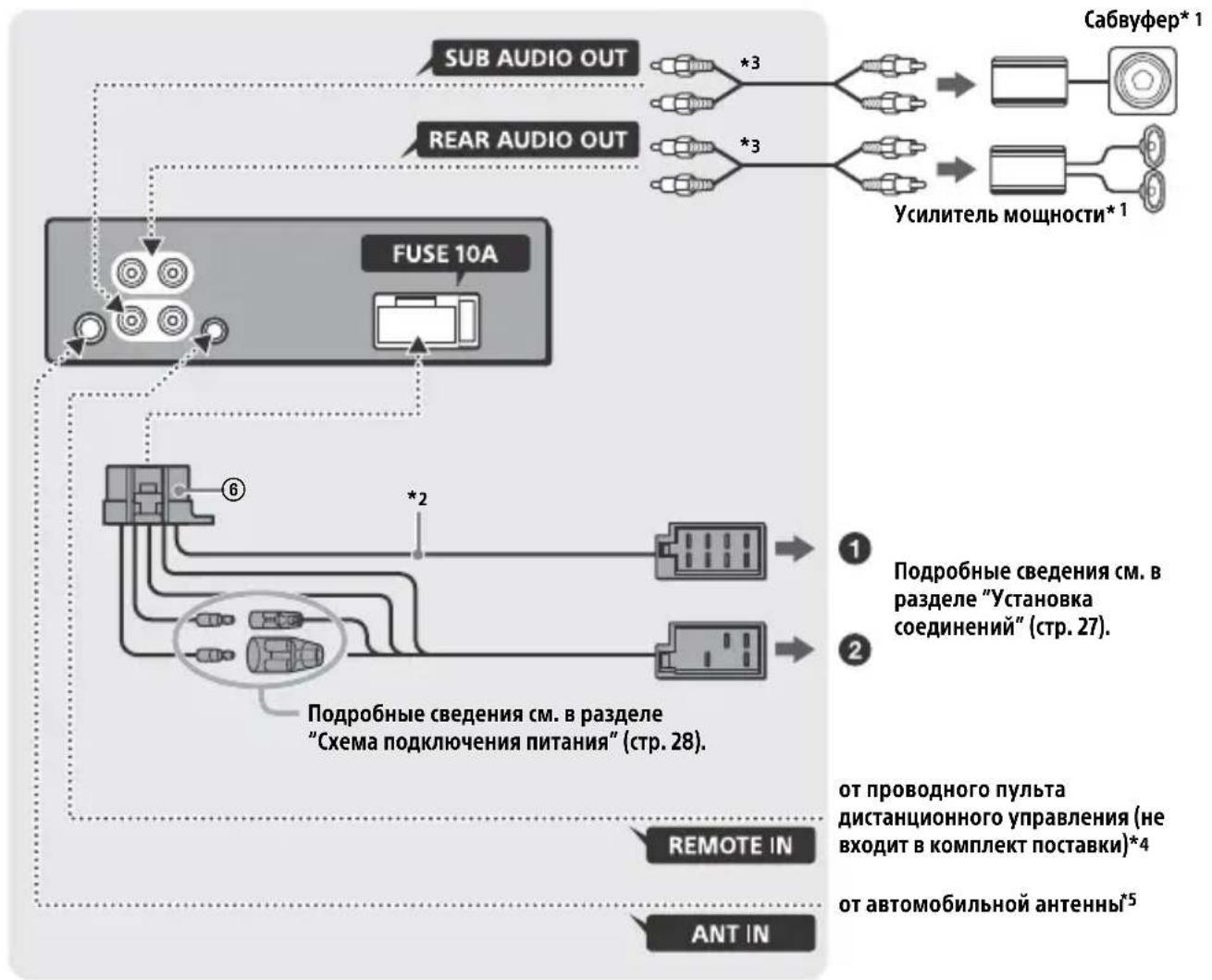
1 It is included in the delivery set. 2 Total speaker impedance: 4 Ω - 8 Ω × 4 3 Cable with RCA connectors (not included in the delivery set). *4 Depending on the car model, it may be necessary to use an adapter for the wired remote control (not included in the delivery set). For additional information on using the wired remote control, see the section "Using the wired remote control" (p. 28). 5 Depending on the car model, use an adapter (not included in the delivery set) if the radio connector does not fit.
Installation and connection
If an external antenna with a power supply without a separate unit is used, connecting this device using the supplied power wire ⑥ may damage the antenna.
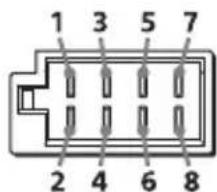
To the car speaker connector
If the red and yellow wires are swapped
Yellow Yellow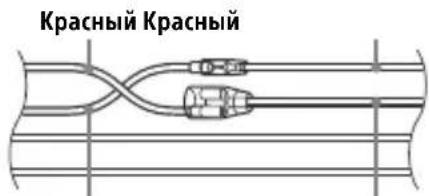
"Device reset" (p. 7).
Replacing the fuse
Replacement
Fuse
Mandatory
Use only those
that match the
current rating indicated on the
original
Fuse (10 A)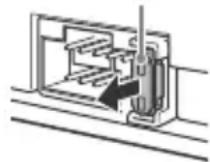
Fuse. If it blows
fuse, check the connection
and replace the fuse.
If after replacement the fuse blows again,
this may indicate
a malfunction of the device. In this case,
contact your nearest Sony dealer.
Bulgarian
Hereby, Sony Corporation declares that this equipment is in compliance with Directive 2014/53/EU.
The full text of the EU declaration of conformity is available at the following internet address:
http://www.compliance.sony.de/
Croatian
Sony Corporation hereby declares that this equipment is in compliance with Directive 2014/53/EU. The full text of the EU declaration of conformity is available at the following internet address: http://www.compliance.sony.de/
Czech
Hereby, Sony Corporation declares that this equipment is in compliance with Directive 2014/53/EU.
The full text of the EU declaration of conformity is available at the following internet address: http://www.compliance.sony.de/
If you have any questions or for the latest support information on this product, please visit the web site below:
Support site
Register your product online now at:
Support by Sony app - Find information and get notification about your product:
Smartphone app
https://sony.net/SBS
- FM/MW/LW CD CAR AUDIO
- CE
- NOTICE FOR CUSTOMERS: THE FOLLOWING INFORMATION IS ONLY APPLICABLE TO EQUIPMENT SOLD IN COUNTRIES APPLYING EU DIRECTIVES
- DISPOSAL OF WASTE BATTERIES AND ELECTRICAL AND ELECTRONIC EQUIPMENT (APPLICABLE IN THE EUROPEAN UNION AND OTHER COUNTRIES WITH
- SEPARATE COLLECTION SYSTEMS)
- CAUTION
- WARNING IF YOUR CAR'S IGNITION HAS NO ACC POSITION
- DISCLAIMER REGARDING SERVICES OFFERED BY THIRD PARTIES
- TABLE OF CONTENTS
- GETTING STARTED
- LISTENING TO THE RADIO
- PLAYBACK
- SETTINGS
- ADDITIONAL INFORMATION
- CONNECTION/INSTALLATION
- GUIDE TO PARTS AND CONTROLS
- MAIN UNIT
- ALBUM ▼/▲
- (REPEAT)
- (SHUFFLE)
- II (PLAY/PAUSE)
- DETACHING THE FRONT PANEL
- CAUTION ALARM
- ATTACHING THE FRONT PANEL
- RESETTING THE UNIT
- NOTE
- SETTING THE AREA/REGION
- SETTING THE CLOCK
- TO DISPLAY THE CLOCK
- TO SET THE CLOCK AUTOMATICALLY
- CHECKING THE BATTERY VOLTAGE
- CONNECTING A USB DEVICE
- CONNECTING OTHER PORTABLE AUDIO DEVICE
- TO MATCH THE VOLUME LEVEL OF THE CONNECTED DEVICE TO OTHER SOURCES
- STORING AUTOMATICALLY (BTM)
- TUNING
- STORING MANUALLY
- RECEIVING THE STORED STATIONS
- USING RADIO DATA SYSTEM (RDS)
- SETTING ALTERNATIVE FREQUENCIES (AF) AND TRAFFIC ANNOUNCEMENT (TA)
- TO STORE RDS STATIONS WITH THE AF AND TA SETTING
- TO RECEIVE EMERGENCY ANNOUNCEMENTS
- TO ADJUST THE VOLUME LEVEL DURING A TRAFFIC ANNOUNCEMENT
- TO STAY WITH ONE REGIONAL PROGRAM (REGIONAL)
- LOCAL LINK FUNCTION (UK ONLY)
- SELECTING PROGRAM TYPES (PTY)
- TYPE OF PROGRAMS
- PLAYING A DISC
- PLAYING A USB DEVICE
- NOTES
- SEARCHING AND PLAYING TRACKS
- REPEAT PLAY AND SHUFFLE PLAY
- SEARCHING A TRACK BY NAME (QUICKBROWZERTM)
- SEARCHING BY SKIPPING ITEMS (JUMP MODE)
- CANCELING THE DEMO MODE
- BASIC SETTING OPERATION
- GENERAL SETUP (GENERAL)
- SOUND SETUP (SOUND)
- DISPLAY SETUP (DISPLAY)
- UPDATING THE FIRMWARE
- PRECAUTIONS
- MOISTURE CONDENSATION
- NOTES ON DISCS
- NOTES ON CD-R/CD-RW DISCS
- PLAYBACK ORDER OF AUDIO FILES
- MAINTENANCE
- CLEANING THE CONNECTORS
- SPECIFICATIONS
- TUNER SECTION
- FM
- MW/LW
- CD PLAYER SECTION
- USB PLAYER SECTION
- POWER AMPLIFIER SECTION
- GENERAL
- COPYRIGHTS
- LIBFLAC
- TROUBLESHOOTING
- NO SOUND OR THE SOUND IS VERY LOW
- NO BEEP SOUND
- STORED STATIONS AND CORRECT TIME ARE ERASED
- DURING PLAYBACK OR RECEPTION, THE DEMONSTRATION MODE STARTS
- THE DISPLAY DISAPPEARS FROM/DOES NOT APPEAR IN THE DISPLAY WINDOW
- THE DISPLAY/ILLUMINATION FLASHES
- THE OPERATION BUTTONS DO NOT FUNCTION. THE DISC WILL NOT EJECT
- THE CLOCK SET AUTOMATICALLY IS NOT ACCURATE
- RADIO RECEPTION
- THE RADIO RECEPTION IS POOR
- STATIC NOISE OCCURS
- MHZ TO 74 MHZ IN FM3 CANNOT BE TUNED IN
- RDS
- RDS SERVICES CANNOT BE RECEIVED (WHEN [AREA] IS SET TO [RUSSIA])
- THE SEEK STARTS AFTER A FEW SECONDS OF LISTENING
- NO TRAFFIC ANNOUNCEMENTS
- PTY DISPLAYS [-- -- --]
- PROGRAM SERVICE NAME FLASHES
- CD PLAYBACK
- THE DISC DOES NOT PLAY
- MP3/WMA FILES CANNOT BE PLAYED
- MP3/WMA FILES TAKE LONGER TO PLAY THAN OTHERS
- USB DEVICE PLAYBACK
- A USB DEVICE TAKES LONGER TO PLAY
- THE AUDIO FILE CANNOT BE PLAYED
- OPERATIONS FOR SKIPPING AN ALBUM, SKIPPING ITEMS (JUMP MODE), AND SEARCHING A TRACK BY NAME (QUICKBROWZER) CANNOT BE PERFORMED
- THE SOUND CANNOT BE OUTPUT DURING PLAYBACK IN ANDROID MODE
- MESSAGES
- READ
- FOR CD PLAYBACK
- CD ERROR
- CD NO DISC
- CD NO MUSIC
- FOR USB DEVICE PLAYBACK
- NOT SUPPORT ANDROID MODE
- USB ERROR
- USB NO DEV
- USB NO MUSIC
- USB NO SUPRT
- FOR RDS OPERATION
- FOR STEERING WHEEL REMOTE CONTROL OPERATION
- ERROR
- TIMEOUT
- FOR FIRMWARE UPDATE OPERATION
- CAUTIONS
- NOTE ON THE POWER SUPPLY LEAD (YELLOW)
- MOUNTING ANGLE ADJUSTMENT
- PARTS LIST FOR INSTALLATION
- CONNECTION
- MAKING CONNECTIONS
- TO THE CAR'S SPEAKER CONNECTOR
- TO THE CAR'S POWER CONNECTOR
- SUBWOOFER EASY CONNECTION
- MEMORY HOLD CONNECTION
- SPEAKER CONNECTION
- POWER CONNECTION DIAGRAM
- COMMON CONNECTION
- WHEN THE POSITIONS OF THE RED AND YELLOW LEADS ARE INVERTED
- WHEN THE CAR WITHOUT ACC POSITION
- USING THE WIRED REMOTE CONTROL
- INSTALLATION
- REMOVING THE PROTECTION COLLAR AND THE BRACKET
- MOUNTING THE UNIT IN THE DASHBOARD
- DETACHING AND ATTACHING THE FRONT PANEL
- FUSE REPLACEMENT
- ATTENTION
- ALLOWS ACTIVATING THE DEMONSTRATION: [ON], [OFF]
- EDIT CUSTOM (CUSTOMIZE)
- [OFF], [R&B], [ROCK], [POP], [HIP-HOP], [EDM], [JAZZ], [SOUL], [COUNTRY], [KARAOKE]*, [CUSTOM]
- INFORMATION STORAGE
- IF THE KEY IS NOT IN THE LOCK, THE DEVICE WILL NOT TURN ON
- DISCLAIMER REGARDING SERVICES PROVIDED BY THIRD-PARTY SUPPLIERS
- CONTENTS
- SCRL (SCROLL)
- REMOVING THE FRONT PANEL
- WARNING BEEP
- FRONT PANEL SETUP
- DEVICE RESET
- COUNTRY/REGION SETTING
- CLOCK SETTING
- FOR LISTENING TO A REGIONAL PROGRAM (REGIONAL)
- LOCAL STATION PRESET FUNCTION (UK ONLY)
- PROGRAM TYPES
- PLAYING USB DEVICES
- EXAMPLES
- TO STOP PLAYBACK
- SEARCHING FOR A TRACK BY NAME (QUICK-BROWZER™)
- DISPLAY SETTINGS (DISPLAY)
- POWER AMPLIFIER
- OTHER INFORMATION
- COPYRIGHT
- INFORMATION
- NO SOUND OR IT IS TOO LOW
- NO AUDIO SIGNAL IS HEARD
- THE PROGRAMMED RADIO STATIONS AND TIME SETTINGS HAVE BEEN LOST. THE FUSE HAS BLOWN. THE SOUND IS TOO LOUD WHEN SWITCHING THE IGNITION KEY POSITION
- DURING PLAYBACK, THE DEMONSTRATION STARTS
- THE DISPLAY IS NOT SHOWN IN THE DISPLAY WINDOW
- THE DISPLAY/BACKLIGHT FLICKERS
- THE CONTROL BUTTONS DO NOT WORK. THE DISC IS NOT EJECTED
- THE AUTOMATIC TIME SETTING WAS INACCURATE
- TRAFFIC MESSAGES ARE NOT TRANSMITTED
- WHEN THE PTY FUNCTION IS SWITCHED ON, THE INDICATION [--] IS DISPLAYED
- THE NAME OF THE PROGRAM SERVICE IS DISPLAYED
- PLAYING AUDIO CDS
- THE COMPACT DISC DOES NOT PLAY
- AN AUDIO FILE CANNOT BE PLAYED
- ALBUM SKIP, ELEMENT SKIP (JUMP MODE), AND TITLE SEARCH BY NAME (QUICKBROWZER) OPERATIONS CANNOT BE PERFORMED
- IN ANDROID MODE, SOUND FROM THE DEVICE IS NOT PLAYED
- MESSAGE
- PLAYBACK OF CD FILES
- PLAYBACK OF USB DEVICES
- RDS OPERATION
- NOTE REGARDING THE POWER CORD (CABLE)
- ADJUSTING THE INSTALLATION ANGLE
- LIST OF PARTS FOR INSTALLATION
- INSTALLATION AND CONNECTION
- IF THE RED AND YELLOW WIRES ARE SWAPPED
- REPLACING THE FUSE
- BULGARIAN
- CROATIAN
- CZECH
- SUPPORT SITE
- SMARTPHONE APP
- HTTPS://SONY.NET/SBS
Brand : SONY
Model : CDXG1301U
Category : Car radio