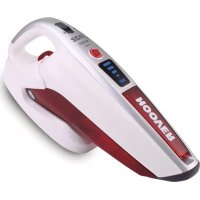
SM156DPN4 011 - Handheld vacuum HOOVER - Free user manual and instructions
Find the device manual for free SM156DPN4 011 HOOVER in PDF.


| Product type | Table vacuum cleaner |
| Brand | Hoover |
| Model | SM156DPN4 011 |
| Power supply | Rechargeable battery (mains charger included) |
| Charging time (first use) | 24 hours minimum |
| Filter type | Washable filter (cloth or microfiber) |
| Included accessories | Crevice tool, upholstery brush, electric brush*, flexible hose*, flat brush* (*depending on model) |
| Charging base | Yes (wall mount possible) |
| Charge indicator | LED (flashing while charging, solid when charged) |
| Suction type | Dry only |
| Electric brush | For deep cleaning of fabrics and pet hair |
| Dustbin emptying | By opening trigger (flap at 45°) |
| Filter maintenance | Clean with hot water, no detergent, dry completely before reassembling |
| Warning | Do not vacuum liquids, hot objects, sharp objects |
| Use | Indoor only |
| Charging temperature | Between 0°C and 37°C |
| Warranty | Conditions vary by country, upon presentation of the invoice |
| Spare parts | Cloth filter (S103 35601645), microfiber filter (S105 35601646) |
| After-sales service | Authorized Hoover repairer recommended |
| Compliance | European directives 2006/95/EC, 2004/108/EC, 2011/65/EU |
Frequently Asked Questions - SM156DPN4 011 HOOVER
User questions about SM156DPN4 011 HOOVER
0 question about this device. Answer the ones you know or ask your own.
Ask a new question about this device
Download the instructions for your Handheld vacuum in PDF format for free! Find your manual SM156DPN4 011 - HOOVER and take your electronic device back in hand. On this page are published all the documents necessary for the use of your device. SM156DPN4 011 by HOOVER.
USER MANUAL SM156DPN4 011 HOOVER
| ENGLISH | P01 |
| FRANÇAIS | P05 |
| DEUTSCH | P09 |
| ITALIANO | P13 |
| NEDERLANDS | P17 |
| PORTUGUÉS | P21 |
| ESPAÑOL | P25 |
| DANSK | P29 |
| NORSK | P33 |
| SVENSKA | P37 |
| SUOMI | P41 |
| ΕΛΛΗΝΙΚΑ | P45 |
| PYCCKΙΝΙ | P49 |
| POLSKI | P53 |
| ČESKY | P57 |
| SLOVENČINA | P61 |
| TÜRKÇE |
1
3
2
4

9
INSTRUCTIONS FOR SAFE USE
This appliance should only be used for domestic cleaning, as described in this user guide. Please ensure that this guide is fully understood before operating the appliance.
Always switch off and remove the charger from the socket before cleaning the appliance or any maintenance task.
This appliance can be used by children aged from 8 years and above and persons with reduced physical, sensory or mental capabilities or lack of experience and knowledge if they have been given supervision or instruction concerning use of the appliance in a safe way and understand the hazards involved. Children shall not play with the appliance. Cleaning and user maintenance shall not be made by children without supervision.
If the power cord is damaged stop using the appliance immediately. To avoid a safety hazard, an authorised Hoover service engineer must replace the power cord.
Never touch the charger with wet hands.
Use only the original charger supplied with the appliance.
Check that your supply voltage is the same as that stated on the charger.
Never charge the batteries in temperatures above 37°C or below 0°C.
Plug the charger in to suitable socket outlet and connect the charger cable to the [H] Charger Base. Ensure the product on/off switch button is at the "OFF" position, place the cleaner into the charger base, ensuring the shroud covers the back of the product.
For the cleaner with LED Display *. The charging LED indicator** will flash to advise that the product is charging. When the product is fully charged and is still positioned on the charger base, the icon will stop flashing and remain lit.
For the cleaner without LED Display*. The charging LED indicator** will illuminate red all the time to advise that the product is charging. When the product is fully charged and is still positioned on the charger base, the red led will remain on.
Before first use, charge your cleaner for at least 24 hours. Do return the appliance to the charger base after use to recharge the batteries. When charging the cleaner, the power switch must be off. If the operating time reduces after repeated use, let the cleaner run until it stops, then recharge for 24 hours and repeat this monthly for best results.
It is normal for the charger to become warm to the touch when charging.
Use only attachments, consumables or spares recommended or supplied by Hoover.
Do not pick up hard or sharp objects, matches, hot ashes, cigarette ends or other similar items.
Do not spray with or pick up flammable liquids, cleaning fluids, aerosols or their vapours.
Do not continue to use your appliance or charger if it appears faulty.
Hoover service: To ensure the continued safe and efficient operation of this appliance we recommend that any servicing or repairs are only carried out by an authorised Hoover service engineer.
Do not use the appliance to clean animals or people.
Keep hands, feet, loose clothing and hair away from rotating brushes.
Do frequently clean the dust cup and filter assembly.
Do not unplug the charger by pulling on the power cord.
Unplug the charger in the event of prolonged absence (holidays, etc.). Recharge appliance again before use as batteries may self discharge over increased periods of storage.
Static electricity: Some carpets can cause a small build up of static electricity. Any static discharge is not hazardous to health.
Do not use your appliance out of doors or on any wet surface or for wet pickup.
Do not replace the batteries with non-rechargeable batteries.
End of Product Life Battery Disposal
If the appliance is to be disposed of the batteries must first be removed. The appliance must be disconnected from the supply mains when removing the battery. Dispose of the batteries safely. Used batteries should be taken to a recycling station and not disposed of with household waste. To remove the batteries, please contact the Hoover Customer Centre or proceed according to the following instructions.
IMPORTANT: Always fully discharge the batteries before removal.
Run the cleaner until the batteries are completely empty.
Remove the front cover and top cover from the unit. Unscrew 7 screws and open the unit. Unscrew 6 screws and open the battery pack. Disconnect the cables and remove the batteries. Remove the wires which connect to the batteries one by one to make sure no short circuit.
NOTE: Should you experience any difficulty in dismantling the unit or for more detailed information on treatment, recovery and recycling of this appliance, please contact your local city office or your household waste disposal service.
FEATURES
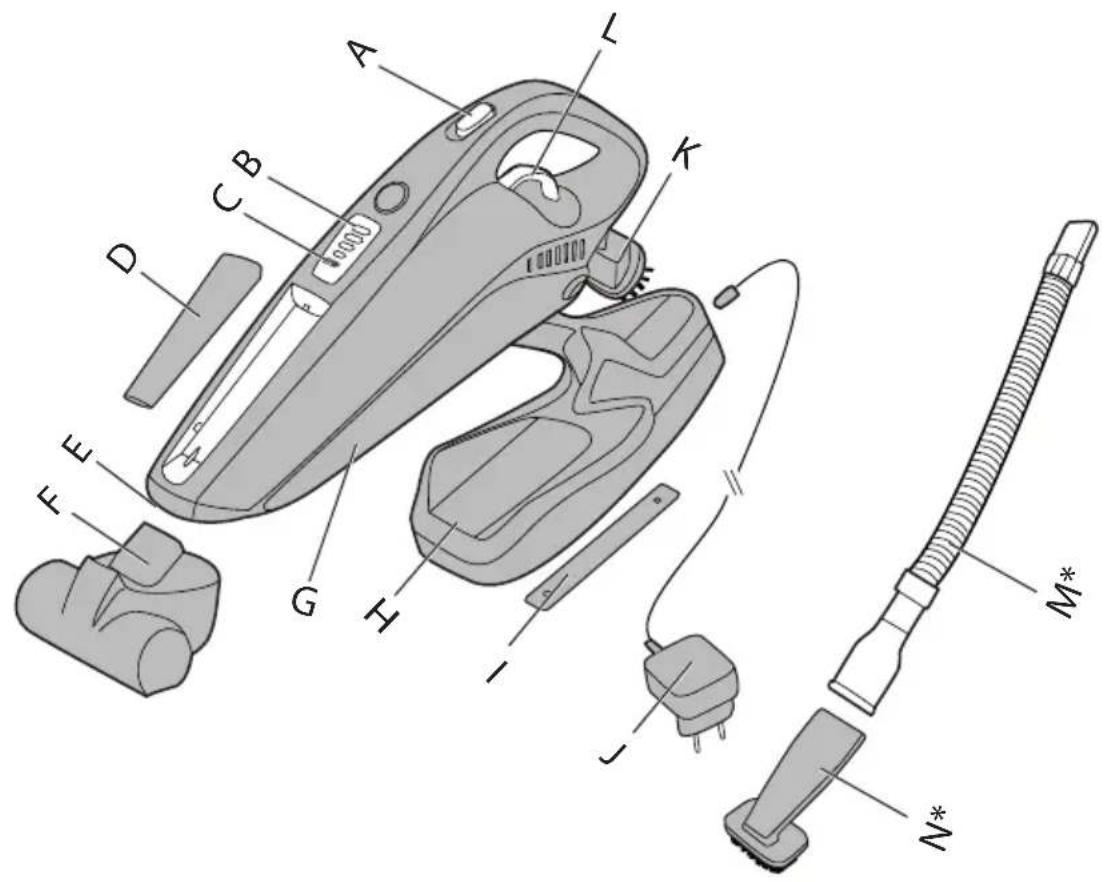
A On/Off Switch**
B LED Display*
C LED Charging Indicator**
D Removable Crevice Tool
E Suction Inlet
F Power Nozzle*
G Dust Bin Flap
H Charger Base
I Cardboard Ruler
J Charger
K Dust Brush
L Dust Bin Open Trigger
M Flexible Hose*
N Crevice Brush*
STORAGE/CHARGING
UNIT STORAGE
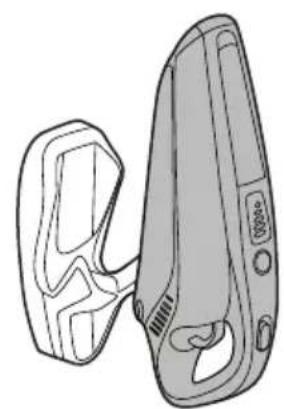
The product is designed to sit in the charging base on a flat surface or vertically if wall mounted. [1] For tidy storage wrap excess cord on the back of the charging base and exit either side or bottom.
To Wall Mount (Tools required: Screwdriver and drill)
- Place the cardboard ruler against the mounting surface. Mark the centres of the holes.
- Move base then drill 4.8mm holes.
- Fit wall plugs.
- Position base into the insert screws, and move down to ensure the base is fixed firmly to the wall.
CHARGING & LED INDICATOR**
Ensure the product on/off switch** button is at the "OFF" position, then place the cleaner into the base, ensuring the shroud covers the back of the product.
For the cleaner with LED Display *. The charging LED indicator** will flash to advise that the product is charging. When the product is fully charged and is still positioned on the charger base, the icon will stop flashing and remain lit.
For the cleaner without LED Display *. The charging LED indicator** will illuminate red all the time to advise that the product is charging. When the product is fully charged and is still positioned on the charger base, the red led will remain on.
NOTE: Use only the charger supplied with your cleaner to recharge the unit.
IMPORTANT: Before first use, charge your cleaner for at least 24 hours. When charging the cleaner, the power switch must be off. It is normal for the charger to become warm to the touch when charging. If the operating time reduces after repeated use, let the cleaner run until it stops, then recharge for 24 hours and repeat this monthly for best results. Never charge the batteries in temperatures above 37°C or below 0°C.
HOW TO USE
- Remove the cleaner from the storage base.
- Push the switch** to 'ON' position to begin cleaning and to turn off move the switch** to the 'OFF' position.
- For the cleaner with Power Nozzle*, push the switch** to "1" position to begin cleaning and to turn off move the switch** to the "0" position, push the switch** to "Power Nozzle Icon" to turn on the power nozzle.
- Empty and clean the unit and filter after each use.
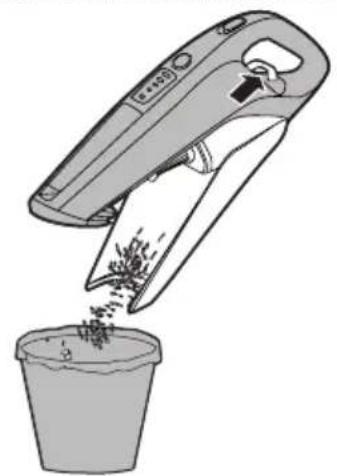
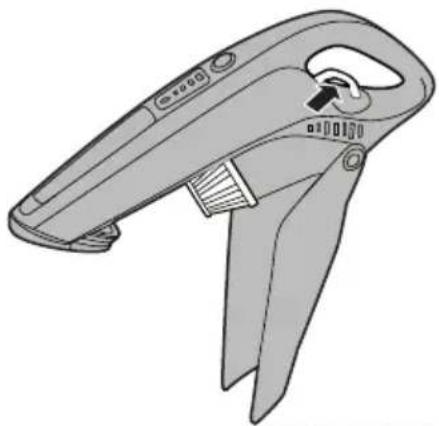
- To empty the bin pull the bin open trigger, the dust bin flap will open and stop about 45° position for debris to empty easily. [2]
IMPORTANT: For best results clean the filter after each use.
LED DISPLAY*
This cleaner is equipped with a LED display. When the product is on, the display will report following information:
Battery Level Indicator*:
• 4 bars = 100% charge
• 3 bars = 75% charge
• 2 bars = 50% charge
• 1 bar = 25% charge
• 0 bar <= 5% charge
*certain models only ** May vary according to model
ATTACHMENTS
Removable Crevice Tool
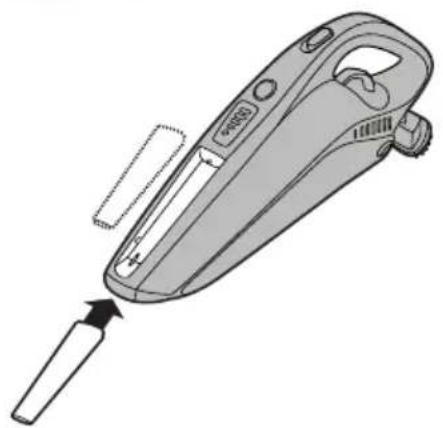
Fit the crevice tool onto the dust cup to clean corners and hard to reach areas. [3]
Dust Brush
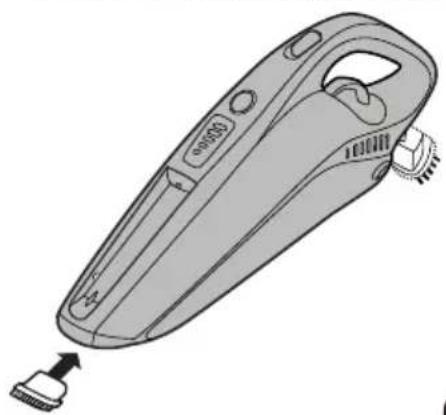
Fit the dust brush onto the dust cup to clean keyboards and other delicate areas. [4]
Power Nozzle*
To use fit onto the container. Ideal for deep cleaning textile surfaces (i.e. sofas) and pet hair removal. Move it steadily backwards and forwards. Do not keep the power nozzle stationary while the brush is rotating. [5]
To clean – Detach nozzle from the container and then remove hair/threads collected on the brush with scissors if necessary.
Crevice Brush*
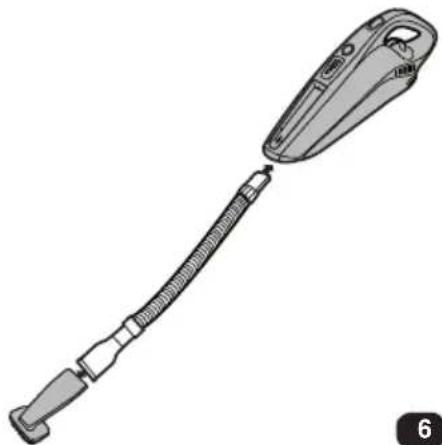
Insert one end of flexible hose into the Suction Inlet, and attach the Crevice Brush to the other end of the flexible hose. [6]
FILTER MAINTENANCE
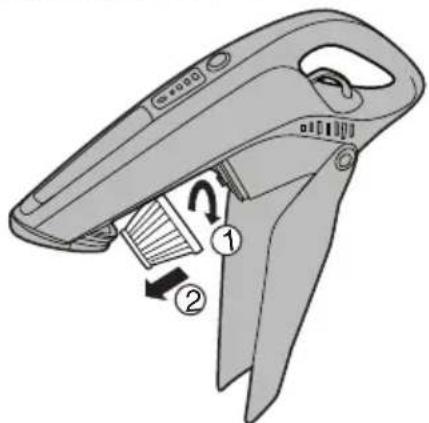
- Pull the trigger and the dust bin flap will open automatically. [7]
- Rotate and remove the filter. [8]
- The container may be cleaned using a wet cloth.
- The filter should be washed in hand warm water DO NOT USE DETERGENTS. Make sure all are completely dry before replacing in your cleaner.
- Replace the filter into the dust container and close the dust container flap.
End of Product Life Battery Disposal
If the cleaner is to be disposed of the batteries should be removed. Used batteries should be taken to a recycling station and not disposed with household waste.
IMPORTANT: Always fully discharge the batteries before removal.
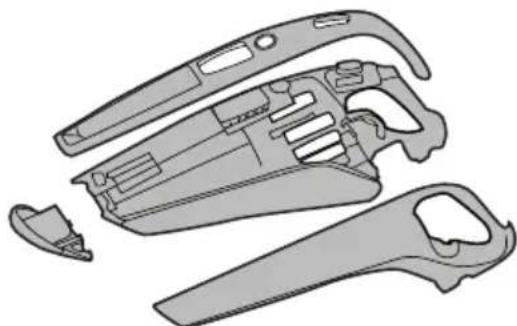
Battery removal [9]
Remove the front cover and top cover from the unit. Unscrew 7 screws and open the unit. Unscrew 6 screws and open the battery pack. Disconnect the cables and remove the batteries.
NOTE: Should you experience any difficulties in dismantling the unit or for more detailed information about treatment, recovery and recycling of this product, please contact your local city office, your household waste disposal service.
IMPORTANT INFORMATION
Hoover spares and Consumables
Always replace parts with genuine Hoover spares. These are available from your local Hoover dealer or direct from Hoover. When ordering parts always quote your model number.
Cloth Filter S103 35601645
Microfiber Filter S105 35601646
The Environment:
The symbol on the product indicates that this product may not be treated as household waste. Instead it shall be handed over to the appliance collection point for recycling of electrical and electronic equipment. Disposal must be carried out in accordance with the local environmental regulations for waste disposal. For more detailed information about treatment, recovery and recycling of this product, please contact your local city office, your household waste disposal service or the shop where you purchased the product.

This product complies with the European Directives 2006/95/EC, 2004/108/EC and 2011/65/EC.
HOOVER Limited Pentrebach, Merthyr Tydfil, Mid Glamorgan CF48 4TU
YOUR GUARANTEE
The guarantee conditions for this appliance are as defined by our representative in the country in which it is sold. Details regarding these conditions can be obtained from the dealer from whom the appliance was purchased. The bill of sale or receipt must be produced when making any claim under the terms of this guarantee.
Subject to change without notice.
INSTRUCTIONS DE SÉCURITÉ D'UTILISATION
A Interruptor Ligar/Desligar (On/Off)**
B Visor LED*
• 4 staplar = 100% laddad
• 3 staplar = 75% laddad
• 2 staplar = 50% laddad
• 1 stapel = 25% laddad
• 0 stapel <= 5% laddad
*endast vissa modeller ** Kan variera beroende på modell
TILLBEHÖR
WYPOSAŻENIE DODATKOWE
NAVODILA ZA VARNO UPORABO
- INSTRUCTIONS FOR SAFE USE
- END OF PRODUCT LIFE BATTERY DISPOSAL
- FEATURES
- STORAGE/CHARGING
- UNIT STORAGE
- TO WALL MOUNT (TOOLS REQUIRED: SCREWDRIVER AND DRILL)
- CHARGING & LED INDICATOR
- HOW TO USE
- LED DISPLAY
- ATTACHMENTS
- REMOVABLE CREVICE TOOL
- DUST BRUSH
- POWER NOZZLE
- CREVICE BRUSH
- FILTER MAINTENANCE
- BATTERY REMOVAL [9]
- IMPORTANT INFORMATION
- HOOVER SPARES AND CONSUMABLES
- THE ENVIRONMENT
- YOUR GUARANTEE
- INSTRUCTIONS DE SÉCURITÉ D'UTILISATION
- TILLBEHÖR
- WYPOSAŻENIE DODATKOWE
- NAVODILA ZA VARNO UPORABO
Brand : HOOVER
Model : SM156DPN4 011
Category : Handheld vacuum