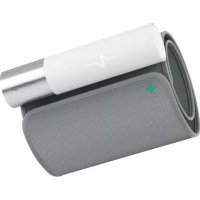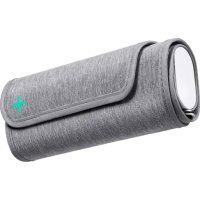
BPM Connect - Blood pressure monitor WITHINGS - Free user manual and instructions
Find the device manual for free BPM Connect WITHINGS in PDF.



User questions about BPM Connect WITHINGS
0 question about this device. Answer the ones you know or ask your own.
Ask a new question about this device
Download the instructions for your Blood pressure monitor in PDF format for free! Find your manual BPM Connect - WITHINGS and take your electronic device back in hand. On this page are published all the documents necessary for the use of your device. BPM Connect by WITHINGS.
USER MANUAL BPM Connect WITHINGS
Withings BPM Connect
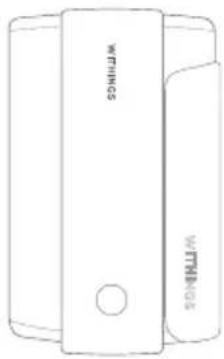
INSTRUCTION MANUAL
THANK YOU FOR CHOOSING WITHINGS BPM CONNECT
MERCI D'AVOIR CHOISI BPM CONNECT | VIELEN DANK, DASS SIE SICH FÜR WITHINGS BPM CONNECT ENTSCHEDEN HABEN
This guide is available in additional languages at: www.withings.com/guides FR Ce guide est disponible dans plusieurs langues sur www.withings.com/guides DE Diese Anleitung führen Sie in weiteren Sprachen unter www.withings.com/guides
Overview
Quick start from your smartphone
Visit go.withings.com from your smartphone or tablet and follow the instructions to install the Health Mate app.
In the app, follow the instructions to install Withings BPM Connect.
How to take a blood pressure measurement
Sit down in a comfortable position, legs uncrossed, feet flat on the floor, arm and back supported. Uncover your left arm. Rest for 5 minutes before the first measurement.
How to take a blood pressure measurement
Unroll the cuff. Place your left arm inside it. The button should be closer to your elbow, and the Withings logo should be closer to your shoulder.
How to take a blood pressure measurement
Tighten the cuff around your arm. The tube should be placed toward the inside of your arm, facing the rib cage, about one inch (2.5 cm) above the bend of your elbow. Make sure the cuff is at heart level.
How to take a blood pressure measurement
Close the cuff at an angle if needed to ensure there are no gaps on the top and bottom. The entire cuff must be in contact with your skin.
How to take a blood pressure measurement
Place your left arm on a table with the cuff at heart level and your palm facing up. Make sure the cuff is not touching the left side of your chest. Your arm should be resting comfortably on the table. Do not speak or move during the measurement.
How to take a blood pressure measurement
Press the button to turn on the blood pressure monitor. You can select a single or triple measurement with a long press on the button. Press the button again to start the measurement.
How to take a blood pressure measurement
If an error message appears on screen, please refer to the troubleshooting explanation described on page 18, or see the Help Center section available in the Health Mate app.
The LED on BPM Connect may appear:
Blue: If BPM Connect hasn't yet been paired with a mobile device.
Green: If you have normal and optimal blood pressure measurements. The LED may also appear green if BPM Connect has been paired with a mobile device.
Orange: If you have high normal blood pressure measurements. The LED may also appear orange if the battery is low. You can still take a measurement.
Red: If hypertension (grade 1, 2, 3) or isolated systolic hypertension are detected. The LED may also appear red if BPM Connect's battery is drained, or if there is an error during the blood pressure measurement. Pink: if you press and hold the monitor button for 6 seconds until "System" displays on the screen, and the Settings menu opens. The LED may also appear pink during firmware updates or when BPM Connect has undergone a factory reset.
Note: The LED color displayed on the device may vary depending on the classification guidelines of your country. Please go to support.withings.com for more information on blood pressure measurement classification.
Blood pressure monitor
FR Tensiometre
In order to use your BPM Connect, you need an iOS (10.0 or higher) or Android (6.0 and higher) device to install it. Thereafter, the product can be used without your mobile device on you, thanks to the Wi-Fi and Bluetooth* connections.
Important safety information
Consult your doctor during pregnancy, or if you suffer from arrhythmia or arteriosclerosis. Please read this section carefully before using the BPM Connect Wi-Fi Smart Blood Pressure Monitor.
Intended use
The BPM Connect is a digital monitor intended for use in measuring blood pressure and heart rate. The device is intended to be used in a human adult population with an arm circumference of 9 inches to 17 inches (22 cm to 42 cm). BPM Connect is a medical device. Contact your physician if hypertensive values are indicated.
General safety and precautions
- Do not forcibly bend the arm cuff.
- Do not inflate the arm cuff when it is not wrapped around your arm.
- Do not apply strong shocks and vibrations to the blood pressure monitor or drop it.
- Do not take measurements after bathing, drinking alcohol, smoking, exercising or eating.
- Do not immerse the arm cuff in water.
- Do not use with a pacemaker, a defibrillator or other electric implant.
- Use on adults only.
- Do not use on children or pets.
Android is a trademark of Google Inc. iOS is a trademark of Apple Inc.
Portable and mobile RF communications equipment should be used no closer to any part of the equipment or system, including cables, than the recommended separation distance calculated from the equation applicable to the frequency of the transmitter. Interference may occur in the vicinity of equipment marked with the following symbol.
Caution
General usage
Always consult your doctor. Self-diagnosis of measurement results and self-treatment are dangerous. People with severe blood flow problems or blood disorders should consult a doctor before using the blood pressure monitor. Cuff inflation can cause internal bleeding. Operational factors such as common arrhythmias, ventricular premature beats, arterial sclerosis, poor perfusion, diabetes, age, pregnancy, preeclampsia or renal disease can affect the performance of the automated sphygmomanometer and/or its blood pressure reading. This is a precision measuring device that may be understood by lay users, but should still be handled with care. Exposing the device to prolonged lint, dust or sunlight might reduce its life or damage it. A damaged cuff or sensor may lead to incorrect measurements. The USB port should only be used for recharging the device. The user is an intended operator. Parts in contact with the skin: cuff. Measurements can be affected by extreme temperatures, humidity and altitude.
- Do not leave the blood pressure monitor unattended with infants or people who cannot express their consent.
- Do not use the blood pressure monitor for any purpose other than measuring blood pressure.
- Do not disassemble the blood pressure monitor.
- Do not operate the blood pressure monitor in a moving vehicle (car, airplane).
- Do not use the device with the USB cable plugged in.
- Improper continuous pressure of cuff or too-frequent measurements may interfere with blood flow and result in injury to the user. Check to ensure that the use of the device does not result in prolonged impairment of your blood circulation.
- Do not apply the cuff over the user's arm if it has a wound or medical treatment, as this can cause further injury.
- Consult your physician before using this monitor if you have had a mastectomy.
- Use of the device can temporarily cause the loss of function of equipment that is used simultaneously on the same limb.
After use
Cleaning
- Do not use an alcohol-based or solvent agent to clean the device.
Clean the device with a soft and dry cloth. - The dirt on the cuff can be cleaned with a damp cloth and soap.
- Do not flush the device and cuff with a lot of water.
- Do not dismantle the device, disconnect the cuff, or try to repair it by yourself. If a problem occurs, please check with the distributor.
- Do not operate the device in a severe environment of extreme temperature, humidity, or direct sunshine.
- Do not shake the unit violently.
- Do not submerge the device or any of the components in water.
- Do not use the device after a strong shock, such as dropping the unit on the floor.
Storage
- Store the device and the components in a clean and safe location.
- If storage conditions are different from the usage conditions indicated in this document, please wait 30 minutes before taking a measurement.
Maintenance
If you cannot fix the problem using the troubleshooting instructions, request service from your dealer. The manufacturer will make available on request circuit diagrams, component part lists, descriptions, calibration instructions, or other information that will assist the manufacturer's staff or authorized representative with repair. It is generally recommended to have the device inspected every 2 years to ensure proper functioning and accuracy. Do not use the device while doing maintenance steps.
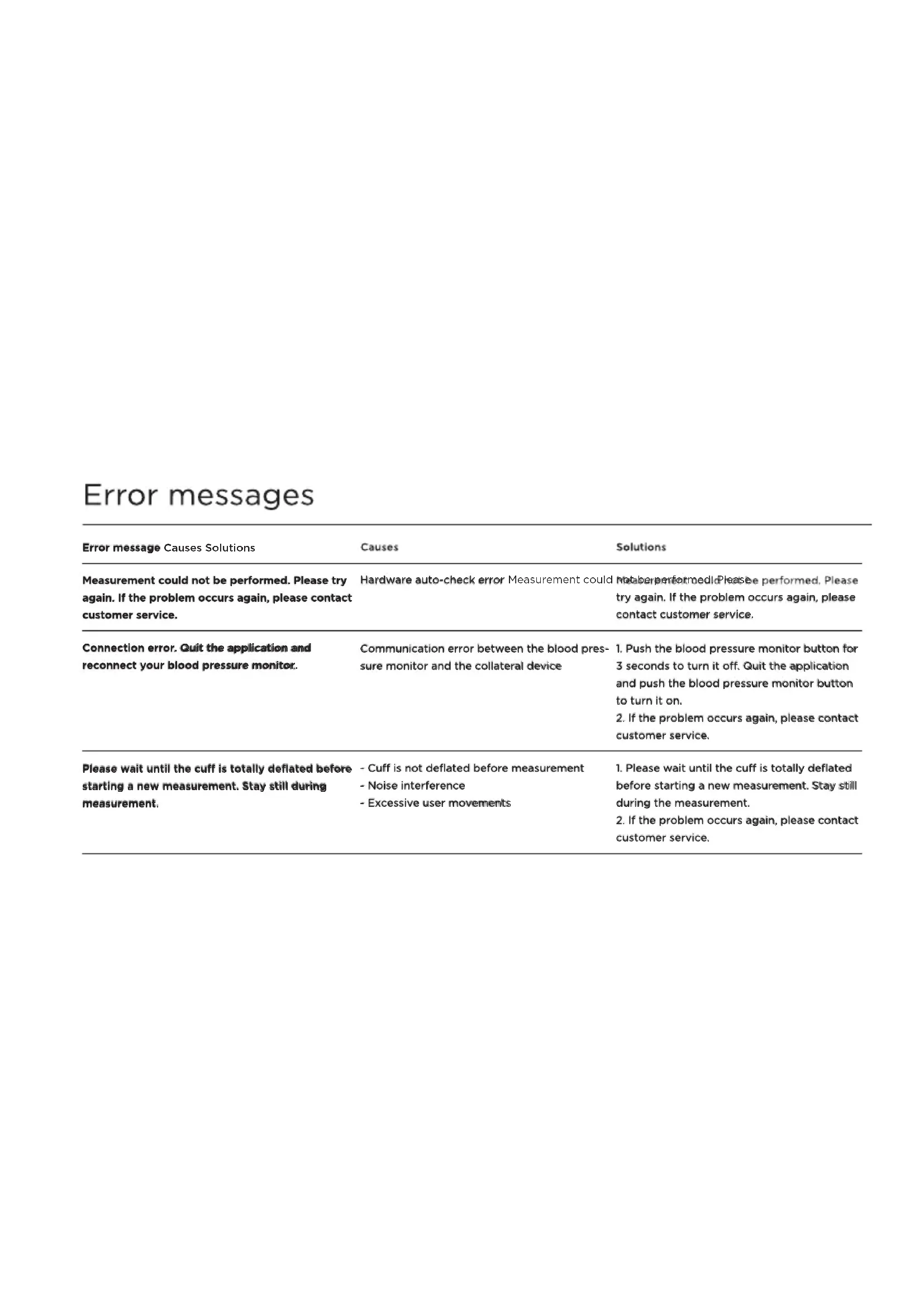
Error messages
| Error message Causes Solutions | Causes | Solutions |
| Measurement could not be performed. Please try again. If the problem occurs again, please contact customer service. | Hardware auto-check error Measurement could be performed. Please try again. If the problem occurs again, please contact customer service. | Malabarperformed. Please perform. Please try again. If the problem occurs again, please contact customer service. |
| Connection error. Quit the application and reconnect your blood pressure monitor. | Communication error between the blood pressure monitor and the collateral device | 1. Push the blood pressure monitor button for 3 seconds to turn it off. Quit the application and push the blood pressure monitor button to turn it on. 2. If the problem occurs again, please contact customer service. |
| Please wait until the cuff is totally deflated before starting a new measurement. Stay still during measurement. | - Cuff is not deflated before measurement - Noise interference - Excessive user movements | 1. Please wait until the cuff is totally deflated before starting a new measurement. Stay still during the measurement. 2. If the problem occurs again, please contact customer service. |
Error messages
| Error message Causes Solutions | Causes | Solutions |
| Check that the blood pressure monitor is correctly positioned on your arm and that the measurement is being performed under good conditions. | -User movement, or user is not relaxed, or is talking- Cuff is not correctly fastened-Cuff is broken-Pump or valve failure-Pressure overflow-Noise interference-User has special characteristics, e.g., some fictions of arrhythmia can trigger errors while measuring blood pressure-Battery level is too low | 1. Check that the blood pressure monitor is correctly positioned on your arm and that the measurement is being performed under good conditions.2. If user has special characteristics, please contact your physician.3. If the problem occurs again, please contact customer service. |
| Low battery level Battery level is too low Chargeable device withotho provided charging | Charge the device with the provided charging cable | |
Troubleshooting
| Problem Solutions | Solutions |
| The inflation action cannot be performed or the air pressure cannot rise | 1. Check the cuff position, fasten the cuff correctly and remeasure blood pressure again2. Check the blood pressure monitor's connection to the iOS or Android device |
| The low battery icon is displayed on the device Charge the device with the cable provided | |
| The blood pressure cannot be taken and the application shows an error message | 1. Re-fastern the cuff2. Relax and sit down3. Keep the cuff at the same level as your heart during the measurement period4. Keep silent and still during the measurement5. If you have a severe heartbeat problem, your blood pressure may not be read correctly |
| Under normal circumstances, the measurement taken at home may differ from the measurement taken in a medical setting | 1. The variation is due to the different environments2. The blood pressure is changing according to the physiological or psychological status of the person being measured3. Show your recorded values to your physician |
Specifications & technical data
20-21
| Product description Digital automatic blood pressure monitor | |
| Model WPM05 | WPM05 |
| Blood pressure measurement method: Cuff oscillometric method | |
| Cuff Inflation Automatic inflation with air pump | aAutomatng/inflation with air pump at 6 mmHg/s |
| Pressure sensor Gauge sensor | Gauge sensor |
| Measurement range (pressure) 0 to 285 mmHg, | D140-285mmHg;dHg;dHg;43Yg;6&c;d3BgmHg;60 to 230 mmHg |
| Measurement range (pulse) 40 to 180 beats/min | n40 to 180 beats/min |
| Pressure sensor accuracy Within +/- 3 mmHg or | 2Withline reading mmHg or 2% of reading |
| Clinical accuracy (blood pressure) | BPM Connect performance in measuring blood pressure was validated in a clinical trial. The results are within the margin of acceptance defined by the internationally recognized evaluation standard of blood pressure monitors ANSI/AATM/1850-831060-222015, ENI/850-831060-2:2014, developed by the European Society of Hypertension, British Hypertension Society and Association for the Advancement of Medical Instrumentation/American Heart Association. For more information, go to: withings.com/support |
| Accuracy (pulse) Within +/-5% of reading | Within +/-5% of reading |
Specifications & technical data
| Sensor Semiconductor pressure sensor | Semiconductor pressure sensor |
| Operating conditions 5 to 40°C, 15 to 90% RH, | atmospheric186kPa-10kPa at bitper2088Kpa-106kpa, altitude: 2000m |
| Storage and transport conditions | -25 to 70°C, 10 to 95% RH, atmospheric 86Kpa-106kpa, altitude: 2000m |
| Arm type Use on left arm | Use on left arm |
| Power source 5V 1A | 5V 1A |
| Weight Approx. 245g | Approx. 245g |
| Accessories Charging cable, Instruction manual | Charging cable, Instruction manual |
| Product life 3 years | 3 years |
| Wireless transmission Wi-Fi and BLE | Wi-Fi and BLE |
Note: Specifications are subject to change without prior notice or any obligation on the parts of the manufacturer
Disposal
22-23
Actuation of European directives 2002/95/EC, 2002/96/EC and 2003/108/EC, for reduction in use of dangerous substances in the electric and electronic device and for garbage disposal. The symbol applied on the device or its packaging means that at the end of its useful life, the product must not be disposed of with domestic waste.
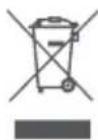
At the end of the device's useful life, the user must deliver it to collection centers for electric and electronic garbage, or give it back to the retailer when purchasing a new device. Disposing of the product separately prevents possible negative consequences for the environment and for health deriving from inadequate disposal. It also allows the recovery of materials of which the device is made up in order to obtain an important saving of energy and resources and to avoid negative effects to the environment and health. Failure to comply with the rules for sorting or recycling waste may make the user liable for a fine. The device and its parts are made with regard to disposal, as appropriate, in accordance with national or regional regulations.
Version 1.1 September 2020
FCC Statement
Federal Communications Commission (FCC) Statement 15.21
You are cautioned that changes or modifications not expressly approved by the part responsible for compliance could void the user's authority to operate the equipment.
15.105(b)
This equipment has been tested and found to comply with the limits for a Class B digital device, pursuant to part 15 of the FCC rules. These limits are designed to provide reasonable protection against harmful interference in a residential installation. This equipment generates, uses and can radiate radio frequency energy and, if not installed and used in accordance with the instructions, may cause harmful interference to radio communications. However, there is no guarantee that interference will not occur in a particular installation. If this equipment does cause harmful interference to radio or television reception, which can be determined by turning the equipment off and on, the user is encouraged to try to correct the interference by one or more of the following measures:
- Reorient or relocate the receiving antenna.
- Increase the separation between the equipment and receiver.
- Connect the equipment into an outlet on a circuit different from that to which the receiver is connected.
- Consult the dealer or an experienced radio/TV technician
for help.
This device complies with Part 15 of the FCC Rules.
Operation is subject to the following two conditions: 1) this device may not cause harmful interference and 2) this device must accept any interference received, including interference that may cause undesired operation of the device.
FCC RF Radiation Exposure Statement:
This equipment complies with FCC radiation exposure limits set forth for an uncontrolled environment. End users must follow the specific operating instructions for satisfying RF exposure compliance.
This transmitter must not be co-located or operating in conjunction with any other antenna or transmitter. This device complies with Industry Canada license-exempt RSS standard(s). Operation is subject to the following two conditions: (1) this device may not cause interference, and (2) this device must accept any interference, including interference that may cause undesired operation of the device.
FCC ID:XNAWPM05
RF Statement
24-25
Medical Electrical Equipment needs special precautions regarding EMC and needs to be installed and put into service according to the EMC information provided in the following. | Interference may occur in the vicinity of equipment marked with the following symbol: | Portable and mobile RF communication equipment (e.g. cell phones) can affect Medical Electrical Equipment. | The use of accessories and cables other than those specified may result in increased emissions or decreased immunity | The device uses RF energy only for its internal function. Therefore, its RF emissions are very low and are not likely to cause any interference in nearby electronic equipment | The device is suitable for use in all establishments, including domestic establishments and those directly connected to the public low voltage power supply network that supplies buildings used for domestic purposes | Portable and mobile RF communications equipment should be used no closer to any part of the device, including cables, than the recommended separation distance calculated from the equation applicable to the frequency of the transmitter | The device is intended for use in an electromagnetic environment in
which radiated RF disturbances are controlled. Any other accessories, transducers and cables may result in increased emissions or decreased immunity and EMC performance. | The device should not be used adjacent to or stacked with other equipment and that if adjacent or stacked use is necessary, which should be observed to verify normal operation in the configuration in which it will be used. Medical Electrical Equipment needs special precautions regarding EMC and needs to be installed and put into service according to the EMC information provided in the following. Portable and mobile RF communication equipment (e.g. cell phones) can affect Medical Electrical Equipment. The use of accessories and cables other than those specified may result in increased emissions or decreased immunity of the unit.
RF Statement
Guidance and manufacturer's declaration-electromagnetic emissions
| This Wi-Fi Smart Blood Pressure Monitor is intended for use in the electromagnetic environment specified below. The customer or the user of the Wi-Fi Smart Blood Pressure Monitor should ensure that it is used in such an environment. | ||
| Emissions test Compliance Electromagnetic eminent enviiguidance - guidance | ||
| CE emissionsCISPR11 | Group 1 | The Wi-Fi Smart Blood Pressure Monitor uses RF energy only for its internal function. Therefore, its RF emissions are very low and are not likely to cause any interference in nearby electronic equipment. |
| RE emissionsCISPR11 | Class B | |
| Harmonic emissionsIEC 61000-3-2 | Not applicable | This Wi-Fi Smart Blood Pressure Monitor is suitable for use in all establishments, including domestic establishments and those directly connected to the public low-voltage power supply network that supplies buildings used for domestic purposes. |
| Voltage fluctuations/Flicker emissionsIEC 61000-3-3 | Not applicable | |
Declaration - electromagnetic emissions and immunity
for equipment and systems that are not life-supporting and are specified for use only in a shielded location
The Wi-Fi Smart Blood Pressure Monitor declaration electromagnetic immunity
This Wi-Fi Smart Blood Pressure Monitor is intended for use in the electromagnetic environment specified below. The customer or the user of the Wi-Fi Smart Blood Pressure Monitor should ensure that it is used in such an environment.
Immunity test IEC 60601 test lgeleoppiatclev Electzompaaetic environment Elguidanognetic environment - guidance
| Conducted RFIEC 61000-4-6 | 3 Vrms 150 kHz to 80 MHz | N/A N/A | N/A |
| Radiated RF IEC 61000-4-3 | 3 V/m 80 MHz to 2.5 GHz | N/A Portable and mobile RFocarbuinidatiobis equipmentushcualbors equipment should be used no closer to any part of the equipment or system, including cables, than the recommended separation distance calculated from the equation applicable to the frequency of the transmitter. Interfienonce may occur in the vicinity of equipment marked with the following symbol. (▲) | |
Declaration - electromagnetic emissions and immunity
for equipment and systems that are not life-supporting and are specified for use only in a shielded location
Declaration - electromagnetic immunity
This Wi-Fi Smart Blood Pressure Monitor is intended for use in the electromagnetic environment specified below. The customer or the user of the Wi-Fi Smart Blood Pressure Monitor should ensure that it is used in such an environment.
Immunity test IEC 60601 test leEeG Complielndelvel Electromagneiaenviroment - guidancea magnetic environment - guidance
| Electrostatic discharge (ESD)IEC 61000-4-2 | Contact: ±8 kV Air: ±2 kV, ±4 kV, ±8 kV, ±15 kV | Contact: ±8 kV Air: ±2 kV, ±4 kV, ±8 kV, covered with synthetic material, the relative humidity should be at least 30%. | Floors should be wood, concrete or ceramic title. If floors are |
| ±15 kV | |||
| Electrical fast transient/ burst IEC 61000-4-4 | 2 kV for power supply lines 1 kV for input/output lines | N/A The main power quality should be similar to that of a typical commercial or hospital environment. | |
| ine(s) to line(s): ±1 kV 100 kHz repetition frequency | The main power quality should be similar to that of a typical commercial or hospital environment. | ||
| Surge IEC 61000-4-5 1 kV differential mode | |||
Declaration - electromagnetic emissions and immunity
for equipment and systems that are not life-supporting and are specified for use only in a shielded location
28-29
| Voltage dips, short interruptions and voltage variations on power supply input lines IEC 61000-4-11 | -5% UT(95% dip in UT) for 0.5 cycle, -40 % UT (60% dip in UT) for 5 cycles, -70% UT(30 % dip in UT) for 25 cycles, -5% UT (95% dip in UT) for 5 sec | N/A The main power quality should be that of the typical commercial or hospital environment. If the user of the equipment or system requires continued operation during power main interruptions, it is recommended that the equipment or system be powered from an uninterruptible power supply or a battery. |
| Power frequency (50/60 Hz) magnetic field IEC 61000-4-8 | 30 A/m 50 Hz or 60 Hz 30 A/10 80Hz and 100Hz Power | Frequency-magnetic fields should be at rated levels characteristic of a typical location in a typical commercial or hospital environment. |
Informations importantes
Configuration require
Version 1.1 September 2020
Version 1.1 September 2020
US Withings One (1) Year Limited Warranty - Withings BPM Connect | Wi-Fi Smart Blood Pressure Monitor
Withings SA, 2 rue Maurice Hartmann, 92130 Issy-les-Moulineaux, ("Withings") warrants the Withings-branded hardware product ("Withings Product") against defects in materials and workmanship when used normally in accordance with Withings' published guidelines for a period of ONE (1) YEAR from the date of original retail purchase by the end-user purchaser ("Warranty Period"). Withings' published guidelines include but are not limited to information contained in technical specifications, safety instructions or Quick Installation Guide. Withings does not warrant that the operation of the Withings Product will be uninterrupted or error-free. Withings is not responsible for damage arising from failure to follow instructions relating to the Withings Product's use.
UK Withings Two (2) Years Commercial Guarantee - Withings BPM Connect | Wi-Fi Smart Blood Pressure Monitor
Withings SA, 2 rue Maurice Hartmann, 92130 Issy-les-Moulineaux, France ("Withings") warrants the Withings-branded hardware product ("Withings") against defects in materials and workmanship when used normally in accordance with Withings' published guidelines for a period of TWO (2) YEARS from the date of original retail purchase by the end-user purchaser ("Warranty Period"). Withings' published guidelines include but are not limited to information contained in technical specifications, safety instructions or Quick Installation Guide. Withings does not warrant that the operation of the Withings Product will be uninterrupted or error-free. Withings is not responsible for damage arising from failure to follow instructions relating to the Withings Product's use.
Information for users in Canada
This device complies with Part 15 of the FCC Rules and with Industry Canada licence-exempt RSS standard(s).
Operation is subject to the following two conditions:
(1) This device may not cause harmful interference, and (2) This device must accept any interference received, including interference that may cause undesired operation. Changes or modifications made to this equipment not expressly approved by Withings may void the FCC authorization to operate this equipment.
Radiofrequency radiation exposure information: The radiated output power of the device is far below the FCC radio frequency exposure limits. Nevertheless, the device shall be used in such a manner that the potential for human contact during normal operation is minimized.
Reference to standards
This device complies with the following normative documents: COUNCIL DIRECTIVE 93/42/EEC of 14 June 1993 concerning medical devices as amended by Directive 2007/47/EC
EN ISO 13485: Medical devices - Quality management systems - Requirements for regulatory purposes. Reference to standards contd. | EN ISO 14971: Medical devices - Application of risk management to medical devices. | IEC/EN 60601-1: Medical electrical equipment - Part 1: General requirements for basic safety and essential performance. | EN
1060-3: Non-invasive sphygmomanometers, Part 3: Supplementary requirements for electromechanical blood pressure measuring systems. | EN 1060-4: Noninvasive sphygmomanometers. Test procedures to determine the overall system accuracy of automated non-invasive sphygmomanometers. | IEC/EN 60601-1-11: General requirements for basic safety and essential performance - Collateral Standard: Requirements for medical electrical equipment and medical electrical systems used in the home healthcare environment. | IEC 80601-2-30: Medical electrical equipment - Part 2-30: Particular requirements for the basic safety and essential performance of automated non-invasive sphygmomanometers. | EN 300 328: Electromagnetic compatibility and Radio spectrum Matters (ERM); Wideband transmission systems; Data transmission equipment operating in the 2,4 GHz ISM band and using wide band modulation techniques; Harmonized EN covering the essential requirements of article 3.2 of the Directive (2014/53/EU). | EN 301 489-1:
Electromagnetic compatibility and Radio spectrum Matters (ERM); ElectroMagnetic Compatibility (EMC) standard for radio equipment and services; Part 1: Common technical requirements. EN 301 489-17: Electromagnetic compatibility and Radio spectrum Matters (ERM); ElectroMagnetic Compatibility (EMC) standard for radio equipment and services; Part 1: Common technical requirements | IEC/EN60601-1-2: Medical electrical equipment; Part 1-2: General requirements for basic safety and essential performance-collateral standard electromagnetic compatibility | EN 55011: Industrial, scientific and medical equipment - Radio-frequency disturbance characteristics - Limits and methods of measurement. | FCC part B 15B: Electromagnetic Compatibility. | FCC Rule Part: 15.247 Cat: DSS (Bluetooth) FCC Rule Part: 15.247 Cat: DTS (BT4.0). | EN ISO 10993-1: Biological evaluation of medical devices -- Part 1: Evaluation and testing within a risk
management process. | EN ISO 10993-5: Biological evaluation of medical devices -- Part 5: Tests for in vitro cytotoxicity | EN ISO 10993-10: Biological evaluation of medical devices. Tests for irritation and skin sensitization | IEC/EN 60601-1-6: Medical electrical equipment - Part 1-6: General requirements for basic safety and essential performance - Collateral standard: Usability | ANSI/AAMI/ ISO 81060-2 Non-invasive sphygmomanometers Part 2: Clinical validation of automated measurement type | EN ISO 15223-1: Medical devices - Symbols to be used with medical device labels, labelling and information to be supplied - Part 1: General requirements

Need help?
withings.com/support

2020
Manufacturer/Fabricant/Hersteller
WITHINGSSA
2 rue Maurice Hartmann
92130 Issy-les-Moulineaux, FRANCE
+33141460460

Distributed by
1282
Withings Inc.
179 South Street, Floor 5 Boston, MA 02111 USA
Ingress of water or particulate matter
Dry storage environment
Complies with waste electrical and electronic equipment directive
Type BF Applied Part (cuff)
Read this manual before use
EN Withings SA hereby declares that the device Withings BPM Connect is in conformity with the essential requirements and other relevant requirements of Directive 2014/53/EU. The declaration of conformity can be found at: withings.com/compliance.
EN Our goods come with guarantees that cannot be excluded under the Australian Consumer Law. You are entitled to a replacement or refund for a major failure and compensation for any other reasonably foreseeable loss or damage. You are also entitled to have the goods repaired or replaced if the goods fail to be of acceptable quality and the failure does not amount to a major failure.
IM_WPM05_ENDEFR_014
WITHINGS
Withings BPM Connect | Wi-Fi Smart Blood Pressure Monitor | V1.1 - Sept. 2020 © 2020 Withings SA. All rights reserved.