K5736 Digital - Wristwatch Calypso - Free user manual and instructions
Find the device manual for free K5736 Digital Calypso in PDF.



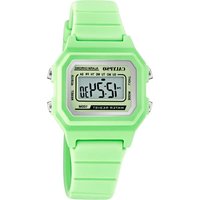
| Product Type | Digital Watch |
| Brand | Calypso |
| Model | K5736 Digital |
| Display | Digital screen with EL backlight |
| Time format | 12h / 24h |
| Main functions | Time, minutes, seconds, day of week, date, month, stopwatch (1/100s, up to 23h59'59"), daily alarm, snooze every 5 min, hourly chime |
| Backlight | Screen illuminated for 3 seconds via button C |
| Alarm | 60-second ring, stop by button D (snooze 5 min) or A (permanent off for the day) |
| Settings | Time, minutes, seconds, date, month, day of week, alarm, alarm on/off and chime |
| Calendar display | Year, month, date (accessible in time setting mode by holding button D) |
| Buttons | B: mode change; C: backlight; D: settings, confirm; A: select, reset |
| Water resistance | Not specified; avoid water and do not press buttons underwater |
| Care and cleaning | Clean with a soft cloth and clean water; avoid chemicals and soap |
| Precautions | Do not open the case, avoid strong shocks, extreme temperatures, electric and static fields |
| Power supply | Battery (type not specified, standard for digital watches) |
| Recycling | Selective collection of waste electrical and electronic equipment |
| Manual pages | 33 pages |
Frequently Asked Questions - K5736 Digital Calypso
User questions about K5736 Digital Calypso
0 question about this device. Answer the ones you know or ask your own.
Ask a new question about this device
Download the instructions for your Wristwatch in PDF format for free! Find your manual K5736 Digital - Calypso and take your electronic device back in hand. On this page are published all the documents necessary for the use of your device. K5736 Digital by Calypso.
USER MANUAL K5736 Digital Calypso
CALYPSO CALYPSO CALYPSO CALYPSO CALYPSO CALYPSO CALYPSO CALYPSO CALYPSO CALYPSO CALYPSO CALYPSO CALYPSO CALYPSO CALYPSO CALYPSO CALYPSO CALYPSO CALYPSO CALYPSO CALYPSO
IKMS063T (R)
DIGITAL
■ MANUAL DE INSTRUCCIONES 4
■ INSTRUCTION MANUAL 14
■ MANUEL D'INSTRUCTION 24
■ BETRIEBSANLEITUNG 34
■ MANUALE DI FUNZIONAMENTO 44
■ MANUALDEINSTRUÇÕES54
4
BUTTONS MODE SELECTION
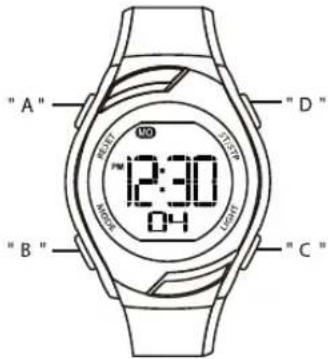
- The operation of buttons are indicated using the letters shown in the illustration.
A -- Reset
B -- Mode
C -- EL backlight
D -- Start / Stop
14 15
- Press "B" to change mode to mode in the following Sequence: Timekeeping Mode Stopwatch Mode Alarm Mode Time Setting Mode.
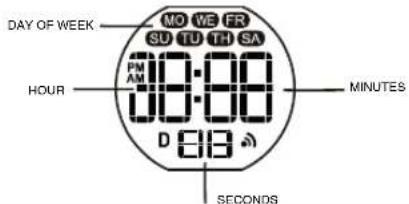
TIMEKEEPING
• Hour, Minutes,
Seconds, Day of week.
- Build in Date.
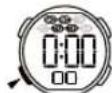
STOPWATCH
- 1/100 second unit.
• Measuring range: 0'0"00\~23:59'59".
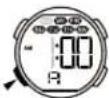
ALARM
• The alarm sounds at the
preset time each day.
• Hourly time signal.
- Snooze for 5 minutes.
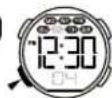
TIME SETTING
• Hour, Minutes,
Seconds, Month,
Date, Day of week
can be set.
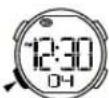
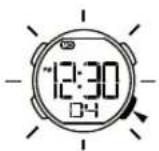
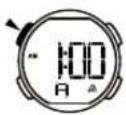
DISPLAY TIMEKEEPING
• The screen shown in below:
BACKLIGHT
- The backlight that uses an EL (electroluminescent) cause the display to glow for easy reading in the dark.
Use EL Backlight
- In any mode, press "C" to illuminate the display about 3 seconds.
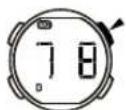
Display The Date
- In the timekeeping mode, press and hold "D" to display the date.
On/Off The Alarm
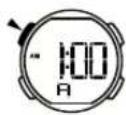
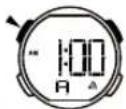
- In the timekeeping mode, press and hold "A" display the alarm time.
- Press "D" at the same time to on/off the alarm.
On/Off The Chime
- In the timekeeping mode, press and hold "A" display the alarm time;
- Press "B" at the same time to on/off the chime.
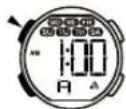
ALARMSTOPWATCH
A Lap Time Split Time
- In the stopwatch mode, press "D" to start the stopwatch.
- To stop the stopwatch by pressing "D" again.
- Press "A" to reset the stopwatch.
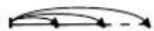
- In the stopwatch mode, press "D" to start the stopwatch.
- Press "A" to display the split time, stopwatch timing continues internally.
- Press "A" to clear the split time and to continue time measurement.
- Repeat step 2 and 3, you can measure the multi split time.
- Press "D" to stop the stopwatch.

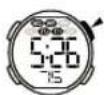
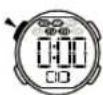


Alarm Time Setting
- In the alarm mode, the hour to flash
- Press "D" to increase the hour, press and hold to increase at high speed.
- Press "A" to select the minutes.
- Press "D" to increase the minutes, press and hold to increase at high speed.
- Press "B" to return the timekeeping mode, after you set.
Snooze
• The alarm sounds at preset time each day for about 60 seconds.
- Press "D" to break it, the alarm continue after 5 minutes.
- Press "A" to stop it.
TIME SETTING
- In the time setting mode, the seconds to flash.
- Press "D" to reset the seconds.
- Press "A" change to the next selection.
- Press "D" to increase the number, press and hold to increase at high speed.
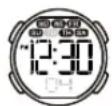


- Repeat step 3 and 4, the selection in the following sequence: Seconds Minutes Hour Date Month Day of week
- Press "B" to return the timekeeping mode, after you set. • 12 / 24H formats can be selected, when hour setting.
CARE OF YOUR WATCH
- This watch contains electronic components. Never attempt to open the case or remove the back cover.
- Do not operate push buttons below the surface of the water while swimming or diving.
- Should water or condensation appear in the watch, have the watch checked immediately. Corrosion of electronic parts can occur inside the case.
- Avoid severe impact. The watch is designed to withstand impact under normal use. It is inadvisable to subject it to severe impact of rough usage.
- Avoid exposing the watch to extreme temperature.
- Clean the watch with soft cloth and clean water only. Avoid using chemicals.
- Keep your watch away from the conditions of strong electric field and estatic electricity.

By virtue of the regulations pursuant to the handling of waste products deriving from electronic and electrical equipment, end of lifecycle watch making products must be selectively collected for processing. You may therefore dispose of your watch making products at any of our retail outlets or any other authorized collection's selective collection, processing, rating and recycling of these products helps to safeguarding the environment and protecting our health.
BOUTONS CHOIX DU MODE
24 25
Activer/Désactiver le carillon
DRUCKKNÖPFE MODUSWAHL
PULSANTI SELEZIONE MODALITÀ
44 45
BOTÕES
54 55
SELECÇÃO DE MODOS
CALYPSO CALYPSO CALYPSO CALYPSO CALYPSO CALYPSO CALYPSO CALYPSO CALYPSO CALYPSO CALYPSO CALYPSO CALYPSO CALYPSO CALYPSO CALYPSO CALYPSO CALYPSO CALYPSO CALYPSO CALYPSO
CALYPSO
WATCHES

- IKMS063T (R)
- DIGITAL
- BUTTONS MODE SELECTION
- TIMEKEEPING
- STOPWATCH
- ALARM
- TIME SETTING
- DISPLAY TIMEKEEPING
- BACKLIGHT
- USE EL BACKLIGHT
- DISPLAY THE DATE
- ON/OFF THE ALARM
- ON/OFF THE CHIME
- ALARMSTOPWATCH
- A LAP TIME SPLIT TIME
- ALARM TIME SETTING
- SNOOZE
- CARE OF YOUR WATCH
- BOUTONS CHOIX DU MODE
- ACTIVER/DÉSACTIVER LE CARILLON
- DRUCKKNÖPFE MODUSWAHL
- PULSANTI SELEZIONE MODALITÀ
- BOTÕES
- SELECÇÃO DE MODOS
- CALYPSO
- WATCHES
Brand : Calypso
Model : K5736 Digital
Category : Wristwatch