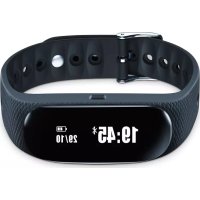
AS 95 - Pedometer BEURER - Free user manual and instructions
Find the device manual for free AS 95 BEURER in PDF.


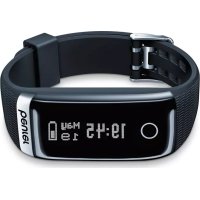
| Product Type | Pedometer / Activity tracker |
| Brand | Beurer |
| Model | AS 95 |
| Weight | 28 g |
| Compatible wrist circumference | 14.5 to 21.0 cm |
| Battery type | Lithium-polymer, 150 mAh |
| Battery life | Approx. 7 days (with 1 hour heart rate measurement per day) |
| Charging time | Approx. 3 hours |
| Internal memory | 30 days / 30 nights |
| Measurable heart rate | 30 to 200 bpm |
| Protection rating | IPX4 (splash-proof) |
| Connectivity | Bluetooth Low Energy (Bluetooth 4.0) |
| Operating conditions | +5°C to +45°C |
| Main functions | Pedometer, distance, calories, active time, daily goal, heart rate, sleep mode, call and message notifications, alarm |
| Compatible app | HealthManager (iOS 8.0+, Android 4.4+) |
| Cleaning and care | Clean with a damp cloth; do not immerse in water |
| Available spare parts | Buckle (ref. 163.850), USB charging cable (ref. 163.851) |
| Package contents | Activity tracker with wristband, USB charging cable |
Frequently Asked Questions - AS 95 BEURER
User questions about AS 95 BEURER
0 question about this device. Answer the ones you know or ask your own.
Ask a new question about this device
Download the instructions for your Pedometer in PDF format for free! Find your manual AS 95 - BEURER and take your electronic device back in hand. On this page are published all the documents necessary for the use of your device. AS 95 by BEURER.
USER MANUAL AS 95 BEURER
Instructions for use.....31
7.5 Distanz A 7.5 KM
Richtlinie - WEEE (Waste Electrical and Electronic Equipment).
Read these instructions for use carefully and keep them for later use, be sure to make them accessible to other users and observe the information they contain.
Table of contents
- Getting to know your device..... 32
- Signs and symbols 34
3.Notes 35 - Initial use 37
- Charging the battery 38
- Put on the activity sensor 39
- Functions 40
7.1 Overview of functions 40
7.2 Time/date/battery indicator ....42
7.3 Activity 42
7.4 Calorie consumption 42
7.5 Distance 43
7.6 Active time 43
7.7 Daily target 43
7.8 Heart rate 43
7.9 Sleep mode 46
7.10 Switching Bluetooth® on/off 46
7.11 Notifications 47
- Transferring data to your smart phone 48
- Cleaning 48
- Frequently asked questions.....49
- Disposal 53
- Technical data 53
- Accessories and wearing parts 54
Included in delivery
Check that the delivery has not been tampered with and make sure that all components are present. Before use, ensure that there is no visible damage to the device or accessories and that all packaging material has been removed. If you have any doubts, do not use the device and contact your retailer or the specified Customer Service address.
1 x activity sensor wrist band
1 x USB charging cable
1. Getting to know your device
Dear customer,
Thank you for choosing one of our products. Our name stands for high-quality, thoroughly tested products for applications in the areas of heat, weight, blood pressure, blood glucose, body temperature, pulse, gentle therapy, massage and air. Please read these instructions for use carefully and keep them for later use. Be sure to make them accessible to other users and observe the information they contain.
With kind regards,
Your Beurer team
Why wear an activity sensor?
Exercise is a prerequisite for leading a healthy life. Physical activity keeps you fit and lowers the risk of heart disease and circulation problems. Exercise helps you to lose weight. Physical activity covers all exercises that use up energy. As a result, daily activities such as walking, cycling, climbing the stairs and household chores play an important part. In this way, it can also motivate you to increase your daily exercise. The activity sensor also has a sensor for measuring your heart rate. This allows you to measure your heart rate in real time on your wrist. With the free "HealthManager" app, you can easily transfer your motion activity from the activity sensor to your smartphone. This means that you can easily get a clear view of your recordings on your smartphone at any time. You can view the heart rate records via live tracking (only possible using the app), for example using the Runtastic app or similar sports apps.
You can also be notified of messages (text message, WhatsApp, Facebook Messenger) or calls received, all with the convenience of a device worn on the wrist. As a result, you see key information at a glance and keep up to date with all your notifications.
The "HealthManager" app offers the following functions:
- Display of steps taken
- Display of distance covered each day
-
Display of calorie consumption
-
Display of active time
- Display of progress towards daily target (in percent %)
- Overview of individual sleep phases
- Notification of messages received on your smartphone (text message, WhatsApp, Facebook Messenger)
- Notification of calls received on your smartphone
System requirements:
Bluetooth® 4.0, iOS from version 8.0, Android™ devices from version 4.4 with
Bluetooth®low energy technology
List of supported devices:
2. Signs and symbols
The following symbols appear in these instructions for use and on the device:
| WARNING Warning notice indicating a risk of injury or damage to health. | Manufacturer |
| CE | The CE symbol certifies that the product complies with the requirements imposed upon the manufacturer by the European Community. | IPX4 | Protection against splashes |
| Disposal in accordance with the Waste Electrical and Electronic Equipment EC Directive – WEEE | |||
3. Notes
WARNING
- Avoid contact with sun cream or similar substances as these could damage the plastic parts.
- Keep packaging material away from children. Choking hazard!
- Consult a doctor before you start a new training programme.
-
This device is not a medical product. The activity sensor's heart rate measurement is not suitable for diagnosing, treating, curing or preventing illnesses.
-
The activity sensor contains magnets. Therefore, consult your doctor before using the activity sensor if you have a pacemaker, defibrillator or any other electronic implant.
- The activity sensor is only splash-proof. Therefore, do NOT use the activity sensor in the shower or whilst swimming.
- Protect the activity sensor from moisture.
- Keep the activity sensor away from water!
- For environmental reasons, do not dispose of the device in the household waste
at the end of its useful life. Disposse of the device at a suitable local collection or recycling point. Observe the local regulations for material disposal. Disposse of the device in accordance with EC Directive - WEEE (Waste Electrical and Electronic Equipment). If you have any questions, please contact the local authorities responsible for waste disposal.
Notes on handling batteries
- If your skin or eyes come into contact with battery fluid, rinse the affected areas with water and seek medical assistance.
- If a battery leaks, put on protective gloves and dispose of the device. Protect batteries from excessive heat.
- Protect batteries from excessive heat.
-
Risk of explosion! Never throw batteries into a fire.
-
Do not disassemble, split or crush the rechargeable batteries.
- Only use chargers specified in the instructions for use.
- Batteries must be charged correctly prior to use. The instructions from the manufacturer and the specifications in these instructions for use regarding correct charging must be observed at all times.
- Fully charge the battery prior to initial use (see Chapter 5).
- In order to achieve as long a battery service life as possible, fully charge the battery at least twice per year.
4. Initial use
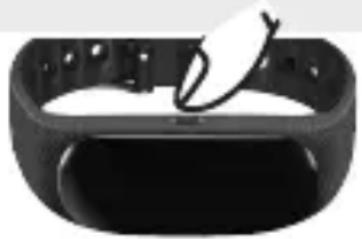
To use the activity sensor for the first time, press and hold the button for approx. 10 seconds. If the activity sensor cannot be switched on, the battery in the activity sensor is flat. Charge the battery as described in Chapter "5. Charging the battery".
- Ensure that your smartphone is connected to the Internet.
- Activate Bluetooth® on your smartphone.
- Download the free "HealthManager" app from the Apple App Store (iOS) or Google Play Store (Android).
Depending on the settings for your smartphone, additional charges may be incurred for connecting to the Internet or transferring data.
- Start the "HealthManager" app and follow the instructions. In the app settings menu, select the AS 95 and set the activity target, sleep target, stride length and weight. Activate/set an alarm if needed.
Tips for successfully pairing the activity sensor with your smartphone
- Position the smartphone as close as possible to your activity sensor.
- Keep a distance of 30m to other Bluetooth® sensors/devices.
- Carry the smartphone in front of you in a bag, on your belt or on bicycle handlebars. Do not carry the smartphone in your rear pocket or on your back.
5. Charging the battery
WARNING
Do NOT charge the activity sensor if the two charger contacts on the rear of the device are wet. If necessary, carefully dab the two charger contacts dry with a cloth.
-
Turn on your computer and insert the USB plug of your USB charging cable into the USB socket.
-
Connect the other end of the USB charging cable to your activity sensor as shown. Ensure that the two charger contacts of the USB charging cable are positioned on the two charger contacts of the activity sensor. A battery symbol appears in the display during the charging process.
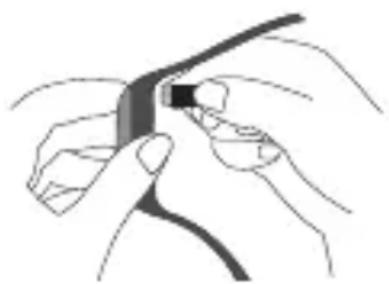
- To see the current charge status, press the button on the activity sensor. It usually takes approx. 3 hours to fully charge the battery. Once the battery is fully charged, a filled-up battery symbol appears in the display. When the battery is fully charged, the battery life is approx. 7 days (if measuring the heart rate for one hour per day). Accordingly, the battery life changes the more or less often you use the pulse measurement. Regularly charge the battery in order to enable consistent data collection.
6. Put on the activity sensor
Wear the activity sensor on your left wrist if you are right-handed, or on your right wrist if you are left-handed.
- Wear the activity sensor approx. 3 - 8cm above the wrist.
- Ensure that the light sensor on the rear has sufficient skin contact.
If you often have cold or poorly circulated hands, we recommend you complete warm-up exercises before the heart rate measurement in order to obtain a more precise measurement.
7. Functions
7.1 Overview of functions
The activity sensor has the following functions: time, pedometer, distance covered, calorie consumption, active time, daily target, sleep mode and battery state display. The functions are reset to zero every day at midnight. The counting then starts again from the beginning.
To switch between the individual functions, press the button on the activity sensor.
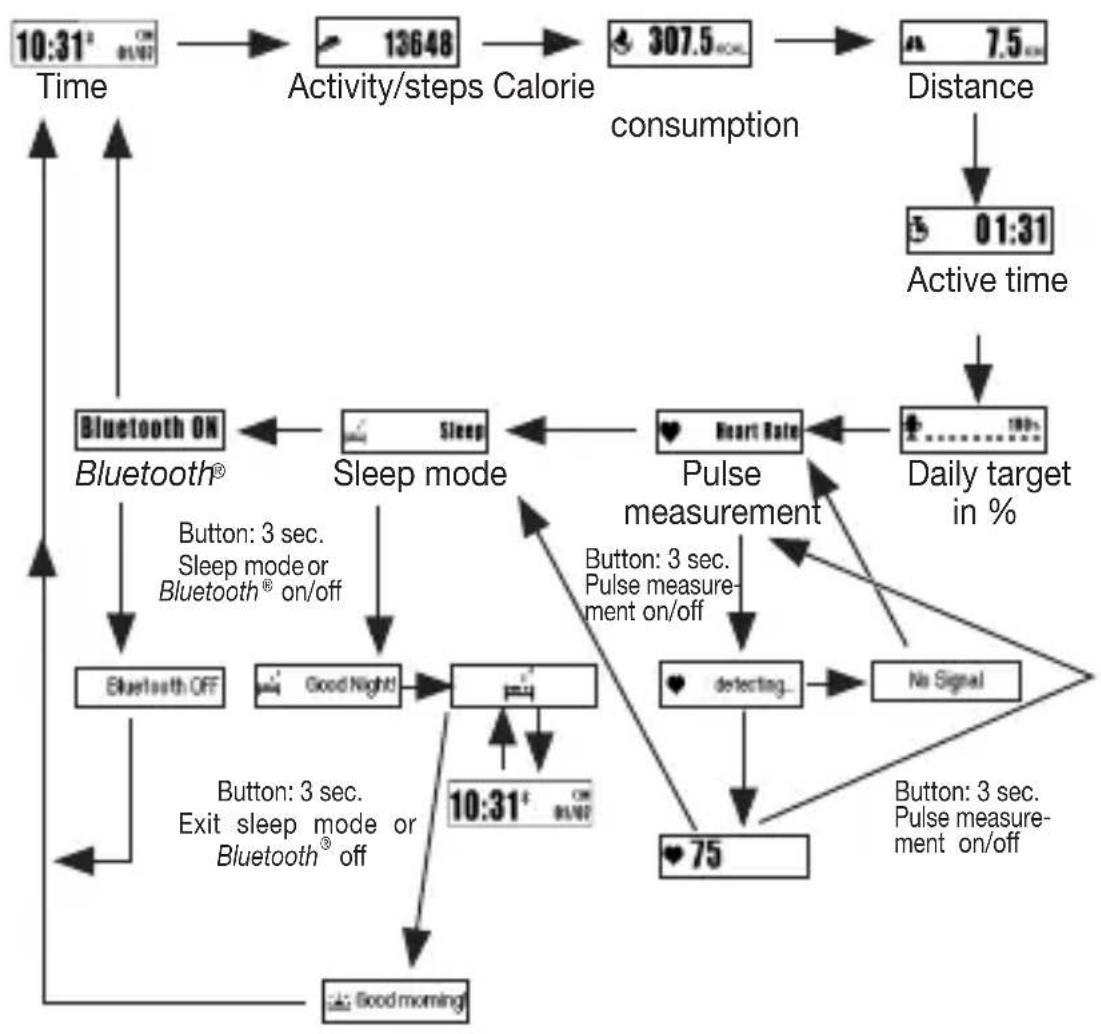
7.2 Time/date/battery indicator 10:31
The activity sensor displays the current time and the current date. Once the activity sensor has been synchronised with the smartphone, the time and date on the smartphone are transferred to the activity sensor. The current battery state is also displayed at the top right. If you have activated Bluetooth® on the activity sensor, the Bluetooth® logo is shown in the display. The Bluetooth® logo flashes in the display if it is searching for a connection to a smartphone. The Bluetooth® logo appears constantly if it is connected to a smartphone.
Charge your battery regularly to allow the data to be continuously recorded.
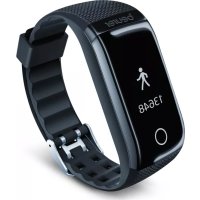
7.3 Activity 13648
The activity sensor shows movements in steps. The steps are recorded with a 3D sensor inside the activity sensor.
7.4 Calorie consumption 307.5 KCAL
The activity sensor calculates your calorie consumption using the details you have entered in the app (height, age, gender) and the steps you have taken. When you wake up in the morning, the activity sensor will already show a figure for the number of calories burned, as your body also burns calories whilst resting (BMR). The
activity sensor displays the total number of calories burned whilst resting (BMR) and actively burned calories (AMR).
7.5 Distance A 7.5 km
The activity sensor calculates your stride length using the height you have entered in the app. The activity sensor then uses the stride length and the number of steps to calculate the distance you have covered.
7.6 Active time 00:31
The active time shows you how long you have been active. The active time only counts the time during which you have been moving.
7.7 Daily target
You can set a daily target in the settings of the "HealthManager" app (e.g. 10000 steps or 2000 kcal).
You can see the current progress towards the set daily target (in %) on the display of the activity sensor.
7.8 Heart rate Heart Rate
The activity sensor has an optical sensor that helps you to measure your heart rate in real time.
It is only possible to measure heart rate if the activity sensor is NOT in sleep mode. If the activity sensor does not have enough battery charge, appears in the display and you cannot take a heart rate measurement. You must first charge the battery to be able to take a heart rate measurement.
- To start the heart rate measurement, press the button repeatedly until Heart Rate appears in the display.
- If you press and hold the button for 3 seconds, appears in the display and the activity sensor starts to record the heart rate. Once the activity sensor has recorded a heart rate, it appears in the display if the activity sensor does not record a heart rate after 30 seconds, appears in the display. In this case, check whether the light sensor on the rear has sufficient contact with the skin and is free of skin particles and dust. Then press the button again to activate the heart rate measurement.
- To stop the heart rate measurement, press and hold the button for 5 seconds. Heart Rate appears in the display.
Heart rate training ranges
Whilst your current heart rate is shown in the display of the activity sensor, the activity sensor also alternately shows your current training range. The maximum heart rate is automatically derived from the following formula: 220 - age = i
mum heart rate. The individual training ranges are calculated using the maximum heart rate. The heart rate is preset into the following training ranges. However, this can be changed in the app:
| Fat Burning | “Fat Burning” appears on the display if your current heart rate is between 50% and 60% of your maximum heart rate. |
| Aerobic | “Aerobic” appears on the display if your current heart rate is between 60% and 70% of your maximum heart rate. |
| Steady | “Steady” appears on the display if your current heart rate is between 70% and 80% of your maximum heart rate. |
| Anaerobic | “Anaerobic” appears on the display if your current heart rate is between 80% and 90% of your maximum heart rate. |
| Maximal | “Maximal” appears on the display if your current heart rate exceeds 90% of your maximum heart rate. |
7.9 Sleep mode Sleep
To measure your movements when you are asleep, switch the device to sleep mode before you go to sleep. To do so, press the button repeatedly until is Sleep shown in the display. Press and hold the button for 3 seconds. appears on the display and the device switches to sleep mode.
If you briefly press the button in sleep mode, you can switch between the Sleep and 100% the device is in sleep mode, no heart rate measurements can be carried out.
When you wake up in the morning, press the button for approx. 3 seconds to switch off sleep mode on the activity sensor.
7.10 Switching Bluetooth® on/off
Bluetooth® is switched on as standard on the device. This can be seen from the Bluetooth® logo in the display and corresponding graphic displayed
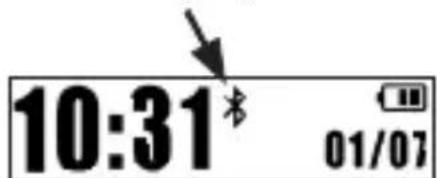
To switch off Bluetooth® on the device, press the button repeatedly until Bluetooth ON is shown in the display. Press and hold the button for 3 seconds.
Bluetooth OFF appears on the display. Bluetooth® is now switched off on the device. To switch Bluetooth® on again, press and hold the button again for 3 seconds. Bluetooth ON appears.
If you switch Bluetooth® off on the device, you cannot transfer any recorded data from your activity sensor to your smartphone.
7.11 Notifications

With the activity sensor, you can receive information about calls/messages received on your smartphone conveniently on your wrist. The activity sensor has the following functions (provided the activity sensor is connected to a smartphone and the "beurer HealthManager" app is installed):
- Notification of calls received on your smartphone: The caller's name appears in the display until the activity sensor button is pressed. If no name is stored for the telephone number that is calling, only the telephone number that is calling will appear on the display.
- Notification of WhatsApp messages received on your smartphone: It appears on the display until the activity sensor button is pressed.
- Notification of Facebook Messenger messages received on your smartphone: appears on the display until the activity sensor button is pressed.
The notifications only appear on the display of the activity sensor if you have activated the „push function“ on your smartphone.
If the senders are stored on your smartphone with their name and number, the name will be displayed.
8. Transferring data to your smartphone
To transfer the recorded data from your activity sensor to the "HealthManager" app, proceed as follows:
- Activate Bluetooth® on your smartphone.
- Open the "HealthManager" app. The recorded data is now automatically transferred to the smartphone if your smartphone and your activity sensor are in range of each other.
9. Cleaning
Regularly clean your activity sensor with a damp cloth. Remove skin residue and dirt from the strap and especially from the contact surfaces on the inside of the strap so that the material is not damaged.
10. Frequently asked questions
What is the correct way to wear the activity sensor?
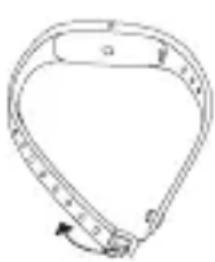
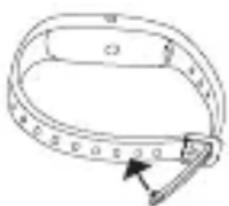
Wear the activity sensor on your left wrist if you are right-handed, or on your right wrist if you are left-handed.
Pull the end of the wrist band through the opening as shown. Now press the fastening clip into the openings of the wrist band until you hear it click into place.
What benefits does the activity sensor offer me?
Exercise is a prerequisite for leading a healthy life. Physical activity keeps you fit and lowers the risk of heart disease and circulation problems. Exercising helps you to lose weight and you will notice that your well-being improves. Physical activity covers all exercises that use up energy. As a result, daily activities such as walking, cycling, climbing the stairs and household chores play an important part. The activity sensor is useful for you to be able to objectively assess and record your daily motion activity. In this way, it can also motivate you to increase your daily exercise. A daily quota of at least 7,000 - 10,000 steps or 30 minutes of activity are ideal. (Source: according to WHO, Dr. Catrine Tudor-Locke, Dr. David R. Bassett jr.)
How does the activity sensor record my steps?
The activity sensor continually records your physical activity using the in-built 3D sensor. All your physical movements are then converted into steps. The information on the distance covered can therefore differ from the actual distance.
How can I analyse my activity and sleep data?
You can use the Bluetooth® interface of your activity sensor to transfer your saved data to a smartphone (Android and iOS), where you can then analyse it. All you need for this is the free "HealthManager" app on your smartphone.
The activity sensor uses Bluetooth® Smart (low energy), 2.4 GHz frequency band.
How do I synchronise my data with the app?
To transfer the recorded data from your activity sensor to the "HealthManager" app, follow the instructions in Chapter "8. Transferring data to your smartphone".
The data transfer on the smartphone does not work.
There could be several reasons for this:
- Check that your smartphone/tablet is compatible with the "HealthManager" app. For a list of all compatible mobile devices, scan the following QR code.
-
The activity sensor is in "sleep mode". To exit "sleep mode", press and hold the button for 2 seconds. Good morning! appears on the display of the activity sensor.
-
Bluetooth® is not activated on your smartphone. Activate Bluetooth® in your smartphone settings.
-
The battery in the activity sensor is flat. If the activity sensor does not switch on, charge it with the USB charging cable supplied.
-
Check that you are using the correct app. Data transfer is only possible with the "HealthManager" app.
-
The contacts on the rear of your sensor are dirty. Clean the sensor as described in chapter 9.
When should I charge the battery in the activity sensor?
Charge the battery in the activity sensor if is shown on the display when pressing the button. As soon as is shown on the display, a maximum battery power of 15 hours remains. In order to continuously record data, never allow the battery to deplete completely.
How do I correctly charge the battery in the activity sensor?
To charge the activity sensor correctly, follow the instructions in Chapter "5. Charging the battery".
Can I wear the activity sensor whilst cycling?
You can also wear the activity sensor whilst cycling. It is crucial that you wear the sensor correctly. You can wear the sensor on your leg or in a narrow or side trouser pocket. You should not wear it on your belt. Otherwise, data on the distance
covered will deviate from the actual distance as the activity sensor will interpret all your physical movements as steps.
How many days/nights can the activity sensor record?
The activity sensor can record 30 days and 7 nights. If all memory spaces are full, the oldest recordings will be automatically overwritten. We therefore recommend that you carry out the data transfer at least once a week.
How do I activate sleep mode?
Press the button repeatedly until Sleep is shown on the display.
Press and hold the button for 3 seconds. Good Night! appears on the display and the device switches to sleep mode.
To exit sleep mode, press and hold the button for 3 seconds. Good morning! appears on the display.
How can I activate the alarm function?
Enter the desired alarm time in the "HealthManager" app. Synchronise the activity sensor with the app after entering/changing the alarm time.
Can I also wear the activity sensor in the shower or whilst swimming?
No, the activity sensor is only splash-proof. Do NOT use the activity sensor in the shower or whilst swimming!
How do I correctly dispose of the activity sensor?
You can find information about this in Chapter "11. Disposal".
How can I clean the activity sensor?
Carefully clean the activity sensor from time to time using a damp cloth. Do NOT immerse the activity sensor in water!
Where can I reorder the USB charging cable/fastening clip?
See Chapter "13. Accessories and wearing parts"
What is included in the delivery?
An activity sensor and a USB charging cable are included in the delivery.
11. Disposal
For environmental reasons, do not dispose of the device in the household waste at the end of its useful life.
Dispose of the device at a suitable local collection or recycling point. Dispose of the device in accordance with EC Directive - WEEE (Waste Electrical and Electronic Equipment).
If you have any questions, please contact the local authorities responsible for waste disposal.
12. Technical data
Weight: 28 g
- Suitable for wrist circumferences from approx. 14.5 to approx. 21.0cm
- Battery life: approx. 7 days (depending on use)
- Battery: 150 mAh lithium polymer
Memory: 30 days/30 nights - Minimum measurable heart rate: 30 bpm
Maximum measurable heart rate: 200 bpm - Permissible operating conditions: +5^ to +45^ (+41^ to +113^)
- Protection class IPX4 (splash-proof)
- Bluetooth® low energy technology
The Bluetooth® word mark and logos are registered trademarks owned by Bluetooth® SIG, Inc. and any use of such marks by Beurer GmbH is under license. Other trademarks and trade names are those of their respective owners.
13. Accessories and wearing parts
You can obtain the following replacement parts directly from Customer Services:
| Designation Item number | and/or order number |
| Fastening clip 163.850 | |
| USB charging cable 163.851 |
FRANÇAIS

Chere cliente, cher client,
Remarques relatives aux batteries
7.5 Distance A 7.5 KM
7.5 Distanza A 7.5 KM
7.6 Aktif sure 00:31
3apynte aKKymyIaTOp DaTnKa aKTHBHOCTN, cIIN npHaxaTN KHOKN Ha DnCnnnee OTo6paXaETcra EcnHa DNcPnlee OTo6paXaETcra,TO Battery Low! 3apyaakymyIaTopa XBaTnT He 6oJee Yem Ha 15 YacOB. He onyckaTe nOHHo
pa3pIaKKyMylTopa, BeIb TOIbKO TaK MOXHO oBeCneHTb HeIpepbIBHyIO peTnCTpaUIO daHHbIX.
Kak npabnIbHo 3apjXaTb aKKymyIaTcNka aKTNBHOCTn?
Для па вьнов зарядк n daTчиka aKТВHOCTN cIeDyIte yKa3aHnЯm B pa3dJIe «5.Зарядka akКуМУЛТopa».
Moxho Hocntb daTnK aKTNBHOCTN BO BpeMa e3bl Ha BeLoCInpe?
BbIMoKTe Hocntb DaTnK aKTINBHOCTN IN BO BpeMra 3dbl Ha BeLOcInpe. IJIa 3TOrO Heo6xOJIMO pa3MeCTNTb DaTnK Ha NOxOJaIeM MeCTe. Zeleco06pa3Ho pa3Me-7aTb DaTnK Ha HOre, B y3KOM nIN B 6OKOBOM KapMaHc 6pIOK; He peKOMeHdyETcR pa3MeUeHne Ha Nocrce. Ondako daHHbIe O npoiDeHHom pacCTOAHm MOyT OTNIuYATbcr OT oakTNueCKo DnIHbI PyTu, TaK KaK DaTnK aKTINBHOCTN nepeCHtTBiBaet BCE Baun nnueckne DBHXeHnB Warn.
B TeueHne cKoJIbKnx dHei/HoueI npOJXaETcpeRnCTpaun DaHHbIX daTchNKOM aKTUBHOCTn?
IaTnK aKTINBHOCTn MOxET peRnCTpnpoBaTb daHhble B TeueHne 30 dHei n 7 Houe. EcJI N BCE JaeyKn NaMRTN 3aONHeHbl, TO CaMbIe CTabbie 3HaueHn8 6yDyT aBTOMaTnueCKn nepe3aNNcBtBcR. IOnrMY Mbl peKOMeHdyem BbINOJHrTB nepeDaCy DaHHbIX He pExe OndHO rpa3a B HeJeIIO.
Kak aKTbBPOBaTb cPAnu peXm?
HaXIMaIte KHOJKy Heo6xOdImOe KOJIyEcTBO pa3, Noka Ha dinCnIee He oTO6pa- 3NTcay Sleep
Tenepb ydepknaTe KhONky HaxaToB TeueHne 3 cekyHd. Ha dinCnIee noBNTcA Good Night, ycTPOCTBO nepeJeT B cIaun peKIM.
YTO6bI BbIEcTn yCTpOJcTBo n3 c7aUeRo peXnMa, ydePKNBaIte KHOkKy HaKaToi npImepHOB V TeueHne 3 cekynd. Ha dinCnlee nOraBntcra Good morning!.
Kak aKTbBnPoBaTb cyHKcHIO 6yDnJIbHnKa?
YkaKnte Heo6xOdHmoe BpeM ca6aTaBHaHn 6yDnIbHnKa B npNIOXeHn HealthManager. CnHXpoHn3npuTe BpeM c6aTaBHaHn 6yDnIbHnKa daTChKa aKTNBHOCTn CO BpeMeHem npNIOXeHn.
Mory liy Hocntb daTcHK aKTHBHOCTN, KOrda y npHmao dUw nI nn pnaBaIO?
HeT, daTnK aKTINBHOCTn 3aunueH ToIbKO oT 6pbI3r. HE nCnoJb3yIe DaTnK aK TINBHOCTn, KOrda Bbl npInHMaTe dUw nn nIbn IpaBaTe!
Kak cIeJyET yTnIIN3InPoBaTb daTynk aKTNBHOCTn?
BHHMaTeIbHo cIeDyIte yKa3aHnIe M B pa3dene «11. YtIIN3aCnIe>.
Kak ouhuaTb daTunk aKTUBHOCTn?
BpeMa OT BpeMeHn npOTnpaIe DaTcHK aKTtNBHOCTN BlaXHoN caIΦeTKoH. HE KlaIte DaTcHK aKTtNBHOCTN B BODY!
Где мохно 3аka3aMb cMeHHbI USB-ka6eIb ДЯЗapяdkn/СMeHHyO 3aCTeKky?
Tobap He IopJexKIT O63aTeJIbHOI cepTnФkaCIN
Cpok 3Kcnpnyataunn n3dennr: mH. 5 jeT
- Distanz A 7.5 KM
- Table of contents
- Included in delivery
- Getting to know your device
- Dear customer,
- Why wear an activity sensor?
- The "HealthManager" app offers the following functions:
- System requirements:
- Signs and symbols
- Notes
- WARNING
- Notes on handling batteries
- Initial use
- Tips for successfully pairing the activity sensor with your smartphone
- Charging the battery
- Put on the activity sensor
- Functions
- Overview of functions
- Time/date/battery indicator 10:31
- Activity 13648
- Calorie consumption 307.5 KCAL
- Distance A 7.5 km
- Active time 00:31
- Daily target
- Heart rate Heart Rate
- Heart rate training ranges
- Sleep mode Sleep
- Switching Bluetooth® on/off
- Notifications
- Transferring data to your smartphone
- Cleaning
- Frequently asked questions
- What is the correct way to wear the activity sensor?
- What benefits does the activity sensor offer me?
- How does the activity sensor record my steps?
- How can I analyse my activity and sleep data?
- How do I synchronise my data with the app?
- The data transfer on the smartphone does not work.
- When should I charge the battery in the activity sensor?
- How do I correctly charge the battery in the activity sensor?
- Can I wear the activity sensor whilst cycling?
- How many days/nights can the activity sensor record?
- How do I activate sleep mode?
- How can I activate the alarm function?
- Can I also wear the activity sensor in the shower or whilst swimming?
- How do I correctly dispose of the activity sensor?
- How can I clean the activity sensor?
- Where can I reorder the USB charging cable/fastening clip?
- What is included in the delivery?
- Disposal
- Technical data
- Accessories and wearing parts
- FRANÇAIS
- Chere cliente, cher client,
- Remarques relatives aux batteries
- Distanza A 7.5 KM
- Aktif sure 00:31
- Kak npabnIbHo 3apjXaTb aKKymyIaTcNka aKTNBHOCTn?
- Moxho Hocntb daTnK aKTNBHOCTN BO BpeMa e3bl Ha BeLoCInpe?
- B TeueHne cKoJIbKnx dHei/HoueI npOJXaETcpeRnCTpaun DaHHbIX daTchNKOM aKTUBHOCTn?
- Kak aKTbBPOBaTb cPAnu peXm?
- Kak aKTbBnPoBaTb cyHKcHIO 6yDnJIbHnKa?
- Mory liy Hocntb daTcHK aKTHBHOCTN, KOrda y npHmao dUw nI nn pnaBaIO?
- Kak cIeJyET yTnIIN3InPoBaTb daTynk aKTNBHOCTn?
- Kak ouhuaTb daTunk aKTUBHOCTn?
- Где мохно 3аka3aMb cMeHHbI USB-ka6eIb ДЯЗapяdkn/СMeHHyO 3aCTeKky?
Brand : BEURER
Model : AS 95
Category : Pedometer