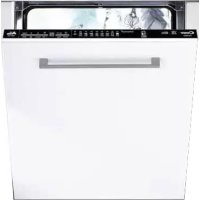
USER MANUAL CDI 2DS36 CANDY
| ● | | ● | ●● | | ○ | ● | 75°C | ○ | ○ | ○ | 130 | SIS | | SI |
| | ● | ●● | | | ●○ | 60°C | ○ | | ○ | 120 | SIS | | SI |
| | ● | ●● | | | ●○ | 55°C | ○ | | ○ | 80 | SIS | | SI |
| ● | | ● | ●● | | | ●○ | 45°C | | | ○ | 190 | SIS | | SI |
| | ● | ●● | | | ●○ | 45°C | ○ | | ○ | 85 | SIS | | SI |
| ● | | ● | ●● | | ○ | ● | 65°C | | | ○ | 59 | SIS | | SI |
| | ● | ●● | | | ● | 50°C | | | ○ | 24 | SIS | N.D. | |
| | ● | ●● | | | ●○ | 55°C | ○ | | ○ | 240 | SIS | | SI |
| | ● | | | | ○ | | | | | 5 | SI | N.D. | |
| | | | | | | | | | | | | | |
- CON ACQUA CALDA IL TEMPO RESIDUO AL TERMINE DEL PROGRAMMA SI AGGIORNA AUTOMATICAMENTE DURANTE LO SVOLGIMENTO DELLO STESSO.
AQUAPROTECT - TUBO DI CARICO PROTETTO
Thank you for choosing a Candy appliance; quality dishwashers which guarantee high performance and reliability.
Candy manufacture a vast range of domestic appliances: washing machines, washer/dryers, cookers, microwave ovens, ovens and hobs, refrigerators and freezers.
Ask your dealer for the catalogue with the complete range of Candy products. Please read this booklet carefully as it provides important information regarding the safe installation, use, and maintenance of the machine, together with some useful advice on how to achieve the best results from your dishwasher.
For future reference please keep this instruction booklet in a safe place.
CUSTOMER SERVICE AND GUARANTEE
Your new appliance is fully guaranteed by the manufacturer for 12 months against electrical/mechanical breakdown excluding:
A. Any faults which occur due to bad installation or misuse of the machine.
B. Any faults which occur due to repair of, or interference with, the machine by any person not authorised by the manufacturer to carry out service.
C. Any faults which occur due to any parts which are fitted to the machine which are not the original manufacturers parts.
D. Any faults arising from non-domestic use or unusual or abnormal use of the machine.
E. Any faults arising from operation at incorrect voltage.
F.Any faults arising from incorrect operation of the machine. The guarantee applies to Gt Britain and Northern Ireland only, and is an addition to your statutory rights.
AFTER SALES SERVICE
For service and repairs call your local engineer on our national telephone number:
GIAS Service
Support Service
Tel: 08444 995599
(Eire 0818 200021)
DESCRIPTION OF THE CONTROL PANEL
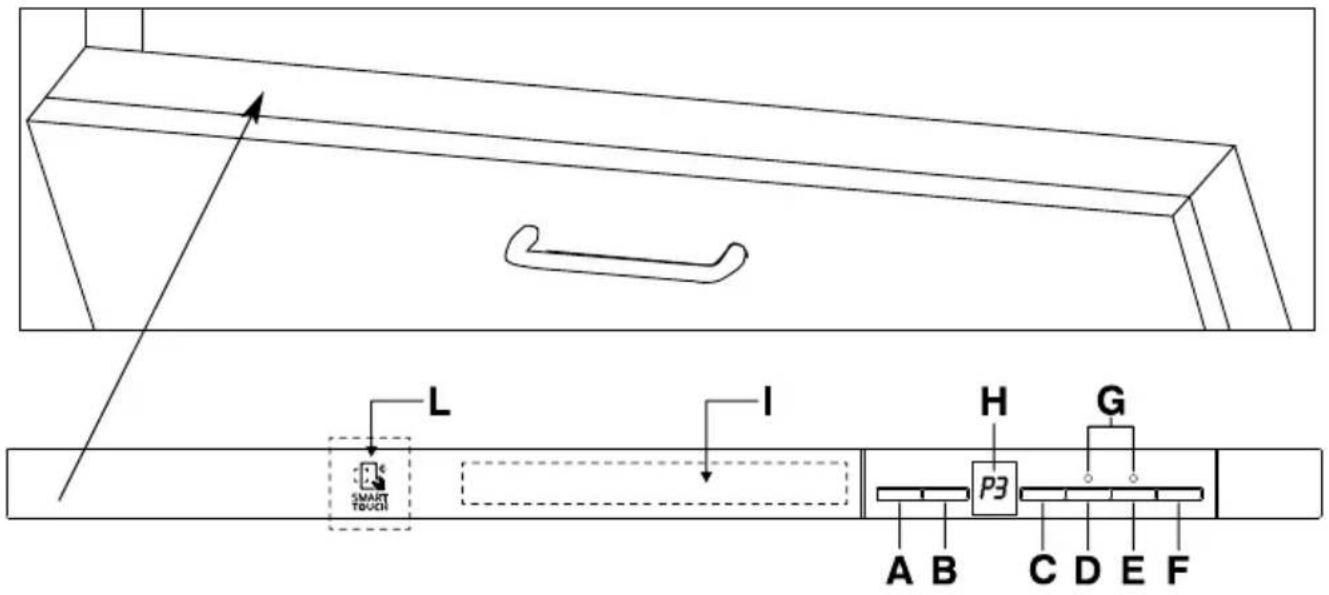
A "ON/OFF" button
B "PROGRAMME SELECTION" button
C "DELAY START" button
D "EXPRESS" option button
E "ALL IN 1" option button
F "START"/"RESET" button (start/cancelling programme)
G "OPTION SELECTION" lights
H DIGITAL DISPLAY
Programme guide
L Area SMART TOUCH
| DIMENSIONS |
| Width x Height x Depth (cm) | 59,8 x 81,8 ÷ 89,8 x 55 |
| Depth with door open (cm) | 117 |
| TECHNICAL DATA |
| EN 50242 place load | 13 |
| Capacity with pans and dishes | 8 persons |
| Water supply pressure (MPa) | Min. 0,08 - Max. 0,8 |
| Fuse / Power input / Supply voltage | See rating plate |
| CONSUMPTION (main programmes)* |
| Programme Energy (kWh) Water (L) | |
| HYGIENIC | 2,00 | 19,5 |
| UNIVERSAL | 1,38 | 13,5 |
| ECO | 0,92 | 10 |
| RAPID 24' | 0,59 | 9 |
| Power consumption of the off-mode and of the left-on mode: 0,45 W / 0,45 W |
| *Values are measured in a laboratory according to European Standard EN 50242 (consumption may vary according to conditions of usage). |
PROGRAMME SELECTION AND SPECIAL FUNCTIONS
(Use in conjunction with programme guide)
Programme settings
- Open the door and place the dirty dishes inside the appliance.
Press the "ON/OFF" button for about 2 seconds. The display will show two lines.
Choose a programme by pressing the "PROGRAMME SELECTION" button.
If you wish to select an option, press the corresponding button (the indicator light will turn on).
The option buttons can be selected or deselected WHITIN one minute of the programme commencing.
Press the "START" button. The length of the program will be shown on the display alternating hours with minutes [I.e:1h (1 hour) / 25 (25 minutes)].
- Close the door (after an audible signal has sounded, the programme will start automatically).
WITHIN one minute of the programme commencing, another programme can be selected, simply by pressing the "PROGRAMME SELECTION" button.
"IMPULSE" programmes
The "IMPULSE" programmes use an impurpose washing technology, which reduces consumption, noise and increases performances.
IMPORTANT
The "intermittent" working of the washing pump MUST NOT BE considered a malfunction, it is a characteristic of the impulse washing so must be considered a normal function of the programme.
Programme interruption
Opening the door when a programme is running is not recommended especially during the main wash and final hot rinse phases. However, if the door is opened while a programme is running (for example, to add dishes) the machine stops automatically and the display will flash the remaining time before the end of the cycle. Close the door, without pressing any buttons. The cycle will start from where it left off.

WARNING!
If you open the door during the drying cycle, an audible audio signal advises you that the drying cycle has not yet finished.
Changing a running programme
Proceed as follows to change or cancel a running program:
Open the door.
Hold the "RESET" button down for at least 3 seconds. "00" will appear on the display and some audible signals will sound.
The running programme will be cancelled. The display will show two lines.
At this point a new programme can be set.

WARNING!
Before starting a new programme, you should check that there is still detergent in the dispenser. If necessary, top up the dispenser.
If there is any break in the power supply while the dishwasher is operating, a special memory stores the selected programme and, when the power is restored, it continues where it left off.
Programme end
A 5 second alarm will sound (if not muted) 3 times at 30 second intervals to signal that the programme has ended.
The dishwasher will automatically switch off.
This button provides an energy and time saving of 25% on average (according to the select cycle) reducing the wash water temperature and the drying time during the final rinse.
This programme is recommended for light soil washes, and for slightly wet dishes that are not fully dry, & improved drying results. We advise you to leave the door of the Dishwasher half-open at the end of the cycle, to allow for a natural circulation of air inside the dishwasher.
This option optimises the use of "ALL in 1" ("3 in 1"/4 in 1"/5 in 1", ecc.) combined detergents.
By pressing this button, the selected washing programme is modified to get best performance from combined detergents (furthermore, the salt empty alert will be de-activated).

WARNING!
Once selected, this option keeps being on (light on) also for next washing cycles and it can be de-activate (light off) only by pressing the button once again.
IMPORTANT
This option is recommended when using the RAPID 24' program, the duration of which will be extended for about 15 minutes, allowing the detergent tablets to achieve a better performance.
Salt empty alert
If your dishwasher requires filling with salt, the display will show and flash "SL" when the dishwasher is switched on.
The appearance of white stains on dishes is generally a warning sign that the salt container needs filling.
Dishwasher start time can be set with this button, delaying start from 1 to 23 hours.
Proceed as follows to set a delayed start:
Press the "DELAY START" button ("00") will appear on the display).
Press the button again to increase the delay in hours (each time the button is pressed the delay is increased by 1 hour to a maximum of 23).
To start the countdown, press the "START" button. At the end of the countdown, the programme will automatically start.
If you wish to see which programme has been selected, press the "PROGRAMME SELECTION" button.
Proceed as follows to cancel a delayed start:
Hold the "RESET" button down for at least 3 seconds. "00" will appear on the display and some audible signals will sound.
The delayed start and the selected programme will be cancelled. The display will show two lines.
At this point, a new programme and option buttons must be set to start a new programme as indicated in the "PROGRAMME SETTINGS" section.
Alarm mute for the PROGRAMME END
The alarm for the programme end may be muted as follows:
IMPORTANT The dishwasher must ALWAYS be off before start of this procedure.
- Hold down the "PROGRAMME SELECTION" button and at the same time switch on the dishwasher by pressing the "ON/OFF" button (a brief audible signal will sound).
- Keep the "PROGRAMME SELECTION" button pressed for at least 15 seconds (during this time 2 audible signals will sound).
-
Release the button when the second audible signal sounds ("b1" will appear on the display to indicate that the alarm is on).
-
Press the same button again ("b0" will appear on the display to indicate that the alarm is off).
- Turn off the dishwasher by pressing the "ON/OFF" button to confirm the new setting.
To turn the alarm on again, follow the same procedure.
Memorization of the last programme used
The last programme used can be memorized by following the below:
IMPORTANT The dishwasher must ALWAYS be off before start of this procedure.
- Hold down the "PROGRAMME SELECTION" button and at the same time switch on the dishwasher by pressing the "ON/OFF" button (a brief audible signal will sound).
- Keep the "PROGRAMME SELECTION" button pressed for at least 30 seconds (during this time, 3 audible signals will sound).
- Release the button when the THIRD audible signal sounds ("A0" will appear on the display to indicate that the memorization is off).
-
Press the same button again ("A1" will appear on the display to indicate that the memorization is on).
-
Turn off the dishwasher by pressing the "ON/OFF" button to confirm the new setting.
To disable the memorization, follow the same procedure.
IMPORTANT
This dishwasher is equipped with an anti-overflow safety device which will automatically discharge any excess water should a problem occur.

WARNING!
To ensure the correct operation of the anti-overflow safety device, we recommend that the dishwasher is not moved or tilted during operation. If however it is necessary to tilt or move the dishwasher, please ensure that the washing cycle is complete and that there is no remaining water inside the dishwasher.
The dishwasher is able to signal a series of faults in the display.
AUTOMATIC FAULT SIGNALS
| FAULTS CAUSE SOLUTION |
| E2 appears on the display and the alarm sounds. | No water (inlet hose closed). | Turn off the dishwasher, open the inlet hose and reset the cycle. |
| E3 appears on the display and the alarm sounds. | The machine cannot drain water. | Check if the drain tube is bent or if the siphon or filters are clogged.
If the problem persists, contact Customer Service. |
| E4 appears on the display and the alarm sounds. | Water leak | Check if the drain tube is bent or if the siphon or filters are clogged.
If the problem persists, contact Customer Service. |
| E5,E6,E7,Ef or EL appears on the display and the alarm sounds. | Electronic control fault. | Contact Customer Service. |
| E8 or Ei appear on the display and the alarm sounds. | The water heating element is not working correctly or the filter plate is clogged. | Clean the filter plate.
If the problem persists, contact Customer Service. |
SMART TOUCH
This appliance is equipped with Smart Touch technology that allows you to interact, via the App, with smartphones based on Android operating system and equipped with NFC (Near Field Communication) function.
Download on your smartphone the Candy simply-Fi App.
The Candy simply-Fi App is available for devices running both Android and iOS, both for tablets and for smartphones. However, you can interact with the machine and take advantage of the potential offered by Smart Touch only with Android smartphones equipped with NFC technology, according to following functional scheme:
| Android smartphone with NFC technology | Interaction with the machine + contents |
| Android smartphone without NFC technology | Contents only |
| Android Tablet | Contents only |
| Apple iPhone | Contents only |
| Apple iPad | Contents only |
FUNCTIONS
The main functions available using the App are:
Voice Assistant - A guide to help you choose the ideal cycle with only three voice inputs (dishes, load level, stain level).
Cycles - To select and launch new additional washing programmes.
Smart Care - Advanced settings, Water Hardness, "Smart Check-up", Filter-Clean and a troubleshooting guide.
My Statistics - Washing statistics and tips for a more efficient use of your machine.
Get all the details of the Smart Touch functions, browsing the App in DEMO mode or go to: www.candysmarttouch.com
HOW TO USE SMART TOUCH
FIRST TIME - Machine registration
Enter the "Settings" menu of your Android smartphone and activate the NFC function inside the "Wireless & Networks" menu.
Depending on the smartphone model and its Android OS version, the process of the NFC activation may be different. Refer to the smartphone manual for more details.
- Switch the appliance on, then enable the Smart Touch mode by selecting the programme "P0".
- Open the App, create the user profile and register the appliance following the instructions on the phone display or the "Quick Guide" attached on the machine.
Every time you want to manage the machine through the App, first you have to enable the Smart Touch mode by switching the appliance on, then selecting the programme "P0".
Make sure you have unlocked your phone (from stand-by mode) and you have activated the NFC function; then, follow the steps mentioned earlier.
If you want to start a washing cycle, load the dishes, the detergent and close the door of the appliance.
Select the desired function in the App (e.g.: starting a programme, the "Smart Check-up" cycle, update statistics, etc...).
Follow the instructions on the phone display, KEEPING IT ON the Smart Touch logo on the machine dashboard, when requested to do so by the App.
Close the door of the appliance.
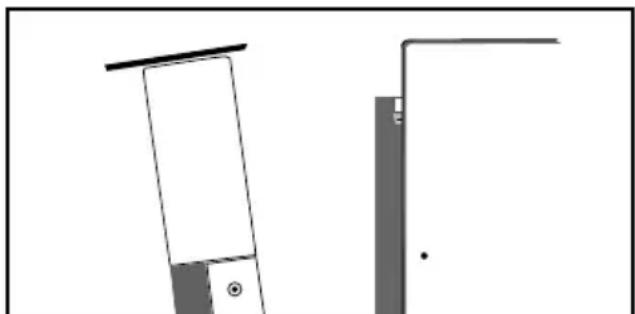
NOTES:
Place your smartphone so that the NFC antenna on its back matches the position of the Smart Touch logo on the appliance (as illustrated below).
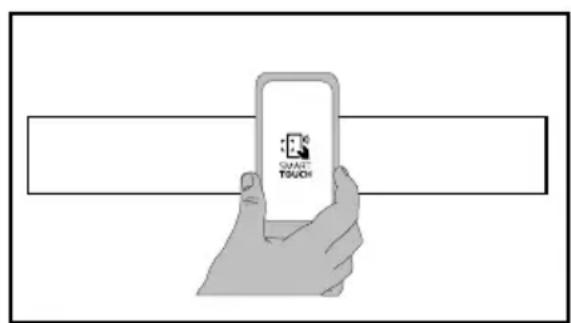
If you do not know the position of your NFC antenna, slightly move the smartphone in a circular motion over the Smart Touch logo until the App confirms the connection. In order for the data transfer to be successful, it is essential TO KEEP THE SMARTPHONE ON THE DASHBOARD DURING THESE THE FEW SECONDS OF THE PROCEDURE; a message on the device will inform about the correct outcome of the operation and advise you when it is possible to move the smartphone away.
Thick cases or metallic stickers on your smartphone could affect or prevent the transmission of data between machine and telephone. If necessary, remove them.
The replacement of some components of the smartphone (e.g. back cover, battery, etc...) with non-original ones, could result in the NFC antenna removal, preventing the full use of the App.
The management and the control of the machine via App is only possible "by proximity": it is therefore not possible to perform remote operations (e.g.: from another room; outside of the house).
PROGRAMME GUIDE
Wash with prewash
For wash programmes with prewash, it is advisable to add a second dose of detergent (max. 10g ) directly in the machine.
| P1 | | Hygienic 75°C | An antibacterial cycle, intended for washing and sterilising dishes (even heavily stained ones) babies' bottles etc. |
| P2 | | Universal 60°C | Once a day - for normal soiled pans and any other items that have been left all day for washing. |
| P3 | | Daily 55°C | Fast cycle, for "normally" dirty dishes - intended for frequent washes and normal loads. |
| P4 | ECO | Eco 45°C | Programme for normally soiled tableware (the most efficient in terms of its combined energy and water consumption for that type of tableware). Programme standardised to EN 50242. |
| P5 | | Delicate 45°C | Suitable for delicate crockery and glassware. Also for less soiled items excluding pans. |
| P6 | R59' | Rapid 59' 65°C | Suitable for heavily soiled items that are to be washed straight after a meal (Max 8 place load). |
| P7 | R24' | Rapid 24' 50°C | Quick wash for dishes which are to be washed immediately after the meal. Wash load of 6 persons. |
| P8 | | Night 55°C | Quietest washing cycle. Ideal for functioning by night and for taking advantage of reduced energy fares. |
| P9 | | Refresh | Short cold pre-wash for items that are stored in the dishwasher until you are ready to wash a full load. |
| PO | Smart Touch | Activation of Smart Touch mode, to enable the interaction between the appliance and the Candy simply-Fi App. Before the first use with the App, this position will be occupied by Hygienic program. |
■ = "IMPULSE" programmes
N/A = OPTION NOT AVAILABLE
| Check list | Programme contents | Avaragedurationin minutes | Special functionbuttonsavailable | |
| Detergent for soaking(Prewash) | Detergent for washing | Clean filter | Check rinse aiddispenser | Hot pre-wash | Cold pre-wash | Main wash | First cold rinse | Second cold rinse | With cold water (15°C)*-Tolerance ± 10%- | "DELAY START" button | "EXPRESS" button | "All IN 1" button |
| ● | | ● | ●● | | ○ | ● | 75°C | ○ | ○ | ○ | 130 | YES | YES | YES |
| | ● | ●● | | | ●○ | 60°C | ○ | | ○ | 120 | YES | YES | YES |
| | ● | ●● | | | ●○ | 55°C | ○ | | ○ | 80 | YES | YES | YES |
| ● | | ● | ●● | | | ●○ | 45°C | | | ○ | 190 | YES | YES | YES |
| | ● | ●● | | | ●○ | 45°C | ○ | | ○ | 85 | YES | YES | YES |
| ● | | ● | ●● | | ○ | ● | 65°C | | | ○ | 59 | YES | YES | YES |
| | ● | ●● | | | ● | 50°C | | | ○ | 24 | YES | N/A | YES |
| | ● | ●● | | | ●○ | 55°C | ○ | | ○ | 240 | YES | YES | YES |
| | ● | | | | ○ | | | | | 5 | YES | N/A | |
| | | | | | | | | | | | | | |
WITH HOT WATER THE TIME REMAINING UNTIL THE END OF THE PROGRAMME IS AUTOMATICALLY DISPLAYED WHILE THE PROGRAMME IS RUNNING.
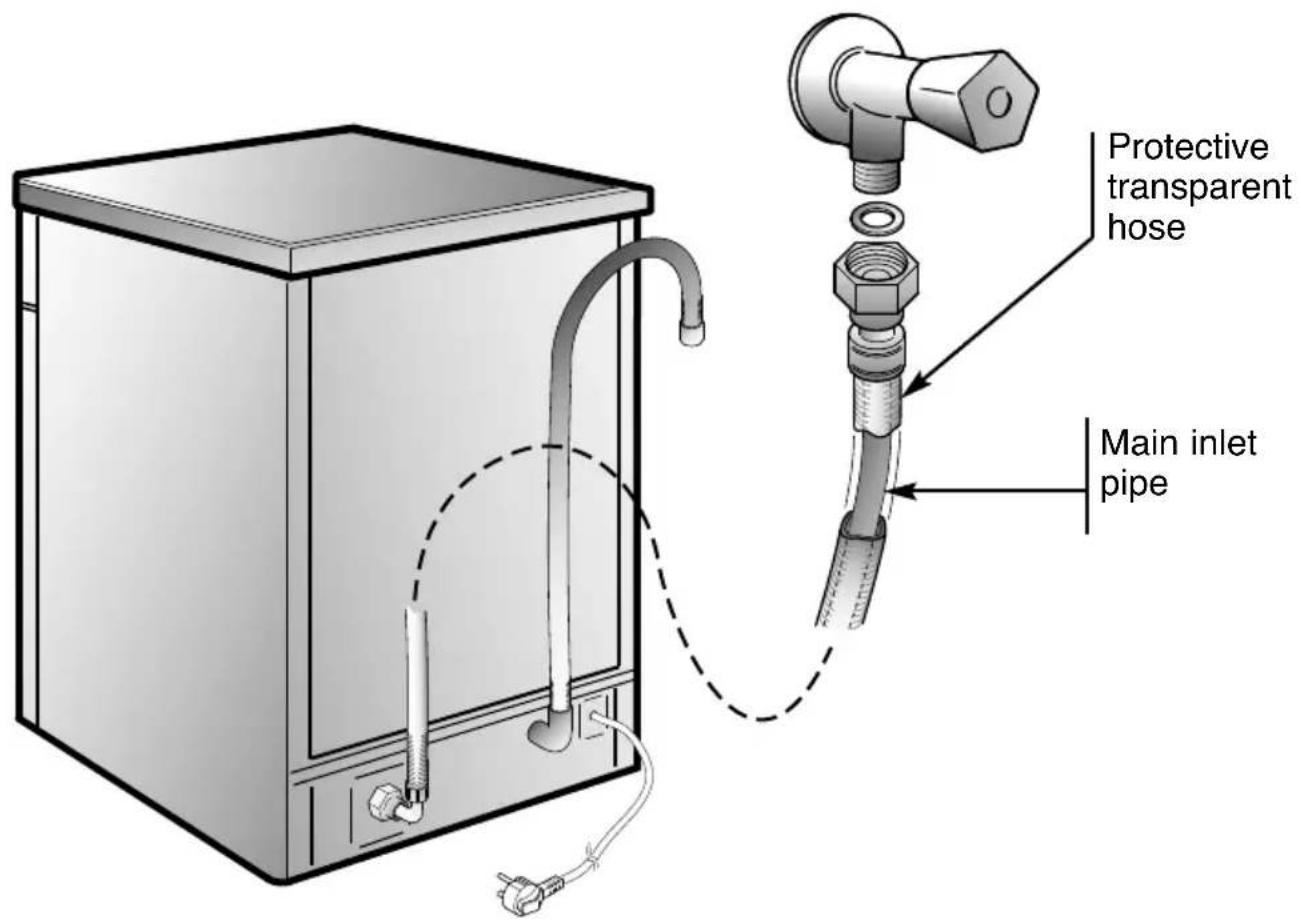
AQUAPROTECT - PROTECTED INCOMING WATER PIPE
The main inlet pipe is contained within a protective transparent hose. In the event of damage occurring to the main inlet pipe any water leakage is retained within the transparent hose.
If water has leaked from the main inlet pipe there will be a visible sign within the transparent hose.
You may continue to complete the programme cycle but for safety we recommend the immediate replacement of the complete hose assembly.
If the hose is not long enough for correct connection, it must be replaced with a longer one.
The hose can be obtained from a Service Centre.
WATER SOFTENER UNIT
Depending on the source of the supply, water contains varying amounts of limestone and minerals which are deposited on the dishes leaving whitish stains and marks. The higher the level of these minerals present in the water, the harder the water is. The dishwasher is fitted with a water softener unit which, through the use of special regenerating salt, supplies softened water for washing the dishes. The degree of hardness of your water can be obtained from your water supply company.
Regulating the water softener with electronic programmer
The water softener can treat water with a hardness level of up to 90^ (French grading) or 50^ (German grading) through 8 settings.
The settings are listed in the table below:
| Level | Water hardness | Use of regenerating salt | Water softener setting |
| °fH (French) | °dH (German) |
| 0 | 0-5 | 0-3 | NO | d0 |
| 1 | 6-10 | 4-6 | YES | d1 |
| 2 | 11-20 | 7-11 | YES | d2 |
| 3 | 21-30 | 12-16 | YES | d3 |
| *4 | 31-40 | 17-22 | YES | d4 |
| 5 | 41-50 | 23-27 | YES | d5 |
| 6 | 51-60 | 28-33 | YES | d6 |
| 7 | 61-90 | 34-50 | YES | d7 |
- The softener unit is set in the factory at level 4 (d4) as this satisfies the requirements of the majority of users.
Regulate the setting of your water softener unit according to the degree of hardness of your water as follows:
IMPORTANT The dishwasher must ALWAYS be off before start of this procedure.
- Hold down the "PROGRAMME SELECTION" button and at the same time switch on the dishwasher by pressing the "ON/OFF" button (a brief audible signal will sound).
- Keep the "PROGRAMME SELECTION" button pressed for at least 5 seconds, UNTIL an audible signal sounds. The current water softener setting level will be shown on the display.
- Press the same button again to select the required water softener level: each time the button is pressed, the setting will increase by one level. When you have reached "d7", the display will go back to "d0".
- Turn off the dishwasher by pressing the "ON/OFF" button to confirm the new setting.
WARNING!
If any problem occurs, turn the dishwasher off by pressing the "ON/OFF" button and start the procedure again from the beginning (STEP 1).
Compliments,
Programmes "IMPULSE"
Touche "DEPART DIFFERE"
Programmes "IMPULSE"
N/A = OPTION NON DISPONIBLE
| ● | | ● | ●● | | ○ | ● | 75°C | ○ | ○ | ○ | 130 | OUI | OUI | OUI |
| | ● | ●● | | | ●○ | 60°C | ○ | | ○ | 120 | OUI | OUI | OUI |
| | ● | ●● | | | ●○ | 55°C | ○ | | ○ | 80 | OUI | OUI | OUI |
| ● | | ● | ●● | | | ●○ | 45°C | | | ○ | 190 | OUI | OUI | OUI |
| | ● | ●● | | | ●○ | 45°C | ○ | | ○ | 85 | OUI | OUI | OUI |
| ● | | ● | ●● | | ○ | ● | 65°C | | | ○ | 59 | OUI | OUI | OUI |
| | ● | ●● | | | ● | 50°C | | | ○ | 24 | OUI | N/A | OUI |
| | ● | ●● | | | ●○ | 55°C | ○ | | ○ | 240 | OUI | OUI | OUI |
| | ● | | | | ○ | | | | | 5 | OUI | N/A | |
| | | | | | | | | | | | | | |
- AVEC DE L'EAU CHAUDRE LE TEMPS RESTANT AVANT LA FIN DU PROGRAMME DE LAVAGE EST AUTOMATIQUEMENTAFFICHE EN COURS DE CYCLE.
AQUAPPROTECT - PROTECTION DU TUYAU D'ARRIVEE D'EAU
| ● | | ● | ●● | | ○ | ● | 75°C | ○ | ○ | ○ | 130 | JA | JA | JA |
| | ● | ●● | | | ●○ | 60°C | ○ | | ○ | 120 | JA | JA | JA |
| | ● | ●● | | | ●○ | 55°C | ○ | | ○ | 80 | JA | JA | JA |
| ● | | ● | ●● | | | ●○ | 45°C | | | ○ | 190 | JA | JA | JA |
| | ● | ●● | | | ●○ | 45°C | ○ | | ○ | 85 | JA | JA | JA |
| ● | | ● | ●● | | ○ | ● | 65°C | | | ○ | 59 | JA | JA | JA |
| | ● | ●● | | | ● | 50°C | | | ○ | 24 | JA | N.V. | JA |
| | ● | ●● | | | ●○ | 55°C | ○ | | ○ | 240 | JA | JA | JA |
| | ● | | | | ○ | | | | | 5 | JA | N.V. | |
| | | | | | | | | | | | | | |
Programas "IMPULSE"
N.D. = OPCION NO DISPONIBLE
Programas "IMPULSE"
N/A = OPÇAÑO INDISPONÍVEL
| ● | | ● | ●● | | ○ | ● | 75°C | ○ | ○ | ○ | 130 | JA | JA | JA |
| | ● | ●● | | | ●○ | 60°C | ○ | | ○ | 120 | JA | JA | JA |
| | ● | ●● | | | ●○ | 55°C | ○ | | ○ | 80 | JA | JA | JA |
| ● | | ● | ●● | | | ●○ | 45°C | | | ○ | 190 | JA | JA | JA |
| | ● | ●● | | | ●○ | 45°C | ○ | | ○ | 85 | JA | JA | JA |
| ● | | ● | ●● | | ○ | ● | 65°C | | | ○ | 59 | JA | JA | JA |
| | ● | ●● | | | ● | 50°C | | | ○ | 24 | JA | N/A | JA |
| | ● | ●● | | | ●○ | 55°C | ○ | | ○ | 240 | JA | JA | JA |
| | ● | | | | ○ | | | | | 5 | JA | N/A | |
| | | | | | | | | | | | | | |
- WANNEER DE MACHINE WARM WATER GEBRUIKT TijdENS EEN PROGRAMMA, KOMT AUTOMATISCH OP DE DISPLAY TE STAAN HOEVEEL MINUTEN HET NOG DUURT TOT HET EINDE VAN HET PROGRAMMA.
AQUAPPROTECT - BEVEILIGING VAN DE WATERTOEVOER
The manufacturer declines all responsibility in the event of any printing mistakes in this booklet. The manufacturer also reserves the right to make appropriate modifications to its products without changing the essential characteristics.
To consult the product fiche, please refer to the manufacturer website.