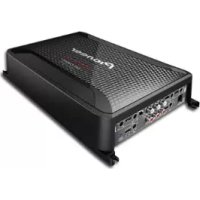
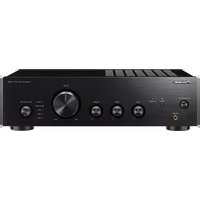
GMD9605 - AV receiver PIONEER - Free user manual and instructions
Find the device manual for free GMD9605 PIONEER in PDF.



| Product type | 5-channel class D audio/video amplifier |
| Brand | PIONEER |
| Model | GMD9605 |
| Dimensions (W x H x D) | 315 mm x 60 mm x 200 mm |
| Weight | 3.2 kg (cables not included) |
| Power supply | 14.4 V DC (10.8 V to 15.1 V acceptable), negative ground |
| Power consumption | 55 A (continuous 4 Ω), average 6 A (4 Ω) |
| Fuses | 30 A x 3 (built-in) + 100 A (battery, sold separately) |
| Maximum output power | 150 W x 4 + 700 W (4 Ω), 200 W x 4 + 1200 W (2 Ω), total 2000 W |
| Continuous power (RMS) | 75 W x 4 + 350 W (14.4 V, 4 Ω), 200 W x 2 + 350 W (14.4 V, 4 Ω), 100 W x 4 + 600 W (14.4 V, 2 Ω) |
| Load impedance | 4 Ω (2 Ω to 8 Ω acceptable) |
| Frequency response | Channels A/B: 10 Hz to 50 kHz; secondary channels: 10 Hz to 500 Hz |
| Signal-to-noise ratio | 94 dB (IEC-A network) |
| Total harmonic distortion | 0.05% (10 W, 1 kHz) |
| Filters | Low-pass (LPF) and high-pass (HPF) adjustable from 40 Hz to 500 Hz, slope -12 dB/oct or -24 dB/oct |
| Gain control | RCA: 200 mV to 6.5 V; speaker: 0.8 V to 16 V |
| Maximum input level / impedance | RCA: 6.5 V / 25 kΩ; speaker: 16 V / 12 kΩ |
| Protection | POWER/PROTECT indicator (red in case of fault), protection against short-circuit, overheating, and DC voltage |
| Inputs | 2 RCA inputs (A and B), 1 RCA subwoofer input, 1 speaker input (SP INPUT) |
| Outputs | Terminals for 4 speakers + 1 subwoofer, bridged mode possible |
| Bass level remote | BB-REMOTE jack for adjustment from 0 dB to 18 dB |
| Maintenance | Clean with a dry cloth; do not use solvents |
| Installation | Monitor ventilation, avoid uneven surfaces, check connections before powering on |
| Safety | Disconnect battery before installation; use appropriate fuses; avoid contact with liquids |
| Spare parts | 30 A and 100 A fuses (sold separately), power and speaker cables optional |
| Warranty | Contact the nearest authorized Pioneer dealer |
Frequently Asked Questions - GMD9605 PIONEER
User questions about GMD9605 PIONEER
0 question about this device. Answer the ones you know or ask your own.
Ask a new question about this device
Download the instructions for your AV receiver in PDF format for free! Find your manual GMD9605 - PIONEER and take your electronic device back in hand. On this page are published all the documents necessary for the use of your device. GMD9605 by PIONEER.
USER MANUAL GMD9605 PIONEER
CLASS D FIVE-CHANNEL AMPLIFIER
ThankyouforpurchasingthisPIONEER product
Toensureproperuse, pleasereadthrough this manual before using this product. It is especially important that you read and observe WARNING sand CAUTION sin this manual. Please keep the manual in as safe and accessible place for future reference.

This device complies with Part 15 of the FCC Rules. Operation is subject to the following two conditions:
(1) this device may not cause harmful interference, and (2) this device must accept any interference received, including interference that may cause undesired operation.
-Reorientorrelocatethereceivingantenna.
-Increasetheseparationbetweentheequipment andreceiver.
-Connecttheequipmentintoanoutletonacircuitdifferentfromthattowhichthereceiveris connected.
-Consultthedealeroranexperiencedradio/TV technicianforhelp.
Visitourwebsite
Visitusatthefollowingsite: http://pioneer.jp/group/index-e.html
Weofferthelatestinformationabout PIONEERCORPORATIONnonourwebsite.

InformationtoUser
Alterationormodificationscarriedoutwithout appropriateauthorizationmayinvalidatethe user'srighttooperatetheequipment.
Note
This equipment has been tested and found to comply with the limits for a Class Digital device, pursuant to Part 15 of the FCC Rules. These limits are designed to provide reasonable protection against harmful interference in residential installation. This equipment generates, uses and can radiate radio frequency energy and, if not installed and used in accordance with the instructions, may cause harmful interference or communication. However, there is no guarantee that interference will not occur in particular installation. If this equipment does cause harmful interference or television reception, which can be determined by turning the equipment off and on, the user is encouraged to try to correct the interference by one or more of the following measures:
The Safety of Your Earsisin Your Hands
Getthemostoutofyourequirementbyplaying itatasafelevel—alevelthatletsthesound comethroughclearlywithoutannoyingblaringordistortionand,mostimportantly,withoutaffectingyoursensitivehearing.Sound canbedeceiving.Overtime,yourhearing "comfortlevel"adaptstohighervolumesof sound,sowhatsounds"normal"canactually beloudandharmfultoyourhearing.Guard againstthisbysettingyourequirementata safelevelIBEFOREyourhearingadapts.
ESTABLISHASAFELEVEL:
- Setyourvolumecontrolatalowsetting.
- Slowlyincreasethesounduntilyoucan hearitcomfortablyandclearly,withoutdistortion.
- Once you have established a comfortable sound level, set the dial and leave it there.
BESURETOOBSERVETHEFOLLOWING GUIDELINES:
- Donotturnupthevolumesohighthatyou can'thearwhat'saroundyou.
- Usecautionortemporarilydiscontinueuse inpotentiallyhazardoussituations.
- Donotuseheadphoneswhileoperatinga motorizedvehicle;theuseofheadphones maycreateatraffichazardandisillegalin manyareas.
Ifyouexperienceproblems
Should this product fail to operate properly, please contact your dealer or nearest authorized Pioneer Service Station.
Beforeconnecting/ installingtheamplifier
WARNING
- Thisunitisforvehicleswitha12Vbatteryandnegativegrounding.Beforeinstallinginrecreationalvehicles,trucksorbuses,checkthe batteryvoltage.
- Wheninstallingthisunit,makesuretoconnectthegroundwirefirst.Ensurethatthe groundwireisproperlyconnectedtometal partsofthecar'sbody.Thegroundwireofthe oneofthisunitmustbeconnectedtothecar separatelywithdifferentscrews.Ifthescrew forthegroundwireloosensorfallsout,it couldresultinfire,generationofsmokeor malfunction.
- Besuretoinstallthefusetothebatterywire.
- Alwaysuseafuseoftheratingprescribed. Theuseofanimproperfusecouldresultin overheatingandsmoke,damagetotheproductandinjury,includingburns.
- Checktheconnectionsofthepowersupply andspeakersifthefuseoftheseparatelysold batterywireortheamplifierfuseblows.Determineandresolvethecause,thenreplacethe fusewithandidenticalequivalent.
- Alwaysinstalltheamplifieronaflatsurface. Donotinstalltheamplifieronasurfacethat isnotflatoronasurfacewithaprotrusion. Doingsocouldresultinmalfunction.
- Wheninstallingtheamplifier, donotallow partssuchasextrascrewstogetcaughtbetweentheamplifierandtheautomobile. Doingsocouldcausemalfunction.
-
Donotallowthisunittocomeintocontact with liquids. Electricalshockcouldresult. Also, damagetothisunit, smoke, and over-heating could result from contact with liquids. Thesurfaces of the amplifier and any attached speakers may also heatup and cause minor burns.
-
Intheeventofanyabnormality, thepower supplytotheamplifieriscutofftoprevent equipmentmalfunction. If this occurs, switch thesystempoweroffandcheckthepower supplyandspeakerconnections. If you are unable to determine the cause, please contact your dealer.
- Always disconnect then negative terminal of the battery before hand to avoid the risk of electric shockor short circuit during installation.
- Donotattempttodisassembleormodifythis unit.Doingsomayresultinfire,electric shockorothermalfunction.

CAUTION
• Always keep the volumelowenought to hear outsidesounds.
- Extended use of the car stereowhile the engine is at restoridling may exhaust the battery.
About the protection function
Thisproducthasprotectionfunction. Whenthis productdetectssomethingabnormal, the following functions will operate to protect the product and speaker output.
- The POWER/PROTECT indicator will turn red and the amplifier will shutdown in the situations outlined below.
—IfaDCvoltageisappliedtothespeaker outputterminal.
- The POWER/PROTECT indicator will turn red and the output will be muted in the situations outlined below.
—If the speaker output terminal and speaker wire a short-circuited.
—If the subwoofer output terminal and subwoofer wire areshort-circuited.
- Theamplifierwillreducethepoweroutputif thetemperatureinsidetheamplifiergets high.Ifthetemperaturegetstoohigh,the POWER/PROTECTindicatorwillturnoff,and theamplifierwillshutdown.
Componentnamesand functions
Frontside
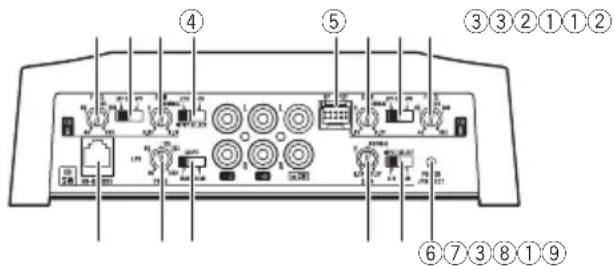
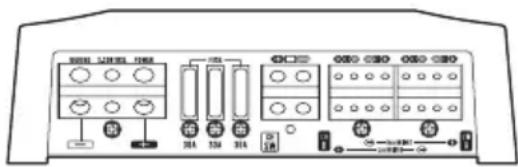
Rearside
Toadjusttheswitch, useaflatheadscrewdriverifneeded.
①FREQ(cutofffrequency)control
Cutoff frequency selectable from 40 Hz to 500 Hz.
- Set the LPF/HPF select switch to LPF or HPF according to the typeoff frequency that you want to cutoff.
②LPF(low-passfilter)/HPF(high-passfilter)selectswitch
Switchthesettingsbasedontheconnected speaker.
- Whenafull-rangespeakerisconnected, select HPF or OFF. HPF eliminates low-rangefrequencyandoutputhigh-range frequency.OFFoutputstheentirefrequencyrange.
- Whenalow-rangespeakerorsubwoofer isconnected,selectLPF.
③GAIN(gain)control
Adjusting the gain control helps align the car stereo output to the Pioneer amplifier. The default setting is the NORMAL position. If the output remains slow, even when the car stereovolume is turned up, turn the control to a lower level. If distortion occurs
whenthecarstereovolumeisturnedup, turnthesecontrolstoahigherlevel.
- Incaseofabridgeconnection, setthe gaincontrolsforspeakeroutputsA and Btothesameposition.
- ForusewithanRCAequippedcarstereo (standardoutputof500 mV), settothe NORMALposition. ForusewithanRCA equippedPioneercarstereo, with maximumoutputof4 Vormore, adjustlevel to match that of the carstereo output.
- ForusewithanRCAequippedcarstereo with output of 4 V, set to the H position.
④2CH-4CHINPUTSELECT(inputselect) switch
Fordetails, refertoConnectingthecarstereo onpage9.
⑤SPINPUT(speakerinput)terminal
Pleaseesethefollowingsectionforspeaker connectioninstructions.RefertoConnectionswhenusingthespeakerinputwireon page11.
⑥POWER/PROTECTindicator
The power indicator lights up to indicate power ON.
- If something is not normal, the indicator turns red.
⑦A/B-SWINPUTSELECT(inputselect) switch
Fordetails, refertoConnectingthecarstereo onpage9.
⑧SLOPE(slope)selectswitch
Select the slope of LPF from -12dB (shallow slope) or -24dB (sharpslope).
⑨BB-REMOTE(bassboostlevelremote control)jack
ByconnectingtheBassboostlevelremote controltothejackonthemainunit,youwill beabletoselectabassboostlevelfrom 0 dBto18 dB.
- Thebassboostlevelsettingappliesonly tothesubwooferoutput.
- Forinstructionofconnectingthebass boostremotecontroltotheamplifier,see theConnectiondiagramonpage7.
Settinggainproperly
- Protectivefunctionincludedtoprevent malfunctionoftheunitand/orspeakers duetoexcessiveoutput,improperuseor improperconnection.
- When outputting high volumesoundetc., this function cut soffthe output for a few seconds as anormal function, but output is restored when the volume of the head unit is turned down.
- Acutinsoundoutputmayindicateimpropersettingofthegaincontrol.Toensure continuoussoundoutputwiththehead unitatahighvolume,setamplifiergain controltoalevelappropriateforthepreout maximumoutputleveloftheheadunit,so thatvolumecanremainunchangedandto controlexcessoutput.
- Despitecorrectvolumeandgainsettings, theunitsoundstillcutsoutperiodically.In suchcases,pleasecontactthenearest authorizedPioneerServiceStation.
Gaincontrolofthisunit
Preoutlevel:2V(Standard:500mV)
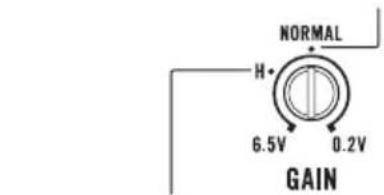
Preoutlevel:4V
AboveillustrationshowsNORMALgainsetting.
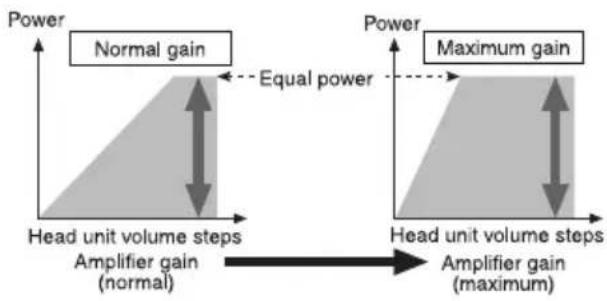
Relationshipbetweenamplifiergain andheadunitoutputpower
flowchart
graph LR
    A["Power"] --> B["Normal gain"]
    B --> C["Equal power"]
    C --> D["Power"]
    D --> E["Maximum gain"]
    E --> F["Amplifier gain (maximum)"]
    F --> G["Head unit volume steps"]
    G --> H["Amplifier gain (normal)"]
    H --> I["Head unit volume steps"]
Ifamplifiergainisraisedimproperly, this will simply increased distortion, with little increase in power.
Signalwaveformwhenoutputtingat highvolumeusingamplifiergain control
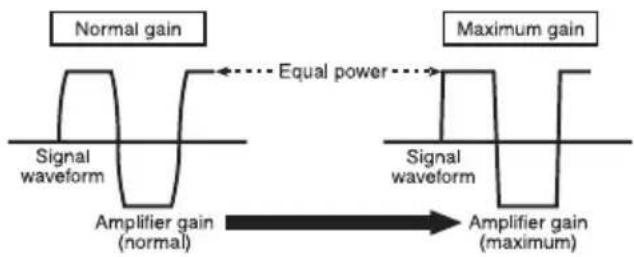
If the signal waveform is distorted due to high output, even if the amplifier gain is raised, the output power will change only slightly.
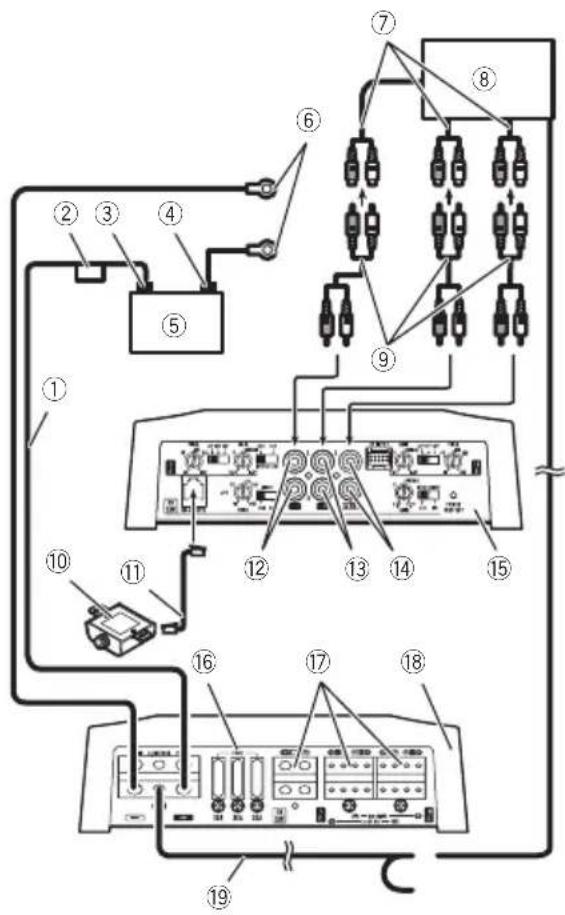
Connectiondiagram
flowchart
graph TD
    A["Device ①"] --> B["Switch ②"]
    B --> C["Switch ③"]
    C --> D["Switch ④"]
    D --> E["Switch ⑤"]
    E --> F["Switch ⑥"]
    F --> G["Switch ⑦"]
    G --> H["Switch ⑧"]
    H --> I["Switch ⑨"]
    I --> J["Switch ⑩"]
    J --> K["Switch ⑪"]
    K --> L["Switch ⑫"]
    L --> M["Switch ⑬"]
    M --> N["Switch ⑭"]
    N --> O["Switch ⑮"]
    O --> P["Switch ⑯"]
    P --> Q["Switch ⑰"]
    Q --> R["Switch ⑱"]
    R --> S["Switch ⑲"]
    S --> T["Switch ⑳"]
    T --> U["Switch ⑴"]
    U --> V["Switch ⑵"]
    V --> W["Switch ⑶"]
    W --> X["Switch ⑷"]
    X --> Y["Switch ⑧"]
①Batterywire(soldseparately)
- Themaximumlengthofthewirebetweenthefuseandthepositive⊕terminalofthebatteryis30cm(12in.).
- Forthewiresize,refertoConnectingthe powerterminalonpage12.Thebattery wire,thegroundwireandtheoptional directgroundwiremustbesamesize. Aftermakingallotherconnectionsat theamplifier,connectthebatterywire terminaloftheamplifiertothepositive ⊕terminalofthebattery.
②Fuse(100A)(soldseparately) Eachamplifiermustbeseparatelyfusedat 100A.
③Positive(⊕)terminal
④Negative(⊖)terminal
⑤Battery(soldseparately)
⑥Groundwire, Terminal(soldseparately) Thegroundwiresmustbesamesizeasthe batterywire.
Connecttometalbodyorchassis.
⑦Externaloutput
Ifonlyoneinputplugisused, donotconnect anythingtoRCAinputjackBorRCAsubwooferinputjack.
⑧CarstereowithRCAoutputjacks(soldseparately)
⑨ConnectingwirewithRCApinplugs(soldseparately)
⑩Bassboostlevelremotecontrol
⑪Bassboostlevelremotecontrolwire(5m (16ft.5in.))
⑫RCAinputjackA
⑬RCAinputjackB
⑭RCAsubwooferinputjack
⑮Frontside
⑯Fuse(30A)×3
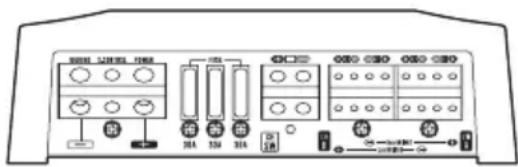
⑰Speaker/subwooferoutputterminals
Pleaseseethefollowingsectionforspeaker connectioninstructions.RefertoConnections whenusingthespeakerinputwireonpage11.
⑱Rearside
19 Systemremotecontrolwire(soldseparately) Connectmaleterminalofthiswiretothesystemremotecontrolterminalofthecarstereo. Thefemaleteminalcanbeconnectedtothe auto-antennarelaycontrolterminal.Ifthecar stereolacksasystemremotecontrolterminal, connectthemaleteminaltothepowerterminalviatheignitionswitch.
Note
INPUTSELECT(inputselect)switchmustbeset.
Fordetails, refer to Connecting the car stereo on page9.
Beforeconnectingthe amplifier
WARNING
- Securethewiringwithcableclampsoradhesivetape.Toprotectthewiring,wrapsections incontactwithmetalpartsinadhesivetape.
- Nevercuttheinsulationofthepowersupply tofeedpowertootherequipment.Currentcapacityofthewireislimited.

CAUTION
- Neverwirethespeakernegativecabledirectly toground.
- Neverbandtogethermultiplespeaker'snegativecables.
- If the system remote control wire of the amplifier is connected to the power terminal via the ignition switch (12VDC), the amplifier will remain on with the ignition whether the car stereoisonor off, which may exhaust battery if the engine is at restoridling.
• Installandroutetheseparatelysoldbattery wireasfaraspossiblefromthespeakerwires.Installandroutetheseparatelysoldbattery wire,groundwire,speakerwiresandtheamplifierasfarawayaspossiblefromtheantenna,antennacableandtuner.
Aboutbridgedmode
Diagram A - Proper
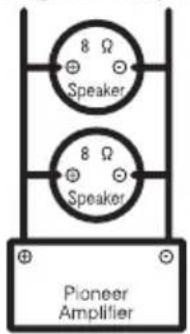
4 Ω Bridged Mode
Diagram B - Improper
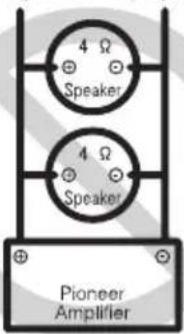
2 Ω Bridged Mode
• Themaximumspeakerimpedanceis4Ω.
Pleasecarefullycheck.Improperconnection totheamplifiermayresultinmalfunctionor personalinjuryduetoburnsfromoverheating.
Forbridgedmodeforatwo-channelamplifier, witha4Ωload,eitherwiretwo8Ωspeakers inparallel,Left⊕andRight⊖(DiagramA)or useasingle4Ωspeaker.Forotheramplifiers, pleasefollowthespeakeroutputconnection diagramforbridgingshownonrear:two8Ω
speakersinparallelfora4Ωloadorasingle 4Ωspeakerperchannel.
Inaddition, refertothespeakerinstruction manualforinformationonthecorrectconnectionprocedure.
- Foranyfurtherenquiries,contactyourlocal authorizedPioneerdealerorcustomer service.
Aboutsuitable specificationofspeaker

CAUTION
Besuretoconnectthesubwoofertothesubwooferoutputterminalofthisunit,andspeakers otherthanthesubwoofertothespeakeroutput terminalofthisunit.
Ensurespeakersconformtothefollowing standards,otherwisethereisariskoffire, smokeordamage.Speakerimpedanceis2Ω to 8 Ω, or 4 Ω to 8 Ω for two-channel and other bridgeconnections.
Subwoofer
- Nominalinput:
Min.350W/4Ω
Min.600W/2Ω
Otherthansubwoofer(4Ω)
| SpeakerchannelPower | |
| Four-channeloutput | Max.input:Min.150W |
| Two-channeloutput | Max.input:Min.400W |

Connectingthecarstereo
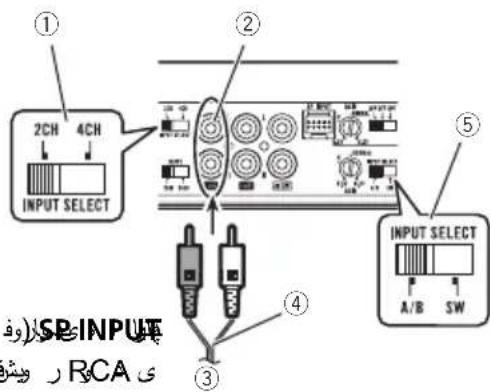
ConnecttheRCAoutputjackofthecarstereo totheRCAinputjackoftheamplifier,orconnectthespeakeroutputwirefromthecar stereotothespeakerinputterminaloftheamplifier.
CH-Ainput(Two-channelinput)
- Slidethe2CH-4CHINPUTSELECT(input select)switchtothe2CHposition.
- SlidetheA/B-SWINPUTSELECT(inputselect)switchtotheA/Bposition.
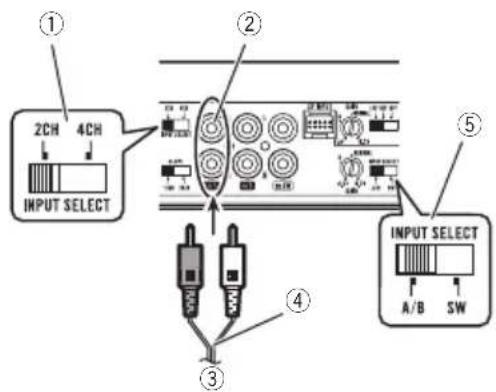
①2CH-4CHINPUTSELECT(inputselect)switch (2CHposition)
②RCAinputjackA
③Fromcarstereo(RCAoutput)
Ifonlyoneinputplugisused, e.g. when the
carstereohasonlyoneoutput(RCAoutput),
connecttheplugtoRCAinputjackA.
④ConnectingwireswithRCAplugs(soldseparately)
⑤A/B-SWINPUTSELECT(inputselect)switch (A/Bposition)
Notes
- Fordetailsonthespeakeroutput,refertoConnectingthespeakersonpage10.
- Whenthe2CH-4CHINPUTSELECT(inputselect)switchissetto2CH,donotconnectanythingtoRCAinputjackB.
CH-ACH-Binput(Four-channel input)
- Slidethe2CH-4CHINPUTSELECT(input select)switchtothe4CHposition.
- SlidetheA/B-SWINPUTSELECT(inputselect)switchtotheA/Bposition.
ConnectionwhenusingtheRCAinputjack
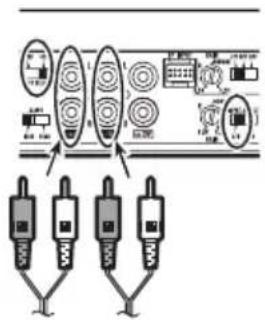
ConnectionwhenusingtheSPINPUT(speaker input)terminal
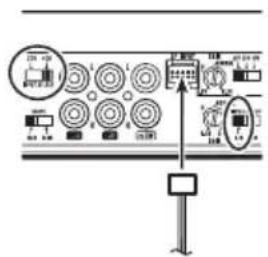
Notes
- Whenconnectingtheamplifierusingthe SPINPUT(speakerinput)terminal,donot connectanythingtotheRCAinputjack.
- Fordetailsonthespeakeroutput,refertoConnectingthespeakersonpage10.
CH-ACH-SInput
- Slidethe2CH-4CHINPUTSELECT(input select)switchtothe2CHposition.
- SlidetheA/B-SWINPUTSELECT(inputselect)switchtotheSWposition.

Notes
- Fordetailsonthespeakeroutput,refertoConnectingthespeakersonpage10.
- Whenthe2CH-4CHINPUTSELECT(inputselect)switchissetto2CH,donotconnectanythingtoRCAinputjackB.
CH-ACH-BCH-SInput
- Slidethe2CH-4CHINPUTSELECT(input select)switchtothe4CHposition.
- SlidetheA/B-SWINPUTSELECT(inputselect)switchtotheSWposition.
ConnectionwhenusingtheRCAinputjack
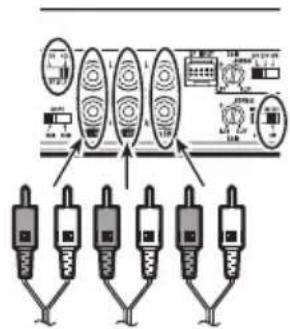
ConnectionwhenusingtheSPINPUT(speaker input)terminal
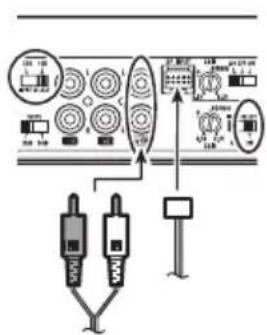
Notes
- Whenconnectingtheamplifierusing the SPINPUT(speakerinput)terminal, donot connectanythingintoRCAinputjackAorB.
- Fordetailsonthespeakeroutput,refertoConnectingthespeakersonpage10.
Connectingthespeakers
Thespeakeroutputmodecanbefive-channel outputorthree-channeloutput.
Connectthespeakerleadsbasedonthemode andthefigureshownbelow.
Five-channeloutput

①Left
②Right
③SpeakeroutputA
④SpeakeroutputB
⑤Subwooferoutput
Three-channeloutput(Stereo bridge)
In the case of abridge connection, connect the speaker leads based on the figures shown below.
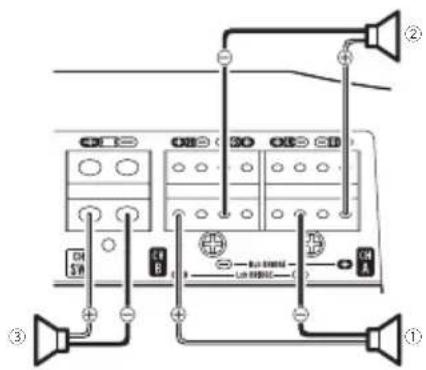
①Left
②Right
③Subwooferoutput

Connectionswhenusing thespeakerinputwire
Connectthecarstereospeakeroutputwires totheamplifierusingthesuppliedspeaker inputwire.
- DonotconnectboththeRCAinputandthe speakerinputatthesametime.
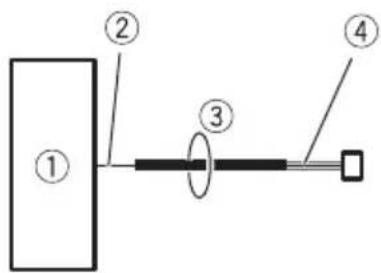
①CarStereo
②Speakeroutput
③Speakerleads
White:Frontleft⊕
White/black:Frontleft⊖
Gray:Frontright⊕
Gray/black:Frontright
Green:Rearleft⊕
Green/black:Rearleft
Violet:Rearright⊕
Violet/black:Rearright⊖
④Speakerinputwire
TotheSPINPUT(speakerinput)terminalof thisunit.
Note
If speaker input wires from ahead unit are connected to this amplifier, the amplifier will automatically turn on when the head unit is turned on. When the head unit is turned off, the amplifier turn soff automatically. This function may not work with some head units. In such cases, please use asystem remote control wire (sold separately). If multiple amplifiers are to be connected to others synchronously, connect the head unit and all amplifiers via the system remote control wire.
Solderlessterminal connections
- Sincethewirewillbecomelooseovertime, itmustbeperiodicallyinspectedandtightenedasnecessary.
- Donotsolderorbindtheendsofthe twistedwires.
- Fastenwhilemakingsuretonottoclamp theinsulatingsheathofthewire.
- Use the supplied hexagonal wrench to tighten and loosent heterminalscrew of the amplifier and use it to securely fasten the wire. Becareful to avoid excessive tightening of this screw, which may damage the wire.
Connecting the power terminal

WARNING
If the battery wire is not securely fixed to the terminal using the terminals screws, there is a risk of overheating, malfunction and injury, including minor burns.
- Alwaysusetherecommendedbatteryand groundwire,whichissoldseparately.Connectthebatterywiredirectlytothecarbaterypositive(⊕)terminalandtheground wiretothecarbody.
- Recommendedwiressize(AWG:American WireGauge)isasfollows.Thebatterywire, thegroundwireandtheoptionaldirect groundwiremustbesamesize.
- Useawireof8AWGto16AWGwireforthe speaker/subwooferwire.
Batterywireandgroundwiresize
| WirelengthWiresize | |
| lessthan2.2m(7ft 3in.) | 8AWG |
| lessthan3.6m(11ft 10in.) | 6 AWG |
| lessthan6.4m(20ft 12in.) | 4AWG |
1Routebatterywirefromenginecompartmenttothevehicleinterior.
- Whendrillingacablepass-holeintothevehiclebodyandroutingabatterywirethoroughit,takecarenottoshort-circuitthe wiredamagingitbythecutedgesorburs ofthehole.
Aftercompletingallotheramplifierconnections, finallyconnectthebatterywireterminal oftheamplifiertothepositive(⊕)battery terminal.
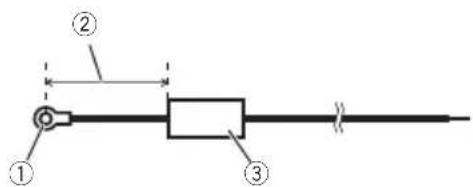
①Positive(⊕)terminal
②Batterywire(soldseparately)
Themaximumlengthofthewirebetween
thefuseandthepositive⊕terminalofthe
batteryis30cm(12in.).
③Fuse(100A)(soldseparately)
Eachamplifiermustbeseparatelyfusedat
100A.
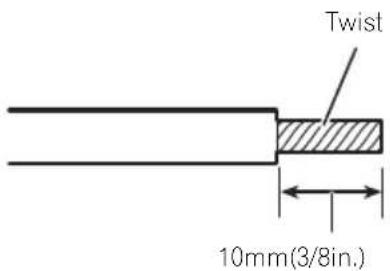
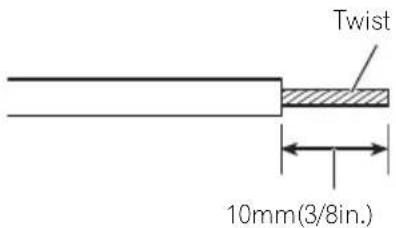
2Usewirecuttersorautilityknifeto striptheendofthebatterywire,ground wireandsystemremotecontrolwiretoexposeabout10mm(3/8in.)oftheendof eachofthewires,andthentwisttheexposedendsofthewires.
3Connectthewirestotheterminal.
Fixthewiressecurelywiththeterminal screws.
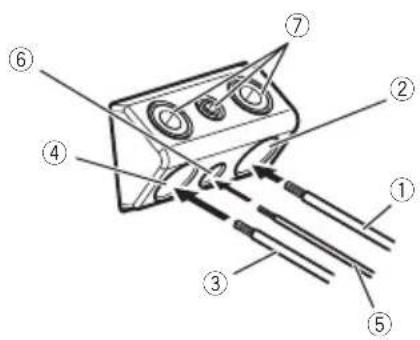
①Batterywire
②Powerterminal
③Groundwire
④Groundterminal
⑤Systemremotecontrolwire
⑥Systemremotecontrolterminal
⑦Terminalscrews
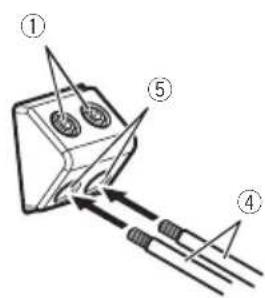
Connectingthespeaker/subwooferoutputterminals
1Usewirecuttersorautilityknifeto striptheendofthespeaker/subwoofer wirestoexposeabout10mm(3/8in.) of wireandthentwistthewire.
2Connectthespeaker/subwooferwires tothespeaker/subwooferoutputterminals.
Fixthewiressecurelywiththeterminal screws.
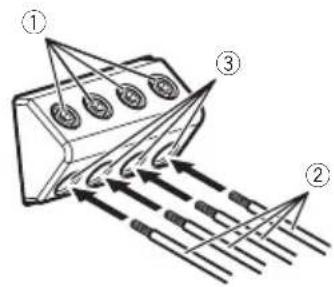
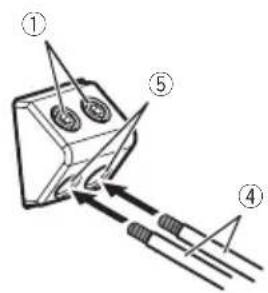
①Terminalscrews
Tightenthescrewswitha1.5mm(1/8in.) hexagonalwrenchforterminalscrewsof thespeakeranda3mm(1/8in.)hexagonal wrenchforterminalscrewsofthesubwoofer.
②Speakerwires
③Speakeroutputterminals
④Subwooferwires
⑤Subwooferoutputterminals

Beforeinstallingtheamplifier
WARNING
- Toensureproperinstallation, usethesupplied partsinthemannerspecified. Ifanyparts otherthanthosesuppliedareused, they may damage internal partsoftheamplifier, orbecomeloosecausingtheamplifiertoshut down.
- Donotinstallin:
—Placeswhereitcouldinjurethedriveror passengersifthevehiclestopssuddenly. —Placeswhereitmayinterferewiththedriver,suchasonthefloorinfrontofthedriver'sseat.
- Installtappingscrewsinsuchawaythatthe screwtipdoesnottouchanywire. This is important to prevent wires from being cut by vibration of the car, which can result in fire.
- Makesurethatwiresdonotgetcaughtinthe slidingmechanismoftheseatsortouchthe legsofapersoninthevehicleasshort-circuit mayresult.
- Whendrillingtoinstalltheamplifier,always confirmnopartsarebehindthepaneland protectallcablesandimportantequipment (e.g.fuel/brakelines,wiring)fromdamage.
CAUTION
- Toensureproperheatdissipationoftheamplifier,ensurethefollowingduringinstallation: —Allowadequatespaceabovetheamplifier forproperventilation. —Donotcovertheamplifierwithafloormat orcarpet.
- Placeallcablesawayfromhotplaces,such asneartheheateroutlet.
- The optimal installation location differs depending on the car model. Secure the amplifier at sufficient rigidity location.
- Checkallconnectionsandsystemsbefore finalinstallation.
- Afterinstallingtheamplifier,confirmthatthe spare tire,jackandtoolscanbeeasilyremoved.
AttachingtheBassboost remotecontrol
Attachwithtappingscrews(3mm×10mm (1/8in.×3/8in.))ataneasilyaccessiblelocationsuchasunderthedashboard.
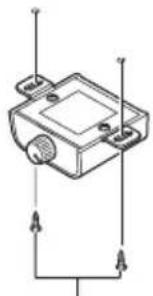
natural_image
Pure electrical circuit lines without any symbolsTappingscrews(3mm×10mm(1/8in.×3/8in.))

Exampleofinstallationon thefloormatorchassis
1Placetheamplifierinthedesiredinstallationlocation.
Insertthesuppliedtappingscrews(4mm×18mm(1/8in.×3/4in.))intothescrewholes andpushonthescrewswithascrewdriverso theymakeanimprintwheretheinstallation holesaretobelocated.
2Drill2.5mm(1/8in.)diameterholesat theimprintseitheronthecarpetordirectly onthechassis.
3Installtheamplifierwiththeuseof suppliedtappingscrews(4mm×18mm (1/8in.×3/4in.)).
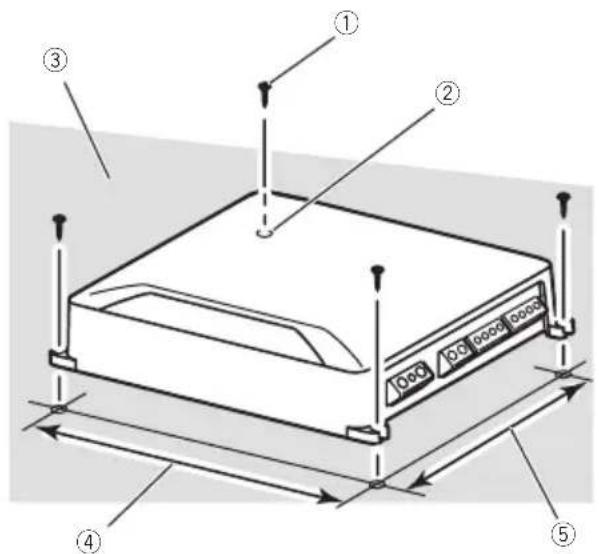
①Tapping-screws(4mm×18mm(1/8in.×3/4in.))
②Drilla2.5mm(1/8in.)diameterhole
③Floormatorchassis
④Hole-to-holedistance:307mm(11-5/8in.)
⑤Hole-to-holedistance:181mm(7-1/8in.)

Additionalinformation
Specifications
Powersource....14.4VDC(10.8Vto15.1V allowable)
Groundingsystem......Negativetype
Currentconsumption.....55A(atcontinuouspower, 4Ω)
Averagecurrentconsumption 6A (4Ω)
Fuse....30A×3
Dimensions(W×H×D)...315mm×60mm×200mm (1ft.×2-3/8in.×7-7/8in.)
Weight....3.2kg(Leadsforwiringnot included)
Maximumpoweroutput.....150W×4+700W(4Ω). 200W×4+1200W(2Ω) (2000WTOTAL)
Continuouspoweroutput...75W×4+350W(at14.4V, 4Ω) 200W×2+350W(at 14.4V,4Ω) 100W×4+600W(at 14.4V,2Ω)
Load impedance ....4Ω (2Ω to 8Ω allowable)
Frequencyresponse:
A/BCH:10Hzto50kHz
SUBCH:10Hzto500Hz
Signal-to-noiseratio....94dB(IEC-Anetwork)
Distortion....0.05%(10W,1kHz)
Lowpassfilter:
(A/BCH)
Cutofffrequency.....40Hzto500Hz
Cutoffslope....-12dB/oct
(SW)
Cutofffrequency.....40Hzto500Hz
Cut off slope ....-12 dB/oct, -24 dB/oct
Highpassfilter:
(A/BCH)
Cutofffrequency.....40Hzto500Hz
Cutoffslope....-12dB/oct
Bassboost:
(SW)
Frequency.....50Hz
Level.....0dBto18dB
Gaincontrol:
RCA....200mVto6.5V
Speaker....0.8Vto16V
Maximum input level/impedance:
RCA....6.5V/25kΩ
Speaker.....16V/12kΩ
CEA2006Specifications

Poweroutput....75WRMS×4+350W×1
RMS(4Ωand≤1%THD
+N)
S/Nratio....75dBA(reference:1Winto
4Ω)
Notes
- Specificationsandthedesignaresubjectto modificationswithoutnotice.
•Theaveragecurrentconsumptionisnearly themaximumcurrentconsumptionbythis unitwhenanaudiosignalisinput. Use this value when working out total current consumption by multiple power amplifiers.

Facearrière
Remarques
Remarques
Connexiondesappareils
①Gauche
②Droite
①Visdelaborne
Connexiondesappareils
natural_image
Pure electrical circuit lines without any symbolsVisautotaraudeuses(3mm×10mm)

Français
①Visautotaraudeuses(4mm×18mm)
②Percezuntroude2,5mmdediamètre.
③Tapisdesolouchâssis
④Distanceentrelestrous:307mm
⑤Distanceentrelestrous:181mm

Pentedecoupure.....-12dB/octave
Pentedecoupure.....-12dB/octave
Accentuation des graves:
Puissancedesortie....75WRMS×4+350W×1 RMS(4Ωet≤1%DHT+B)
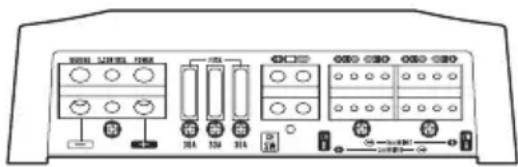
Partetrasera
Notas
Notas
①Cabledebatería
②Terminaldepotencia
③Cabledepuestaatierra
④Terminaldepuestaatierra
⑤Cabledecontroladistanciadelsistema
⑥Terminaldecontroladistanciadelsistema
⑦Tornillosparaterminales
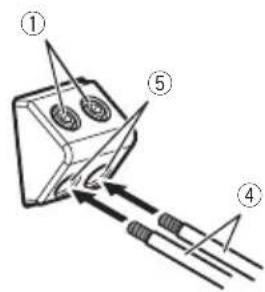
①Tornillosparaterminales Aprietelostornillosconunallavehexagonalde1,5mm(1/8pulg.)paratornillosparaterminalesdelaltavozyunallavehexagonalde3mm(1/8pulg.)paratornillosparaterminalesdelaltavozdesubgraves.
②Cablesdelaltavoz
③Terminalesdesalidadelaltavoz
④Cablesdelaltavozdesubgraves
⑤Terminalesdesalidadelaltavozde subgraves ■
Antesdeinstalarel amplificador

ADVERTENCIA
natural_image
Pure electrical circuit lines without any symbolsTornillosderoscacortante(3mm×10mm)

Potenciadesalida....75WRMS×4+350W×1 RMS(4Ωy≤1%THD+N)
natural_image
Pure electrical circuit lines without any symbols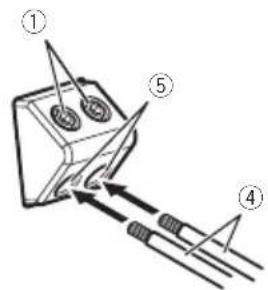
فارطلااطبرهيم
^F
② اقفرط
رکلیس
④ الصرف الأرضي
① الصرف الموجب
ت嫁 رایسیلی و تد
ةعامى١٢٣رخ
③ عَلَمْفُولِط
①
②نيم
A ③ خرج rmsاعة
B ④ خرج السماعة
①
②نيم
لاحظات
لاحظات
natural_image
Pure electrical circuit lines without any symbols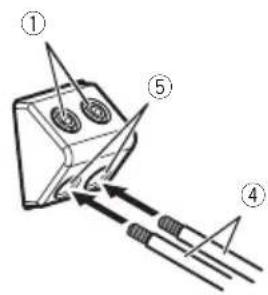
① بیچ های پاینه
① سيم باتری
② پایانه برق
③ سيم اتصال به زمین
نایا (٣) نطه
( يُحْتَفِّا 1 د جت ر و صُم١١٥١)
①
②
③ خروجی سابووفر
G E C
تاكذ
الجBOB##ر فيش
کنامجید ت بلمطیزف
نکا
حلك يل ٣ اهم
G E C B
الشام سد ق
SPINPUT ⑤
Visit us on the World Wide Web at
http://www.pioneer.com.au/
Pioneer Electronics Asiacentre.Pte
Pioneer (HK) Ltd.
Pioneer High Fidelity Taiwan Co., Ltd.
http://www.pioneer.com.sg
http://www.pioneerhongkong.com.hk
http://www.pioneer-twn.com.tw
Pioneer International Latin America S.A.
http://www.pioneer-latin.com
PIONEERCORPORATION
1-1, Shin-ogura, Saiwai-ku, Kawasaki-shi,
Kanagawa212-0031, JAPAN
PIONEERELECTRONICS(USA)INC.
P.O.Box1540,LongBeach,California90801-1540,U.S.A.
TEL:(800)421-1404
PIONEEREUROPENV
Haven1087, Keetberglaan1, B-9120Melsele, Belgium/Belgique
TEL:(0)3/570.05.11
PIONEERELECTRONICSASIACENTREPTE.LTD.
253AlexandraRoad,#04-01,Singapore159936
TEL:65-6472-7555
PIONEERELECTRONICSAUSTRALIAPTY.LTD.
5ArcoLane,Heatherton,Victoria,3202Australia
TEL:(03)9586-6300
PIONEERELECTRONICSDEMEXICOS.A.deC.V.
Blvd.ManuelAvilaCamacho13810piso
Col.LomasdeChapultepec,Mexico,D.F.11000
TEL:52-55-9178-4270
FAX:52-55-5202-3714
先锋股份有限公司
台北市內湖區瑞光路407號8樓
電話:886-(0)2-2657-3588
先鋒電子(香港)有限公司
香港九龍長沙灣道909號5樓
電話:852-2848-6488
©2015PIONEERCORPORATION.
Allrightsreserved.
©2015PIONEERCORPORATION.
Tousdroitsréservés.


- ThankyouforpurchasingthisPIONEER product
- Visitourwebsite
- InformationtoUser
- Note
- The Safety of Your Earsisin Your Hands
- ESTABLISHASAFELEVEL:
- BESURETOOBSERVETHEFOLLOWING GUIDELINES:
- Ifyouexperienceproblems
- Beforeconnecting/ installingtheamplifier
- WARNING
- CAUTION
- About the protection function
- Componentnamesand functions
- ①FREQ(cutofffrequency)control
- ②LPF(low-passfilter)/HPF(high-passfilter)selectswitch
- ③GAIN(gain)control
- ④2CH-4CHINPUTSELECT(inputselect) switch
- ⑤SPINPUT(speakerinput)terminal
- ⑥POWER/PROTECTindicator
- ⑦A/B-SWINPUTSELECT(inputselect) switch
- ⑧SLOPE(slope)selectswitch
- ⑨BB-REMOTE(bassboostlevelremote control)jack
- Settinggainproperly
- Gaincontrolofthisunit
- Relationshipbetweenamplifiergain andheadunitoutputpower
- Signalwaveformwhenoutputtingat highvolumeusingamplifiergain control
- Connectiondiagram
- Beforeconnectingthe amplifier
- Aboutbridgedmode
- Aboutsuitable specificationofspeaker
- Subwoofer
- Connectingthecarstereo
- CH-Ainput(Two-channelinput)
- Notes
- CH-ACH-Binput(Four-channel input)
- CH-ACH-SInput
- CH-ACH-BCH-SInput
- Connectingthespeakers
- Five-channeloutput
- Three-channeloutput(Stereo bridge)
- Connectionswhenusing thespeakerinputwire
- Solderlessterminal connections
- Connecting the power terminal
- 1Routebatterywirefromenginecompartmenttothevehicleinterior.
- 3Connectthewirestotheterminal.
- Connectingthespeaker/subwooferoutputterminals
- 2Connectthespeaker/subwooferwires tothespeaker/subwooferoutputterminals.
- Beforeinstallingtheamplifier
- AttachingtheBassboost remotecontrol
- Exampleofinstallationon thefloormatorchassis
- 1Placetheamplifierinthedesiredinstallationlocation.
- Additionalinformation
- Specifications
- (A/BCH)
- (SW)
- CEA2006Specifications
- Remarques
- Connexiondesappareils
- Notas
- Antesdeinstalarel amplificador
- ADVERTENCIA
- SPINPUT ⑤
- PIONEERCORPORATION
Brand : PIONEER
Model : GMD9605
Category : AV receiver