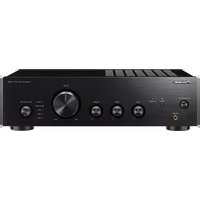
A-10EB - AV receiver PIONEER - Free user manual and instructions
Find the device manual for free A-10EB PIONEER in PDF.



| Brand | Pioneer |
| Model | A-10EB |
| Product Type | Integrated stereo audio-video receiver |
| Rated Output Power | 2 × 60 W (4 Ω, 1 kHz, 0.9% THD) / 2 × 43 W (8 Ω, 1 kHz, 0.9% THD) |
| Input Sensitivity (LINE) | 200 mV / 47 kΩ |
| Input Sensitivity (PHONO MM) | 4 mV / 47 kΩ |
| Frequency Response (DIRECT) | 10 Hz - 100 kHz (+1 dB, -3 dB) |
| Signal-to-Noise Ratio (LINE IN) | 103 dB (IHF-A) |
| Supported Speaker Impedance | 4 Ω - 16 Ω |
| Supported Headphone Impedance | 8 Ω - 600 Ω |
| Power Supply | AC 220-230 V, 50/60 Hz |
| Power Consumption | 130 W (operation), 0.2 W (standby) |
| Audio Inputs | LINE IN (3 pairs), PHONO MM |
| Audio Outputs | SPEAKERS L/R (screw terminals), PHONES (6.3 mm) |
| Line Output | LINE OUT (for recording) |
| Main Functions | DIRECT mode, Loudness, BASS/TREBLE control, Balance, Auto standby |
| Protection | Protection circuit against short-circuits and overheating |
| Operating Temperature | +5 °C to +35 °C |
| Operating Humidity | Less than 85% RH |
| Cleaning | Wipe with a soft, dry cloth. Do not use chemical agents. |
| Repairability | No user-serviceable parts. Refer to qualified personnel. |
Frequently Asked Questions - A-10EB PIONEER
User questions about A-10EB PIONEER
0 question about this device. Answer the ones you know or ask your own.
Ask a new question about this device
Download the instructions for your AV receiver in PDF format for free! Find your manual A-10EB - PIONEER and take your electronic device back in hand. On this page are published all the documents necessary for the use of your device. A-10EB by PIONEER.
USER MANUAL A-10EB PIONEER
Table of Contents What's in the box
Before use
What's in the box 2
Safety Information.... 3
Part Names .... 5
Front Panel 5
Rear Panel 6
Preparations
Setup and connection ...... 7
Connecting Speakers....7
Connecting players (LINE IN connection) ...... 8
Connecting players (Turntable connection) ..... 8
Power Cord Hookup....9
Before play 10
Turn on the power of the unit 10
Speaker impedance settings 10
Basic Operations
Playback ....11
Switching input and adjusting the volume .....11
Using the Direct Function ....11
Adjusting the sound quality and balance ..... 12
Others
Useful functions 13
Setting auto standby 13
Troubleshooting 14
Specifications 16
natural_image
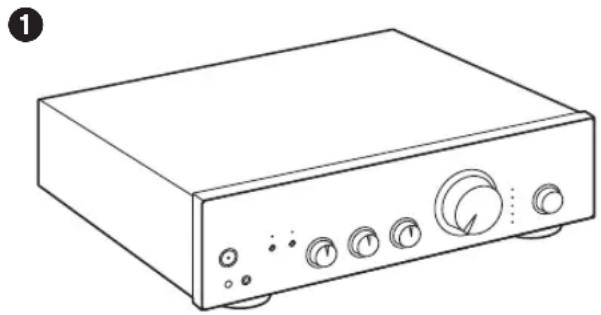
Line drawing of a rectangular electronic device with control knobs and buttons (no text or symbols)- Main unit (1)
• Instruction Manual (This document)
- Connect speakers with 4 to 16 impedance.
- The power cord must be connected only after all other cable connections are completed.
- We will not accept responsibility for damage arising from the connection of equipment manufactured by other companies.
- Specifications and appearance are subject to change without prior notice.
Safety Information

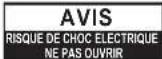


The lightning flash with arrowhead symbol, within an equilateral triangle, is intended to alert the user to the presence of uninsulated "dangerous voltage" within the product's enclosure that may be of sufficient magnitude to constitute a risk of electric shock to persons.

The exclamation point within an equilateral triangle is intended to alert the user to the presence of important operating and maintenance (servicing) instructions in the literature accompanying the appliance.
CAUTION:
TO PREVENT THE RISK OF ELECTRIC SHOCK, DO NOT REMOVE COVER (OR BACK). NO USER-SERVICEABLE PARTS INSIDE. REFER SERVICING TO QUALIFIED SERVICE PERSONNEL.
WARNING
TO PREVENT THE RISK OF ELECTRIC SHOCK, DO NOT REMOVE COVER (OR BACK). NO USER-SERVICEABLE PARTS INSIDE. REFER SERVICING TO QUALIFIED SERVICE PERSONNEL.
This equipment is not waterproof. To prevent a fire or shock hazard, do not place any container filled with liquid near this equipment (such as a vase or flower pot) or expose it to dripping, splashing, rain or moisture.
To prevent a fire hazard, do not place any naked flame sources (such as a lighted candle) on the equipment.
Store small parts out of the reach of children and infants. If accidentally swallowed, contact a doctor immediately.
Slots and openings in the cabinet are provided for ventilation to ensure reliable operation of the product, and to protect it from overheating. To prevent fire hazard, the openings should never be blocked or covered with items (such as newspapers, tablecloths, curtains) or by operating the equipment on thick carpet or a bed.
Precautions
If you install the apparatus in a built-in installation, such as a bookcase or rack, ensure that there is adequate ventilation.
Leave 20 cm (8") of free space at the top and sides and 10 cm (4") at the rear. The rear edge of the shelf or board above the apparatus shall be set 10 cm (4") away from the rear panel or wall, creating a flue-like gap for warm air to escape.
Operating Environment
Operating environment temperature and humidity: +5 °C to +35 °C (+41 °F to +95 °F); less than 85 %RH (cooling vents not blocked)
Do not install this unit in a poorly ventilated area, or in locations exposed to high humidity or direct sunlight (or strong artificial light).
Important Notice
The model number and serial number of this equipment are on the rear or bottom. Record these numbers on your enclosed warranty card and keep in a safe place for future reference.
CAUTION
The power switch on this unit will not completely shut off all power from the AC outlet. Since the power cord serves as the main disconnect device for the unit, you will need to unplug it from the AC outlet to shut down all power. Therefore, make sure the unit has been installed so that the power cord can be easily unplugged from the AC outlet in case of an accident. To avoid fire hazard, the power cord should also be unplugged from the AC outlet when left unused for a long period of time (for example, when on vacation).
This product is for general household purposes. Any failure due to use for other than household purposes (such as long-term use for business purposes in a restaurant or use in a car or ship) and which requires repair will be charged for even during the warranty period.
Power-Cord Caution
Handle the power cord by the plug. Do not pull out the plug by tugging the cord and never touch the power cord when your hands are wet as this could cause a short circuit or electric shock. Do not place the unit, a piece of furniture, etc., on the power cord, or pinch the cord. Never make a knot in the cord or tie it with other cords. The power cords should be routed such that they are not likely to be stepped on. A damaged power cord can cause a fire or give you an electrical shock. Check the power cord once in a while. When you find it damaged, ask your nearest our authorized service center or your dealer for a replacement.
For European models
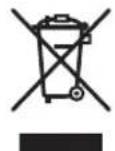
Information for users on collection and disposal of old equipment and used batteries
(Symbol for equipment)
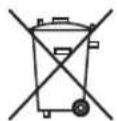
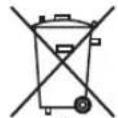
Symbol examples for batteries
Pb
These symbols on the products, packaging, and/or accompanying documents mean that used electrical and electronic products and batteries should not be mixed with general household waste.
For proper treatment, recovery and recycling of old products and used batteries, please take them to applicable collection points in accordance with your national legislation.
By disposing of these products and batteries correctly, you will help to save valuable resources and prevent any potential negative effects on human health and the environment which could otherwise arise from inappropriate waste handling.
For more information about collection and recycling of old products and batteries, please contact your local municipality, your waste disposal service or the point of sale where you purchased the items.
These symbols are only valid in the European Union. For countries outside the European Union:
If you wish to discard these items, please contact your local authorities or dealer and ask for the correct method of disposal.
WEEE
http://www.onkyo.com/manual/weee/weee.pdf
Part Names
Front Panel
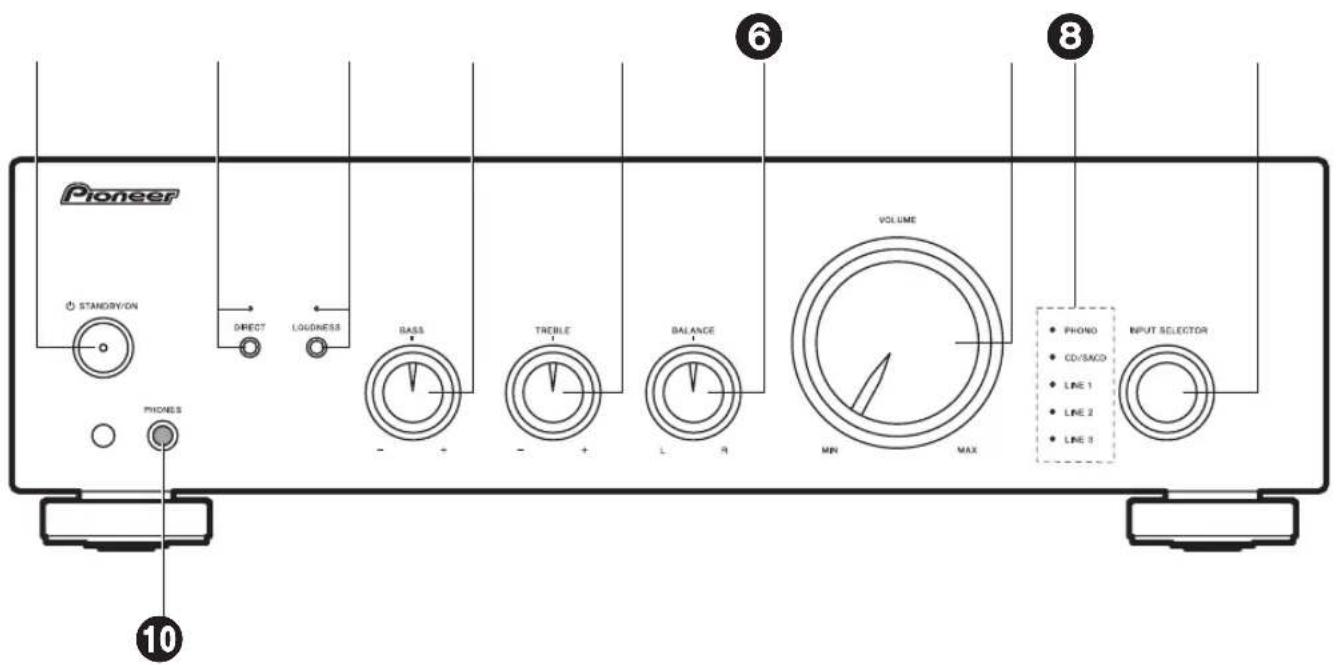
- ⏻ STANDBY/ON button
- DIRECT button/indicator: Switch the DIRECT mode on and off. The indicator lights when the DIRECT mode is on. (→p11)
- LOUDNESS button/indicator: Switch the LOUDNESS mode on and off. The indicator lights when the LOUDNESS mode is on. (→p12)
- BASS -/+ controller: Enhance or moderate the bass range of the speakers. (→p12)
- TREBLE -/+ controller: Enhance or moderate the treble range of the speakers. (→p12)
- BALANCE L/R controller: Adjust the left/right audio balance. (→p12)
- VOLUME controller
- Input source indicators: The indicator corresponding to the selected input source lights.
- INPUT SELECTOR dial: Switches the input source to be played.
- PHONES jack: Connect stereo headphones with a standard plug (∅1/4"/6.3 mm diameter).
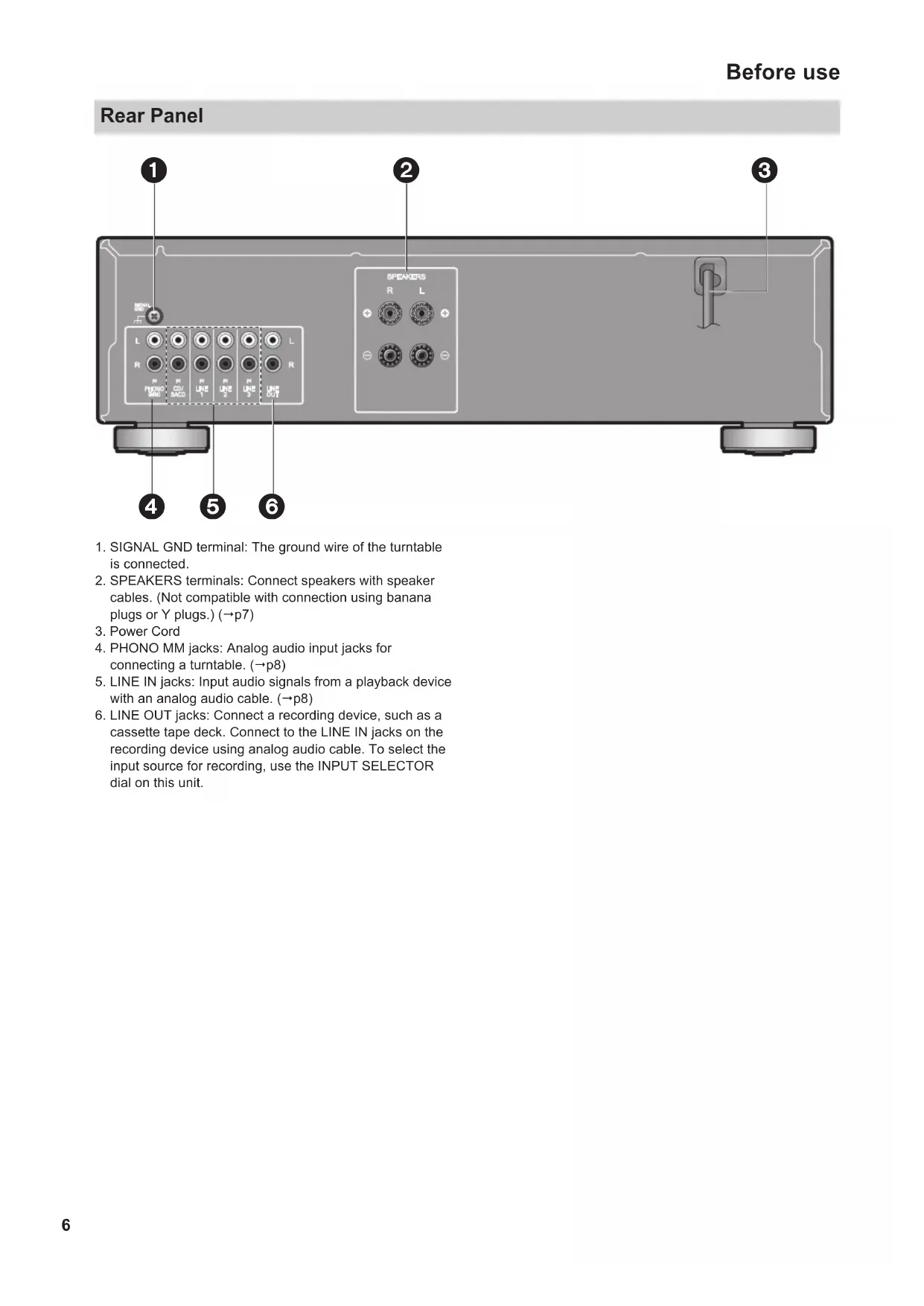
Rear Panel
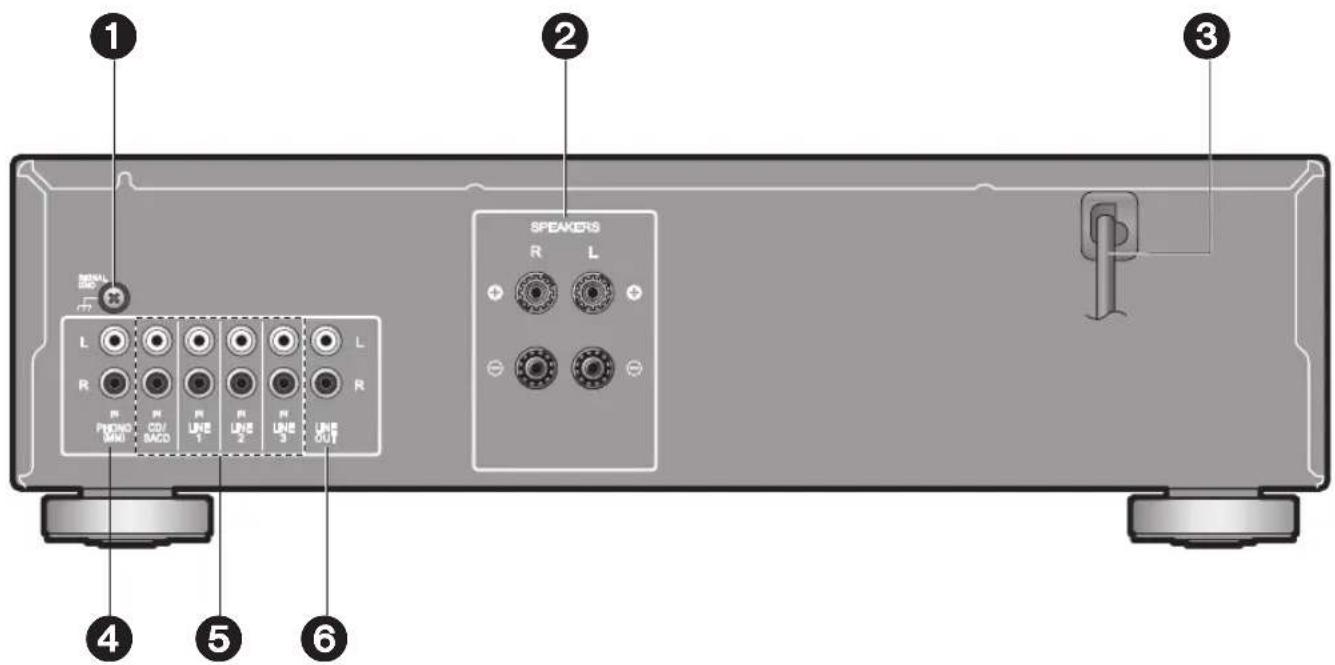
- SIGNAL GND terminal: The ground wire of the turntable is connected.
- SPEAKERS terminals: Connect speakers with speaker cables. (Not compatible with connection using banana plugs or Y plugs.) ( p7)
- Power Cord
- PHONO MM jacks: Analog audio input jacks for connecting a turntable. (→p8)
- LINE IN jacks: Input audio signals from a playback device with an analog audio cable. ( p8)
- LINE OUT jacks: Connect a recording device, such as a cassette tape deck. Connect to the LINE IN jacks on the recording device using analog audio cable. To select the input source for recording, use the INPUT SELECTOR dial on this unit.
Setup and connection
Connecting Speakers
a Speaker Cable

(Note) Speaker Impedance
Connect speakers with 4 Ω to 16 Ω impedance.
- Setup: You have to change the setting on this unit if any of the connected speakers have 4 Ω or more to less than 8 Ω impedance. Change the speaker impedance setting to 4 Ω. (→p10)
Connect the Speaker Cables
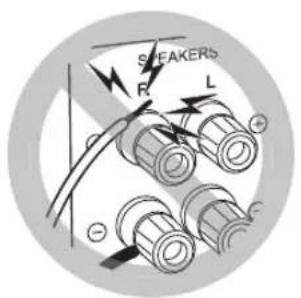
Make correct connection between the unit's jacks and speaker's jacks (+ side to + side, and - side to - side) for each channel. If the connection is wrong, a bass sound will not be reproduced properly due to reverse phase. Twist the wires exposed from the tip of the speaker cable so that the wires do not stick out of the speaker terminal when connecting. If the exposed wires touch the rear panel, or the + side and - side wires touch each other, the protection circuit will be activated.
Connecting players (LINE IN connection)
a Analog Audio Cable
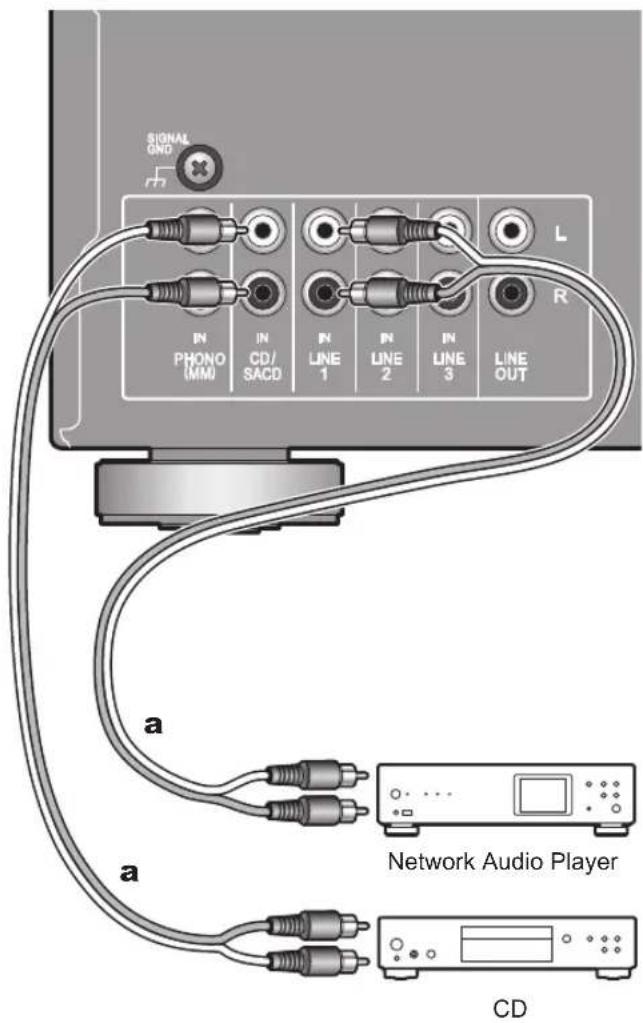
Connect a playback device with an analog audio cable.
Connecting players (Turntable connection)
a Analog Audio Cable
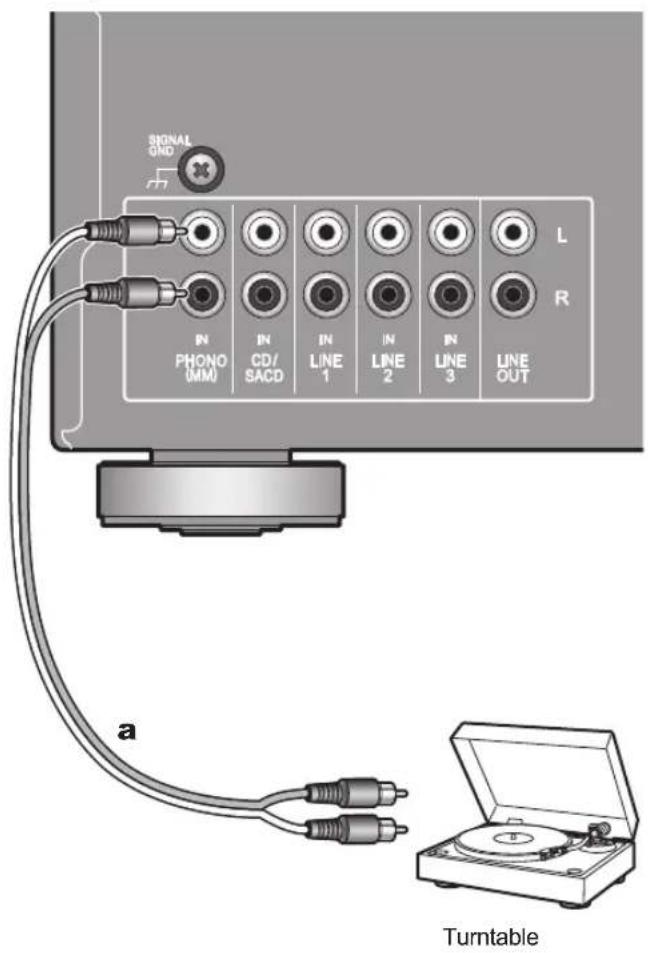
You can connect a turntable that has an MM-type cartridge to the PHONO jack. Use an analog audio cable to connect a turntable.
If the turntable has a ground wire, connect it to the SIGNAL GND terminal. With some turntables, connecting the ground wire may cause hum, in which case it should be disconnected.
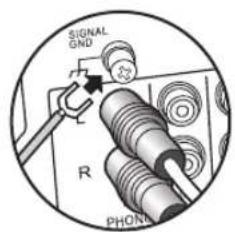
- If the turntable has a built-in audio equalizer, connect it to an LINE IN jack other than the PHONO jack. Also, if the turntable uses an MC type cartridge, install an audio equalizer compatible with the MC type cartridge between the unit and the turntable, then connect to any LINE IN jack other than the PHONO jack.
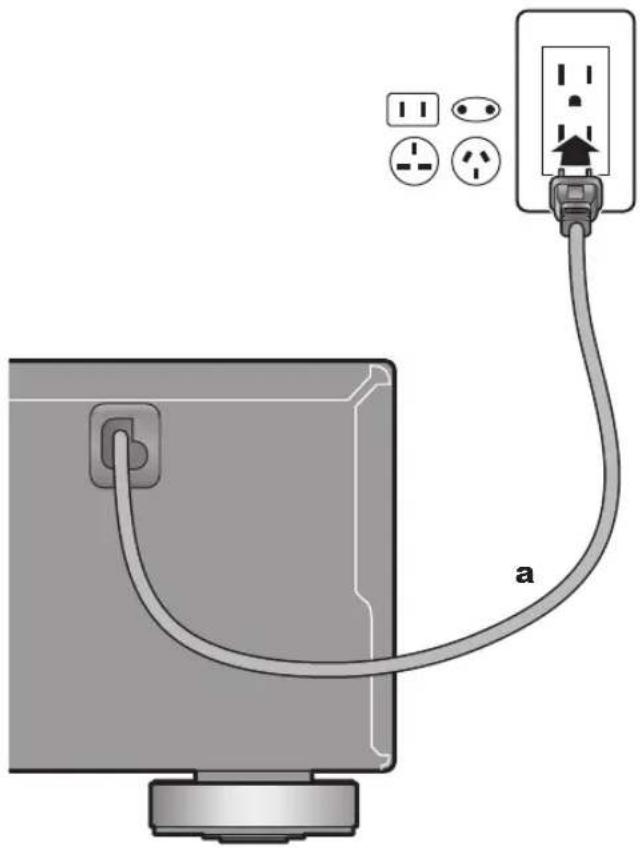
Power Cord Hookup
a Power Cord
natural_image
Diagram of a cable being inserted into a computer monitor, showing connections to an electrical outlet (no text or symbols present)The power cord must be connected only after all other connections are completed.
Before play
Turn on the power of the unit
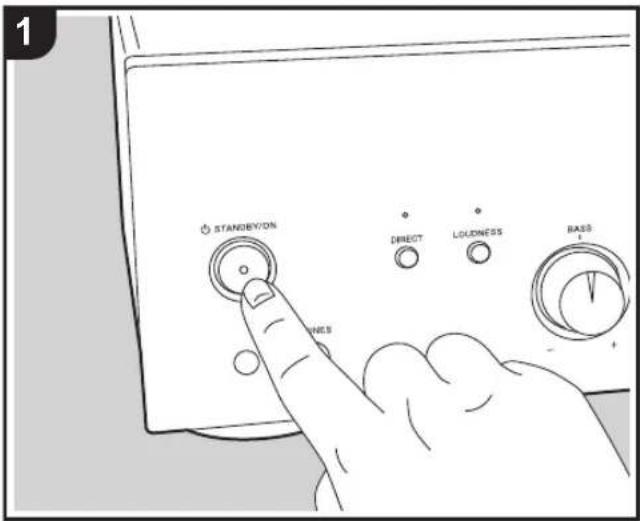
Press ⏻ STANDBY/ON on this unit.
Speaker impedance settings
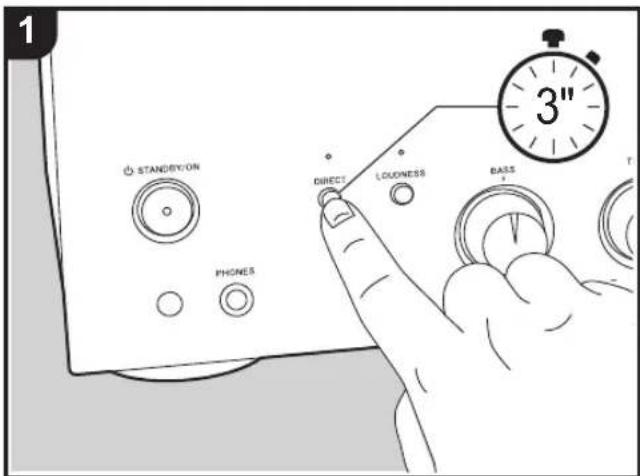
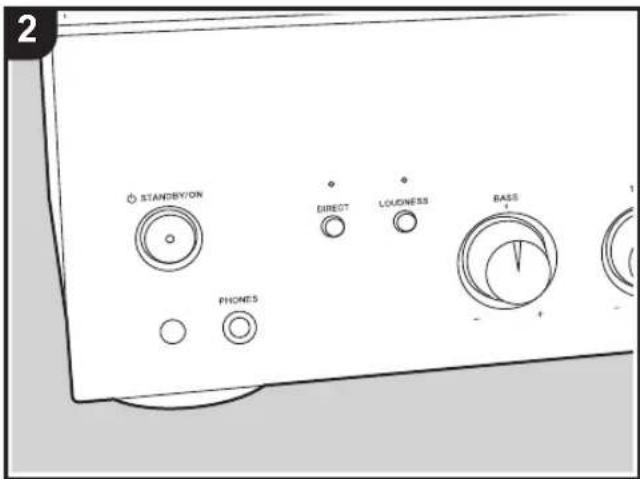
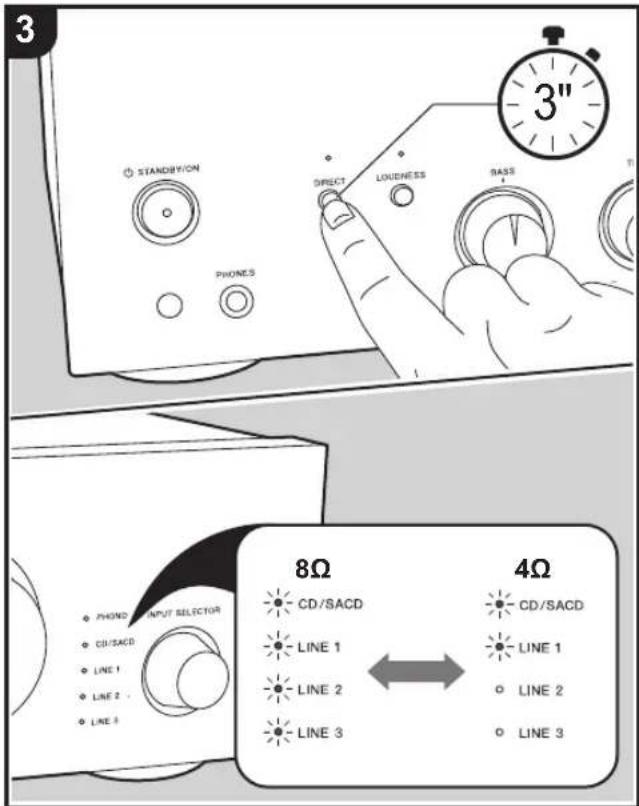
Depending on the speakers you connect, you may need to change the speaker impedance setting on this unit. Refer to the page describing speaker connection ( p7), and do the following procedures if the change is required.
- Press and hold DIRECT until some indicators, such as the input source indicators "CD/SACD" and "LINE 1", start blinking on the unit.
- The unit has switched to the setting mode when the indicators blink and the current setting is displayed.
-
Take your finger off DIRECT for a moment.
-
Press and hold DIRECT again to change the setting. The following content switches alternately by pressing and holding the button.
- 4 Ω: "CD/SACD" and "LINE 1" indicators are blinking - 8 Ω (default value): "CD/SACD", "LINE 1", "LINE 2", and "LINE 3" indicators are blinking
- The setting mode ends after 5 seconds elapse with no operations performed.
Playback
Switching input and adjusting the volume
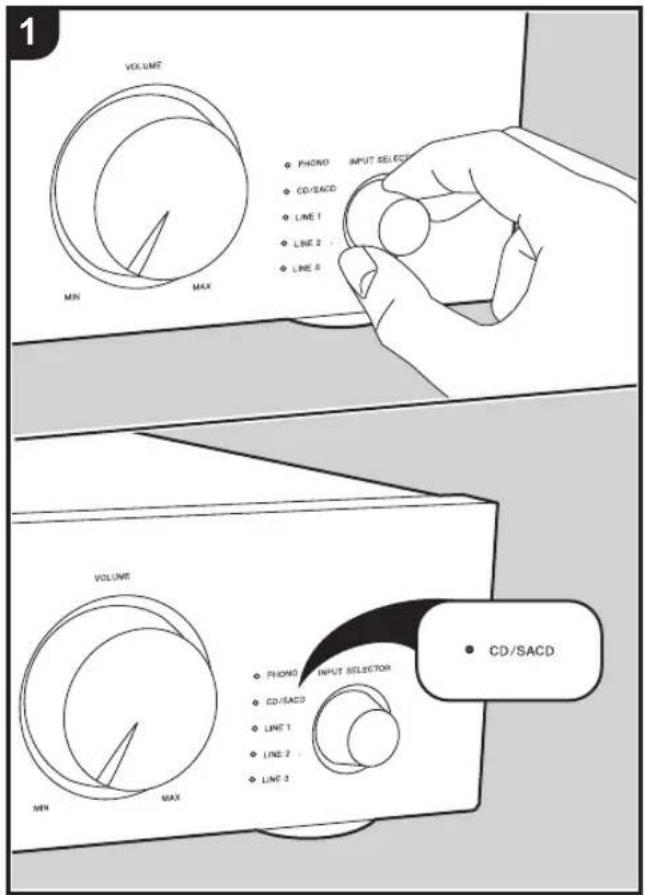
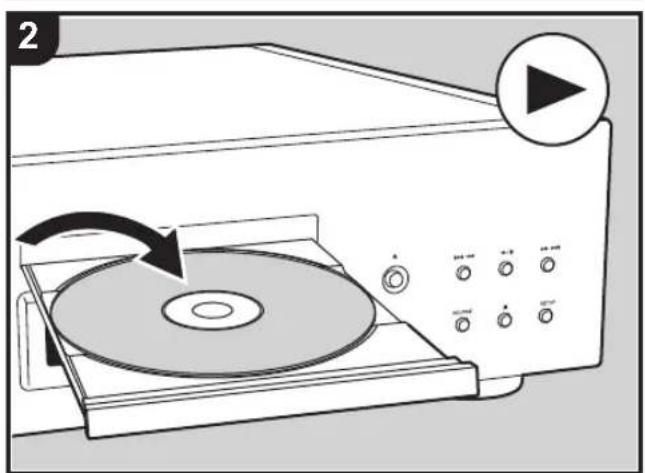
natural_image
Diagram of a CD/DVD machine with an arrow indicating rotation, showing no text or symbols on the device itself.Perform the following procedure when the unit is on.
- Turn the INPUT SELECTOR dial to switch to the input with the same name as the jack to which you have connected the player.
For example, select CD/SACD to play the device connected to the CD/SACD jack.
• The indicator for the selected input source lights.
- Start play on the connected player.
- Adjust the volume with the VOLUME controller.
Using the Direct Function
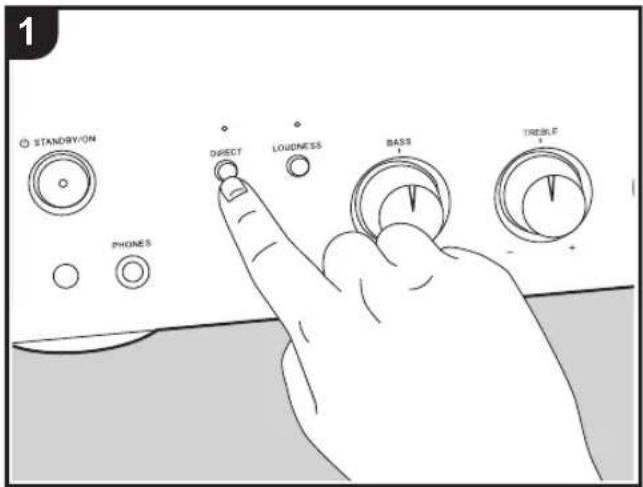
When you turn the DIRECT feature on, the unit bi-passes the tone control circuits that adjust the bass and treble, taking the shortest route which favors sound quality.
- LOUDNESS/BASS/TREBLE (→p12) cannot be adjusted when DIRECT mode is on.
- Press DIRECT on the main unit to switch on or off. The DIRECT indicator lights when on.
Adjusting the sound quality and balance
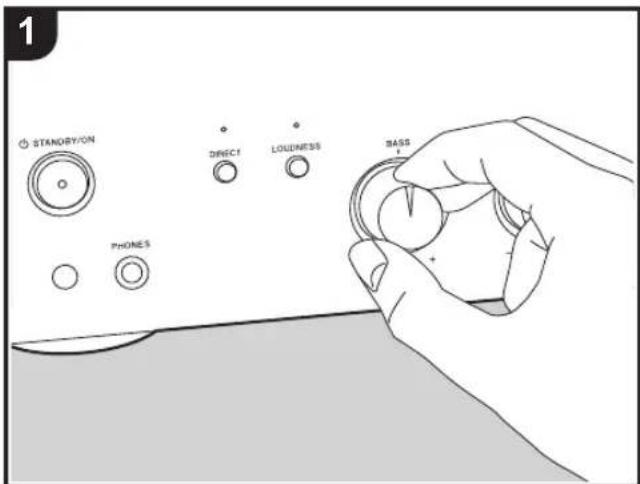
LOUDNESS
When the LOUDNESS function is on, the bass and treble are emphasized to enable powerful playback audio even at low volumes.
- This cannot be set when DIRECT (→p11) is on (default value). Press DIRECT to turn the DIRECT indicator off before operating. Note that the LOUDNESS setting reverts to the previous setting when the DIRECT function is turned off.
- Press LOUDNESS on the main unit to switch on or off. The LOUDNESS indicator lights when on.
BASS
- This cannot be set when DIRECT (→p11) is on (default value). Press DIRECT to turn the DIRECT indicator off before operating.
- Turn the BASS -/+ controller to enhance or moderate the bass.
TREBLE
- This cannot be set when DIRECT (→p11) is on (default value). Press DIRECT to turn the DIRECT indicator off before operating.
- Turn the TREBLE -/+ controller to enhance or moderate the treble.
BALANCE
- Turn the BALANCE L/R controller on the main unit to adjust the balance of the sounds output from the left and right speakers.
Useful functions
Setting auto standby
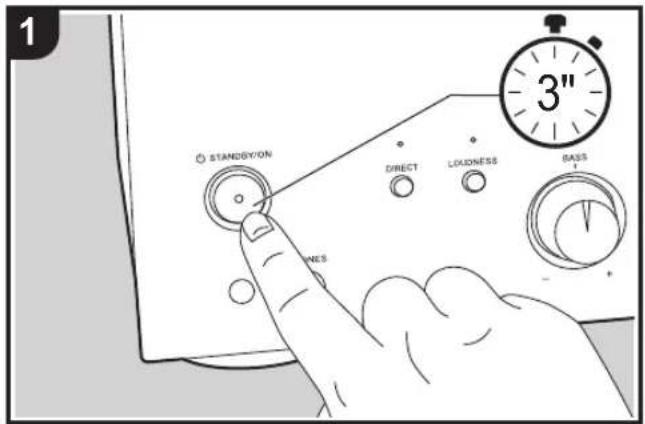

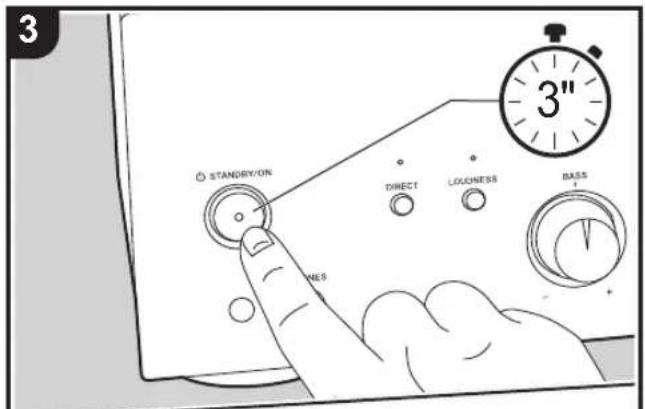
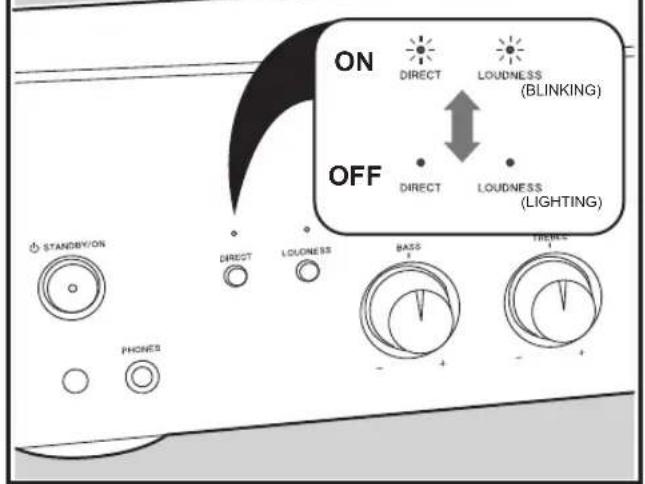
When automatic standby is on, the unit automatically switches to standby mode after 20 minutes of no audio input without any operations.
- Press and hold ⏻ STANDBY/ON on the main unit until the "DIRECT" and "LOUDNESS" indicators either blink or light.
- The unit has switched to the setting mode when the indicators blink or light and the current setting is displayed.
- Take your finger off ⏻ STANDBY/ON for a moment.
- Switch auto standby on or off by pressing and holding ⏻ STANDBY/ON again.
- On (default value): "DIRECT" and "LOUDNESS" indicators are blinking
- Off: "DIRECT" and "LOUDNESS" indicators light
- The setting mode ends after 5 seconds elapse with no operations performed.
- 60 seconds before switching to standby mode, the input source indicator for the currently selected source starts blinking.
- Depending on the connected device, the auto standby feature may not engage due to factors such as noise.

Troubleshooting
Before starting the procedure
Problems may be solved by simply turning the power on/off or disconnecting/connecting the power cord, which is easier than working on the connection, setting and operating procedure. Try the simple measures on both the unit and the connected device. After reconnecting, turn off and on the unit and the connected device.
- This unit contains a microPC for signal processing and control functions. In very rare situations, severe interference, noise from an external source, or static electricity may cause it to lockup. In the unlikely event that this happens, unplug the power cord from the wall outlet, wait at least 5 seconds, and then plug it back in.
- We are not responsible for reparations for damages (such as CD rental fees) due to unsuccessful recordings caused by the unit's malfunction. Before you record important data, make sure that the material will be recorded correctly.
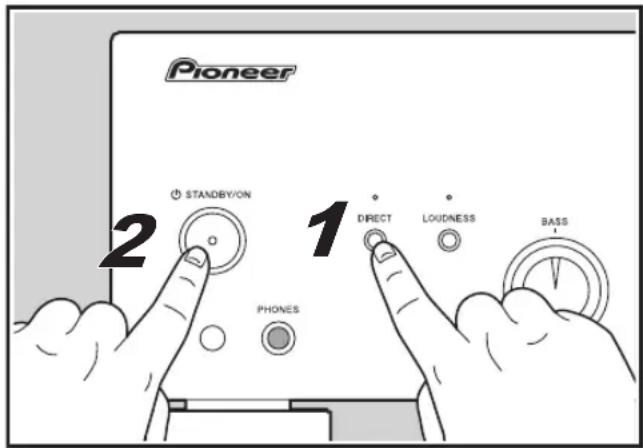
■ Resetting the unit (this resets the unit settings to the default)
Resetting the unit to the status at the time of shipment may solve the problem. If the unit is reset, your settings are restored to the default values. Be sure to note down your setting contents before performing the following operations.
- While the power is on, press ⏻ STANDBY/ON while pressing DIRECT.
Power
■ Cannot turn on the unit
- Make sure that the power cord is properly plugged into the wall outlet.
- Unplug the power cord from the wall outlet, wait 5 seconds or more, then plug it in again.
■ The unit turns off unexpectedly
- The unit automatically enters standby mode when auto standby ( p13) is activated.
- A speaker cable may have shorted and the protective circuit function may have been activated. Make sure bare
speaker wires are not touching each other or the back panel of the unit, then turn the unit on again. If this unit does not turn on, immediately unplug the power cord from the wall outlet and contact your dealer.
- The protective circuit function may have been activated because the temperature of the unit rose abnormally. If this happens, then the power will continue to turn off after you have turned the unit on again. Make sure the unit has plenty of space for ventilation around it, wait for the unit to cool down sufficiently, and then try turning it on again.
WARNING: If smoke, smell or abnormal noise is produced by the unit, unplug the power cord from the wall outlet immediately and contact the dealer or customer support.
Audio
- Confirm that the connection between the output jack on the device and the input jack on this unit is correct.
- Make sure that none of the connecting cables are bent, twisted, or damaged.
- While headphones are connected to the PHONES jack, no sound is output from the speakers.
■ Audio performance
- Audio performance will be at its best about 10 to 30 minutes after the integrated amplifier has been turned on and had time to warm up.
- The sound quality can be affected by strong magnetic fields, such as those from a TV. Try moving any such devices away from the integrated amplifier.
- If you have any devices that emit high-intensity radio waves near the integrated amplifier, such as a cellular phone that's being used to make a call, the integrated amplifier may output noise.
- Install the integrated amplifier on a sturdy rack or shelf. Position it so that its weight is evenly dispersed on its four insulators. Do not install the integrated amplifier in a place with vibration or an unstable location.
■ No sound from a connected playback device
- Change the input selector on this unit to the position of the terminal to which the playback device is connected.
■ A speaker produces no sound
- Make sure that the polarity of the speaker cables (+/-) is correct, and that no bare wires are in contact with the metal part of speaker terminals.
• Make sure that the speaker cables have not shorted. - Make sure the speakers are connected correctly. (→p7)
■ Noise can be heard
- Using cable ties to bundle analog audio cables, power cords, speaker cables, etc. may degrade the audio performance, Do not bundle cords.
- An audio cable may be picking up interference. Try repositioning your cables.
■ Headphone output is intermittent or there's no sound
- The connection part may be dirty. Clean the headphones plug. See your headphones' instruction manual for cleaning information. Also, make sure that the headphones cable is not broken or damaged.
Others
■ Strange noises can be heard from the unit
- If you have connected another unit to the same wall outlet as this unit, this noise may be an effect from the other unit. If the symptoms improve by unplugging the power cord of the other unit, use different wall outlets for this unit and the other unit.
Specifications
Amplifier (Audio) section
Rated Output Power (IEC)
2 ch × 60 W at 4 ohms, 1 kHz, 2 ch driven of 0.9% THD
2 ch × 43 W at 8 ohms, 1 kHz, 2 ch driven of 0.9% THD
Input Sensitivity and Impedance
200 mV/47 kΩ (LINE (RCA))
4 mV/47 kΩ (PHONO MM)
Phono Maximum Input Signal Voltage
70 mV (MM 1 kHz, 0.5%)
Frequency Response
10 Hz - 100 kHz/+1 dB, -3 dB (DIRECT)
Tone Control Characteristics
±10 dB, 100 Hz (BASS)
±10 dB, 10 kHz (TREBLE)
Signal to Noise Ratio
103 dB (IHF-A, LINE IN, SP OUT)
78 dB (IHF-A, PHONO IN, SP OUT)
Speaker Impedance
4 Ω - 16 Ω
Supported impedance of Headphones
8 Ω- 600 Ω
Headphones Frequency Response
30 Hz -100 kHz
General
Power Supply
AC 220-230 V, 50/60 Hz
Power Consumption
130 W
0.2 W (Stand-by)
Dimensions (W × H × D)
435 mm × 129 mm × 323 mm
17-1/8" × 5-1/16" × 12-11/16"
Weight
6.8 kg (15 lbs)
Audio Inputs
Analog
PHONO, CD/SACD, LINE1, LINE2, LINE3
Audio Outputs
Analog
LINE OUT L/R
Speaker Outputs
SPEAKERS: L/R
Phones
PHONES (∅6.3 mm)
Mode d'emploi
A-10AE
INTEGRATED AMPLIFIER
Avant l'utilisation
Préparatifs
Commandes de base
Autres
natural_image
Line drawing of a rectangular electronic device with control knobs and buttons (no text or symbols)- Appareil principal (1)
natural_image
Diagram of a cable being inserted into a computer monitor, showing connections to an electrical outlet (no text or symbols present)natural_image
Illustration of a CD/DVD machine with an arrow indicating rotation, no text or symbols present78 dB (IHF-A, PHONO IN, SP OUT)
Dimensions (L × H × P)
435 mm × 129 mm × 323 mm
17-1/8" × 5-1/16" × 12-11/16"
Poids
6,8 kg (15 livres)
Entrées audio
Analogique
PHONO, CD/SACD, LINE1, LINE2, LINE3
Sorties audio
Analogique
LINE OUT L/R
natural_image
Line drawing of a rectangular electronic device with control knobs and buttons (no text or symbols)- Unidad principal (1)
natural_image
Diagram of a cable being inserted into a computer monitor, showing connections to an electrical outlet (no text or symbols present)natural_image
Illustration of a CD-ROM being placed on a front panel with a play button (no text or symbols)78 dB (IHF-A, PHONO IN, SP OUT)
17-1/8" × 5-1/16" × 12-11/16"
Peso
6,8 kg (15 libras)
Entradas de audio
Analógico
PHONO, CD/SACD, LINE1, LINE2, LINE3
Salidas de audio
Analógico
LINE OUT L/R
Anteros Building, Odyssey Business Park, West End Road, South Ruislip, Middlesex, HA4 6QQ United Kingdom Tel: +44(0)208 836 3612
6, Avenue de Marais F - 95816 Argenteuil Cedex FRANCE Tel: +33(0)969 368 050
Register your product on / Enregistrez votre produit sur / Registre su producto en / Registrare il proprio prodotto su / Registrieren Sie hier Ihr Produkt/ Registreer uw product op / Registrera din produkt på
http://www.pioneer.eu (Europe)


- Table of Contents What's in the box
- Before use
- Preparations
- Basic Operations
- Others
- Safety Information
- CAUTION:
- WARNING
- Precautions
- Operating Environment
- Important Notice
- CAUTION
- Power-Cord Caution
- For European models
- Information for users on collection and disposal of old equipment and used batteries
- These symbols are only valid in the European Union. For countries outside the European Union:
- WEEE
- Part Names
- Front Panel
- Rear Panel
- Setup and connection
- Connecting Speakers
- (Note) Speaker Impedance
- Connect the Speaker Cables
- Connecting players (LINE IN connection)
- Connecting players (Turntable connection)
- Power Cord Hookup
- Before play
- Turn on the power of the unit
- Speaker impedance settings
- Playback
- Switching input and adjusting the volume
- Using the Direct Function
- Adjusting the sound quality and balance
- LOUDNESS
- BASS
- TREBLE
- BALANCE
- Useful functions
- Setting auto standby
- Troubleshooting
- Before starting the procedure
- ■ Resetting the unit (this resets the unit settings to the default)
- Power
- ■ Cannot turn on the unit
- ■ The unit turns off unexpectedly
- Audio
- ■ Audio performance
- ■ No sound from a connected playback device
- ■ A speaker produces no sound
- ■ Noise can be heard
- ■ Headphone output is intermittent or there's no sound
- ■ Strange noises can be heard from the unit
- Specifications
- Amplifier (Audio) section
- General
- Audio Inputs
- Audio Outputs
- Mode d'emploi
- A-10AE
- Entrées audio
- Sorties audio
- Entradas de audio
- Salidas de audio
Brand : PIONEER
Model : A-10EB
Category : AV receiver