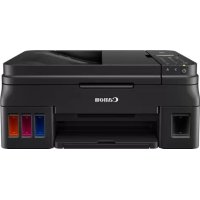
PIXMA G4511 - Printer CANON - Free user manual and instructions
Find the device manual for free PIXMA G4511 CANON in PDF.


| Product type | Inkjet multifunction printer |
| Functions | Print, copy, scan |
| Printing technology | Inkjet (refillable cartridges) |
| Number of cartridges | 2 (black and color) |
| Ink supply system | Replaceable ink tanks with bottles (MegaTank type) |
| Maximum print resolution | 4800 x 1200 dpi |
| Print speed (mono) | Approx. 11 ipm (A4, draft) |
| Print speed (color) | Approx. 6 ipm (A4, draft) |
| Maximum paper size | A4, A5, B5, Letter, envelopes |
| Paper tray capacity | 100 plain sheets |
| Display | Monochrome LCD screen, control buttons |
| Connections | Wi-Fi 802.11b/g/n, USB 2.0 Hi-Speed |
| Wireless printing | AirPrint, Canon PRINT, Google Cloud Print, Mopria |
| Dimensions (W x D x H) | 416 x 366 x 191 mm (approx.) |
| Weight | Approx. 7.1 kg |
| Power supply | AC 100-240 V, 50/60 Hz |
| Power consumption | Approx. 11 W (printing), 0.2 W (standby) |
| Scanning | Flatbed scanner, optical resolution 600 x 1200 dpi |
| Copying | Reduce/Enlarge 25-400%, PC-free copying |
| Maintenance and cleaning | Clean print heads via software; wipe exterior with a soft, dry cloth |
| Safety | Safety instructions in manual: do not open, avoid moisture, unplug before cleaning |
| Spare parts and repairability | Compatible ink cartridges, maintenance kit available; repair by Canon authorized center |
| General information | 2-year warranty (EU), Canon online support |
Frequently Asked Questions - PIXMA G4511 CANON
User questions about PIXMA G4511 CANON
0 question about this device. Answer the ones you know or ask your own.
Ask a new question about this device
Download the instructions for your Printer in PDF format for free! Find your manual PIXMA G4511 - CANON and take your electronic device back in hand. On this page are published all the documents necessary for the use of your device. PIXMA G4511 by CANON.
USER MANUAL PIXMA G4511 CANON
Copyright (c) 2003-2015 Apple Inc. All rights reserved.
Redistribution and use in source and binary forms, with or without modification, are permitted provided that the following conditions are met:
- Redistributions of source code must retain the above copyright notice, this list of conditions and the following disclaimer.
- Redistributions in binary form must reproduce the above copyright notice, this list of conditions and the following disclaimer in the documentation and/or other materials provided with the distribution.
- Neither the name of Apple Inc. ("Apple") nor the names of its contributors may be used to endorse or promote products derived from this software without specific prior written permission.
THIS SOFTWARE IS PROVIDED BY APPLE AND ITS COLNTRIBUTORS "AS IS" AND ANY EXPRESS OR IMPLIED WARRANTY, INCLUDING, BUT NOT LIMITED TO, THE IMPLIED WARRANTY OF MERCHANTABILITY AND FITNESS FOR A PARTICULAR PURPOSE ARE DISCLAIMED. IN NO EVENT SHALL APPLE OR ITS COLNTRIBUTORS BE LIABLE FOR ANY DIRECT, INDIRECT, INCIDENTAL, SPECIAL, EXEMPLARY, OR CONSEQUENTIAL DAMAGES (INCLUDING, BUT NOT LIMITED TO, PROCUREMENT OF SUBSTITUTE GOODS OR SERVICES; LOSS OF USE, DATA, OR PROFITS; OR BUSINESS INTERRUIPTION) HOWEVER CAUSED AND ON ANY THEORY OF LIABILITY, WHETHER IN CONTRACT, STRICT LIABILITY, OR TORT (INCLUDING NEGLIGENCE OR OTHERWISE) ASING IN ANY WAY OUT OF THE USE OF THIS SOFTWARE, EVEN IF ADVISED OF THE POSSIBILITY OF SUCH DAMAGE.
Apache License
Version 2.0, January 2004
http://www.apache.org/licenses/
TERMS AND CONDITIONS FOR USE, REPRODUCTION, AND DISTRIBUTION
1. Definitions.
"License" shall mean the terms and conditions for use, reproduction, and distribution as defined by Sections 1 through 9 of this document.
"Licensor" shall mean the copyright owner or entity authorized by the copyright owner that is granting the License.
"Legal Entity" shall mean the union of the acting entity and all other entities that control, are controlled by, or are under common control with that entity. For the purposes of this definition, "control" means (i) the power, direct or indirect, to cause the direction or management of such entity, whether by contract or otherwise, or (ii) ownership of fifty percent (50%) or more of the outstanding shares, or (iii) beneficial ownership of such entity.
"You" (or "Your") shall mean an individual or Legal Entity exercising permissions granted by this License.
"Source" form shall mean the preferred form for making modifications, including but not limited to software source code, documentation source, and configuration files.
"Object" form shall mean any form resulting from mechanical transformation or translation of a Source form, including but not limited to compiled object code, generated documentation, and conversions to other media types.
"Work" shall mean the work of authorship, whether in Source or Object form, made available under the License, as indicated by a copyright notice that is included in or attached to the work (an example is provided in the Appendix below).
"Derivative Works" shall mean any work, whether in Source or Object form, that is based on (or derived from) the Work and for which the editorial revisions, annotations, elaborations, or other modifications represent, as a whole, an original work of authorship. For the purposes of this License, Derivative Works shall not include works that remain separable from, or merely link (or bind by name) to the interfaces of, the Work and Derivative Works thereof.
"Contribution" shall mean any work of authorship, including the original version of the Work and any modifications or additions to that Work or Derivative Works thereof, that is intentionally submitted to Licensee for inclusion in the Work by the copyright owner or by an individual or Legal Entity authorized to submit on behalf of the copyright owner. For the purposes of this definition, "submitted" means any form of electronic, verbal, or written communication sent to the Licensee or its representatives, including but not limited to communication on electronic mailing lists, source code control systems, and issue tracking systems that are managed by, or on behalf of, the Licensee for the purpose of discussing and improving the Work, but excluding communication that is conspicuously marked or otherwise designated in writing by the copyright owner as "Not a Contribution."
"Contributor" shall mean Licensee and any individual or Legal Entity on behalf of whom a Contribution has been received by Licensee and subsequently incorporated within the Work.
-
Grant of Copyright License. Subject to the terms and conditions of this License, each Contributor hereby grants to You a perpetual, worldwide, non-exclusive, no-charge, royalty-free, irrevocable copyright license to reproduce, prepare Derivative Works of, publicly display, publicly perform, sublicense, and distribute the Work and such Derivative Works in Source or Object form.
-
Grant of Patent License. Subject to the terms and conditions of this License, each Contributor hereby grants to You a perpetual, worldwide, non-exclusive, no-charge, royalty-free, irrevocable (except as stated in this section) patent license to make, have made, use, offer to sell, sell, import, and otherwise transfer the Work, where such license applies only to those patent claims licensable by such Contributor that are necessarily infringed by their Contribution(s) alone or by combination of their Contribution(s) with the Work to which such Contribution(s) was submitted. If You institute patent litigation against any entity (including a cross-claim or counterclaim in a lawsuit) alleging that the Work or a Contribution incorporated within the Work constitutes direct or contributory patent infringement, then any patent licenses granted to You under this License for that Work shall terminate as of the date such litigation is filed.
-
Redistribution. You may reproduce and distribute copies of the Work or Derivative Works thereof in any medium, with or without modifications, and in Source or Object form, provided that You meet the following conditions:
-
You must give any other recipients of the Work or Derivative Works a copy of this License; and
-
You must cause any modified files to carry prominent notices stating that You changed the files; and
-
You must retain, in the Source form of any Derivative Works that You distribute, all copyright, patent, trademark, and attribution notices from the Source form of the Work, excluding those notices that do not pertain to any part of the Derivative Works; and
-
If the Work includes a "NOTICE" text file as part of its distribution, then any Derivative Works that You distribute must include a readable copy of the attribution notices contained within such NOTICE file, excluding those notices that do not pertain to any part of the Derivative Works, in at least one of the following places: within a NOTICE text file distributed as part of the Derivative Works; within the Source form or documentation, if provided along with the Derivative Works; or, within a display generated by the Derivative Works, if and wherever such third-party notices normally appear. The contents of the NOTICE file are for informational purposes only and do not modify the License. You may add Your own attribution notices within Derivative Works that You distribute, alongside or as an addendum to the NOTICE text from the Work, provided that such additional attribution notices cannot be construed as modifying the License.
You may add Your own copyright statement to Your modifications and may provide additional or different license terms and conditions for use, reproduction, or distribution of Your modifications, or for any such Derivative Works as a whole, provided Your use, reproduction, and distribution of the Work otherwise complies with the conditions stated in this License.
-
Submission of Contributions. Unless You explicitly state otherwise, any Contribution intentionally submitted for inclusion in the Work by You to the Licensor shall be under the terms and conditions of this License, without any additional terms or conditions. Notwithstanding the above, nothing herein shall supersede or modify the terms of any separate license agreement you may have executed with Licensor regarding such Contributions.
-
Trademarks. This License does not grant permission to use the trade names, trademarks, service marks, or product names of the Licensor, except as required for reasonable and customary use in describing the origin of the Work and reproducing the content of the NOTICE file.
-
Disclaimer of Warranty. Unless required by applicable law or agreed to in writing, Licensee provides the Work (and each Contributor provides its Contributions) on an "AS IS" BASIS, WITHOUT WARRANTY OR CONDITIONS OF ANY KIND, either express or implied, including, without limitation, any warranties or conditions of TITLE, NON-INFRINGEMENT, MERCHANTABILITY, or FITNESS FOR A PARTICULAR PURPOSE. You are solely responsible for determining the appropriateness of using or redistributing the Work and assume any risks associated with Your exercise of permissions under this License.
- Limitation of Liability. In no event and under no legal theory, whether in tort (including negligence), contract, or otherwise, unless required by applicable law (such as deliberate and grossly negligent acts) or agreed to in writing, shall any Contributor be liable to You for damages, including any direct, indirect, special, incidental, or consequential damages of any character arising as a result of this License or out of the use or inability to use the Work (including but not limited to damages for loss of goodwill, work stoppage, computer failure or malfunction, or any and all other commercial damages or losses), even if such Contributor has been advised of the possibility of such damages.
- Accepting Warranty or Additional Liability. While redistributing the Work or Derivative Works thereof, You may choose to offer, and charge a fee for, acceptance of support, warranty, indemnity, or other liability obligations and/or rights consistent with this License. However, in accepting such obligations, You may act only on Your own behalf and on Your sole responsibility, not on behalf of any other Contributor, and only if You agree to indemnify, defend, and hold each Contributor harmless for any liability incurred by, or claims asserted against, such Contributor by reason of your accepting any such warranty or additional liability.
END OF TERMS AND CONDITIONS
--- Part 1: CMU/UCD copyright notice: (BSD like) ---
Copyright 1989, 1991, 1992 by Carnegie Mellon University
Derivative Work - 1996, 1998-2000
Copyright 1996, 1998-2000 The Regents of the University of California
All Rights Reserved
Permission to use, copy, modify and distribute this software and its documentation for any purpose and without fee is hereby granted, provided that the above copyright notice appears in all copies and that both that copyright notice and this permission notice appear in supporting documentation, and that the name of CMU and The Regents of the University of California not be used in advertising or publicity pertaining to distribution of the software without specific written permission.
CMU AND THE REGENTS OF THE UNIVERSITY OF CALIFORNIA DISCLAIM ALL WARRANTYES WITH REGARD TO THIS SOFTWARE, INCLUDING ALL IMPLIED WARRANTYES OF MERCHANTABILITY AND FITNESS. IN NO EVENT SHALL CMU OR THE REGENTS OF THE UNIVERSITY OF CALIFORNIA BE LIABLE FOR ANY SPECIAL, INDIRECT OR CONSEQUENTIAL DAMAGES OR ANY DAMAGES WHATSOEVER RESULTING FROM THE LOSS OF USE, DATA OR PROFITS, WHETHER IN AN ACTION OF CONTRACT, NEGLIGENCE OR OTHER TORTIOUS ACTION, ARISING OUT OF OR IN CONNECTION WITH THE USE OR PERFORMANCE OF THIS SOFTWARE.
--- Part 2: Networks Associates Technology, Inc copyright notice (BSD) ---
Copyright (c) 2001-2003, Networks Associates Technology, Inc.
All rights reserved.
Redistribution and use in source and binary forms, with or without modification, are permitted provided that the following conditions are met:
- Redistributions of source code must retain the above copyright notice, this list of conditions and the following disclaimer.
- Redistributions in binary form must reproduce the above copyright notice, this list of conditions and the following disclaimer in the documentation and/or other materials provided with the distribution.
- Neither the name of the Networks Associates Technology, Inc nor the names of its contributors may be used to endorse or promote products derived from this software without specific prior written permission.
THIS SOFTWARE IS PROVIDED BY THE COPYRIGHT HOLDERS AND Contributors "AS IS" AND ANY EXPRESS OR IMPLIED WARRANTY, INCLUDING, BUT NOT LIMITED TO, THE IMPLIED WARRANTY OF MERCHANTABILITY AND FITNESS FOR A PARTICULAR PURPOSE ARE DISCLAIMED. IN NO EVENT SHALL THE COPYRIGHT HOLDERS OR Contributors BE LIABLE FOR ANY DIRECT, INDIRECT, INCIDENTAL, SPECIAL, EXEMPLARY, OR CONSEQUENTIAL DAMAGES (INCLUDING, BUT NOT LIMITED TO, PROCEDURE OF SUBSTITUTE GOODS OR SERVICES; LOSS OF USE, DATA, OR PROFITS; OR BUSINESS INTERRUsION) HOWEVER CAUSED AND ON ANY THEORY OF LIABILITY, WHETHER IN CONTRACT, STRICT LIABILITY, OR TORT (INCLUDING NEGLIGENCE OR OTHERWISE) ARISING IN ANY WAY OUT OF THE USE OF THIS SOFTWARE, EVEN IF ADVISED OF THE POSSIBILITY OF SUCH DAMAGE.
--- Part 3: Cambridge Broadband Ltd. copyright notice (BSD) ---
Portions of this code are copyright (c) 2001-2003, Cambridge Broadband Ltd.
All rights reserved.
Redistribution and use in source and binary forms, with or without modification, are permitted provided that the following conditions are met:
- Redistributions of source code must retain the above copyright notice, this list of conditions and the following disclaimer.
- Redistributions in binary form must reproduce the above copyright notice, this list of conditions and the following disclaimer in the documentation and/or other materials provided with the distribution.
- The name of Cambridge Broadband Ltd. may not be used to endorse or promote products derived from this software without specific prior written permission.
THIS SOFTWARE IS PROVIDED BY THE COPYRIGHT HOLDER "AS IS" AND ANY EXPRESS OR IMPLIED WARRANTY, INCLUDING, BUT NOT LIMITED TO, THE IMPLIED WARRANTY OF MERCHANTABILITY AND FITNESS FOR A PARTICULAR PURPOSE ARE DISCLAIMED. IN NO EVENT SHALL THE COPYRIGHT HOLDER BE LIABLE FOR ANY DIRECT, INDIRECT, INCIDENTAL, SPECIAL, EXEMPLARY, OR CONSEQUENTIAL DAMAGES (INCLUDING, BUT NOT LIMITED TO, PROCUREMENT OF SUBSTITUTE GOODS OR SERVICES; LOSS OF USE, DATA, OR PROFITS; OR BUSINESS INTERRUsION) HOWEVER CAUSED AND ON ANY THEORY OF LIABILITY, WHETHER IN CONTRACT, STRICT LIABILITY, OR TORT (INCLUDING NEGLIGENCE OR OTHERWISE) ARISING IN ANY WAY OUT OF THE USE OF THIS SOFTWARE, EVEN IF ADVISED OF THE POSSIBILITY OF SUCH DAMAGE.
--- Part 4: Sun Microsystems, Inc. copyright notice (BSD) ---
Copyright c 2003 Sun Microsystems, Inc., 4150 Network Circle, Santa Clara, California 95054, U.S.A. All rights reserved.
Use is subject to license terms below.
This distribution may include materials developed by third parties.
Sun, Sun Microsystems, the Sun logo and Solaris are trademarks or registered trademarks of Sun Microsystems, Inc. in the U.S. and other countries.
Redistribution and use in source and binary forms, with or without modification, are permitted provided that the following conditions are met:
- Redistributions of source code must retain the above copyright notice, this list of conditions and the following disclaimer.
- Redistributions in binary form must reproduce the above copyright notice, this list of conditions and the following disclaimer in the documentation and/or other materials provided with the distribution.
- Neither the name of the Sun Microsystems, Inc. nor the names of its contributors may be used to endorse or promote products derived from this software without specific prior written permission.
THIS SOFTWARE IS PROVIDED BY THE COPYRIGHT HOLDERS AND Contributors "AS IS" AND ANY EXPRESS OR IMPLIED WARRANTY, INCLUDING, BUT NOT LIMITED TO, THE IMPLIED WARRANTY OF MERCHANTABILITY AND FITNESS FOR A PARTICULAR PURPOSE ARE DISCLAIMED. IN NO EVENT SHALL THE COPYRIGHT HOLDERS OR COLNTRutors BE LIABLE FOR ANY DIRECT, INDIRECT, INCIDENTAL, SPECIAL, EXEMPLARY, OR CONSEQUENTIAL DAMAGES (INCLUDING, BUT NOT LIMITED TO, PROCEDURE OF SUBSTITUTE GOODS OR SERVICES; LOSS OF USE, DATA, OR PROFITS; OR BUSINESS INTERRUIPTION) HOWEVER CAUSED AND ON ANY THEORY OF LIABILITY, WHETHER IN CONTRACT, STRICT LIABILITY, OR TORT (INCLUDING NEGLIGENCE OR OTHERWISE) ARISING IN ANY WAY OUT OF THE USE OF THIS SOFTWARE, EVEN IF ADVISED OF THE POSSIBILITY OF SUCH DAMAGE.
--- Part 5: Sparta, Inc copyright notice (BSD) ---
Copyright (c) 2003-2012, Sparta, Inc.
All rights reserved.
Redistribution and use in source and binary forms, with or without modification, are permitted provided that the following conditions are met:
- Redistributions of source code must retain the above copyright notice, this list of conditions and the following disclaimer.
- Redistributions in binary form must reproduce the above copyright notice, this list of conditions and the following disclaimer in the documentation and/or other materials provided with the distribution.
- Neither the name of Sparta, Inc nor the names of its contributors may be used to endorse or promote products derived from this software without specific prior written permission.
THIS SOFTWARE IS PROVIDED BY THE COPYRIGHT HOLDERS AND Contributors "AS IS" AND ANY EXPRESS OR IMPLIED WARRANTY, INCLUDING, BUT NOT LIMITED TO, THE IMPLIED WARRANTY OF MERCHANTABILITY AND FITNESS FOR A PARTICULAR PURPOSE ARE DISCLAIMED. IN NO EVENT SHALL THE COPYRIGHT HOLDERS OR COLNTRIBUTORS BE LIABLE FOR ANY DIRECT, INDIRECT, INCIDENTAL, SPECIAL, EXEMPLARY, OR CONSEQUENTIAL DAMAGES (INCLUDING, BUT NOT LIMITED TO, PROCEDURE OF SUBSTITUTE GOODS OR SERVICES; LOSS OF USE, DATA, OR PROFITS; OR BUSINESS INTERUPTION) HOWEVER CAUSED AND ON ANY THEORY OF LIABILITY, WHETHER IN CONTRACT, STRICT LIABILITY, OR
TORT (INCLUDING NEGLIGENCE OR OTHERWISE) ARISING IN ANY WAY OUT OF THE USE OF THIS SOFTWARE, EVEN IF ADVISED OF THE POSSIBILITY OF SUCH DAMAGE.
--- Part 6: Cisco/BUPTNIC copyright notice (BSD) ---
Copyright (c) 2004, Cisco, Inc and Information Network Center of Beijing University of Posts and Telecommunications.
All rights reserved.
Redistribution and use in source and binary forms, with or without modification, are permitted provided that the following conditions are met:
- Redistributions of source code must retain the above copyright notice, this list of conditions and the following disclaimer.
- Redistributions in binary form must reproduce the above copyright notice, this list of conditions and the following disclaimer in the documentation and/or other materials provided with the distribution.
- Neither the name of Cisco, Inc, Beijing University of Posts and Telecommunications, nor the names of their contributors may be used to endorse or promote products derived from this software without specific prior written permission.
THIS SOFTWARE IS PROVIDED BY THE COPYRIGHT HOLDERS AND Contributors "AS IS" AND ANY EXPRESS OR IMPLIED WARRANTY, INCLUDING, BUT NOT LIMITED TO, THE IMPLIED WARRANTY OF MERCHANTABILITY AND FITNESS FOR A PARTICULAR PURPOSE ARE DISCLAIMED. IN NO EVENT SHALL THE COPYRIGHT HOLDERS OR Contributors BE LIABLE FOR ANY DIRECT, INDIRECT, INCIDENTAL, SPECIAL, EXEMPLARY, OR CONSEQUENTIAL DAMAGES (INCLUDING, BUT NOT LIMITED TO, PROCEDURE OF SUBSTITUTE GOODS OR SERVICES; LOSS OF USE, DATA, OR PROFITS; OR BUSINESS INTERRUsION) HOWEVER CAUSED AND ON ANY THEORY OF LIABILITY, WHETHER IN CONTRACT, STRICT LIABILITY, OR TORT (INCLUDING NEGLIGENCE OR OTHERWISE) ARISING IN ANY WAY OUT OF THE USE OF THIS SOFTWARE, EVEN IF ADVISED OF THE POSSIBILITY OF SUCH DAMAGE.
--- Part 7: Fabasoft R&D Software GmbH & Co KG copyright notice (BSD) ---
Copyright (c) Fabasoft R&D Software GmbH & Co KG, 2003 oss@fabasoft.com
Author: Bernhard Penz bernhard.penz@fabasoft.com
Redistribution and use in source and binary forms, with or without modification, are permitted provided that the following conditions are met:
- Redistributions of source code must retain the above copyright notice, this list of conditions and the following disclaimer.
- Redistributions in binary form must reproduce the above copyright notice, this list of conditions and the following disclaimer in the documentation and/or other materials provided with the distribution.
- The name of Fabasoft R&D Software GmbH & Co KG or any of its subsidiaries, brand or product names may not be used to endorse or promote products derived from this software without specific prior written permission.
THIS SOFTWARE IS PROVIDED BY THE COPYRIGHT HOLDER "AS IS" AND ANY EXPRESS OR IMPLIED WARRANTY, INCLUDING, BUT NOT LIMITED TO, THE IMPLIED WARRANTY OF MERCHANTABILITY AND FITNESS FOR A PARTICULAR PURPOSE ARE DISCLAIMED. IN NO EVENT SHALL THE COPYRIGHT HOLDER BE LIABLE FOR ANY DIRECT, INDIRECT, INCIDENTAL,
SPECIAL, EXEMPLARY, OR CONSEQUENTIAL DAMAGES (INCLUDING, BUT NOT LIMITED TO, PROCUREMENT OF SUBSTITUTE GOODS OR SERVICES; LOSS OF USE, DATA, OR PROFITS; OR BUSINESS INTERRUPTION) HOWEVER CAUSED AND ON ANY THEORY OF LIABILITY, WHETHER IN CONTRACT, STRICT LIABILITY, OR TORT (INCLUDING NEGLIGENCE OR OTHERWISE) ARISING IN ANY WAY OUT OF THE USE OF THIS SOFTWARE, EVEN IF ADVISED OF THE POSSIBILITY OF SUCH DAMAGE.
--- Part 8: Apple Inc. copyright notice (BSD) ---
Copyright (c) 2007 Apple Inc. All rights reserved.
Redistribution and use in source and binary forms, with or without modification, are permitted provided that the following conditions are met:
- Redistributions of source code must retain the above copyright notice, this list of conditions and the following disclaimer.
- Redistributions in binary form must reproduce the above copyright notice, this list of conditions and the following disclaimer in the documentation and/or other materials provided with the distribution.
- Neither the name of Apple Inc. ("Apple") nor the names of its contributors may be used to endorse or promote products derived from this software without specific prior written permission.
THIS SOFTWARE IS PROVIDED BY APPLE AND ITS COLNTRIBUTORS "AS IS" AND ANY EXPRESS OR IMPLIED WARRANTY, INCLUDING, BUT NOT LIMITED TO, THE IMPLIED WARRANTY OF MERCHANTABILITY AND FITNESS FOR A PARTICULAR PURPOSE ARE DISCLAIMED. IN NO EVENT SHALL APPLE OR ITS COLNTRIBUTORS BE LIABLE FOR ANY DIRECT, INDIRECT, INCIDENTAL, SPECIAL, EXEMPLARY, OR CONSEQUENTIAL DAMAGES (INCLUDING, BUT NOT LIMITED TO, PROCUREMENT OF SUBSTITUTE GOODS OR SERVICES; LOSS OF USE, DATA, OR PROFITS; OR BUSINESS INTERRUsION) HOWEVER CAUSED AND ON ANY THEORY OF LIABILITY, WHETHER IN CONTRACT, STRICT LIABILITY, OR TORT (INCLUDING NEGLIGENCE OR OTHERWISE) ARISING IN ANY WAY OUT OF THE USE OF THIS SOFTWARE, EVEN IF ADVISED OF THE POSSIBILITY OF SUCH DAMAGE.
--- Part 9: ScienceLogic, LLC copyright notice (BSD) ---
Copyright (c) 2009, ScienceLogic, LLC.
All rights reserved.
Redistribution and use in source and binary forms, with or without modification, are permitted provided that the following conditions are met:
- Redistributions of source code must retain the above copyright notice, this list of conditions and the following disclaimer.
- Redistributions in binary form must reproduce the above copyright notice, this list of conditions and the following disclaimer in the documentation and/or other materials provided with the distribution.
* Neither the name of ScienceLogic, LLC nor the names of its contributors may be used to endorse or promote products derived from this software without specific prior written permission.
THIS SOFTWARE IS PROVIDED BY THE COPYRIGHT HOLDERS AND Contributors "AS IS" AND ANY EXPRESS OR IMPLIED WARRANTY, INCLUDING, BUT NOT LIMITED TO, THE IMPLIED WARRANTY OF MERCHANTABILITY AND FITNESS FOR A PARTICULAR PURPOSE ARE DISCLAIMED. IN NO EVENT SHALL THE COPYRIGHT HOLDERS OR Contributors BE LIABLE
FOR ANY DIRECT, INDIRECT, INCIDENTAL, SPECIAL, EXEMPLARY, OR CONSEQUENTIAL DAMAGES (INCLUDING, BUT NOT LIMITED TO, PROCEDURE OF SUBSTITUTE GOODS OR SERVICES; LOSS OF USE, DATA, OR PROFITS; OR BUSINESS INTERRUPTION) HOWEVER CAUSED AND ON ANY THEORY OF LIABILITY, WHETHER IN CONTRACT, STRICT LIABILITY, OR TORT (INCLUDING NEGLIGENCE OR OTHERWISE) ARISING IN ANY WAY OUT OF THE USE OF THIS SOFTWARE, EVEN IF ADVISED OF THE POSSIBILITY OF SUCH DAMAGE.
LEADTOOLS
Copyright (C) 1991-2009 LEAD Technologies, Inc.
CMap Resources
Copyright 1990-2009 Adobe Systems Incorporated. All rights reserved.
Copyright 1990-2010 Adobe Systems Incorporated. All rights reserved.
Redistribution and use in source and binary forms, with or without modification, are permitted provided that the following conditions are met:
Redistributions of source code must retain the above copyright notice, this list of conditions and the following disclaimer.
Redistributions in binary form must reproduce the above copyright notice, this list of conditions and the following disclaimer in the documentation and/or other materials provided with the distribution.
Neither the name of Adobe Systems Incorporated nor the names of its contributors may be used to endorse or promote products derived from this software without specific prior written permission.
THIS SOFTWARE IS PROVIDED BY THE COPYRIGHT HOLDERS AND
CONTRIBUTORS "AS IS" AND ANY EXPRESS OR IMPLIED WARRANTY,
INCLUDING, BUT NOT LIMITED TO, THE IMPLIED WARRANTY OF
MERCHANTABILITY AND FITNESS FOR A PARTICULAR PURPOSE ARE
DISCLAIMED. IN NO EVENT SHALL THE COPYRIGHT HOLDER OR
CONTRIBUTORS BE LIABLE FOR ANY DIRECT, INDIRECT, INCIDENTAL,
SPECIAL, EXEMPLARY, OR CONSEQUENTIAL DAMAGES (INCLUDING, BUT
NOT LIMITED TO, PROCUREMENT OF SUBSTITUTE GOODS OR SERVICES;
LOSS OF USE, DATA, OR PROFITS; OR BUSINESS INTERRUsION)
HOWEVER CAUSED AND ON ANY THEORY OF LIABILITY, WHETHER IN
CONTRACT, STRICT LIABILITY, OR TORT (INCLUDING NEGLIGENCE OR
OTHERWISE) ARISING IN ANY WAY OUT OF THE USE OF THIS
SOFTWARE, EVEN IF ADVISED OF THE POSSIBILITY OF SUCH DAMAGE.
MIT License
Copyright (c) 1998, 1999, 2000 Thai Open Source Software Center Ltd
Permission is hereby granted, free of charge, to any person obtaining a copy of this software and associated documentation files (the "Software"), to deal in the Software without restriction, including without limitation the rights to use, copy, modify, merge, publish, distribute, sublicense, and/or sell copies of the Software, and to permit persons to whom the Software is furnished to do so, subject to the following conditions:
The above copyright notice and this permission notice shall be included in all copies or substantial portions of the Software.
THE SOFTWARE IS PROVIDED "AS IS", WITHOUT WARRANTY OF ANY KIND, EXPRESS OR IMPLIED, INCLUDING BUT NOT LIMITED TO THE WARRANTY OF MERCHANTABILITY, FITNESS FOR A PARTICULAR PURPOSE AND NONINFRINGEMENT. IN NO EVENT SHALL THE AUTHORS OR COPYRIGHT HOLDERS BE LIABLE FOR ANY CLAIM, DAMAGES OR OTHER LIABILITY, WHETHER IN AN ACTION OF CONTRACT, TORT OR OTHERWISE, ARISING FROM, OUT OF OR IN CONNECTION WITH THE SOFTWARE OR THE USE OR OTHER DEALINGS IN THE SOFTWARE.
Written by Joel Sherrill joel@OARcorp.com.
COPYRIGHT (c) 1989-2000.
On-Line Applications Research Corporation (OAR).
Permission to use, copy, modify, and distribute this software for any purpose without fee is hereby granted, provided that this entire notice is included in all copies of any software which is or includes a copy or modification of this software.
THIS SOFTWARE IS BEING PROVIDED "AS IS", WITHOUT ANY EXPRESS OR IMPLIED WARRANTY. IN PARTICULAR, THE AUTHOR MAKES NO REPRESENTATION OR WARRANTY OF ANY KIND CONCERNING THE MERCHANTABILITY OF THIS SOFTWARE OR ITS FITNESS FOR ANY PARTICULAR PURPOSE.
(1) Red Hat Incorporated
Copyright (c) 1994-2009 Red Hat, Inc. All rights reserved.
This copyrighted material is made available to anyone wishing to use, modify, copy, or redistribute it subject to the terms and conditions of the BSD License. This program is distributed in the hope that it will be useful, but WITHOUT ANY WARRANTY expressed or implied, including the implied warranties of MERCHANTABILITY or FITNESS FOR A PARTICULAR PURPOSE. A copy of this license is available at http://www.opensource.org/licenses. Any Red Hat trademarks that are incorporated in the source code or documentation are not subject to the BSD License and may only be used or replicated with the express permission of Red Hat, Inc.
(2) University of California, Berkeley
Copyright (c) 1981-2000 The Regents of the University of California.
All rights reserved.
Redistribution and use in source and binary forms, with or without modification, are permitted provided that the following conditions are met:
- Redistributions of source code must retain the above copyright notice, this list of conditions and the following disclaimer.
- Redistributions in binary form must reproduce the above copyright notice, this list of conditions and the following disclaimer in the documentation and/or other materials provided with the distribution.
* Neither the name of the University nor the names of its contributors may be used to endorse or promote products derived from this software without specific prior written permission.
THIS SOFTWARE IS PROVIDED BY THE COPYRIGHT HOLDERS AND Contributors "AS IS" AND ANY EXPRESS OR IMPLIED WARRANTY, INCLUDING, BUT NOT LIMITED TO, THE IMPLIED WARRANTY OF MERCHANTABILITY AND FITNESS FOR A PARTICULAR PURPOSE ARE DISCLAIMED. IN NO EVENT SHALL THE COPYRIGHT OWNER OR CONTRIBUTORS BE LIABLE FOR ANY DIRECT, INDIRECT, INCIDENTIAL, SPECIAL, EXEMPLARY, OR CONSEQUENTIAL DAMAGES (INCLUDING, BUT NOT LIMITED TO, PROCEDURE OF SUBSTITUTE GOODS OR SERVICES; LOSS OF USE, DATA, OR PROFITS; OR BUSINESS INTERRUsION) HOWEVER CAUSED AND ON ANY THEORY OF LIABILITY, WHETHER IN CONTRACT, STRICT LIABILITY, OR TORT (INCLUDING NEGLIGENCE OR OTHERWISE) ARISING IN ANY WAY OUT OF THE USE OF THIS SOFTWARE, EVEN IF ADVISED OF THE POSSIBILITY OF SUCH DAMAGE.
(c) 2009-2013 by Jeff Mott. All rights reserved.
Redistribution and use in source and binary forms, with or without modification, are permitted provided that the following conditions are met:
- Redistributions of source code must retain the above copyright notice, this list of conditions, and the following disclaimer.
- Redistributions in binary form must reproduce the above copyright notice, this list of conditions, and the following disclaimer in the documentation or other materials provided with the distribution.
- Neither the name CryptoJS nor the names of its contributors may be used to endorse or promote products derived from this software without specific prior written permission.
THIS SOFTWARE IS PROVIDED BY THE COPYRIGHT HOLDERS AND CONTRIBUTORS "AS IS," AND ANY EXPRESS OR IMPLIED WARRANTY, INCLUDING, BUT NOT LIMITED TO, THE IMPLIED WARRANTY OF MERCHANTABILITY AND FITNESS FOR A PARTICULAR PURPOSE, ARE DISCLAIMED. IN NO EVENT SHALL THE COPYRIGHT HOLDER OR CONTRIBUTORS BE LIABLE FOR ANY DIRECT, INDIRECT, INCIDENTAL, SPECIAL, EXEMPLARY, OR CONSEQUENTIAL DAMAGES (INCLUDING, BUT NOT LIMITED TO, PROCEDURE OF SUBSTITUTE GOODS OR SERVICES; LOSS OF USE, DATA, OR PROFITS; OR BUSINESS INTERRUsION) HOWEVER CAUSED AND ON ANY THEORY OF LIABILITY, WHETHER IN CONTRACT, STRICT LIABILITY, OR TORT (INCLUDING NEGLIGENCE OR OTHERWISE) ARISING IN ANY WAY OUT OF THE USE OF THIS SOFTWARE, EVEN IF ADVISED OF THE POSSIBILITY OF SUCH DAMAGE.
Read Safety and Important Information (addendum) first.
Lea primero Informacion de seguidade e informacion importante (apendice).
Connecting with Computer and Smartphone/Tablet.. page 4

He ydapayTe NM no OKpykaioUIM DeTaIaM.
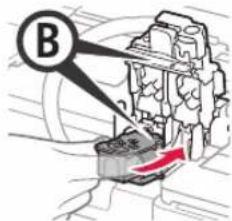
5 3akpoTeΦnKcnpyuOyU KpbIuKy KapTpndka n npnxMnte ee.
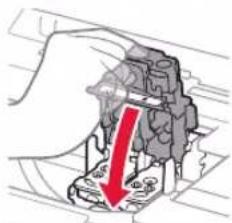
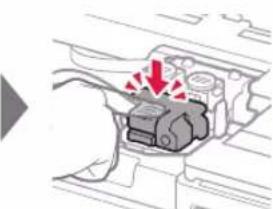
6 HaxmTe do ynopa o6e coeHNHTbHbIe KhoNKn.
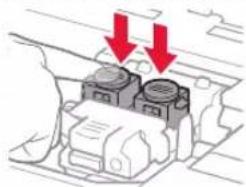
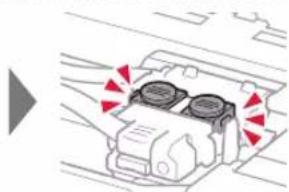
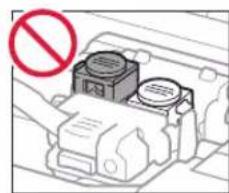
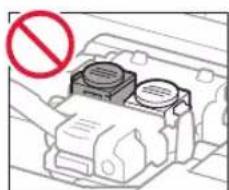
4.3aJIbKa uepHnJ
3TOT npOdyKT Tpe6yEt octopoxHoro 6bpaueHnC cepHNJAMN. Pn 3aONHeHH Nc HnJIbHbIX KOHTeHepOB cepHnla Moryt pa36pb13raTbcr. Ecn Nc HcHnla nonaTy Ha oDeXdy nIN dpYtne BcU, OHn MOrYr He OTCTnpaTbcr.
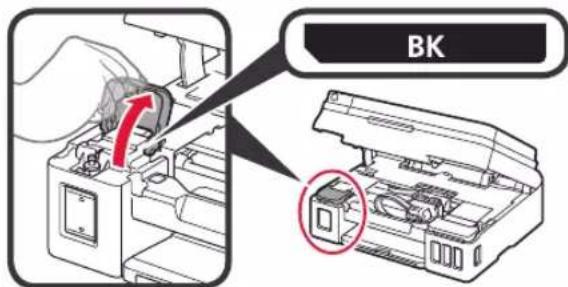
1 OTKpOte KpbIkky YepHnIbHOro KOHTeHepa.
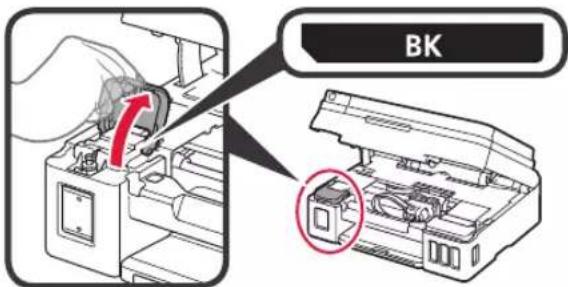
2 Bo3bMntecb 3a KONnauOK KOHTeHepa u ydaIte ero c YepHnIbHoro KOHTeHepa.
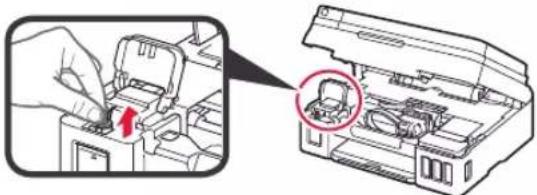
3 YdepKnBa qnaKOH C cepHnAmn BepTnKaJIbHO, CHIMTE KOJNaQOK qnaKoHa.

4 BCTaBbTe HakoHeuHcФnaKoHa C cepHnIaMn BO Bnyckhoe OTBepCTne N nepeBepHnTe ΦNaKOH C cepHnIaMn BBepx dHOM.
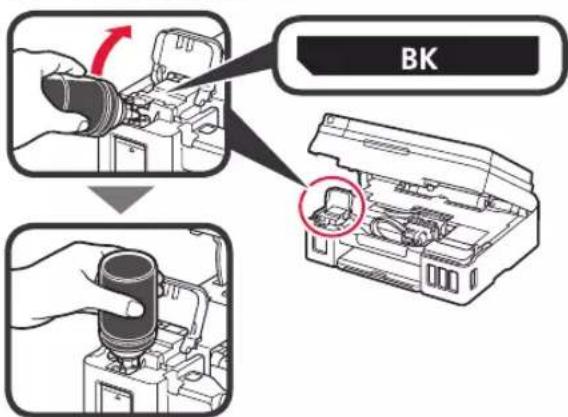
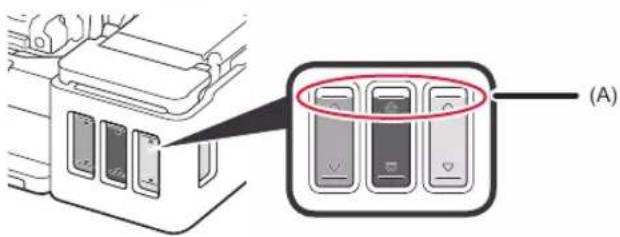
5 BbIeIe BCE uepHnna B uepHnIbHbI KOHTeHep. Y6eIntecb, yTO uepHnna DoCTnraT BepxHero npedena (A).
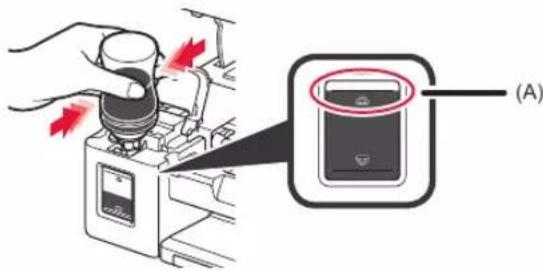
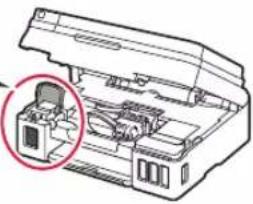
6 OctopoxkHO yCTaHOBnTe Ha MecTo KOJInaHOK KOHTeHepa.
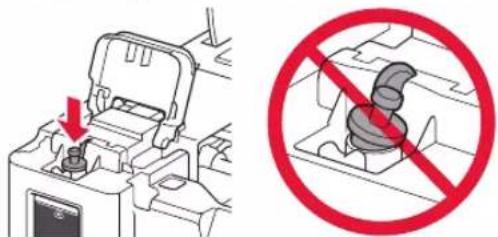
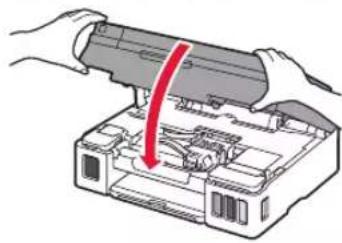
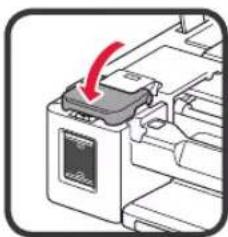
7 3akpoTe KpbIkky UepHnIbHO KOHTeHepa.
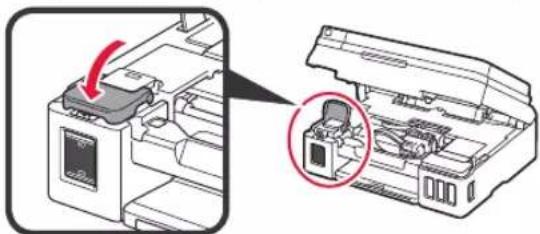
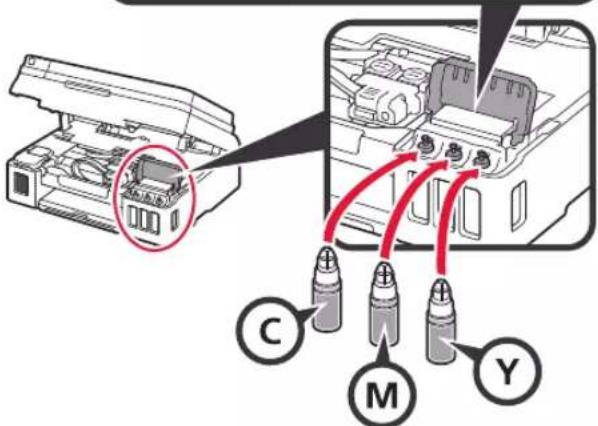
8 NOBTOPAIte DeiCTBn1-7, YTO6bHaHNTb UePHnna B COOTBETCTBYIOUne UePHNbHbIE KOHTeHepbI Cnpaba CornaCHO MapKnipOBKe.
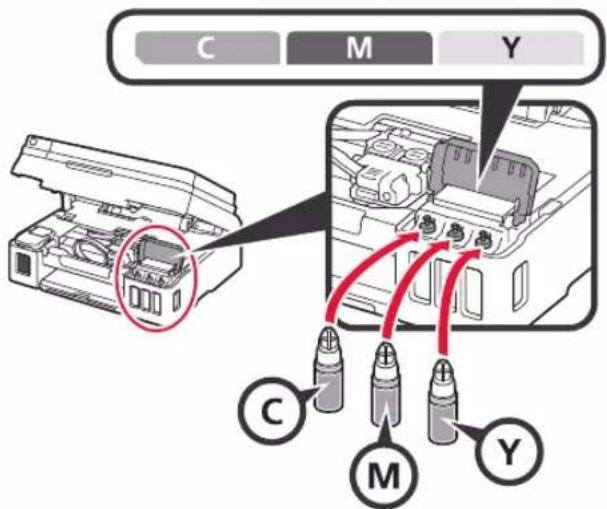
Y6eHntecb, YTO YepHnna DoCTnraIOT BepxHero npedena (A).
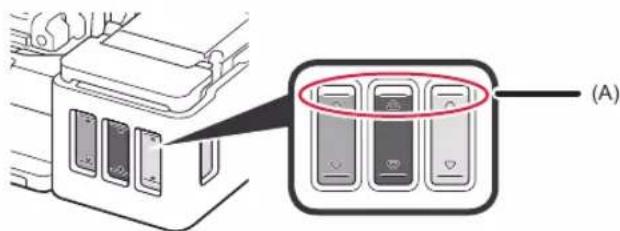
9 3akpoTe MoDyIb cKaHnpOBaHH / KpbIiKy.
Prepare for connection [OK]Next

3anyctnconepaunnoIROTOBKn cepHnJ.
Moxet notpe6oBaTc8 O 5 do 6 MNHy.T. Ipeennte K cIeDyIOUeMy wary.
2 Y6eIntecb, yTO oTo6paXaETcnaKa3aHHbH HIXe 3kpan.
Ready to connect For details on how to co
Iocne 3Toro nepeuHnTe K HxHOMy Wary B COOTBETCTBm C TEM, KaK BBINCNOb3yeTe npHTep.
- YTo6bI HcNoJIb3OBAbI npHTeP c NODKIIoueHHEm K KomNbIOTepy HnN KOMNbIOTepy n CmapTfoHy
7-A.ПОДКЛЮЧЕНЕ K KOMMbTOpepy
- YTO6bI HcNoJIb3OBAbI npHTeP, NOdKJIIOUHBero TOnbKO K CmapTfoHy
7-7-B.ПоДКнIOHHeHne K cMaprTOHу) Ha cTp.6
UTo6bI NcNoJb3OBaTb npHTeP 6e3 NOdkNIOueHnK KOMNbIoTepy nnn CMapTfoHy
1 HaxmTe KhoNky Cton (Stop) Ha npHTepe.
C NOMOJIbIO KHOJOK Ha 3KpaHe BbIbOpa cnocoba noKJIoueHnBbIbepnte He noKJIouaTbcr (Do not connect), a 3aTEM HaxMITE KHOJky OK.
C NOMOUIKHOHONOK BBI6epNTe Da (Yes) HAXMTE KONKY OK.
4 Ndojnte, noka He noaBnTcra noka3aHHbH Hnke 3kpaH.

HactpoKa 3aBepseHa.
BBeDHTe MM MoDeI N CBOero npHTepa N 1eKNHTe OK.

Moxho BbIbpaTb mMa MoeJIn n3 CnNcKa.
5 电KHTe HacpOka.

Hnke npnbedeH nopAOK DeICTBn I
onepaunOHbIX CnCTem Windows n macOS. EcnBbl
ncnoJIb3yeTe KOMNBIOTep C pyroI onepaunOHHO
CnCTeMoH, Hapmep Chrome OS, BInONHtE
HaCTpoKy, cneDy INCHTpKzMn Ha 3kpaHe.
6 ⅢeJIKNHTe 3arpy3nTb n 3arpy3nTe paJn yCTaHOBKn.
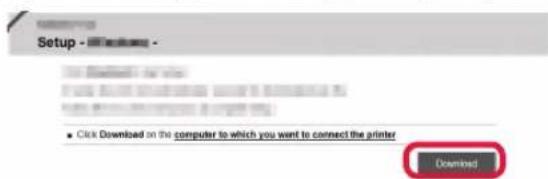
73anyCTnTe 3arpyxHbI qaiJN.
IpeenTe K 2Ha cneyioe en CtpaHnce, YTO6bl npoDOnxNtB.

IcnoJb3ObaHne yCTaHOBOUHOro KOMnakT-ДИСKa (ToNbko Windows)
BCTaBBTe B KOMNbOTe VCTaHOBOHbIK KOMnAKT-DINCK

■Пи Исторьанни Windows 10 Windows 8.1;
KordaB npaBoJ qactn 3kpaHa KOMNbIOTepa NOBNTcCneDyOuuee coo6uene, uENKHITe erO.

3PnnoBHeHnCneDyUoJeroKpaHa HaxMnte 3anyctntb Msetup4.exe (Run Msetup4.exe).
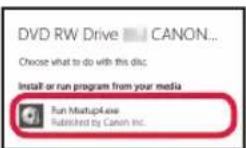
4Пи NOBHeHn DuaIorOBoR OkHa KOnTpOByueTHbIX 3aIncen (User Account Control) HaxMITE Da (Yes).
EcIN3TO COO6UeHHe NoBETcR (NIN NCHE3IO)
- Haxmte PpOboDnK (File Explorer) Ha nane 3aana.

- Haxmte 3tot PK (This PC) B neBOJ Yactn OTKpbIBWeroCg OKha.
3.Двaxды инкнгte 3HaOK KOMnAKT-DnCKa B npaBoH yactn Okha. Korda oTo6pa3ntcra copeXmoe KOMnAKT-DnCKa, DBaxdI ueKNHrTe paJn Msetup4.exe.
4.ПерейдenteКшагу
HaKMMTe Ha npHTepe KhoNky HAcTpoKa (Setup).
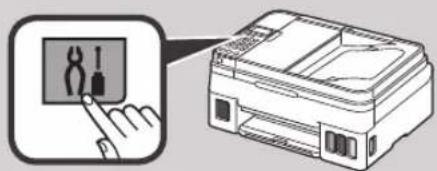
C NOMOJIbKO KHOIOK H BbI6epNTe Hactp. 6ecnp. cetn (Wireless LAN setup) > Ipoct. 6ecnp. nodk. (Easy WL connect) H NaXMITE KHOIKy OK.
BepHntecb K BbINOJIHeHnIO DeIcTBnHa cMapTfoHe.
1 OtkpoTe ynp dnn 6ymaru n dononHntbHyn ynp dnn 6ymaru.
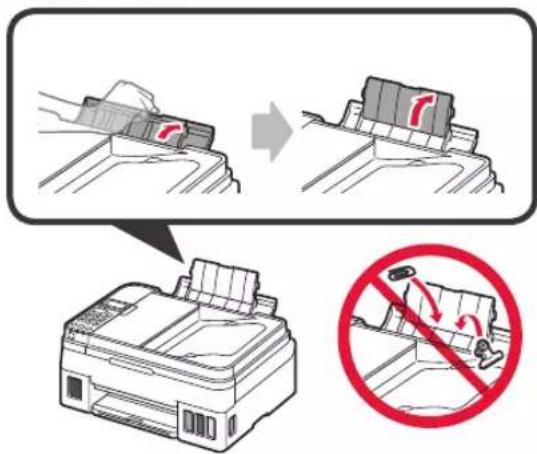
2 CdbnHbTe npabYIO HanpaBnIouyio 6ymarN do KOHua.
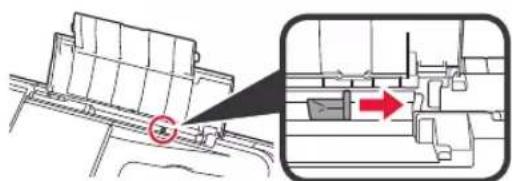
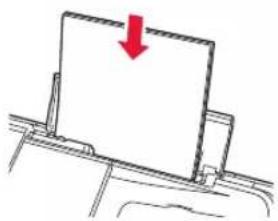
3 3arpy3nte6ymaryIuueBOBCTOPHOBBepx.
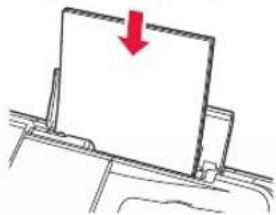

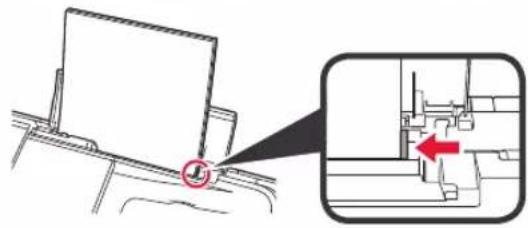
4 IpeBnhte npabyo HanpabJIOuyo 6ymarn do coBmeHna CO cTOnkO bymarn.
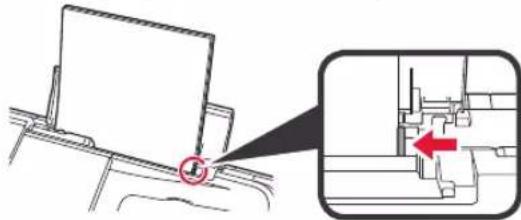
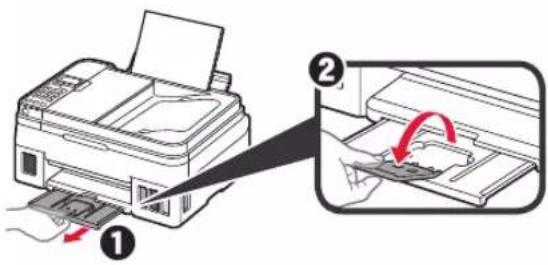
5 1 BbIDBnHbTe NOTOK npneMa6ymar.
OTKPOITE DOONHHTeNBHJI JIOTOK npMa6ymaM.
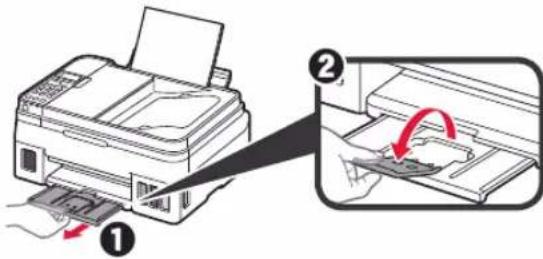
IepemeeHne npHTepa
Pn nepemeuen npntepa no3a6oTbTecb o cneyuouem. Ira noIyueHna noDpo6hix CbeHn CM. OhnaH-pykoBODCTBO.
Bo n36exahanyeTeKNyepHNy6eHntecbBTOM,TO 06e coeHNHTenbHbIe KHOKN HxKaTbI do ynopa.
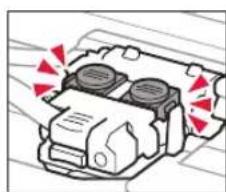
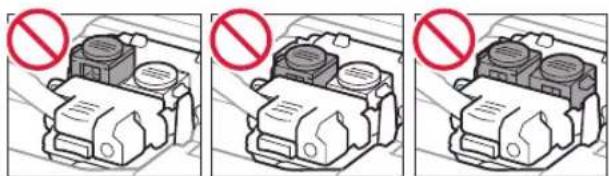
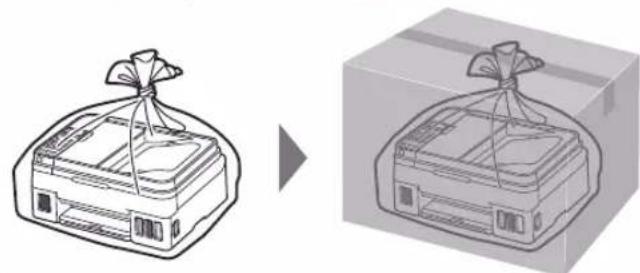
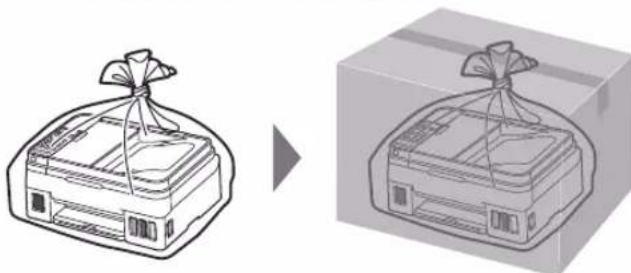
B cnyuae yTeuKN YepHnN nomecnte npHtep B nlaCTNKOBbI naKeT.
- YnakyuTe npInTep B TBepdyIO Kopo6ky, NOMEcTNB ERO HxKHHIO YoacThb Ha DHO Kopo6Kn I NCIOJIb3yI DOCTaTOUHoe KOINuCeTBO 3aunTHOro MaTePnaJa dIra 6e3ONaCHO TpaHCnOpTnPOBkn.
- He haknohny Te npnHTep. YepHnna MoryT BbITEyb.
- O6paauiTecb octopoxHo, yTo6bl kopo6ka nekana pOBHO n HE nepeBopaunBaIacb 6bpatHO CTOpOHnHa 60K, nockoJbky B 3TOM clyyae BO3MOxHO NOBpeXdHHe npInTEpa nn yTeyKa cepHnI.
Korda 3KcneIup 6ydt npHIMaTb 3aKa3 Ha TpaHCnOpTnpOBky npnHTepa, npkpenTe 3TNKeTKy «BEPXHRA CTOPOHA» dna obecneueHra TpaHCnOpTnpOBKn npnHTepa HxKHe yacTbIO BHN3. Kpome Toro, npkpenTe 3TNKeTKy «XPYJKOE» nnn «OBPAUATbCRA C OCTOPOXHOCTbIO!
1. Npebipka komnneKtaui

KaptpnDx
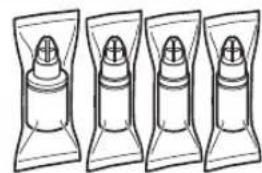
ΦNaKOH i3 YOpHnIOM
HypKMBHeHH
MoynbHn Kaeb
KoMnAkrT-Dmck i nporpaMoIO BCTaHOBneHHdI PIK 3 OC Windows
□InfopmauiyiooBe3neKnBakNBIbIDOMOCTI
□Noci6HnKДЯ NOATkPypo60Tu(ueiNoC6HnK)
2. 3ЯTTa nakyBaIbHnx MaTepiJIb
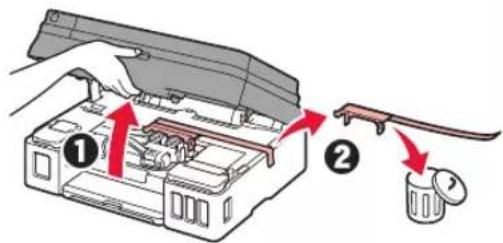
1 3Himt b naKyBaIbHi MaTepiAin (Hanpknad, KOBTorapAry CTpiKy) i3 0BHIuHBoi YacTHnN npHTepa.
2 BiKpnTe MoyIb cKaHyBaHHa / KpNkY.
3HIMITbXOBTORapAcyCTpiKyTa3axnchMaTepiAniBKNHbTeix.
3.YctaHOBneHHKapTpndka
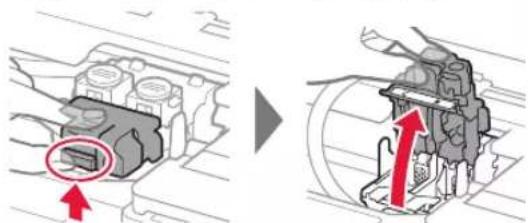
1 BiikpnTe KpnuKy iKcaui KaptpnDxiv.
2 BntTnHtB KOKeH KapTpNdx 3 yNaKOBKn Ta 3HIMtB eTNKeTkn.
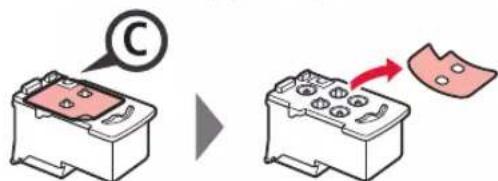
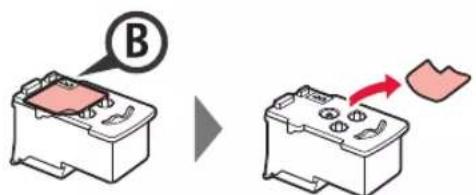
3 3HimItb 3axnchy cTpiKy.
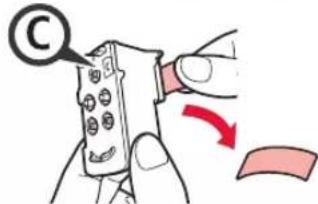

He TopkaiTeca.

4 YctaHObitb kaptpnIck C (KoNbOpOBn) NIBOPy, a KapTpIck B (OOpHn) - npabOpuy.
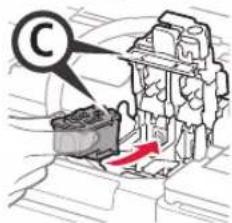

HeBdapnTeIoro06 npnerriyactHH.

5 3akpnnte kpnuky pfikcaqii kaptpndkiB i npntnciht b ii.
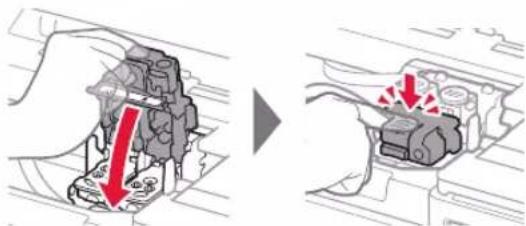
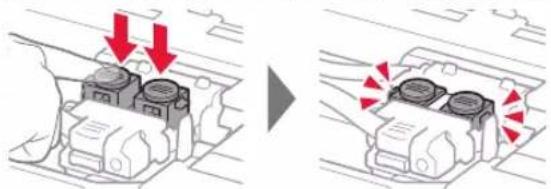
6 HataNCHiBbOuDiKHOHKn3'EDHaHHaDo KInua.
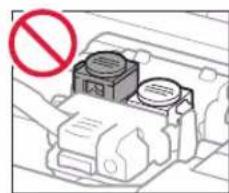
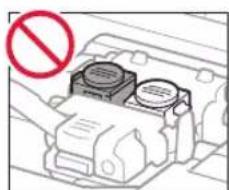
4. HanelBaHHy YOpHnla
Iiud BnKOpNCTaHHa bOro npOyKTy notpi6Ho oBepexHNO NOoDHTNC3 YOpHNOM. BOHO MOKe po3INTSC 3 OOpHbHnCb. JaKIO OOpHNo nOTpanNTb Ha oJr afo peyi, pIamn Byde BaXKO BnBeCTn.
1 BiKpnIe KpnIcky OOpHnIbHnIc.
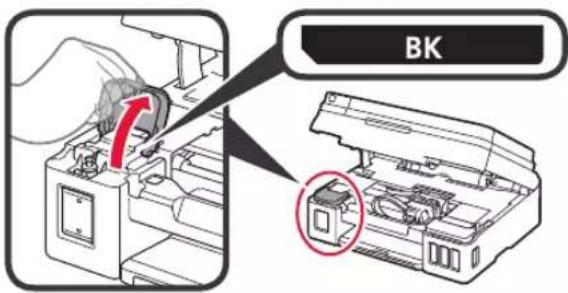
2 Bi3bmitbcra 3a KOBnayok YOpHnIbHnIi Ta 3HiIMtB Ioro 3 YOpHnIbHnIi.
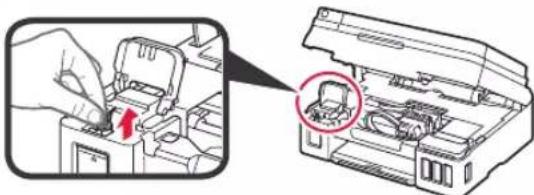
3 Tpmaohn fnaokoh i3 yopHnIOM BepTnkaJIbHO, 3HIMtB KOBnaHOK fnaKoHa.

4 BCTaBTe hakoHeuHK 0nKaOHa 3 OOpHInOM y BXiHN OTBip i npeBepHiTb 0nAkoH i3 OOpHInOM DOROpN dHom.
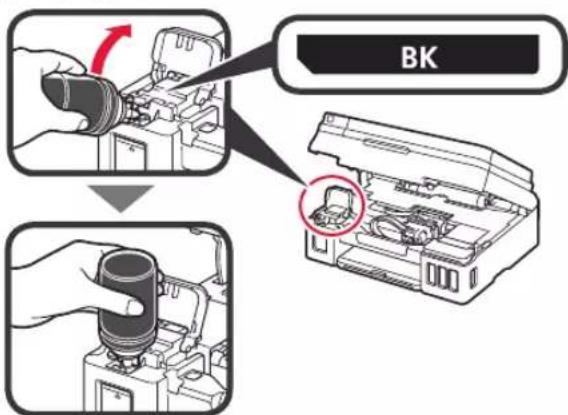
5 3aHnTe yOpHnIO B OOpHNbHnIcI.
IpekeKaHTeC, 10 cOpHnNo HAnlTo Do BepXhBoi oMekyBaJIbHOI NiHII (A).
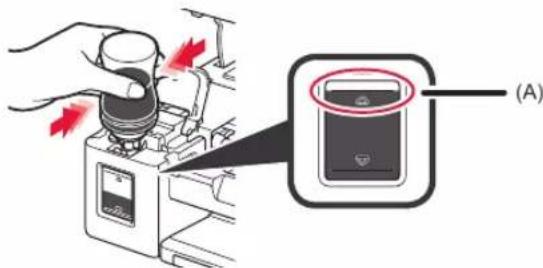
6 O6epeKHO BCTaHOBtB Ha MiCue KObNaqOK OOpHnIbHnIc.
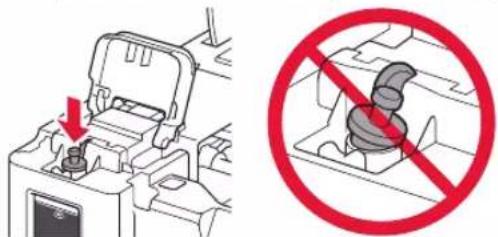
7 3akpniTe kpiuky oOpHnIbHuNi.
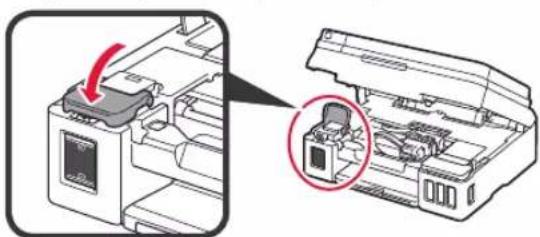
8 NOBTOPIb KpOKn 1-7,06 HAnITn Bci YOpHnna y BiNIOBIDHi OOpHNbHnCi,po3TaWOBaHI npabOpuy, BiNObiDHO Do MapKyBaHH.
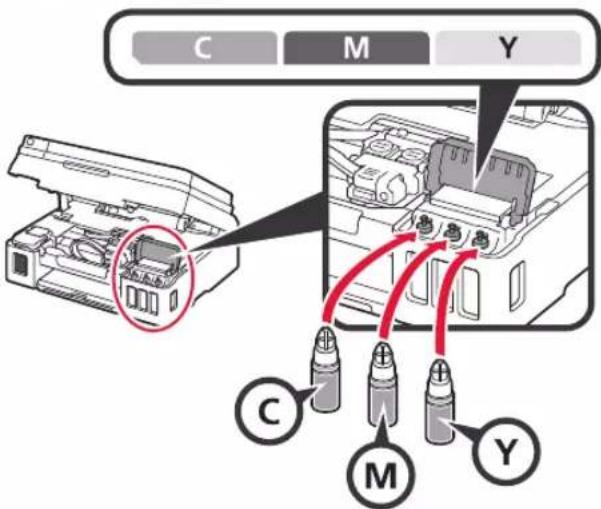
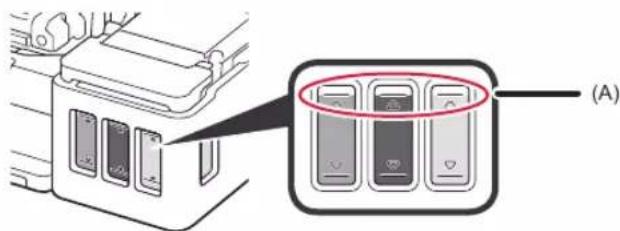
IpekeohaiTeC, 10 yOpHnNo HAnlTo Do BepxHboi o6mexyBaJIbHOi NiHII (A).
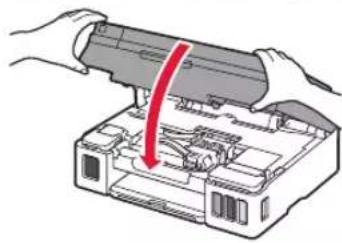
9 3akpnnte Moynb cKaHyBaHHa / KpnuKy.
5. YbimkHeHH npHTepa
1 PnncHaHte uHyp kNbIeHHra.
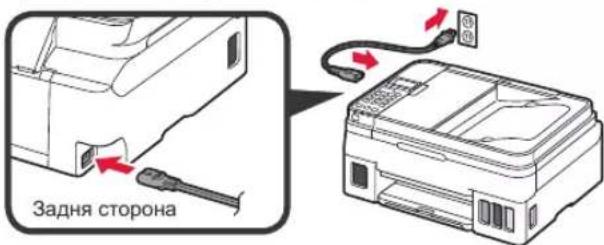
He npueHynte XoDnHex Ka6enib Ha cboMy etani, OKpim uHypa KINBneHH.
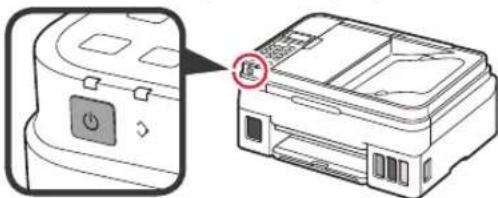
2 HaTnCHiB KhONky YBMK. (ON).
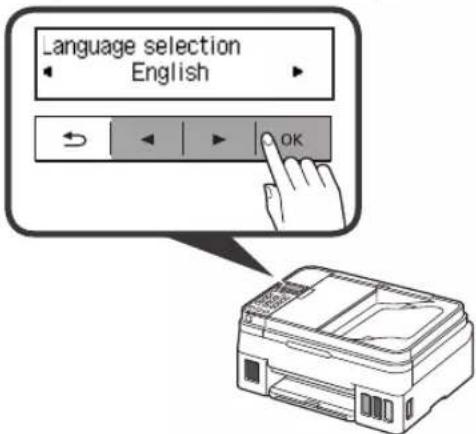
3 3KIO 3'BAITbcH HABeHn HNKeE kpaH, CKOpNCaTaeCk HONkAMn i ,O6 Bn6paTM MOBy,a NOTIM HATNCHTb KNONk OK.
4 RaKIO 3'ABNTbCn HabeDeHn HnXy eKpaH, Bn6epiTb CBOIO KpaIHy a6o perioH i HaTnCHITb KNONky OK.


5 IpekoHaTeCra, 0o Bci OOpHnIbHnCi HAnOBHeHO OOpHnON.
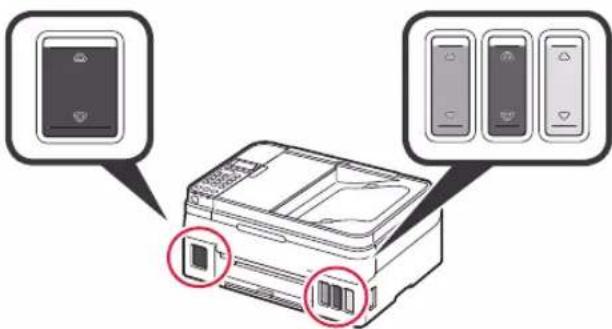
6 Bn6epiTb TaK (Yes) 3a donomoroH KOHONOK i a notim HATNCHTb KHONKY OK.
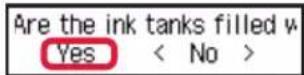

6.ПiДrOToBka Do NiДКnIQUeHHa
1 HaTnCHiTh KhONkY OK.
Prepare for connection [OK]Next

NoHnEbCn iDroTobKa YOpHnla.
3aBvau 5-6 XbuiH. IpeyniTb do HAcTyNHO KpOy.
2 Mae o6oB'3KOBO 3'BAITnCra HabeDeHn HnKHe ekpaH.
Ready to connect For details on how to co
Iotim nepeindtB do hactynHoro kpoky BiNobiHO do BKNOPcTAHn npHTepa.
- Ⅲo6 BnKOpNCTOByBaTN npHTeP, nIiKnIouHbun Horo IuSe Do KOMn'IOTepa a6o KOMn'IOTepa Ta cMaprfoHa

Ha3By MoJei MoXHa Bn6paTn 3i cnNcKy.
5HaTnCHiHb HAcTPOBaHHa.

Dani onicaHo npoedpyn dny Windows i macOS. RaKoBn Bn BkOpncToBcyTe KOMn'IoTep 3 OC, BiMInHO BIDWindows i macOS, k-OT Chrome OS, DToPmYtecbIhCTpykui, kki 3'RbNtTmYbCn Ha ekpaHi.
KnaHtB 3aBaHTaxnTn 3aBaHTaxkTe paan BCTaHOBNEHHA.
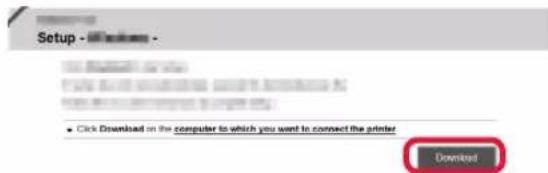
73anyctitb 3abaHTaKeHHn faHn.
IpeeniditbdoKpoky2HaHactyniH ctopinci,0o6 npodOBxHTN.

BukopncTahnK KomnakT-Dncka 3 nporpaMOIO BCTAHOBHeHH (TilbKn DnJa Windows)
1 BCTaBte KOMnakT-Dnck i3 nporpaMOIO BCTaHOBnEHHB KOMn'IOTeP.

Windows 10 a60 Windows 8.1
KoN B npaB i qactnH i ekpHa KOMN'IOTepa 3'BAITbCgIe NOBIDOMJIeHH, KNaUHTb NOrO.

3 anyctntu Msetup4.exe (Run Msetup4.exe).
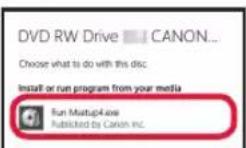
YKUO 3'ABNTbCra DianorObe BIKHO Cnyx6a 3axncty KopncTyBauch (User Account Control), KnauchTb Tak (Yes).
YkuO ce NOBIDOMJIeHH He 3'RBnIOcA (a6o 3HKnI)
- Klaunitb PobidnK (File Explorer) Ha naHeni 3aBdaHb.
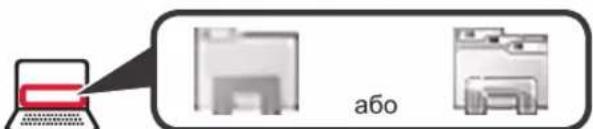
- KnaunihnyhKT Cen PIK (This PC) niBopyy y BIKHI, 0o BiDknpnoCra.
3.Дык КацИт b nIKTORpamy KOMnAKT-DnCKa npabopyu y BIKHI. KoIN BiIObopa3ntbCBy BMICT KOMnAKT-DnCKa,Дык КацИт b paIN Msetup4.exe. - NpeenDitb do KpOKy 0
Dnra Windows 7
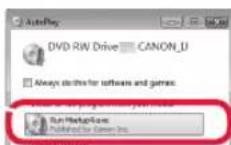
KoIN 3'ABNTbCRAkpan ABTOBIDTBOPeHHA (AutoPlay), KnaHITb 3anyCTnMsetup4.exe (Run Msetup4.exe).
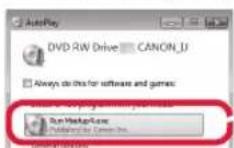
3 RaKIO 3'ABITbcra DianorOBe BIKHO Cnyx6a 3axncty KopncTyBauiB (User Account Control), KnaunHtB PpOdoBXHTn (Continue).
KaOeKpaH AToBIOIaTBOpENHa (AutoPlay) He 3'ABnEeTbcR
- Klauchitb Komn'otep (Computer) y roIOBHOmy MeHIO.
2.Дычкнить niktorpamyKOMnakT-Dncka npabopyuy bikhi,zo BiDkprnilocr. KOnBbD6pa3ntbcR BMICT KOMnakT-DnCKa,Дыч knaCHt phin Msetup4.exe.
Ipeeniditbdo kpoky 2,0o6 npoobxntn.
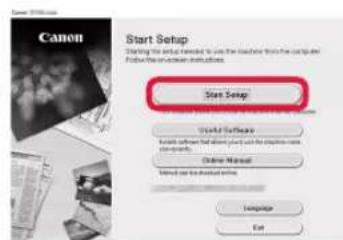
2 Bn6epiB nyHKT 3anyck HactpoobAHn (Start Setup).
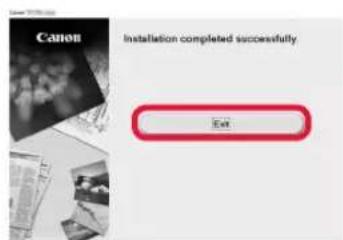
KIO 3'ABNTcra TaKn ekpaH, HATNCHTb KHONKy Bxixd (Exit).
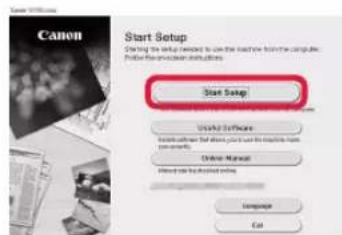

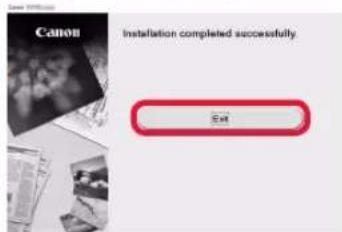
Uo6 npoobkntn HAcTpoOBaHH, 0TpmyTeCb IHcpyKui, kIy3'ABTMyTbCnHa ekpaH.
KoII eKpaH npInTepa BiO6paKaC HabeDeHn HnXyE eKpaH, HAcTpoOBaHHa 3aBepSeHo. Tenep MoXHa DpyKyBaTn 3 KOMn'IOtepa.

7-B.Пдкнюченяdo cmapTopona
Iy KoxHoro CmapToHa noTpi6HO HAcTpoTTn 3'EnHAnHH. Ioo6 ue 3poBHTn, noOHITb 3 kPOky 1.
PiIroTobKa
- YbimKHTb Wi-Fi Ha cMapTphoiHi.
- Y pa3i HauBHOCTI MapuTy3aTopa 6e3npoBOOoi Mepexi niaKluueHHn o npHTepa yctAHOBiTB 3B'3OK mixHIM i CBOIM cMapTFOHOM.
* 106 i3HaTnca npo dii, kki notpi6Ho dIy IcBoro BnKoHaTn, nIB. Noci6HnK 3 ekCnnyatau cMapTfoHa Ta MapuTyTHaTopa 6e3npoBODOoi Mepeksi abo 3BepHiTcRdo ixhix Bnpo6HnKiB.
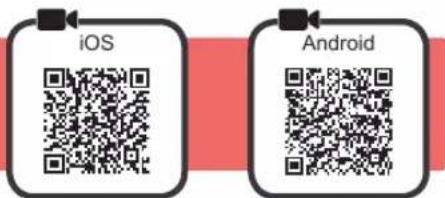
1 IhctaIIOte Ha cMaprfoHn npKnaHe nporpaMHe 3a6e3neueHHa Canon PRINT Inkjet/SELPHY.

iOS : BUKOHAte nouYk nporpamn Canon PRINT y MaraunHi App Store.
Android: BUKOHaTe noIyK nporpamn Canon PRINT y mara3nHi Google Play.
Takok MoKHa BiKpTu Be6-caNT Canon, BiDcKaHyBaBUn QR-KoI.
- CmapToH He MoXHa NiKluOHTn Do IInTePHeTy Uepe3 6e3npoBODBy MepExy NiJ cac NiKluOHeHHa npInTepa HAnpMy Do CmapToHa. Y Takomy pa3i 3 Bac MoKe 6yTu CTaRHyTO pNAty 3aIexKHO BiD yMOB KOHTpAKTy 3 NOCTaHJIbHkOM NocLyt.
- Hanpmy uepe3 niikkquehnno 6e3npoBOOBoI nokajbHOI MEpeKi do npHTepa moXHa niikkquHtN do 5 npncTpoB.
2 NOrnHbTe Ha dncJIe npHTepa.
EkpaH BmKHeBcra, RaIO He BnKohyBaTn KoDnHex iI npToTROM 6n3bKO 10 XBnIH. Uo6 yBIMKHyTN NorO, HATNCHTb ONDy 3 KHONOK Ha naHeJI KepyBaHHa (Kpim KhoNk YBIMK. (ON)).
1 Yu 3'YBnBCa HabeHn HnKye ekpaH?
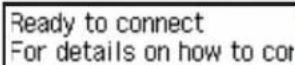
Tak (nepeiDITb Do npoceUpyn B.)
2 Yu 3'YBnacn iKtorpama Wi-Fi (npntep nID'edHaHO do Mepeki) Ha ekpaH, kN BIO6pa3NBc niCna HATnCKaHH KONIK KONI (Copy)?
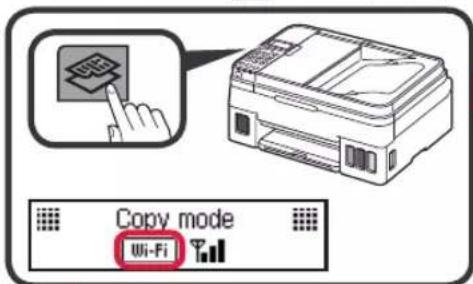
Tak
Hi (npeiNb do npoeDpyn B)
I08a no3haKu XFi CBiHtB npo Te, 1o npHTep He MoKe 06MIHOBATNC daHIMN Ype3 iKIOUHeHHdo 6e3npOBDOBOI IOKaBHoi MepeXi. 1o6 di3HaTNC 6iNbue, nepeiDITb 3a NOcHnAHRM «http://ij.start.canon» do po3diny 3anntAHn BiDnOBidi

iOS
Android
TopKHiTbcra IHCTaIbOBAHOropnKnaAdHoro nporpaMHoro3a6e3neueHH.

2 3apeecpyBaTN npHTeP,doTPmyTecb IHCTpyKui, kki 3'BAJIaTMyTBcRa Ha ekpaHi.
Ma e 06OB'3KOBO 3'BAHTNC ekpaH, HabeHn npabOpuy.
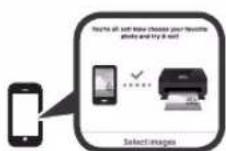
Плкюевна Do cMapTФОHA BCTaHOBJIeHo. Tenep MoXHa dpyKyBaTN 3 HbOrO.
Uo6 haupykByaTn foToRpaΦi, 3aBaHTaXte foToanip. IpeeiDITb do poZdiny «3aBaHTaXeHHa nanepy» Ha cToPiHj 8.

Habeeni HnKHe npOeDpyr 3aIeKaTb BiD TORo, kA onepauiHa CnCTema BnKOpNCTOBycBcra (iOS a60 Android). Bn6epiB cBOU onepauiHy cnCTemy Ta nepeinDb Do BiINOBiHOI npOeDpyr.
iOS
CnoaTy TOpKHiTbcrnyHKTy NapaMeTp (Settings) Ha CTapTOBOMy ekpaHc CBORo CmapToHa, a notim — nyHKTy Canon_ij_XXXX y napaMeTpax Wi-Fi.

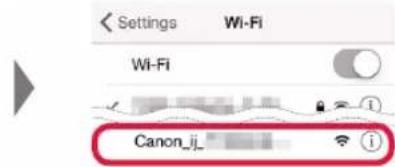
KIO B CnCKy He 3'ABNTcR PyHKT Canon_ij_XXXX, npOHaIte po3dIN «YcyHHe HEnoJaOK» HmKHe, BIKOHaIte ONiCaHbHbOMy dHa npInHTepi Ta nobToptB KpOK
TopKHiBcIHCtAlBoBaHOro npKnlaHOrOporpamHoro 3a6e3neueHHra.

3 3apeecpyBaTN npHTepe, DOTpmyTecb IHCTpyKui, kki 3'ABJIaTmMyTbcra Ha ekpaHi.
Ioo6 npoOBXHTn HAcTpoIOBaHHa,
DOTpmyTEcB IHCTpyKcii, Aki 3'YBnATMyTbcra
Ha ekpani.
Kaio Ha ekpani Bn6opy cnocoby niKnHouenHH Bn6paTn NyHKT Auto Select Conn. Method (recommended),HaJIeKHi CNOCiB nIKNIOHHeHHa 6yJe Bn6pao ABToMaTuHcO3aIeXHo BiD cepedOBuHa.
Maé 06OB'3KOBO 3'BAITNCa HabeHn HxKHe ekpaH.
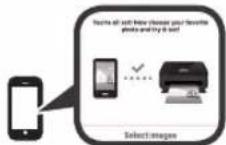
IiKnHueHHa O cMapToHa BcTaHOBJeHo. Tenep MoXHa dpyKyBaTu 3 HbOrO.
Iio6 hndpykbytn foToTpaqii, 3aBaHTaxTe foToTanip. Ipeeniditb do po3iny «3abaHTaxHnnaepy» Ha cToPiu 8.
Android
TopKHiBcIHCtAlBoBaHOro npKJaDHorO nporpamHoro 3a6e3neueHH.

2 3apeecpyBaTN npHTeP,doTPmyTecb ihctpyKui, kki 3'BAIaTmMyTbcra Ha ekpaHi.
JKIO NOIOMJIeHHA «Printer is not registered. Perform printer setup?» He 3'ABNTbcra, npouHTaIte po3dIn «YcyHHeH HEnoJaOK» HxKYe, BIKOHaIte OINcAHi B HbOMy DII Ha npHTepi Ta 3aueKaIte, DOKI CE NOIOMJIeHHA He 3'ABNTbcra.
Ioo6 npoobkntn HactpoOBaHHN, DoTpmyTecb IHCpyku, kki 3'ABJATMBybCn Ha ekpaH.
HaIeKHH cnoci6 niIKnOueHHBnBnpaetbcra 3aJIeKHO BiD cepEOBua.
KaHHaekpaHlRegister Printer BiO6paxaIbCnDiHa3Bn npHTepa, kNoka3aHO B pNknaHIXXe, Bn6epiB nyHtA.
A) G4010 series (xxx.xxx.xxx.xxx)
B) Direct-xxxx-G4010series
Ma o6oB'3KOBO 3'ABNTnC HabeHn HnKue ekpaH.

YcyHeHHH HenonlaDOK
He Bdaetbca 3HaHTn npHtep 3i CmapTfohy.
HaTnCHITb KHONky HAcTpOBOAHN (Setup) Ha npHTepi.
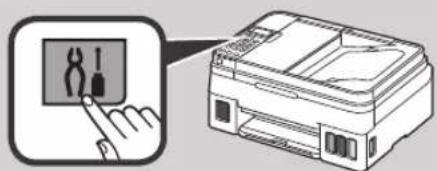
3a donomoro KhoNOK i Bn6epitb HactpoobanHRA WLAN (Wireless LAN setup) Cnpou. 6e3np. nikn. (Easy WL connect), a notim HATNCHTb KhoNky OK.
3 NohyB 3HOBY KOpHcyBaTHcCMapTOHOM.
1 BiikpnTe niDnopy dna nanepy nnoobkybau niDnpu dna nanepy.
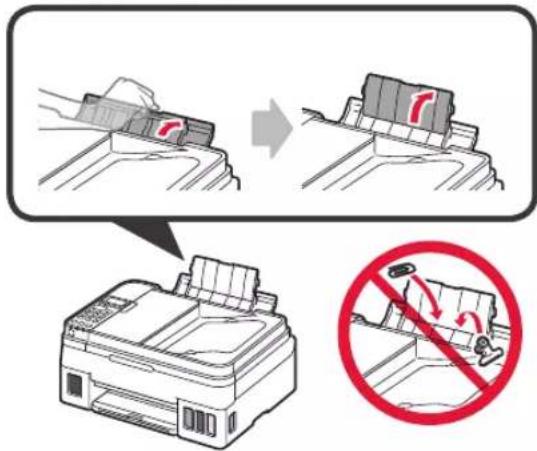
2 Nocyhte npabn HapmHK nnaepy do kiHra.
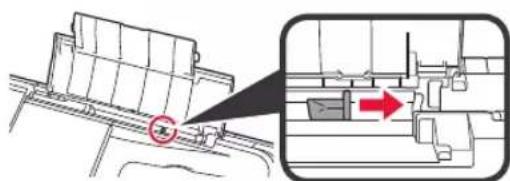
3 3aabaTaxTe nanip cToPOHOIO dnydpyky doropn.
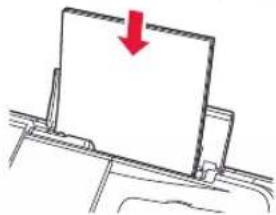

4 NocyhbTe npabHn HnpanMHNk dna nanepy, 06 BnpiBnTn Ioro 3i CTopoHOIO CTOCY nanepy.
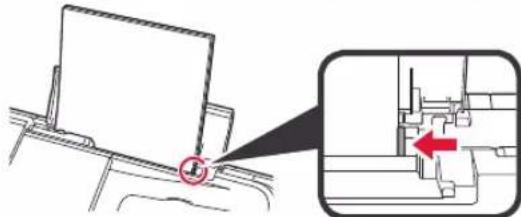
5 1 BuTnHiB IOTOK BnBeJeHHa nanepy.
BbdkpnTe nooBkyBaB bviDHoro JOTka.
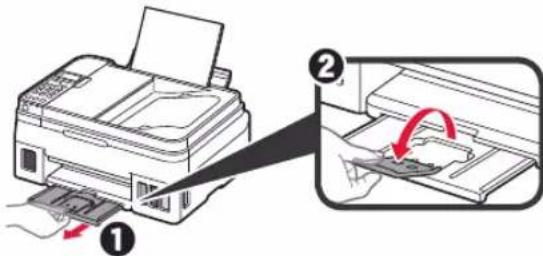
TpaHcnpTyBaHH npHTepa
Iiud nepemieHn npntepa nepekoHaTecra, 0Bn DOTpmyTeca HabeDeHX HxKHe IHCTpykui. 06 otpmatn DOknaHni BiDOMOCTI, INB. DOKyMeHT OHnaHOBNI Noci6Hnk.
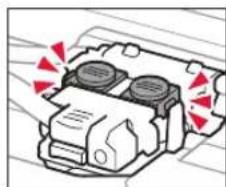
Ioo6 3ano6irtn npotikahHIO yOpHnla, nepekoHaTeCra, 0o 6nDiKHOKN 3'cHaHHa HATNCHYTO NOBHICTHO.
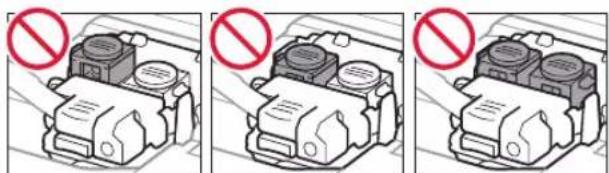
Pomictb npHTep y nonietnHeOBn nakeT, Ocklbkn OOpHNO MoKe npotikatn.
IomictiTp npHTep y TBepDy Kopo6ky HxKhbOu YoactnHOIO npHTepa DoHN3y Kopo6Kn, BkOpNCTOBvOHy DOCTaTHIO kJbKiCtB 3axNCHoro MATEpiany Dnra rapaHTyBaHH 6e3neHORo TpaHCnOpTyBaHH.
He haxnIyTe npHtep. OOpHNo MOKe BNTeKtN.
- NObOdbTeC3 KOpO6koIO oBepeXHO Ta nepeKoHaIteC3, 10o II CTiHKPiBHi, BOHa HE nepeBepHyTa DOROpN dHOM a6o Ha6IK, OckInbKn npHTep MOKe NOuKOaNTncb, a YOpHNIO B HbOMy MOKe BNTEKTN.
HannuithhaKopo6ui3 npHTepom LUM BOKOM D0TPOU》,uO6 niudac TpaHCnOpTyBaHHa EKCneINTOP 3aBxJn TpIMab pInHTep HxHbOCTOPHOIO DOHN3y.Takox Hanuithk KPNXKE》 a6o IIOBOIDNTUC OBEPEXKHOO
aee aee

3
3 3
4
.
2
5
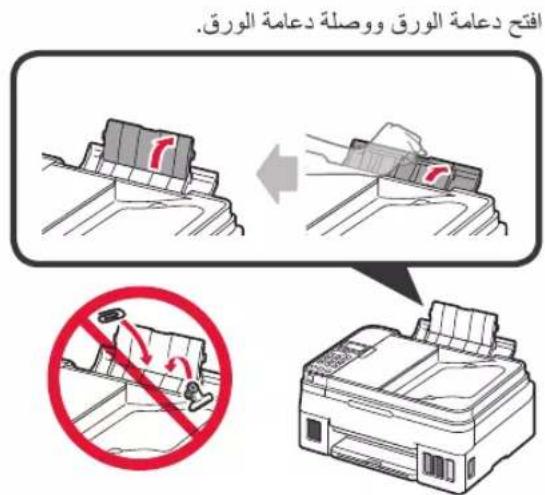
1
y
2
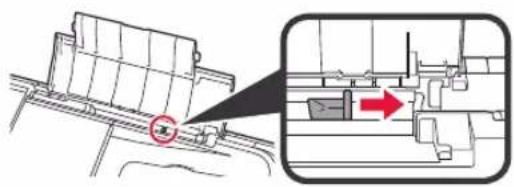
aalil aaii jai
Jadill 1eal ci jyI ge Jdall gai yLau Sli aylll Jiaie
aai 1
Aaiy jaiyaiyaiyaiyaiyaiyaiyaiyaiyaiyaiyaiyaiyaiyaiyaiyaiyaiyaiyaiyaiyaiyaiyaiyaiyaiyaiyaiyaiyaiyaiyaiyaiyaiyaiyaiyaiyaiyaiyaiyaiyaiyaiyai

Aaill jaiil aaiil gie 2jll caii
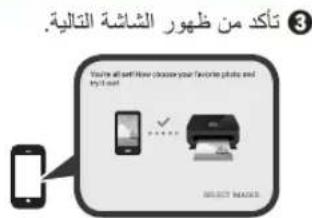
Printer is not registered."Laiaa aalaae al 13
Lbasi ciis "j. "Perform printer setup?
gbi jll cagll jaii jaiil jaiil
..A.100000000000000000000000000000000000000000000000000000000000000000000000000000000000
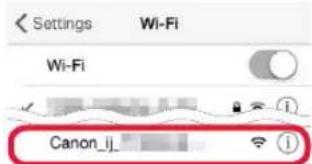
aiy j (Settings) 1 Wi-Fi Canon_ij_XXXX


lll" 1
A 2

Aaall aal alal gls 2g jll g
.8 aaii i"3jll jll 1
Wireless LAN setup > 2. (OK) Easy WL connect
42x1g 1
sill dita jia ball jial jina

all (Setup) 1
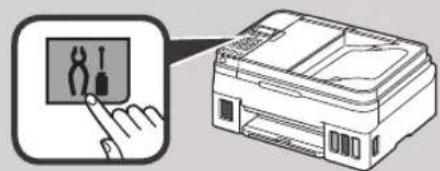

Ss 1 s
Si1i 1
aBally aay yiy gall sll ayy y
aannn aal 1
Canon PRINT Inkjet/SELPHY
AppStore"CanonPRINT"
iOS
Google Play "Canon PRINT" : Android
aannnnnnae nnne nnnnne nnne ne nnnnne nnnnne nnnnne nnnnne nnnnne nnnnne nnnnne nnnnne nnnnne nnnnne nnnnne nnnnne nnnnne nnnnne nnnnne nnnnne nnnnne nnnnne nnnnne nnnnne nnnnne nnnnne nnnnne nnnnne nnnnne nnnnnee

aall aiee ie eae jia jai ai all ae jy jay gill anly aal Jgj ci i y jiy jil dla Jgj y
3jul 5 j
aalall gce 3gaaal aalll
jol (ON) jz r jie 10 s d a
A
(B)
yaii 1
Ready to connect
For details on how to cor
Y
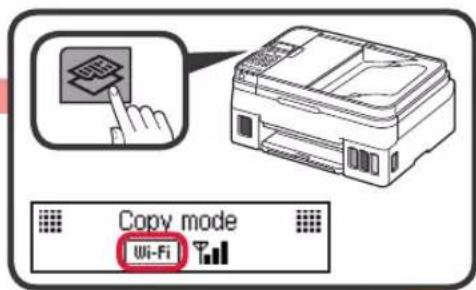
(Copy)
(B)
iJiFi jy 100000000000000000000000000000000000000000000000000000000
Android
iOS
A
Jds Jiejlll dss. jil jil jil
.
Jaaai jaiy jay gaiy gaiy gaiy gaiy gaiy gaiy
.8aal

Aai 1
:Windows8.1Windows10
jsslll lnnn nnnnllllllllllllll
- gai jai 1.

3
.(Run Msetup4.exe) Msetup4.exe
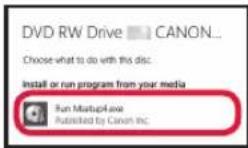
pssssssssssssssssssssssssssssssssssss
.(Yes) (User Account Control)
(AutoPlay)
(Computer)
aall g aagaaal gaaal aa jra 1jai 2
C. 3 坐标轴: y = - 12x + 1
jia jia jia jia jia jia jia jia jia jia jia jia jia jia jia jia jia jia jia jia jia jia jia jia jia jia jia jia jia jia jia jia jia jia jia jia jia jia
.Msetup4.exe
:Windows7jaiilpiaiisai
AutoPlay)
.(Run Msetup4.exe) Msetup4.exe
pnnnlll 1
(Continue) (User Account Control)
2g
.(Exit) 14
. (Start Setup)
2

a 1234567890
S ADE = S COD + S_ BDO
J 1
Copy
100%


01
j j 1
all (Stop)
y 2
.(OK) do not connect
.(OK) 1
aaii aaiia jai jai 4

.
JUANAL 1.6
.(OK)
Prepare for connection [OK]Next
yall yiaosaiacei
a 6 5
aaii aaii
Ready to connect For details on how to co
1
2
aalal alalal aalal lal, s jai jai all
iag jgssj gbiia jgsj ggiagge
iL
"jjssJj7.7-A"
←
hsssiis
6 1ai j"si J7-B

Jgss JgjJ.7-A
Ssss s 100000000000000000000000000000000000000
B 4a jall A aagbally aee
1
1

jai macOS,Windows
macosWindows
Chrome OS
Download

1
Click Download on this computer to which you want to connect the printer
j jill 1
2g 1

jssll jie (oye 2)
.Canon 25
http://ij.start.canon

21 × 21 × 21

4

aiill jjbjjbjdiay
a aalaiiaai jaiy daa aaii y
.(OK)


jdl ljl jla gaa jla jla jla
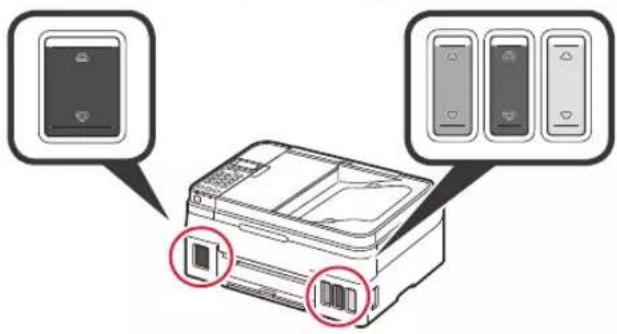
.(OK) 5
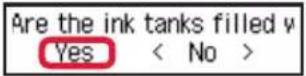

4
9
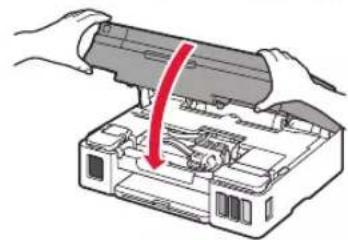
5
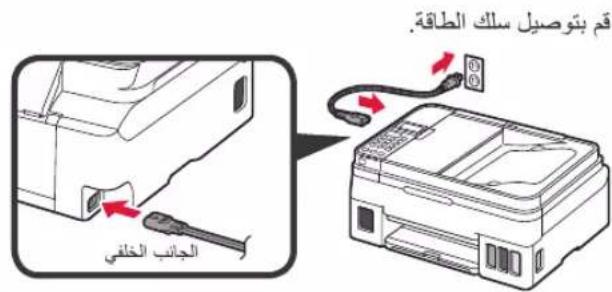
a.5
1
6
Aelllll 1
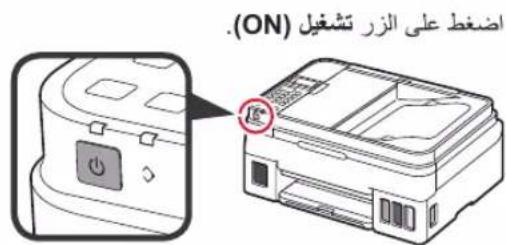
2
3 (OK)
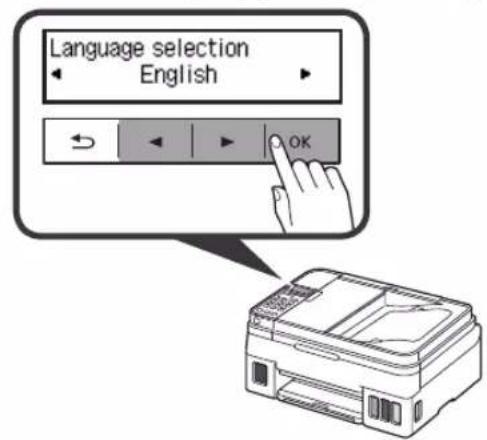
. 15
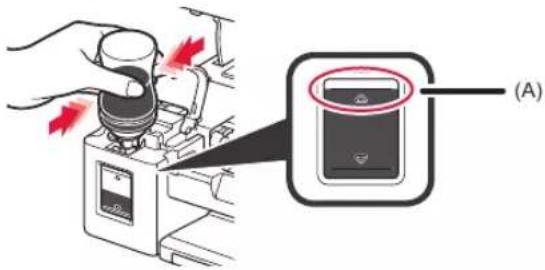
pSaly jjdael cdte yyj x

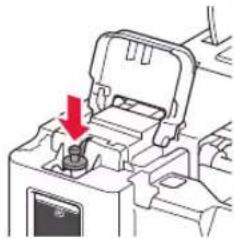
joll jis elac
1 7 1 1 1

M
Y
(A) 150
5
4.4
aai jai aie yaiy aiia iaiy aaii
jai jia oie
1
Access Online Manual Acesse o Manual On-line Ooctyn K DokymeHTy OHnaH-pyKOBOCTBO