EasyManual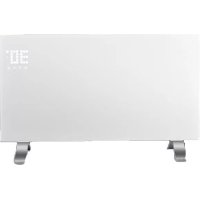
Vidro 2000 - Heating Sonnenkönig - Free user manual and instructions
Find the device manual for free Vidro 2000 Sonnenkönig in PDF.



User questions about Vidro 2000 Sonnenkönig
0 question about this device. Answer the ones you know or ask your own.
Ask a new question about this device
Download the instructions for your Heating in PDF format for free! Find your manual Vidro 2000 - Sonnenkönig and take your electronic device back in hand. On this page are published all the documents necessary for the use of your device. Vidro 2000 by Sonnenkönig.
USER MANUAL Vidro 2000 Sonnenkönig
natural_image
Two white outdoor heat exchanger units with metal legs and base supports, displayed against a plain background (no visible text or symbols)text_image
PCB L N Switch Tip over r switch Heating element KSD thermostat KSD thermostat Temperatur e sensortext_image
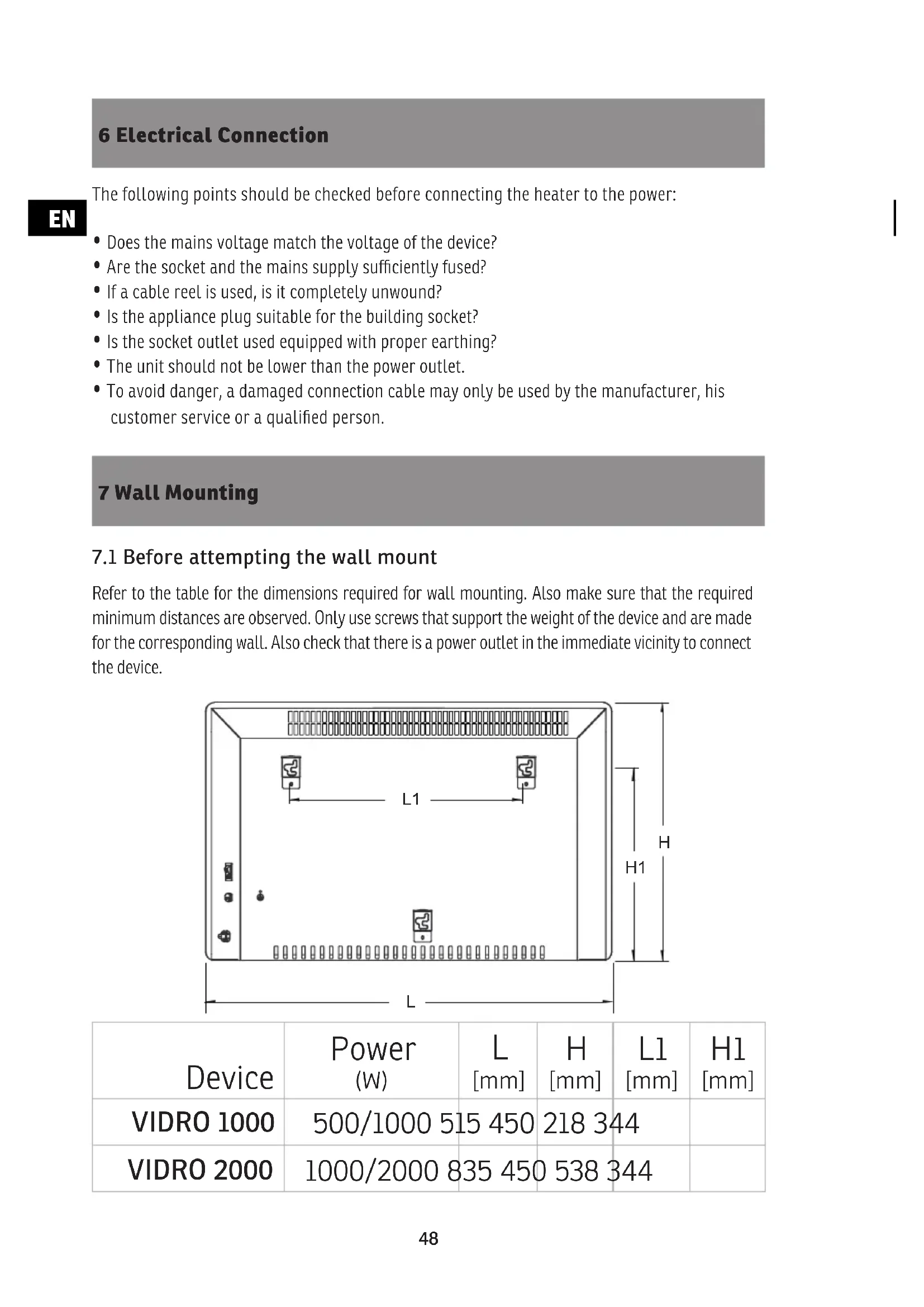
L1 H H1 L| Gerät | Leistung (W) | L [mm] | H [mm] | L1 [mm] | H1 [mm] |
| VIDRO 1000 | 500/1000 515 450 | 218 344 | |||
| VIDRO 2000 | 1000/2000 835 450 | 538 344 | |||
text_image
Technical diagram showing a mechanical assembly with labeled components and directional arrows indicating flow or movement.natural_image
Two white outdoor heat exchanger units with metallic legs and control knobs, displayed against a plain background (no visible text or symbols)Article-No. VIDRO 1000: 20110102
Article-No. VIDRO 2000: 20110202
SOMMAIRE
Tension....230 V ....230 V
text_image
PCB L N Switch Tip over r switch Heating element KSD thermostat KSD thermostat Temperatur e sensor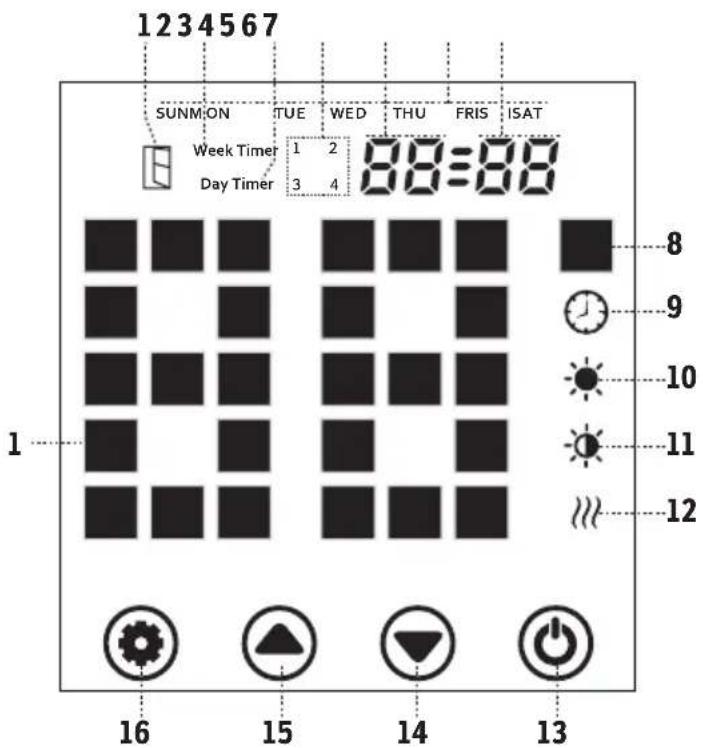
text_image
1234567 SUNMON TUE WED THU FRIS ISAT Week Timer 1 2 Day Timer 3 4 8 9 10 11 12 16 15 14 13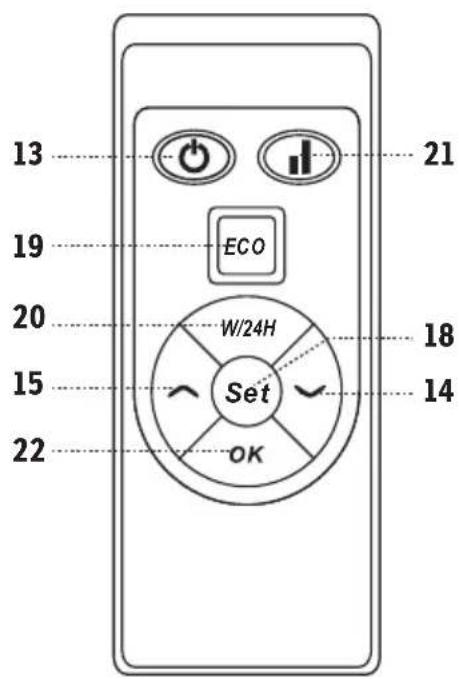
text_image
13 19 20 15 22 ECO W/24H Set OK 18 14 21text_image
L1 H H1 L| Appareil | Puissance (W) | L [mm] | H [mm] | L1 [mm] | H1 [mm] |
| VIDRO 1000 | 500/1000 515 450 | 218 344 | |||
| VIDRO 2000 | 1000/2000 835 450 | 538 344 | |||
text_image
Technical diagram showing a mechanical assembly with labeled components and directional arrow7.3 Visser le support
Modifications techniques
natural_image
Two white outdoor heat exchanger units with metallic legs and base plates, no visible text or symbols on the surfaces.N.articolo. VIDRO 1000: 20110102
N.articolo. VIDRO 2000: 20110202
IT
INDEX
text_image
PCB L N Switch Tip over r switch Heating element KSD thermostat KSD thermostat Temperatur e sensor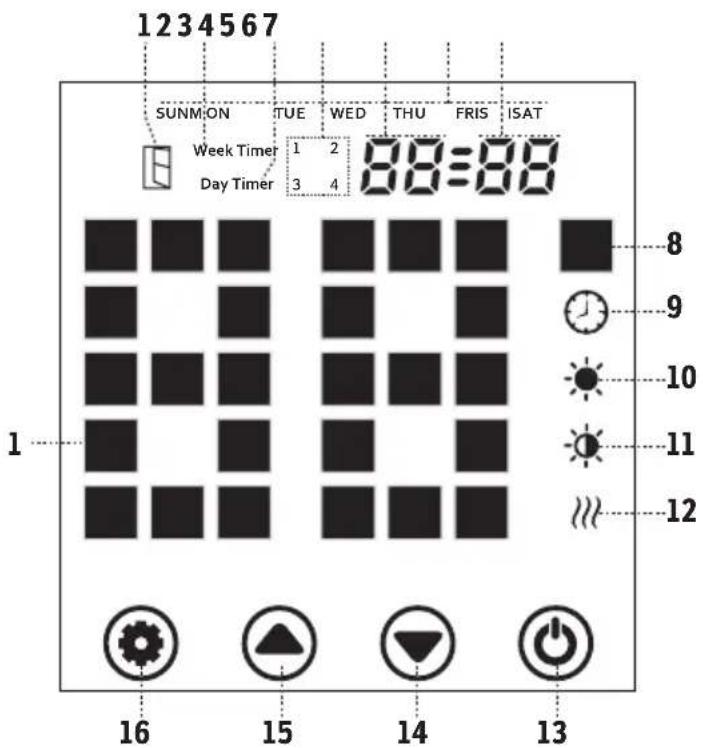
text_image
1234567 SUNMON TUE WED THU FRIS ISAT Week Timer 1 2 88=88 Day Timer 3 4 1 8 9 10 11 12 16 15 14 13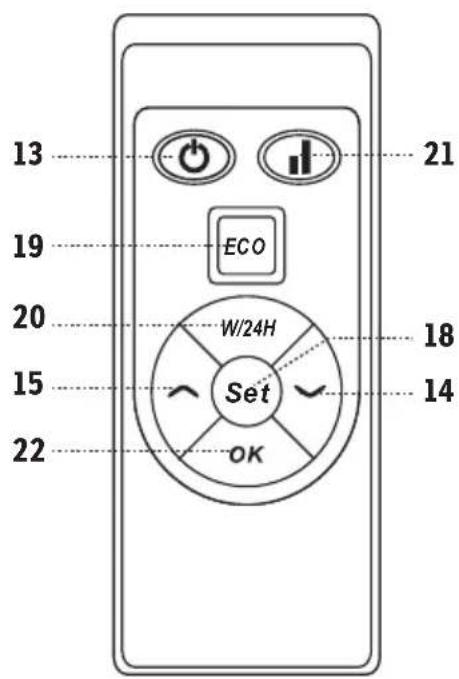
text_image
13 19 20 15 22 ECO W/24H Set OK 18 14 21text_image
L1 H H1 L| Apparecchio | Potenza (W) | L [mm] | H [mm] | L1 [mm] | H1 [mm] |
| VIDRO 1000 | 500/1000 515 450 | 218 344 | |||
| VIDRO 2000 | 1000/2000 835 450 | 538 344 | |||
text_image
Technical diagram showing a mechanical assembly with labeled components and directional arrow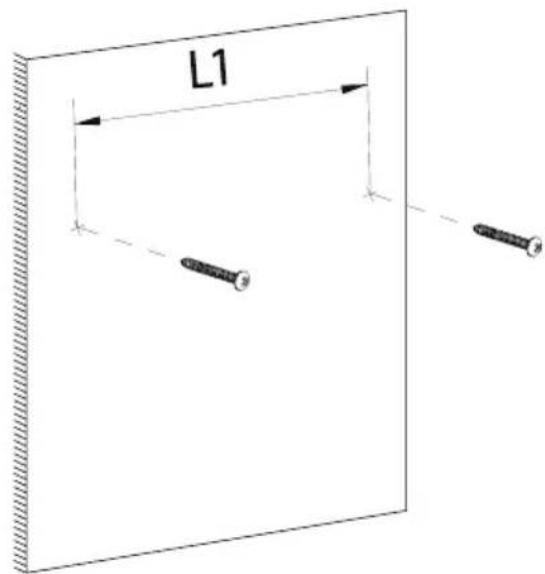
text_image
L1natural_image
Two white outdoor heat exchanger units with metal legs and base supports, displayed against a plain background (no visible text or symbols)Article-No. VIDRO 1000: 20110102
Article-No. VIDRO 2000: 20110202
This product is only suitable for well insulated rooms and occasional use.
EN
INDEX
1 Safety 45
2 Names of parts ....46
3 Properties 46
4 Circuit ....46
5 Control panel / Remote 47
6 Electrical Connection....48
7 Wall Mounting....48
8 Operation ....50
9 Maintenance and Care....52
10 Warranty / Disposal / Technical change....53
1 Safety
Please read before first commissioning the safety instructions carefully and observe the safety instructions to prevent damage due to misuse, improper operation, and improper environmental conditions to be avoided. Keep these for later reference.
Check the device after removing the packaging for damage. Do not put the unit in case of suspected corruption in operation and consult a specialist. The recyclable packaging material must not be stored or disposed accessible for young children, but must be disposed of properly.
This appliance is only for the purpose for which it was explicitly developed, ie be used for heating rooms. Any other use is regarded as improper and therefore dangerous. The supplier is not liable for damage to persons and / or property damage due to an improper or incorrect use.
Repairs to electrical appliances must only be carried out by trained personnel only. Improperly performed repairs and alterations to the equipment can have dangerous consequences for the user according to what the warranty will be rejected.
The use of all electrical equipment must be observed some fundamentally important rules:
- Do not touch the appliance with wet hands or feet.
- Do not expose the device to the weather.
- The appliance must not be used by children or infirm persons without supervision.
• Pull the plug from the outlet when you no longer need it. not by pulling the power cable or the device to unplug it. - Disconnect before carrying out any cleaning or maintenance operation, unplug the device. The air intake must be cleaned at least once a week.
- Do not use near a bathtub, shower, sink, or swimming pools
- Do not use any accessories or attachments that are not approved by the manufacturer.
- Do not insert objects into the interior of the device.
- Do not cover the appliance with objects.
The device must not be used under the following conditions:
- In areas with potentially explosive atmospheres.
• In rooms with aggressive atmospheres. - In rooms with high solvent concentration.
• In areas with extremely high levels of dust. - Disreputable operating conditions, it is recommended that the technical department of SONNENKÖNIG or dealer to contact. The use of an electric heater under the wrong conditions will invalidate the warranty!
This appliance can be used by children aged from 8 years and above and persons with reduced physical, sensory or mental capabilities or lack of experience and knowledge if they have been given supervision or instruction concerning use of the appliance in a safe way and understand the hazards involved. Children shall not play with the appliance. Cleaning and user maintenance shall not be made by children without supervision.
Children aged from 3 years and less than 8 years shall only switch on/off the appliance provided that it has been placed or installed in its intended normal operating position and they have been given supervision or instruction concerning use of the appliance in a safe way and understand the hazards involved. Children aged from 3 years and less than 8 years shall not plug in, regulate and clean the appliance or perform user maintenance.
2 Names of parts
EN
text_image
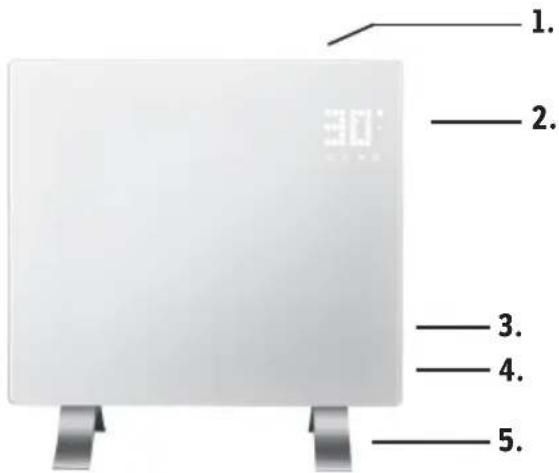
1. 2. 3. 4. 5.Device
1 Air outlet
2 Control panel
3 Main switch
4 Powercable
5 Foot
3 Properties
Model......VIDRO 1000......VIDRO 2000
Voltage....230 V ....230 V
Frequency....50 Hz ....50 Hz
Power 1000 Watt 2000 Watt
Dimensions.....515 x 105 x 450 mm ..835 x 105 x 450 mm
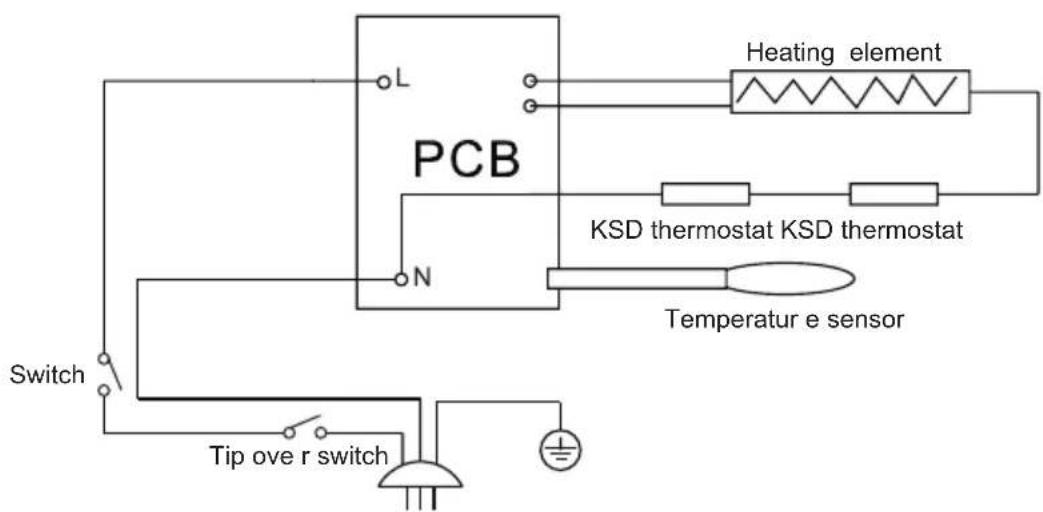
4 Circuit
text_image
PCB L N Switch Tip over r switch Heating element KSD thermostat KSD thermostat Temperatur e sensor5 Control panel / Remote
EN
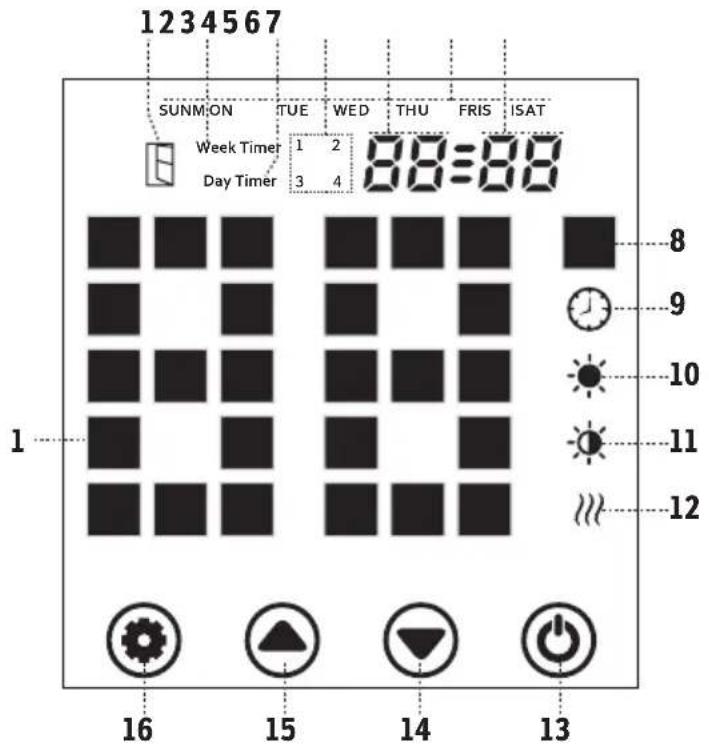
text_image
1234567 SUNMON TUE WED THU FRIS ISAT Week Timer 1 2 88=88 Day Timer 3 4 1 8 9 10 11 12 16 15 14 13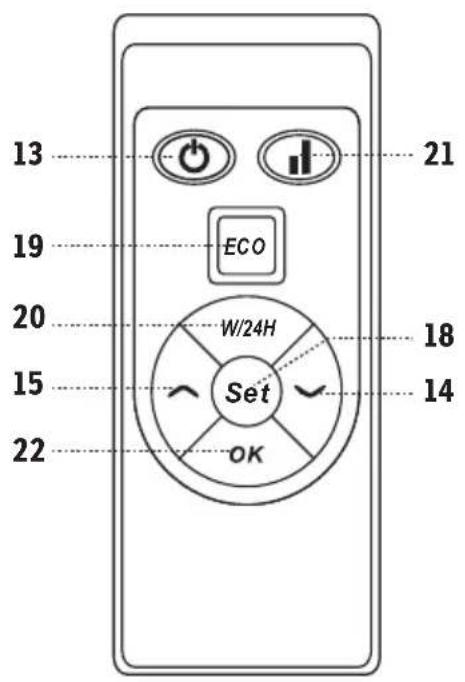
text_image
13 19 20 15 22 ECO W/24H Set OK 18 14 21- Open window indicator
- Week-Timer-Indicator
- Day-Timer-Indicator
- Timer-Period-Indicator
- Hour display
- Week display
- Minute display
- Temperature Unit
- Timer Display
- High-temperature-indicator
-
Low-temperature-indicator
-
Heating-element-indicator
- ON / OFF Switch
- Decrease-Button
- Increase-Button
- Settings (Display)
- Temperature-Display
- Settings (Remote)
- ECO-Mode ON/OFF Toggle
- Day- / Weektimer Toggle
- Selection for High / Low Temperature
- OK-Button
6 Electrical Connection
The following points should be checked before connecting the heater to the power:
- Does the mains voltage match the voltage of the device?
- Are the socket and the mains supply sufficiently fused?
- If a cable reel is used, is it completely unwound?
- Is the appliance plug suitable for the building socket?
- Is the socket outlet used equipped with proper earthing?
- The unit should not be lower than the power outlet.
- To avoid danger, a damaged connection cable may only be used by the manufacturer, his customer service or a qualified person.
7 Wall Mounting
7.1 Before attempting the wall mount
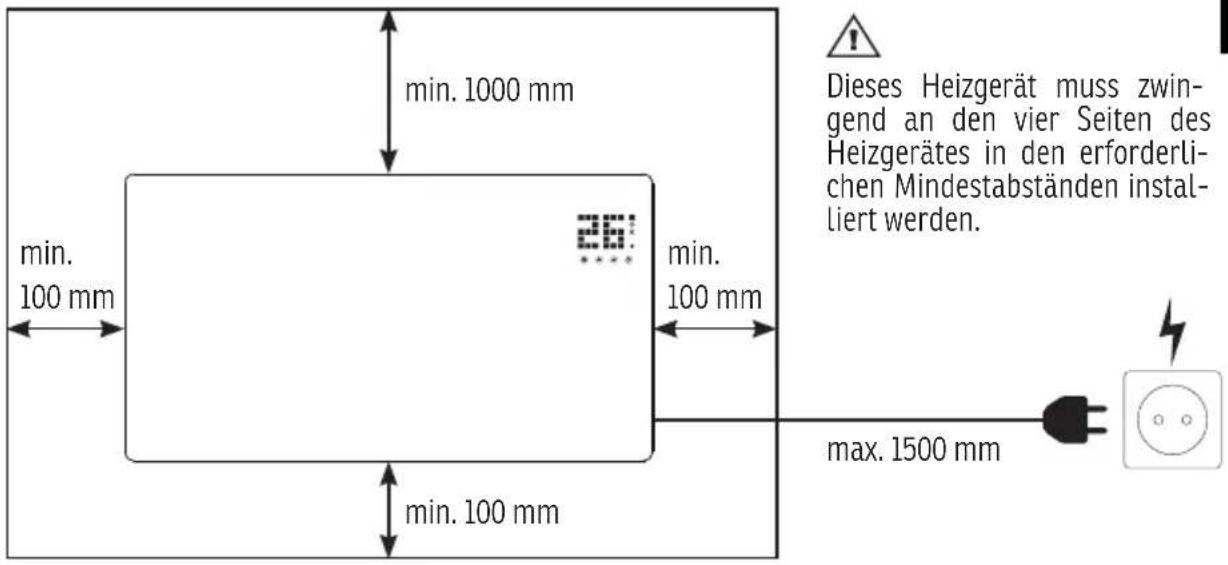
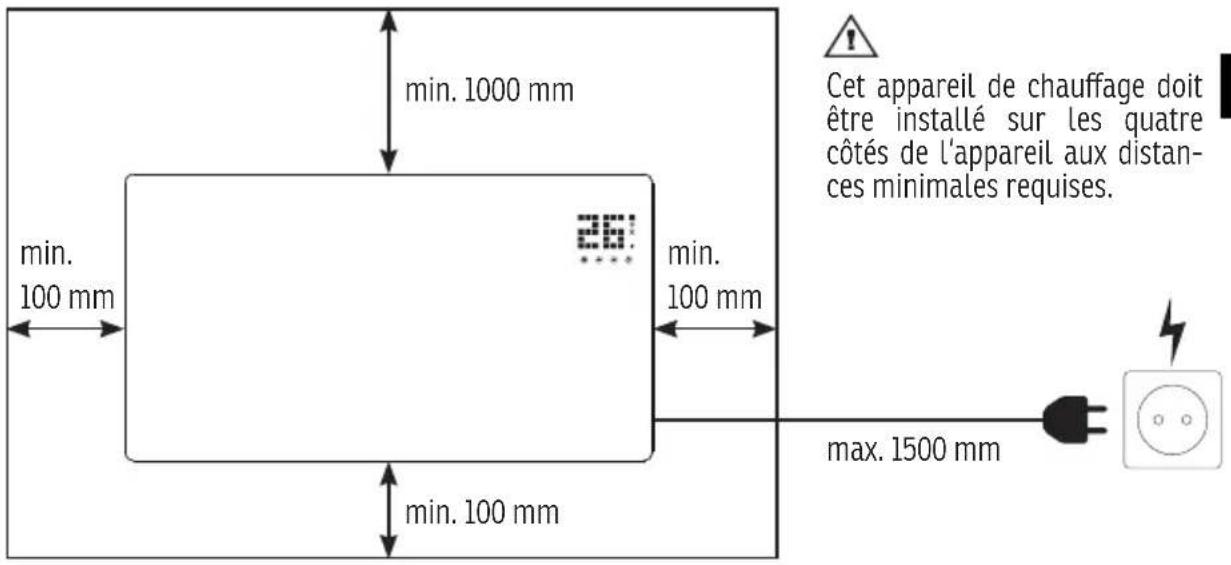
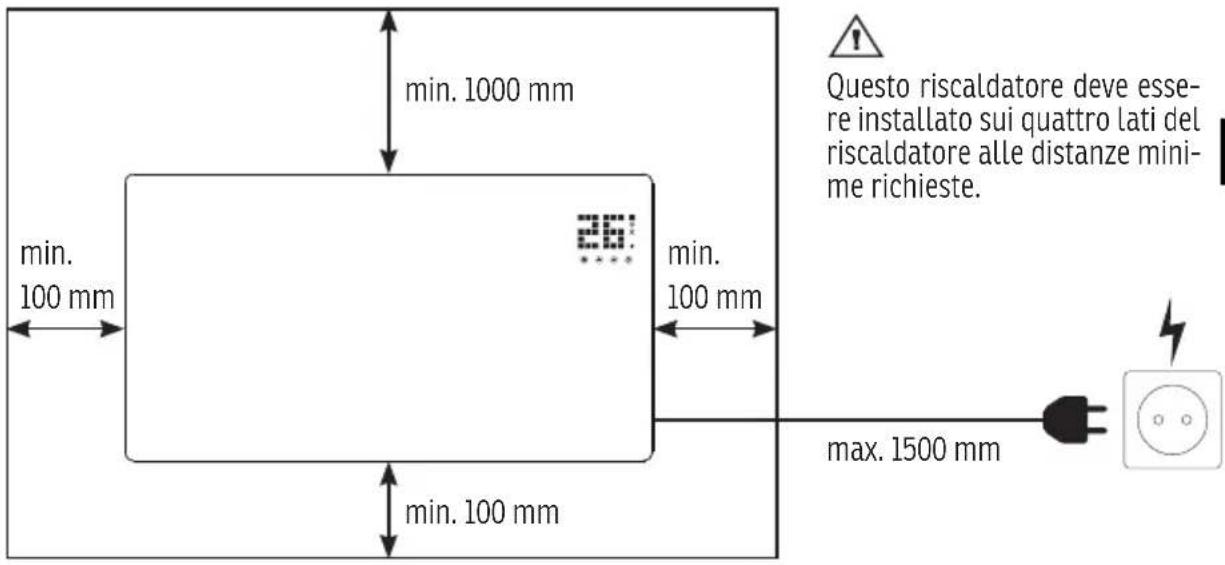
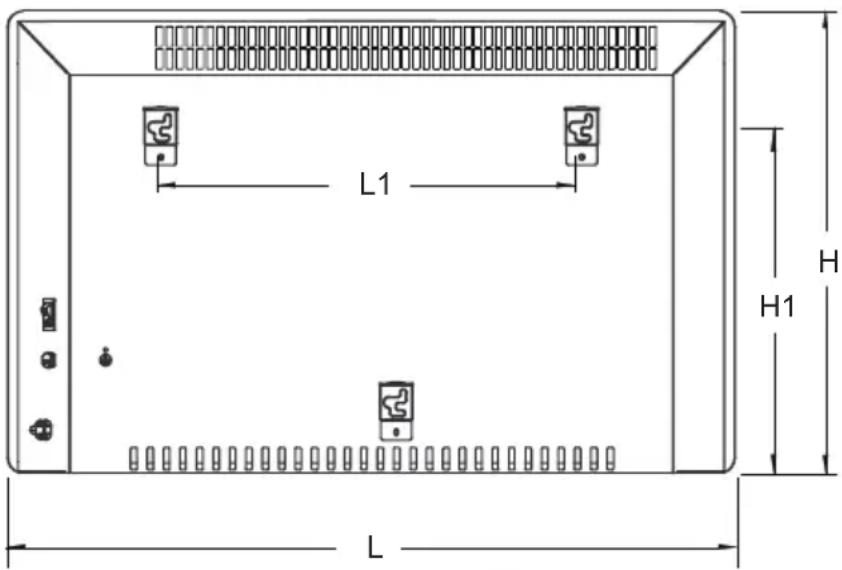
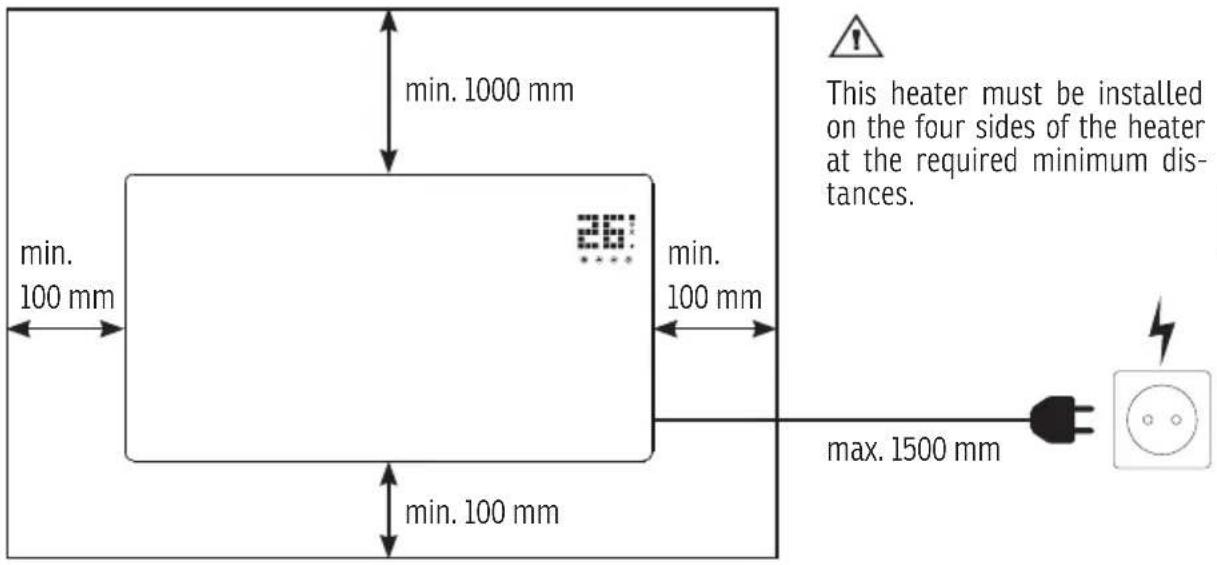
Refer to the table for the dimensions required for wall mounting. Also make sure that the required minimum distances are observed. Only use screws that support the weight of the device and are made for the corresponding wall. Also check that there is a power outlet in the immediate vicinity to connect the device.
text_image
L1 H H1 L| Device | Power (W) | L [mm] | H [mm] | L1 [mm] | H1 [mm] |
| VIDRO 1000 | 500/1000 515 450 | 218 344 | |||
| VIDRO 2000 | 1000/2000 835 450 | 538 344 | |||
text_image
min. 1000 mm min. 100 mm min. 100 mm 26" min. 100 mm max. 1500 mm This heater must be installed on the four sides of the heater at the required minimum distances.EN
7.2 Remove feet
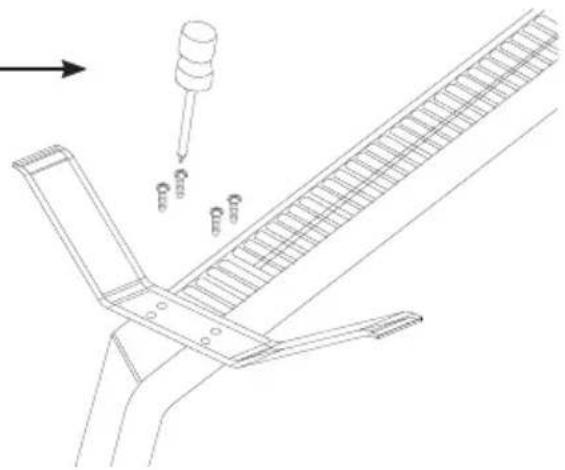
Turn the unit upside down and ensure that it cannot fall over during assembly. Remove all screws from both feet and pick up all parts.
text_image
Technical diagram showing a mechanical assembly with labeled components and directional arrows indicating motion or force.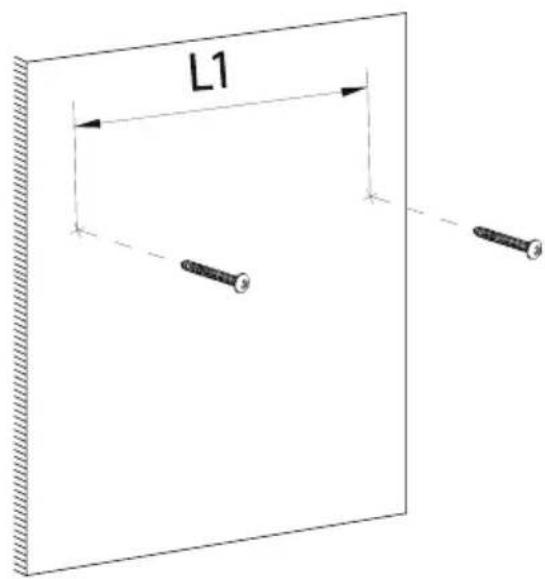
text_image
L17.3 Screw in brackets
Screw holes in the wall at a distance of L1. Depending on the wall type, dowels should be used. The screw head must be at least 5 mm away from the wall.
7.4 Mounting the device
Place the unit on the two screws through the large hole in the wall bracket. Now move the unit in the direction shown in the illustration to secure the bracket to the screws. Check that the screws in the brackets are seated by trying to pull the unit towards you.

text_image
1. 2. 3.8 Operation
EN
8.1 Initial setup
To use the heater, proceed as follows:
- Connect the mains cable to the power circuit.
- Press the ⏻-button on the unit or the remote control.
- Then operate the device as described below.
8.2 Activate the display
During normal operation, only the temperature is shown on the display. In ECO mode the display switches off completely. To activate the complete display, press below the temperature display.
8.3 Thermostat
You can set the desired temperature using the thermostat. To do this, press the ⏻ button directly on the device below the temperature display. The temperature display now flashes. Use the ▼-buttons to set the desired temperature.
You can use the remote control to control the temperature with the ▼buttons and confirm your selection with the OK -button.
The heater is now in operation until the preset value is reached. The thermostat causes the heater to switch on when the ambient temperature is below the preset value.
8.4 Setting the time
Press the setting buttons „ Ⓞ” and „ ▲” together for 3 seconds.
First, set the weekday with the ▼ and ▲ buttons. Confirm your Choice with the button. Next, set the hours and minutes using the same method.
8.5 Toggle Week- and Daytimer
Press the "Wait" -button on the remote to choose between day or weektimer. The according setting is shown on the control panel on the device with either and .
8.6 Switch off display / ECO-Mode
Press the ⏻ and ⏱ buttons at the same time for 3 seconds or press the ⏱ button on the remote to switch off the display.
To reactivate the display press below the display or press the -button on the remote.
EN
8.7 Child safety lock
Press the 📋 and -buttons at the same time for 3 seconds or press the -button on the remote to trigger the safety lock. The child safety lock indicator is shown on the display: [ ]
To turn the safety lock off again, press the ▼ and -buttons at the same time for 3 seconds.
8.8 Temperature level settings
To engage high mode press the -or -button on the device or the -button on the remote.
To engage low mode press the ⚙ or ▼ button on the device or the -button on the remote.
8.9 Open window detection
If the room temperature drops 2^ C within two minutes, the device indicates an open window via the symbol on the display together with a beep sound and stops heating.
To reactivate the device, close all windows and take measures to prevent another drop in the temperature and reboot the device.
8.10 Delete settings
To delete all settings, press the ⏻ button on the device for 10 seconds.
8.11 Setting Daytimer
To set the day timer ensure that the device is currently in day timer mode. Press the SET button on the remote control to set the time for daily heating. Control the hour and minute with the and -buttons.
9 Maintenance and Care
EN
Attention! Maintenance and care with the general safety requirements must be observed. To ensure trouble-free operation of the heater, the unit should be cleaned regularly. The following procedure is recommended for:
- Turn off the heater.
- Then tighten the power cord from the outlet.
- Remove the accumulated dust by means of cloth or vacuum cleaner.
- Wipe the cabinet with a Damp cloth. When cleaning the plastic parts gasoline solvents or abrasive cleaners that may damage the plastic surface.
- Plug the power cord into the wall outlet.
- Turn on the device.
- If the mains cable is damaged, it must be replaced by the manufacturer, its service agent or similarly qualified person in order to avoid a hazard.
10 Warranty / Disposal / Technical change
Warranty
The Products are controlled just before delivery. If despite a lack of your product, try trustfully your seller. Please bring your receipt, as this is to be submitted for each warranty. The guarantee period is 24 months from date of purchase.
Disposal
The device must be disposed of properly. The device can be distributed free of charge for disposal at each dealer.
Technical changes
Reserving technical changes in technology and design
Caution – Some parts of this product can become very hot and cause burns. Particular attention has to be given where children and vulnerable people are present.
CE Declaration of Conformity
This device complies with the following standards
EN 50564:2011
EN 55014-1:2017
EN 55014-2:2015
EN 60335-2-30:2009 + Cor. :2010 + A11:2012
EN 60335-1:2012/AC:2014
EN 61000-3-2:2014
EN 61000-3-3:2013
EN 62233:2008
2009/125/EG
2011/65/EU
2014/30/EU
2014/35/EU
DISPOSAL INSTRUCTIONS FOR THE ELECTRICAL PART OF THE PRODUCT
In accordance with Article 26 of the Decree-Law of 14 March 2014 implementing Directive 2012/19/EC and the Law of 4 March 2014 implementing Directive 2011/65/EC on the reduction of the use of hazardous substances in electrical and electronic equipment and on waste management.
The crossed-out dustbin symbol on the machine or packaging indicates that the waste generated at the end of its useful life must be collected separately from other waste. The user must therefore take the device to the appropriate collection points at the end of its service life. Sort electronic and electrical waste or send the purchase of new, equivalent devices back to the dealer in a one-to-one process. L'adeguata separate collection for subsequent commissioning of the equipment to be recycled, treatment and environmentally sound disposal, helps to avoid possible adverse effects on the environment and health and promote the reuse and/or recycling of the materials to which they belong. composed the equipment. Misuse of this product by the user will result in the application of the administrative penalties provided for in the applicable legislation. Batteries contained in the device must be disposed of separately in the appropriate containers for the collection of used batteries.
DISPOSAL OF BATTERIES AND ACCUMULATORS
In accordance with Legislative Decree 188 of 20 November 2008 implementing Directive 2006/66/EC on batteries, accumulators and related waste, the symbol of the crossed-out waste bin on the battery indicates that it is prohibited to dispose of used batteries in household waste.
Batteries and batteries contain substances that are highly polluting for the environment. The user is obliged to dispose of used batteries at collection points in the municipality or in appropriate containers. The service is free. In this way, legal requirements will be respected and the environment will be protected. The symbols identifying hazardous materials that may be present in batteries and accumulators are as follows: Hg= Mercury, Cd= Cadmium, Pb= Lead.
Notizen | Notes | Nota
Company
Armin Schmid
Olensbachstrasse 9-15
CH-9631 Ulisbach
Tel. Int. +41 71 987 60 60
Tel. Nat. 0848870850
www.sonnenkoenig.ch
Company
Armin Schmid