
BP 6101 wes - Vacuum Cleaner Exquisit - Free user manual and instructions
Find the device manual for free BP 6101 wes Exquisit in PDF.

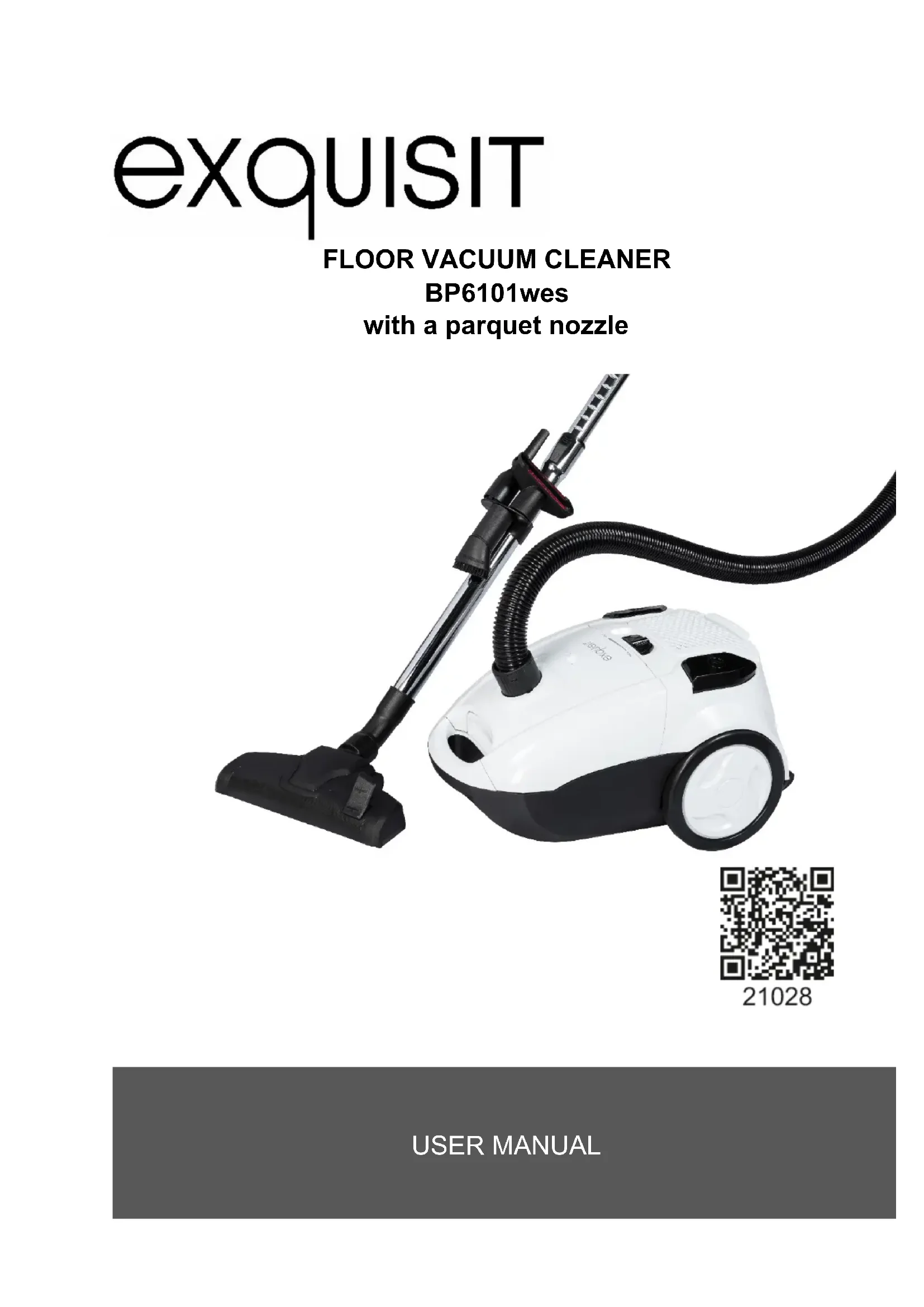


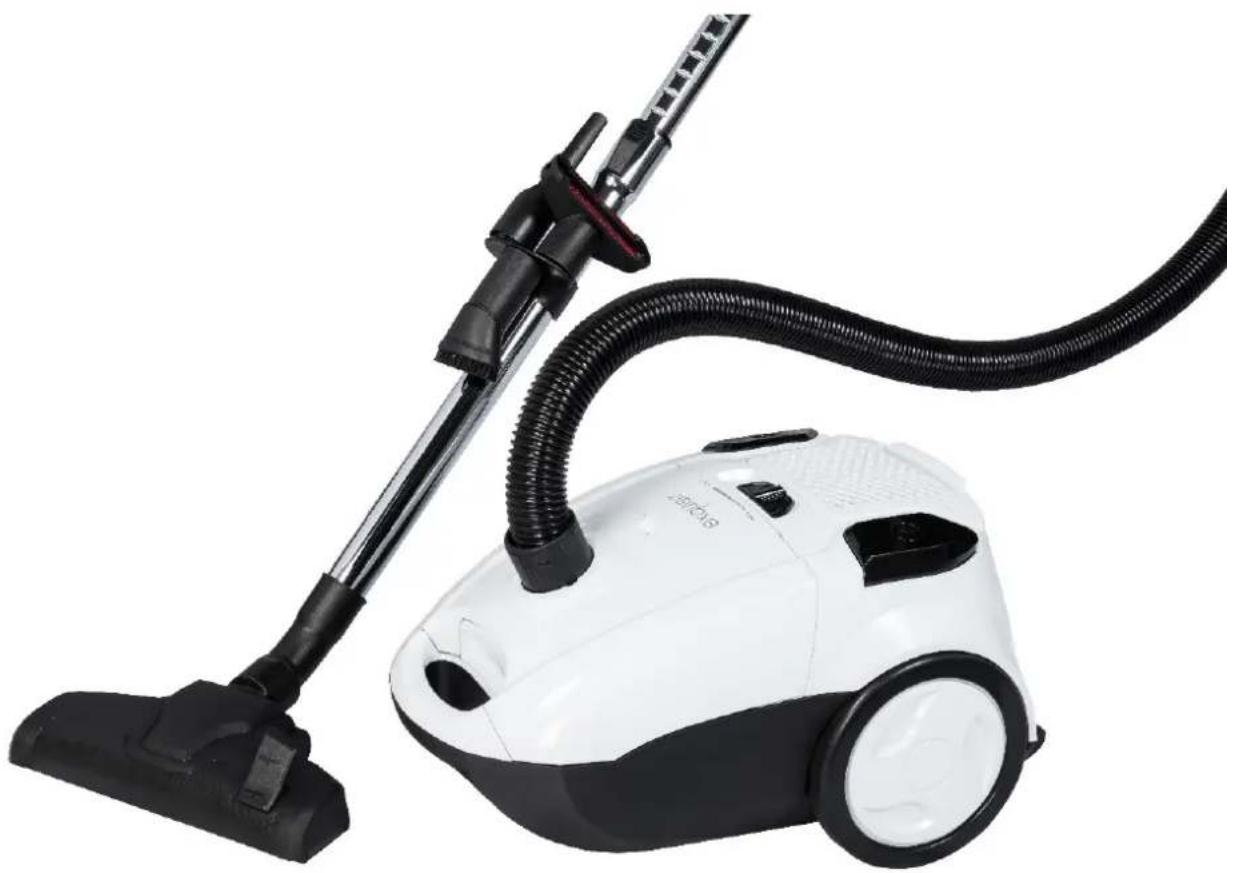
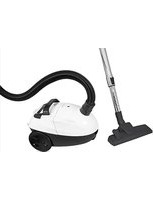
| Brand | Exquisit |
| Model | BP 6101 wes |
| Vacuum cleaner type | Universal canister vacuum |
| Energy efficiency class | A |
| Annual energy consumption | 25.1 kWh/year |
| Carpet performance class | D |
| Hard floor performance class | A |
| Dust emission class | A |
| Noise level | 76 dB |
| Rated power | 700 W |
| Power supply | 230 V ~, 50 Hz |
| HEPA filter | Yes, replaceable every 6 months |
| Motor filter | Yes, replaceable every 12 months |
| Dust container | With level indicator |
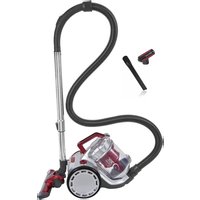
| Included accessories | Telescopic tube, carpet/hard floor nozzle, crevice nozzle, parquet brush, small brush |
| Cable winder function | Yes, winding button |
| Power regulation | Manual |
| Warranty | 24 months |
| Intended use | Domestic, indoor, dry dust |
Frequently Asked Questions - BP 6101 wes Exquisit
User questions about BP 6101 wes Exquisit
0 question about this device. Answer the ones you know or ask your own.
Ask a new question about this device
Download the instructions for your Vacuum Cleaner in PDF format for free! Find your manual BP 6101 wes - Exquisit and take your electronic device back in hand. On this page are published all the documents necessary for the use of your device. BP 6101 wes by Exquisit.
USER MANUAL BP 6101 wes Exquisit
natural_image
White and black vacuum cleaner with black hose and handle, no visible text or symbols
21028
21028
natural_image
Line drawing of a hand holding a coiled spring or hose component, with no visible text or symbols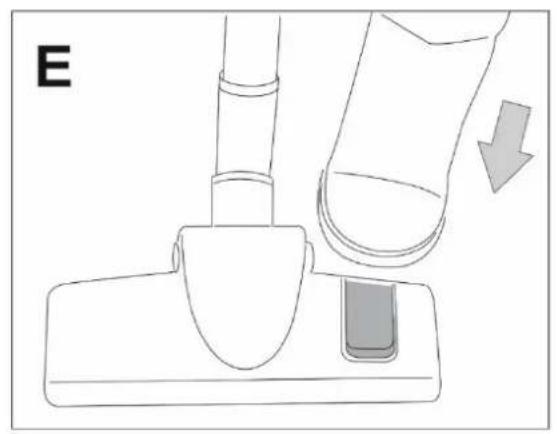
natural_image
Diagram of a finger pressing a small object on a base, with an arrow indicating motion (no text or symbols)
natural_image
Diagram of a finger pressing down on a curved mechanical component with directional arrows indicating movement (no text or symbols)
natural_image
Line drawing of a mechanical device with a downward arrow indicating force or movement (no text or symbols)
natural_image
Line drawing of a hand gripping a cylindrical object, labeled 'D' in the top-left corner (no other text or symbols)
natural_image
Line drawing of a sewing machine's side panel with a finger pressing the button (no text or symbols)
natural_image
Diagram of a vehicle's rearview and side profile with a circular button and arrow symbol (no text or labels)
natural_image
Diagram of a hand pressing a button on a car interior, showing no text or symbols
natural_image
Diagram of a car interior showing a circular component with an arrow indicating rotation or movement (no text or symbols)
natural_image
Top-down line drawing of a device casing with buttons and control panel (no text or symbols)
natural_image
Illustration of a hand pressing a button on a device (no text or symbols visible)
natural_image
Line drawing of a hand pressing down on a shopping cart with an upward arrow (no text or symbols)
natural_image
Illustration of a hand holding a curved object over a grid, with a north arrow labeled 'N' (no text or symbols on the diagram itself)2 CE-Kennzeichnung
Zum Zeitpunkt der
with a parquet nozzle
natural_image
White and black vacuum cleaner with black hose and handle, no visible text or symbols
21028
With QR codes there's fast and easy access to all information
What are QR codes?
QR codes (Quick Response codes) are graphic codes, which are read by means of a Smartphone camera and lead quickly and easily to further information (e.g. see internet site, product video or contact information).
And this is how it works
To scan the QR codes all you need is a Smartphone, a QR code reader app (available free of charge in the App Store) and an internet connection. *
QR-CODE

21028
*When reading QR codes additional costs may be incurred for the internet connection depending on the rate you pay.
Dear client
Thank you for buying our product. You have chosen well.
Your Exquisit – appliance has been designed for use in private households and is a quality product, combining highest technical requirements with ease of practical comfort in handling – alike other Exquisit – appliances, to the full satisfaction of their owners throughout Europe
Please read this user manual carefully before you start up your appliance for the first time. It contains important safety instructions and information concerning the installation, operation and maintenance of the appliance. Correct handling will contribute to efficient use and will minimize energy consumption during operation.
Improper use could lead to dangerous situations, particularly for children. Keep this user manual for later use. Pass it on to any future owner of this product. In case of doubt concerning questions or topics, which are not dealt with in detail in this manual, please contact your dealer or an authorized technician or go to our homepage: www.ggv-service.de
The manufacturer is constantly working to further develop all types and models. We reserve the right to make changes to the design, features and equipment of all types and models without previous notice.
Contents
1 Description of the appliance .... 5
2 CE marking.... 10
3 Disposal of old equipment.... 10
4 Safety directions.... 10
4.1 Explanation of the safety directions.... 10
4.2 General safety instructions 11
5 Purpose of use 12
6 Initial operation.... 12
7 Operating instructions:.... 14
8 Cleaning and maintenance.... 15
8.1 Replacement of the HEPA filter.... 15
8.2 Replacing the motor filter 15
9 General warranty conditions.... 16
10 Troubleshooting 19
11 Technical Data 20
11.1 EU Product datasheet 20
11.2 Energy lable / Rading lable.... 20
INDIVIDUAL PARTS
1 Description of the appliance
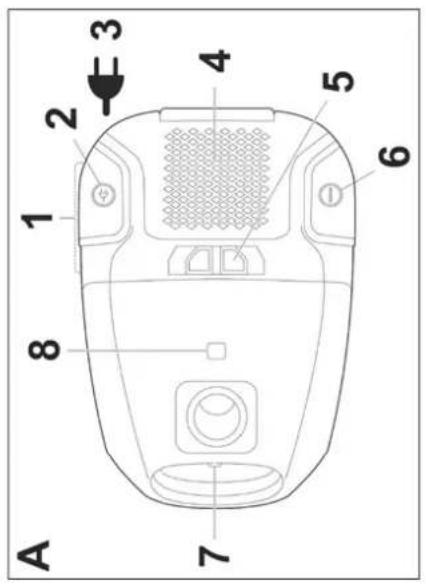
- Wheels
- Cable rewind button
- Power cord
- HEPA filter flap
- Power slider
- On/Off button
- Cover lock
- Fill level indicator
- Length adjuster for the telescopic pipe
- Accessory holder
- Telescopic pipe
- Carpet/floor nozzle
- Brush switch, in order to adapt the position of the bristles
- Flexible hose
- Crevice nozzle
- Dust brush
- Parquet bruch
- Upholstery nozzle


natural_image
Hand holding a coiled spring component with a directional arrow, no text or symbols present
natural_image
Line drawing of a finger pressing a button on a device (no text or symbols)
natural_image
Diagram of a hand holding a flexible hose with directional arrows indicating movement or force (no text or symbols)
natural_image
Line drawing of a hand operating a medical or laboratory device with a downward arrow indicating force or movement (no text or symbols present)
natural_image
Line drawing of a hand gripping a wrist, labeled 'D' in the top-left corner (no other text or symbols)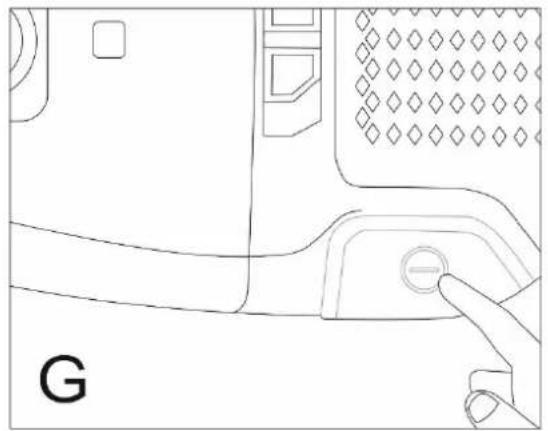
natural_image
Line drawing of a device's door panel with a finger pressing the button (no text or symbols)DE
natural_image
Diagram of a vehicle's rearview and side profile with a circular button labeled 'H' and a downward arrow, no readable text or symbols present.
natural_image
Diagram of a hand pressing a button on a device casing, showing directional arrows (no text or symbols)
natural_image
Diagram of a car interior showing a circular component with an arrow indicating rotation or movement (no text or symbols)
natural_image
Top-down line drawing of a device casing with buttons and control panel (no text or symbols)
natural_image
Illustration of a hand pressing a card into a device with an upward arrow (no text or symbols)
natural_image
Line drawing of a hand pressing down on a computer monitor with an upward arrow (no text or symbols)
natural_image
Illustration of a hand holding a curved object over a grid, with a north arrow labeled 'N' (no text or symbols on the diagram itself)2 CE marking
At the time of its introduction on the market the product fulfills the requirements, which were specified in the directive for the standardization of the laws of the Member States concerning the electromagnetic compatibility (2014/30/EU) of electrical equipment within certain voltage limits (2014/35/EU). This product is identified by the CE marking and delivered with a declaration of conformity for inspection by the market monitoring authority. *Subject to change without notice*
3 Disposal of old equipment
This product is marked in accordance with the European waste framework directive 2012/19/EU. The directive regulates the correct disposal of the product. Environmentally appropriate disposal of the appliance will prevent possibly negative consequences for health, which are caused by improper disposal. The symbol on the product or the packaging indicates that this product must not to be disposed of with normal domestic refuse. The user must return the product to a collection point for the recycling of electrical and electronic equipment. Disposal must be in accordance with the existing local regulations. For further information please contact

4 Safety directions
4.1 Explanation of the safety directions
All of the safety instructions in this manual are identified with a warning symbol. They indicate possible dangers promptly. It is essential to read this information and to adhere to it.
Explanation of the safety instructions
The following symbols and warnings will be featured in the user manual or on the vacuum cleaner or the packaging.

WARNING
This refers to a dangerous situation that can lead to death or to a serious injury!

ATTENTION
This refers to a dangerous situation that can lead to a minor or moderately serious injury.
IMPORTANT
Describes a situation, which can cause substantial damage to property or to the environment.
4.2 General safety instructions
- Avoid injuries and damage, by transporting the equipment only in a package.
- Assemble and connect the appliance only in accordance with the instructions in this manual.
- The plug must be accessible after assembly.
- In the event of an emergency unplug the appliance immediately.

WARNING
Do not touch the plug and the power supply cord with wet or damp hands when you are connecting or removing them.

DANGER OF ELECTROCUTION!
- Hold the plug tightly whilst removing the power cord. Do not pull on the power cord.
- Remove the plug before a cleaning or maintenance procedure.
- A damaged power cord must be replaced immediately by the supplier, dealer or customer service department. If the power cord or the plug is damaged, you can no longer use the appliance.
- Do not implement any further change except for the cleaning and maintenance procedures specified in these instructions.
- If you leave the equipment unattended and before each assembly, disassembly or cleaning of the accessories (nozzles, brushes, hoses, filters
etc.) or of the appliance itself, always unplug it from the power supply.
Special safety instructions Safety instructions for children and people with limited abilities.

WARNING
After removing the packaging check that all components and accessories were delivered. In case of doubt do not use your appliance and contact a qualified technician. The packaging materials (plastic bag, polystyrene, metal clips, etc.) must not be left within the reach of children since they represent possible sources of danger and must be disposed of in accordance with the valid regulations.

WARNING
The appliance must be stored beyond the reach of animals, children or people, who are incapable of using it. Do not leave the equipment unattended if it is connected to a power source.
- Undertake the necessary precautionary measures to prevent children from playing with the appliance.
- The appliance can only be used by children above eight years of age and by people, whose physical, mental or emotional capabilities are limited or impaired, or, who lack experience or knowledge,
if they are supervised, after they have received instructions on the safe use of the appliance and understand the risks.
• Children must not play with the appliance.
- Cleaning and maintenance, which must be performed by the user, may not be carried out by children if they are not supervised.
- This appliance can be used by children over eight years and older and by people with physical, sensory or mental restrictions or who lack experience and knowledge if they are properly supervised or if they have received instructions concerning the safe use of the equipment and if they understand the relevant dangers. Children must not play with the appliance. Cleaning and maintenance should not be performed by children unless they are older than 8 years and are supervised.
5 Purpose of use
The vacuum cleaner is designed exclusively for vacuum cleaning indoors. It is intended exclusively for private use and is not suitable for the industrial sector.
Do not pick up any water with the vacuum cleaner.
Use the vacuum cleaner only as described in this user manual. Any other use will be deemed to be out of compliance with the regulations and can lead to
material damage or even to personal injury.
The manufacturer or dealer assumes no liability for damage that was caused by improper use.
6 Initial operation

WARNING!
Incorrect electrical installation or excessively high mains voltage leads to electric shock

DANGER OF ELECTROCUTION!
- Connect the vacuum cleaner only to 230- volt alternating current. The plug socket should be protected with a 16-amp fuse. If further appliances with a high connected load are connected to the same electrical circuit, the safety device can be triggered when the vacuum cleaner is switched on. This can be avoided if the lowest (minimum) suction power is set and is only increased to the desired level when the engine is running.
- Connect the floor vacuum cleaner only to an easily accessible receptacle so that you can unplug it quickly from the power supply in the event of a malfunction.
- Do not operate the floor vacuum cleaner, if it exhibits visible damage or the power supply cable and/or the power plug is defective.
- If the appliance's power cord is damaged, it must be
replaced by the manufacturer or its customer service representative in order to avoid risks.
- The vacuum cleaner may not be operated with an external time switch or a separate remote control system.
- Do not open the housing but leave repairs to professional experts. Consult a specialist workshop for this. In the event of independently performed repairs, inappropriate connection or improper operation liability and warranty claims are excluded.
- In the event of repairs, only parts, which are compatible with the original equipment data, may be used. There are electrical and mechanical parts in this vacuum cleaner, which are essential for protection against sources of danger.
- Never grasp the power plug with damp or wet hands.
- Do not unplug the appliance from the power supply by pulling the cord but always grasp the power plug.
- Do not use the power cord as a carrying handle.
- Keep the floor vacuum cleaner the power supply plug and the cord away from an open fire and hot surfaces.
- Lay the power cable in such a way that it does not become the tripping hazard.
- Do not bend the power cord and do not run it over sharp edges over sharp edges. Do not squeeze it under doors for example. Avoid frequent movement of the vacuum cleaner over the power cable.
- If you're not using the vacuum cleaner or are changing the accessories, cleaning the appliance or if there is a malfunction, switch off the
vacuum cleaner and unplug t from the power supply receptacle.

WARNING!
Dangers for children and people with reduced physical, sensory or mental abilities (for example partially impaired elderly people with restriction of their physical and mental abilities) or with a lack of experience and knowledge (for example older children).

ATTENTION!
Risk of injury! Improper handling the vacuum cleaner can lead to injuries.
- Do not use the vacuum cleaner on humans or animals.
- Do not come close to your head or hair when you are using the vacuum cleaners suction nozzle
- Danger of crushing: The vacuum cleaner contains moving parts. Pay attention to your fingers and hands when assembling it, using it daily and cleaning it.
PLEASE NOTE!
Danger of damage!
Improper handling of the vacuum cleaner can lead to damage to the appliance.
- Set up the vacuum cleaner on an easily accessible, even, dry, heatproof and sufficiently stable work surface. Do not place the vacuum cleaner on the edge of the work surface.
- Do not bring the power cable into contact with hot parts.
Do not expose the vacuum cleaner to high temperatures (heating etc.) or weather conditions (rain etc.) - Do not use the floor vacuum cleaner any longer if its plastic components have tears or cracks or have been deformed.
- Do not use the appliance without HEPA filters.
- Do not suck up burning or glowing items such as cigarettes or seemingly extinguished ash.
- Do not suck up liquids or damp dirt. Let damp cleaned or shampooed carpets dry before vacuuming.
- Do not suck up toner dust from printers or copiers. The filter system cannot filter toner dust perfectly. The toner dust would be blown into the room again by the blower.
- Do not vacuum up easily flammable or explosive materials or gases.
- Do not vacuum up sharp edged, heavy or hard objects. The vacuum cleaner would be blocked.
- Do not stand or sit on the vacuum cleaner.
Assembling the vacuum cleaner
PLEASE NOTE!
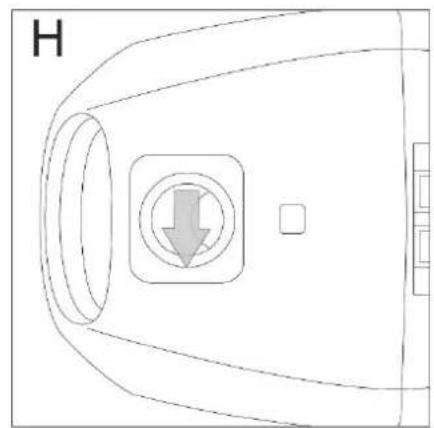
Depending on what you would like to vacuum, there are four attachments, from which to choose. For a dusty carpet or a hard floor use the floor nozzle. With the foot pedal you can lower or expose the integrated bristle ring (see fig. E and H).
- We recommend the crevice nozzle for corners that are hard to reach.
- For sensitive or shaped articles use the brush nozzle by putting it on the crevice nozzle.
- For pieces of furniture there is an upholstery nozzle.

WARNING
Do not use electrical appliances inside food storage compartments equipment, if they are not of the type recommended by the manufacturer.
7 Operating instructions:
Please note:
Only use the appliance if all parts are fully and correctly installed. In case of doubt have it examined and assembled by a qualified specialist.
Every time before you use it, make sure that the appliance is in good condition and that the power cord isn't damaged: if the cord is damaged, it must be replaced by the manufacturer or the service center or by someone with a similar qualification, in order to prevent any risks.
- Place the vacuum cleaner housing on the floor.
- Stick the suction piece of the flexible hose (14) into the suction opening of the vacuum cleaner housing. The hose must snap into place perceptibly.
-
Put the handle of the hose on the telescopic pipe (11). The hose must snap into place perceptibly.
-
Put the desired suction nozzle to the other end of the telescopic pipe.
- Use the floor nozzle (12) to clean dusty carpets or hard floors.
• We recommend the crevice nozzle (15) for corners that are hard to reach. - For sensitive or formed items use the brush nozzle (16).
- In addition, there is an upholstery nozzle (17).
- Brush (7): step on the switch in order to adjust the position of the brush to this position is suitable for parquet and soft surfaces such as floors or tiles. For carpets or mats step on the brush again
- The crevice nozzle (15) is suitable for corners or places that are difficult to reach.
• Fully unwind the power cord. - Plug the appliance into the receptacle and press the on/off button (3).
- When you are using the appliance make sure that the flexible hose isn't blocked, twisted or trapped.
- In order to switch off the floor vacuum cleaner, unplug it from the receptacle and wind the cord with the cord rewind button (2).
- Carry the vacuum cleaner easily by the handle.
8 Cleaning and maintenance
8.1 Replacement of the HEPA filter
The HEPA filter is used to filter viruses, respirable types of dust, mite eggs and excretions, pollen, smoke particles, asbestos, bacteria, various toxic types of dust and aerosols out of the air. The HEPA filter is not washable.
- Remove the grille from the floor vacuum cleaner housing.
- Change the L, M, N HEPA filter.
- Put the grille into the vacuum cleaner housing again.
PLEASE NOTE!
Danger due to faulty operation!
The HEPA filter must be changed every 6 months. The dirt filters and motor filters must be renewed every
12 months. You can obtain a spare filter set consisting of
5 floor vacuum cleaner bags,
1 motor filter and
1 HEPA filter from www.ggv-service.de
8.2 Replacing the motor filter
No illustration available.
- Open the floor vacuum cleaner cover by the latch (7).
- Remove the floor vacuum cleaner bag first and then take the grille off the motor filter.
- Change the motor filter and insert the grille and the floor vacuum cleaner bag again with the cover of the floor vacuum cleaner

CAUTION
Risk of injury!
Improper handling of the vacuum cleaner can
Lead to injuries.
Switch the vacuum cleaner off every time before you clean or maintain it and unplug it from the receptacle.
Please note: Switch the appliance off and unplug it every time before you clean it. For optimal use of the appliance and to guarantee a longer life span, empty the container regularly and clean its filters (E) and (H).
- To completely clean the container (C), it is necessary to completely dismantle it after each use (see figures A, B, C, G, F and H – Press on the unlocking button (A 1) and pull on the container at the same time using the handle (B).
Pour the dust from the container, by opening the cover with the release button (22).
- Remove the central plastic filter (15) from the holder, by turning it in an anticlockwise direction. If water is used, dry it thoroughly before putting it back in.
ATTENTION
- Do not immerse the motor unit, the plug or the power supply cord in water or any other liquid.
(Clean it only with a dry cloth.)
- Clean the brushes and nozzles regularly. Use water and a
sponge, which has been slightly dipped into a liquid cleaning agent. Then rinse it off thoroughly and dry it. Don't use steel wool or abrasive products. If the appliance is not being used for an extended period of time, it must be covered and placed in a dry place, in an upright position. The appliance can be carried by the handle on the motor unit. It is recommended that you put it back into its original packaging in order to protect it against dust and humidity.
- If you are no longer using the appliance, take it out of operation, disconnect the cord from the power supply and secure all parts that constitute a risk for playing children.
9 General warranty conditions
Warranty conditions
As the purchaser of an Exquisit appliance you are entitled to the legal guarantees under the purchasing contract with your dealer. In addition, we grant you a warranty under the following conditions:
Benefit duration
The warranty lasts for 24 months from the date of purchase. (Proof of purchase must be submitted.) During the first 6 months, any defects on the appliance will be eliminated free of charge, provided that the appliance is accessible for repairs without any special effort. In the further 18 months, the purchaser is obliged to prove that the defect was already in existence when the appliance was delivered.
For industrial use (e.g. in hotels or canteens) or for community use by several households, the warranty lasts for 12 months from the date of purchase. (Proof of purchase must be submitted.) During the first 6 months, any defects on the appliance will be eliminated free of charge, provided that the appliance is accessible for repairs without any special effort. In the further 6 months, the purchaser is obliged to prove that the defect was already in existence when the appliance was delivered.
If a claim is made on the warranty, the warranty will not be extended for either the appliance or for newly installed parts.
Extent of defect rectification
We will rectify all defects on the appliance that can be proven to be attributed to faulty workmanship or material defects. Replaced parts will become our property.
The following are excluded:
Normal wear and tear, deliberate or negligent damage, damage that was caused by a failure to comply with the user manual, improper assembly and/or installation or connection of the appliance to the wrong mains voltage, damage due to chemical and/or electro thermal effects or other abnormal environmental conditions, glass, varnish or enamel damage, variations in colour and defective light bulbs. Likewise, defects on the appliance are excluded if they are to be attributed to damage in transit. We do not render any services if any work has been performed on the Exquisit appliance by unauthorized persons or if parts from a third party were used without our specific written permission. This restriction shall not apply to error-free work that was performed by a qualified professional within our organization to adapt the appliance to the technical safety provisions of another EU country.
Area of application
Our warranty applies to appliances that were purchased in an EU country and that are in operation in the Federal Republic of Germany or Austria.
For appliances that were purchased in an EU country and that were brought to a different EU country, services will be rendered in accordance with the warranty conditions that are customary in that country in each case. There is only an obligation to perform under the warranty if the appliance complies with the technical provisions of the country where the claim under the warranty is being asserted.
The following shall apply to repair orders outside of the warranty period:
If an appliance is repaired, the repair bills will be due immediately and must be paid without any deduction.
If an appliance is checked and/or a repair that was started has not been completed, lump sums will be charged for travel expenses and the work which has been carried out. Advice from our customer service centre is free of charge.
10 Troubleshooting
| Defects | Possible reason | Solution |
| The vacuum cleaner doesn't work. | The appliance is not switched on. | Switch the appliance on. |
| The electrical plug is defective. | Contact a qualified technician. | |
| The appliance is not plugged into the receptacle. | Plug the appliance into the receptacle. | |
| If the vacuum cleaner does not have any suction power | An accessory part: The hose or pipe or nozzles or brushes are blocked. | Remove whatever is causing the blockage. |
| The HEPA filter is soaked/dirty | Clean the filter. | |
| If the vacuum cleaner doesn't work as it ought to or if there are noises and/or whistling sounds. | An accessory part: The hose or pipe or nozzles or brushes are blocked. | Remove whatever is causing the blockage. |
| The dust container is full. | Empty it and clean it. | |
| The cover of the container is not correctly positioned. | Close the cover well. | |
| The dust collector is not correctly positioned. | Position it correctly. | |
| The manual air flow controller is open. | Close it. | |
| If the cord does not rewind completely | Rewinding the cord is slow: unwind it and press the button again. |
In case of doubt consult a qualified expert.
11 Technical Data
11.1 EU Product datasheet
RÈGLEMENT DÉLÉGUÉ (UE) 665/2013
11.2 Energy lable / Rading lable

bar
EXQUISIT BP6101 wes | Category | Energy Consumption (kWh/annum) | |---|---| | A+++ | 25,1 | | A++ | 76 | | A+ | 25,1 | | A | 25,1 | | B | 25,1 | | C | 25,1 | | D | 25,1 | ENERGIA - ECHOCYHR - ENERGIDA ENERGIA - ENERGY - ENERGIE - ENERGI 665/2013 - IIexquisit
ASPIRATEUR-TRAINEAU
BP6101wes
natural_image
White and black vacuum cleaner with black hose and handle, no visible text or symbols
21028
21028
natural_image
Hand holding a finger pointing to a button or knob on a car (no text or symbols visible)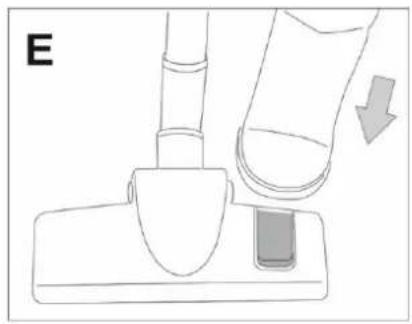
natural_image
Illustration of a finger pressing a small object on a base, with an arrow indicating downward motion (no text or symbols)
natural_image
Simple line drawing of a vehicle's side profile with a circular button and arrow (no text or symbols)
natural_image
Hand holding a finger with arrows indicating movement or force (no text or symbols)
natural_image
Diagram of a hand holding a tool with a downward arrow indicating force or movement (no text or symbols present)
natural_image
Top-down schematic of a vehicle's rearview and side profile showing a circular component with an arrow indicating rotation (no text or symbols)
natural_image
Line drawing of a hand gripping a cylindrical object, labeled 'D' (no text or symbols on the diagram itself)
natural_image
Line drawing of a device's door and handle with a finger pointing to the button (no text or symbols)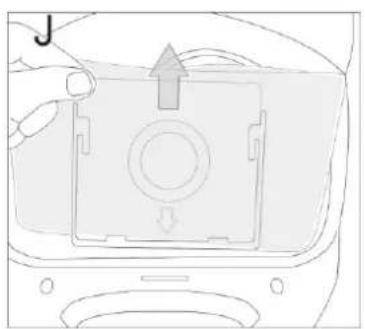
natural_image
Diagram of a device interior with a central button and directional arrow (no text or symbols)
natural_image
Illustration of a hand pressing a button on a surface with an upward arrow (no text or symbols)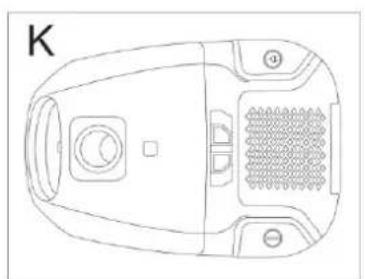
natural_image
Top-down line drawing of a device casing with buttons and a central button (no text or symbols)
natural_image
Diagram of a hand pressing a grid component with an arrow indicating upward motion (no text or symbols)
natural_image
Illustration of a hand placing a sample on a grid surface with a compass (no text or symbols)2 Marquage CE
natural_image
White and black vacuum cleaner with black hose and handle, no visible text or symbols
21028
21028
natural_image
Hand holding a finger pressing a button on a car (no text or symbols visible)
natural_image
Diagram of a hand pressing down on a mechanical component (no text or symbols)
natural_image
Simple line drawing of a curved object with a circular button and arrow symbol (no text or labels)
natural_image
Diagram of a finger pressing a button on a car handle, with arrows indicating movement (no text or symbols)
natural_image
Diagram of a hand holding a tool with a downward arrow, no text or symbols present
natural_image
Top-down line drawing of a mechanical component with a circular housing and a curved arrow indicating rotation (no text or symbols)
natural_image
Line drawing of a hand gripping a wrist, labeled 'D' (no text or symbols on the diagram itself)
natural_image
Line drawing of a camera with a finger pressing a button labeled 'G' (no text or symbols beyond the label)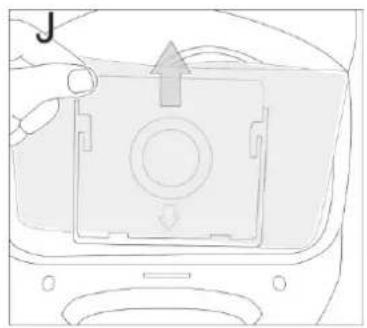
natural_image
Diagram of a car interior showing a camera module with an arrow indicating direction (no text or symbols)
natural_image
Illustration of a hand holding a tablet with an upward arrow, no text or symbols present
natural_image
Top-down line drawing of a device casing with buttons and a grid pattern (no text or symbols)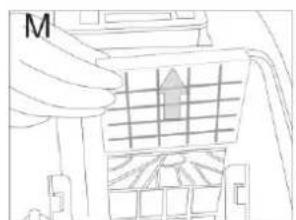
natural_image
Line drawing of a hand pressing a grid structure with an arrow symbol (no text or labels)
2 CE-markering
GGV HANDELGES. MBH & CO. KG
AUGUST-THYSSEN-STR.8
D-41564 KAARST
GERMANY


- CE-Kennzeichnung
- With QR codes there's fast and easy access to all information
- What are QR codes?
- And this is how it works
- Dear client
- Contents
- INDIVIDUAL PARTS
- Description of the appliance
- CE marking
- Disposal of old equipment
- Safety directions
- Explanation of the safety directions
- WARNING
- ATTENTION
- IMPORTANT
- General safety instructions
- DANGER OF ELECTROCUTION!
- Purpose of use
- Initial operation
- WARNING!
- ATTENTION!
- PLEASE NOTE!
- Danger of damage!
- Assembling the vacuum cleaner
- Operating instructions:
- Please note:
- Cleaning and maintenance
- Replacement of the HEPA filter
- Danger due to faulty operation!
- Replacing the motor filter
- CAUTION
- General warranty conditions
- Warranty conditions
- Benefit duration
- Extent of defect rectification
- The following are excluded:
- Area of application
- Technical Data
- EU Product datasheet
- Energy lable / Rading lable
- exquisit
- Marquage CE
- CE-markering
Brand : Exquisit
Model : BP 6101 wes
Category : Vacuum Cleaner