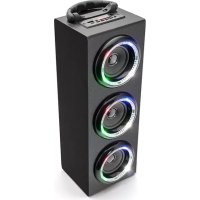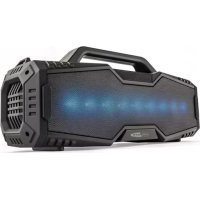
HPG529BTL - Speaker CALIBER - Free user manual and instructions
Find the device manual for free HPG529BTL CALIBER in PDF.


| Product type | Portable Bluetooth speaker |
| Brand | Caliber |
| Model | HPG529BTL |
| Power supply | Built-in rechargeable battery, charge via USB 5V |
| Wireless connectivity | Bluetooth, FM radio |
| Wired connectivity | AUX input (3.5 mm jack), USB port, micro SD card reader |
| Functions | Bluetooth playback, USB, micro SD, FM, hands-free mode, playback controls |
| Battery life | Varies depending on usage (loud music consumes more) |
| Operating temperature | 0°C to +45°C |
| Cleaning | Soft dry cloth, water only for stubborn stains |
| Safety | Disconnect in case of issue, do not expose to heat or sunlight |
| Spare parts / Repairability | Built-in battery not user-replaceable, return to retailer for repair |
| General information | Compliant with directives RCH 2011/65/EU and RED 2014/53/EU |
Frequently Asked Questions - HPG529BTL CALIBER
User questions about HPG529BTL CALIBER
0 question about this device. Answer the ones you know or ask your own.
Ask a new question about this device
Download the instructions for your Speaker in PDF format for free! Find your manual HPG529BTL - CALIBER and take your electronic device back in hand. On this page are published all the documents necessary for the use of your device. HPG529BTL by CALIBER.
USER MANUAL HPG529BTL CALIBER
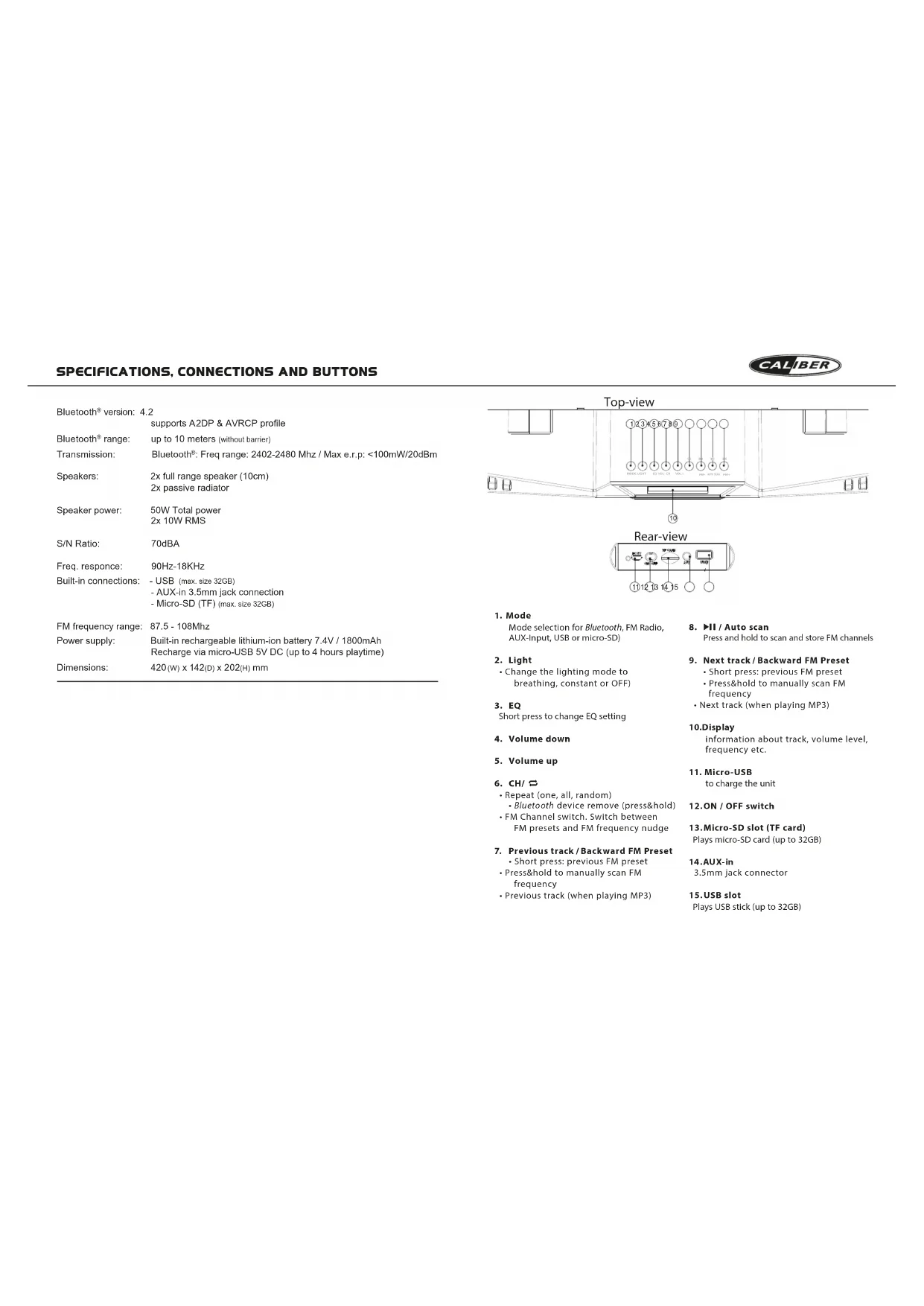
SPECIFICATIONS, CONNECTIONS AND BUTTONS

Bluetooth version: 4.2
supports A2DP & AVRCP profile
Bluetooth range: up to 10 meters (without barrier)
Transmission: Bluetooth*: Freq range: 2402-2480 Mhz / Max e.r.p: <100mW/20dBm
Speakers: 2x full range speaker (10cm)
2x passive radiator
Speaker power: 50W Total power
2x 10W RMS
S/N Ratio: 70dBA
Freq. response: 90Hz-18KHz
-USB (max. size 32GB)
-AUX-in 3.5mm jack connection
-Micro-SD (TF) max.size 32GB
FM frequency range: 87.5 - 108Mhz
Built-in rechargeable lithium-ion battery 7.4V/1800mAh
Recharge via micro-USB 5V DC (up to 4 hours playtime)
Dimensions: 420(W) x 142(D) x 202(H) mm
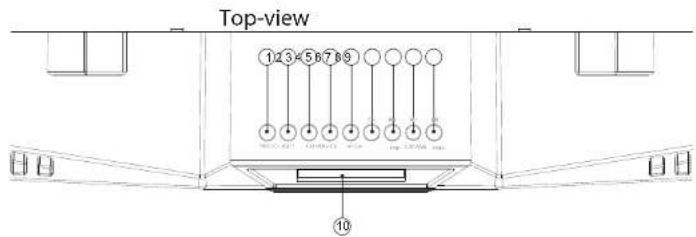
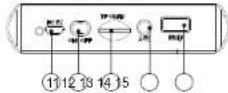
Rear-view
1.Mode
Mode selection for Bluetooth, FM Radio.
AUX-Input, USB or micro-SD)
- Light
Change the lighting mode to:
breathing, constant or OFF)
- EQ
Short press to change EQ setting
-
Volume down
-
Volume up
-
CH/
-
Repeat (one, all, random)
-
Bluetooth device remove (press&hold)
FM Channel switch. Switch between
FM presets and FM frequency nudge
- Previous track/Backward FM Preset
Short press: previous FM preset
- Press&hold to manually scan FM
frequency
Previous track (when playing MP3)
- II / Auto scan
Press and hold to scan and store FM channels
-
Next track/Backward FM Preset
-
Short press: previous FM preset
Presshold to manually scan FM frequency
- Next track (when playing MP3)
10.Display
information about track, volume level, frequency etc.
- Micro-USB
to charge the unit
12.ON/OFF switch
13.Micro-SD slot (TF card)
Plays micro-SD card (up to 32GB)
14.AUX-in
3.5mm jack connector
15.USB slot
Plays USB stick (up to 32GB)
MANUAL
Precautions
Points to observe for safe usage
Read this manual carefully before using this item and its components. They can refer instructions on how to use this product in a safe and effective manner. Caliber Europs BV cannot be responsible for problem resulting from failure to observe the instructions in this manual.
Turn off the device immediately in case of a problem. The device is turned off by the manufacturer and returns to the previous return. Return it to your authorized Galberk kulture欣司放行。
Product cleaning.
Use a soil dry cloth for periodic cleaning of the product. For more severe stains, please dampen it with water only. Anything less than 1mm in diameter is not allowed to be used.
Temperature.
Ensure that the ambient temperature is between 3^ and +45^ before turning on the device.
A
If you have problems, do not attempt to reapply this unit, yourself. Return it to your Caliber Europe BV expert for advice.

Placement
Place the product on a flat surface. Provide enough space around the product for sufficient ventilation.

Do not locate the appliance in the vicinity of a heat surface or in direct sunlight.

Check the main voltage indicated on the adaptation/product rating table in accordance to the local electricity supply if it doesn't. Check that the voltage is not higher than 10V

Remove the plug from the outlet, when the product is unused for a long period of time and during houndersystems.

The unit is rechargeable tassily is not replaceable. Uo ro lne 1000000000000000000000000000000000000000000000000000000000000000000000
Below the descriptions of the features/options of the HPG 529BTL. The numbers between the ( ^ ..) ^ refer to the key or connections on the unit. The illustrations can be found in the front of this manual.
Warning: Make sure all volume knobs are set to minimum levels before powering ON speaker.
Power ON/OFF
- Switch the [O] (12) to turn ON.
- Switch [0] (12) again to turn OFF.
Battery charging
The device has a built-in rechargeable battery. The unit is provided with a USB-to-Micro USB cable. Connect the USB to a 5V USB port and the other end to the DC-in of the unit (11). While charging, the indicator will light up and will turn OFF when fully charged.
The unit will operate without the charging cable using the internal battery.
The battery discharge depends on the use of it. E.G: Heavy, loud, bass music will use more energy to produce than spoken word.
Bluetooth connection
- Tum ON the speaker.
- Use the [MODE] button (1) to select the Bluetooth mode.
- Set your Bluetooth device to 'Search' using the devices' Bluetooth menu.
- Choose 'HPG529BTL_CALIBER' from the list.
- When the devices are paired successfully, a sound will be heard and you can start playing music on your device. If your device supports AVRCP you can use the buttons on the HPG529BTL to control the playback.
Playing from USB-stick / micro SD card
- Turn the speaker ON.
- Insert a USB / micro SD card into the slot, the stored music will be played automatically
While playing, short press [or [79) to select the previous or next song.

Note: Under Bluetooth or AUX-in mode, if a USB is inserted it will automatically start playing. To return to the previous mode, use the [MODE] button.
FM Mode
- Turn ON the speaker.
- Press the [MODE] button (1) to switch to FM mode.
- Long press the [H] button (B) to search and store FM stations automatically.
- Use [K] / [H] to switch between stored FM stations.
Hands free calls
When a mobile phone is connected by Bluetooth, the HPG can be used as a speakerphone. The built-in microphone is located on the front of the unit. While having a telephone conversation, please speak in that direction.
- Call pickup: If there is an incoming call you can press the II (8) to pause the music and answer the call. After the conversation, press II (8) again to hang up and the music will automatically resume playing.
- Reject call: If the connected phone receives an incoming call, push and hold the [▶II] (8) for 3 seconds to reject the call.
- Making a call: Make sure your phone is connected. Use your phone to dial as usual, than listen and talk through the HPG. After the conversation, press [▶II] (8) again to hang up and the music will automatically resume playing.
AUX-IN:
You can connect an external device e.g. MP3 player to the AUX-in of the HPG529BTL using a jack-to-jack cable.
- When an external device is connected, use the [MODE] button to switch to AUX mode.
- Start playing music on your external device
Note: The playback control buttons on the HPG529BTL will not work in this mode.
MANUEL
CALIBER
Precautions
Chlamate in yivayoce
Temperature.
In air, the compound temperature at inlet 0^ och +45^ inducts due to gas on contact.
Underfall
Gim du har proponi, forse inle reparaer anheirare spal. Lamin in enen hiin Dicel Eperco Bui Hntrfns Nw service
Placing
Piscara production pa on plan yie. Tllar ilitacgt mad uyrrn m runt appenfes for god ventilation
A
Placora ino apaporer I natheton ay on vam yla eier idhki selus.
Spawning.
Kontofera zhi huaoduansong men ayezapadopuyuside 1-1 gongren xien dan xieyu atiabuipingden. (20 am a) faikei, 1000000000000000000
Kontakt
Taui konlakir uvarvagolig rnr produknt inte anvands under ne flre fio onr under Avdov.
Tillshir
Aandendast mafjardla libehr.
Byts ay batheri
Del inegybrige upluadigestadener balleinere ilu acetylat. Te inte riegei e tive iucrare a cieurite o l'etat. Andante est metrefioge jaedacnngsagater.
Benzothiazole on n 18-20-oxopentanoic tetrahydrofuran (6) (10°C) + 45^ every experiment is carried out.
A Uusupuun ypciaic.
Hypoparalpovd v srrnepa mnnrna rny
dunr hiv npnulion . Auspotsie 6 okee an in uokuzkr kTropocvte Tneonu and gne uovn vnuw
A
TOMOBENTOPOBVEOTPOBVEOTPNOEAPNOAApnoe apofo
Xpa ypaand to npovn napk eeppuo.
A Geppomr
y
10g.
- 2015-2016: The U.S. and China are the two most important经济体 in the world, respectively. The U.S. is the second, while China is the third.
A
Apapntto aag and my tpi, bav ay oanrnnn va
xepnneepnneepnneepnneepnneepnneepnneepnneepnneepnneepnneepnneepnneepnneepnneepnneepnneepnneepnneepnneepnneepnneepnneepnneepnneepnneepnneepnneepnneepnneepnneepnneepnneepnne
Aatcoupd.
xepnepnncnpeo noueunne aennp
Avikatogtaon ueratapac.
H Evbipatuae Tn eanapipocepu npaepie ne paei ve
Nnnnnnnnnnnnnnnnnnnnnnnnnnnnnnnnnnnnnnnnnnnnnnnnnnnnnnnnnnnnnnnnnnnnnnnnnnnnnnnnnnnnnnnnnnnnnnnnnnnnnnnnnnnnnnnnnn
ApakatawavapepovraiTiePiypapeTuwXapaktniPiotkWwIHOyuvtouHPG529BTLOr apaiqoi ni napevdeocic ("...") avapoevrto nAikpo iO tOvdoon movdac kav/ro TnAekipotpiou.
Oikovc Biokovtai nV npoattn Aeupa tou yxepidio
IpoioBoiomn: BeiauBcEme Ida Ta koumaEvtaaCt eivatpuBuaeva sto loxiaiTo emdo pnr ivy evpyoamn ron ngclou.
Tpoopooia evapg/iaakotn (ON/OFF)
-
Pannote [O] (12) yia evpyoToinan.
-
Parrnene gava [O] (12) ia aeepeytooin.
ΦoPtion μπatapias
H oukeireo dioeotovouatuiueyn eovapopnpicuymarapla. H ovo db eivai epoiobiauev ne kauwio USB-oe-Micro USB. Uovde to kaowio USB 0e hupa USB 5V (11) kai to ao kdo npit uiooDC-in nocovadac. KaTn npion th avaiei ma eviei kai o bnoi oavivai niipuc opiouoyev.
Hovdaia Kxovpuyi xupit, kaiuioa ophiantc, xpaiaotoiovac tvv evouatuaevn iutapata. Oxovapayopoynte eapiatai tni xipoh nts ouokeun. P. x: Tgivtwn. vauoikr me taalna maataa aattneirpepeveyoeae oxe ane mTvnn qulia.
Σύνδεσηn Bluetooth
Baire OE Aetoupyia to nxeio.
To xiaotai tauta stant iuotyauia Bloutoth. diaopoptika xprjoiotioiote To IAIKTPO [MODE] (1)via etimalezEte iuotyua Bloutoth.
Pübjiöte Tn ouakeun Bluetooth 0n tian leitoupyia 'Search-Avaçnton' xpnaioutoiuvtac to pevo Bluetooth nC ouakehj.
EtniAeTe 'HPG529BTL CALIBER' ato 7ki Atia. Ecv xpeiaZaTe, empeBaiaOte Tc cUeN TnIkpTkoVauTic vov kukio tnpoBaoJc000'.
Meta iyn etiuny cekui tuv ooukeuov 8a aouotai evi nac kai niutopite va eiknuoetiy nve avayapowuyn ouiyckns cn ouokuek onc Eaiv ouokuek au tuootinie to npia AAVRCP.
mnpoeite erianc va xpnaiomoiinere ta niktpa oTO HPG yia tv eayxto avanapayync.
Avapaywyn aTO USB / kaptSD
BATE eAeitoupyia to nxeio.
TotoBETnOte ja kapTa USB / micro SD otiv utofoxh, n attoeKeueyn ouaokk 8a Tautu autoujta.
- Tn λeɪtoupyia avaɪpáaywɪyɪc, MIEOTE Σɪvɪdʒi [ ] n [ +] (7/9) vla væ πɪAɪEgEte
TO pponyouevo n to eioevo tpayoudi
Jeuikou: JI Aotuayjia Bluetooth # AUX-in, av suvdei katoia oukeur USB, n ovaparayjy) kevidei autopara.
Tia va emipepere oynnponyouevn leioupyia, manore [MODE].
Aetoupyia FM
BATEeAeitoupyia to nxeio.
- Patjntote ro koupi [MODE] yia aaaay n tynarupyia FM.
- Patnote napatetapeva to koumu iia autoupatn avaqtnan kai attohkeuaon otaeov FM.
- Pntnoe[1] / [1] ia va evaalayn metau wv anoNkeupeuvw otBov FM.
AUX-IN:
MTOpeTeA uavduEeTaeJmu EeUeKTHouKEuN, T. x, mu duueKeun ovTuapayuyng MP3, aty N elaox Au v To HPGS29BTL Xpuaotnovtivc Ea Kauoioa Jeac Joc.
Av ouv6e bi Kaioia eWepikoukeur, nntote [MODE] yia aalayn ot anloupia Aux.
- 3EKIVNATE va avatapayete youikn ato Tnv Ewtepiok oukeun oac
Zneuio: ta koumtia Ekyou ovatapaywn tou HPG529BTL dev Aetroupyov ae autynta leiotrypa.
Ayoiktn gkoagn
Oteavuovetai KivntmEepuwo maw Bluetooth n ovaDA HPG mtopei va xnpaotomBc avn neio. To evauatmuveo kippuvo biPekoe ot ravnupeoc nvcovaoCata n diapkeia niac nAeupvkiKc vouuiliac, JIATEOTN KATeUbuvon TOnyneiu
AmavtnanKAnj; StnV Teipmwn Eaeipxoyevn KAnj, mOpTe va tAneteto TnAtpko [II] (8) ya va ataataneTne Tmauiak kai va atvnteTne Tny KaH.
Orav Oaoknpoote in ouovouia, trioite o t kikipro [ II ] (8) Csva va te patoctie nTv kkan. Hounoi 0e Eekivnai ve auvapayacata autopatrto an toqmeu Toe kge Taatpae
Attoptipn kAnC: Edv to ouvseEeVTO nTaeuvoIa Ieia 1eepxOevn KAnT, TteTe TpataTeaueV [ ] (8) y/o 3 deetoeAETTA vio va atoppiekeTvN KaN.
Ipaayatoinan KAni; BeBaWtei OTo TnAeKuovO aEiv ouvduoebeEvo. XpnaTaeTouto Taepauovua vToTnKpOavTu oTo apDioa uCuvwuc Ka, anu ouveia, maiote kai akouate meau Tou HPG. OraV aoKApwTe e Tnv ouvuiia, matote to nKtpko [II] (8) cya via TopeiaTe Tnv Kani; HmuauikBg Eekivrva avatapayetai autuaotatio to onueio Tou iEe otaiqefei.
PRIRUCKA

VAROVANIE
Body, koreje je potrebné doridziav'prebeznevi prévidáku
Pond poulitni tishu disau a componentny systurmi je paozm
précižaje kiziu prudnik. Oasuzhu ekpiny, kizu pouzil teni yvrošek
bezopromy i krozhný spósoobam. Sastojstnoe Calbor Europe BV
neprabere zedpovodnečné za problemka koryvpu z neodrozovania
pakovny v tsko prudniko.
Ak sa vysklynne problem, okamizte ukonadte pouzivanie.
Necodzitana tisha poryu moze spasibat raneree srbet
aei peosiodenyeVybrko. Vybrdo odine na oposkar vadinu
srechni zhe kralny pravleniya. Ovni kralny pravleniya. VV also do serveshnoe streskia spochnitsi Caliber Europe BV.
Cistenie vyrobku.
Ne presestio Satoe vibrio, gauzivibrio milkii, suohilu kriti. Prin sridgian formovn rukvili kriti en vodoi. Cereovibrio in by morsutis (Bakker 1985).
Tejolota.
Ustata sa, 2e oxoatpate jeod 0^ co +45^ .pred zapruim. zarzantenia.
Kengdenzara, yhkosti
72 Tsvodu konderace maybe sponzovai solsianv zvku potas prvnizvia disiu. Ak ta kstan, vytber disk 2 prnivate a pokrata problei hadinm. kym sa vhovsi neyvarj.
A. Unipolar
Vryvobol ustruktura na rovy kovil. V okrov krylovna nezvala dostokono vasky rovy pristakov kovil dostokono ventilat.
Ohrev.
Zaradjei neumusjuehvi biukslv yvhvehtvo pachru albe na pramion sncnem zhenr
Napitite
Skoroklje, Hravite rupice, stote [c] evadone s hovacn fisiu acapacitacpocnai. Di yucovce i stamnierei stochkodostatica picae, 1970.
Zastroka
Zschutzyberige zaszynik ak neubasei terna yvobok dhtsi duoh potiva a potas bork.
Prisualnate.
Pouzivaja ter dadan prisusonsiva.
Xymena bacteria
Zabobvadnaya nabizialna bacteria ne y vemylenite. Daita, nevoceitsa et anieniels, neevzukii zu aodpu du an ochna.
Nizsie sa nachadza popis fungcilmoznosti pro model HPG 529BTL. CIsla medzi(…)sa vztahujna na tlaiclda aleba p绍兴ia jednotky a/alebo dialkovhe ovladaca. Ilustracion najdete na zaichkatu tejo prinouc.
Varoanie: Pred zapnutim reproduktra sa uistle, ze su vsetky regulaory hlasitosti nestavene na minimainu urohen.
ZAP, VYP, napáianja
Stlaenim [O] (12) zariadenie zapneto.
- Opatovnym stlacenim [0] (12) zariadenie vypnete.
Nabilanie baterle
Zariaidenia mabudovanu nabijatelnu liivov bateriu. Jednotka je vybavena USB na Micro USB kablom. Jened konic USB pripojte k 5 V USB portu (11) a druh konie k DC vstupu na Jednotke. Kontroika napajania bud poceas nabijania sviit' a vypne sa pa upnim nobabit
Zariadenie nezapojene do elektriny funguje vdaka mvtri zabodovanej bateni Vybljanie baterie zalezi od pouzivania. Napr.: Tvrda, hlasna basova hudba spotrebuje viac energie kao hovorené slovo.
Prippoliee Bluetooth
Zappite reproductor
Reprodutator automaticky preje do rezimu Bluetooth, V opacnom tripapre vyberte rezimu Bluetooth pomocu liacidia [MODE] (1).
Nastavte svije Bluetooth zariadenie na,Search (Hladat) pomocou ponuky Bluetooth. V zozname vyberte ,HPG529BTL_CALIBER". Ak je to potrebné, potvrde povaromy heslom ..0000
P. Opušesnom spárovani zariadieni začujete zvuk a na v Ġsodom zariadieni budete močt začaf prehrav't hudbu. Ak vase zariadenie podporunjé AVRCP, možěte na ovládanie prehravania použivat aj tăcîdă na HPG.
Prehravanie z USB / micro SD karty
Zapnite reprodktor.
Vlozte USB / micro SD kartu do slotu, bude ulozena hudba bude hraf automaticky.
V rezime prehravania nikrátko stlacte alebo [7/9] a vyberte predchodazjucAlebo nasledovn' plesen.
Pozmansk: Ak sa v rozime Bluetooth alebro AUX-invo! USB, zăne sa automaticky prehravat. Ak sa chcete vrátlo do predachadžajuceho rezimo, uzpusté tacdido [MODE].
Režim EM
Zapnite reproduktor.
Stlacte tlaicidlo [MODE],aby ste prepl do rezimu FM
- Podrzte stlačene tlačidio [H], aby ste vyhladali uložili FM stanice automaticky.
- Pouzite[1] / [1] na prepinanie medzi ulozenymi FM stanicami.
AUX-IN:
Mözte pripojit externe zariadenie, napr. MP3 prehrávac k vstupu Aux-in na HPG529BTL pomocou kábla-jack-to-jack.
- Ked'prijopei externe zariaendane, pouzie tiaicidio [MODE], aby ste prepi do rezimu AUX.
- Zaifne prehra'vat hudbo na svojom externom zaradleni.
water bioassays . Androgen products , used as part of the
GB Old appliances and/or batteries must not be disposed with garbage If the device/battery can not be used anymore, every user is legally obliged to dispose of old appliances and/or batteries separated from the garbage, e.g. at a collection point of his municipality/district.
GB Caliber hereby declares that the item HPG520BTL is in compliance with the essential requirements and other relevant provisions of Directive RoHS 2011/65/EU and RED 2014/53/EU.
Latest declaration form can be found at:
www.caliber.nl/media/forms/DeclarationHPG529BTL.pdf
Www.CALIBER.NL
CALIBER EUROPE BV · Kortakker IO · 4264 AE Veen · The Netherlands