HPG526BTL - Speaker CALIBER - Free user manual and instructions
Find the device manual for free HPG526BTL CALIBER in PDF.


| Product Type | Portable Bluetooth Speaker |
| Brand | Caliber |
| Model | HPG526BTL |
| Bluetooth Version | 2.1 |
| Bluetooth Range | Up to 10 meters |
| Audio Inputs | AUX-in (3.5mm jack), USB, SD card |
| FM Receiver | Yes, with automatic station search |
| Power | Built-in rechargeable lithium battery |
| Battery Charging | Via USB-to-mini-USB cable (included) on 5V USB port |
| Initial charging time | 5 hours |
| Playback Media | USB flash drive, SD card, Bluetooth device or AUX |
| Main Functions | Bluetooth, USB, SD, FM, AUX playback; playback controls (previous/next, fast forward) |
| Cleaning | Soft dry cloth; for stubborn stains, damp cloth (water only) |
| Operating Temperature | Between -10°C and +35°C |
| Compliance | Directives 2014/53/EU (RED) and 2011/65/EU (RoHS) |
| Included Accessories | USB-to-mini-USB cable, 3.5mm Jack cable |
Frequently Asked Questions - HPG526BTL CALIBER
User questions about HPG526BTL CALIBER
0 question about this device. Answer the ones you know or ask your own.
Ask a new question about this device
Download the instructions for your Speaker in PDF format for free! Find your manual HPG526BTL - CALIBER and take your electronic device back in hand. On this page are published all the documents necessary for the use of your device. HPG526BTL by CALIBER.
USER MANUAL HPG526BTL CALIBER
natural_image
Two white and black LEGO-style speakers with three circular earbuds, displayed against a plain background (no text or symbols visible)HPG 526BTL
Manual
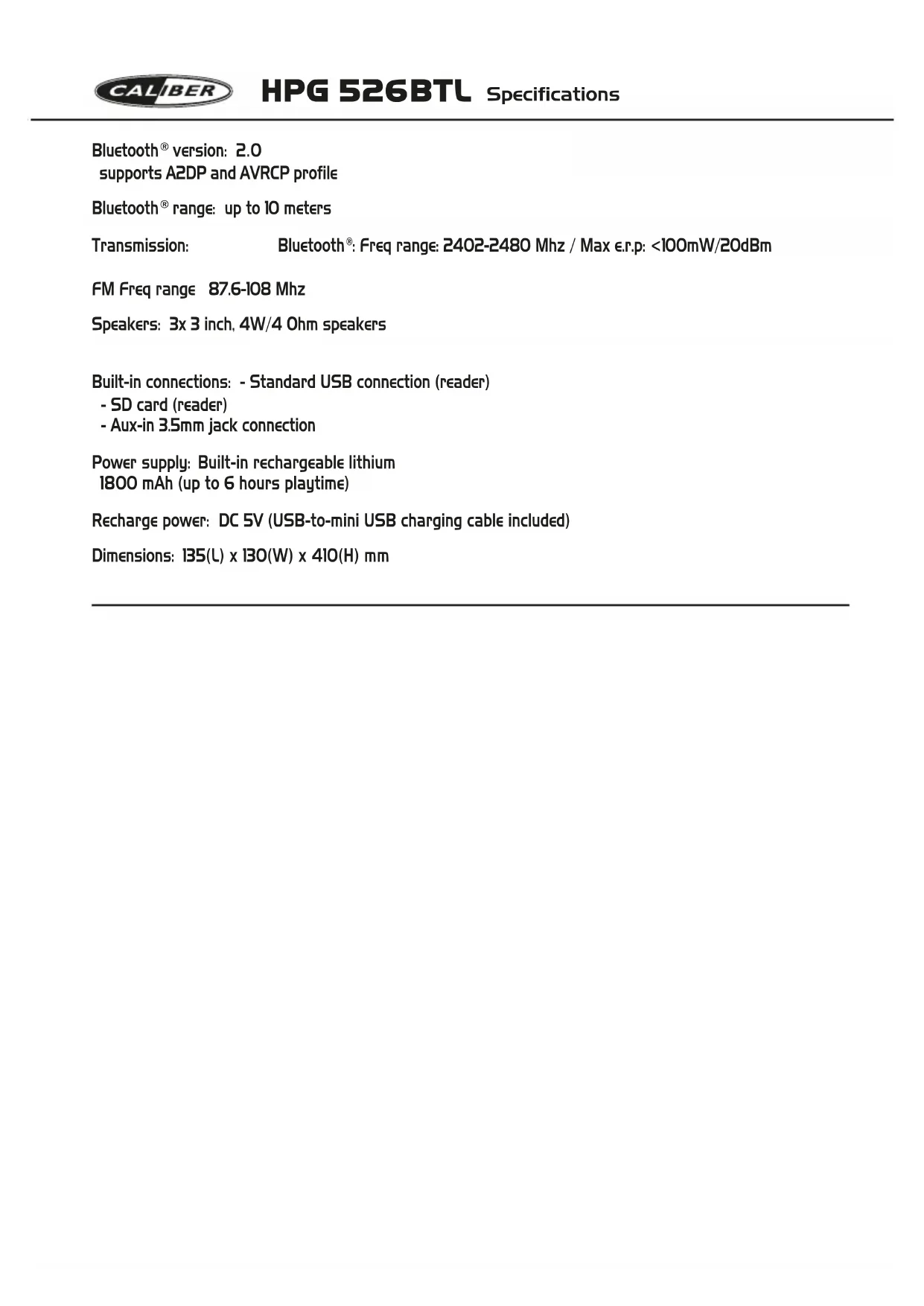
supports A2DP and AVRCP profile
Bluetooth® range: up to 10 meters
Transmission:
Bluetooth®: Freq range: 2402-2480 Mhz / Max ε.r.p: <100mW/20dBm
FM Freq range 87.6-108 Mhz
Speakers: 3x 3 inch, 4W/4 Ohm speakers
Built-in connections: - Standard USB connection (reader)
- SD card (reader)
- Aux-in 3.5mm jack connection
Power supply: Built-in rechargeable lithium
1800 mAh (up to 6 hours playtime)
Recharge power: DC 5V (USB-to-mini USB charging cable included)
Dimensions: 135(L) x 130(W) x 410(H) mm
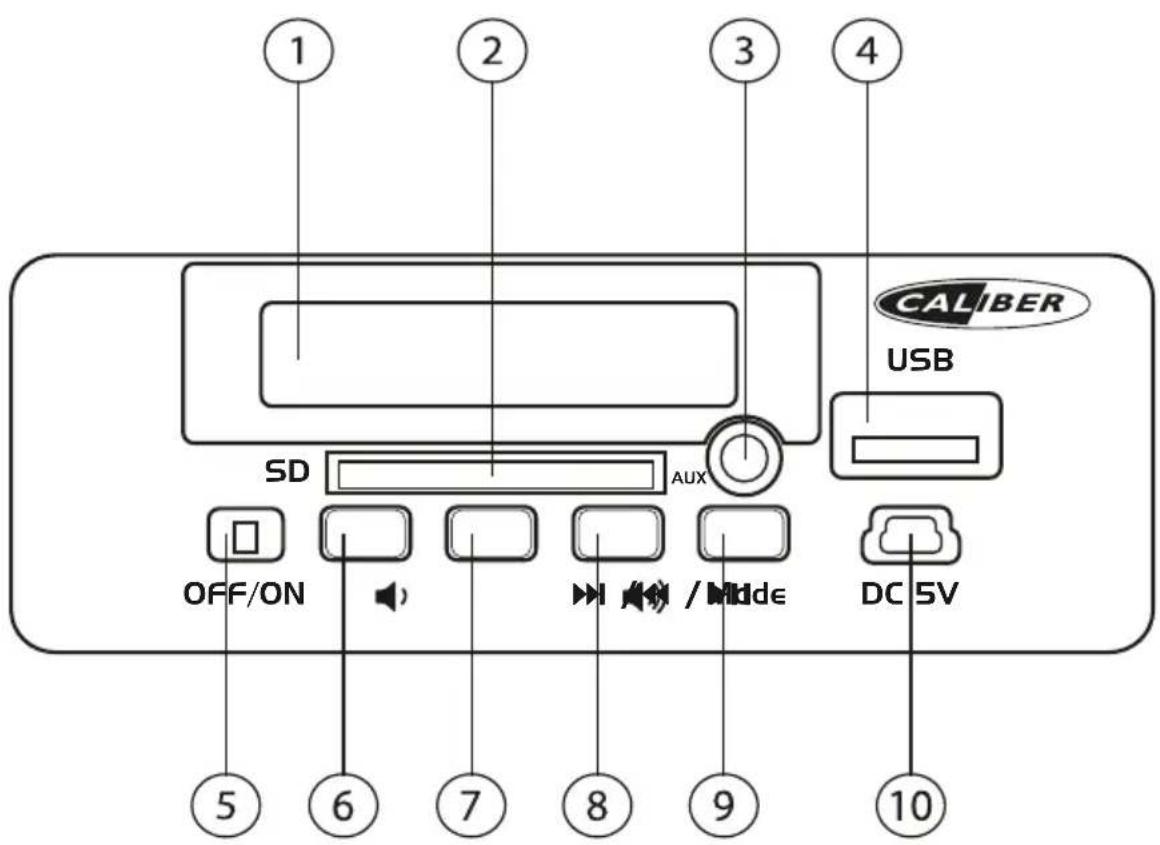
1. Display
LED display and LED indicators
(BT and charging)
2. SD Slot
For standard SD card, up to 32GB
3. AUX-in
3,5mm jack connector, cable included
4. USB port
For standard USB connector, up to 32GB
5. ON/OFF button
6. Previous /
Short press: Previous song
Long press: Volume decrease
7. Play/pause
8. Next /
Short press: Next song
Long press: Volume increase
9. Mode
Switch between Bluetooth, USB, SD, FM and AUX-IN
10. Charging jack
DC in, USB-to-Mini USB cable included
Precautions
Points to observe for safe usage
Read this manual carefully before using this item and its components. They contain instructions on how to use this product in a safe and effective manner. Caliber Europe BV cannot be responsible for problems resulting from failure to observe the instructions in this manual.
Turn off the device immediately in case of a problem.
Failure to do so may cause personal injury or damage to the product. Return it to your authorized Caliber Europe BV dealer for repairing.
Product cleaning.
Use a soft dry cloth for periodic cleaning of the product. For more severe stains, please dampen the cloth with water only. Anything else has the chance of dissolving the paint or damaging the plastic.
Temperature.
Be sure the temperature inside the room is between +35°C (+95°F) and -10°C (+14°F) before turning your unit on.
Maintenance.
If you have problems, do not attempt to repair the unit yourself. Return it to your Caliber Europe BV dealer for servicing.
Placement.
Place the product on a flat surface. Provide enough space around the product for sufficient ventilation.
Heat.
Do not locate the appliance in the vicinity of a heat surface or in direct sunlight.
Accessories.
Use only supplied accessories
Battery.
Avoid overcharging. The battery could overheat.
Replace battery.
The built-in rechargebale battery is not replaceable. Do not remove or replace the battery, do not throw in the trash or in the fire.
Information
- Rechargeable battery
(USB-to-Mini USB cable included) - Bluetooth version 2.0, up to 10m of range.
- Optional wired connection by AUX-in (3.5mm jack-to-jack cable included)
• FM tuner, SD card and USB reader.
Power ON/OFF
• ON: Switch [ON/OFF] button to ON
• OFF: Switch [ON/OFF] button to OFF
Battery charging
The device has a built-in rechargeable lithium battery. For the first time; charge the battery for 5 hours. The unit is provided with USB-to-Mini USB cable.
Connect the USB to a 5V USB port and the other end to the DC-in of the unit. While charging a indicator will light up and will turn OFF when fully charged.
The unit will operate without the wire connection using the lithium battery. The amount of battery life depends on how hard the unit is working. Heavy, loud, bass music will use more energy to produce than spoken word.
Bluetooth connection
- Turn ON the speaker.
- The speaker is automatically in Bluetooth mode (display shows a flashing LED). Else use the [MODE] button to select the Bluetooth mode.
- Set your Bluetooth device to 'Search' using the devices' Bluetooth menu.
- Choose 'HPG526_Caliber' from the list. If required, confirm the pairing with the passkey: "0000".
- When the devices are paired successfully, three beeps will be heard and LED on the display will stop flashing.
Play music from USB disk or SD card:
- Turn ON the speaker.
- Insert SD card or USB disk into the slot, the stored music will be played automatically.
- Under playing mode, short press [◀◀] or [▶▶] to select the previous or next song.
FM Mode
- Turn ON the speaker.
- Press the [MODE] button to switch to FM mode.
- Short press the [▶II] button to search and store FM stations automatically.
- Use [◀] / [▶] to switch between stored FM stations.
Note: Under Bluetooth or FM mode, if an SD or USB will be inserted it will automatically starts playing it. To return to the previous mode, use the [MODE] button.
AUX-IN:
For the optional wired connection you can connect an external device e.g. MP3/MP4 player to the AUX-in of the HPG using the provided jack-to-jack cable.
- When an external device is connected, use the [MODE] button to switch to AUX mode.
- Start playing music on your external device.
Note: The [▶II] and [◀◀] / [▶◀] control buttons on the HPG will not work in this mode.
Précautions
Mise SOUS/HORS tension
GB Caliber hereby declares that the item HPG526BTL is in compliance with the essential requirements and other relevant provisions of Directive 2014/53/EU (RED) and 2011/65/EU (RoHS).
GB Old appliances and/or batteries must not be disposed with garbage! If the device/battery can not be used anymore, every user is legally obliged to dispose of old appliances and/or batteries separated from the garbage, e.g. at a collection point of his municipality/district.