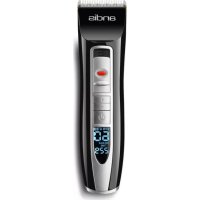
CLC3 - Beard trimmer Andis - Free user manual and instructions
Find the device manual for free CLC3 Andis in PDF.



| Product type | Beard trimmer |
| Brand | Andis |
| Model | CLC3 |
| Power supply | Rechargeable lithium-ion battery, universal AC adapter 120V/240V |
| Number of speeds | 5 (5000, 5500, 6000, 6500, 7000 rpm) |
| Runtime | Remaining time indicator in minutes with audible and visual alert at 10 min |
| Initial charge time | 16 hours |
| Blade type | Adjustable blades, interchangeable blade set |
| Cutting guides | Included, slide-on attachment |
| Operation | Cordless or with adapter cord in case of discharge |
| Blade maintenance | Oil before, during and after each use; clean with brush and Andis Blade Care Plus |
| Safety | Do not use in water or under shower; unplug before cleaning; do not use with damaged blades |
| Warranty | 12 months against manufacturing and material defects (blades excluded) |
| After-sales service | Authorized Andis repair centers; www.andis.com or 1-800-558-9441 |
| Battery recycling | Rechargeable battery recyclable; inquire with local authorities |
| Storage temperature | Between 10°C and 40°C; avoid excessive humidity |
Frequently Asked Questions - CLC3 Andis
User questions about CLC3 Andis
0 question about this device. Answer the ones you know or ask your own.
Ask a new question about this device
Download the instructions for your Beard trimmer in PDF format for free! Find your manual CLC3 - Andis and take your electronic device back in hand. On this page are published all the documents necessary for the use of your device. CLC3 by Andis.
USER MANUAL CLC3 Andis
Please read the following instructions before using your new Andis clipper. Give it the care that a fine precision built instrument deserves and it will give you years of service.
IMPORTANT SAFEGUARDS
When using an electrical appliance, basic precautions should always be followed, including the following: Read all instructions before using the Andis clipper.
DANGER: To reduce the risk of electric shock:
- Do not reach for an appliance that has fallen into water. Unplug immediately.
- Do not use while bathing or in a shower.
- Do not place or store appliance where it can fall or be pulled into a tub or sink. Do not place in or drop into water or other liquid.
- Except when charging, always unplug this appliance from the electrical outlet immediately after using.
- Unplug this appliance before cleaning, removing or assembling parts.
WARNING: To reduce the risk of burns, fire, electric shock, or injury to persons:
- An appliance should never be left unattended when plugged in.
- Close supervision is necessary when this appliance is used by, on or near children or individuals with certain disabilities.
- Use this appliance only for its intended use as described in this manual. Do not use attachments not recommended by Andis.
- Never operate this appliance if it has a damaged cord or plug, if it is not working properly, if it has been dropped or
damaged, or dropped into water. Return the appliance to an Andis authorized service station for examination and repair.
- Plug charger directly into receptacle - do not use an extension cord.
- Unplug charger before plugging or unplugging appliance.
- Keep the cord away from heated surfaces.
- Never drop or insert any object into any opening.
- Do not use outdoors or operate where aerosol (spray) products are being used or where oxygen is being administered.
- Do not use this appliance with a damaged or broken blade or comb, as injury to the skin may occur.
- To disconnect turn control to OFF then remove plug from outlet.
- Use only the charger supplied by the manufacturer to recharge.
- This appliance is not intended for use by persons (including children) with reduced physical, sensory or mental capabilities, or lack of experience and knowledge, unless they have been given supervision or instruction concerning use of the appliance by a person responsible for their safety.
- Children should be supervised to ensure that they do not play with the appliance.
- WARNING: Keep the appliance dry.
- The battery must be removed from the appliance before it is scrapped.
- The appliance must be disconnected from the supply mains when removing the battery.
- The battery is to be disposed of safely.
SAVE THESE INSTRUCTIONS
THIS PRODUCT INTENDED FOR HOUSEHOLD USE
OPERATING INSTRUCTIONS
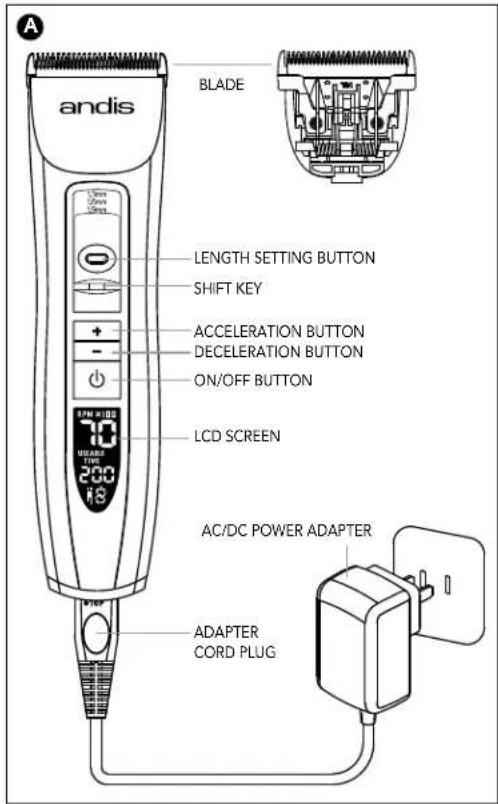
(Refer to Figure A unless noted).
Before starting your clipper, it must be pre-charged fully before using it for the first time. To start clipper, push the power button; to stop, push the power button again.
UNIVERSAL AC/DC POWER ADAPTER
The unit is equipped with a universal AC/DC power adapter.
CHARGINGCLIPPER
This battery charger is intended for use with Andis model CLC-3 clipper. Remove the clipper and AC/DC adapter from the carton. Plug the adapter into a 120V AC outlet, or according to your local power standards. Confirm the voltage available at each overseas location before using the appliance. For connection to a 240V supply, use an attachment plug adapter of the proper configuration for the power supply receptacle.
The clipper must be OFF for the battery to charge. Plug the adapter cord plug directly into the bottom of the clipper. The clipper has a lithium-ion battery that cannot be damaged by overcharging. We recommend that the clipper be unplugged if not in use for seven or more days.
CLIPPER INDICATOR LIGHTS:
Speed Indicator
This clipper has five speed settings that it can run at:
Speed 1: 5,000 RPM (displays as 50)
Speed 2:5,500 RPM (displays as 55)
Speed 3:6,000 RPM (displays as 60)
Speed 4:6,500 RPM (displays as 65)
Speed 5: 7,000 RPM (displays as 70)
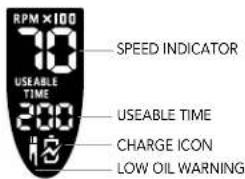
Usable Time
Remaining battery life shown in minutes until the battery will be depleted and will need a recharge.
Charge Icon
This red icon will illuminate and flash when the battery is on its last 10 minutes of use. Once the battery is nearing depletion, the user will hear 3 clicking sounds as a final reminder to charge before battery dies.
The icon will blink on and off while the unit is charging. The battery only charges when the unit is OFF.
Low Oil Warning
After a usage of 60 minutes, the red low oil warning light will start blinking to indicate that the product needs to be cleaned. At this time, the blade should be disinfected and oiled. Please see the "Care and Servicing of your Andis Clipper Blades" section for additional instructions.
FAILURE TO CHARGE:
- Make sure voltage is present at the wall outlet (confirm with an appliance you know is working).
- Check to make sure adapter cord plug is plugged firmly into clipper. If failure to charge still exists, return clipper to Andis or an Andis authorized service station for examination and repair or replacement.
CORDLESS OPERATION
When the clipper is running in cordless operation, the Motor Speed icon as well as the Remaining Usable Time icons will be illuminated. The Remaining Usable Time icon will continue to count down as the battery is depleted to notify the user of the battery life left. When the battery is on it's final 10 minutes of use, a red Charge Icon will illuminate and flash. Once the battery is nearing depletion, the user will hear 3 clicking sounds as a final reminder to charge before battery dies.
The clipper features five various speed levels. To adjust between levels, push the (+) button to increase the speed or push the (-) button to decrease the speed. The Motor Speed icon will indicate the speed level that is currently chosen. Note that the various speeds will impact the battery level (higher speeds will deplete the battery more quickly than the lower speeds).
USE WITH ADAPTER CORD
If the clipper powers off in the middle of a clipping job, the adapter cord can be attached to continue use in corded operation. When the clipper is running with the adapter cord attached, the red Battery Icon will blink on and off.
USING THE ATTACHMENT COMBS
(Some models do not have combs and sizes will vary by kit)
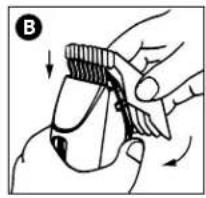
You can set the blades for a longer cut by using any of the attachment combs made for your Andis clipper. The combs mount easily; simply slip the cutter blade teeth into comb and snap the comb down (Figure B). To remove, simply snap off. These attachment combs guide hair into the blades and give you precise control of hair lengths. The length of trim is indicated on the attachment comb. Different blade angles in relation to the skin, as well as thickness and texture of the hair will vary the cutting length.
CLIPPER BLADE ADJUSTMENT
Your Andis adjustable clipper blade set is easy to adjust. For shorter cuts, use thumb on shift key to slide button up to your desired length setting. To slide back for longer cuts, press thumb on red length setting button and slide back.
USER MAINTENANCE
The internal mechanism of your motor clipper has been permanently lubricated by the factory. Other than the recommended maintenance described in this manual, no other maintenance should be performed, except by Andis Company, or an Andis authorized service station. To find an Andis authorized service station near you log on to www.andis.com or contact our customer service department: 1-800-558-9441.
REPLACEMENT (REMOVAL) OF BLADE SET
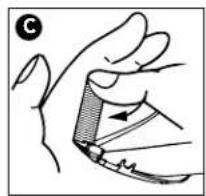
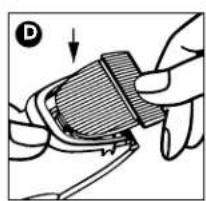
When removing the blade, turn the clipper OFF. Push the blade away from the clipper with your thumb, and the blade will pop off (Figure C). To replace or change the blade set, first slide the length setting to the 1.9mm mark. Then fit the black plastic tab on the blade set into the notch located at the bottom of the clipper opening. Firmly push the blade into the clipper housing and it will snap into place (Figure D).
BLADE TEMPERATURE
Due to the high speed nature of Andis clippers, please check for blade heat often, especially on close cutting blades. If blades are too hot, dip the blades only into Andis Blade Care Plus or apply Andis Cool Care Plus and then Andis Clipper Oil.
CARE AND SERVICING OF YOUR ANDIS CLIPPER BLADES
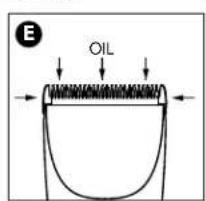
Blades should be oiled before, during, and after each use. If your clipper blades leave streaks or slow down, it's a sure sign that the blades need oil. Hold the clipper with the blades pointing down to prevent oil from getting into the motor. Place a few drops of Andis Clipper Oil on the front and side of the cutter blades (Figure E). Wipe excess oil off blades with a soft dry cloth. Spray lubricants contain insufficient oil for good lubrication, but are an excellent clipper blade coolant. Always replace broken or nicked blades to prevent injury. You can clean the excess hair from your blades by using a small brush or worn out tooth brush. To clean the blades we suggest to immerse the blades only into a shallow pan of Andis Blade Care Plus, while the clipper is running. Any excess hair and dirt that has accumulated between the blades should come out. After cleaning, turn your clipper off and start clipping again.
USE GUIDELINES FOR LITHIUM-ION BATTERIES
-
The lithium-ion battery included with your clipper does not develop a "memory effect" like a nickel-metal hydride (NiMH), or nickel cadmium (NiCd) battery. You can plug the adapter cord into the clipper at any time for a full charge, or even use the battery before a charge cycle is complete. Like most rechargeable batteries, lithium-ion batteries perform best when used frequently.
-
For maximum battery life, store the clipper in a partially discharged condition if the unit will be unused for several months.
- Do not store clipper under 50^ or over 104^ . Do not expose clipper to excessively damp conditions.
- Avoid locating the clipper near heat vents, radiators, or in direct sunlight. Optimum charging will result where the temperature is stable. Sudden increases in temperature can result in the battery receiving less than a full charge.
- Many factors influence lithium-ion battery life. A battery that has received heavy use or is more than a year old may not give the same run-time performance as a new battery pack.
- New lithium-ion batteries, unused for a period of time, may not accept a full charge. This is normal and does not indicate a problem with the battery or charger. The battery will accept a full charge after several cycles of clipper use and recharging.
- Disconnect the adapter cord from the AC outlet if extended periods of non-use are anticipated.
BATTERY DISPOSAL
The product you have purchased contains a rechargeable battery. The battery is recyclable. At the end of its useful life, under various state and local laws, it may be illegal to dispose of this battery into the municipal waste stream. Check with your local solid waste officials for details in your area for recycling options or proper disposal.
BLADE & CLIPPER/TRIMMER REPAIR SERVICE
When the blades of your Andis clipper become dull after repeated use, it is advised to purchase a new set of blades available through your Andis supplier or through an Andis authorized service station. If you wish your clipper to be serviced as well, it should be carefully packed and mailed either Parcel Post Insured, or U.P.S. to any Andis authorized service station. To find an Andis authorized service station near you log on to www.andis.com or contact our customer service department: 1-800-558-9441.
Caution: Never handle your Andis clipper while you are operating a water faucet, and never hold your clipper under a water faucet or in water. There is danger of electrical shock and damage to your clipper. Andis Company will not be responsible in case of injury due to this carelessness.
ESPANOL
MANUFACTURER'S 12 MONTH LIMITED WARRANTY
This Andis product is warranted against defective material or workmanship for one year from the date of purchase. All implied warranties arising and by virtue of State law shall also be limited to one year. Any Andis product determined to be defective in material or workmanship during the warranty period will be repaired or replaced without cost to the consumer for parts and labor. The defective product must be returned via parcel post insured or U.P.S., with proof of purchase to any Andis Authorized Service Station or to Andis, 1800 Renaissance Blvd., Sturtevant, WI 53177 USA. Attach a letter describing the nature of the problem. Due to foreign matter sometimes found in hair, clipper blades or resharpening of blades are not subject to this warranty. Andis will not be responsible for cost of repairs or alterations made by any other person, agency or company, nor for incidental or consequential damages of any type, or for the use of unauthorized attachments. Some states may not allow exclusion of limitation of incidental or consequential damages, so the limitation or exclusion may not apply to you.
Date Purchased Model
To find an Andis Authorized Service Station near you log on to www.andis.com or contact our customer service department: 1-800-558-9441
GARANTÍA LIMITADA DEL FABRICANTE DE 12 MESES
300 Renaissance Blvd. Sturtevant, WI 53177
1-800-558-9441 info@andisco.com www.andis.com