Cheesecake Tab XL 2 - Tablet Aqprox - Free user manual and instructions
Find the device manual for free Cheesecake Tab XL 2 Aqprox in PDF.



User questions about Cheesecake Tab XL 2 Aqprox
0 question about this device. Answer the ones you know or ask your own.
Ask a new question about this device
Download the instructions for your Tablet in PDF format for free! Find your manual Cheesecake Tab XL 2 - Aqprox and take your electronic device back in hand. On this page are published all the documents necessary for the use of your device. Cheesecake Tab XL 2 by Aqprox.
USER MANUAL Cheesecake Tab XL 2 Aqprox
Tablet Cheesecake 10.1" XL2 16:9
PbKOBOdCTBO 3a notpe6nteJia
3apexdaneHa 6aTepeyTa
CbpbjkeTe 3apdHOTO yCTPOIcTBO npedocTaba Ha KOHTaKTa Ha CBONTe nocetnten i cnlaT a DC nopT ha Baunr Tablet. Ta6netkata ue 3anouhe da ce 3apekda.
The 3apejdahe n pa3pejdahe Ha 6aTePnraT Ta Tpa6Ba Da 6bJe PbJHa, HNKoRa noMaIko ot 5 yaca. He n3KnIOuBaIte 3apAHDTo yCTpOcTBo 3a PbJHO 3apejdaHe Ha 6aTePnraTa e 3aBbPweH, B npOTnBeH clyaai T a Je CkbcN JKBOTA Ha 6aTePnraTa.
3a BKNIOUbaHe / n3KNIIOUbaHe 6yToH
3aДаВКЛIOUHTe yCTPOIcTBOTO 3aIpbjXTe 3a BKJIIOUcBaHe / n3KJIIOUcBaHe nO3nCnA, DOKaTO ekpaHbT ce BKJIIOU.
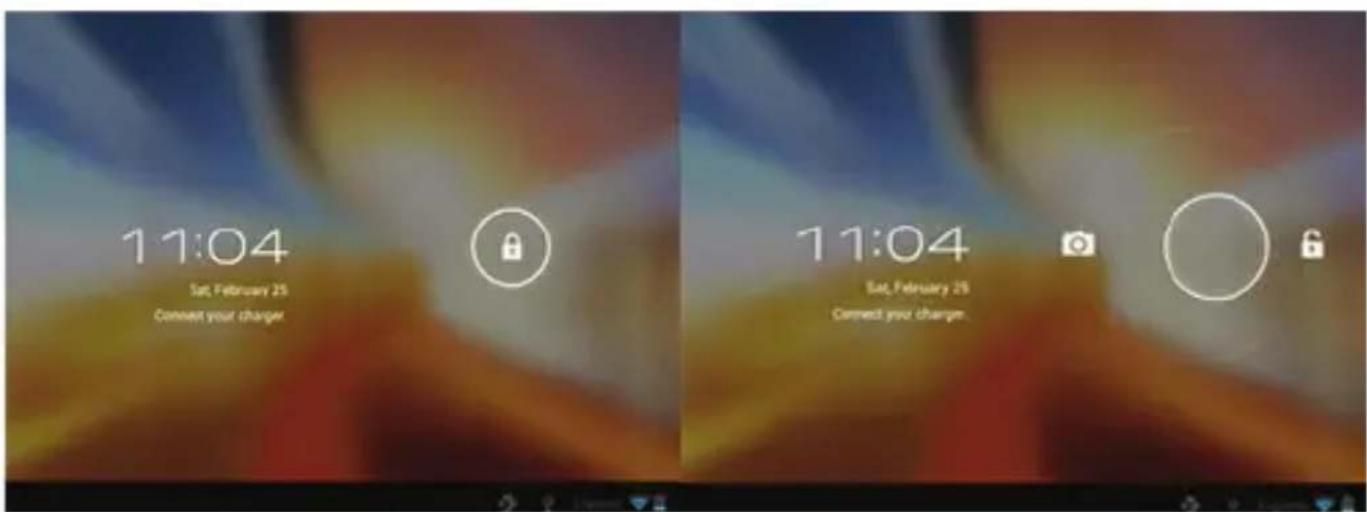
Cnei KaTo cnCTemata TOBap KInKHeTe Bbpxy IKoHaTa 3a 3aKJIIOUBaHe I rO pIb3HeTe HaJcHOb, KaKTo Ce BnJda B n306paXeHNeTO NO-DOy:
Пльзганeto Ляво пoka3Ва Диpeктно ФотоanapapaTа
3a Да включITE устpoиCTBOTO 3адрьжTe 3a BKЛIOUBAHe / n3KЛIOUBAHe ПОЗИЦЯ, дOKATO Тя се NOЯВЯBa Ha ekpaHa Ha cbo6шeHneTo, 3a Дa n3KЛIOUHTe ySTPOICTBOTO И дa ппeMaT.
Korato 6aTepejTa e n3ToeHa, ye ige Ce n3KJIouH aBTOMaTnUHO
3aKJIIOUbaHe N OTKJIIOUbaHe Ha ekpaHa
3aKIOUbaHe Ha ekpaHa: Hatnche Te IeKO 3a BkIOUbaHe / n3KIOUbaHe 6yToHn Ha ekpaHa ige Ce 3aKIOUHy Ie Otnide B eHeprocneTBAu peJIM.
OTKJIIOUbaHe Ha ekpaHa: HatncHeTe IeKO 3a BKJIIOUbaHe /
n3KIOUBAHe 6yToH nHa dncnpe HaTNCHeTe IKOHaTa 3a 3aKIOUBaHe n Pb3HeTe HAJRCHO, 3a da OTKIOUHTe.
Cbpxte Ta6neta KbM KOMNIOTp 3a npexBpIne Ha aaiNoBe.
BkHouTe yCTpoCTBOTo n BeHbK OTKnHoyeHa Cbbp3BaT Upe3 npedeOctaBeHn USB Ka6eN KbM PC, nHTepFeNCbT ige NOKaxe "USB Bpb3Ka", KlnKHeTe Bbpxv "BkHouTe USB cbXpaHene", TЯ ige NOKaxe MaTePnaHn Hocnten Ha naMeT Ha Ta6Ieta Ha Baunn KOMnIOTp . Cera MoKeTe da npexBbpIaTe daHHn MeJdY Baunn KOMnIOTp n Ta6Iet.
Wifbpb3ka
Select" Settings", "Mpexa n 6e3xuHa Bpb3Kn", "WiFi" n aKtubpaIte. UcTpoiCTBOTO ige ce NOBn aBTOMaTHUHO OTKpNTte MpeXn, n36epTe n BbBeJeTe JKeJaHaTa npOla, aKO cNrypHocTTa Ha MpexaTa e 3aunTeHa. BeNbJx CBbp3aH, INKoHaTa 3a 6e3xuHa MpeXa. KaTO Cbbp3aH KbM OCHOBHnEkpaH.
OTG Bpb3ka
3a da ce cBbpxKeTe nicaKka dNcKOBe, 3G moJeMn i np. CbpxKeTe USB-OTG aanTepa KbM nopT USB-OTG Ha Ta6neTkata.
HDMI Bpb3kaTa
CbpxeHDMI / mHnHDMI ka6en meky mHnHDMI nopT ot Ba7nTa6let n npT HDMI ha Ba7nra TeJeBn3Op, n36epete n3ToUHnka Ha HDMI ha TeJeBn3Opa nHaTncHe uKoHata Ha HDMI, kOnTo ige ce no8n B doHNy decen bTbJn Ha Ta6neta, n36epete pe30IoUznn i npneMeTe Cbo6uEHHeTo. Ka6eJbT He Tp86Ba da 6bnde nobuee ot 1,8 m (npenopbHTeHno einnm)
Бутона за рессане
B cnuyaHa cPnB Ha CNCTeMaTa nn Hma OTROBOp, BbBeJeTe KNIKBaHe nn nIgna B dynKaTa 3a pecTapTnpaHe n HaTncHete 6yToHa 3a 3 cekyHn Ha Mnkpo HynpaHe KIOU.
Technical Support.
Moj, 3a noBueHnOopMaun 3a nHCTaIIpaHeTo N KOHnIpypHaTeTo Ha To3n npOdyKT, nocTeTe pa3dEJa 3a nOdpbXkKa Ha HauNya ye6caNT www.approx.es nn n3npaTeTe nmeJn Ha soporte@approx.xes
Introduction and product description.
Thank you for choosing the tablet APPTB105B
The new Tablet Cheesecake APPTB105B XL2 16:9, incorporates the latest technology, multi-touch capacitive touch 10.1 " screen, 1024 * 600", the latest Android 4.2 Jelly Bean system, 1.5 GHz dual core processor, 1GB DDR3, front and rear camera and internal memory 8GB, all to enjoy and share on the network all your photos, videos, music and endless multimedia content at unimaginable speeds, thanks to its wireless 150 Mbps N card. Weighing only 650 grams and with a thickness of 10.6 mm, it gives it a sleek, compact design ideal for demanding users. With its hdmi output, you can turn your TV into a media center.
Discover a new way to surf the net and enjoy the latest technology!
Package contents
APPTB105B
- Quick installation guide.
- USB / Micro usb cable
- USB-OTG adapter
- Tablet charger
Make sure that your package contains the items described above. If you find any items are missing or damaged, please contact your dealer.
System requirements
- 1 USB 2.0 port
OS Windows 2000/XP/VISTA/7/8 (32 bits and 64 bits).
Installation and Configuration.
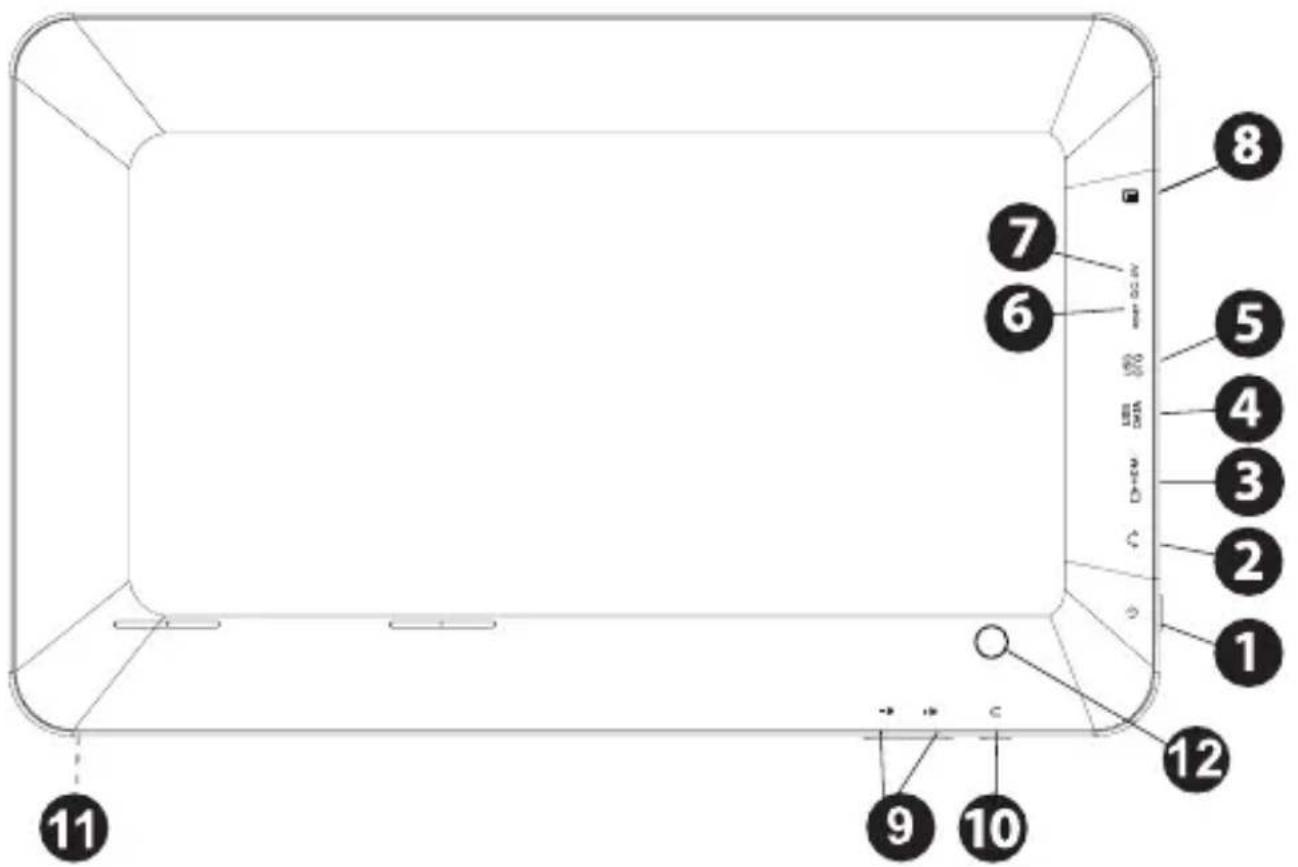
- On/off
- Micro SD
- Jack 3,5 mm input
- Volume + / -
- HDMI output
- Back
- USB Data
- Front Camera
- USB-OTG
- Rear Camera
- Reset
- DC power input
English
Before using the tablet, please read the following
Charging the battery
Connect the charger supplied from a power outlet in your home and the DC power port of your tablet. The Tablet will start charging.
The charging and discharging of the battery must be complete, never less than 5 hours. Do not disconnect the charger until the battery is fully charged, otherwise it will shorten the battery life.
On/off button
To turn on hold the button on the on / off position until the display turns on.
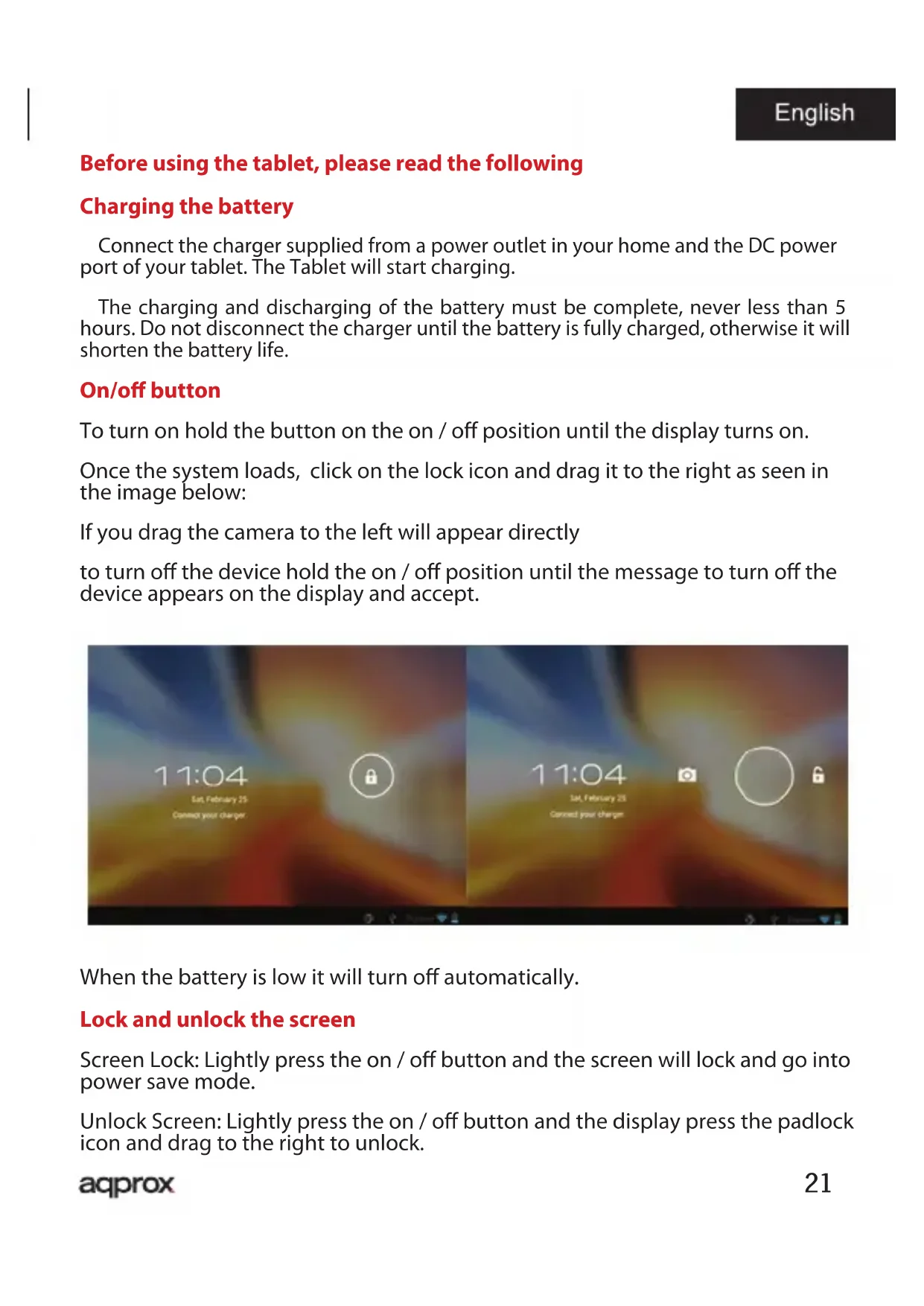
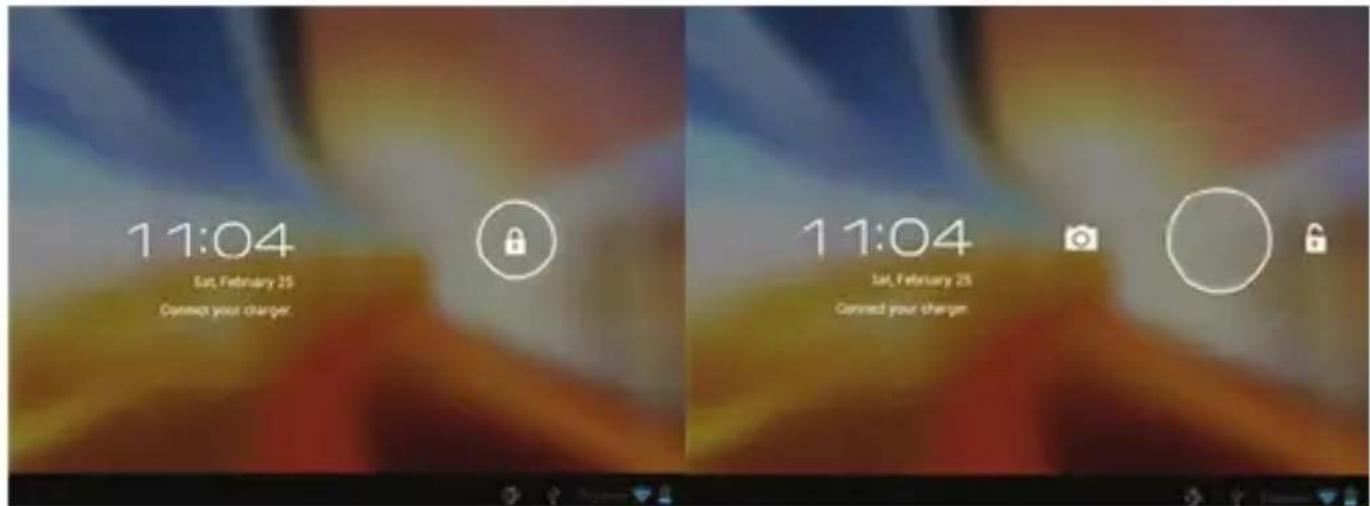
Once the system loads, click on the lock icon and drag it to the right as seen in the image below:
If you drag the camera to the left will appear directly
to turn off the device hold the on / off position until the message to turn off the device appears on the display and accept.
When the battery is low it will turn off automatically.
Lock and unlock the screen
Screen Lock: Lightly press the on / off button and the screen will lock and go into power save mode.
Unlock Screen: Lightly press the on / off button and the display press the padlock icon and drag to the right to unlock.
Connect the tablet to the PC to transfer files.
Turn on the device and once unlocked connect the USB cable between the USB port on the tablet and an USB port on your PC. It will show the "USB Connection", click "Turn on USB storage" interface and storage means memory in your tablet PC will appear. Now you can transfer data between your PC and the tablet.
Wif con nnection
Select Settings"" "Wireless & networks", 'Wi-Fi' and activate it. The device will display the network automatically detected, select and enter the desired password if network security is protected. Once connected the wireless network icon is connected appear on the main screen.
OTG connection
To connect pen drives, 3G modems, etc. Connect the USB-OTG adapter to the USB-OTG port on the tablet.
HDMI connection
Connect an HDMI / mini HDMI cable between the mini hdmi port on the Tablet and the hdmi port on your TV. Select the HDMI source on your TV, the image will appear automatically.
The HDMI cable must not exceed 1.8m (recommended one meter)
Reset button
In case of system crash or no response, enter a click or needle into the reset hole and press for 3 seconds the micro reset switch.
Technical Support.
Please for more information on installation and configuration of this product visit the support section of our website www.approx.es or send an email to
soporte@approx.es
EC DECLARATION OF CONFORMITY
We declare under our sole responsibility that the product:
Brand name: APPROX IBERIA S.L.
Model no:APPTB105B
Product description: Tablet 10.1"
The measurements shown in this test report were made in accordance with the procedures given in the:
RoHS DIRECTIVE: 2011/65/EU
- RTTE DIRECTIVE: 1999/5/EC
LVD DIRECTIVE: 2006/95/CEE
To which this declaration is based on with full conformance to the following European norms and standards:
EN60950-1:2006+A11:2009+A1:2010+A12:2011
EN62311:2008
Jose Luis Ruiz Gomez Director
APPROX IBERIA SL.
ADD: Poligono Industrial Guadalquivir
C/Tecnologia,5 Postcode:41120
Gelves (Sevilla), Spain.
Website: www.approx.es
C E
Importado por / Imported by:
APPROX IBERIA S. L.
CIF: B-91202499
Soporte专业技术/Technical support:
soporte@approx.es
MADE IN PRC
The content of this guide is subject to typographical errors
aqprox
www.approx.es