
Z31PX10X0 - Wireless temperature sensor NEFF - Free user manual and instructions
Find the device manual for free Z31PX10X0 NEFF in PDF.
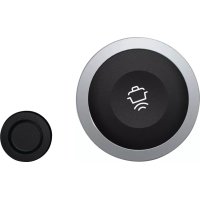



| Product type | Wireless temperature sensor |
| Brand | Neff |
| Model | Z31PX10X0 |
| Power supply | CR2032 battery |
| Transmission | Wireless, Bluetooth® |
| Attachment | By silicone patch glued to the pan |
| Use | With Neff hobs equipped with temperature sensor function |
| Main functions | Temperature measurement of food during cooking, transmission to the hob |
| LED indicator | Yes, to indicate operating status |
| Cleaning the sensor | With a damp cloth, do not immerse, do not wash in dishwasher |
| Cleaning the silicone patch | Dishwasher safe, dry before reuse |
| Cleaning the sensor window | Soft cloth or cotton swab with glass cleaner, do not touch with fingers |
| Safety - Magnetism | Do not carry in a pocket near electronic implants, min. distance 10 cm |
| Safety - Risk of burns | Use kitchen gloves to remove the hot sensor |
| Safety - Battery | Do not expose the sensor to heat after cooking, the battery may burst |
| Spare parts - Silicone patch | Reference 00577921 (set of 5 patches) |
| Spare parts - Sensor + patches | Reference Z31PX10X0 (sensor + 5 patches) |
| Compliance | Directive 1999/5/EC, CE marking |
| Intended use | Domestic, for food and beverage preparation |
Frequently Asked Questions - Z31PX10X0 NEFF
User questions about Z31PX10X0 NEFF
0 question about this device. Answer the ones you know or ask your own.
Ask a new question about this device
Download the instructions for your Wireless temperature sensor in PDF format for free! Find your manual Z31PX10X0 - NEFF and take your electronic device back in hand. On this page are published all the documents necessary for the use of your device. Z31PX10X0 by NEFF.
USER MANUAL Z31PX10X0 NEFF
Wireless Temperature Sensor
Z31PX10X0
de Gebrauchsanleitung. 3 en Instruction manual 9 fr Mode d'emploi. 14 it Istruzioni per l'uso 19 nl Gebruiksaanwijzing 24 da Brugsanvisning. 29 noBruksveiledning. 34 svBruksanvisning. 39 fi Kayttoohje 44 es Instrucciones de uso 49 pt Instruções deServiço. 55 el O8nyiec xpnoc 60 tr Kullanma kilavuzu 66 cs Navod k pouziti 71 sk Navod na použivanie 76 hu Hasznalati utasitas .81 pl Instrukcja obstugi. 86 ro Instruetiuni deutilizare 92 bg PbKOBOdCTBO 97 ru PpaBnla noIb3OBaHnra. 102 uk Ihctpykci3 BnKOpncTaHHa..108 sr Uputstva za upotrebu. 114 hr Upute za uporabu 119 sl Navodila za uporabo. 124 sq Udhezim per perdorim 129 mk YnataTBo 3a ynoTpe6a. .134
Table of contents

Online shop: www.neff-eshop.com
For
Product information
and
applications
089-12474474

Read these instructions carefully. Please keep the instruction in a safe place for later use or for subsequent owners.
Read these instructions carefully. Please keep the instruction in a safe place for later use or for subsequent owners.

Environmentally-friendly disposal . . . 10
Wireless temperature sensor . . 11

Wireless temperature sensor . . 11
Preparing and maintaining the wireless temperature sensor 11 Cleaning. 13 Declaration of Conformity . 13
Additional information on products, accessories, replacement parts and services can be found at www.neff-international.com and in the online shop www.neff-eshop.com
Check the appliance after removing it from the packaging. If it has suffered any damage in transport, do not use the appliance, contact the Technical Assistance Service and provide written notification of the damage caused, otherwise you will lose your right to any type of compensation.
This appliance is intended for private domestic use and the household environment only. The appliance must only be used for the preparation of food and beverages. The cooking process must be supervised. A short cooking process must be supervised without interruption. Only use the appliance in enclosed spaces.
This appliance may be used by children over the age of 8 years old and by persons with reduced physical, sensory or mental capabilities or by persons with a lack of experience or knowledge if they are supervised or are instructed by a person responsible for
their safety how to use the appliance safely and have understood the associated hazards.
Children must not play with, on, or around the appliance.
Children must not clean the appliance or carry out general maintenance unless they are at least 8 years old and are being supervised.
When using the cooking functions, set the hotplate on which you have placed the saucepan with the temperature sensor.

Important safety information
Warning
Hazard due to magnetism!
The wireless temperature sensor is magnetic. The magnetic elements in it may damage electronic implants, e.g. pacemakers or insulin pumps. People fitted with electronic implants should therefore not carry the temperature sensor in their pockets and always keep it at least 10 cm away from their pacemaker or similar medical device.
Warning
Risk of injury!
The battery in the wireless temperature sensor may become damaged or explode if it gets too hot. Remove the sensor from the hob after cooking and do not store it near sources of heat. The temperature sensor may be very hot when removing it from the saucepan. Wear oven gloves or use a tea towel to remove it.

Environmental protection
Environmentally-friendly disposal
Dispose of packaging in an environmentally-friendly manner.
This appliance is labelled in accordance with European Directive 2012/19/EU concerning used electrical and electronic appliances (waste electrical and electronic equipment - WEEE). The guideline determines the framework for the return and recycling of used appliances as applicable throughout the EU.
The wireless temperature sensor is battery-powered. Dispose of used batteries in an environmentally responsible manner.

Wireless temperature sensor
Additional information can be found in the detailed instruction manual for the hob in chapter "Cooking Assist Functions". Read it through carefully.
Preparing and maintaining the wireless temperature sensor
In this section, you will find the following information:
Adhering the silicone patch Using the wireless temperature sensor Changing the battery
You can obtain a temperature sensor and silicone patches from specialist retailers or through our technical after-sales service. Always quote the relevant reference number.
00577921 Set of 5 silicone patches
Z31PX10X0 Temperature sensor and set of 5 silicone patches
Adhering the silicone patch
The silicone patch attaches the temperature sensor to the cookware.
A silicone patch must be adhered when using a saucepan with the cooking functions for the first time.
Proceed as follows:
- The adhesion point on the saucepan must be free of grease. Clean the saucepan, dry it thoroughly and wipe the adhesion point with a degreasing agent such as spirit.
- Remove the protective film from the silicone patch. Adhere the silicone patch to the saucepan in the correct place using the enclosed template as a guide.
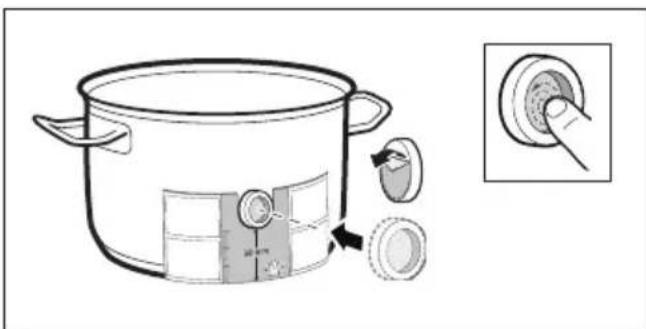
- Press the silicone patch down, including its inside surface.
The adhesive requires 1 hour to fully harden. The cookware must not be used or cleaned during this time.
Notes
Cookware with the silicone patch must not be left to soak for long periods in soapy water. If the silicone patch comes off, attach a new one.
Using the wireless temperature sensor
Attach the temperature sensor to the silicone patch and align it correctly.
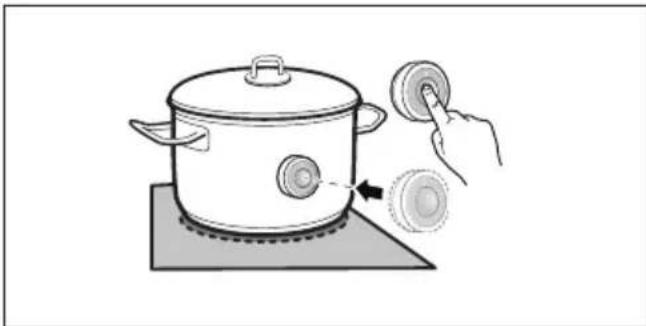
Notes
Make sure that the silicone path is completely dry before attaching the temperature sensor. Position the cookware in such a way that the temperature sensor is pointing towards the outer side of the hob.
To prevent overheating, the temperature sensor must not be pointed towards another item of cookware that is hot. Remove the temperature sensor from the saucepan after cooking. Store it in a clean, safe place away from sources of heat.
Changing the battery
If you press the wireless temperature sensor symbol and the LED does not light up, the battery is flat.
Changing the battery:
- Remove the silicone cover from the lower section of the casing. Unscrew the screws with a screwdriver.
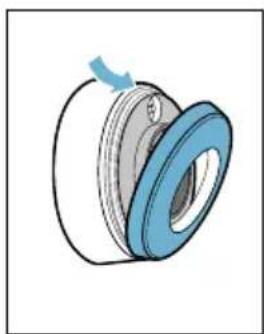
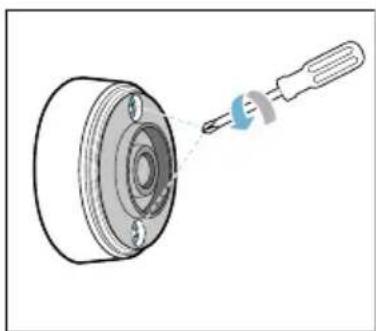
- Remove the upper section of the casing. Take the old batteries out. Put the new batteries in. Make sure that the polarity is correct.
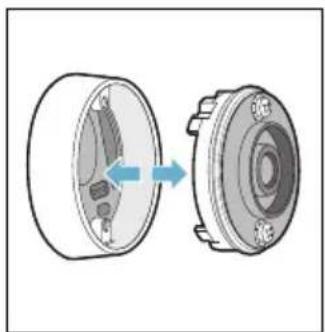
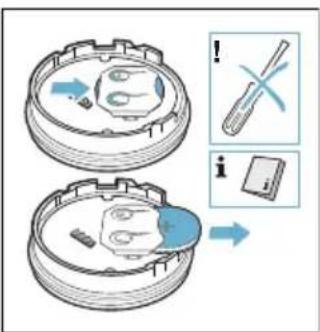
Caution!
Do not use metal objects to remove the battery. Do not touch the contacts.
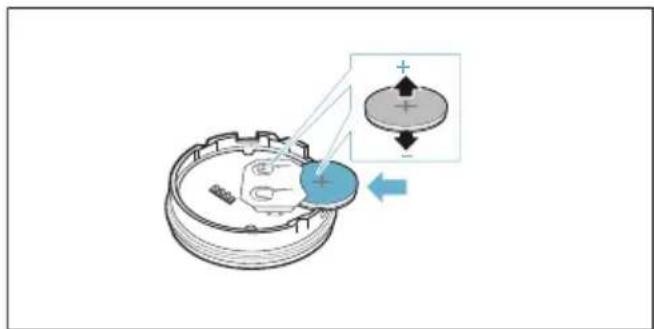
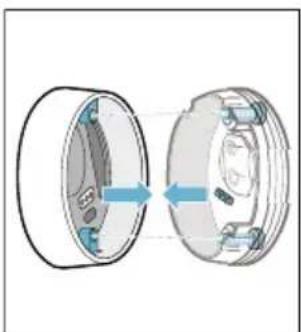
- Put the upper and lower sections of the casing back together. Make sure that the contact pins are aligned correctly.
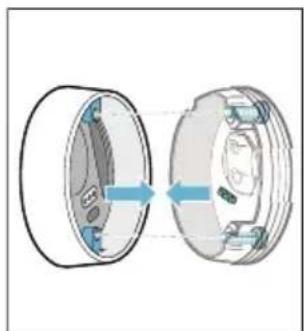
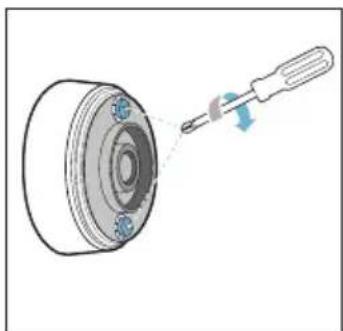
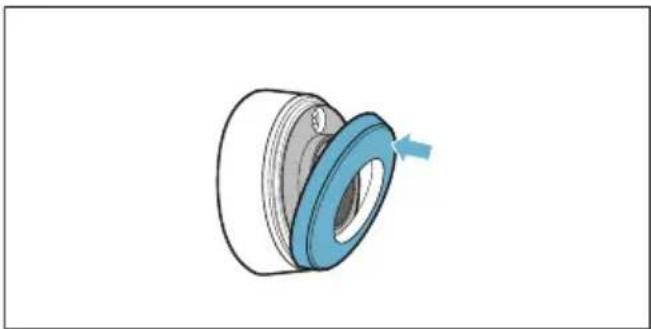
- Put the silicone cover back on the lower section of the temperature sensor casing.
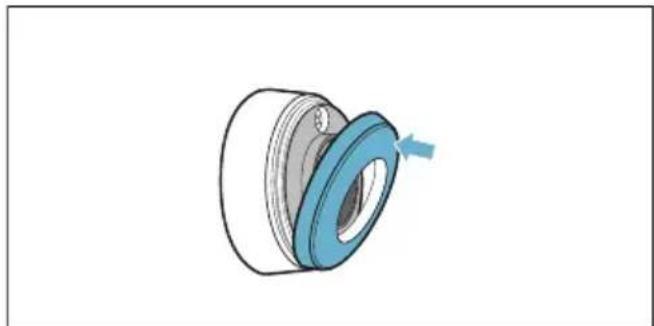
Note: Only use premium-quality CR2032 batteries. These have an especially long service life.
Cleaning
Temperature sensor
Clean the temperature sensor with a damp cloth. Never clean it in the dishwasher. Do not immerse it in water or clean it under running water.
Remove the temperature sensor from the saucepan after cooking. Store it in a clean, safe place (such as in its packaging) away from sources of heat.
Silicone patch
Clean and dry before attaching to the temperature sensor. Dishwasher safe.
Note: Cookware with the silicone patch must not be left to soak for long periods in soapy water.
Temperature sensor window
The sensor window must always be clean and dry. Proceed as follows:
Remove dirt and oil splatters regularly. Use a soft cloth or cotton buds and window cleaner for cleaning.
Notes
- Do not use abrasive cleaning agents such as scouring pads, scrubbing brushes or cream cleaners.
- Do not touch the sensor window with your fingers. This may make it dirty or scratch it.
Declaration of Conformity
Constructa-Neff Vertriebs-GmbH hereby declares that the appliance with wireless temperature sensor function meets the basic requirements and other relevant provisions of the Directive 1999/5/EG.
A detailed R&TTE Declaration of Conformity can be found online at www.neff-international.com on the product page for your appliance under "Additional documents".
The logos and the Bluetooth® brand are registered trademarks and property of Bluetooth SIG, Inc. These trademarks are used by Constructa-Neff Vertriebs-GmbH under licence. All other trademarks and brand names are owned by the respective companies.
Table of contents

Online: www.neff-eshop.com
www.neff-international-home.com
or in the online shop:
www.neff-eshop.com

Intended use
purpose
Dispose of the packaging in an environmentally friendly manner.

Danger of burns!
The temperature sensor can be damaged if it is heated too much. Keep the sensor away from the hob and do not store it near heat sources. The temperature sensor may be very hot when cooking. Use oven mitts and an oven cloth when cooking.

Do not use metal objects to remove the battery. Do not touch the contacts.
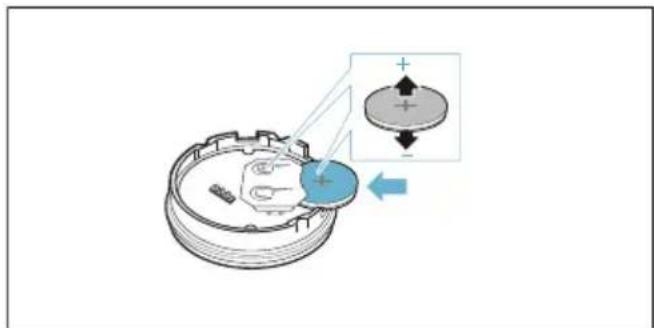
- Close the upper and lower parts of the housing again. When doing so, ensure that the contacts are correctly aligned.
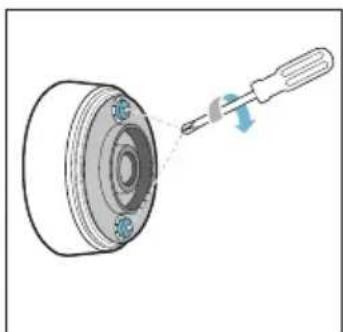
- Place the supplied spacer on the lower part of the temperature sensor housing.
Warning: Use only high-quality CR2032 batteries. They are particularly long-lasting.
Cleaning
Temperature sensor
Use the temperature sensor with a damp cloth. Never use a dishwasher. Do not immerse in water and do not use under running water.
Remove the temperature sensor from the meat probe after cooking. Store it in a clean, safe place, for example in its packaging, and not near a heat source.
Silicone pad
Before inserting the temperature sensor, clean and dry it. Suitable for dishwasher.
Note: The silicone pad should not be left in the cleaning solution for a long time.
www.neff-international.com in specialist shops www.neff-eshop.com
Declaration of conformity
With this Constructa-Neff Vertriebs-GmbH declares that the wireless temperature sensor complies with the essential requirements and other relevant provisions of Directive 1999/5/EC.
The detailed R&TTE declaration of conformity can be found on the Internet at www.neff-international.com on the product page for your appliance, among the additional documents.
The Bluetooth® word mark and logos are registered trademarks owned by Bluetooth SIG, Inc. and any use of such marks by Constructa-Neff Vertriebs-GmbH is under license. Other trademarks and trade names are those of their respective owners.
Register your product online
www.neff-international.com


9001147551
960104(00)
de, en, fr, it, nl, da, no, sv, fi, es, pt, el, tr, cs, sk, hu, pl, ro, bg, ru, uk, sr, hr, sl, sq, mk
- TABLE OF CONTENTS
- IMPORTANT SAFETY INFORMATION
- WARNING
- HAZARD DUE TO MAGNETISM
- RISK OF INJURY
- ENVIRONMENTAL PROTECTION
- ENVIRONMENTALLY-FRIENDLY DISPOSAL
- WIRELESS TEMPERATURE SENSOR
- PREPARING AND MAINTAINING THE WIRELESS TEMPERATURE SENSOR
- ADHERING THE SILICONE PATCH
- NOTES
- USING THE WIRELESS TEMPERATURE SENSOR
- CHANGING THE BATTERY
- CAUTION
- CLEANING
- TEMPERATURE SENSOR
- SILICONE PATCH
- TEMPERATURE SENSOR WINDOW
- DECLARATION OF CONFORMITY
- INTENDED USE
- PURPOSE
- DANGER OF BURNS
- SILICONE PAD
Brand : NEFF
Model : Z31PX10X0
Category : Wireless temperature sensor