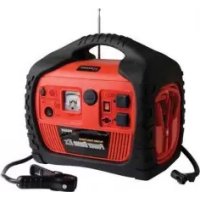
Power Dome EX - Portable generator WAGAN - Free user manual and instructions
Find the device manual for free Power Dome EX WAGAN in PDF.



| Product Type | Portable electric generator with jump starter, compressor, inverter, and radio |
| Power Source | Sealed lead-acid internal battery 12V, 18 Ah |
| Jump Starter | 600 amps with high-performance cables and clamps |
| Air Compressor | 260 PSI with analog pressure gauge |
| Power Inverter | 400 continuous watts (800 peak watts), two AC outlets 115V |
| DC Outlet | 12V, 11 A max |
| USB Port | 5V, 500 mA max |
| Radio | AM/FM with built-in speakers and 3.5mm audio input |
| Work Light | 5 LEDs |
| Battery Status Display | Analog voltmeter |
| Polarity Indicator | LED indicator for jump starter cables |
| AC Charging | 34 hours max, via included AC adapter (110-220V) |
| DC Charging | 12 hours max, via cigarette lighter adapter (engine running) |
| Overload Protection | 40A fuse for inverter, circuit breaker for DC outlet |
| Warranty | 1 year limited, registration required within 30 days |
| Customer Service | WAGAN Corporation, (800) 231-5806, www.wagan.com |
Frequently Asked Questions - Power Dome EX WAGAN
User questions about Power Dome EX WAGAN
0 question about this device. Answer the ones you know or ask your own.
Ask a new question about this device
Download the instructions for your Portable generator in PDF format for free! Find your manual Power Dome EX - WAGAN and take your electronic device back in hand. On this page are published all the documents necessary for the use of your device. Power Dome EX by WAGAN.
USER MANUAL Power Dome EX WAGAN
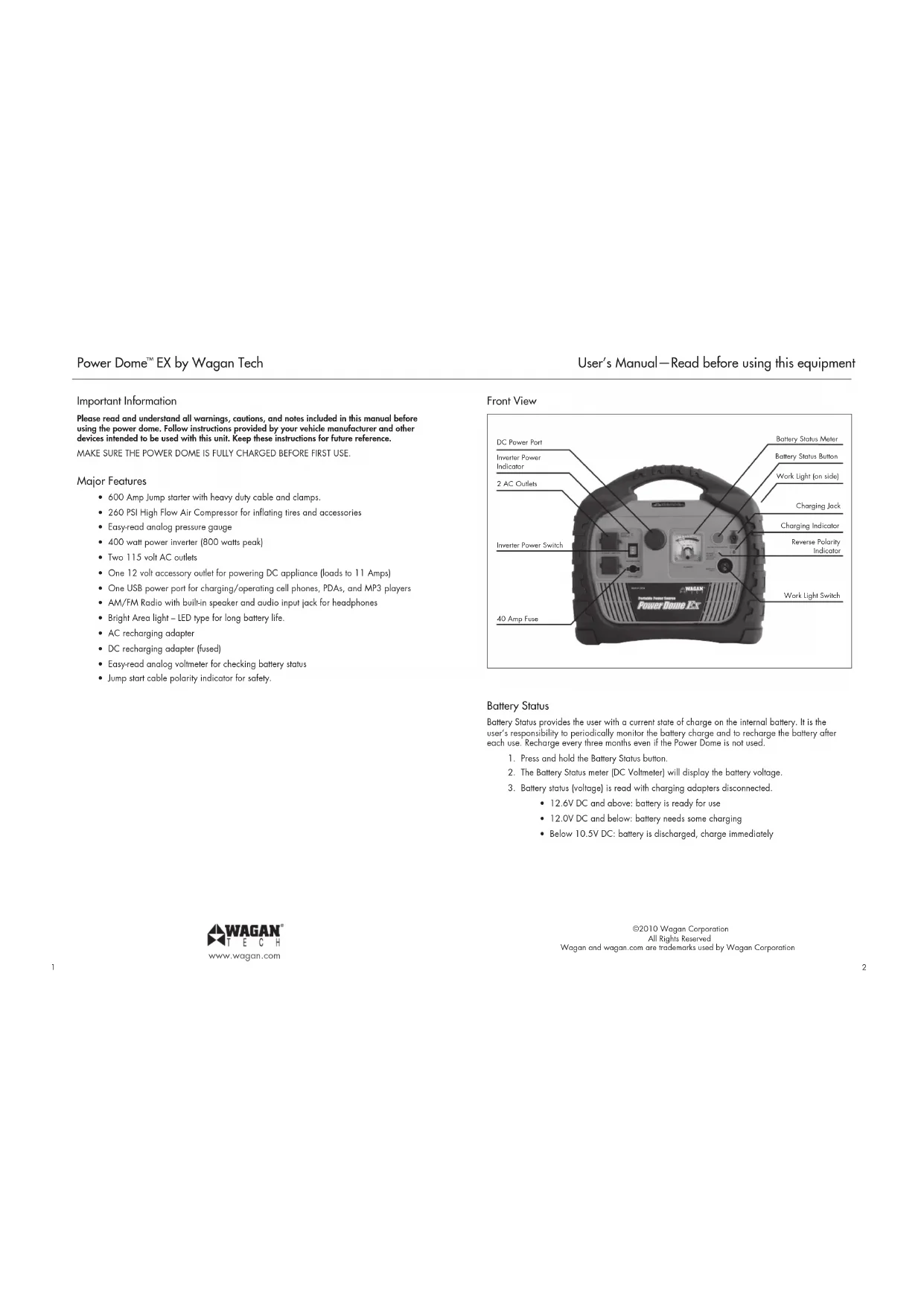
Please read and understand all warnings, cautions, and notes included in this manual before using the power dome. Follow instructions provided by your vehicle manufacturer and other devices intended to be used with this unit. Keep these instructions for future reference.
MAKE SURE THE POWER DOME IS FULLY CHARGED BEFORE FIRST USE.
Major Features
- 600 Amp Jump starter with heavy duty cable and clamps.
260 PSI High Flow Air Compressor for inflating tires and accessories
Easy-read analog pressure gauge
400 watt power inverter (800 watts peak) - Two 115 volt AC outlets
One 12 volt accessory outlet for powering DC appliance (loads to 11 Amps)
One USB power port for charging/operating cell phones, PDAs, and MP3 players
AM/FM Radio with built-in speaker and audio input jack for headphones
Bright Area light - LED type for long battery life. - AC recharging adapter
- DC recharging adapter (fused)
Easy-read analog voltmeter for checking battery status - Jump start cable polarity indicator for safety.
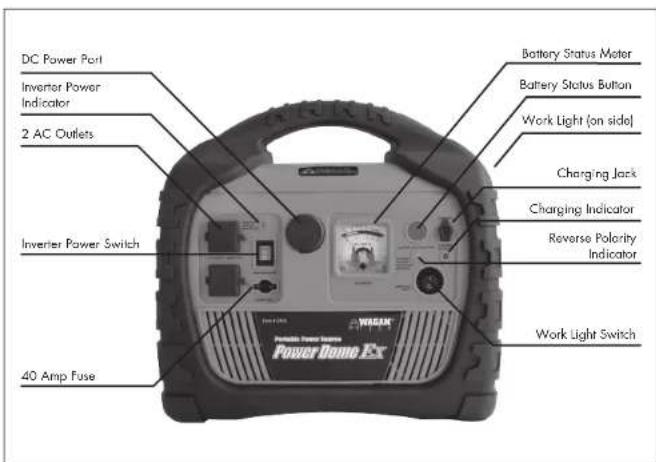
Front View
Battery Status
Battery Status provides the user with a current state of charge on the internal battery. It is the user's responsibility to periodically monitor the battery charge and to recharge the battery after each use. Recharge every three months even if the Power Dome is not used.
- Press and hold the Battery Status button.
- The Battery Status meter (DC Voltmeter) will display the battery voltage.
- Battery status (voltage) is read with charging adapters disconnected.
12.6V DC and above: battery is ready for use
12.0V DC and below: battery needs some charging
Below 10.5V DC: battery is discharged, charge immediately

©2010 Wagon Corporation
All Rights Reserved
Wagon and wagon.com are trademarks used by Wagon Corporation
Charging the Power Dome
AC Charging
Make sure the supplied AC Charging Adapter is to be powered by the correct voltage. (i.e. 110V AC or 220V AC). Only use the AC charging adapter supplied with this unit.
- Make sure all Power Dome switches are set to off.
- Open the dust cover on the Charging Jack.
- Connect the AC Charging Adapter to the AC outlet.
- Plug the Charging Adapter's cord into the Power Dome's Charging Jack.
- The Charging Indicator will light during the charging process.
- Initial AC charge can take up to 34 hours.
- Do not charge for more than 48 hours.
- After charging the battery, disconnect the adapter from the AC outlet first, then from the charging jack.
- Replace the dust cover on the charging jack.
DC Charging in Your Vehicle or Boat
Only use the DC charging adapter supplied with this unit.
- Note that the engine must be operating while charging Power Dome.
- Make sure all Power Dome switches are set to off.
- Open the dust cover on the Charging Jack
- Plug the Charging Adapter's cord into the Power Dome's Charging Jack.
- Plug the DC Charging Adapter into an accessory outlet (cigarette lighter).
- The Charging Indicator will light during the charging process.
- Do not charge more than 16 hours using the DC method.
- After charging the battery, disconnect the adapter from the accessory socket first, then from the charging jack.
- Replace the dust cover on the charging jack.
DC to AC Power Inverter
The Power Dome's inverter can operate most AC appliances or a combination of appliances up to 400 watts. Operating time is dependent on the AC load (watts) and the charge and condition of Power Dome's internal battery. Reduced AC loads and full charge on the battery will result in longer operating time. Be sure to turn off or disconnect any AC appliance not in use. There is a user replaceable 40 amp automotive type fuse below the Inverter Power Switch. This fuse protects the inverter from an unlikely excessive input current. Ordinary overloads will cause the inverter to automatically shut down. Reduce the load and restart the inverter.

www.wagan.com
Using the Power Inverter
- Open the AC outlet dust cover.
- Connect the AC appliance or appliances to either AC outlet.
- Turn the Inverter on by flipping the switch to the "1" position.
- If the Inverter Power Indicator light is green, the inverter is operating.
-
Turn on one AC appliance and observe the Power Indicator.
-
If the LED remains green, then turn on the second appliance.
-
If the Power Indicator remains green, then both appliances are operating properly.
After use, remove the appliance plug and close the dust cover. - If the Power indicator LED is not lit, then reduce the AC load.
If the inverter is still not operating, refer to the troubleshooting table at the end of this User's Manual. - Recharge Power Dome as soon as convenient.
Note:
- "I" = Turns on USB ports and DC outlets
O=O - " | " = Turns on AC Inverter, USB ports, and DC outlets
CAUTION
Some rechargeable devices are equipped with a separate AC charger. These devices are likely to operate properly with this inverter. Rechargeable devices that have built-in chargers [see device owner's manual] may not operate properly with this type of inverter.
Some motorized devices may operate at excessively elevated temperature when used with this inverter. During first use with this inverter, check for excessive motor temperature. Abnormally elevated temperature of the device is an indication that they should not be used together.
DC Power Port
DC Power Port (accessory socket) is located to the left of the Battery Status meter (voltmeter). The port can power a DC load up to 11 Amps. Overloading the port will result in tripping (a self-resetting circuit breaker). Removing the overload automatically restores power to the DC Power Port.
- Uncover the dust cover from the Power Port.
- Insert the 12V DC accessory plug into the Power Port.
- Operate the appliance as usual.
- After use, disconnect the accessory plug from the Power Port and store the accessory.
- Replace the Power Port's dust cover.
- Recharge the Power Dome as soon as convenient.
©2010 Wagon Corporation
All Rights Reserved
Wagon and wagon.com are trademarks used by Wagon Corporation
Rear View

AM/FM Radio
The Radio can receive frequencies in the standard AM and FM broadcast bands: AM 520 to 1710kHz FM 88 to 108 MHz. An extendable rod antenna provides adequate signal to receive all local radio stations. When not in use, the antenna should be stored in its parking location. This will prevent damage to the antenna while Power Dome is being moved. All Radio controls are conveniently located in one area. The controls are: Radio Power Switch/Volume Control, AM/FM Salection Switch, a Tuning Dial, and an Audio Input Jack for external audio devices such as MP3s or CD players (Requires 3.5 mm mini audio cable-not included).
A USB Power Port is to the right of the Audio Output Jack can power/charge devices that require 5 Volts at up to 500mA through the use of a user-supplied cord.
To save energy, first raise and extend the antenna and select the AM or FM band before turning on the radio.
NOTE: All AM band radios are subject to receiving noise interference from electronic devices, static lightning strikes and some motorized equipment. If you are operating the Power Dome inverter and noise is being received on the AM band, turn off the inverter or change the radio to receive the FM band.
Using the AM/FM Radio
- Carefully raise and extend the multi-section antenna.
- Select either AM or FM band.
- Turn on the radio by turning the Radio Power Switch/Volume Control knob clockwise.
- Rotate the tuning dial to the desired frequency.
- Adjust the volume control to desired loudness.
- Adjust the position of the antenna for best reception.
- After use, turn off the Radio by rotating the power/volume knob counterclockwise until the knob clicks.
B. Carefully retract the antenna and return it to the parked position.
Air Compressor
The Air Compressor can inflate a variety of tires and inflatable equipment. It can provide inflation pressure up to 260 PSI (pounds per square inch). Be careful not to over inflate. Monitor the compressor gauge while inflating. The compressor's power switch is located above the compressor hose compartment.

Compressor Hose Compartment
Using the Air Compressor
CAUTION: Never connect or disconnect the nozzle with the compressor operating.
- Before any tire inflation, look for the recommended inflation pressure information on the sidewoll of the tire.
- Open the compartment door at the rear of the Power Dome and extend the air hose.
- Position the Power Dome so that you can see the pressure gauge.
-
Make sure the chuck lever is positioned up (away from the chuck opening).
-
Remove the valve cap from the valve stem of the tire.
- Attach the chuck to the tire's valve stem.
- Move the chuck lever down to secure the chuck to the valve stem.
- Turn compressor switch on to "l" position.
-
Monitor the pressure gauge while inflating the tire.
-
When recommended tire pressure has been reached, turn off air compressor.
- Disconnect hose and replace valve cap.
- Store the hose in the Air Hose Compartment.
- Recharge the Power Dome as soon as convenient.
Jump StartWarnings
- Lead-acid batteries can release explosive gasses. Failure to follow instructions may cause property damage, explosion hazard, and/or personal injury.
- Do not smoke while jump starting.
- Jump start a vehicle or boat in a well ventilated area.
- Do not attempt to jump start a frozen battery.
- Do not wear vinyl clothing when jump starting—friction can cause static electricity sparks.
- Remove all metal jewelry—this can cause short circuits.
Always use safety glasses when jump starting battery-acid can cause blindness and/or severe burns. - Never allow red and black clamps to touch—this can cause power arcing and/or explosion.
After use, turn off Power Safety switch. - Keep out of reach of children.
- Excessive engine cranking can damage the vehicle's starter motor. If the engine fails to start after the recommended number of attempts, discontinue jump start procedure and look for other problems that may need to be corrected.
- If vehicle to be started has a Positive Grounded System (positive battery terminal is connected to chassis):
i. Connect negative black clamp to vehicle battery's negative terminal.
ii. Connect positive (+) red clamp to vehicle chassis or a solid, non-moving, metal vehicle component or body part. DO NOT clamp directly to positive battery terminal or moving part.
Jumpstarting
- Review the Jump Start Warnings.
- Make sure all vehicle appliances, lights, radio, etc are turned off.
- Make sure the vehicle's gear is in "park" position and the brake is set.
- Make sure all Power Dome switches are off.
- Securely connect the red (+) cable clamp to the vehicle's positive (+) battery terminal.
- Connect the black [ ] cable clamp to a non-moving part on the vehicle.
- Observe the color of the Reverse Polarity Protection Indicator that is located between the Battery Status button and Work Light switch.
If the light is RED, DO NOT TURN ON THE JUMPER SAFETY SWITCH!
i. Cable clamps need to be reversed.
ii. Disconnect the black clamp first then the red clamp.
iii. Reconnect and observe the indicator again.
- If the light is GREEN, turn on the Jumper Safety Switch.
i. Inside the vehicle, turn on the ignition switch and attempt to start the engine.
ii. Crank a maximum of three seconds. If the engine does not start, wait three minutes before the next attempt.
iii. After the engine starts, turn off the Jumper Safety Switch.
iv. Disconnect the black clamp first, and then disconnect the red clamp.
-
Be sure that the cables and clamps are securely stored.
-
Recharge the Power Dome as soon as convenient.
NOTE: If the engine does not start, there may be a problem other than a discharged battery. Call for service.
Work Light
The Work Light is a cluster of bright LEDs located above the negative Jumper Cable storage area. The location of the Work Light allows the light to be used while the Power Dome is being carried.
- Turn the work light switch (located on front panel) to the "l" position for power on.
The light will illuminate. - Turn off while not in use.
Troubleshooting Guide - Inverter
| TroubleCauseRemedy | ||
| Lack of power output Power | Power Dome battery voltage below 10 volts | Recharge the Power Dome immediately. |
| Excessive current drawn by appliance being oparaed | Reduce load to maximum of 400 watts. | |
| 1. Turn off the device and inverter.2. Disconnect device.3. Turn the inverter on and leave running for a minimum of 2 minutes.4. Turn off inverter.5. Quickly plug in device to inverter.6. Turn on the inverter and the device. | ||
| Inverter fuse blown Check | and replace if necessary. Be sure replacement fuse is the same type and rating. | |
| Inverter Power Indicator is not lit. | Excessive voltage drop | Check Power Dome and recharge if voltage drops below 10 volts. |
| Inverter is overloaded Reduce load to maximum of 400 watts. | ||
| Television/Power Tool will not start | High surge wattage requirement to start-up | Toggle the Inverter Power Switch on and off in quick succession a total of 5 times. If the device does not start, the device is not compatible with this type of inverter. |
| Television Interference Picture breaking up (static) | Place the Power Dome as far as possible from the TV, the antenna, and the coaxial cable. | |
| TV station may be out of range. | ||
| Static/noise interference in audio system | Sound system has weak alternating current shielding. | Do not use inverter with low quality audio AC filtering system. |
| Replace audio system with high quality noise filtering. | ||
Specifications
| Battery Sealed lead-acid battery/rechargeable/12 | volt/18 amp-hours |
| Work Light 5 LEDs | |
| Compressor | 260 PSI analog gauge |
| Inverter - Two AC outlets | 11.5 volts AC 60Hz |
| Maximum Inverter Output Power | 400 watts |
| Peak Power | 800 watts peak surge for a max of 0.3 sec |
| I2V Accessory Outlet | 12 volt, 11 amps max |
| USB Power Port | 5V up to 500 mA |
| AM/FM Radio self contained speaker. | AM 520 to 1710 kHz/FM 88 to 108 MHz |
| Audio Output Jack | 3.5 mm diameter (1/8 inch) |
| Max Recharging Time (AC) | 34 hours |
| Max Recharging Time (DC) with engine running 12 | hours |
| Jumper Cables and Clamps | 6 Gauge/heavy duty clamps/24 inches |
WAGAN Corp. Limited Warranty
All WAGAN Corporation products are warranted to the original purchaser of this product.
Warranty Duration: This product is warranted to the original purchaser for a period of one (1) Year from the original purchase date, to be free of defects in material and workmanship. WAGAN Corporation disclaims any liability for consequential damages. In no event will WAGAN Corporation be responsible for any amount of damages beyond the amount paid for the product at retail. In the event of a defective item, please contact WAGAN Corporation at (800) 231-5806 to obtain a Returned Merchandise Authorization number (RMA#), and return instructions. Each item returned will require a separate RMA#. After you have received the RMA# and the return instructions from WAGAN Corporation, please follow the instructions and send the item with PREPAID SHIPPING, along with all of the required documentation, a complete explanation of the problem, your name, address and daytime phone number. WAGAN Corporation will, at its option, replace or repair the defective part.
A Returned Merchandise Authorization number (RMA#) is REQUIRED when sending in any defective item. WAGAN Corporation is not responsible for any item(s) returned without an official Returned Merchandise Authorization number. The item(s) must be returned with prepaid shipping. WAGAN Corporation is not responsible for any shipping charges incurred in returning the item(s) back to the company for repair or replacement. This warranty is void if the product has been damaged by accident, in shipment, unreasonable use, misuse, neglect, improper service, commercial use, repairs by unauthorized personnel or other causes not arising out of defects in materials or workmanship. This warranty is effective only if the product is purchased and operated in the USA and does not extend to any units which have been used in violation of written instructions furnished.
Warranty Disclaimers: This warranty is in lieu of all warranties expressed or implied and no representative or person is authorized to assume any other liability in connection with the sale of our products. There shall be no claims for defects or failure of performance or product failure under any theory of tort, contract or commercial law including, but not limited to negligence, gross negligence, strict liability, breach of warranty and breach of contract.
Warranty Performance: During the above one (1) Year warranty period, a product with a defect will be replaced with a comparable model when the product is returned to WAGAN Corporation with an original store receipt. The replacement product will be in warranty for the balance of the one (1) Year warranty period.
Updated August 2008
Usando el Radio AM-FM
©2010 Wagon Corporation
Please activate my limited warranty for WAGAN Corp.
| Name | ||
| Mailing address | ||
| City | ||
| State, Zip code | ||
| E-mail address | ||
| Item purchased | Item no. | |
| Store name | ||
| Date of purchase | ||
| Signature | Date | |
All WAGAN Corporation Products must be registered within [30] days of purchase to activate this warranty. WAGAN Corporation Mail the complete registration form, along with a copy of the original sales receipt to: Hayward, CA 94544
Por Favor Activen mi garantia limitada de Wagan Tech.
Aim: Customer Service
WACAN Operations
31088 San Clemente St.
Hoyward, CA 94344
Toll Free: 1.800.231.5806
31088 San Clemente Street
Hayward, CA 94544
U.S.A.
©2010 Wagan Corporation/Corporación Wagan 2010
All Rights Reserved/To dos Derechos reservados/Tous droits réservés
Wagan and wagan.com are trademarks used by Wagan Corporation.