Levity RS1 - Treadmills BH FITNESS - Free user manual and instructions
Find the device manual for free Levity RS1 BH FITNESS in PDF.



User questions about Levity RS1 BH FITNESS
0 question about this device. Answer the ones you know or ask your own.
Ask a new question about this device
Download the instructions for your Treadmills in PDF format for free! Find your manual Levity RS1 - BH FITNESS and take your electronic device back in hand. On this page are published all the documents necessary for the use of your device. Levity RS1 by BH FITNESS.
USER MANUAL Levity RS1 BH FITNESS
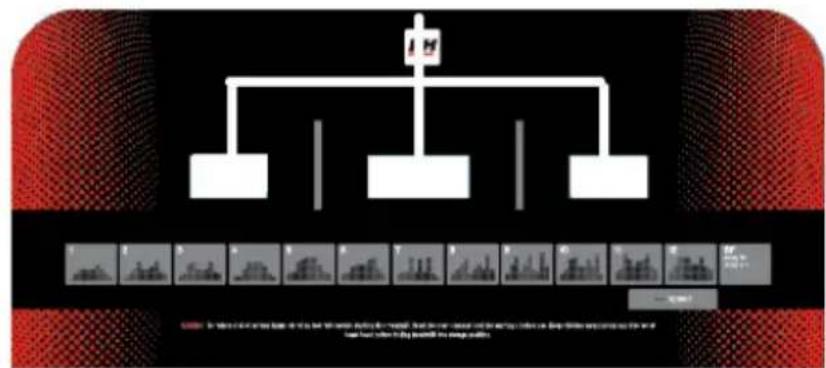
A: This display gives a simultaneous readout of Time; Programs; Speed; Distance; Incline; Pulse rate and Calories.
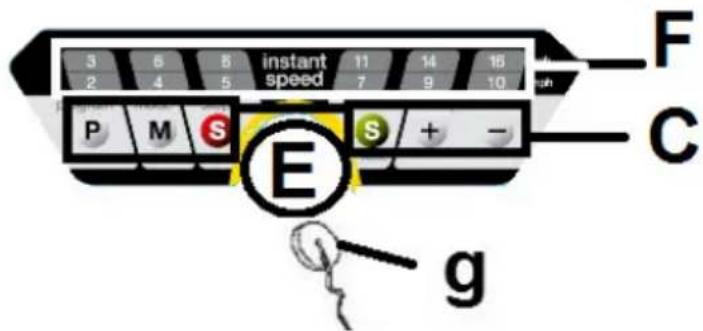
C: The electronic monitor has 6 push buttons or keys; PROGRAM; MODE; START/STOP; SPEED Km/h (↑).
E: Slot for safety key.
F: Speed function quick access keys or buttons (3-6-8-11-14-16 Km/h).
g: Safety key.
START/STOPING.-
Plug the unit into a wall socket with an EARTH terminal and set switch (L) to position (1), Fig.1.
The safety key (g) must be inserted into its spot (E) Fig.2, otherwise the
machine will not operate. As soon as the safety key (g) is in place, the machine will beep and all of the displays will show a [00:00] value, indicating that the machine is READY to be used.
CHANGING FROM KILOMETRES TO MILES.-
This machine has the option to display speed in km/h or mph. The factory setting for the machine is km/h.
To change from km/h to mph follow these steps:
Unplug the machine from the mains supply, remove the safety key. Plug the machine back in.
Press and hold the PROGRAM and MODE keys at the same time for 5 approximately seconds.
The speed display (A) "0.6" corresponds to miles per hour. and insert the safety key (g) into its slot.
OPERATING INSTRUCTIONS.-MANUAL MODE
This monitor has program (MANUAL). For programs MANUAL you can specify the duration of the exercise between (5 to 99) minutes, distance between (1 to 99.5) and calories between (20 to 990).
Pressing the START/STOP key will light the MANUAL and the machine will start within 3 seconds, shown by a countdown on the TIME display, at a speed of 1.0km/h .
You can increase or decrease the speed setting in MANUAL mode by pressing the SPEED (↑) keys, between 1.0-16 km/h.
The machine will stop if you press the START/STOP key or if you remove the SAFETY KEY
PROGRAM MODE.-
This monitor has 17 programs (MANUAL, P01; P02; P03; P04; P05; P06; P07; P08; P09; P10; P11; P12; U1; U2; U3; BODY-FAT).
For programs P1 to P12 you can specify the duration of the exercise between (5 to 99) minutes.
Program graphics for P1 to P12. See end pages.-
With the machine ready, press the PROGRAM key and P01 will appear on the display, by pressing the PROGRAM key you can access the programs (P1 al P12: BODY-FAT), once you have chosen a program press the MODE key and the word TIME will begin to flash.
Use the SPEED () keys to specify the duration of the program (5 - 99 minutes). The monitor has a default program setting of 30 minutes.
Press the START/STOP key and the machine will start to operate after 3 seconds, shown by the countdown on the central display, based on the values it has been given.
You can change the speed settings at any time during the exercise by pressing the SPEED- SPEED + keys.
USER PROGRAM MODE.-
The user programs allow you to design the speed and inclination graphs with reference to your fitness level.
With the machine ready, press the PROGRAM key and U1 will appear on the display, by pressing the PROGRAM key you can access the user program, once you have chosen a program press the MODE key and the first step of the program you are designing will be shown in the TIME/DISTANCE window, (001).
Press the SPEED keys to select the speed that you want for the first stage between 1 and 16km / h
Press the MODE key and this will take you to the second stage (002) carry out the same procedure as in (001) varying the speed and inclination settings for this stage, and so on up to stage 16 to complete the User Program Graph.
By pressing the MODE key you can program a time limit for the exercise (between 5 to 99 minutes).
If the programmed exercise time is 16 minutes then each stage will last 1 minute.
Press START and the machine will start after a 3 second countdown, shown on the TIME display.
BODY FAT PROGRAM.-
The ("F" BODY-FAT) program is designed to calculate the user's body fat percentage.
Press the ("F" BODY-FAT) program key, then press the MODE key and by using the () keys to select SEX
(Male01-Female 02),press the MODE key to confirm,use the () keys select your AGE (10-99) press the MODE key to confirm,use the () keys to select your WEIGHT (20 - 150Kg)
Press the MODE key to confirm, use the () keys to select HEIGHT (100 - 200cm), press the MODE key to confirm.
Place your hands on the handgrip sensors (R), as shown in Fig.3, and after a few seconds the screen will display the result.
FAT. (Body fat).-
The body fat function helps you to calculate your body fat percentage.
REF. TABLE:
BODY FAT PERCENTAGE %
| SEX / FAT% | LOW | LOW / AVERAGE | AVERAGE | HIGH |
| MALE | < 13% | 13%-25,8% | 26%-30% | >30% |
| FEMALE | <23% | 23%-35,8% | 36%-40% | >40% |
BODY TYPE
There are 9 body types based on the percentage of fat calculated.
| TYPE 1 | (5%-9%) Extremely athletic |
| TYPE 2 | (10%-14%) Ideal sportsman |
| TYPE 3 | (15%-19%) Very slender |
| TYPE 4 | (20%-24%) Sportsman |
| TYPE 5 | (25%-29%) Ideal health |
| TYPE 6 | (30%-34%) Slender |
| TYPE 7 | (35%-39%) Very overweight |
| TYPE 8 | (40%-44%) Overweight |
| TYPE 9 | (45%-50%) Extremely obese |
The main screen will display the type of profile for your body type.
If the error code "E-3" appears then this means that an error has occurred, position your hands correctly on the pulse sensors (R), Fig.3.
EMERGENCY STOP.-
For the user's maximum safety, this unit is equipped with a safety key (g) and a STOP button. The safety key (g) must be slotted into its housing (E), Fig.2, otherwise the machine will not start.
When you are using the machine always clip the cord on the safety key to your clothing. Tugging on the cord will pull the safety key out of its slot and the machine will stop immediately. To restart the machine simply put the key back into the key slot.
Remove the safety key (g) whenever the machine is not being used and keep it out of children's reach. Pressing the red button marked STOP will also stop the unit immediately. To restart it, press the button marked START/STOP again.
Important: Do not change the inclination level of your treadmill by propping it up on objects.
PULSE MEASUREMENT.-
Your pulse rate is measured by placing both hands on pulse sensors (R) with which the electronic unitis equipped. The pulse rate readout will appear after a few seconds. The heart symbol beside the pulse rate value will flash in time with your heart rate, Fig.3.
IMPORTANT: This is not a medical appliance and therefore the heart rate shown is merely for guideline purposes.
THE MANUFACTURER RESERVES THE RIGHT TO MODIFY THE SPECIFICATIONS OF ITS
PRODUCTS WITHOUT PRIOR NOTICE.
FAULT FINDING CHART
| PROBLEM CHECKS | SOLUTIONS | |
| 1.The monitor does not switch on. | 1) Make sure that the machine is plugged in, the ON/OFF switch in position 1 and that the safety key is inserted. | 1) Plug the machine into the mains supply. Set the switch to position 1 and insert the safety key. |
| 2.The monitor switches on but the motor fails to start. | 2) Check that the current limiter is pressed in. | 2) Switch the machine off and press the circuit breaker in. Lubricate the treadmill band. |
| 3.Walking motion is jerky on the treadmill. | 3.a) Check that the belt is lubricated. 3.b) Check the tension on the sliding belt. 3.c) Check the tension on the drive belt. | 3.a) Lubricate the sliding belt. 3.b) Adjust the belt tension. 3.c) Adjust the drive belt tension. |
| 4.The machine stops (the breaker trips). | 4) Check that the band is lubricated. | 4) Reset the overload button with the On /Off switch at „0“ and lubricate the treadmill band. |
| 5.Electrical shocks through the handrail. | 5) Check that the machine is plugged into an earthed mains socket. | 5) Plug the machine into an earthed mains socket. |
| 6.The treadmill belt skews off centre. | 6.a) Check that the machine is level on the floor. 6.b) Check that the machine does not wobble. |
ERROR CODES
| Monitor screen display E1 | Possible message fault. | Connect the wire well between top controller and bottom controller |
| Monitor screen display E2 | Burst clash. | Operating with correct voltage;Connect the motor wire again. |
| Monitor screen display E3 | No speed sensor signal | Replace the sensor light on the bottom controller or speed sensor. |
| Monitor screen display E5 | Possible motor overload. Lubricate the belt. | |
| Monitor screen display E7 | Safety key. Insert the safety key. |
Do not hesitate to get touch with the Technical Assistance Service if you have any queries by phoning customer services (see last page in manual).
Français
A
MONITEUR.-
FONCTIONNEMENT.-MODE MANUEL
Toll free: +1 866 325 2339
No.80, Jhongshan Rd.,
Daya Dist.,
Taichung City 42841,
Taiwan. R.O.C.
Tel.: +886 4 25609200
Fax: +886 4 25609280
e-mail: info@bhfitness.pt
BH SERVICE PORTUGAL
Tel.: +351 234 729 510
Fax: +351 234 729 519
e-mail: info@bhfitness.pt
BH FITNESS MEXICO
BH Exercycle de Mexico S.A. de
CV
Eje 132/136
Zona Industrial, 2A Secc.
78395 San Luis Potosí
S:L:P: MÉXICO
Tel.: +52 (444) 824 00 29
Fax: +52 (444) 824 00 31
www.bhlatam.com.mx
BH FITNESS CHINA
BH China Co., Ltd.
Block A, NO.68, Branch Lane
455, Lane 822,
Zhen Nan RD., Li Zi Yuan,
Putuo, Shanghai 200331, P.R.C.
Tel: +86-021-5284 6694
Fax:+86-021-5284 6814
e-mail: info@i-bh.cn
BH GERMANY GmbH
Grasstrasse 13
45356 ESSEN
GERMANY
Tel: +49 2015 997018
e-mail:
technik@bhgermany.com
BH FITNESS UK
Tel: 02037347554
e-mail:
sales.uk@bhfitness.com
AFTER SALES - UK
Tel.: 02074425525
e-mail:
service.uk@bhfitness.com
BH FITNESS FRANCE
SAV FRANCE
Tel: +33 0810 000 301
Fax: +33 0810 000 290
savfrance@bhfitness.com
BH SE RESERVVA EL DERECHO A MODIFICAR LAS ESPECIFCACIONES DE SUS PRODUCTOS SIN PREVIO AVISO.
SPECIFICATIONS MAY BE CHANGED WITHOUT PRIOR NOTICE DUE TO OUR PROGRAMME OF CONTINUOUS PRODUCT DEVELOPMENT.
BH SE RÉSERVE LE DROIT DE MODIFIER LES SPECIFICATIONS DE SES PRODUITS SANS PREAVIS.